Our readers keep the lights on and my smoothie glass nicely filled. As an Amazon Associate, I earn from qualifying purchases.
The streaming market is saturated with options, but the difference between a sluggish interface and a fluid, cinematic experience comes down to one decision: which box or stick sits behind your TV. A true 4K streaming device does more than just decode video—it manages your apps, processes HDR metadata, and negotiates your Wi-Fi environment in real time, all to avoid that spinning wheel of death mid-credits.
I’m Mohammad Maruf — the founder and writer behind WellFizz. I’ve spent years analyzing the hardware specifications and real-world performance of streaming hardware to separate the genuinely capable devices from the ones that just check boxes on a spec sheet.
This guide compares seven candidates across processing power, HDR format support, wireless technology, and storage capacity to help you find the best 4k streaming device for your specific setup and viewing habits.
How To Choose The Best 4K Streaming Device
Picking the right device hinges on your TV’s capabilities, your internet infrastructure, and whether you want a platform-agnostic interface or one that leans into a specific ecosystem. Here are the three factors that separate a great streaming experience from a frustrating one.
HDR Format Support
Not all 4K is created equal. Dolby Vision delivers dynamic metadata scene-by-scene, while HDR10+ uses a similar approach but is less widely adopted. Standard HDR10 is static. If your TV supports Dolby Vision, a device that can output it natively matters because the difference in contrast and color depth is immediately visible on a capable panel. Devices like the Fire TV Stick 4K Max and the Google Chromecast with Google TV handle both Dolby Vision and HDR10+, which future-proofs your setup regardless of which format your next TV favors.
Wireless Connectivity and Processor
A streaming stick is only as fast as its Wi-Fi chipset. Wi-Fi 6 (802.11ax) offers better performance in congested households where multiple devices compete for bandwidth. Wi-Fi 6E takes that further by adding a 6 GHz band for even less interference. A sluggish processor paired with an older Wi-Fi standard will cause buffering during high-bitrate 4K streams, especially with services like Apple TV+ or 4K Blu-ray rips via Plex. Look for devices with at least 2 GB of RAM and a modern quad-core chip to keep app switching instant.
Storage and Ecosystem Lock-In
16 GB of storage is becoming the baseline for downloading apps, games, and offline content. Devices with only 8 GB fill up fast once you install a few streaming apps and a game or two. Also consider the interface: Roku offers a neutral, ad-supported home screen with no ecosystem bias, while Fire TV and Google TV heavily integrate their respective storefronts. Your choice between convenience and a curated experience should align with how much you want Alexa or Google Assistant managing your TV.
Quick Comparison
On smaller screens, swipe sideways to see the full table.
| Model | Category | Best For | Key Spec | Amazon |
|---|---|---|---|---|
| Amazon Fire TV Stick 4K Max | Streaming Stick | Dolby Vision & Atmos power users | Wi-Fi 6E / 16GB storage / 2GB RAM | Amazon |
| Google Chromecast with Google TV | Streaming Dongle | TV-agnostic interface & casting | Dolby Vision / Dolby Atmos / 4K HDR | Amazon |
| Onn 4K Plus | Streaming Box | High-performance budget choice | Wi-Fi 6 / 16GB storage / 2GB RAM | Amazon |
| Roku Express 4K+ (2025 Model) | Streaming Box | Simple interface & live TV fans | HDR10 / 4K upscaling / voice remote | Amazon |
| Amazon Fire TV Stick 4K (Refurb) | Streaming Stick | Dolby Vision streaming on a budget | Wi-Fi 6 / Dolby Vision / Dolby Atmos | Amazon |
| Roku Express 4K+ (2021 Model) | Streaming Box | Entry-level 4K on a secondary TV | 4K HDR / dual-band Wi-Fi / voice remote | Amazon |
| INVERSE NET Wireless HDMI | HDMI Extender | Wireless PC-to-TV mirroring | 1080P output / 165ft range / 5G chip | Amazon |
In‑Depth Reviews
1. Amazon Fire TV Stick 4K Max (newest model)

The Fire TV Stick 4K Max is the most powerful streaming stick Amazon has released, and it shows in every metric that matters. The Wi-Fi 6E support gives it a genuine advantage in congested network environments, reducing latency and buffering during high-bitrate 4K streams. With 16 GB of storage and a quad-core processor that launches apps almost instantly, this device handles Dolby Vision, HDR10+, and Dolby Atmos natively, delivering a home theater experience that rivals dedicated media players.
The new Fire TV interface (2026 release) is a meaningful upgrade—dedicated content categories, pinned apps, and Alexa+ recommendations cut down the scrolling time significantly. The remote includes dedicated channel buttons for live TV surfers, plus a recents button that makes switching between apps feel fluid rather than clunky. For gamers, the Xbox Cloud Gaming integration via Game Pass is a bonus that adds genuine utility beyond streaming.
Where the Max truly separates itself is in its handling of high-fidelity formats. Jellyfin users report flawless direct play with correct Dolby Vision profile mapping, no stuttering, and no washed-out colors. The Wi-Fi 6E connection remains rock-solid even when streaming lossless audio alongside 4K video. It is the closest a streaming stick gets to a set-top box experience without the bulk.
Why it’s great
- Wi-Fi 6E delivers the fastest wireless throughput of any streaming stick
- 16GB storage prevents app-bloat frustration
- Perfect Dolby Vision profile mapping for Plex/Jellyfin users
Good to know
- Power cable is short—may need an extension for wall-mounted TVs
- Cannot remove Amazon-first apps from the home screen taskbar
- Initial setup may require disabling PIN for parental controls
2. Google Chromecast with Google TV

The Chromecast with Google TV remains the best option for those who value platform neutrality and a clean, personalized home screen. It aggregates content from across your subscriptions—Netflix, Prime Video, Disney+, Hulu—and presents recommendations based on your actual viewing habits rather than pushing a single storefront. The Google Assistant voice search is excellent at parsing natural language queries, like finding action movies with car chases, and it handles TV control, volume, and input switching without extra hardware.
Picture quality is top-tier with support for Dolby Vision and HDR10, and the upscaling engine handles 1080p content impressively well on larger 4K panels. The included pouch and cleaning cloth are a thoughtful touch for travelers, and the dongle form factor tucks neatly behind the TV. Casting from a phone or tablet remains as seamless as it was with the original Chromecast, making it ideal for households with mixed Android and iOS devices.
Where it falls slightly short is raw processing speed compared to the Fire TV Max. The interface can feel a fraction slower when launching apps, and the remote lacks dedicated number pads or channel surf buttons for live TV enthusiasts. However, for users who want a straightforward, ecosystem-agnostic device that just works across all major streaming services, this is still the benchmark.
Why it’s great
- Aggregated home screen shows content from all your subscriptions
- Excellent Google Assistant voice search and TV control
- Portable design with included pouch is great for travel
Good to know
- Processing speed is slightly behind the Fire TV Max
- Remote lacks dedicated live TV or number buttons
- No Wi-Fi 6 or 6E—uses Wi-Fi 5
3. Onn 4K Plus Streaming Device with Google TV

The Onn 4K Plus is a surprise contender in the streaming device market, offering 2 GB of RAM and 16 GB of internal storage at a price point that undercuts most competitors. It runs Google TV natively, which means you get the same content-aggregated home screen and Google Assistant voice search as the pricier Chromecast. The inclusion of Wi-Fi 6 ensures smooth 4K streaming even in homes with multiple connected devices, and Dolby Vision support brings vibrant contrast to compatible panels.
The box form factor includes an HDMI cable and power adapter right in the box, which some users prefer over a dangling stick. Setup is straightforward—plug in, connect to Wi-Fi, and log into your Google account. The interface is clean, responsive, and free of bloat. Users report fast app loading, no buffering during 4K streams, and a solid soundstage when paired with Dolby Atmos soundbars.
The main caveat is regional lock: all smart features are optimized for the US market. Users outside the US have reported difficulties during setup and limited functionality. Additionally, the build quality of the remote feels less premium than the Fire TV or Chromecast remotes, though it functions reliably. For North American buyers who want Google TV without the premium price tag, this is the smart pick.
Why it’s great
- 2GB RAM and 16GB storage provide smooth multitasking
- Wi-Fi 6 ensures consistent 4K streams in busy homes
- Google TV interface with content aggregation at a low price
Good to know
- Smart features are US-only—tricky setup internationally
- Remote build feels less premium than competitors
- No Dolby Vision profile mapping for advanced users
4. Roku Express 4K+ (2025 Model)

Roku’s 2025 refresh of the Express 4K+ maintains everything users love about the platform—a dead-simple interface, no ecosystem bias, and support for 4K HDR at a very accessible price. The included Premium HDMI cable means you won’t need to buy extra accessories, and the voice remote controls TV power and volume, reducing remote clutter. The setup process is the fastest in the category: plug in, connect to Wi-Fi, and start streaming in under ten minutes.
Picture quality is solid for HDR10 content, though it does not support Dolby Vision or HDR10+—a limitation if your TV can leverage those formats. The processor handles 4K streaming well, with minimal buffering on a strong Wi-Fi connection. The interface remains the cleanest in the market, with no promotional rows pushing a specific streaming service. Private listening via the Roku mobile app is a handy feature for late-night viewing without disturbing others.
Where it struggles is advanced video format support. For users with Dolby Vision-capable TVs, the lack of dynamic HDR is a real drawback, as the difference in contrast on a high-end OLED is immediately visible. The remote also lacks a backlit option, which makes navigating in the dark a bit of a fumble. Still, for a secondary bedroom TV or a guest room setup, this is hard to beat for simplicity.
Why it’s great
- Simplest, fastest setup of any streaming device
- Neutral interface with no ecosystem push
- Includes Premium HDMI cable in the box
Good to know
- No Dolby Vision or HDR10+ support
- Remote is not backlit
- Occasional Wi-Fi glitches need a restart to fix
5. Amazon Fire TV Stick 4K (Refurbished, newest model)

The refurbished Fire TV Stick 4K is an excellent value proposition for anyone who wants Dolby Vision and Dolby Atmos support without the premium price of the Max model. It comes tested and certified to look and work like new, and includes the same limited warranty as a new device. The Wi-Fi 6 support ensures smooth 4K streaming even in a busy household network, and the Alexa Voice Remote with preset buttons for popular apps makes navigation fast.
Performance is snappy for everyday streaming tasks—launching Netflix, Prime Video, or Disney+ feels instant, and the Dolby Vision output on a compatible TV is noticeably richer than standard HDR10. The Fire TV interface is immersive with personalized recommendations, though it does push Amazon content front and center. The Xbox Cloud Gaming integration (via Game Pass subscription) adds a console-free gaming option that works surprisingly well with a compatible controller.
The primary limitation is storage: at 8 GB, this model fills up quickly once you install a handful of apps and a game or two. The Max’s 16 GB is a meaningful upgrade for power users. Also, the refurbished packaging uses a generic Amazon-branded box, which some buyers find less satisfying than retail packaging. But for a dedicated streaming stick that handles Dolby Vision without breaking the budget, this is a compelling option.
Why it’s great
- Dolby Vision and Dolby Atmos at an accessible entry price
- Wi-Fi 6 provides stable high-bandwidth streaming
- Xbox Cloud Gaming integration without a console
Good to know
- Only 8GB storage—fills up quickly with apps and games
- Refurbished packaging is a generic Amazon box
- Subscriptions do not always transfer seamlessly from an older model
6. Roku Express 4K+ (2021 Model)

This earlier generation of the Roku Express 4K+ remains a capable performer for users who want 4K streaming without paying for Dolby Vision or Wi-Fi 6. It upscales 1080p content cleanly and handles standard HDR10 streams without issue. The voice remote controls TV power and volume, and the Roku interface is as straightforward as ever—no learning curve, no bloatware. It is the ideal device for converting a dumb TV into a smart one on a tight budget.
Setup is a breeze: plug into HDMI, connect to Wi-Fi, and start browsing the 350+ free live TV channels. The dual-band Wi-Fi (2.4/5 GHz) is sufficient for most households, though it cannot match the congestion-handling of Wi-Fi 6. The compact form factor (3 x 1.6 x 0.83 inches) fits anywhere and is light enough to be held in place by the HDMI cable alone, though the included adhesive strip provides a more permanent mount.
The lack of Dolby Vision is the biggest trade-off here. If your TV supports dynamic HDR, you will miss the deeper blacks and brighter highlights. The remote also lacks a mute button that is easy to find by feel, and the voice-to-text function works well but the microphone pickup can be inconsistent at a distance. For a secondary TV where 4K resolution matters more than HDR format depth, this is a reliable, cost-effective choice.
Why it’s great
- Very low cost to add 4K streaming to any HDMI TV
- Simple, neutral interface with no ad clutter
- Includes voice remote with TV power/volume control
Good to know
- No Dolby Vision or HDR10+ support
- Wi-Fi is dual-band only, not Wi-Fi 6
- Remote mute button is easy to hit accidentally
7. INVERSE NET Wireless HDMI Transmitter and Receiver
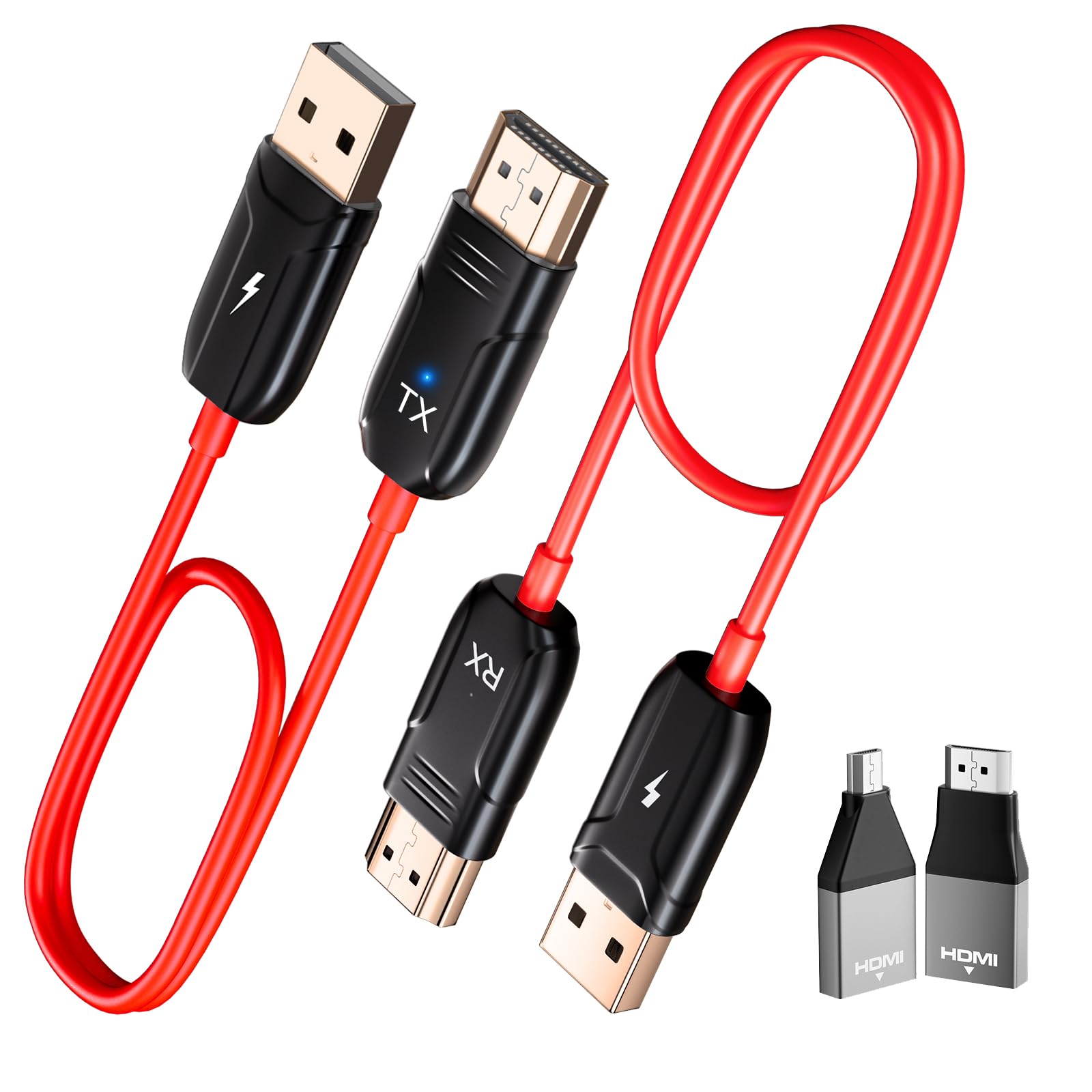
The INVERSE NET Wireless HDMI system is not a traditional streaming stick—it is a transmitter/receiver pair that sends a video signal from any HDMI source (laptop, camera, set-top box) to a display up to 165 feet away. It operates at 1080P/60Hz output with 4K decoding input, making it ideal for presentations, church services, or wireless monitoring. Setup requires no Wi-Fi, Bluetooth, or app—just plug the transmitter into your source and the receiver into your display.
The dual-band 2.4/5 GHz chip maintains a stable connection through walls, which is genuinely useful for sending a laptop screen to a living room TV from upstairs. For static content like slideshows, presentations, or short video clips, the quality is clear and the latency is manageable. The compact design means it packs easily for business trips or classroom setups.
The critical limitation is latency and video quality during motion. Users report noticeable audio/video sync lag of roughly 5 seconds, and high-motion content suffers from tearing and artifacting. It is not suitable for gaming or movie watching where lip-sync accuracy matters. Additionally, the 4K decoding is input-only—the output remains 1080P, so you lose native 4K resolution on the display. This device serves a specific use case, not a general streaming replacement.
Why it’s great
- True plug-and-play with no Wi-Fi or app required
- 165-foot range works through walls
- Useful for presentations, classrooms, and backstage monitors
Good to know
- Output is limited to 1080P, not 4K
- Significant latency makes it unsuitable for gaming or movies
- Video tearing and artifacting during movement
FAQ
Do I need Wi-Fi 6 for reliable 4K streaming?
What is the difference between Dolby Vision and HDR10 on a streaming stick?
Can I use any 4K streaming device with an older 1080p TV?
How much storage do I really need on a streaming stick?
Final Thoughts: The Verdict
For most users, the best 4k streaming device winner is the Amazon Fire TV Stick 4K Max because it combines Wi-Fi 6E, 16 GB storage, and full Dolby Vision/Atmos support in a compact stick that outperforms everything else in its class. If you want an ecosystem-agnostic interface with excellent voice search, grab the Google Chromecast with Google TV. And for a budget-conscious setup that does not compromise on core features, the Onn 4K Plus offers Google TV with 2 GB RAM and Wi-Fi 6 at a remarkable value.

Mo Maruf
I created WellFizz to bridge the gap between vague wellness advice and actionable solutions. My mission is simple: to decode the research and give you practical tools you can actually use.
Beyond the data, I am a passionate traveler. I believe that stepping away from the screen to explore new environments is essential for mental clarity and physical vitality.