Our readers keep the lights on and my smoothie glass nicely filled. As an Amazon Associate, I earn from qualifying purchases.
Choosing a premium display is an investment in every pixel you see, from the deepest blacks in a shadowy game scene to the crisp lines of a spreadsheet. The combination of true 4K resolution, OLED contrast, and an ultrawide aspect ratio creates an immersive experience that standard monitors simply cannot match. You are looking for a panel that delivers both breathtaking visuals and the productivity space to handle multiple workflows simultaneously.
I’m Mohammad Maruf — the founder and writer behind WellFizz. My research focuses on dissecting the real-world performance of high-end hardware, separating marketing specs from the tangible benefits that matter for daily use in demanding environments.
After analyzing dozens of panels, I have selected the models that genuinely deliver on the promise of a premium viewing experience. This guide to the best 4k oled ultrawide monitor is built for buyers who value clarity, contrast, and a seamless workflow.
How To Choose The Best 4K OLED Ultrawide Monitor
Selecting the right panel involves more than just picking the biggest number. You need to balance resolution, panel technology, curvature, connectivity, and the specific features that guard your investment against burn-in. The following factors are the real determinants of long-term satisfaction.
Panel Technology: QD-OLED vs. WOLED
The panel type defines the visual signature. QD-OLED uses a blue OLED layer with quantum dot color conversion, producing a wider color gamut and higher peak brightness in HDR scenes. WOLED uses a white OLED layer with color filters, which often results in better text clarity due to a more conventional subpixel layout. Your choice depends on whether you prioritize vibrant gaming visuals or sharp text for mixed use.
Resolution and Pixel Density
A true 4K ultrawide typically means a 5120 x 2160 resolution (often called 5K2K), delivering around 110-125 PPI. This provides sharp text and immense horizontal space. A 3440 x 1440 panel is technically not 4K in height but offers a native ultrawide experience with lower GPU demands. Higher pixel density reduces the need for scaling and eliminates the “soft text” complaint seen on older OLED monitors.
Refresh Rate and Input Connectivity
For smooth gameplay at this resolution, aim for 144Hz or higher. To drive these speeds without compression artifacts, your connection matters. DisplayPort 1.4 with DSC (Display Stream Compression) works well, but DisplayPort 2.1 offers full bandwidth for uncompressed high-refresh signals. HDMI 2.1 is essential for console compatibility. A USB-C port with 90W+ power delivery is also a major convenience for laptop users.
Burn-in Prevention and Warranty
OLED burn-in is a real concern for monitors used for static tasks. Look for features like pixel shifting, logo dimming, automatic brightness limiting (ABL), and proximity sensors. A manufacturer warranty that explicitly covers burn-in is a strong indicator of panel durability and long-term support.
Quick Comparison
On smaller screens, swipe sideways to see the full table.
| Model | Category | Best For | Key Spec | Amazon |
|---|---|---|---|---|
| LG 45GX950A-B | Premium | Ultimate Gaming & Productivity | 5K2K (5120×2160) WOLED, 165Hz, DP 2.1 | Amazon |
| Alienware AW3225QF | Premium | High-End 4K Gaming | 32″ 16:9 QD-OLED, 240Hz, Dolby Vision | Amazon |
| Samsung Odyssey OLED G8 (G85SD) | Premium | HDR Gaming & Media | 34″ QD-OLED, 175Hz, Glare-Free | Amazon |
| ASUS ROG Strix XG32UCWG | Mid-Range | Versatile Gaming & Editing | 32″ WOLED, Dual-Mode 4K@165Hz/FHD@330Hz | Amazon |
| Dell UltraSharp U4025QW | Premium | Professional Productivity | 40″ IPS Black, 120Hz, 5K2K | Amazon |
| Samsung 49″ Odyssey G9 (G95C) | Mid-Range | Super-Ultrawide Immersion | 49″ VA, 240Hz, 1000R Curve | Amazon |
| LG 34GX90SA-W | Mid-Range | WQHD Gaming & Streaming | 34″ WQHD (3440×1440) OLED, 240Hz, webOS | Amazon |
| INNOCN 49″ OLED Monitor | Mid-Range | Productivity & Budget Ultrawide | 49″ QD-OLED, 144Hz, USB-C 90W | Amazon |
| Deco Gear 49″ QD-OLED | Mid-Range | Value Ultrawide Gaming | 49″ QD-OLED, 240Hz, KVM | Amazon |
| MSI MPG 321URX QD-OLED | Mid-Range | High-Refresh 4K Gaming | 32″ QD-OLED, 240Hz, 0.03ms | Amazon |
| Philips Evnia 49M2C8900L | Premium | Immersive Gaming & Audio | 49″ QD-OLED, 144Hz, DTS Sound | Amazon |
| Samsung LS34BG850SUXEN | Premium | Smart Gaming Monitor | 34″ WQHD OLED, 175Hz, Tizen | Amazon |
| GIGABYTE AORUS CO49DQ | Premium | Sim Racing & Large Format | 49″ DQHD OLED, 144Hz, FreeSync | Amazon |
In‑Depth Reviews
1. LG 45GX950A-B Ultragear

The LG 45GX950A-B sets a new benchmark for what a premium display can be. Its world-first 5K2K (5120 x 2160) WOLED panel delivers a pixel density of 125 PPI, completely eliminating the text fringing that plagued earlier OLED monitors. The 45-inch diagonal and 800R curve create an enveloping field of view that is ideal for both competitive racing sims and complex productivity workflows.
The inclusion of DisplayPort 2.1 is a game-changer, providing the full bandwidth needed to drive its 165Hz refresh rate at full resolution without relying on Display Stream Compression. The dual-mode feature allows a hotkey switch to 330Hz at Wide FHD resolution, giving you the flexibility for fast-paced shooters. Connectivity is robust with two HDMI 2.1 ports and a USB-C port delivering 90W of power for a laptop.
HDR performance is equally impressive, with up to 1300 nits peak brightness and DisplayHDR True Black 400 certification. The anti-glare coating, certified by UL, keeps reflections to a minimum. The burn-in prevention suite includes pixel cleaning and a logo brightness dimmer. It is a significant investment, but for the highest fidelity in both play and work, this is the current apex.
Why it’s great
- Sharp 125 PPI text clarity eliminates subpixel fringing issues.
- Future-proof DisplayPort 2.1 connectivity for uncompressed high-refresh.
- Dual-mode (5K2K 165Hz / FHD 330Hz) offers versatile gaming performance.
Good to know
- The steep 800R curve may take time to adjust to for non-gaming tasks.
- The on-screen display (OSD) joystick can feel clunky for input switching.
2. Alienware AW3225QF

The Alienware AW3225QF packs a premium 32-inch QD-OLED panel into a more traditional 16:9 aspect ratio, making it a superb choice for those who prioritize image quality over ultrawide real estate. Its 4K resolution combined with a 240Hz refresh rate and 0.03ms response time delivers buttery-smooth motion. It also supports Dolby Vision, a feature rare in monitors, which enhances color and contrast in supported content.
In terms of pure visual fidelity, the QD-OLED technology provides exceptional color volume and near-infinite contrast. The panel is calibrated out of the box, making it suitable for creative work alongside gaming. The design is classic Alienware, with robust build quality and customizable RGB lighting. Connectivity includes DisplayPort 1.4, HDMI 2.1, and multiple USB ports.
One of the strongest selling points is Alienware’s burn-in warranty, which provides peace of mind for long-term static use. While it does not offer the horizontal space of an ultrawide, the combination of high refresh, Dolby Vision, and excellent color accuracy makes this a top-tier choice for a primary gaming display. It is a compact powerhouse that excels in every scenario.
Why it’s great
- Stunning QD-OLED image quality with Dolby Vision support.
- Blazing-fast 240Hz refresh rate ideal for competitive gaming.
- Included burn-in warranty offers excellent long-term protection.
Good to know
- The 16:9 aspect ratio limits horizontal multitasking compared to ultrawides.
- Requires a powerful GPU to drive 4K 240Hz in modern titles.
3. Samsung Odyssey OLED G8 (G85SD)

The Samsung Odyssey OLED G8 (G85SD) is a 34-inch ultrawide curved monitor that excels in delivering a high-quality HDR experience. Its QD-OLED panel, combined with Glare-Free technology, ensures deep blacks and vibrant colors remain visible even in brightly lit rooms. The 175Hz refresh rate and 0.03ms response time are well-suited for fast-paced titles, providing crisp motion without tearing.
What sets this monitor apart is its integrated Smart TV functionality. Powered by Tizen, it allows direct access to streaming services like Netflix and cloud gaming platforms like GeForce NOW without needing a PC. This makes it an excellent all-in-one entertainment hub for a desk setup. The included remote control simplifies navigating these features, which is a rare convenience in the monitor category.
Samsung has included robust OLED protection features, including Logo and Taskbar Detection that automatically dims static regions to prevent burn-in. The Ultra-WQHD resolution (3440 x 1440) is the more traditional ultrawide format, which is easier to drive than a full 4K panel. It is a polished, feature-rich monitor that balances gaming prowess with smart functionality.
Why it’s great
- Glare-Free QD-OLED panel performs great in bright rooms.
- Built-in Smart TV apps and cloud gaming reduce need for a PC.
- Excellent OLED protection features for burn-in prevention.
Good to know
- Resolution is WQHD (3440×1440), not true 4K height.
- The anti-glare coating can slightly diffuse light in very bright scenes.
4. ASUS ROG Strix XG32UCWG

The ASUS ROG Strix XG32UCWG is a 32-inch WOLED gaming monitor that brings premium features to a more accessible price point. Its signature feature is the dual-mode capability, allowing you to switch between 4K at 165Hz for visually stunning games and Full HD at 330Hz for ultra-smooth competitive play. The “TrueBlack Glossy” panel provides exceptional clarity and a zero-haze surface, making images look incredibly sharp.
ASUS has integrated its OLED Care Pro suite, which includes a Neo Proximity Sensor. This sensor intelligently detects when you step away from the desk and automatically blanks the screen to reduce burn-in risk. The build quality is excellent, with a solid stand and a premium ROG aesthetic. Connectivity covers the essentials with DisplayPort 1.4 (DSC), HDMI 2.1, and a USB-C port.
Color accuracy is strong out of the box, with a Delta E < 2 rating and 99% DCI-P3 coverage, making it suitable for content editing. The HDR performance, certified to VESA DisplayHDR 400 True Black, provides deep blacks and decent highlight punch. It offers a compelling balance of high-refresh gaming, professional-grade color, and advanced burn-in protection at a competitive price.
Why it’s great
- Excellent value with dual-mode (4K 165Hz / FHD 330Hz).
- Crisp glossy WOLED panel with advanced burn-in sensor.
- Strong color accuracy for both gaming and editing.
Good to know
- Limited stand adjustability compared to some competitors.
- Maximum full-window brightness is around 250 nits.
5. Dell UltraSharp U4025QW

The Dell UltraSharp U4025QW is the definitive professional’s display, focusing on maximum productivity over raw gaming speed. Its 40-inch IPS Black panel delivers a 5K2K (5120 x 2160) resolution, providing immense horizontal and vertical workspace. The contrast ratio of 2000:1, while not OLED-level, is exceptional for IPS technology, providing deep blacks without blooming.
The 120Hz refresh rate is a significant upgrade for productivity, making window movement and scrolling incredibly smooth. The built-in Thunderbolt 4 hub acts as a full dock, providing high-speed data, ethernet, and power delivery up to 140W to a single laptop cable. This drastically simplifies cable management. The screen also features a 600-nit brightness rating, making it usable in very bright offices.
Color accuracy is superb, covering 99% DCI-P3 right out of the box. The ergonomic stand is robust, with full tilt, swivel, and height adjustments. While its pixel response time (5ms) is slower than OLED options, for professional work—coding, video editing, financial analysis—this monitor is transformative. It is a premium tool that enhances workflow efficiency.
Why it’s great
- Massive 5K2K resolution on a 40-inch screen is a productivity powerhouse.
- Built-in Thunderbolt 4 hub with 140W charging simplifies cable management.
- Excellent IPS Black panel with high contrast and 600-nit brightness.
Good to know
- Premium price is aimed at professional workflows, not gamers.
- 5ms response time is not suitable for competitive gaming.
6. Samsung 49″ Odyssey G9 (G95C)

The Samsung Odyssey G9 (G95C) is a 49-inch super-ultrawide that completely wraps your peripheral vision using a dramatic 1000R curve. While it is not an OLED panel, its VA/QLED technology delivers a high contrast ratio of 1,000,000:1 and a peak brightness of 1000 nits, providing an incredibly immersive HDR experience. The 32:9 aspect ratio effectively replaces a dual-monitor setup without the bezel gap.
The 240Hz refresh rate and 1ms response time are competitive for high-action gaming. AMD FreeSync Premium Pro ensures tear-free performance. Its size is its greatest asset for flight and racing sims, where the peripheral view is crucial. For productivity, the screen is massive, but managing windows without a tiling tool can be challenging.
It is important to note that this model uses a VA panel, not OLED. This means while contrast is excellent, black levels are not as deep as an OLED, especially in dark scenes. The monitor is heavy and requires a large desk. It offers a unique, immersive experience that is excellent for specific use cases, but the panel technology is a generation behind the QD-OLED competitors.
Why it’s great
- Massive 49″ screen with 1000R curve for maximum immersion.
- High 240Hz refresh rate and 1000-nit peak brightness.
Good to know
- Uses VA/QLED panel, not true OLED for deepest blacks.
- The large size and weight require a very deep desk.
7. LG 34GX90SA-W Ultragear

The LG 34GX90SA-W is a 34-inch WQHD (3440 x 1440) OLED monitor that combines gaming performance with the convenience of LG’s webOS smart platform. The steep 800R curve is designed for deep immersion, pulling you into the game. With a 240Hz refresh rate and 0.03ms response time, it offers elite motion clarity for competitive gaming, backed by support for both FreeSync Premium and G-Sync.
The integrated webOS platform allows you to stream content and play cloud games from services like GeForce NOW directly on the monitor without a PC. This makes it an excellent all-in-one solution for a bedroom or living room desk. The USB-C port with 65W power delivery is convenient for powering a laptop. The white color scheme is a refreshing change from the typical black monitor.
OLED protection is covered by a 2-year limited warranty and pixel cleaning tools. The main trade-off is the WQHD resolution, which does not offer the same pixel density or sharpness as a true 4K panel. The 800R curve is also aggressive, which may not suit all users. It is a great monitor for those who want a fast, curved OLED with smart TV capabilities.
Why it’s great
- Fast 240Hz OLED with a highly immersive 800R curve.
- Integrated webOS for streaming and cloud gaming.
- USB-C with 65W power delivery simplifies laptop setup.
Good to know
- WQHD (3440×1440) resolution is less sharp than true 4K.
- The aggressive curve can feel unnatural for productivity work.
8. INNOCN 49″ OLED Monitor

The INNOCN 49Q1R is a 49-inch QD-OLED monitor that offers a massive ultrawide canvas at a price that undercuts many competitors. Its 32:9 aspect ratio with a 5120 x 1440 resolution is ideal for side-by-side multitasking and immersive gaming. The 144Hz refresh rate, while lower than some, is sufficient for smooth gameplay, and the 1500000:1 contrast ratio is classic OLED.
Connectivity is a strong point, featuring a USB-C port with 90W power delivery, two HDMI 2.1 ports, and a built-in USB hub. The KVM function allows you to control two computers with a single set of peripherals, which is a major productivity win. The 1800R curve is gentler than the 1000R curve, making it more comfortable for productivity tasks and document work.
Build quality feels solid, though the on-screen display (OSD) controls are clunky. Some users report occasional screen blinking and customer service responsiveness issues. While it may lack the polish of a Samsung or LG, for the price, it offers a huge QD-OLED screen with excellent connectivity. It is a fantastic entry point into the world of super-ultrawide OLED monitors.
Why it’s great
- Affordable entry to a large 49-inch QD-OLED panel.
- Excellent connectivity with USB-C 90W and KVM support.
- Gentler 1800R curve is better for productivity than steeper curves.
Good to know
- Clunky OSD controls and potential firmware issues reported.
- Customer support quality is a concern for some buyers.
9. Deco Gear 49″ QD-OLED

The Deco Gear 49″ QD-OLED delivers high-end specs like a 5120×1440 resolution, a blistering 240Hz refresh rate, and a 0.03ms response time. It is designed for gamers who want a super-ultrawide experience with top-tier speed. The QD-OLED panel provides vibrant colors, deep blacks, and an excellent contrast ratio, making games and video content look fantastic.
It features a built-in KVM and PiP/PBP support, which adds significant value for productivity users who need to manage multiple PCs. The USB-C port with 90W power delivery enables a clean, single-cable connection for modern laptops. The curvature is immersive, and the adjustable stand offers good ergonomic flexibility.
The build quality is decent, though some users have reported issues with shipping damage and the included power cable. Its performance is very similar to the Innocn 49Q1R, as they likely share the same Samsung QD-OLED panel source. For a premium price, it offers a full feature set, but buyers should be attentive to the condition of the unit upon delivery.
Why it’s great
- High 240Hz refresh rate for smooth gameplay.
- Built-in KVM switch is great for managing multiple devices.
- Stunning QD-OLED image quality with rich colors.
Good to know
- Potential quality control issues with power cable reported.
- Essentially same panel as Innocn 49Q1R, so compare pricing.
10. MSI MPG 321URX QD-OLED

The MSI MPG 321URX is a 32-inch QD-OLED monitor that has quickly become a standard for high-performance 4K gaming. It combines a 3840 x 2160 resolution with a 240Hz refresh rate and an incredible 0.03ms response time, providing a buttery-smooth and incredibly responsive experience. The QD-OLED panel delivers exceptional vibrancy, covering 99% of the DCI-P3 color gamut.
Its True Black HDR 400 certification ensures deep, inky blacks and impressive contrast. The monitor includes MSI’s OLED Care 2.0, a suite of software and hardware tools designed to prevent burn-in, including pixel shift and panel protect features. Connectivity is solid with HDMI 2.1, DP 1.4a, and a USB-C port with 90W power delivery.
The text clarity is generally very good for a QD-OLED, though some users note a slight difference compared to WOLED panels. The stand is 4-way adjustable, and the build quality feels premium. It is a direct competitor to the ASUS ROG offering and the Alienware, often coming in at a slightly more accessible price. It is an outstanding choice for gamers wanting the full QD-OLED package.
Why it’s great
- High 240Hz refresh rate with fast 0.03ms response for competitive play.
- Excellent QD-OLED color gamut and HDR performance.
- Comprehensive OLED Care 2.0 burn-in prevention suite.
Good to know
- 16:9 aspect ratio offers less horizontal space than ultrawides.
- Requires a powerful GPU to fully utilize 4K 240Hz.
11. Philips Evnia 49M2C8900L
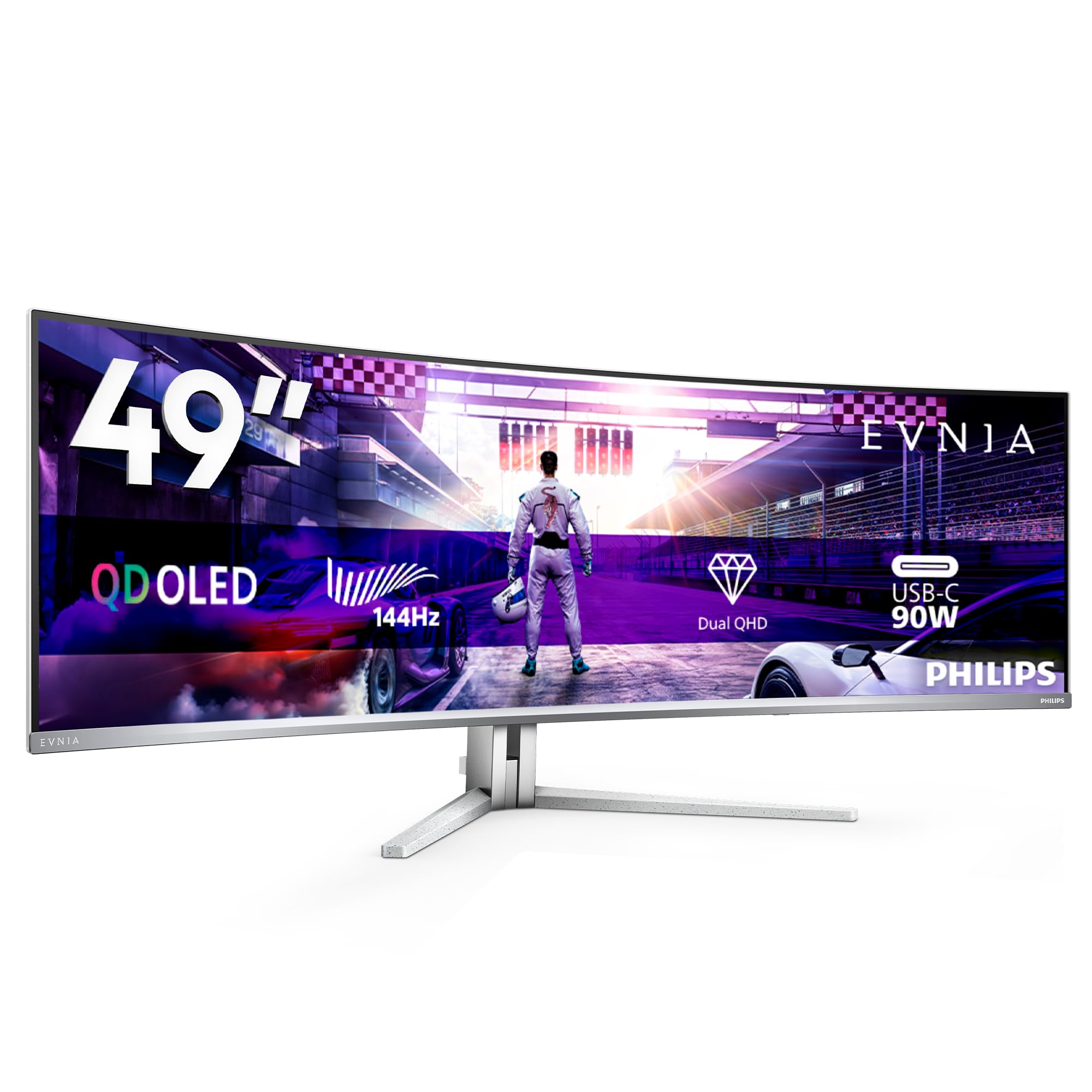
The Philips Evnia 49M2C8900L is a 49-inch QD-OLED monitor that focuses on creating a holistic sensory experience. It features Ambiglow, a technology that projects colored light onto the wall behind the monitor to reduce eye strain and increase immersion. The 32:9 aspect ratio and 1800R curve provide a massive, wraparound field of view for gaming and multitasking.
Performance is strong with a 144Hz refresh rate and 0.03ms GtG response time, supported by FreeSync Premium Pro. The speakers are surprisingly powerful, with DTS sound delivering rich audio that reduces the immediate need for external speakers. The USB-C port provides 90W power delivery, and the KVM function is a welcome addition for multi-PC setups.
The build quality is excellent, with a white and silver finish that looks clean and modern. The 1800R curve makes it more versatile for both productivity and gaming. The main trade-off is the 144Hz refresh rate, which is lower than the 240Hz found on some competitors. It is a premium, well-rounded display that prioritizes the full user experience over raw speed.
Why it’s great
- Integrated Ambiglow lighting enhances immersion and reduces eye strain.
- Excellent built-in DTS sound speakers for a monitor.
- Versatile 1800R curve works well for both productivity and gaming.
Good to know
- Refresh rate capped at 144Hz, not the 240Hz available elsewhere.
- Ambiglow’s effectiveness is less impactful than on a TV.
12. Samsung LS34BG850SUXEN

The Samsung LS34BG850SUXEN is a 34-inch WQHD (3440 x 1440) OLED monitor that functions as a complete smart hub. Based on Samsung’s Tizen OS, it offers direct access to major streaming apps and cloud gaming services. This makes it a fantastic standalone entertainment center for a desk, removing the need for a PC to watch media. The 175Hz refresh rate ensures smooth motion in games.
The OLED panel delivers the characteristic deep blacks and vibrant colors. The design is sleek, with a thin profile and a silver finish. It includes a remote control, which is a major convenience over standard monitor OSDs. The connectivity includes a mini-DisplayPort and HDMI ports, though a full-size DP cable is not included.
This monitor is essentially the same panel as the Odyssey G8 G85SD but in a different market release, and it lacks the Glare-Free coating of its newer sibling. The WQHD resolution is an important spec to note—it is also not a true 4K panel. Its value depends on its price, which can often be higher than the newer G8 model. It is a great smart OLED that requires careful price comparison.
Why it’s great
- Integrated Tizen smart platform for direct streaming and cloud gaming.
- Included remote control is a unique convenience feature.
- Excellent OLED image quality with high 175Hz refresh rate.
Good to know
- Often priced higher than the newer Samsung Odyssey G8 G85SD.
- Resolution is WQHD, not true 4K (UHD).
13. GIGABYTE AORUS CO49DQ

The GIGABYTE AORUS CO49DQ is a 49-inch OLED monitor designed for extreme immersion, especially in simulation and racing games. Its Dual QHD (5120 x 1440) resolution offers massive screen real estate with a 32:9 aspect ratio. The 144Hz refresh rate and 0.03ms response time provide smooth motion and excellent clarity for fast-moving content.
It supports FreeSync Premium Pro for tear-free gaming and a high dynamic contrast ratio. The Gigabyte Control Center software is a useful tool for fine-tuning settings and managing profiles. The connectivity includes HDMI and DisplayPort inputs. Its large size requires significant desk space, but the visual payoff is substantial for supported uses.
Reviews indicate excellent picture quality with vibrant colors and deep blacks. The height is somewhat shorter than some other 49-inch models, which can limit vertical workspace. Some users note a need for firmware updates to address minor bugs. It is a solid choice for users who prioritize a massive, immersive OLED screen for gaming and simulation.
Why it’s great
- Very large 49-inch QD-OLED screen is excellent for sim racing.
- FreeSync Premium Pro support for smooth gaming.
- Rich, vibrant QD-OLED color and contrast.
Good to know
- Vertical height is shorter than some 49-inch competitors.
- Requires significant desk depth and a powerful GPU.
FAQ
Is a 4K OLED ultrawide monitor good for productivity and coding?
What is the real difference between QD-OLED and WOLED for an ultrawide?
Can a single GPU drive a 4K OLED ultrawide at high refresh rates?
How can I tell if a monitor is a true 4K ultrawide versus a WQHD panel?
Final Thoughts: The Verdict
For most users seeking the pinnacle of modern display technology, the best 4k oled ultrawide monitor winner is the LG 45GX950A-B because it uniquely combines a sharp 5K2K resolution, a fast 165Hz refresh rate, and future-proof DisplayPort 2.1 in a beautifully immersive 45-inch WOLED panel. If you prefer a smaller, high-refresh gaming powerhouse with Dolby Vision, grab the Alienware AW3225QF. And for pure productivity maximization, nothing beats the Dell UltraSharp U4025QW with its integrated Thunderbolt 4 hub and massive 40-inch IPS Black canvas.

Mo Maruf
I created WellFizz to bridge the gap between vague wellness advice and actionable solutions. My mission is simple: to decode the research and give you practical tools you can actually use.
Beyond the data, I am a passionate traveler. I believe that stepping away from the screen to explore new environments is essential for mental clarity and physical vitality.