Our readers keep the lights on and my smoothie glass nicely filled. As an Amazon Associate, I earn from qualifying purchases.
The promise of a 49-inch ultrawide is simple: replace a messy dual-monitor setup with one seamless, bezel-free canvas. But the reality involves navigating panel technology choices—VA, IPS, QD-OLED, Mini-LED—and understanding that not every curved panel delivers the crisp text or uniform brightness a professional workflow demands.
I’m Mohammad Maruf — the founder and writer behind WellFizz. I spend my days dissecting monitor specifications, from color gamut coverage and pixel response to the real-world performance of KVM switches and USB-C power delivery, to ensure every recommendation serves a productive, long-term workstation.
After hours of careful analysis and real-user validation, I’ve found that the best 49 inch monitor for work truly balances sprawling screen real estate with accurate color, ergonomic stability, and dependable connectivity that keeps your desk tidy and your workflow uninterrupted.
How To Choose The Best 49 Inch Monitor For Work
Selecting the right 49-inch ultrawide for work goes far beyond screen size. The difference between a monitor that enhances your productivity and one that causes daily frustration lies in three core areas: panel technology, connectivity, and ergonomic flexibility. Below, I break down what to prioritize.
Panel Technology: VA, IPS, or QD-OLED?
For work, the panel determines how sharp text looks and how accurate colors appear. VA panels offer high contrast, making them good for media consumption, but they can suffer from dark text smearing and limited viewing angles. IPS panels provide superior color consistency and wider viewing angles, essential for color-critical tasks like photo or video editing. QD-OLED panels deliver the best contrast and vibrant colors, but you must be cautious about static UI elements (taskbars, toolbars) causing burn-in over long periods. For pure productivity and text clarity, a premium IPS or a well-managed QD-OLED panel is the safest bet.
Connectivity and the One-Cable Dream
A 49-inch monitor is intended to be the hub of your desk. Look for a monitor with USB-C that delivers at least 90W of power delivery. This single cable can transmit video, data, and charge your laptop, eliminating a nest of wires. In a multi-computer setup, a built-in KVM switch is a non-negotiable feature—it lets you control two PCs with one keyboard and mouse. Thunderbolt 4 support is a bonus for Mac users needing high bandwidth and display daisy-chaining.
Curvature and Ergonomics
The curvature rating, measured in R (radius), dictates how the screen wraps around your field of vision. A 1000R curve is the tightest and most immersive, mimicking the human eye’s natural field and reducing the need for head movement. A 1800R curve is gentler and more suited for shared viewing or design work where a flat reference line is needed. The stand must offer height adjustment, tilt, and swivel—without these, you will experience neck and eye strain trying to view the entire screen correctly. A VESA mount compatibility is also critical if you plan to use a monitor arm.
Quick Comparison
On smaller screens, swipe sideways to see the full table.
| Model | Category | Best For | Key Spec | Amazon |
|---|---|---|---|---|
| Dell UltraSharp U4924DW | Premium LCD | Built-in KVM & Reliability | 2000:1 Contrast Ratio | Amazon |
| Deco Gear QD-OLED | QD-OLED | Deep Blacks & Vibrant Color | 90W USB-C / KVM | Amazon |
| MSI MPG 491CQP QD-OLED | QD-OLED | Gaming & Productivity Hybrid | 0.03ms Response Time | Amazon |
| LG 49WQ95C-W | Nano IPS | Multi-Device Workflows | 98% DCI-P3 / HDMI 2.1 | Amazon |
| INNOCN 49Q1R | QD-OLED | Laptop-Only Setup | Single USB-C with 90W PD | Amazon |
| Samsung Odyssey G9 G95C | VA QLED | High Refresh & Immersion | 240Hz / 1000R Curve | Amazon |
| LG 40WP95C-W | Nano IPS | Mac Users & 5K2K Resolution | Thunderbolt 4 / 96W PD | Amazon |
| Samsung Business LS49C954UANXZA | VA LED | Business Productivity Hub | Built-in Speakers / 90W USB-C | Amazon |
| Dell U4919DW | IPS LED | Color-Consistent Spreadsheets | USB-C KVM Hub | Amazon |
| ASUS ROG Strix XG49VQ | VA LED | Mid-Range GPU Workflows | 3840×1080 / 144Hz | Amazon |
| Amzfast AMZG49C7U | VA LED | Budget Ultrawide Entry | 120Hz / 5120×1440 | Amazon |
| ViewSonic VP3881A | IPS | Professional Color Grading | Pantone Validated / 100% sRGB | Amazon |
| BenQ PD2730S | LED | Mac Retina-Like Clarity | 5K / 218 PPI | Amazon |
In‑Depth Reviews
1. Dell UltraSharp U4924DW

The Dell UltraSharp U4924DW is the gold standard for productivity-centric ultrawide monitors. Its 49-inch Dual QHD (5120×1440) VA panel delivers a high 2000:1 contrast ratio, ensuring deep blacks and better readability in dimly lit rooms than standard IPS displays. The 3800R curvature is gentle—just enough to reduce glare without distorting straight lines, making it a favorite for architects and CAD users who need precise geometry.
Where this screen truly excels is its connectivity suite. The built-in KVM supports up to three connected computers, and a single USB-C upstream cable handles video, data, and 90W of power delivery to your laptop. The included software, Dell Display Manager, allows you to partition the screen into multiple virtual displays with ease, a feature that genuinely boosts workflow efficiency. The stand is rock-solid with full height, tilt, and swivel adjustments.
Text clarity on the VA panel is very good, though some users note that it lacks the absolute sharpness of a high-end IPS for color-critical work. The 60Hz refresh rate is standard for office work but feels sluggish compared to gaming monitors. The KVM switch takes a few seconds to transition between computers, which can be a minor annoyance if you hot-swap frequently. For the professional who needs a reliable, all-in-one hub, this is the pick.
Why it’s great
- Exceptional KVM functionality with support for 3 computers.
- High 2000:1 contrast ratio for comfortable extended viewing.
- USB-C with 90W power delivery acts as a complete desk hub.
Good to know
- 60Hz refresh rate limits smooth scrolling and gaming potential.
- 3800R curve is very subtle; may not feel immersive for some users.
- USB-C port has been reported to fail outside of warranty.
2. Deco Gear 49″ QD-OLED
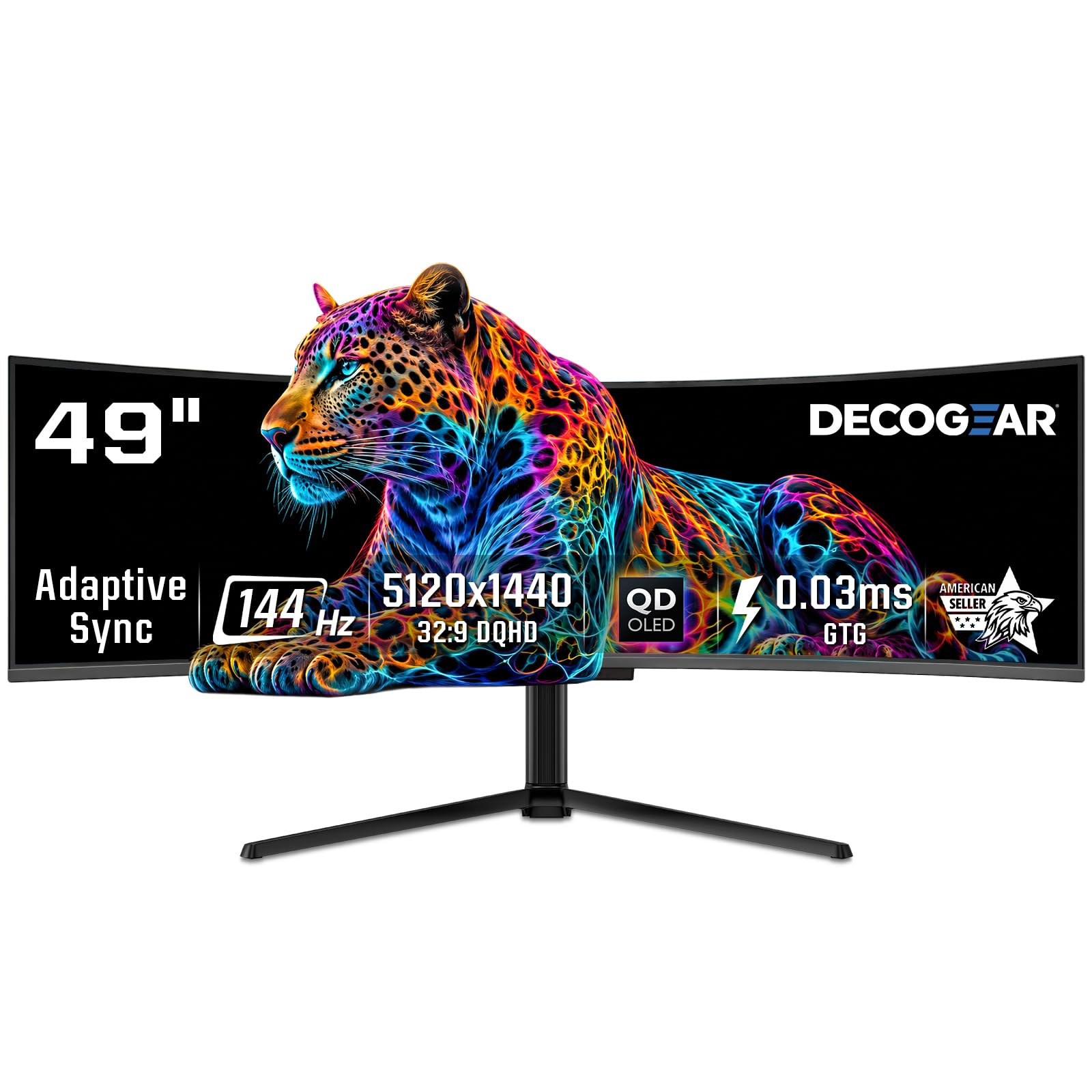
The Deco Gear QD-OLED monitor brings stunning image quality to the productivity market without the premium price tag of some competitors. Its 49-inch QD-OLED panel delivers a 1,500,000:1 contrast ratio, making blacks truly infinite and colors exceptionally vibrant. The 1800R curve provides a noticeable but comfortable wrap that helps reduce peripheral motion, making long coding or spreadsheet sessions less tiring on the eyes.
For connectivity, this monitor is well-suited for modern workflows. It includes a 90W USB-C port for power and data, along with HDMI 2.1 and DisplayPort 1.4 inputs. The built-in KVM switch allows you to control two systems from one keyboard and mouse, and the QD-OLED Care features (pixel shift, static screen detection) give you peace of mind against burn-in for static work elements like toolbars and icons. The height-adjustable stand offers tilt and swivel, though its footprint is large.
The main drawback is the documented power cable issue—some units arrive with a tightly folded cable that may fail prematurely. While image quality is superb, the overall build and support experience can vary depending on the seller. The text clarity on OLED panels is excellent for a VA or IPS user, but some Mac users might find the sub-pixel rendering slightly less sharp than a true Retina display. It is an incredible choice for workers who prioritize visual media alongside productivity.
Why it’s great
- QD-OLED panel delivers unmatched contrast and vibrant color.
- 90W USB-C with KVM for a clean, two-computer desk setup.
- Advanced burn-in prevention software for static UI elements.
Good to know
- Power cable may arrive damaged and require replacement.
- Footprint of the stand is large; desk clamping arm is recommended.
- Warranty support varies; avoid refurbished models.
3. MSI MPG 491CQP QD-OLED

The MSI MPG 491CQP is a rare monitor that genuinely excels at both productivity and gaming. Its 49-inch QD-OLED panel offers 5120×1440 resolution with a 144Hz refresh rate and a near-instant 0.03ms response time. For work, this means buttery-smooth scrolling through code, documents, and web pages, while the infinite contrast makes multimedia editing a pleasure. The stand is well-built with height, swivel, and tilt adjustments.
For connectivity, it offers a USB-C port with 65W power delivery (not 90W), plus HDMI 2.1 and DisplayPort inputs. The KVM functionality is hidden in the OSD but can be configured to share peripherals between two computers. The monitor includes MSI’s OLED Care 2.0, which performs pixel refresh and actively helps prevent burn-in. The Delta E≤2 out-of-the-box color accuracy means you can trust this screen for photo or video editing without a hardware calibrator.
The main caveat is the USB-C power delivery is capped at 65W, which may not charge a 16-inch MacBook Pro at full speed during heavy workloads. The built-in speakers are basic, barely acceptable for system sounds. Also, the 144Hz refresh rate comes from generating over DisplayPort 1.4 with DSC—some HDMI sources might be limited to 120Hz. If you need one monitor for both office tasks and after-hours gaming, this is arguably the best balance on the list.
Why it’s great
- QD-OLED with 144Hz for ultra-smooth scrolling and gaming.
- Excellent Delta E≤2 color accuracy out of the box.
- Strong OLED Care 2.0 software for burn-in prevention.
Good to know
- USB-C power delivery is only 65W, not 90W.
- No built-in speakers worth relying on for meetings.
- Customer service can be slow for warranty claims.
4. LG 49WQ95C-W

The LG 49WQ95C-W brings the company’s excellent Nano IPS panel technology to the ultrawide form factor. Its 49-inch DQHD (5120×1440) resolution covers 98% of the DCI-P3 color space, making it one of the most color-accurate non-OLED options available for creative professionals. The 1800R curve is moderate, providing a sense of wrap without causing geometric distortion for spreadsheet or design work.
Connectivity is where this monitor shines for power users. It supports HDMI 2.1, USB-C with 90W power delivery, and includes a built-in KVM that works with two computers. The Picture-by-Picture mode is excellent, allowing you to split the screen into two 2560×1440 halves, each driven by a different source. This makes it ideal for a work laptop on one side and a personal PC on the other. G-Sync and FreeSync Premium Pro support ensures tear-free performance.
The major downside is the reported reliability—some units have failed completely after 7-12 months, with LG’s warranty support being frustratingly slow. The screen’s curvature is very subtle at 1800R, and some users who previously used two separate curved monitors find it less comfortable for multi-computer use. The white/black color scheme may not match all desk aesthetics. Despite these concerns, for its color accuracy and connectivity, it remains a top choice for multi-device creative workflows.
Why it’s great
- Excellent 98% DCI-P3 color coverage for creative work.
- HDMI 2.1 and 90W USB-C support modern laptops and consoles.
- PBP mode effectively splits the screen for dual-computer use.
Good to know
- Reliability concerns—some units fail within a year.
- 1800R curve is very gentle; may feel nearly flat.
- No remote control included for adjusting OSD settings.
5. INNOCN 49Q1R

The INNOCN 49Q1R is an excellent entry point into the world of QD-OLED ultrawides without breaking the bank. It shares the same Samsung QD-OLED panel as some more expensive monitors, delivering the same deep blacks and vibrant colors. The 1800R curvature is well-suited for an office environment, and the 5120×1440 resolution provides ample vertical space for coding or reading documents without excessive scrolling.
For the laptop user, this monitor is perfect. A single USB-C cable delivers 90W of power delivery, video, and data to your laptop, turning it into a full docking station. The built-in KVM works with two computers, and the monitor includes a USB hub with two USB-A ports. The inclusion of an RJ45 Ethernet port is a bonus for users who need a stable wired connection. The stand is adjustable and the build quality feels solid for the price point.
The main trade-offs are in the details. The OSD menu is basic and can be clunky to navigate. Some users have reported that after a month, the screen can go blank or develop flickering issues, with INNOCN’s customer service being unresponsive. The monitor does not have a dedicated burn-in prevention system as robust as MSI or Deco Gear’s solutions. It is software-dependent for pixel shift. For the budget-conscious professional who wants OLED quality, it offers incredible value, but you should buy with a credit card that extends your warranty.
Why it’s great
- Excellent QD-OLED image quality at a value-driven price.
- Single USB-C cable with 90W PD acts as a complete docking station.
- Includes RJ45 Ethernet port for wired network connections.
Good to know
- Burn-in prevention software is less robust than competing models.
- Some units fail within a few months; customer support can be poor.
- OSD controls are clunky and the menu is unintuitive.
6. Samsung Odyssey G9 G95C

The Samsung Odyssey G9 G95C is an intensity machine, and for the right power user, it is an incredible productivity tool. Its 49-inch 1000R curve is the tightest on the market, wrapping around your peripheral vision to a degree that makes you feel like you’re inside the screen. The Dual QHD (5120×1440) resolution with a 240Hz refresh rate makes scrolling through code or large documents feel impossibly smooth.
This is a Quantum Dot VA panel, which delivers a 1,000,000:1 contrast ratio and HDR1000 certification. This means deep blacks and very bright highlights, making it ideal for editing HDR video or viewing content in a bright room. The Auto Source Switch+ feature is smart and convenient, automatically detecting which device is powered on. The stand is sturdy but has a large footprint; a monitor arm is recommended for desk space optimization.
The primary issue for work use is the aggressive 1000R curve. While immersive, it can cause initial eye strain and makes geometric work (like in CAD or design) slightly distorted. Text clarity on a VA panel is good but not as sharp as IPS for mixed-use content. The included DisplayPort cable only supports 240Hz at 10-bit, requiring DSC. Some users report a lengthy adjustment period before the curve feels natural. It is a fantastic choice if you want the smoothest, most immersive productivity experience and don’t mind a gaming aesthetic.
Why it’s great
- 240Hz refresh rate for incredibly smooth scrolling and gaming.
- 1000R curve provides the most immersive ultrawide experience.
- HDR1000 with high peak brightness for HDR content creation.
Good to know
- Aggressive 1000R curve can cause eye strain for some users.
- Large stand footprint; a monitor arm is almost mandatory.
- VA panel text clarity is not as sharp as IPS for fine details.
7. LG 40WP95C-W

While slightly smaller at 40 inches, the LG 40WP95C-W is arguably the best ultrawide for Mac users who demand high pixel density. Its WUHD (5120×2160) resolution provides a 5K2K experience with a crisp 140 PPI, making text incredibly sharp and macOS scaling look native. This is a Nano IPS panel with 98% DCI-P3 coverage and HDR10 support, delivering bright, accurate colors perfect for video editing and graphic design.
The big selling point is Thunderbolt 4 connectivity with 96W power delivery. A single cable to a MacBook Pro provides video, data, and charging at near-full speed. The monitor also includes a DisplayPort and HDMI for a secondary PC, though it lacks a traditional KVM—you use the Thunderbolt daisy chain or a software solution. The built-in speakers with Rich Bass are surprisingly usable for a monitor, good enough for casual media consumption and conference calls.
Downsides are notable. Some units have developed image retention and flickering after about two years, with LG only offering a one-year warranty. The 72Hz refresh rate is fine for productivity but feels dated for a premium monitor in 2024. The screen is also quite reflective, causing significant glare in a sunny office. If you are a Mac professional needing the highest PPI and seamless connectivity, this is a top pick, but budget for a long-term warranty or replacement.
Why it’s great
- 5K2K resolution provides excellent Mac Retina-like text clarity.
- Thunderbolt 4 with 96W PD is ideal for MacBook professionals.
- Surprisingly good built-in speakers for a monitor.
Good to know
- Reports of image retention and flickering after 1-2 years.
- Only 72Hz refresh rate feels outdated for the price.
- Reflective screen can be problematic in bright rooms.
8. Samsung Business LS49C954UANXZA

The Samsung Business LS49C954UANXZA is designed for the corporate or home office user who prioritizes desk organization and a 120Hz smooth experience over pixel-perfect color. Its 49-inch VA panel with 5120×1440 resolution and a 1000R curve provides immersive productivity. The 120Hz refresh rate is a sweet spot for work, making scrolling through endless spreadsheets or documents feel fluid and reducing eye fatigue.
This monitor excels as a dock. It includes USB-C with 90W charging, DisplayPort, and two HDMI inputs. It also has built-in speakers, which, while basic, are adequate for conference calls and system sounds, eliminating the need for desktop speakers. The VESA DisplayHDR 400 support ensures decent dynamic range for video conferencing and media consumption. The height-adjustable stand is sturdy and has a relatively small footprint for a 49-inch monitor.
The main compromise is the VA panel. While the 3000:1 contrast ratio is good, viewing angles are narrower than IPS, so color shifts are noticeable at the edges of the screen. The 250 cd/m² brightness is adequate for a typical office but may struggle in very bright rooms. The on-screen display (OSD) menu is functional but basic, lacking the granular controls of a professional monitor. It is a fantastic, reliable hub for a business user who values smooth scrolling and solid connectivity.
Why it’s great
- 120Hz refresh rate provides smooth scrolling for productivity.
- USB-C with 90W PD and built-in speakers reduce desk clutter.
- HDR400 support improves video and media quality.
Good to know
- VA panel has narrower viewing angles than IPS.
- 250 cd/m² brightness may be dim for brightly lit rooms.
- OSD menu is basic and lacks professional calibration options.
9. Dell U4919DW

The Dell U4919DW is a classic in the productivity ultrawide space, and its reputation for reliability is well-earned. Its 49-inch IPS panel delivers consistent 1000:1 contrast and excellent viewing angles, making it a workhorse for spreadsheets, writing, and coding. The 5120×1440 resolution provides the same screen real estate as two 27-inch QHD monitors, but with no bezel in the middle.
This monitor was one of the first to popularize the built-in KVM. It supports up to three connected computers via the upstream USB-C and USB-B ports, and switching is done through a hotkey or the OSD. The single USB-C cable provides 90W power delivery, cleaning up a messy desk. The stand is premium, with smooth height, tilt, and swivel adjustments. The 60Hz refresh rate is standard for office work.
Limitations are clear today. Compared to newer models, the U4919DW has a 60Hz refresh rate and no HDMI 2.1 support, limiting its future-proofing for both productivity smoothness and any casual gaming. The OSD is slow to navigate and has unintuitive buttons. It is also a heavy monitor, requiring a strong monitor arm if you choose to mount it. If you need a proven, reliable hub for three computers and you don’t need high refresh rates, this is an enduring choice.
Why it’s great
- Reliable IPS panel with consistent color and wide viewing angles.
- Excellent KVM supports up to three connected computers.
- USB-C with 90W PD provides a clean, one-cable setup.
Good to know
- 60Hz refresh rate feels limited for smooth scrolling today.
- OSD is slow and the navigation buttons are unintuitive.
- Large, heavy build requires significant desk space.
10. ASUS ROG Strix XG49VQ

The ASUS ROG Strix XG49VQ offers an affordable entry into 49-inch ultrawide territory. Its DFHD (3840×1080) resolution is paired with a 144Hz VA panel and a 1800R curve, making it a decent candidate for a hybrid work-and-gaming setup. The 1080p vertical height means it is less suited for coding or reading documents compared to a 1440p monitor, but for tasks where horizontal width is critical (like spreadsheets with many columns), it works well.
This monitor includes FreeSync 2 HDR and DisplayHDR 400 certification, offering better color and contrast than basic office monitors. The 144Hz refresh rate ensures smooth browsing and gaming. It has a built-in USB hub and includes a VESA mount kit, but the stand only offers height and tilt adjustments—no swivel. The VA panel’s contrast ratio of 3000:1 provides deep blacks for movie watching.
The biggest downside is the resolution. 3840×1080 is effectively two 27-inch 1920×1080 screens side by side. This means pixel density is low (about 82 PPI), leading to less sharp text and visible pixel structure. This monitor is best for users with mid-range GPUs (like the AMD 7900XT or Nvidia 1080ti) who can drive the resolution at high frame rates without spending on a top-tier card. It is a budget-oriented choice that sacrifices vertical clarity for width.
Why it’s great
- 144Hz refresh rate for smooth scrolling and gaming.
- VA panel offers good 3000:1 contrast for media.
- Easy to drive for mid-range GPUs at 3840×1080.
Good to know
- 3840×1080 resolution has low pixel density for text work.
- FreeSync 2 can flicker with Nvidia G-Sync cards.
- Stand is basic with no swivel adjustment.
11. Amzfast AMZG49C7U

The Amzfast AMZG49C7U is a value-driven entry into the 49-inch ultrawide category that proves you don’t need to spend a fortune to get the size. It features a VA panel with 5120×1440 resolution, a 120Hz refresh rate (requires DisplayPort), and a 1500R curve. For a productivity-focused buyer on a tight budget, this offers the screen real estate of a much more expensive monitor at a fraction of the cost.
The connectivity is surprisingly solid for the price. It includes two HDMI 2.0 ports and two DisplayPort 1.4 inputs, along with a headphone jack. The stand provides height adjustment (0-110mm), tilt, and limited swivel. The monitor supports PIP/PBP, allowing you to connect two devices and split the screen. The HDR performance is basic but acceptable for static content, covering 120% sRGB color gamut.
The build quality is where the budget cuts show. The stand attachment feels insecure, with some users reporting the monitor tilting backward. The VA panel has typical dark-level smearing, which is noticeable when scrolling through dark-mode code editors or documents. The OSD is basic and not very responsive. It is a good option for a secondary or guest workstation, but for primary daily driving, the compromises in build and motion clarity may become frustrating over time.
Why it’s great
- Excellent value for a 5120×1440 49-inch display.
- 120Hz refresh rate for smooth productivity scrolling.
- PIP/PBP support allows dual-device connection.
Good to know
- Stand attachment can be insecure and causes tilting.
- VA panel has noticeable dark smearing in fast content.
- OSD is basic and build quality feels budget-tier.
12. ViewSonic VP3881A

The ViewSonic VP3881A is a professional color monitor built for creative pros who need out-of-the-box color accuracy. Its 38-inch WQHD+ (3840×1600) panel is smaller than the 49-inchers, but the quality is unmatched in this list. It is IPS with 100% sRGB, Pantone Validated, and Delta E<2 accuracy out of the box. This monitor is ideal for photographers, video editors, and graphic designers who trust the colors they see.
Connectivity is centered around a 90W USB-C port that handles video, data, and power. It also includes an RJ45 Ethernet port, making it a full docking station for a single-cable setup. The 2300R curve is gentle, providing a subtle wrap without distorting straight lines. The ergonomic stand is excellent, offering smooth tilt, swivel, and height adjustments along with a flicker-free, blue-light filtered panel for all-day comfort.
The key downside is the resolution and size. At 3840×1600, it has less vertical space than a 5120×1440 panel, making it feel less like twin monitors and more like a stretched single 16:9 display. Its 60Hz refresh rate is standard for color work but feels sluggish. The anti-glare coating is good but not matte, so it still reflects some ambient light. For the professional who needs absolute color accuracy over the absolute widest screen, this is the superior choice.
Why it’s great
- Pantone Validated and Delta E<2 color accuracy out of the box.
- 90W USB-C with RJ45 Ethernet acts as a full docking station.
- Excellent ergonomic stand with smooth adjustments.
Good to know
- 38-inch size feels smaller than true 49-inch ultrawides.
- 60Hz refresh rate is standard for professional monitors.
- Lower vertical resolution than DQHD monitors.
13. BenQ PD2730S

The BenQ PD2730S is a specialized monitor for Mac and creative professionals who prioritize pixel density above all else. While only 27 inches and a 16:9 aspect ratio, it is included here for its 5K (5120×2880) resolution which offers 218 PPI—exceeding the pixel density of most 49-inch ultrawides. This is effectively a Retina display for a desktop, with text so sharp it feels like paper. It is perfect for 3D artists, VFX animators, and game designers who need to see every detail without aliasing.
Connectivity is future-focused with Thunderbolt 4, providing up to 90W power delivery and 40Gbps data transfer speeds. This single cable can drive two 5K displays or one 8K display, providing incredible flexibility. The panel is IPS with 98% P3 color coverage and a 2000:1 contrast ratio (unusually high for IPS, thanks to advanced backlighting). The Nano Matte panel diffuses ambient light, reducing glare in bright offices.
The biggest issue is its size. At 27 inches, it does not offer the screen real estate of the 49-inch monsters. For pure multitasking with multiple windows side-by-side, it is less capable than an ultrawide. Some units have also been reported with defects like vertical lines or stuck pixels shortly after purchase. For the user who values pixel density for detail work (photo retouching, 3D modeling) over sheer width, this is an unparalleled tool.
Why it’s great
- 5K 218 PPI provides Retina-like sharpness for detailed work.
- Thunderbolt 4 with 90W PD and 40Gbps data transfer speed.
- High 2000:1 contrast ratio for an IPS panel, improving depth.
Good to know
- 27-inch size lacks the multitasking width of a 49-inch ultrawide.
- Some units have been reported with defects out of the box.
- Price premium for the Thunderbolt 4 connectivity.
FAQ
What is the ideal pixel density for work on a 49-inch monitor?
Can a QD-OLED monitor be used for 8-hour static work without burn-in?
Is a 1000R curve comfortable for work or only for gaming?
Do I need an HDMI 2.1 port on a work ultrawide monitor?
What is the benefit of a built-in KVM switch over a separate KVM box?
Is 144Hz or 240Hz worth it for productivity work?
Final Thoughts: The Verdict
For most users, the best 49 inch monitor for work winner is the Dell UltraSharp U4924DW because it delivers a rock-solid KVM, reliable build, and the connectivity that truly turns a monitor into a productivity hub. If you want stunning visual quality and deep contrast for creative or media work, grab the Deco Gear 49″ QD-OLED. And for the smoothest, most immersive all-around experience that handles both work and play with equal grace, nothing beats the MSI MPG 491CQP QD-OLED.

Mo Maruf
I created WellFizz to bridge the gap between vague wellness advice and actionable solutions. My mission is simple: to decode the research and give you practical tools you can actually use.
Beyond the data, I am a passionate traveler. I believe that stepping away from the screen to explore new environments is essential for mental clarity and physical vitality.