Our readers keep the lights on and my smoothie glass nicely filled. As an Amazon Associate, I earn from qualifying purchases.
Staring at a tiny, pixelated spreadsheet all day is a fast track to eye strain and lower productivity. A 32-inch screen offers the real estate to tile four windows side-by-side, but the wrong panel technology or connector can leave you squinting at blurry text. The jump from 1080p or 1440p to a true 4K (3840×2160) panel at this size delivers a pixel density of roughly 140 PPI—the sweet spot where fonts become razor-sharp without needing aggressive scaling.
I’m Mohammad Maruf — the founder and writer behind WellFizz. I’ve spent the last decade tracking panel technologies, connectivity standards, and color accuracy metrics across hundreds of displays to understand exactly what separates a productive workspace from a frustrating one.
This guide breaks down the best options available right now, comparing ergonomic adjustability, color coverage, and built-in hub features so you can find the best 32 inch monitor for work that matches your setup and keeps your eyes comfortable from morning to night.
How To Choose The Best 32 Inch Monitor For Work
Selecting the right 32-inch work monitor goes beyond simply picking the largest screen you can afford. You need to balance resolution, panel technology, connectivity, and ergonomic adjustability to match your specific daily tasks—whether you’re crunching numbers in Excel, editing photos in Lightroom, or spending all day in a code editor.
Panel Technology: IPS vs VA
For productivity, IPS (In-Plane Switching) panels are the gold standard. They offer wider viewing angles (178 degrees) and more consistent color reproduction across the screen, which means no color shift when you lean left to read a document. VA (Vertical Alignment) panels deliver deeper blacks and higher static contrast ratios (3000:1 vs 1000:1) because they block more backlight bleed, making them ideal for reading text in dark mode or watching video content. However, VA panels can have slightly slower pixel response and color shift at extreme angles. If you do color-critical design work, IPS is the safe choice. If you work in a dim room and prioritize contrast, VA is a strong competitor.
Connectivity and the Power of USB-C
A single USB-C cable that carries video, data, and delivers power to your laptop is the most convenient feature for a modern desk setup. Look for USB-C ports that support at least 65W of power delivery so you can keep your laptop charged without a second cable. Some premium monitors also include a built-in USB hub with multiple Type-A ports and even an RJ45 Ethernet jack, turning the monitor into a full docking station. If your laptop uses HDMI or DisplayPort, ensure the monitor supports the version you need (HDMI 2.0 or DisplayPort 1.4 are standard for 4K at 60Hz).
Ergonomics: Adjustability Matters
A 32-inch screen places the top bezel higher than eye level if the stand is fixed. A height-adjustable stand (HAS) lets you raise or lower the panel so the top bezel sits just at or slightly above your natural eye line. Tilt adjustments help reduce glare from overhead lighting, and pivot rotation (portrait mode) is a huge productivity booster for coding, reading long documents, or editing vertical photos. Monitors with a VESA mount pattern (usually 100x100mm) allow you to use a monitor arm for even greater flexibility and desk space recovery. Do not underestimate the eye fatigue reduction from a properly positioned screen.
Quick Comparison
On smaller screens, swipe sideways to see the full table. All models are 4K UHD (3840×2160).
| Model | Category | Best For | Key Spec | Amazon |
|---|---|---|---|---|
| ASUS ProArt PA329CV | Premium | Color-accurate design work | ΔE < 2, 100% sRGB/Rec.709 | Amazon |
| BenQ MA320U | Premium | MacBook users | 90W USB-C, P3 color gamut | Amazon |
| ViewSonic VP3256-4K | Premium | Color-critical creative workflows | Pantone Validated, 60W USB-C | Amazon |
| Dell Pro P3225QE | Mid-Range | Professional workstation hub | 90W USB-C, RJ45 Ethernet | Amazon |
| Samsung M8 (M80F) | Mid-Range | Smart TV + productivity | 65W USB-C, built-in streaming apps | Amazon |
| Samsung M7 (M70F) | Mid-Range | Smart features on a budget | Built-in streaming apps, Samsung Vision AI | Amazon |
| LG 32UR550K-B | Mid-Range | All-around home office | 3000:1 contrast, pivot/height adjust | Amazon |
| Dell S3225QS | Mid-Range | Multimedia and light productivity | 120Hz refresh rate, VA panel | Amazon |
| ViewSonic VX3276-4K-MHD | Budget | Entry-level 4K desk setup | MVA panel, 2500:1 contrast ratio | Amazon |
In‑Depth Reviews
1. ASUS ProArt Display PA329CV

The ASUS ProArt PA329CV is the closest you can get to a reference monitor without spending four figures. It ships with a factory color-calibration report guaranteeing a Delta E of less than 2, and it’s Calman Verified, meaning the color accuracy holds across the entire sRGB and Rec. 709 gamuts. With a brightness rating of 400 cd/m², it’s bright enough to combat moderate ambient light in a home office while still offering deep enough blacks for video editing. The 32-inch 4K IPS panel offers 178-degree viewing angles, so you never lose color fidelity even when sharing your screen with a colleague.
What pushes this into the top spot for productivity is the full-featured USB-C port that delivers 65W of power to your laptop while handling video and data—a true single-cable docking experience. The stand provides height, tilt, swivel, and pivot adjustments, plus ASUS bundles a desk C-clamp if you prefer a monitor arm. The four USB 3.2 Gen 1 Type-A ports downstream turn it into a hub for peripherals, and the OSD joystick is responsive and intuitive.
No monitor is perfect, and the PA329CV’s contrast ratio sits at the typical 1000:1 for IPS, so you won’t get the deep inky blacks of a VA panel. The built-in speakers are functional but not impressive. However, for anyone doing photo editing, content creation, or professional color work, this monitor’s out-of-box color accuracy and robust connectivity justify its premium tier status.
Why it’s great
- Factory-calibrated Delta E < 2 ensures color accuracy from the moment you plug it in.
- USB-C with 65W power delivery acts as a laptop dock for a clean desk setup.
- Full ergonomic stand with height, tilt, swivel, and 90-degree pivot rotation.
Good to know
- Contrast ratio is standard IPS-level (1000:1); blacks won’t be as deep as a VA panel.
- Integrated speakers are adequate but thin; external speakers or headphones recommended.
2. BenQ MA320U

The BenQ MA320U was designed specifically for MacBook users, and it shows. Its “Mac Color Match” tuning replicates the P3 wide color gamut of Apple’s Retina displays, so photos and designs look consistent whether they are on your laptop or external monitor. The 32-inch IPS panel delivers a brightness of 400 nits, which matches the sustained brightness of a MacBook Pro, and the anti-glare coating reduces reflections without making the image look hazy. At this resolution, 3840×2160 on a 32-inch panel, text is crisp and sharp at default scaling on macOS.
Connectivity is where this monitor shines for Apple users. The dual USB-C ports deliver 90W of power delivery—enough to fast-charge a MacBook Pro—while a second 15W USB-C port charges an iPad or iPhone. You can also adjust the monitor’s brightness and volume directly from your MacBook keyboard without installing additional software. The stand offers height, tilt, swivel, and pivot adjustments, and the build quality feels solid and premium.
The catch is that the MA320U doesn’t include a built-in webcam or microphone, which some competitors like the LG UltraFine series include. The HDR performance is acceptable for media consumption but not professional grade. For any Mac-centric workspace where color fidelity and a single USB-C cable are the priorities, this BenQ is a near-perfect match.
Why it’s great
- Color-matched to Apple’s P3 gamut for consistency between laptop and external display.
- 90W USB-C power delivery can fast-charge a MacBook Pro with one cable.
- Keyboard brightness and volume controls work natively on macOS without extra software.
Good to know
- No built-in webcam or microphone; you’ll need external peripherals for video calls.
- VESA mount uses a circular pattern that may require specific adapters for some arms.
3. ViewSonic VP3256-4K

ViewSonic’s VP3256-4K is part of their ColorPro series, and it earns the Pantone Validated badge, meaning its factory calibration matches the Pantone Matching System used in print and graphic design. With 100% sRGB coverage and a Delta E under 2, this monitor is built for professionals who need predictable, repeatable color across their workflow. The 32-inch IPS panel is bright at 350 cd/m² and offers wide 178-degree viewing angles, so you can collaborate without losing color accuracy at the edges.
Where this monitor differentiates itself is the 60W USB-C port that carries video, audio, and data while charging your laptop. That’s enough for most ultrabooks and many MacBooks, though heavy workstation laptops may drain slowly under load. The advanced ergonomic stand supports height, tilt, swivel, and pivot, and the thin-bezel design looks clean in a multi-monitor setup. The on-screen display menu is a bit clunky via the physical buttons, but the included ViewSonic software gives you full control from your desktop.
The VP3256-4K lacks the 90W+ power delivery of some newer models, so if you’re running a 16-inch MacBook Pro at full load, you might still need the OEM charger. The 1,000:1 contrast ratio is also standard IPS territory, not exceptional. For a dedicated designer workstation where color accuracy is non-negotiable, this remains a solid value compared to higher-priced Eizo or NEC options.
Why it’s great
- Pantone Validated and factory-calibrated for professional color consistency.
- USB-C with 60W power delivery keeps most laptops charged via a single cable.
- Full ergonomic stand with height, tilt, swivel, and 90-degree pivot rotation.
Good to know
- 60W power delivery may not keep larger workstation laptops fully charged under heavy load.
- Built-in speakers are present but lack volume and bass for serious media use.
4. Dell Pro 32″ Plus 4K USB-C Hub Monitor – P3225QE
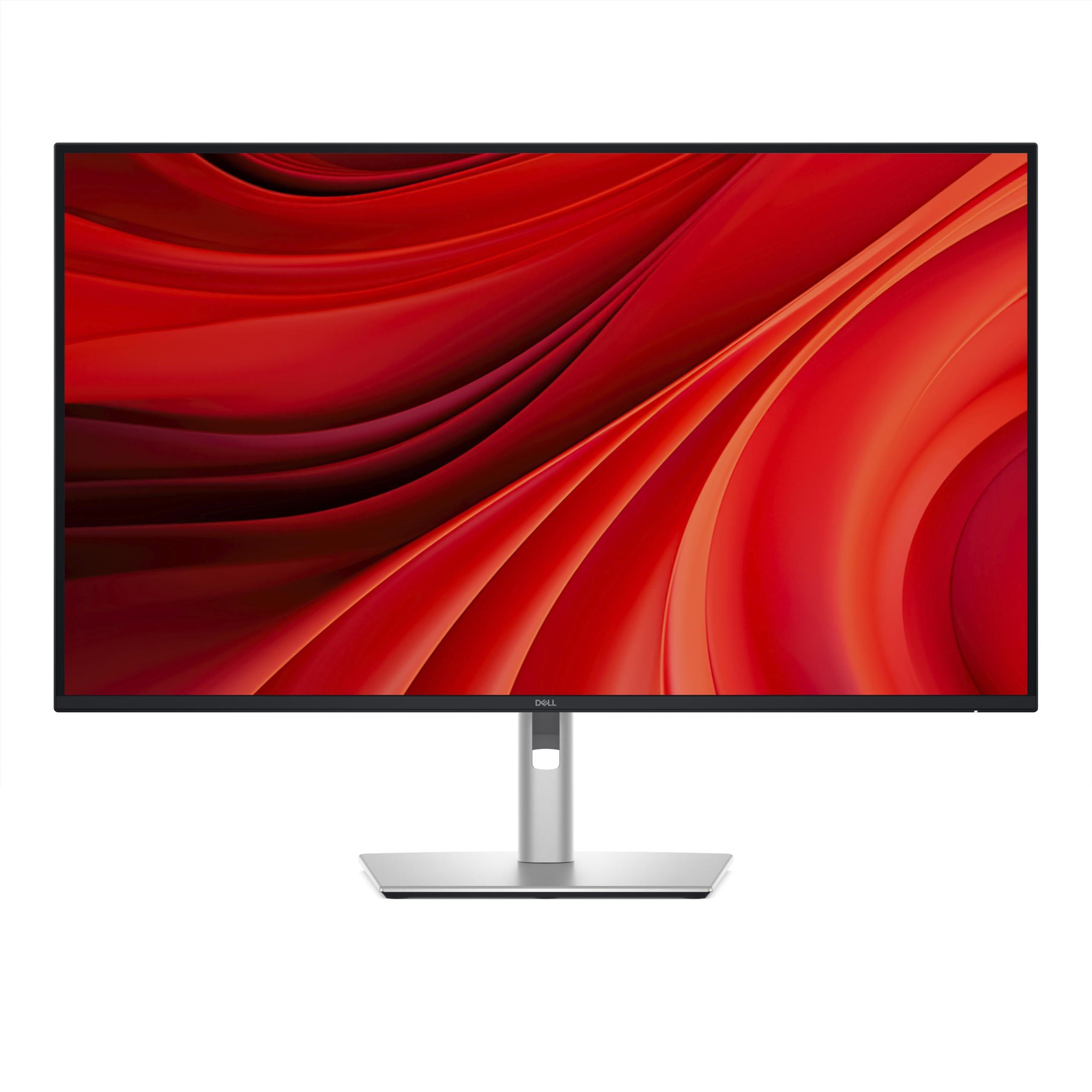
The Dell P3225QE is the ultimate productivity hub for professionals who need to connect multiple wired devices. Its standout feature is the 90W USB-C port that delivers full power to a laptop while simultaneously driving video and data, plus the built-in RJ45 Ethernet jack provides a stable 1GbE wired network connection—critical for large file transfers and video calls in environments where Wi-Fi is unreliable. The 32-inch 4K IPS panel offers a 3000:1 contrast ratio, which is notably high for IPS, giving deep blacks while maintaining wide viewing angles.
Ergonomics are class-leading: the stand offers height adjustment, tilt, swivel, and pivot, and the three-sided frameless bezel makes multi-monitor setups nearly seamless. The 100Hz refresh rate is a welcome upgrade over the standard 60Hz, making window dragging and scrolling feel smoother without sacrificing productivity. Dell’s ComfortView Plus technology reduces blue light emissions to ≤35% without the yellow tint typical of software-based filters.
The main trade-off is the price, which lands in the premium tier. The HDMI 2.1 and DisplayPort 1.4 connections are future-proofed, but the monitor only includes downstream USB-A ports for older peripherals, not the latest USB-C downstream. For a corporate workstation or home office where wired networking and reliable 90W charging are essential, the P3225QE is a top-tier choice.
Why it’s great
- 90W USB-C power delivery and RJ45 Ethernet turn the monitor into a full docking station.
- 100Hz refresh rate makes UI navigation feel noticeably smoother than 60Hz panels.
- 3000:1 contrast ratio on an IPS panel provides deeper blacks than standard IPS models.
Good to know
- Premium price point makes it an investment rather than an impulse buy.
- No audio-in/out ports; you’ll need external audio routing for speaker setups.
5. Samsung 32” Smart Monitor M8 (M80F)

The Samsung Smart Monitor M8 is a unique hybrid that functions as both a 32-inch 4K productivity monitor and a standalone smart TV. With Samsung Vision AI powering features like AI Picture Optimizer and Active Voice Amplifier, it adapts the visual profile to your current application—whether you’re reading a document, watching a movie, or gaming. The 32-inch VA panel delivers a 3,000:1 native contrast ratio, making text in dark mode look inky and video content punchy. Brightness peaks at 400 nits, which is solid for a well-lit room.
Connectivity is versatile: one USB-C port handles video and 65W power delivery, plus there’s an HDMI input and USB-A ports for peripherals. The monitor runs the Tizen smart TV platform, giving you access to Netflix, Disney+, and Samsung TV Plus without needing a separate device. The included slim remote control is solar-powered, and the built-in speakers are serviceable for casual viewing, though they won’t replace a dedicated soundbar. The stand offers height, tilt, and pivot adjustment in the white finish model.
The M8 isn’t ideal for pure productivity purists. The Tizen OS occasionally misidentifies the input type (requiring a manual switch to “HDMI” mode), and the 60Hz refresh rate is standard. Plus, the single HDMI port means you’ll need a switch for multiple sources. For a home office where you also want to stream shows during breaks or monitor security feeds, this is a space-saving option that pulls double duty.
Why it’s great
- Built-in Tizen smart TV apps eliminate the need for a separate streaming device.
- VA panel provides deep 3000:1 contrast for rich blacks in video and dark modes.
- USB-C with 65W power delivery keeps your laptop charged with a single cable.
Good to know
- Smart TV interface can occasionally misidentify inputs, requiring manual switching.
- Only one HDMI port; connecting multiple HDMI sources needs an external switch.
6. Samsung 32″ Smart Monitor M7 (M70F)

The Samsung M7 sits one step below the M8 in the Smart Monitor lineup, but it retains the core features that make the series compelling. You get the same 32-inch VA panel with a 3,000:1 contrast ratio, delivering deep blacks and decent color for work tasks. It also runs the Tizen smart TV platform, giving you instant access to streaming services, plus Samsung Gaming Hub for cloud gaming without a console. The 300-nit brightness is adequate for a standard indoor office, though it may struggle in very bright rooms.
Connectivity includes a USB-C port with video and power delivery (power wattage is not specified as high as the M8), plus HDMI and USB-A ports. The monitor includes a solar-powered remote and supports Bluetooth and Wi-Fi for wireless connections. The stand offers height adjustment, and the ultra-thin bezel design keeps the footprint clean. The M7 also includes Samsung Knox security for data protection, which is a plus for sensitive work environments.
The trade-off for the lower price point is reduced brightness (300 nits vs 400 on the M8) and fewer premium software features. The speakers are adequate but treble-heavy, and some users report that the monitor can feel sluggish when switching between the smart TV interface and a connected PC. For a budget-conscious buyer who wants a combined work monitor and secondary TV for a guest room or dorm, the M7 is a smart hybrid choice.
Why it’s great
- VA panel delivers a strong 3000:1 contrast ratio for deep blacks and text clarity.
- Built-in smart TV apps and cloud gaming hub eliminate the need for external devices.
- Samsung Knox security provides data protection for sensitive work files.
Good to know
- Maximum brightness of 300 nits is lower than premium models, limiting use in bright rooms.
- Smart TV interface can be slow when switching between modes and inputs.
7. LG 32UR550K-B

The LG 32UR550K-B is a straightforward productivity monitor that hits the sweet spot of price, features, and ergonomics. It uses a VA panel with a native 3000:1 contrast ratio, making text pop on screen and video content look rich. The 32-inch 4K resolution delivers sharp fonts without aggressive scaling, and the 250 cd/m² brightness is lower than some competitors but still comfortable for a typical interior home office with controlled lighting. The anti-reflective coating is effective, reducing glare without making the screen look cloudy.
What elevates this monitor above basic options is its ergonomic stand, which includes height adjustment, tilt, and pivot rotation. Being able to flip the monitor into portrait mode is a major bonus for reading long documents, code, or vertical spreadsheets. The connectivity is standard but sufficient: two HDMI ports and one DisplayPort, all supporting 4K at 60Hz. The built-in speakers are usable for system sounds and quick YouTube clips, but you’ll want external speakers for focused listening.
The main drawbacks are the 250-nit brightness ceiling, which makes it less ideal for very bright rooms or near windows, and the lack of USB-C connectivity. You’ll need a separate HDMI or DisplayPort cable plus a charger for your laptop. For a home office upgrade where you need a height-adjustable, pivot-capable monitor with excellent contrast, this LG provides strong value without stretching the budget.
Why it’s great
- 3000:1 VA panel contrast ratio delivers deep blacks and crisp text readability.
- Height, tilt, and pivot adjustments allow for portrait-mode document and code viewing.
- Strong anti-reflective coating reduces glare for comfortable all-day use.
Good to know
- 250-nit peak brightness is lower than premium models, best for controlled indoor lighting.
- No USB-C port; requires separate video cable and laptop power adapter.
8. Dell 32 Plus 4K Monitor – S3225QS

The Dell S3225QS distinguishes itself with a 120Hz refresh rate, a rare find in productivity-focused monitors. While 60Hz is standard for office work, the jump to 120Hz makes every mouse movement, window drag, and scroll feel significantly smoother, reducing perceived latency without any manual tweaking. It pairs this with AMD FreeSync Premium, which eliminates screen tearing during video playback and occasional light gaming. The 32-inch VA panel delivers a 1500:1 contrast ratio with 99% sRGB and 95% DCI-P3 coverage, producing vibrant yet accurate colors out of the box.
Dell has also redesigned the audio system for this generation, with deeper frequency response and more decibel range than previous models. The result is surprisingly full-sounding built-in speakers that are usable for conference calls and casual media without external speakers. The stand offers tilt and height adjustment, and the ash white finish gives the monitor a clean, modern aesthetic. The blue light reduction (ComfortView Plus) cuts emissions to ≤35% without the yellow tint that plagues software filters.
The S3225QS sits in the mid-range tier, and the trade-offs are present. The refresh rate is capped at 120Hz, which is excellent for general use but not necessary for pure office work. The VA panel, while great for contrast, can show some color shift at extreme viewing angles compared to IPS. For a user who splits their time between productivity apps and media consumption, the smooth 120Hz experience and impressive built-in audio make this a compelling all-rounder.
Why it’s great
- 120Hz refresh rate makes all UI interactions feel smoother than standard 60Hz monitors.
- Redesigned audio system delivers fuller sound than typical monitor speakers.
- Wide color gamut (95% DCI-P3) with ComfortView Plus reduces blue light without yellowing.
Good to know
- VA panel viewing angles are narrower than IPS; color shifts off-center.
- Higher refresh rate is a nice bonus but not essential for pure productivity workflows.
9. ViewSonic VX3276-4K-MHD

The ViewSonic VX3276-4K-MHD is the budget-friendly entry point into 32-inch 4K work monitors. It uses an MVA panel that delivers a strong 2500:1 contrast ratio, so fonts and dark mode interfaces look crisp and black levels are substantially deeper than entry-level IPS panels. The 300-nit brightness is sufficient for standard indoor offices, and the built-in blue light filter and flicker-free technology reduce eye strain during long sessions. The ultra-thin bezel design keeps the aesthetic modern, and the brushed metal frame feels more premium than the price suggests.
Connectivity is generous for the tier: two HDMI ports, one DisplayPort, and a Mini DisplayPort input, plus a headphone-out jack. The monitor is VESA mountable (100x100mm), so you can easily install it on a monitor arm to reclaim desk space. Preset modes for “Text,” “Web,” and “Movie” allow you to quickly switch the picture profile based on your task, and the physical buttons on the front bezel are responsive, even if the OSD menu is basic.
The trade-offs are clear at this tier. The included stand only offers tilt—no height adjustment or pivot rotation—so you’ll want a monitor arm or a riser to get the screen to eye level. The 60Hz refresh rate is standard, and the MVA panel has narrower viewing angles than IPS, so colors fade slightly when viewed off-center. For a strict budget build or a secondary monitor for a home office that values 4K resolution over ergonomic flexibility, this ViewSonic delivers the essential functionality.
Why it’s great
- MVA panel offers a strong 2500:1 contrast ratio for deep blacks and crisp text.
- Thin bezels and brushed metal frame give it a premium look at an accessible price point.
- VESA mountable with multiple video inputs (HDMI, DP, Mini DP) for versatile setups.
Good to know
- Fixed stand only tilts; no height or pivot adjustment out of the box.
- Narrower viewing angles than IPS panels; color fades when viewed from the side.
FAQ
Can a 32-inch 4K monitor run at 100% scaling on Windows?
Is a VA panel or IPS panel better for reading text in dark mode?
What is the minimum USB-C power delivery I need for a 32-inch work monitor?
Final Thoughts: The Verdict
For most users, the best 32 inch monitor for work winner is the ASUS ProArt PA329CV because it combines factory-calibrated color accuracy, a full ergonomic stand, and 65W USB-C connectivity at a price that undercuts professional-grade competitors. If you need a true laptop hub with built-in Ethernet and 90W charging, grab the Dell Pro P3225QE. And for MacBook users who want seamless color matching and native keyboard controls, nothing beats the BenQ MA320U for an integrated Apple ecosystem experience.

Mo Maruf
I created WellFizz to bridge the gap between vague wellness advice and actionable solutions. My mission is simple: to decode the research and give you practical tools you can actually use.
Beyond the data, I am a passionate traveler. I believe that stepping away from the screen to explore new environments is essential for mental clarity and physical vitality.