Our readers keep the lights on and my smoothie glass nicely filled. As an Amazon Associate, I earn from qualifying purchases.
A 27 Inch 1440p Monitor splits the difference perfectly, offering 77% more pixels than Full HD without the brute-force rendering requirements of 4K. At this diagonal, pixel density hits roughly 109 PPI, delivering sharp text and immersive gaming visuals without scaling headaches.
I’m Mohammad Maruf — the founder and writer behind WellFizz. I’ve analyzed hundreds of display specifications across refresh rate tiers, panel technologies, color gamut claims, and adaptive sync implementations to separate marketing fluff from measurable performance.
Whether you need blistering 360Hz for competitive shooters, OLED inky blacks for cinematic titles, or a versatile IPS workhorse for hybrid productivity and gaming sessions, navigating the current market requires understanding real-world contrast ratios, response time behavior, and connectivity limitations. This guide evaluates nine top contenders to help you identify the ideal 27 inch 1440p monitor for your specific setup and budget.
How To Choose The Best 27 Inch 1440p Monitor
Choosing the right 27-inch QHD monitor comes down to three core variables: panel technology, refresh rate, and connectivity. Your primary activity — competitive gaming, immersive single-player, professional creative work, or general productivity — determines which specs matter most. Understanding how these factors interact prevents overspending on features you don’t need or underspending on a monitor that bottlenecks your hardware.
Panel Technology: IPS vs. OLED vs. QD-OLED
IPS panels dominate the mid-range market because they offer reliable color accuracy, wide viewing angles, and consistent brightness. Modern Fast IPS variants push response times under 1ms GtG, making them viable for high-refresh gaming. OLED and QD-OLED displays deliver superior contrast ratios (1.5M:1 or higher) with perfect blacks and vibrant colors, but they cost more and carry burn-in risk over years of static desktop use. QD-OLED improves color volume over standard OLED by using quantum dots, producing brighter highlights and wider gamut coverage, especially in well-lit rooms.
Refresh Rate and Response Time: Real vs. Advertised
Refresh rate determines how many frames per second the monitor can display, directly affecting motion smoothness. For esports, 240Hz or 360Hz provides a tangible competitive edge. For general gaming and productivity, 165Hz to 200Hz delivers fluid motion without requiring a top-tier GPU. Response time, measured in GtG (gray-to-gray) or MPRT (moving picture response time), indicates how quickly pixels change color. Lower is better for reducing ghosting. OLED panels achieve 0.03ms GtG, while Fast IPS panels typically range from 0.3ms to 1ms GtG. Note that MPRT specs are often optimistic and may not reflect real-world clarity without backlight strobing.
Connectivity: HDMI 2.1 vs. DisplayPort 1.4
Bandwidth dictates maximum refresh rate at QHD resolution. DisplayPort 1.4 (32.4 Gbps) easily handles 1440p at 240Hz without compression. HDMI 2.1 (48 Gbps) also supports 1440p at 360Hz, making it essential for next-gen consoles and high-end PCs. HDMI 2.0 caps out at 1440p 144Hz, which limits performance on newer GPUs. Always check which ports deliver full bandwidth — some monitors limit HDMI to lower refresh rates, requiring DisplayPort to reach maximum performance.
HDR Certification: What the Rating Actually Means
Not all HDR labels are equal. VESA DisplayHDR 400 entry-level certification only requires 400 nits peak brightness and local dimming is optional. DisplayHDR 600 and 1000 demand higher brightness and better contrast. For OLED panels, DisplayHDR True Black 400 requires a minimum of 400 nits peak brightness with a true black floor, meaning contrast is theoretically infinite. Most IPS monitors in this category ship with DisplayHDR 400, which provides a minor dynamic range boost in bright scenes but does not match the visual impact of OLED HDR implementation.
Quick Comparison
On smaller screens, swipe sideways to see the full table.
| Model | Category | Best For | Key Spec | Amazon |
|---|---|---|---|---|
| MSI MAG 271QPX QD-OLED | OLED | Competitive Gaming | 360Hz / 0.03ms GtG | Amazon |
| LG 27GX704A-B OLED | OLED | Premium Gaming & Media | 240Hz / 0.03ms GtG | Amazon |
| AOC Q27GAZD QD-OLED | QD-OLED | Value OLED Gaming | 240Hz / 0.03ms GtG | Amazon |
| Acer Predator X27U | QD-OLED | Color-Accurate Gaming | 240Hz / DCI-P3 99% | Amazon |
| ASUS TUF Gaming VG27AQL5A | Fast IPS | High-Speed Gaming | 210Hz / 0.3ms GtG | Amazon |
| LG 27G610A-B UltraGear | IPS | Work & Gaming Combo | 200Hz / DisplayHDR 400 | Amazon |
| Alienware AW2725DM | IPS | G-Sync Gaming | 180Hz / DCI-P3 95% | Amazon |
| Samsung Odyssey G5 G53F | IPS | Budget Gaming | 200Hz / FreeSync Premium | Amazon |
| Dell S2725DSM | IPS | Productivity & Media | 144Hz / 1500:1 Contrast | Amazon |
In‑Depth Reviews
1. MSI MAG 271QPX QD-OLED

The MSI MAG 271QPX QD-OLED sets the benchmark for what a 27-inch QHD gaming monitor can deliver. Its 3rd-generation QD-OLED panel reaches a 360Hz refresh rate with a 0.03ms GtG response time, effectively eliminating motion blur and ghosting even in fast-paced esports titles. The panel achieves a Delta E ≤ 2 color accuracy, ensuring that competitive performance does not come at the cost of image fidelity. VESA DisplayHDR True Black 400 certification means deep blacks and bright highlights coexist without blooming, a feat IPS panels simply cannot match at this tier.
Connectivity matches the premium hardware: HDMI 2.1 ports provide the full 48 Gbps bandwidth, enabling 1440p at 360Hz without compression on compatible GPUs. The inclusion of USB Type-C expands compatibility with laptops and modern peripherals. MSI’s OLED Care 2.0 reduces burn-in risk through pixel shifting and logo detection, a critical feature for long-term ownership. The adjustable stand offers tilt and height adjustments, though the footprint is compact enough to free up desk space.
Real-world feedback confirms that the immediate visual upgrade is dramatic — users report flawless G-Sync performance and no motion tearing even at maximum refresh rates. Some note that DSC is required to hit 360Hz via DisplayPort, which adds a slight delay when alt-tabbing out of fullscreen games. The 3-year burn-in warranty provides peace of mind for early adopters wary of OLED longevity. If your budget stretches, this monitor is the definitive high-end choice for competitive gaming.
Why it’s great
- 360Hz refresh rate with 0.03ms GtG response eliminates motion blur
- QD-OLED panel delivers perfect blacks and vibrant, accurate colors
- Full HDMI 2.1 bandwidth supports uncompressed 1440p at high refresh
- Comprehensive OLED Care 2.0 reduces burn-in risk
Good to know
- Requires DSC for 360Hz via DisplayPort, slowing alt-tab transitions
- OLED burn-in remains a long-term concern despite firmware mitigation
- Premium price point may exceed budget-focused buyers’ limits
2. LG 27GX704A-B UltraGear OLED

The LG 27GX704A-B delivers a glossy WOLED panel that produces exceptional contrast and color saturation. With 240Hz native refresh rate and a 0.03ms response time, motion clarity is superb for both competitive shooters and cinematic single-player titles. The glossy finish enhances perceived contrast and sharpness compared to matte OLED alternatives, though it does reflect ambient light in bright rooms. VESA DisplayHDR True Black 400 certification ensures that the monitor can maintain bright highlights alongside true black levels, making HDR content look genuinely immersive.
Connectivity is a standout feature: dual HDMI 2.1 ports provide full 48 Gbps bandwidth, allowing 1440p at 240Hz without DSC. DisplayPort 1.4 and USB 3.2 hub functionality round out a versatile I/O setup. The monitor carries three UL certifications for anti-glare, flicker-free operation, and low blue light, addressing eye strain during marathon sessions. The stand offers full ergonomic adjustments including height, tilt, swivel, and pivot, making it easy to find an optimal viewing position.
Users consistently praise the image quality as a major upgrade from IPS panels, with deep blacks making games and movies look dramatically better. The OLED panel is thin and feels delicate, so care is needed when mounting on an arm. Some reviewers note that default settings require tuning — adjusting Black Level and Black Stabilizer optimizes shadow detail without crushing blacks. This is the best OLED option for gamers who want top-tier visual quality without jumping to 360Hz, saving cost while keeping premium responsiveness.
Why it’s great
- Glossy WOLED display offers incredible contrast and vibrant colors
- Dual HDMI 2.1 ports provide full bandwidth for uncompressed 240Hz
- Full ergonomic stand with height, tilt, swivel, and pivot
- Three UL certifications reduce eye strain during long sessions
Good to know
- Glossy finish reflects ambient light in bright rooms
- Ultra-thin panel feels fragile when handling
- Requires calibration for optimal shadow detail out of the box
3. AOC Q27GAZD QD-OLED

The AOC Q27GAZD brings QD-OLED technology to a significantly lower price point than most competitors in its class. The 27-inch QHD panel delivers a 1.5M:1 contrast ratio, making blacks truly black and colors exceptionally vibrant. The 240Hz refresh rate paired with a 0.03ms GtG response time ensures that motion remains smooth and artifact-free during fast-paced gaming. Color gamut coverage reaches 147.6% sRGB and 110.2% DCI-P3, which translates to vivid, saturated visuals out of the box for both gaming and content consumption.
HDR400 True Black certification provides a meaningful boost for HDR content, as the OLED panel can maintain perfect black levels while hitting 400 nits peak brightness. Adaptive-Sync compatibility eliminates screen tearing across both FreeSync and G-Sync compatible GPUs. However, the panel is limited to DisplayPort 1.4 and standard HDMI — HDMI does not support 240Hz, capping at 165Hz. The included stand is basic with no height adjustment, which many users swap for a VESA monitor arm to improve desk ergonomics.
Owners report that the visual quality is a generational leap over their previous IPS monitors, with no visible text fringing and comfortable viewing for extended sessions. The main trade-offs are the mediocre stock stand and the lack of HDMI 2.1, which matters for console users. For PC gamers seeking an affordable entry into QD-OLED, this monitor delivers the core panel performance where it counts most: color, contrast, and responsiveness.
Why it’s great
- QD-OLED panel with 1.5M:1 contrast and vivid color coverage
- 240Hz refresh rate at a lower entry price for OLED
- HDR400 True Black enhances HDR content with perfect blacks
- No visible text fringing for desktop productivity
Good to know
- Stand offers no height adjustment; a monitor arm is recommended
- HDMI limited to 165Hz; full 240Hz requires DisplayPort
- Brightness is adequate for dim rooms but not ideal for very bright spaces
4. Acer Predator X27U W1bmiipprx

The Acer Predator X27U packs a 26.5-inch WQHD QD-OLED panel with DCI-P3 99% color gamut coverage and Delta E < 2 factory calibration. This makes it one of the most color-accurate gaming monitors available, suitable for creative professionals who also game. The 240Hz refresh rate and 0.03ms GtG response time deliver the same blistering speed as competing OLEDs, while AMD FreeSync Premium ensures tear-free gameplay. The ZeroFrame design minimizes bezels for a more immersive multi-monitor setup.
Connectivity is robust with two DisplayPort 1.4 inputs and two HDMI 2.1 ports, a rare feature at this price point that enables dual-high-refresh connections. The stand provides full ergonomic adjustment including height, tilt, swivel, and pivot, making it easy to find a comfortable viewing angle. Built-in speakers eliminate the need for external desktop audio in simple setups, though their quality is typical of monitor speakers.
Users highlight the incredible color vibrancy and contrast as the main reason to choose this monitor, with many noting that G-Sync works flawlessly despite the FreeSync certification. The image retention refresh feature automatically runs during standby to prevent burn-in. On the downside, the menu system is complex and lacks a sharpness adjustment, and the maximum brightness is lower than some competing QD-OLEDs. For those who prioritize color accuracy alongside high-refresh gaming, this is the top option.
Why it’s great
- DCI-P3 99% with Delta E < 2 delivers exceptional color accuracy
- Dual HDMI 2.1 and dual DisplayPort for flexible multi-device setups
- Full ergonomic stand with height, tilt, swivel, and pivot
- ZeroFrame bezel design improves multi-monitor immersion
Good to know
- Menu interface is overly complex and lacks sharpness adjustment
- Peak brightness is lower than some QD-OLED competitors
- Build quality has minor wobble, and the joystick feels cheap
5. ASUS TUF Gaming VG27AQL5A

The ASUS TUF Gaming VG27AQL5A pushes Fast IPS performance to 210Hz with a 0.3ms GtG response time, making it one of the fastest IPS monitors in this class. This combination delivers exceptionally clean motion without the ghosting or smearing that plagues slower panels, giving competitive players a clear view of fast-moving targets. The 1300:1 contrast ratio is above average for IPS, providing deeper blacks than typical 1000:1 panels. ASUS Extreme Low Motion Blur Sync (ELMB Sync) allows backlight strobing and variable refresh rate to run simultaneously, eliminating both ghosting and tearing without the usual trade-off.
The DisplayWidget Center software enables monitor adjustments directly from the desktop, reducing reliance on OSD buttons. FreeSync Premium support ensures tear-free performance across a wide frame rate range. The stand offers height adjustment, which is welcome at this price tier, though it lacks swivel and pivot flexibility. Built-in speakers are acceptable for system sounds but not for immersive gaming or media consumption.
Users consistently note the excellent color reproduction and uniform backlight with no edge bleeding, which is a common issue in cheaper IPS panels. The 210Hz overclock is stable and provides a noticeable improvement over standard 165Hz displays. The speakers are functional but thin, and the menu navigation can be cumbersome without the software. For gamers who want IPS reliability with near-OLED response times, the VG27AQL5A offers the best IPS speed currently available.
Why it’s great
- 210Hz refresh rate with 0.3ms GtG offers elite IPS motion clarity
- ELMB Sync eliminates ghosting and tearing simultaneously
- 1300:1 contrast ratio provides deeper blacks than typical IPS
- DisplayWidget Center enables easy settings via mouse
Good to know
- Built-in speakers are usable but lack bass and volume
- Stand lacks swivel and pivot adjustment
- OC refresh rate requires DisplayPort connection
6. LG 27G610A-B UltraGear
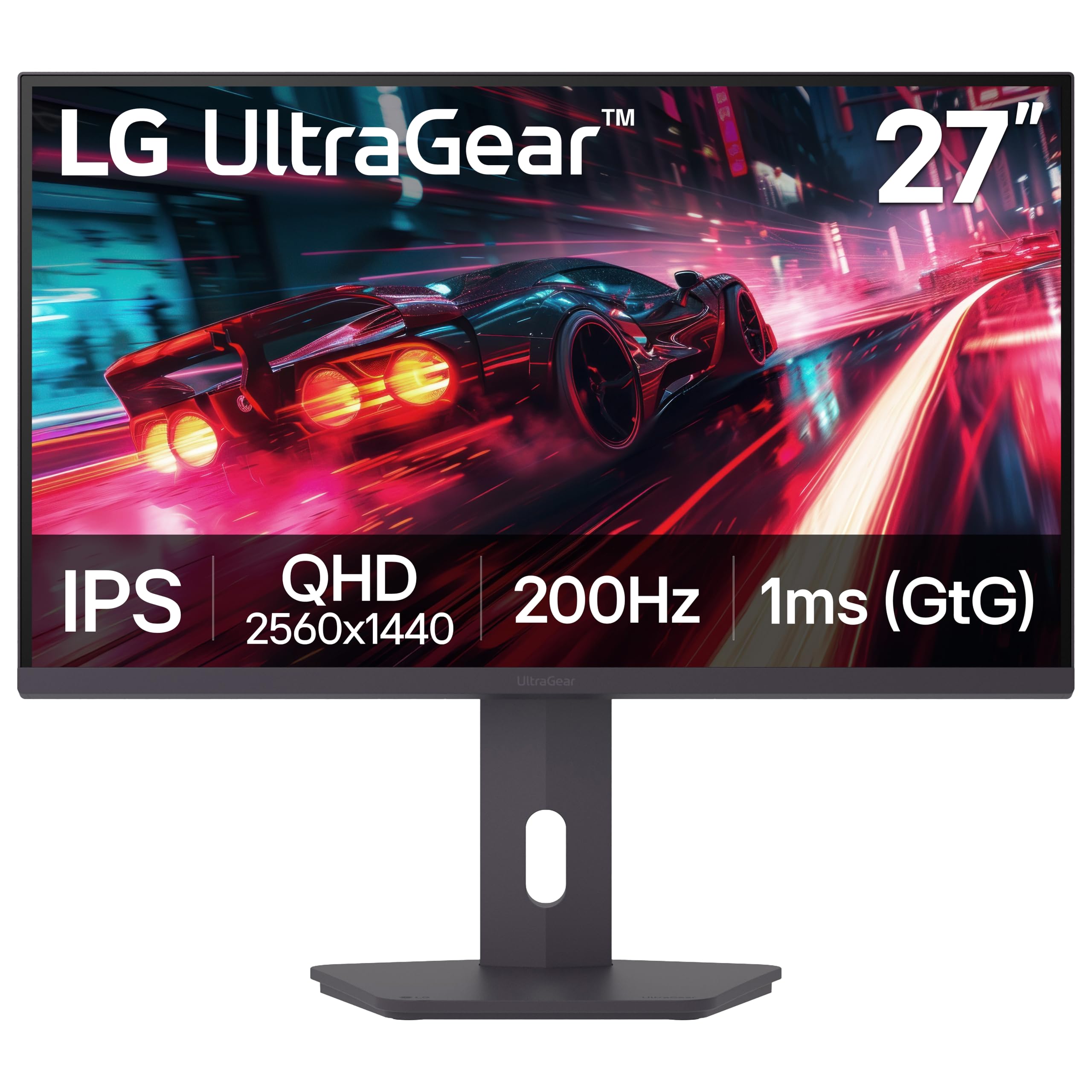
The LG 27G610A-B strikes a strong balance between gaming performance and productivity features, making it versatile for mixed-use setups. The 200Hz native refresh rate with 1ms GtG response time ensures smooth gameplay in most titles, while the VESA DisplayHDR 400 certification provides a meaningful brightness and color boost for HDR content. The IPS panel covers 99% sRGB, delivering vibrant colors with wide viewing angles suitable for photo editing and design work.
Ergonomics are a key advantage: the stand offers full height, tilt, swivel, and pivot adjustment, allowing the monitor to rotate into portrait mode for coding or document reading. The Switch app enables screen splitting into up to six sections with customizable layouts, enhancing multitasking without needing third-party tools. Dynamic Action Sync reduces input lag, and Black Stabilizer brightens dark areas without overexposing highlights.
Owners appreciate the sharp QHD resolution and fluid motion, with FreeSync Premium working reliably to eliminate tearing. The HDR performance is adequate for the price tier but cannot match OLED depth — highlights are bright but blacks remain gray in dark scenes. The built-in speakers are noted as essentially useless, which is typical for this class. For users who need a single monitor that handles both competitive gaming and eight-hour workdays, this is the most practical mid-range choice.
Why it’s great
- Full ergonomic stand with height, tilt, swivel, and pivot
- 200Hz native refresh ideal for both gaming and fast scrolling
- DisplayHDR 400 enhances brightness and color range
- Switch app enables customizable multi-window layouts
Good to know
- HDR performance is mediocre with limited contrast improvement
- Built-in speakers are near-useless for most users
- Plastic stand feels less premium than the panel quality
7. Alienware AW2725DM

The Alienware AW2725DM delivers a well-rounded IPS experience with official NVIDIA G-Sync compatibility alongside AMD FreeSync support, making it a safe choice for GPU-agnostic builders. The 180Hz refresh rate and 1ms GtG response time provide smooth, responsive gameplay without the premium cost of OLED alternatives. DCI-P3 95% color coverage and VESA DisplayHDR 400 certification ensure vibrant colors and solid dynamic range for both gaming and media consumption.
Build quality is a highlight: the stand is sturdy with height, tilt, swivel, and pivot adjustments, and the overall design feels premium. Dell’s console mode optimizes the monitor for PlayStation and Xbox inputs, automatically detecting the connection and applying suitable settings. The hardware-based low blue light solution reduces eye strain without washing out colors, a meaningful advantage for users who spend extended periods in front of the screen.
Users report that the panel has no dead pixels or severe backlight bleed, with IPS glow being the only minor compromise. The monitor lacks built-in speakers and a headphone jack, so separate audio is required. HDMI caps at 144Hz, so the full 180Hz requires a DisplayPort connection. For buyers who prioritize out-of-box quality, solid ergonomics, and multi-platform G-Sync/FreeSync compatibility, the AW2725DM is a reliable mid-range powerhouse.
Why it’s great
- Official G-Sync Compatible plus FreeSync support
- Sturdy, fully adjustable stand with premium build quality
- Console mode optimizes input detection automatically
- Hardware-based low blue light preserves color accuracy
Good to know
- No built-in speakers or headphone jack
- HDMI limited to 144Hz; DisplayPort required for 180Hz
- No USB-C connectivity for modern laptops
8. Samsung Odyssey G5 G53F

The Samsung Odyssey G5 G53F delivers a 200Hz refresh rate with a 1ms MPRT response time and AMD FreeSync Premium at an entry-level price that undercuts most competitors. The 27-inch IPS panel produces accurate colors with wide 178-degree viewing angles, making it suitable for both gaming and daily productivity. HDR10 support provides a minor dynamic range boost, though the 300 cd/m² brightness and 1000:1 contrast ratio are standard for the category. Black Equalizer improves visibility in dark game scenes, giving players an edge in shadow-heavy environments.
Auto Source Switch+ automatically detects and switches between connected devices, a convenience feature typically found on pricier monitors. The Virtual Aim Point overlay increases crosshair accuracy in shooters. The stand only offers tilt adjustment, no height or swivel, which may necessitate a VESA mount for ergonomic setup. Connectivity includes one HDMI and one DisplayPort, with the HDMI port limited to lower refresh rates.
Users consistently praise the picture quality and ease of setup, noting that the colors look vibrant with minimal calibration required. The stand is widely criticized as cheap-feeling, and the cable management loop is prone to breakage. For budget-conscious gamers who prioritize high refresh rate and resolution over premium build and ergonomics, this monitor represents the best performance-per-dollar in the entry-level segment.
Why it’s great
- 200Hz refresh rate with FreeSync Premium for smooth gameplay
- Auto Source Switch+ simplifies multi-device setups
- Black Equalizer and Virtual Aim Point aid competitive gaming
- Vibrant IPS colors with minimal calibration needed
Good to know
- Stand only offers tilt adjustment; lacks height and swivel
- Plastic build feels less durable than mid-range options
- Cable management loop is fragile and may break
9. Dell S2725DSM

The Dell S2725DSM prioritizes image quality and ergonomic comfort over maximum gaming speed, making it the best choice for productivity-first users. Its 1500:1 contrast ratio is significantly higher than typical 1000:1 IPS panels, producing noticeably deeper blacks and better on-screen text readability. The 144Hz refresh rate and 1ms MPRT response time still provide smooth motion for light gaming, striking a practical balance for hybrid use. The 4-star TÜV-certified display reduces harmful blue light emissions while preserving color accuracy, reducing eye fatigue during long workdays.
Ergonomic versatility is a defining feature: the stand supports height, tilt, pivot, and swivel adjustments, allowing the monitor to rotate into portrait mode for coding or document review. The integrated dual 3W speakers deliver a wider frequency range than typical monitor audio, making them usable for video calls and casual media without external speakers. The Ash White finish is a refreshing alternative to the standard black, though a black version is also available.
Users frequently note that the text clarity and color reproduction are excellent for business tasks, with the built-in speakers being genuinely functional rather than an afterthought. The 144Hz refresh rate is sufficient for casual gaming but competitive players may want higher. The HDMI 2.1 port is limited to TMDS signaling, which caps the refresh rate at 144Hz even on modern GPUs. For professionals and office workers who want a crisp QHD display with superior ergonomics and helpful extras, this is the most practical choice.
Why it’s great
- 1500:1 contrast ratio delivers deeper blacks than typical IPS
- Full ergonomic stand with height, tilt, pivot, and swivel
- Built-in dual 3W speakers are genuinely usable
- 4-star TÜV blue light reduction preserves eye comfort
Good to know
- 144Hz is adequate but not competitive for high-level esports
- No built-in webcam for video conferencing
- HDMI 2.1 bandwidth is limited to TMDS speeds
FAQ
Is 1440p noticeably sharper than 1080p on a 27-inch screen?
Can a mid-range GPU drive a 1440p 240Hz monitor effectively?
Does HDMI 2.1 matter for 1440p monitors?
Final Thoughts: The Verdict
For most users, the 27 inch 1440p monitor winner is the MSI MAG 271QPX QD-OLED because it combines the fastest refresh rate in its class with OLED contrast and a comprehensive burn-in warranty, making it the definitive high-end choice. If you want excellent IPS motion clarity without OLED cost, grab the ASUS TUF Gaming VG27AQL5A. And for a versatile work-and-play monitor that covers all ergonomic bases, nothing beats the LG 27G610A-B UltraGear.

Mo Maruf
I created WellFizz to bridge the gap between vague wellness advice and actionable solutions. My mission is simple: to decode the research and give you practical tools you can actually use.
Beyond the data, I am a passionate traveler. I believe that stepping away from the screen to explore new environments is essential for mental clarity and physical vitality.