Our readers keep the lights on and my smoothie glass nicely filled. As an Amazon Associate, I earn from qualifying purchases.
The jump from a standard 60Hz or 144Hz panel to a high-refresh 24-25 inch gaming monitor is the single most impactful hardware upgrade for competitive edge and visual fluidity in fast-paced shooters and battle royales. At this size, pixel density peaks at 1080p, delivering razor-sharp clarity that larger screens simply cannot match without increasing resolution.
I’m Mohammad Maruf — the founder and writer behind WellFizz. I’ve spent hundreds of hours analyzing refresh rate curves, response time overshoot, panel uniformity, and adaptive sync compatibility across the most popular 24-25 inch gaming monitors to find the ones that actually deliver on their specs.
Whether you are an esports competitor chasing 360Hz or a console gamer wanting a tear-free 120Hz experience, this guide breaks down the best options. Finding the right 24-25 inch gaming monitor means balancing refresh rate, panel type, and build quality without overspending on features your hardware cannot use.
How To Choose The Best 24-25 Inch Gaming Monitor
The 24-25 inch segment is dominated by 1080p panels that maximize pixel density for a sharp image without the GPU overhead of 1440p. Your decision comes down to refresh rate, panel technology, and adaptive sync support.
Refresh Rate vs. GPU Capability
240Hz and 360Hz monitors provide smoother motion than 144Hz, but only if your graphics card can output those frame rates in your target games. For esports titles like Valorant, CS2, or Overwatch 2, 300Hz+ panels give a measurable advantage. For AAA single-player games, 180Hz or 240Hz is more than sufficient.
Panel Type: Fast IPS vs. Fast TN
Fast IPS panels (1ms GTG) dominate this category because they offer vibrant colors and wide viewing angles without sacrificing response time. Fast TN panels, like the one in the BenQ Zowie XL2546X+, provide superior motion clarity and less overshoot but have narrower viewing angles and less vibrant color. Choose Fast IPS for a versatile experience; choose Fast TN if competitive motion clarity is your only priority.
Adaptive Sync: FreeSync Premium vs. G-Sync Compatible
FreeSync Premium requires an AMD GPU or an Xbox console to enable variable refresh rate (VRR), but many monitors are also certified G-Sync Compatible for NVIDIA GPUs. Check your GPU brand before choosing. Monitors with both certifications, like the ASUS TUF VG249QL3A, offer the widest compatibility.
Quick Comparison
On smaller screens, swipe sideways to see the full table.
| Model | Category | Best For | Key Spec | Amazon |
|---|---|---|---|---|
| Alienware AW2523HF | Premium | Esports 360Hz gaming | 360Hz / 0.5ms / Fast IPS | Amazon |
| ASUS TUF VG27AQM5A | Premium | High-refresh 1440p gaming | 300Hz / 0.3ms / Fast IPS | Amazon |
| SANSUI ES-G25F6Q Pro | Mid-Range | 1440p high-refresh value | 300Hz / 1ms / Fast IPS | Amazon |
| Samsung Odyssey G4 | Mid-Range | 240Hz FHD gaming | 240Hz / 1ms / IPS | Amazon |
| KTC H25X7 | Mid-Range | Ultra-high 400Hz FHD gaming | 400Hz / 1ms / Fast IPS | Amazon |
| ASUS TUF VG249QL3A | Mid-Range | Value 180Hz gaming | 180Hz / 1ms / Fast IPS | Amazon |
| Alienware AW2725DM | Mid-Range | QHD 180Hz all-rounder | 180Hz / 1ms / IPS | Amazon |
| BenQ Zowie XL2546X+ | Premium | Competitive esports motion clarity | 280Hz / Fast TN / DyAc 2 | Amazon |
| AOC Q27GAZD | Premium | QD-OLED color and contrast | 240Hz / 0.03ms / QD-OLED | Amazon |
In‑Depth Reviews
1. Alienware AW2523HF 24.5″ 360Hz Gaming Monitor

The Alienware AW2523HF delivers a 360Hz variable refresh rate with a 0.5ms gray-to-gray response time in Extreme mode, making it one of the fastest IPS panels available at this size. The Fast IPS panel covers 99% sRGB and supports HDR content playback, giving you vibrant, consistent colors across wide viewing angles. The redesigned hexagonal base and integrated retractable headset hanger are practical touches for a competitive desk setup.
With AMD FreeSync Premium Technology and VESA AdaptiveSync Display certification, this monitor eliminates stutter and tearing during high-action sequences. Motion clarity at 360Hz is visibly superior to 240Hz panels in fast-paced shooters like CS2 and Valorant. Users consistently report excellent build quality, a smooth overdrive implementation, and an easy-to-navigate on-screen display.
One reviewer noted the 360Hz refresh rate feels “overkill but smooth” and that color accuracy improves after minor adjustment. The monitor includes DisplayPort and HDMI inputs, a USB 3.2 Gen 1 upstream cable, and an Alienware sticker. For competitive gamers who want the highest refresh rate possible without moving to a TN panel, this is the benchmark.
Why it’s great
- 360Hz refresh rate is currently the ceiling for IPS at this size
- 0.5ms GTG in Extreme mode with minimal overshoot
- Hexagonal base frees desk space for mouse movement
Good to know
- No built-in speakers or headphone jack
- HDMI input limited to lower refresh rates than DisplayPort
2. ASUS TUF VG27AQM5A 27″ 300Hz QHD Gaming Monitor

The ASUS TUF VG27AQM5A pairs QHD 1440p resolution with a 300Hz refresh rate and ASUS Fast IPS technology that achieves a 0.3ms GTG response time. This combination is rare in the 27-inch category and gives you the sharpness of 1440p without the motion blur penalty. The 95% DCI-P3 color gamut ensures vibrant, accurate colors that rival more expensive monitors.
ASUS Extreme Low Motion Blur Sync (ELMB Sync) technology allows ELMB and variable-refresh-rate technologies to work simultaneously, eliminating both ghosting and tearing. The Shadow Boost feature enhances detail in dark areas without over-exposing bright spots, useful for spotting enemies hiding in shadows. DisplayWidget Center software lets you adjust settings with a mouse instead of fumbling with the OSD joystick.
Reviewers consistently praise the sharp 1440p image and the ultra-smooth 300Hz motion. One user called it “a massive upgrade from 1080p 185Hz” and noted it pairs perfectly with an RTX 5080. The built-in speakers are surprisingly decent for a gaming monitor, though the contrast ratio is average at 1,300:1.
Why it’s great
- 300Hz at 1440p is elite performance for both esports and AAA gaming
- ELMB Sync eliminates ghosting and tearing simultaneously
- 0.3ms GTG response time is class-leading
Good to know
- Some units may have minor backlight bleed or a single dead pixel
- Requires DisplayPort to reach 300Hz at 1440p
3. SANSUI ES-G25F6Q Pro 24.5″ 300Hz QHD Gaming Monitor
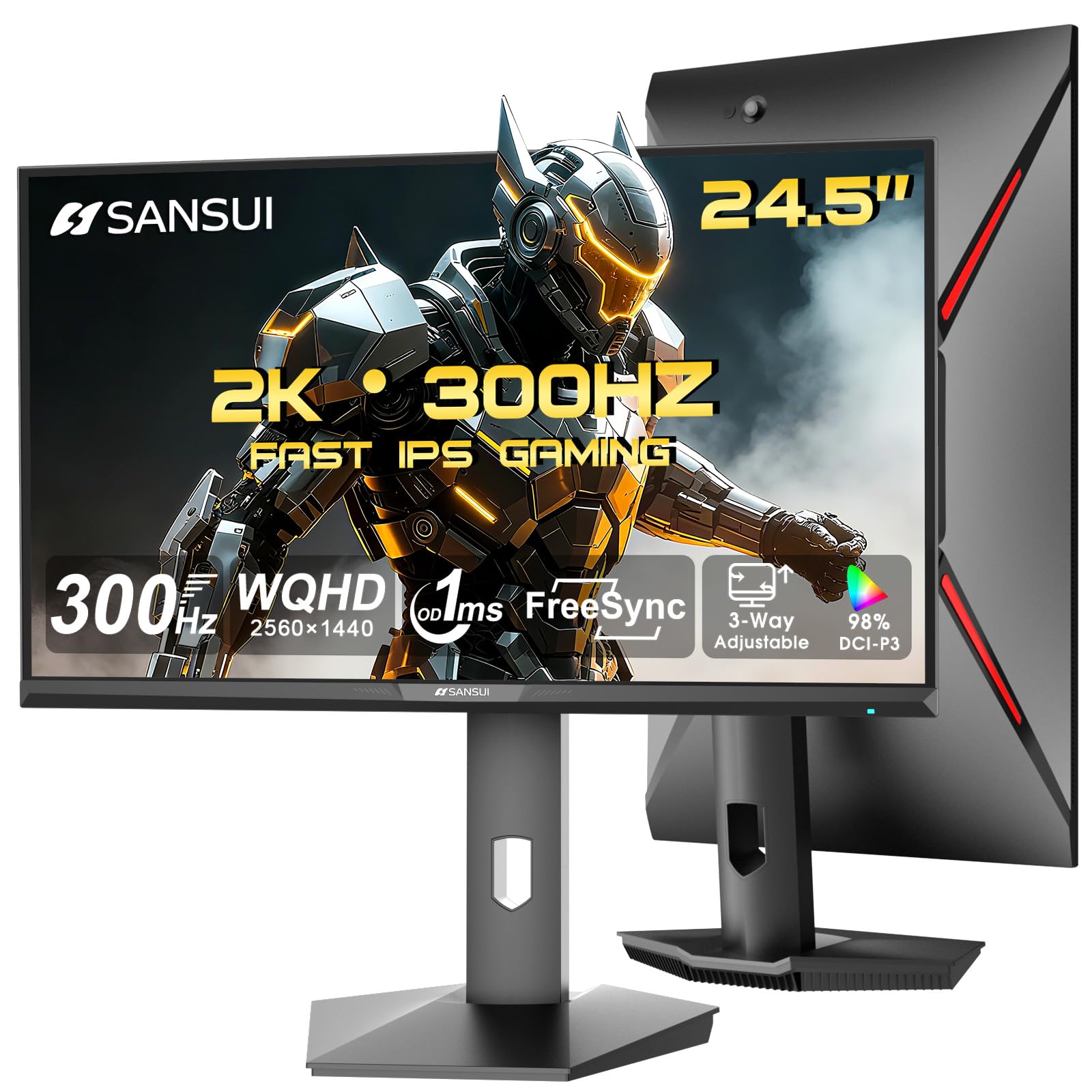
The SANSUI ES-G25F6Q Pro delivers a 24.5-inch QHD 2560×1440 resolution with a 300Hz refresh rate and Fast IPS panel, making it a unique entry that packs high pixel density into a smaller frame. The 130% sRGB color gamut and 350 nits brightness produce vivid, punchy visuals that exceed typical entry-level monitors. With two HDMI 2.1 ports and two DisplayPort 1.4 ports, it supports 300Hz over both connection types.
FreeSync technology and a 1ms OD/MPRT response time ensure smooth, tear-free gameplay. The ergonomic stand offers pivot, swivel, height, and tilt adjustments, giving you full control over positioning. The built-in crosshair, timer, and game-specific presets (FPS, RTS, Racing) are genuinely useful for different game genres without needing third-party software.
Reviewers highlight the excellent price-to-performance ratio, with one calling it “perfect for gaming” and another noting the “outstanding colors and construction.” The monitor runs slightly warm during extended use, and the curved design may not appeal to everyone. SANSUI includes a 30-day money-back guarantee and lifetime technical support, which adds reassurance for a less established brand.
Why it’s great
- 1440p 300Hz in a 24.5-inch form factor is rare and sharp
- Full ergonomic stand with pivot, swivel, and height
- Two HDMI 2.1 ports and two DP 1.4 ports
Good to know
- No built-in speakers or USB hub
- Monitor runs slightly warm during long sessions
4. Samsung Odyssey G4 25″ 240Hz FHD Gaming Monitor

The Samsung Odyssey G4 offers a 25-inch FHD IPS panel with a 240Hz refresh rate and 1ms GTG response time, creating a smooth, responsive gaming experience ideal for competitive shooters. The IPS panel delivers clear colors and a wide 178-degree viewing angle, so the image stays consistent from any position. NVIDIA G-Sync Compatible and AMD FreeSync Premium support ensure your GPU and panel stay synchronised for stutter-free gameplay.
Ultrawide Game View lets you adjust the screen to a 21:9 aspect ratio, revealing hidden areas in supported games and giving you a wider field of view in racing and sports titles. Auto Source Switch+ automatically detects when connected devices power on and switches to that input, saving you from flipping through ports manually. The ergonomic stand offers swivel, tilt, and height adjustment for comfortable long sessions.
Reviewers love the “top tier 1080p monitor” color and brightness quality, with one user buying a second unit after consistent performance. A common note is the lack of built-in speakers, though the monitor passes audio through a 1/8-inch output. The bezel is low-profile, fitting easily into tight desk spaces.
Why it’s great
- 240Hz with G-Sync Compatible and FreeSync Premium
- Auto Source Switch+ saves time on multi-device setups
- Ultrawide Game View useful for racing and sports games
Good to know
- No built-in speakers
- Some users report HDMI notification issue when laptop is in sleep mode
5. KTC H25X7 24.5″ 400Hz FHD Gaming Monitor

The KTC H25X7 pushes the refresh rate ceiling to 400Hz on a 24.5-inch FHD Fast IPS panel, surpassing 360Hz and 280Hz monitors for the smoothest motion possible. The 1ms MPRT response time and FreeSync Premium Pro support eliminate screen tearing and stuttering. HDR 400 certification combined with 128% sRGB color coverage produces vibrant, punchy colors that breathe life into games.
Connectivity includes two HDMI 2.0 ports capable of 240Hz and two DisplayPort 1.4 ports that unlock the full 400Hz refresh rate at 1080p. The silver-gray monitor features a fully adjustable stand that allows tilt, swivel, pivot, and height adjustments for optimal ergonomics. The headphone port is a welcome addition, though there are no built-in speakers.
Reviewers describe the monitor as “great picture, easy to setup, very durable,” with one buyer purchasing a second unit months later. The value proposition at this price tier is strong given the 400Hz capability. Some users note that to reach 400Hz, you must use DisplayPort, and the OSD menu lacks some advanced features found on more expensive models.
Why it’s great
- 400Hz refresh rate is currently the highest available at this size
- FreeSync Premium Pro for tear-free gaming
- HDR 400 with 128% sRGB color coverage
Good to know
- No built-in speakers
- 400Hz only available via DisplayPort 1.4
6. ASUS TUF VG249QL3A 23.8″ 180Hz FHD Gaming Monitor

The ASUS TUF VG249QL3A is a 23.8-inch Full HD Fast IPS monitor with a 180Hz refresh rate and 1ms GTG response time, designed for budget-conscious gamers who still want smooth motion and low latency. ASUS Extreme Low Motion Blur (ELMB) technology reduces ghosting and motion blur without the brightness penalty of some strobe implementations. Shadow Boost enhances visibility in dark game areas without washing out bright spots.
FreeSync Premium and G-SYNC Compatible certification ensure variable refresh rate works with both AMD and NVIDIA GPUs for tear-free gameplay. The monitor includes built-in speakers (a rarity in this category), a height-adjustable stand with tilt, swivel, and pivot functions, and a 3-year warranty. The Ultra-Slim design and VESA mount compatibility make it easy to integrate into any setup.
Reviewers call it the “Honda Accord of monitors” — reliable, consistent, and reasonably priced. One user noted “excellent value for performance” and praised the “solid plastic build, easy UI, adjustable stand.” The weak built-in speakers are a common complaint, and the unit ships with only an HDMI cable despite advertising both HDMI and DisplayPort cables in the box.
Why it’s great
- 180Hz with ELMB and FreeSync Premium at a budget-friendly price
- Full ergonomic stand with height, swivel, pivot, and tilt
- Built-in speakers and 3-year warranty
Good to know
- Built-in speakers are weak; external speakers recommended
- Only includes HDMI cable despite advertising DisplayPort cable
7. Alienware AW2725DM 27″ QHD 180Hz Gaming Monitor

The Alienware AW2725DM combines QHD 2560×1440 resolution with a 180Hz refresh rate and 1ms gray-to-gray response time, making it a versatile monitor for both competitive and single-player gaming. The IPS panel covers 95% DCI-P3 color gamut and is VESA DisplayHDR 400 certified, delivering vibrant colors and decent dynamic range. NVIDIA G-SYNC Compatible and AMD FreeSync support ensure smooth performance with any modern GPU.
The monitor features a fully adjustable stand with height, pivot, swivel, and tilt adjustments, plus a hardware-based low blue light solution that reduces eye strain without washing out colors. Console mode is built in for seamless PS5 or Xbox Series X compatibility. The build quality is solid, with a sleek Legend 2.0 design that looks clean on any desk.
Reviewers highlight the “vibrant colors, smooth motion, high refresh rate improves gaming responsiveness” and the “durable stand, excellent picture quality, very bright.” One critical note is that HDMI limits the refresh rate to 144Hz; you must use DisplayPort 1.4 to achieve the full 180Hz. There are no built-in speakers, so external audio is required.
Why it’s great
- QHD 180Hz offers sharp visuals and smooth motion for all game types
- DCI-P3 95% color coverage and VESA DisplayHDR 400
- Fully adjustable stand with ergonomic range
Good to know
- HDMI limited to 144Hz; DisplayPort needed for full 180Hz
- No built-in speakers or headphone jack
8. BenQ Zowie XL2546X+ 24.1″ 280Hz Fast TN Gaming Monitor
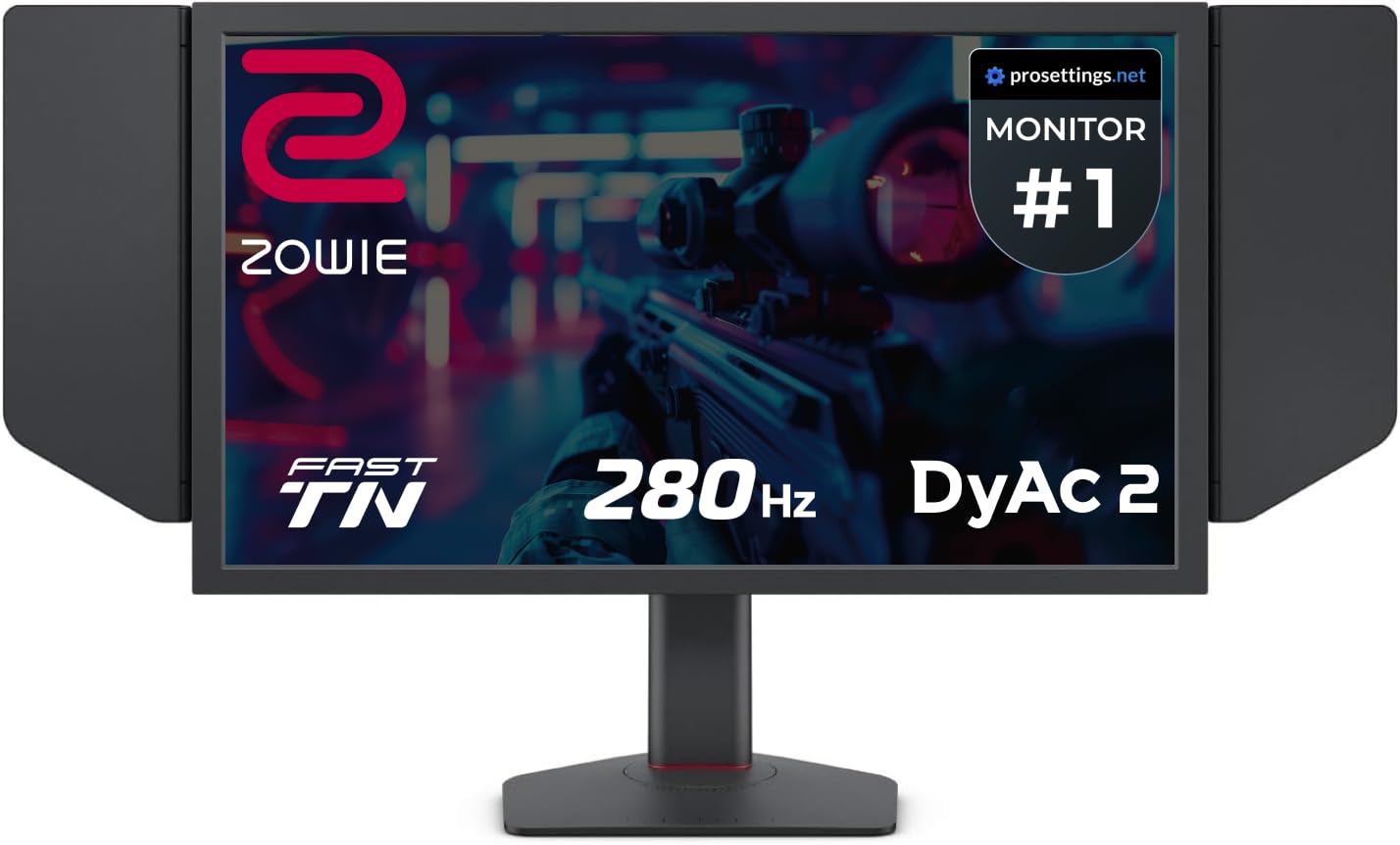
The BenQ Zowie XL2546X+ uses a Fast TN panel with DyAc 2 technology to provide the clearest motion clarity in the industry, outperforming IPS panels for competitive esports where tracking fast-moving targets is critical. The 280Hz refresh rate and reduced overshoot from the newly developed panel design deliver sharper, cleaner moving images with less distraction from afterimages. The monitor includes a shielding hood to block ambient light and help you focus.
DyAc 2 uses dual backlight technology to enhance blur reduction while providing a softer light output that eases eye adaptation during long tournaments. The S Switch remote lets you save and load monitor profiles instantly, and the industrial-grade bearing height adjustment stand is built for heavy daily use. Color performance has been improved over previous Zowie models, offering more vibrant hues for better enemy identification.
Reviewers report “high quality display with fast, responsive refresh rate” and one user noted a direct rank improvement from gold to diamond in Valorant after switching to this monitor. The integrated sound card is a weak point, described as “unacceptable” with very quiet output quality. The Fast TN panel also has narrower viewing angles than IPS, so it is best as a dedicated competitive gaming display.
Why it’s great
- DyAc 2 provides best-in-class motion clarity for esports
- Shielding hood and S Switch for tournament-grade setup
- Industrial-grade height adjustment stand built for heavy use
Good to know
- Integrated sound card quality is very poor
- Fast TN panel has narrow viewing angles and less vibrant color than IPS
9. AOC Q27GAZD 27″ QHD 240Hz QD-OLED Gaming Monitor

The AOC Q27GAZD introduces QD-OLED technology to the 27-inch QHD category, offering a 240Hz refresh rate and an astonishing 0.03ms GTG response time. The Quantum Dot OLED panel covers 147.6% sRGB and 110.2% DCI-P3 color gamut, delivering colors that look punchy and realistic, with true blacks thanks to the 1,500,000:1 contrast ratio. HDR400 True Black certification means dark scenes retain detail without blooming or gray patches.
Adaptive-Sync compatibility (G-Sync Compatible) ensures tear-free gameplay across a wide frame rate range. The monitor is VESA mountable and includes HDMI and DisplayPort inputs, though DisplayPort is required to reach 240Hz. The anti-glare screen reduces reflections without the purple tint some QD-OLED panels exhibit under direct light.
Reviewers call it “the biggest upgrade ever” and praise the “perfect blacks, 0.03ms response time.” One note is that the stock HDR and color settings need adjustment to look their best; the DCI-P3 mode is recommended. The stand is functional but basic, and a monitor arm is a better long-term solution for this panel. The glossy screen shows reflections in bright rooms, so control your ambient lighting for the best experience.
Why it’s great
- QD-OLED delivers true blacks, infinite contrast, and stunning color accuracy
- 240Hz 0.03ms response time is near-instantaneous
- HDR400 True Black for detailed dark scenes
Good to know
- Requires DisplayPort to reach full 240Hz
- Mediocre stand; a monitor arm is recommended
- Glossy screen shows reflections in bright rooms
FAQ
Is 240Hz or 360Hz noticeable over 144Hz on a 24-inch monitor?
Should I get a 1080p or 1440p monitor at 24 inches?
What does DyAc 2 do and do I need it?
Do 24-inch gaming monitors have built-in speakers?
Can I use a 24-inch gaming monitor for work and productivity?
Final Thoughts: The Verdict
For most users, the 24-25 inch gaming monitor winner is the Alienware AW2523HF because it combines a 360Hz refresh rate with Fast IPS color quality and a practical hexagonal base for competitive setups. If you want the best motion clarity for esports, grab the BenQ Zowie XL2546X+. And for a budget-friendly yet high-performance option, nothing beats the ASUS TUF VG249QL3A for its 180Hz Fast IPS panel, full ergonomic stand, and exceptional value.

Mo Maruf
I created WellFizz to bridge the gap between vague wellness advice and actionable solutions. My mission is simple: to decode the research and give you practical tools you can actually use.
Beyond the data, I am a passionate traveler. I believe that stepping away from the screen to explore new environments is essential for mental clarity and physical vitality.