Our readers keep the lights on and my smoothie glass nicely filled. As an Amazon Associate, I earn from qualifying purchases.
Choosing a high-refresh-rate gaming monitor involves more than just scanning the Hz figure on the box. At 180Hz, you are entering a performance tier that eliminates visible stutter in fast-paced shooters and sim racing, but the panel technology, resolution, and adaptive sync support ultimately decide whether that fluidity translates to a competitive advantage or just a smoother desktop. The wrong combination of specs can leave you with motion blur, washed-out colors, or a stand that constantly wobbles mid-game.
I’m Mohammad Maruf — the founder and writer behind WellFizz. I have spent years analyzing display hardware specifications, comparing panel types, overdrive implementations, and color gamut coverage to separate real-world performance from marketing figures.
After researching numerous options across different panel types and feature sets, this guide breaks down the top choices for a 180hz monitor purchase, focusing on what actually matters during extended gaming sessions and creative work.
How To Choose The Best 180Hz Monitor
Not every 180Hz panel delivers the same image quality. The refresh rate only defines the frame delivery ceiling; the panel technology, resolution, and adaptive sync implementation determine whether each one of those 180 frames per second looks crisp or blurry. Focus on these four factors to match a monitor to your hardware and usage habits.
Panel Type and Its Effect on Motion Clarity
The panel technology dictates contrast, viewing angles, and response time consistency. IPS panels offer wide viewing angles and accurate color reproduction, making them versatile for both gaming and creative work, but they typically show IPS glow in dark corners. VA panels provide deeper blacks and higher contrast ratios, which improve immersion in dark game scenes, though they can suffer from dark-level smearing at high refresh rates. OLED panels deliver near-infinite contrast and sub-millisecond response times, producing the cleanest motion at 180Hz, but they carry a premium price and require burn-in management.
Resolution and GPU Bandwidth Matching
At 180Hz, the pixel throughput is significant. A 1080p 180Hz monitor places less strain on your graphics card and allows older or mid-range GPUs to maintain high frame rates. A 1440p 180Hz monitor demands substantially more GPU power to push those frames, meaning you may need a current-gen card to fully utilize the refresh rate in demanding titles. Confirm that your monitor’s video inputs support the full refresh rate at your chosen resolution — many 1440p 180Hz monitors require DisplayPort 1.4 to hit 180Hz, while HDMI 2.0 often caps at 144Hz at that resolution.
Adaptive Sync: FreeSync vs G-Sync Compatible
Adaptive sync eliminates screen tearing when your frame rate fluctuates between your GPU’s output and the monitor’s refresh window. FreeSync uses the VESA Adaptive-Sync standard and works with AMD GPUs and many modern Nvidia cards over DisplayPort. G-Sync Compatible certification means Nvidia has validated the monitor for tear-free operation. For console gamers, ensure the monitor supports HDMI-VRR if you plan to use a PlayStation 5 or Xbox Series X at variable refresh rates.
Stand Ergonomics and Build Quality
A high-refresh monitor is a multi-year investment. A stand that offers height adjustment, tilt, swivel, and pivot allows you to position the screen for comfortable long sessions without neck strain. Budget-friendly 180Hz monitors often skimp on stand quality, using non-adjustable or flimsy bases that wobble during intense gameplay. If the included stand is weak, factor in the cost of a VESA-compatible monitor arm — most 180Hz panels support the 100x100mm VESA pattern.
Quick Comparison
On smaller screens, swipe sideways to see the full table.
| Model | Category | Best For | Key Spec | Amazon |
|---|---|---|---|---|
| Samsung Odyssey OLED G5 | Premium | Ultimate contrast and motion clarity | 0.03ms GtG response time | Amazon |
| Alienware AW2725DM | Premium | Full ergonomic stand and 95% DCI-P3 | 27-inch QHD IPS panel | Amazon |
| LG 27GS75Q-B UltraGear | Mid-Range | 180Hz overclockable to 200Hz | QHD IPS with G-Sync Compatible | Amazon |
| ASUS TUF Gaming VG249QL3A | Mid-Range | 1080p esports with ELMB motion blur reduction | 23.8-inch Fast IPS 1ms GtG | Amazon |
| Acer Nitro KG271U | Value | Budget 1440p with DCI-P3 95% | 27-inch IPS QHD 0.5ms GTG | Amazon |
| AOC Q27G4XN | Value | High brightness (400 nits) and sRGB gamut | 27-inch QHD 1ms GtG HDR10 | Amazon |
| GIGABYTE GS27QA SA | Mid-Range | SuperSpeed IPS with OSD Sidekick software | 27-inch IPS QHD 1ms MPRT | Amazon |
| SANSUI 27 Inch WQHD | Value | 200Hz overclocked and metal stand | 27-inch Fast IPS 1ms WQHD | Amazon |
| KTC H27S17 | Budget | Curved VA panel with 4000:1 contrast | 27-inch Curved HVA 1ms MPRT | Amazon |
In‑Depth Reviews
1. Samsung 27” Odyssey OLED G5 (G50SF)

The Samsung Odyssey OLED G5 combines a QD-OLED panel with a 180Hz refresh rate and a 0.03ms gray-to-gray response time, producing motion clarity that IPS and VA panels cannot match. The 2560×1440 QHD resolution delivers sharp image detail, while the 1,000,000:1 contrast ratio ensures that dark scenes retain full depth without blooming. Pantone validation covering over 2,100 colors means this monitor doubles as a color-accurate display for content creation.
Glare Free technology effectively suppresses reflections, making the screen usable in rooms with ambient light without losing the deep black performance of OLED. The Auto Source Switch+ feature automatically detects active devices, simplifying multi-platform setups with a console and a PC connected simultaneously. The build remains lightweight but plastic, and the stand offers only tilt adjustment, so users who need height or swivel should budget for a VESA arm.
Thermal management is addressed through OLED Safeguard, a system designed to prevent image retention by monitoring panel temperature. For gamers who prioritize absolute contrast, per-pixel lighting, and the fastest response available at this refresh rate tier, the Odyssey G5 represents the ceiling of what 180Hz can look like in this form factor.
Why it’s great
- Near-instantaneous 0.03ms response eliminates all visible ghosting
- Infinite contrast ratio provides unmatched depth in dark game environments
- Pantone Validated color accuracy for professional creative workflows
Good to know
- Non-adjustable stand limits ergonomic positioning out of the box
- Only one HDMI and one DisplayPort input reduces multi-device flexibility
2. Alienware 27 Gaming Monitor AW2725DM

The Alienware AW2725DM delivers a fully loaded ergonomic package alongside its 180Hz QHD IPS panel. The stand offers height, swivel, pivot, and tilt adjustments, allowing precise positioning for long sessions without aftermarket hardware. The 27-inch display covers 95% DCI-P3 and carries VESA DisplayHDR 400 certification, producing vibrant color that holds up in both gaming and media consumption.
Nvidia G-Sync compatibility and AMD FreeSync support ensure variable refresh rate operation across both GPU ecosystems. The monitor ships with a DisplayPort 1.4 cable and an HDMI cable, and users report that the full 180Hz is only achievable through the DisplayPort input — HDMI is limited to 144Hz at QHD. The build quality is notably sturdy, with a metal-reinforced stand base that eliminates wobble during rapid mouse movements.
Users upgrading from 1080p 144Hz panels consistently describe the visual improvement as immediately noticeable, with sharper text and smoother motion in fast-paced titles. The anti-glare coating manages reflections well without introducing excessive grain. For a premium mid-range option that sacrifices nothing in adjustability, the AW2725DM represents a well-rounded choice.
Why it’s great
- Full ergonomic stand with height, swivel, pivot, and tilt coverage
- 95% DCI-P3 color gamut with DisplayHDR 400 certification
- Dual adaptive sync support for both Nvidia and AMD GPUs
Good to know
- HDMI input limited to 144Hz at QHD resolution
- No USB-C connectivity for single-cable laptop setups
3. LG 27GS75Q-B UltraGear

The LG 27GS75Q-B UltraGear stands out by offering a 180Hz refresh rate that overclocks to 200Hz, giving users headroom beyond the standard 180Hz ceiling. The 27-inch QHD IPS panel covers 99% sRGB and supports HDR10, providing accurate color reproduction for games and general productivity. Nvidia G-Sync Compatible validation and AMD FreeSync support cover both major GPU brands for tear-free operation.
The stand includes height, tilt, swivel, and pivot adjustments, matching the ergonomic flexibility of higher-priced monitors. The ultra-thin bezel design reduces distraction in multi-monitor arrays, and the on-screen display offers dedicated gaming modes including FPS and RTS presets. Black Stabilizer and Dynamic Action Sync features allow fine-tuning of shadow detail and input latency respectively.
Users report vivid colors and sharp detail at the native QHD resolution, with the 1ms GtG response time keeping motion clean in competitive shooters. The bottom-mounted controls are functional but require some familiarization. For a mid-range 1440p monitor that exceeds the 180Hz mark and includes a fully adjustable stand, the LG UltraGear delivers strong value per dollar.
Why it’s great
- Overclockable to 200Hz for a performance buffer above standard 180Hz
- Fully ergonomic stand with height, swivel, pivot, and tilt
- Both G-Sync Compatible and FreeSync certified
Good to know
- No built-in speakers; requires external audio solution
- Bottom-mounted joystick controls can be awkward to reach
4. ASUS TUF Gaming VG249QL3A

The ASUS TUF Gaming VG249QL3A focuses on maximizing motion clarity for competitive esports titles at 1080p. The 23.8-inch Fast IPS panel delivers a 180Hz refresh rate with a 1ms GtG response time, and ASUS Extreme Low Motion Blur technology further reduces perceived ghosting by strobing the backlight between frame transitions. FreeSync Premium and G-Sync Compatible certification ensure smooth variable refresh rate operation.
The stand offers height, swivel, pivot, and tilt adjustments, a rare feature at this price tier that allows precise positioning for tournament-style setups. Shadow Boost technology improves visibility in dark corners without overexposing bright areas, a practical advantage in games like Valorant or Rainbow Six Siege. The monitor also includes built-in speakers, though their output is limited and best reserved for system sounds rather than primary audio.
Users highlight the excellent responsiveness and minimal ghosting, with one reviewer noting that the monitor’s build feels sturdy despite the plastic chassis. The included accessories consist only of an HDMI cable, so buyers who plan to use DisplayPort for the full 180Hz will need to purchase one separately. For competitive gamers who prioritize response time and smooth motion over resolution, this ASUS TUF provides a well-built 1080p option.
Why it’s great
- ELMB technology reduces motion blur beyond standard 1ms response
- Fully adjustable stand with height, swivel, pivot, and tilt
- FreeSync Premium and G-Sync Compatible for broad GPU support
Good to know
- No DisplayPort cable included in the box
- Built-in speakers are low volume and lack bass response
5. Acer Nitro KG271U

The Acer Nitro KG271U delivers a 27-inch QHD IPS panel with a 180Hz refresh rate and a reported 0.5ms GTG response time, targeting budget-conscious gamers who want 1440p clarity without overspending. The zero-frame design maximizes screen real estate, and the DCI-P3 95% color coverage makes this monitor suitable for color-sensitive tasks like photo editing and graphic design. AMD FreeSync is supported for tear-free gameplay on compatible GPUs.
Built-in speakers are included for convenience, though their quality is basic and best suited for notifications or background audio rather than immersive gaming. The monitor ships with a DisplayPort cable, which is necessary to achieve the full 180Hz refresh rate — HDMI connections are limited to lower refresh rates. The stand provides tilt adjustment only and has been noted by multiple users as flimsy, causing noticeable wobble on standard desks.
Users praise the image quality and responsiveness at this price tier, with several noting that the monitor pairs well with PlayStation 5 for 1440p gaming. However, a small number of units have developed display issues within the first few months of use, though Acer’s customer service replaced affected units promptly. For buyers willing to mount the monitor on a VESA arm, the KG271U offers strong 1440p 180Hz performance at a low entry cost.
Why it’s great
- QHD resolution with DCI-P3 95% color gamut at a budget-friendly tier
- 0.5ms GTG response time minimizes ghosting in fast scenes
- Built-in speakers for basic audio output without external hardware
Good to know
- Stand is non-adjustable and causes noticeable monitor wobble
- Some units have developed display lines; warranty service is responsive but requires shipping
6. AOC Q27G4XN

The AOC Q27G4XN brings a 27-inch QHD panel with 400 nits of brightness and a 127.8% sRGB color gamut, making it one of the more vibrant options in the mid-range 180Hz segment. The 1ms GtG response time and Adaptive-Sync support keep motion smooth and tear-free across a wide frame rate range. HDR10 compatibility adds extra contrast depth for supported games and media.
The 3-sided frameless design facilitates multi-monitor setups with minimal bezel gap, and the stand offers height and tilt adjustment for basic ergonomic customization. The monitor ships with an HDMI cable but does not include a DisplayPort cable, which is required to access the full 180Hz refresh rate at QHD resolution. There are no built-in speakers, so users must connect external headphones or speakers via the 3.5mm audio jack.
Customer feedback consistently highlights the excellent color reproduction and brightness, with several users noting a significant improvement in image quality over their previous monitors. Some users have reported faint dark ghosting, particularly in high-contrast transitions, which is a characteristic of the VA panel variant used in this model. For gamers who prioritize high brightness and wide color coverage over absolute black levels, the AOC Q27G4XN is a strong contender.
Why it’s great
- 400-nit peak brightness improves HDR content visibility
- 127.8% sRGB color gamut delivers rich, saturated colors
- Three-sided frameless design minimizes bezel distraction in multi-screen arrays
Good to know
- No DisplayPort cable included; HDMI limits refresh rate at QHD
- Lacks built-in speakers; requires external audio
7. GIGABYTE GS27QA SA
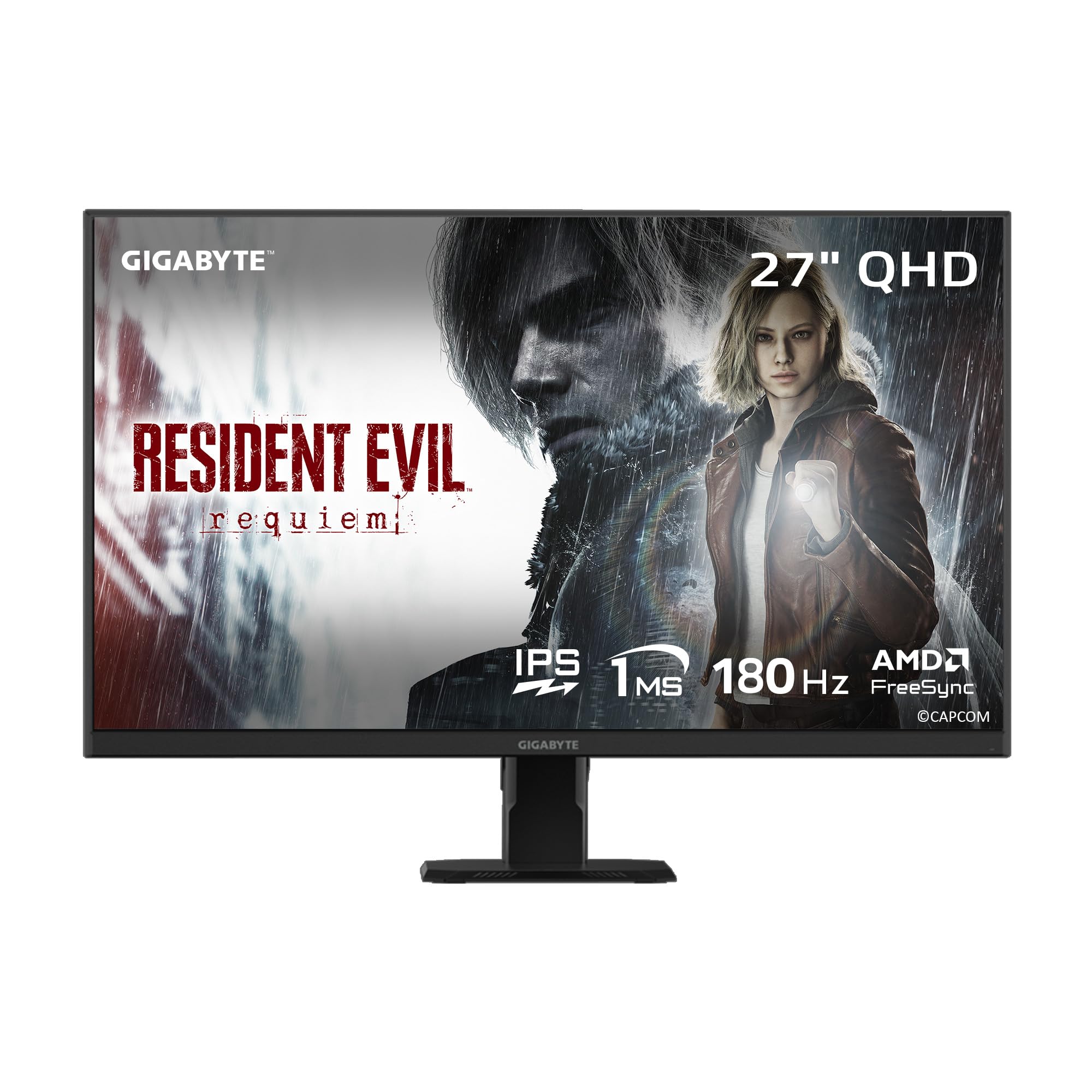
The GIGABYTE GS27QA SA uses a SuperSpeed IPS panel to deliver a 180Hz refresh rate with a 1ms MPRT response time, targeting gamers who want IPS-level color accuracy without the typical ghosting trade-offs. The 27-inch QHD display covers 100% sRGB and supports 8-bit color depth, producing accurate colors suitable for both gaming and productivity. AMD FreeSync is supported for variable refresh rate operation.
GIGABYTE’s OSD Sidekick software allows monitor settings to be adjusted directly from the desktop, including Black Equalizer levels, Game Assist crosshairs, and low blue light filtering. The on-screen display also includes a built-in crosshair overlay and timer, useful for competitive shooters. The monitor offers tilt adjustment only, and the HDMI 2.1 port is physically looser than standard on some units, though function is not affected.
Xbox Series X users should note that this monitor does not support 1440p at 120Hz over HDMI — it will cap at 60Hz at that resolution. For PC gamers using DisplayPort, the full 180Hz is accessible without issues. The overall build is solid, and the included DP cable allows immediate high-refresh operation. For desktop gamers who value software control over stand ergonomics, the GS27QA SA offers a distinctive feature set.
Why it’s great
- OSD Sidekick software enables mouse-controlled monitor adjustments
- Built-in Game Assist features including crosshair overlay and timer
- 100% sRGB coverage with good out-of-box color accuracy
Good to know
- HDMI port does not support 1440p at 120Hz on Xbox Series X
- Tilt-only stand limits ergonomic positioning
8. SANSUI 27 Inch WQHD

The SANSUI 27 Inch WQHD monitor offers a 180Hz refresh rate that can be overclocked to 200Hz via DisplayPort, placing it above the standard 180Hz competition in raw frame delivery. The Fast IPS panel at 27-inch QHD resolution delivers a 1ms response time, 320 nits of brightness, and 120% sRGB color coverage. The metal stand provides tilt adjustment from -5° to 15° and feels more substantial than the plastic bases found on comparable budget monitors.
Port selection includes two DisplayPort 1.2 inputs and two HDMI 2.0 inputs, offering flexibility for multi-device setups. One DP cable is included in the box. The monitor supports VESA mounting at 100x100mm for users who prefer an arm. Game assistant features include crosshair, timer, and mode presets for RTS, FPS, and racing genres.
Customer feedback highlights strong color reproduction and smooth performance at 180Hz, with one user reporting a replacement process that resolved a corner clouding issue. The lack of built-in speakers is a notable omission at this price tier. SANSUI includes a 30-day money-back guarantee and lifetime technical support, which adds confidence for buyers cautious about less established brands. For users who want 200Hz headroom and a sturdy stand at a low entry price, this monitor delivers.
Why it’s great
- Overclockable to 200Hz for extra motion smoothness
- Metal stand provides greater stability than plastic alternatives
- Dual DisplayPort and dual HDMI inputs for multi-device switching
Good to know
- No built-in speakers require external audio connection
- Customer reports of corner clouding on initial units; support resolves proactively
9. KTC H27S17

The KTC H27S17 uses a 27-inch curved HVA panel with a 1500R radius, wrapping the display edges slightly toward the viewer for a more immersive field of view. The 2560×1440 resolution paired with a 180Hz refresh rate and 1ms MPRT response time targets gamers who prefer VA-level contrast — the 4000:1 ratio produces deep blacks that IPS panels cannot match. FreeSync and G-Sync Compatible certification ensure broad adaptive sync support.
GAMEPLUS features include on-screen crosshairs for first-person shooters and Black eQualizer for lifting shadow detail without brightening the entire image. The OSD uses a joystick control for menu navigation, and the 3-sided narrow bezel reduces visual distraction. The stand offers tilt adjustment only, and the monitor weighs relatively little, making it easy to mount on a VESA arm.
Users consistently praise the image quality relative to the price, noting that colors appear vibrant and the 180Hz motion is noticeably smoother than older 144Hz panels. The 1500R curve is subtle at this screen size and does not introduce noticeable distortion during productivity work. For buyers who prioritize deep black levels and immersive contrast in a curved form factor, the KTC H27S17 offers a compelling entry-level option.
Why it’s great
- 4000:1 contrast ratio delivers deep, inky blacks typical of VA panels
- 1500R curve enhances peripheral immersion without distorting text
- Both FreeSync and G-Sync Compatible for flexible GPU pairing
Good to know
- Tilt-only stand limits ergonomic adjustments
- HVA panel may exhibit slight ghosting in very dark transitions
FAQ
Can my current graphics card drive a 1440p 180Hz monitor at full speed?
Why does my 180Hz monitor show only 144Hz when connected via HDMI?
Is a curved 180Hz monitor better than a flat one for gaming?
Final Thoughts: The Verdict
For most users, the best 180hz monitor overall is the Samsung Odyssey OLED G5 because its QD-OLED panel delivers unmatched contrast and the fastest response time at this refresh tier, elevating both competitive gameplay and single-player immersion. If you need a fully adjustable stand and prefer IPS color accuracy, grab the Alienware AW2725DM. And for a budget-friendly curved VA panel that offers deep blacks and a wide contrast ratio, nothing beats the KTC H27S17 at its entry-level price point.

Mo Maruf
I created WellFizz to bridge the gap between vague wellness advice and actionable solutions. My mission is simple: to decode the research and give you practical tools you can actually use.
Beyond the data, I am a passionate traveler. I believe that stepping away from the screen to explore new environments is essential for mental clarity and physical vitality.