Our readers keep the lights on and my smoothie glass nicely filled. As an Amazon Associate, I earn from qualifying purchases.
An 11×17 laser printer is the backbone of any office that produces architectural blueprints, engineering schematics, large financial spreadsheets, or tabloid-size marketing materials. Moving beyond the limitations of inkjet—where clogged nozzles and slow output kill workflow—a laser engine delivers crisp, smudge-resistant text and graphics on ledger paper at speeds that keep pace with real business demands.
I’m Mohammad Maruf — the founder and writer behind WellFizz. I’ve spent years analyzing wide-format printing hardware, tracking page yields, toner costs, and connectivity standards to separate genuine workhorses from office paperweights.
This guide examines the strongest contenders on the market, from all-in-one powerhouses to dedicated tabloid machines, to help you identify the best 11×17 laser printer for your specific workflow and volume requirements.
How To Choose The Best 11X17 Laser Printer
Wide-format laser printers are a durable-goods purchase. Your decision directly impacts daily productivity, monthly supply expenses, and office floor space. Focus on these four areas before comparing models.
Print Speed and Volume Rating
An 11×17 laser printer must sustain rated speeds across ledger-size paper, not just letter. Look for a duty cycle that exceeds your monthly volume by at least 30 percent — an office printing 2,000 ledger pages per month should target a unit rated for 3,000 pages or more. Slower models, such as those rated below 22 ppm, will bottleneck team workflows when shared across multiple users.
Paper Handling and Input Capacity
Tabloid paper is physically larger and heavier than letter stock. A printer that only accepts 11×17 through a single-sheet bypass tray forces you to hand-feed every job. Prioritize units with a dedicated tray that holds 250 sheets or more of ledger-size media. For high-volume environments, an optional 550-sheet cassette extends uptime and reduces staff intervention.
Total Cost of Toner Ownership
Starter toner cartridges often yield only 500 to 700 pages — enough for setup but not sustained use. Calculate the per-page cost of standard-yield and high-yield replacements before committing. Some brands lock out third-party toner via firmware updates, which can double your long-term expense. Models with separate drum and toner units, like many Brother units, tend to lower replacement frequency compared to all-in-one cartridge designs.
Connectivity and Network Integration
A shared office printer must support Ethernet for stable wired performance and dual-band Wi-Fi for flexible placement. Wi-Fi Direct or NFC allows walk-up printing from mobile devices without network credentials. Verify that the printer supports AirPrint and Mopria for direct iOS and Android output. Models lacking a front-panel USB port for walk-up scan-to-drive jobs create unnecessary workflow friction.
Quick Comparison
On smaller screens, swipe sideways to see the full table.
| Model | Category | Best For | Key Spec | Amazon |
|---|---|---|---|---|
| Canon MF753Cdw II | All-in-One | High-speed small teams | 35 ppm color / 50-sheet ADF | Amazon |
| Brother MFC-L3780CDW | All-in-One | Single-pass duplex scanning | 31 ppm / single-pass duplex scan | Amazon |
| HP LaserJet 5200 Series | Print Only | Dedicated tabloid monochrome | 35 ppm / 90 lb unit | Amazon |
| Canon MF665Cdw | All-in-One | 3-year warranty coverage | 26 ppm / 5-inch touchscreen | Amazon |
| HP Color LaserJet Pro 3301fdw | All-in-One | TerraJet toner vividness | 26 ppm / single-pass duplex scan | Amazon |
| Brother MFC-L3720CDW | All-in-One | Refresh subscription trial | 19 ppm / 3.5-inch color touchscreen | Amazon |
| Xerox C235dni | All-in-One | Low starting cost per page | 24 ppm / 500-yield starter toner | Amazon |
| Epson EcoTank ET-15000 | Supertank | Extreme low-cost color refills | 17 ppm B&W / 13×19 support | Amazon |
| HP Color LaserJet Pro 3201dw | Print Only | Fast color for small teams | 26 ppm / TerraJet toner | Amazon |
| Epson Workforce Pro WF-7840 | All-in-One | Inkjet alternative with 13×19 | 25 ppm B&W / 500-sheet capacity | Amazon |
| Epson XP-980 | Photo Inkjet | Borderless photo prints to 11×17 | 8.5 ppm B&W / 6-color ink system | Amazon |
In‑Depth Reviews
1. Canon Color imageCLASS MF753Cdw II

The Canon MF753Cdw II is a true mid-to-high-volume workgroup machine, delivering 35 ppm in both color and monochrome. Its first-print-out time of approximately 7 seconds minimizes idle waiting, and the 50-sheet multipurpose tray handles ledger-size media without forcing you to swap out the main cassette. The 5-inch color touchscreen runs Canon’s Application Library, giving fast access to scan-to-email, scan-to-USB, and cloud destination shortcuts.
Build quality is notably solid — the chassis feels denser than typical sub- all-in-ones, and the 50-sheet single-pass duplex ADF keeps multi-page scan jobs moving without flips. Early user reports highlight zero paper jams over months of moderate use, and the 069-series toner yields are competitive for offices printing 2,000 to 3,000 pages per month. The optional PF-K1 cassette adds 550 sheets, making this one of the most expandable units in its class.
The main drawback is Canon’s web and software ecosystem, which some users describe as clunky — the driver-discovery tool occasionally fails to find the printer on the network. However, once configured via wired Ethernet or a direct USB connection, the hardware itself runs reliably. The 3-year limited warranty provides extra confidence for a team-oriented deployment.
Why it’s great
- Fastest color print speed in this guide at 35 ppm for 11×17 jobs
- Expandable paper path with optional 550-sheet cassette
- Quiet operation and efficient duplex scanning
Good to know
- Canon software suite has occasional network-discovery glitches
- Starter toner yields are moderate — budget for high-yield replacements early
- Heavier than many competing models at over 60 pounds
2. Brother MFC-L3780CDW

Brother’s MFC-L3780CDW stands out for its single-pass duplex automatic document feeder, which scans both sides of a page in one pass at speeds up to 29 images per minute for black-and-white. This feature alone makes it the most efficient option in this price tier for offices that regularly digitize double-sided contracts or reports. Color print speed holds steady at 31 ppm, keeping the pace with the Canon MF753Cdw II in most real-world scenarios.
The machine uses Brother’s TN229 series toner, available in standard, high-yield, and super-high-yield capacities, with separate drum and toner units to lower replacement frequency. Setup via the 3.5-inch color touchscreen is straightforward, and dual-band Wi-Fi plus Gigabit Ethernet give IT departments flexible deployment options. Users consistently praise the reliability — no clogged nozzles, no firmware-update lockouts for third-party consumables, and minimal paper jams even with heavier 11×17 stock.
The Refresh subscription trial is included, but several users report frustration with the program — a declined card can disable the printer entirely, and support for troubleshooting subscription issues has been inconsistent. For buyers who prefer to manage toner purchases directly, skipping the subscription is advisable. The scanner glass also extends to accommodate thick books or bound materials, a thoughtful touch for mixed-media offices.
Why it’s great
- Genuine single-pass duplex ADF saves significant scan time
- Separate drum and toner reduces overall consumable cost
- Fast 31 ppm color output with reliable wireless connectivity
Good to know
- Refresh subscription can cause issues if payment details change
- Not designed for borderless photo printing — laser text only
- Toner replacement is still expensive compared to entry-level monochrome
3. HP LaserJet 5200 Series (Renewed)
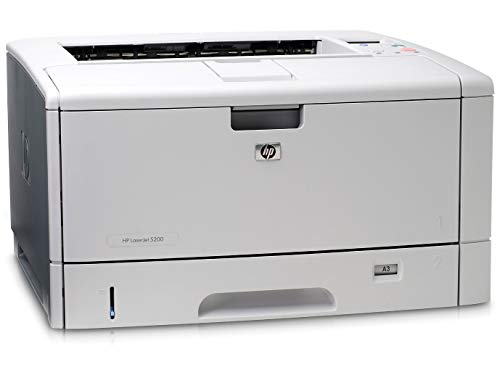
The HP LaserJet 5200 is a legacy workhorse that continues to command respect in engineering and architecture firms for its raw tabloid throughput. At 35 ppm monochrome, it matches the speed of modern color all-in-ones while handling 11×17 paper through a straight paper path that virtually eliminates jams on heavy stock. The renewed units available now offer a cost-effective entry point for businesses that need high-volume mono printing without paying for color toner they won’t use.
The printer is massive — 90 pounds — and requires dedicated floor space. It supports ledger paper through a bypass tray for single sheets and an optional tray for larger runs, though the base model ships without a dedicated 11×17 cassette. Users who purchased refurbished units report that the paper-tray mechanism occasionally needs adjustment, but the core print engine remains reliable after thousands of pages. Non-HP toner can be used but may require careful installation to achieve full print quality.
The biggest caveat is connectivity: the LaserJet 5200 relies on IEEE 1284 parallel and Ethernet — no Wi-Fi, no AirPrint, no mobile app support. For a dedicated print server in a wired office, this is acceptable. For teams that need walk-up mobile printing or cloud integration, a network bridge or print server is required. The unit also ships without toner in some renewed listings, so factor that into your purchase timing.
Why it’s great
- Extremely fast 35 ppm monochrome on tabloid size
- Straight paper path minimizes jams on heavy stock
- Low cost per page when using high-yield toner
Good to know
- No wireless or mobile printing natively
- Weighs 90 pounds — requires a sturdy stand or table
- Renewed units may ship without toner; verify listing details
4. Canon Color imageCLASS MF665Cdw

The Canon MF665Cdw delivers a well-rounded color laser all-in-one package with a standout 3-year limited warranty, offering peace of mind for small businesses that cannot afford downtime. Print speed reaches 26 ppm in both color and black, and the 10.3-second first-print-out time keeps short jobs efficient. The 50-sheet duplex ADF handles scanning and copying of multi-page documents without manual flipping, saving time on routine office tasks.
Paper capacity is limited to a 250-sheet cassette plus a single-sheet multipurpose tray, which may require frequent refills in busy environments. However, the 5-inch color touchscreen with Application Library provides quick access to frequently used workflows, and mobile printing via Canon PRINT, AirPrint, and Mopria covers all major platforms. Users on both Windows and Linux report straightforward driver installation, though Mac users have occasionally encountered software conflicts that required Canon support intervention.
The 075-series toner yields are moderate, and Canon’s genuine toner is not cheap, but users report that starter cartridges last longer than expected, often covering the first few months of moderate use. The chassis is sturdy at around 60 pounds, and the flatbed scanner extends for scanning thick manuals or bound documents. For a team that values warranty coverage and consistent color output, this is a strong mid-range choice.
Why it’s great
- 3-year limited warranty provides long-term coverage
- Fast 26 ppm color with quick first-print-out time
- Intuitive 5-inch touchscreen with customizable shortcuts
Good to know
- Paper capacity limited to 250 sheets — add cassette for higher volume
- Mac software can be problematic in some configurations
- Heavy at approximately 60 pounds
5. HP Color LaserJet Pro MFP 3301fdw

The HP Color LaserJet Pro MFP 3301fdw brings HP’s next-generation TerraJet toner technology to the tabloid office, producing noticeably more vivid color graphics and sharper text than earlier HP color laser engines. Print speed holds steady at 26 ppm for both color and monochrome, and the single-pass duplex ADF scans both sides of a page in one pass — a major efficiency gain for teams that digitize double-sided reports. The 250-sheet input tray keeps the footprint compact for a full-featured MFP.
Setup via HP Smart app is straightforward, and dual-band Wi-Fi with self-reset automatically resolves common network hiccups, reducing IT support tickets. Early adopters report excellent print quality on brochure and presentation materials, with colors that pop without the banding typical of lower-end color lasers. The scanner produces clean, legible copies, though users note it is not a high-volume production scanner — best suited for up to a few hundred scans per day.
The familiar HP caveat applies: the printer blocks non-HP toner chips, and firmware updates can enforce this restriction. Several users experienced severe print defects (streaks, missing toner) on new units when introductory toner depleted prematurely, and HP support struggled to supply replacement cartridges for this relatively new model. Buyers should stock a full set of replacement toner at purchase time to avoid workflow interruptions.
Why it’s great
- TerraJet toner delivers best-in-class color vibrancy for a laser
- Single-pass duplex scanning boosts productivity
- Compact for an all-in-one with ADF and fax
Good to know
- Firmware restricts use of third-party toner cartridges
- Introductory toner yield may be very low; plan for immediate replacements
- Rear feed for 11×17 only — no dedicated cassette for tabloid size
6. Brother MFC-L3720CDW

The Brother MFC-L3720CDW is a solid mid-range color laser all-in-one that prioritizes reliability and mobile connectivity over raw speed. Print speed is rated at 19 ppm, which is adequate for small teams printing a few hundred pages per week but will feel slow for high-volume ledger jobs. The 50-sheet ADF and automatic duplex printing are welcome features, and the 3.5-inch color touchscreen supports 48 customizable shortcuts for frequent workflows like scan-to-email or scan-to-cloud.
Brother’s refresh subscription trial is included, but many users prefer to buy toner directly — and the good news is that Brother offers a wide range of standard, high-yield, and super-high-yield TN229 cartridges, giving buyers flexibility to match their volume without being locked into a subscription. Connectivity is a highlight: dual-band Wi-Fi, Wi-Fi Direct, and Gigabit Ethernet ensure the printer integrates easily into any network environment. Users consistently report easy setup and crisp, vibrant print quality for office documents.
The machine’s duty cycle is rated for moderate volumes, but some users have reported that the printer stops functioning when toner is detected as empty by page count rather than actual toner level, and the chips on the cartridges prevent manual reset. This can lead to mid-print stoppages that require a new cartridge even if residual toner remains. The scanner performs well, and the overall build quality is robust for the price tier.
Why it’s great
- Excellent mobile and wireless connectivity options
- Customizable touchscreen shortcuts streamline daily workflows
- Reliable Brother build quality with separate drum unit
Good to know
- 19 ppm is slower than competitors — not ideal for high-volume tabloid
- Page-count-based toner detection can stop printing prematurely
- Wi-Fi Direct can be finicky to set up in some network environments
7. Xerox C235dni

The Xerox C235dni offers a budget-conscious entry into color laser printing without sacrificing the core features needed by a small office. Print speed reaches 24 ppm in both color and black, which is competitive for its tier, and the all-in-one functionality covers scan, copy, and fax. The 500-yield starter toner helps keep the initial cost reasonable, and high-yield replacements bring the per-page cost down for ongoing use. Automatic duplex printing is standard, and the straight paper path handles 11×17 sheets through the rear feed for occasional ledger jobs.
Setup via the Xerox Easy Assist App is designed for smartphone-first configuration, though some users report that the app fails to discover the printer reliably — resorting to the front-panel menu to complete Wi-Fi configuration. Print quality on standard copy paper can appear light, but users found that switching to a premium laser paper like Hammermill and disabling Eco mode resolved the issue. Once properly configured, the output is sharp and professional for text and basic graphics.
The scanner is the weakest link in this machine — multiple users report that scanned documents come out extremely light with a white band in the middle, making the scanner effectively unusable for anything beyond occasional basic copies. The printer itself prints fine, but the scanning defect is a significant limitation for offices that rely on digitizing documents. Considering the overall package, the C235dni is best for teams that primarily need color printing with only occasional scanning needs.
Why it’s great
- Competitive 24 ppm color speed for the price tier
- High-yield toner options reduce long-term cost per page
- Compact footprint for a color laser all-in-one
Good to know
- Scanner quality is poor — light output with banding issues reported
- Mobile app setup can be unreliable; manual configuration may be required
- Rear feed for 11×17 only — no dedicated tabloid cassette
8. Epson EcoTank ET-15000

The Epson EcoTank ET-15000 is not a laser printer, but it earns a spot here as a compelling alternative for offices that want tabloid-size color printing at an exceptionally low cost per page. The ink-tank system replaces cartridges with bottle refills: one set of bottles is equivalent to roughly 80 individual cartridges, and replacement ink costs up to 90 percent less than traditional ink cartridges. The printer handles paper up to 13×19, giving extra margin for bleed or larger layouts, and the all-in-one functionality includes scanner, copier, and fax.
Print speed is slower than any laser in this guide — 17 ppm black and 9 ppm color — so it is not suited for high-speed production environments. However, for small businesses like craft sellers, real estate agents, or design studios that produce a moderate volume of large-format color prints, the speed trade-off is offset by the dramatic ink savings. Users report that the black ink tank lasts over 1,000 pages even on vivid settings, and the color tanks handle vibrant flyers and signage without noticeable banding on compatible paper.
The document feeder can be unreliable — several users report constant jams requiring manual paper pushing, and the clicking noise during scanning indicates a potential mechanical issue. Epson’s support for this model has been criticized for being difficult to reach, with email-only options that sometimes loop through captcha verification. For buyers who need reliable everyday scanning, this may be a dealbreaker; for those primarily printing, the ET-15000 is a cost-effective large-format solution.
Why it’s great
- Extremely low cost per page with bottle refills
- Prints up to 13×19 for extra layout flexibility
- Ink in the box lasts up to 2 years for moderate use
Good to know
- Significantly slower than laser — 9 ppm color maximum
- Document feeder prone to jams and scanning issues
- Epson support is difficult to reach for troubleshooting
9. HP Color LaserJet Pro 3201dw

The HP Color LaserJet Pro 3201dw is a print-only color laser that focuses on speed and output quality without the complexity of integrated scanning. At 26 ppm for both color and monochrome, it keeps pace with all-in-ones in its class while maintaining a more compact footprint. The TerraJet toner system produces vivid color output that rivals entry-level production printers, making it a strong choice for small teams that need professional-looking marketing collateral, proposals, or reports in ledger size.
Setup is straightforward via the HP Smart app, and the dual-band Wi-Fi with self-reset automatically resolves common connection drops, reducing help-desk calls. The 250-sheet input tray is adequate for moderate-volume teams, though high-output offices will want to supplement with additional paper handling. Automatic duplex printing is standard, and the printer supports AirPrint and Mopria for mobile output without app installation.
The major concern with this model is toner cost — replacement HP 218a cartridges are expensive, and several users report that starter cartridges produce excellent prints but replacements yield poor, faded output despite being genuine HP products. The printer also enforces HP’s chip-based cartridge authentication, blocking third-party alternatives. With toner for a full set of four colors running hundreds of dollars, the total cost of ownership can exceed expectations. This machine is best suited for teams that print mostly black with occasional color, keeping replacement cycles manageable.
Why it’s great
- Fast 26 ppm color output with vivid TerraJet toner
- Compact footprint for a color laser printer
- Self-resetting Wi-Fi reduces connectivity support needs
Good to know
- Print-only — no scanner, copier, or fax functionality
- Expensive replacement toner; starter cartridges quality not replicated
- Blocks third-party toner via firmware enforcement
10. Epson Workforce Pro WF-7840

The Epson Workforce Pro WF-7840 is a wide-format inkjet all-in-one that competes directly with color lasers for offices that prioritize low hardware cost and the ability to print borderless 13×19 graphics. Print speeds reach 25 ppm black and 12 ppm color, which is slower than most lasers but surprisingly fast for an inkjet. The PrecisionCore Heat-Free technology reduces warm-up time and power consumption, and the DURABrite Ultra ink dries quickly on plain paper without smudging — a common complaint with budget inkjets on ledger sheets.
Paper handling is a strong suit: the 500-sheet capacity across two trays reduces refill frequency, and the rear feed handles heavier media like cardstock for presentation covers. The 50-page ADF and 4.3-inch touchscreen provide smooth navigation for scanning and copying. Users who rely on this machine for AutoCAD drawings and architectural prints report crisp line quality and reliable Ethernet connectivity, with over 12,000 pages printed across three years without mechanical failure in some cases.
The primary drawbacks are Epson’s aggressive firmware update prompts — which some users ignore without issue — and the requirement to print in color every 1-2 weeks to prevent inkjet nozzle clogging. The scanner requires the connected computer to be powered on for network scanning, which is less convenient than standalone scan-to-email functionality on laser MFPs. For teams that already manage inkjet maintenance, this is a capable wide-format workhorse at a lower entry point than comparable color lasers.
Why it’s great
- Large 500-sheet paper capacity reduces refill frequency
- Prints borderless 13×19 for marketing materials
- DURABrite Ultra ink resists smudging on plain paper
Good to know
- Requires periodic color printing to prevent nozzle clogs
- Constant firmware update prompts can be intrusive
- Network scanning requires host computer to be on
11. Epson Expression Photo XP-980

The Epson Expression Photo XP-980 is the outlier in this guide — a dedicated photo inkjet printer designed for producing gallery-quality borderless prints up to 11×17. Its six-color Claria Photo HD ink system includes light cyan and light magenta for smoother gradients and skin tones, producing output that exceeds the color gamut of any color laser in this lineup. The 4.3-inch color touchscreen simplifies setup and job management, and Wi-Fi plus Wi-Fi Direct provides flexible placement options for a creative studio or home office.
Photo speed is competitive for an inkjet — 4×6 prints in as fast as 11 seconds — but document printing is slow at 8.5 ppm black and 8 ppm color, making this a poor choice for text-heavy ledger documents. The printer uses separate trays for plain paper and photo paper, plus a rear feed for specialty media, giving photographers the flexibility to switch between stock types without clearing trays. Users report excellent print quality on glossy and metallic papers, with accurate color reproduction and minimal banding when using genuine Epson ink.
Ink consumption is the main concern: the print head requires regular cleaning cycles that consume significant ink, and the six cartridges are expensive to replace. Several users report that the 11×17 paper path requires single-sheet rear loading, which is slow for volume jobs. Ink dries on the print head within days of non-use, necessitating multiple cleaning cycles that waste up to a third of a cartridge. For a photographer or designer who needs occasional large-format prints, this is a capable tool. For a general office handling mixed document types, a color laser is more practical.
Why it’s great
- Six-color ink system produces superior photo color gamut
- Borderless 11×17 printing with glossy and fine-art media
- Separate paper trays for photo and plain stock
Good to know
- Slow for text documents — 8.5 ppm black maximum
- Frequent cleaning cycles waste substantial ink
- 11×17 sheets must be fed one at a time via rear slot
FAQ
Can I print 11×17 on a standard letter-size laser printer with a bypass tray?
Why do some 11×17 laser printers cost much more than letter-size models with similar features?
Final Thoughts: The Verdict
For most teams, the best 11×17 laser printer winner is the Canon Color imageCLASS MF753Cdw II because it combines the fastest color print speed in its class (35 ppm) with expandable paper capacity and a genuine single-pass duplex ADF. If your workflow prioritizes scan efficiency and you want to avoid subscription traps, grab the Brother MFC-L3780CDW for its single-pass duplex scanning and separate drum-and-toner design. And for a dedicated monochrome workhouse that handles tabloid paper with industrial reliability, nothing beats the HP LaserJet 5200 Series (Renewed) — just be prepared for its size and lack of wireless connectivity.

Mo Maruf
I created WellFizz to bridge the gap between vague wellness advice and actionable solutions. My mission is simple: to decode the research and give you practical tools you can actually use.
Beyond the data, I am a passionate traveler. I believe that stepping away from the screen to explore new environments is essential for mental clarity and physical vitality.