Our readers keep the lights on and my smoothie glass nicely filled. As an Amazon Associate, I earn from qualifying purchases.
Finding an 11×17 color laser printer that balances tabloid-size output with reliable daily operation is a hunt that exposes the real divide between office-grade hardware and consumer-level compromises. The wide-format color laser market is packed with machines that look similar on paper but differ radically in print engine durability, toner cost per page, and network reliability—three factors that make or break a purchase for any small office or creative studio.
I’m Mohammad Maruf — the founder and writer behind WellFizz. I’ve spent countless hours analyzing OEM toner yield specs, printhead technologies, duplex mechanisms, and long-term network stability across dozens of wide-format color laser models to separate genuine workhorses from overpriced traps.
Whether you need architectural drawings, marketing brochures, or financial reports on ledger-size paper, this breakdown of the best 11×17 color laser printer options will help you match speed, paper handling, and total cost of ownership to your actual workload.
How To Choose The Best 11×17 Color Laser Printer
Selecting a wide-format color laser printer requires weighing output speed, paper handling flexibility, toner economics, and network integration against your specific daily volume. The wrong choice can mean frequent jams on ledger paper, sky-high per-page costs, or frustrating connectivity drops during critical print jobs.
Print Speed and First-Page-Out Time
Manufacturers advertise mono and color pages-per-minute (ppm) ratings, but the real-world bottleneck is often the time it takes for the first page to exit the fuser assembly. A machine with a sub-10-second first-page-out time keeps small workgroups moving, while a slower warm-up sequence can stall multiple users. Models in the 26–35 ppm range offer the best balance for offices printing mixed document sets on tabloid-size stock.
Toner Cost and Cartridge Architecture
The most deceptive spec in any color laser is the toner yield on starter cartridges versus standard and high-yield replacements. Some manufacturers ship cartridges with half the capacity of retail versions, forcing early replacements. Calculate the cost per page using high-yield cartridges to understand the true operating expense. Machines that accept third-party toner offer dramatic savings, but some brands enforce chip-based cartridge authentication that blocks non-OEM supplies.
Paper Handling and Duplex Capability
For 11×17 output, the paper path design is critical. Look for a straight paper path or a rear output tray when printing on heavy cardstock or labels. Automatic duplex printing on ledger-size paper should be standard—not a premium upgrade. The multipurpose tray capacity and the maximum paper weight (measured in lb or gsm) determine whether the printer can handle envelopes, presentation covers, or thick art paper without jamming.
Network Connectivity and Security
An office printer must integrate without friction into existing wired or wireless networks. Gigabit Ethernet offers the most stable throughput for large color files, while dual-band Wi-Fi with self-healing connectivity minimizes interruptions. Advanced security features—secure print release, encrypted data transmission, and port-based authentication—protect sensitive documents shared on a multi-user network.
Quick Comparison
On smaller screens, swipe sideways to see the full table.
| Model | Category | Best For | Key Spec | Amazon |
|---|---|---|---|---|
| Brother MFC-L8730CDW | All-in-One | High-volume business workgroup | 33 ppm / 104 ipm scan | Amazon |
| Canon MF753Cdw II | All-in-One | Speed-oriented office with expandable trays | 35 ppm / 7 sec first page | Amazon |
| HP Color LaserJet Pro MFP 4301fdw | All-in-One | Mid-size teams needing security and speed | 35 ppm / self-healing Wi-Fi | Amazon |
| Xerox VersaLink C405/DN | All-in-One | Demanding office with app-based workflows | 36 ppm / 5-inch touchscreen | Amazon |
| Epson EcoTank Pro ET-16650 | Supertank AIO | Lowest-cost-per-page wide-format | 25 ppm / pigment ink bottles | Amazon |
| Brother MFC-L3780CDW | All-in-One | Small business with subscription option | 31 ppm / single-pass duplex scan | Amazon |
| Canon MF665Cdw | All-in-One | Value-focused 4-in-1 with 3-year warranty | 26 ppm / 5-inch color touchscreen | Amazon |
| HP Color LaserJet Pro MFP 3301fdw | All-in-One | Trusted brand for small office color jobs | 26 ppm / TerraJet toner | Amazon |
| Xerox C235dni | All-in-One | Budget-friendly home office all-in-one | 24 ppm / 500-page starter toner | Amazon |
| Canon imageCLASS LBP632Cdw | Print Only | Entry-level single-function duplex | 22 ppm / 067 high-capacity toner | Amazon |
| Epson SureColor P900 | Photo Printer | Fine art and gallery-quality prints | 17-inch / UltraChrome PRO10 ink | Amazon |
In‑Depth Reviews
1. Brother MFC-L8730CDW

The Brother MFC-L8730CDW is a fully loaded business-class all-in-one that delivers 33 ppm in both color and black, supported by a 104-ipm duplex scanner and a robust 80-page auto document feeder. The included 3,000-page black and 1,800-page color starter cartridges immediately reduce upfront accessory costs, and the dual-band Wi-Fi plus Gigabit Ethernet ensure stable connectivity in any office network topology.
Paper handling is generous: an 80-sheet ADF with legal-size glass, plus a multipurpose tray for heavy stock up to 200 gsm. The 3.5-inch color touchscreen supports up to 48 customizable shortcuts, while NFC badge authentication and triple-layer security features make it suitable for regulated environments. The machine is notably compact for its class—25 percent smaller than its predecessor—but still weighs roughly 50 pounds.
User feedback highlights excellent out-of-box performance, seamless integration with Windows and mobile platforms, and reliable WiFi setup. Some long-term owners report frustration with Brother’s chip-locked toner and the forced subscription Refresh program, but the included cartridge yields and available high-yield options provide a decent runway before the first replacement. The MFC-L8730CDW earns the top spot because it combines speed, advanced scanning, expandable paper capacity, and enterprise-grade security in a single well-built chassis.
Why it’s great
- Fast 33 ppm color with high-yield starter toner included
- Single-pass duplex scanner at 104 ipm saves significant time on multi-page tabloid sets
- NFC authentication and triple-layer security for sensitive document workflows
Good to know
- Chip-locked toner prevents use of third-party cartridges
- Heavy 50-pound chassis requires two-person unboxing
- Some users report frustrating subscription program policies
2. Canon Color imageCLASS MF753Cdw II

The Canon MF753Cdw II rockets through color and mono jobs at 35 ppm with a remarkably fast first-page-out time around 7 seconds. This makes it the ideal choice for offices where multiple users queue short color documents throughout the day. The 5-inch color touchscreen with Canon’s Application Library allows intuitive access to scanning, fax, and custom shortcuts without needing a PC.
Paper capacity starts at 250 sheets plus a 50-sheet multipurpose tray, expandable with an optional 550-sheet cassette. The 50-sheet duplex ADF supports single-pass two-sided scanning, and the 3-year limited warranty provides extended peace of mind. Toner is Canon’s Genuine 069 series, with starter yields of 1,100 pages per color and 2,100 black—better than many competitors’ initial cartridges.
Customer experiences are overwhelmingly positive regarding hardware reliability and print clarity, though several users note that Canon’s software suite lags behind the hardware quality, especially on macOS and Linux machines. The bypass tray is praised for handling thick media without jams. For a mid-range office machine that prioritizes raw speed and a generous warranty, the MF753Cdw II delivers strong value.
Why it’s great
- Blazing 35 ppm speed with sub-10-second first page
- Expandable paper path with optional 550-sheet cassette
- 3-year limited warranty covers extended office use
Good to know
- Canon’s software package can be finicky on macOS and Linux
- Starter toner yields are lower than full retail cartridges
- Touchscreen UI can feel sluggish compared to the print speed
3. HP Color LaserJet Pro MFP 4301fdw

The HP MFP 4301fdw pushes color print speed to 35 ppm with sharp detail and vivid color reproduction, making it a serious contender for teams printing marketing collateral, reports, and presentations. HP’s TerraJet toner technology boosts color saturation, and the intelligent dual-band Wi-Fi with self-healing capabilities reduces connectivity disruptions that plague lesser office printers.
Security is a standout feature: HP Wolf Pro Security offers customizable protection against network threats, encrypted data transmission, and secure print release. The 250-sheet tray works alongside a 50-sheet ADF, and the automatic duplex scanning handles two-sided originals in a single pass. The printer is designed for workgroups of up to 10 people, and it supports Bluetooth, Ethernet, and AirPrint for flexible device access.
Reliability feedback is mixed: many users praise the fast setup and excellent print quality, but a notable minority report persistent WiFi disconnections and false paper jam errors after extended use. HP’s chip-locked cartridge policy blocks third-party toner, and introductory cartridges have reduced yields (1,200 black / 1,000 color). For offices prioritizing security and vendor lock-in is acceptable, this machine is a powerful choice.
Why it’s great
- Fast 35 ppm color with vivid TerraJet toner output
- Self-healing dual-band Wi-Fi reduces network interruptions
- HP Wolf Pro Security provides robust enterprise-level protection
Good to know
- Chip-locked cartridges block all third-party toner options
- Some users report WiFi connectivity drops after months of use
- Introductory cartridges yield only 1,000–1,200 pages
4. Xerox VersaLink C405/DN

The Xerox VersaLink C405/DN is a fully featured office multifunction printer that reaches 36 ppm in color and black, supported by a large 5-inch color touchscreen that mirrors a smartphone experience with gestures and task-based apps. The preloaded Xerox ConnectKey apps and access to the Xerox App Gallery enable document translation, cloud scanning, and customized workflows without a PC intermediary.
Standard paper handling includes a 550-sheet tray plus a stationery feeder, and the duplex auto document feeder scans two-sided sets efficiently. Setup is guided through an IT-free installation wizard, and the machine supports Ethernet, USB, and optional wireless connectivity. The starter toner includes 3,000-page black and 2,000-page color cartridges, and users report that generic toner works reliably for significant cost savings.
Long-term reliability reports are split: some users have operated the C405 for years with consistent output, while others experienced connectivity errors and color calibration issues that required service intervention. The lack of built-in wireless (sold separately) may frustrate smaller offices. For a high-volume workgroup that demands app-driven customization and robust build quality, the VersaLink C405 remains a compelling option.
Why it’s great
- Fast 36 ppm color with intuitive touchscreen and app ecosystem
- Generic toner works reliably, reducing total cost of ownership
- 550-sheet standard tray with additional feeder for heavy workloads
Good to know
- Wireless adapter is sold separately, adding to upfront cost
- Some users report connectivity errors and color issues after extended use
- Setup complexity for email and network folders may require IT support
5. Epson EcoTank Pro ET-16650
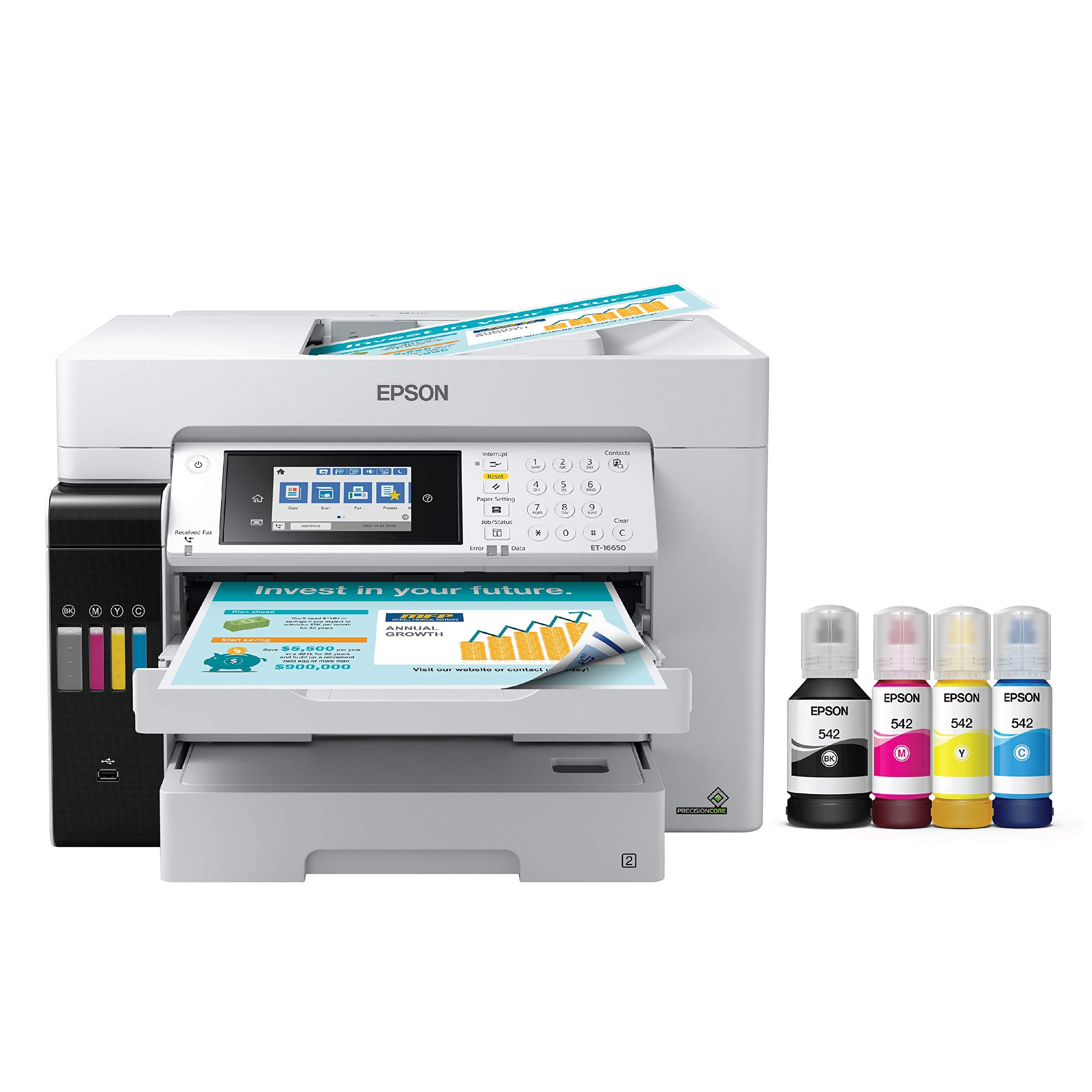
The Epson EcoTank Pro ET-16650 challenges the traditional laser paradigm with a supertank ink system that delivers an exceptionally low cost per page—roughly 2 cents per color ISO page versus 14 cents for typical laser toner cartridges. It prints up to 25 ppm in both black and color, handles borderless 11×17 output, and uses pigment-based DURABrite inks that dry instantly on plain paper and produce sharp text.
The included ink bottles yield approximately 7,500 black pages and 6,000 color pages, and the promotion often includes two years of unlimited ink when registered. The 500-sheet dual-cassette system plus a rear specialty feed handles up to 13×19-inch media, and the automatic duplex scanning and printing keep workflow efficient. The PrecisionCore Heat-Free printhead technology reduces energy consumption versus traditional laser fusers.
Reliability feedback is a concern: several units developed printhead clogs within the first year, and some users reported Epson denying warranty claims based on ink system inspection. The pigment-based ink is essential—dye inks will damage the machine. For high-volume offices willing to accept inkjet maintenance in exchange for dramatic savings on consumables, the ET-16650 offers unmatched operating economics.
Why it’s great
- Extremely low cost per page compared to laser toner cartridges
- Ink bottles supply thousands of pages before first refill
- Borderless 11×17 printing with instant-dry pigment ink
Good to know
- Printhead clogs and warranty denials reported by multiple users
- Must use pigment ink only—dye inks void warranty and damage the unit
- Large footprint requires 24×32 inches of desk space
6. Brother MFC-L3780CDW

The Brother MFC-L3780CDW is a solid all-rounder that prints at 31 ppm in color and mono, with a single-pass duplex scanner running at 29 ipm black and 22 ipm color. This makes it fast enough for a small to mid-sized office without the premium price of higher-speed models. The touchscreen and LED interface are intuitive, and support for AirPrint, Mopria, and voice control via Alexa provides flexible connectivity.
Brother’s TN229 toner series offers standard, high, and super-high yield options, giving you control over your per-page costs. The Refresh EZ Print Subscription trial is included but can be declined if you prefer buying cartridges outright. The 250-sheet tray works with a manual feed for envelopes and labels, and the machine supports wired Ethernet, dual-band wireless, and USB direct connections.
User feedback is largely positive: easy setup, reliable network connectivity, and crisp output for professional documents. Some users point out that replacement cartridges are expensive compared to the printer’s initial cost, and the subscription program has drawn criticism for disabling the printer during billing issues. For a midsize office that values reliable color output and flexible toner options, this is a strong mid-range pick.
Why it’s great
- Reliable 31 ppm color printing with single-pass duplex scanning
- Multiple toner yield options help optimize per-page cost
- Voice control and wide device compatibility with AirPrint and Mopria
Good to know
- Replacement cartridges are expensive relative to initial printer price
- Refresh subscription can lock the printer during billing disputes
- Toner page counter may not reset to zero on refurbished units
7. Canon Color imageCLASS MF665Cdw

The Canon MF665Cdw is a 4-in-1 color laser that prints at 26 ppm in both color and mono, with a first-print-out time around 10.3 seconds. Its 5-inch color touchscreen provides access to the Application Library, which lets you customize frequently used tasks. The 50-sheet duplex ADF handles two-sided scanning in a single pass, and the 250-sheet cassette plus multipurpose tray cover daily paper needs.
Canon includes a 3-year limited warranty—significantly longer than the standard one-year coverage offered by most competitors. The toner system uses Canon 075 cartridges with starter yields of 500 pages per color and 700 black. Mobile printing is supported via Canon PRINT, AirPrint, and Mopria. The machine is Chromebook compatible, making it flexible for education or hybrid office environments.
Reviews highlight the heavy, sturdy build and easy setup on both Windows and Linux systems. Some Mac users encountered driver issues that caused random print interruptions, and the Canon software interface is considered clunky by several reviewers. The print quality is rated as fast and professional, though color vibrancy may be slightly less saturated than HP’s TerraJet output. For buyers prioritizing warranty length and solid all-in-one functionality, this model delivers.
Why it’s great
- 3-year limited warranty offers exceptional long-term protection
- 50-sheet duplex ADF enables efficient two-sided scanning
- Fast 26 ppm color with Chromebook compatibility
Good to know
- Mac and Linux users may experience software compatibility issues
- Canon’s user interface is slower and less intuitive than competitors
- Starter toner yields are lower than many competing models
8. HP Color LaserJet Pro MFP 3301fdw

The HP MFP 3301fdw is a compact all-in-one that delivers 26 ppm color and mono output using HP’s TerraJet toner, which produces more vivid colors than previous generations. The footprint is slightly smaller than many competing AIO laser printers, making it a better fit for desks with limited space. It includes a 250-sheet tray, a 50-sheet ADF, and automatic duplex printing on both sides of ledger-sized paper.
Setup is fast thanks to the HP Smart app and dual-band Wi-Fi with self-healing connectivity. Phone-based configuration gets you running in minutes without a computer. The machine supports fax, scan-to-email, and cloud services. The Touchscreen interface is responsive, and the print quality receives consistent praise for sharp text and vibrant color in brochures and reports.
Several long-term users warn that HP’s firmware updates can render the printer unusable with non-HP toner, and the introductory cartridges deplete quickly—sometimes after only 50 pages in extreme cases. Support during initial toner defects was reportedly slow due to the model being new. For small offices that stay within HP’s ecosystem and value compact dimensions, the 3301fdw is a capable choice.
Why it’s great
- TerraJet toner produces more vibrant color than previous HP lasers
- Compact footprint saves desk space compared to competitors
- HP Smart app makes Wi-Fi setup fast and intuitive
Good to know
- Firmware updates may break compatibility with third-party toner
- Introductory cartridges may deplete very quickly in some units
- HP support has been slow for replacement cartridges on new models
9. Xerox C235dni

The Xerox C235dni is one of the most accessible entry points into 11×17 color laser all-in-one ownership, offering print, scan, copy, and fax at 24 ppm in both color and mono. The included starter toner has a 500-page yield, and high-yield cartridges are available to reduce long-term costs. It supports wireless connectivity via Apple AirPrint and Mopria, and the Xerox Easy Assist App simplifies smartphone setup.
The machine uses a color touchscreen for menu navigation, and the duplex printing is automatic for both paper sides. The 250-sheet tray and manual feed slot handle standard letter and tabloid sizes. At this price tier, the C235dni competes directly with inkjet all-in-ones while offering the smudge-proof text and page throughput typical of laser engines.
Customer reviews show a split: many users find the setup intuitive and print quality excellent for the price, while others report extreme light output on copies and scans, unexplained white bands, and Windows driver discovery failures. Paper selection matters—using heavier laser-specific paper resolves many of the lightness issues. For budget-conscious buyers who can navigate potential driver quirks, this Xerox delivers solid basics.
Why it’s great
- Lowest entry price for a color laser AIO with 11×17 support
- High-yield toner cartridges available to improve per-page economics
- Wireless setup via Xerox Easy Assist App is straightforward
Good to know
- Scanner and copy output can be extremely light on standard copy paper
- Windows driver installation may fail, requiring manual configuration
- Starter toner has only 500-page yield, requiring an early first replacement
10. Canon imageCLASS LBP632Cdw

The Canon LBP632Cdw is a single-function color laser printer that focuses on fast duplex output at 22 ppm for both black and color. It uses Canon’s 067 toner series, with high-capacity cartridges that stretch the interval between replacements. The 250-sheet cassette plus a one-sheet multipurpose tray handle standard media sizes, and the machine supports wireless, Ethernet, and USB connectivity.
This is a print-only unit with no scanner, copier, or fax—a deliberate simplification that reduces mechanical complexity and cost. The LCD display is basic but adequate for network configuration and job status. Chromebook compatibility and support for Canon PRINT, AirPrint, and Mopria make it flexible across platforms. Energy Star and EPEAT Silver certifications reflect modest power consumption.
Reviews repeatedly praise the sharp image quality on both text and color graphics, as well as the reliable auto-duplex mechanism that rarely jams. Some users encountered persistent WiFi connectivity issues where the printer rejected password entries or failed to maintain a connection to specific routers. The wired USB fallback works reliably. For buyers who need a straightforward networked color duplex printer without scanning overhead, the LBP632Cdw is a smart, cost-effective pick.
Why it’s great
- Reliable automatic duplex produces clean two-sided prints
- Sharp image quality with Canon’s 067 high-capacity toner
- Simple print-only design reduces mechanical complexity and cost
Good to know
- WiFi connectivity issues reported with some router brands
- No scanning, copying, or fax capabilities
- Basic LCD display lacks advanced touchscreen features
11. Epson SureColor P900

The Epson SureColor P900 is a 17-inch wide-format inkjet printer designed for photographers, graphic artists, and printmakers who demand gallery-quality output. It uses a 10-channel UltraChrome PRO10 pigment ink set with a dedicated violet channel for an expanded color gamut, and separate photo black and matte black nozzles eliminate switch-over waste. The Carbon Black Driver mode improves black density on glossy media for deep, rich shadows.
Media handling supports roll and sheet paper up to 1.5 mm thick, including Epson’s Professional and Legacy papers as well as third-party fine art stocks. The 4.3-inch color touchscreen controls the print queue, media settings, and network configuration. The internal LED light illuminates the output area for easy monitoring. The machine is 23 percent smaller than its predecessor, fitting more easily into studio spaces.
The P900 consistently earns praise for outstanding print permanence (up to 200 years color, 400 years B&W in testing) and exceptional tonal gradation. However, it is not a high-volume office printer—speed tops out around 1 ppm, and the ink cost is substantial at roughly – for a full set of cartridges. The initial priming consumes about half the ink. For fine art reproduction and proofing, the P900 is in a league of its own.
Why it’s great
- UltraChrome PRO10 ink with violet delivers exceptional color gamut
- Separate photo black and matte black nozzles eliminate ink waste
- Print permanence rated 200+ years for color prints
Good to know
- Very slow print speed (approximately 1 ppm) unsuitable for office use
- Full ink replacement costs between and
- Initial ink charge consumes roughly half the included cartridges
FAQ
Can I print 11×17 on any color laser printer?
Is duplex printing slower on 11×17 than on letter-size?
Why do laser printers use chip-locked cartridges?
What paper weight should I use for color laser printing on tabloid size?
Final Thoughts: The Verdict
For most users, the best 11×17 color laser printer winner is the Brother MFC-L8730CDW because it delivers fast 33 ppm output, advanced security features, exceptional scanning speed, and generous starter toner yields in a compact chassis. If you want the fastest color output with the flexibility of expandable paper trays, grab the Canon MF753Cdw II. And for the lowest cost per page on high-volume tabloid printing, nothing beats the Epson EcoTank Pro ET-16650.

Mo Maruf
I created WellFizz to bridge the gap between vague wellness advice and actionable solutions. My mission is simple: to decode the research and give you practical tools you can actually use.
Beyond the data, I am a passionate traveler. I believe that stepping away from the screen to explore new environments is essential for mental clarity and physical vitality.