Our readers keep the lights on and my smoothie glass nicely filled. As an Amazon Associate, I earn from qualifying purchases.
Choosing a 1080p monitor seems straightforward until you’re faced with dozens of nearly identical-looking screens. The difference between a smooth, comfortable daily driver and a frustrating source of eye strain lies in the subtle details—refresh rates, panel types, and ergonomic design that aren’t always apparent in a product title.
I’m Mohammad Maruf — the founder and writer behind WellFizz. My process involves deep-diving into market data, analyzing thousands of technical specifications, and synthesizing user feedback trends to separate genuinely valuable features from clever marketing.
This guide distills that research, focusing on clarity, comfort, and longevity to help you find a display that genuinely enhances your workspace or gameplay. Finding the right balance of performance, visual quality, and comfort is essential when selecting the best 1080p monitor for your specific needs and environment.
How To Choose The Best 1080P Monitor
Full HD 1080p remains the sweet spot for desktop clarity, offering sharp text and detailed imagery without requiring a top-tier graphics card. Your choice should be guided by how you’ll use it most, balancing performance with daily comfort.
Panel Technology: The Foundation of Image Quality
This is the screen’s core. IPS panels offer the best color accuracy and wide viewing angles, ideal for office work, content consumption, and casual gaming where color consistency matters. VA panels provide much deeper blacks and higher contrast ratios, great for movies and games with dark scenes, though some may have slower pixel response. Budget TN panels are less common now; they offer fast response for competitive gaming but suffer from poor viewing angles and color reproduction.
Refresh Rate & Response Time: Smoothness vs. Speed
A 60Hz refresh rate is standard, but stepping up to 100Hz, 120Hz, or higher makes every on-screen movement—scrolling, cursor motion, video playback—visibly smoother. For gaming, a higher refresh rate paired with Adaptive-Sync (FreeSync) eliminates screen tearing. Response time (measured in milliseconds, ms) affects motion clarity; a lower number (1ms to 5ms) reduces ghosting in fast-paced games, while for general use, anything under 8ms is perfectly fine.
Ergonomics & Eye Care: Your Long-Term Health
Don’t underestimate a good stand. Height, tilt, and swivel adjustment let you position the screen perfectly, preventing neck and back strain. Features like flicker-free backlights and blue light filters (certified by TÜV Rheinland) are essential for reducing eye fatigue during long sessions. A matte anti-glare coating is also preferable for well-lit rooms.
Connectivity & Extras
Ensure the monitor has the ports you need. HDMI is standard, DisplayPort is preferred for high refresh rates, and VGA is a legacy option. Built-in speakers are convenient for basic audio but often lack quality. Consider if you need USB ports or a headphone jack for easier accessory management.
Quick Comparison
On smaller screens, swipe sideways to see the full table.
| Model | Type | Best For | Key Feature | Amazon |
|---|---|---|---|---|
| ViewSonic VA2456A-MHD | IPS | Versatile Home Office | 120Hz, All Major Ports (DP/HDMI/VGA) | Amazon |
| Acer Nitro KG241Y Sbiip | VA | Serious Gaming | 165Hz, AMD FreeSync Premium | Amazon |
| HP 24mh FHD Monitor | IPS | Ergonomic Workspace | Height-Adjustable Stand, Built-in Speakers | Amazon |
| Dell SE2725HM | IPS | Productivity & Comfort | 27-inch, 100Hz, Dell ComfortView Plus | Amazon |
| acer KB242Y | IPS | Balanced Performance | 120Hz, 1ms VRB, 99% sRGB | Amazon |
| acer 27 Inch KB272 | IPS | Larger Screen Real Estate | 27-inch, 120Hz, 1ms VRB | Amazon |
| ViewSonic VS2447M | IPS | Productive Office Use | 100Hz, Eye Care Tech, Thin Bezels | Amazon |
| Sceptre 24-inch Prime | LED | Value with Extras | Two HDMI Ports, Built-in Speakers | Amazon |
| Philips 24″ Frameless | VA | Budget Multi-Monitor Setup | Frameless Design, 100Hz, 4-Year Warranty | Amazon |
| Philips 22″ 221V8LB | VA | Compact Secondary Screen | 100Hz, Adaptive-Sync, 4-Year Warranty | Amazon |
| KOORUI 22 Inch | VA | Entry-Level Gaming & Work | 100Hz, 4000:1 Contrast, TÜV Certified | Amazon |
In‑Depth Reviews
1. ViewSonic VA2456A-MHD

The ViewSonic VA2456A-MHD earns its top spot by delivering a remarkably balanced feature set that caters to almost every user. Its 24-inch IPS panel provides excellent color consistency and wide viewing angles, while the 120Hz refresh rate introduces a level of smoothness that enhances everything from scrolling documents to casual gaming. This combination of visual fidelity and fluid motion is rare in this category.
Connectivity is a major strength, as it includes HDMI, DisplayPort, and even a legacy VGA port, making it compatible with virtually any modern or older device right out of the box. The inclusion of multiple preset modes (Game, Movie, Text, etc.) allows you to quickly optimize the image for different tasks. Its three-sided frameless design also makes it an excellent candidate for a clean, multi-monitor setup.
User feedback consistently highlights its plug-and-play simplicity and the noticeable improvement a 120Hz display brings to daily computing. The built-in speakers are a convenient bonus for video calls or system sounds, though most will prefer dedicated audio for entertainment. For a mid-range monitor that refuses to compromise on key specs, this ViewSonic is a standout.
Why it’s great
- Versatile 120Hz IPS panel is excellent for both work and play.
- Comprehensive port selection includes DisplayPort for high-refresh connectivity.
- Useful preset image modes and effective flicker-free/blue light filter technology.
- Sleek, frameless design ideal for multi-monitor configurations.
Good to know
- The stand offers only basic tilt adjustment, lacking height or swivel.
- While convenient, the built-in speakers are best for basic audio only.
2. Acer Nitro KG241Y Sbiip

If your primary goal is a competitive edge in games, the Acer Nitro KG241Y Sbiip is engineered for that purpose. Its 165Hz refresh rate and 1ms (VRB) response time are the headline specs, designed to deliver incredibly smooth motion and minimal blur during fast-paced action. Coupled with AMD FreeSync Premium technology, it virtually eliminates screen tearing and stutter for a buttery-smooth gaming experience.
The monitor uses a VA panel, which offers a high contrast ratio for deeper blacks and more immersive visuals in dark game scenes. The ZeroFrame design maximizes the screen real estate and looks sharp on any desk. It comes with a DisplayPort and two HDMI 2.0 ports, providing ample connectivity for a gaming PC and a console simultaneously.
Gamers praise its out-of-the-box performance and the tangible difference the high refresh rate makes. The HDR readiness is a nice touch, though it’s important to note peak brightness is limited. While the stand is tilt-only and the color gamut is geared toward gaming (72% NTSC), this monitor makes clear trade-offs to prioritize pure gaming performance at its price point.
Why it’s great
- 165Hz refresh rate and 1ms response are ideal for fast-paced competitive gaming.
- AMD FreeSync Premium ensures tear-free, fluid gameplay.
- High contrast VA panel delivers rich, immersive visuals.
- Includes a DisplayPort and dual HDMI for multiple device connections.
Good to know
- Stand only offers tilt adjustment; a monitor arm is recommended for ergonomics.
- Color gamut (72% NTSC) is sufficient for gaming but not for professional color work.
- No built-in speakers, so external audio is required.
3. HP 24mh FHD Monitor

The HP 24mh stands out in the premium segment by investing in your long-term comfort. Its most notable feature is a fully ergonomic stand that offers a full 100mm of height adjustment, plus tilt and swivel, allowing you to achieve the perfect viewing posture. This level of adjustability is typically found on more expensive business-class monitors and is a game-changer for preventing neck and back strain.
Beyond the stand, it delivers a quality 23.8-inch IPS display with vibrant colors and wide viewing angles, backed by HP’s Low Blue Light mode. It also includes built-in speakers and a comprehensive set of ports (HDMI, DisplayPort, VGA). The micro-edge bezel design provides a modern look and is great for multi-screen setups.
Users who spend long hours at their desks consistently commend the HP 24mh for its robust build quality and the transformative effect of the adjustable stand. It’s a monitor that prioritizes how you interact with it all day, making it a superb choice for dedicated home offices, students, or anyone who values ergonomics as much as image quality.
Why it’s great
- Excellent ergonomic stand with height, tilt, and swivel adjustment.
- Solid IPS panel performance with consistent colors.
- Includes built-in speakers and a full array of video ports.
- High build quality and a clean, professional design.
Good to know
- Positioned at a premium price point for a 1080p monitor.
- The 75Hz refresh rate is good, but not as high as some gaming-focused models.
4. Dell 27 Monitor – SE2725HM

For those who want more desktop real estate without jumping to a higher resolution, the Dell SE2725HM offers a compelling 27-inch Full HD experience. The larger canvas is excellent for productivity, allowing you to have multiple windows open side-by-side comfortably. Dell’s trusted IPS panel ensures good color accuracy and wide viewing angles across the bigger screen.
It incorporates several thoughtful features for comfort, including a 100Hz refresh rate for smoother visuals and Dell’s ComfortView Plus technology, a TÜV Rheinland-certified solution that reduces blue light emission without making the colors look overly warm or washed out. The built-in power supply and cable management keep your desk tidy.
Feedback highlights the monitor’s vibrant picture, ease of setup, and the noticeable benefit of the 100Hz refresh rate for everyday smoothness. While pixel density is slightly lower than a 24-inch 1080p screen, at a normal viewing distance, the image remains sharp for work and media, making this a great option for users who prioritize screen size and brand reliability.
Why it’s great
- 27-inch IPS screen provides ample space for multitasking.
- 100Hz refresh rate enhances general usability and casual gaming.
- Dell ComfortView Plus offers effective, color-accurate blue light reduction.
- Clean design with built-in power supply for a clutter-free desk.
Good to know
- At 27 inches, the 1080p resolution is less sharp than on a 24-inch screen.
- Lacks DisplayPort connectivity, relying on HDMI and VGA.
- No built-in speakers.
5. acer KB242Y

The Acer KB242Y strikes a brilliant balance, packing high-performance specs typically found in more expensive models into a mid-range package. Its 120Hz IPS panel is the centerpiece, offering both the color accuracy of IPS and the smooth motion of a high refresh rate. The 1ms Visual Response Boost (VRB) feature helps minimize motion blur, making it a surprisingly capable monitor for both creative tasks and gaming.
With support for Adaptive-Sync (FreeSync compatible), it handles variable refresh rates smoothly, reducing tearing in games. The zero-frame design gives it a modern aesthetic and is beneficial for multi-monitor setups. It covers 99% of the sRGB color space, which is excellent for casual photo editing and enjoying vibrant media.
Users are consistently impressed with the clarity, color quality, and the perceptible smoothness the 120Hz refresh rate provides for everyday use. It’s a testament to how far mid-range monitors have come, offering a feature set that satisfies a wide audience without demanding a premium investment.
Why it’s great
- Excellent combination of a 120Hz IPS panel and 1ms VRB response.
- Wide 99% sRGB color gamut for vibrant, accurate colors.
- FreeSync compatibility for smooth gaming.
- Slim, zero-frame design maximizes screen space.
Good to know
- Stand only provides tilt adjustment.
- Connectivity is limited to one HDMI and one VGA port.
6. acer 27 Inch KB272

This Acer KB272 is essentially the larger sibling to the KB242Y, bringing the same compelling 120Hz IPS performance to a 27-inch canvas. For users who want the expansive feel of a bigger screen alongside the fluidity of a high refresh rate, this model presents a very attractive option. The 1ms VRB and Adaptive-Sync support remain, making it suitable for both productivity and entertainment.
The larger size makes it easier to work with multiple applications or enjoy more immersive movies and games. As with the 24-inch model, it boasts a 99% sRGB color gamut, ensuring images and videos look vibrant and true-to-life. The stand is basic but stable, and the overall design is clean and functional.
Owners appreciate the significant upgrade in screen real estate and the smooth performance it offers for the cost. It’s an ideal pick for anyone who has decided a 27-inch display is a must-have but still wants the benefits of modern panel technology without a steep price hike.
Why it’s great
- 27-inch IPS panel with a smooth 120Hz refresh rate.
- Good color coverage (99% sRGB) for a enjoyable viewing experience.
- Includes Adaptive-Sync for smoother gameplay.
- Provides excellent value for a larger, performance-oriented screen.
Good to know
- Pixel density is lower than 24-inch 1080p models.
- Basic tilt-only stand lacks ergonomic adjustments.
- Some users note the power cable can be short for certain desk setups.
7. ViewSonic VS2447M

The ViewSonic VS2447M is tailored for the home or office professional who stares at a screen all day. It starts with a quality 24-inch IPS panel and adds a 100Hz refresh rate, which makes scrolling through spreadsheets, documents, and web pages noticeably smoother than traditional 60Hz office monitors. This alone can reduce visual fatigue over long periods.
It’s packed with eye care technology, including flicker-free illumination and a blue light filter, both designed to minimize strain during extended sessions. The thin bezels give it a modern look and help maximize the screen area. Connectivity is straightforward with HDMI and VGA inputs to cover most business and personal computing setups.
Feedback from users in productivity roles confirms that this monitor delivers a clear, comfortable viewing experience that holds up over an eight-hour workday. It’s a thoughtful, no-nonsense display that prioritizes user well-being and smooth performance for task-based work.
Why it’s great
- 100Hz refresh rate enhances everyday productivity smoothness.
- Comprehensive eye care features (flicker-free, blue light filter) for comfort.
- Reliable IPS panel with good viewing angles.
- Clean, thin-bezel design suitable for professional environments.
Good to know
- On-screen controls use a joystick on the back, which some find less intuitive.
- Stand is somewhat basic and can feel less stable on uneven surfaces.
8. Sceptre 24-inch Prime Monitor

The Sceptre Prime Monitor is a classic value champion, offering a very complete package for a budget-friendly price. It features not one, but two HDMI ports, allowing you to easily connect both a computer and a game console or streaming device without constantly swapping cables. The inclusion of built-in speakers, while not audiophile-grade, adds convenience for casual viewing or video calls.
It boasts a 99% sRGB color gamut for a vivid picture and includes useful modes like Blue Light Shift for eye comfort and specific FPS/RTS presets for gamers. The design is ultra-thin, and it supports VESA mounting for flexible installation. For many, this monitor covers all the basic needs without any fuss.
Long-term users often report reliable performance over several years of use, praising it as a workhorse for general computing, media consumption, and light gaming. It’s a testament to getting a lot of practical features for your money.
Why it’s great
- Exceptional value with two HDMI ports and built-in speakers.
- Vivid 99% sRGB color performance.
- Useful gaming presets and eye-care features.
- Reliable and durable according to long-term user reports.
Good to know
- Speakers are functional but lack bass and overall audio quality.
- Refresh rate is 60Hz/75Hz (varies by model and connection), not 100Hz+.
- The stand offers only tilt adjustment.
9. Philips New 24 inch Frameless Monitor

This Philips monitor makes a strong case for itself with a sleek, virtually borderless design on three sides. This frameless aesthetic isn’t just for looks; it minimizes distractions and creates a nearly seamless view when placed next to another monitor, making it an excellent choice for multi-display productivity or gaming setups.
It uses a VA panel that delivers a high 3000:1 contrast ratio for deep blacks and bright whites, enhancing movie and game visuals. The 100Hz refresh rate and Adaptive-Sync support ensure smooth motion. Philips also includes its EasyRead mode, which mimics the look of paper to reduce eye strain when reading long documents.
Backed by a robust 4-year advance replacement warranty, it offers significant peace of mind. Users love the modern look and the solid performance it delivers for general use, light gaming, and as part of a multi-screen array.
Why it’s great
- Stunning three-sided frameless design ideal for multi-monitor setups.
- VA panel with high 3000:1 contrast for vibrant, deep images.
- Smooth 100Hz refresh rate with Adaptive-Sync support.
- Includes useful EasyRead mode and a strong 4-year warranty.
Good to know
- Glossy screen finish can be reflective in bright rooms.
- Stand only offers tilt, no height adjustment.
- No built-in speakers or USB ports.
10. Philips 22 inch 221V8LB

The Philips 221V8LB is a fantastic choice when desk space is at a premium or you need a reliable secondary display. Its 22-inch size fits perfectly in compact setups, yet it doesn’t skimp on performance, featuring a 100Hz refresh rate and Adaptive-Sync for smooth visuals. The VA panel provides a strong contrast ratio, making text and images pop with clarity.
It comes from a trusted brand and is backed by an exceptional 4-year advance replacement warranty, which speaks volumes about its expected reliability. The inclusion of LowBlue Mode and flicker-free technology ensures it’s easy on the eyes during long sessions. It’s a no-frills monitor that focuses on delivering core value and dependable operation.
Users frequently recommend it as a secondary screen for laptops or for basic office and entertainment tasks. Its combination of smooth performance, eye comfort features, and outstanding warranty support makes it a very smart, budget-conscious purchase for everyday computing.
Why it’s great
- Compact 22-inch form factor is ideal for small desks or as a second screen.
- Surprisingly smooth 100Hz refresh rate for a budget monitor.
- Industry-leading 4-year warranty provides significant long-term security.
- Effective eye-care features with LowBlue Mode.
Good to know
- Smaller screen size may not suit users needing more workspace.
- Limited to tilt adjustment; stand is not height-adjustable.
- Only includes HDMI and VGA ports; no DisplayPort.
11. KOORUI 22 Inch Monitor
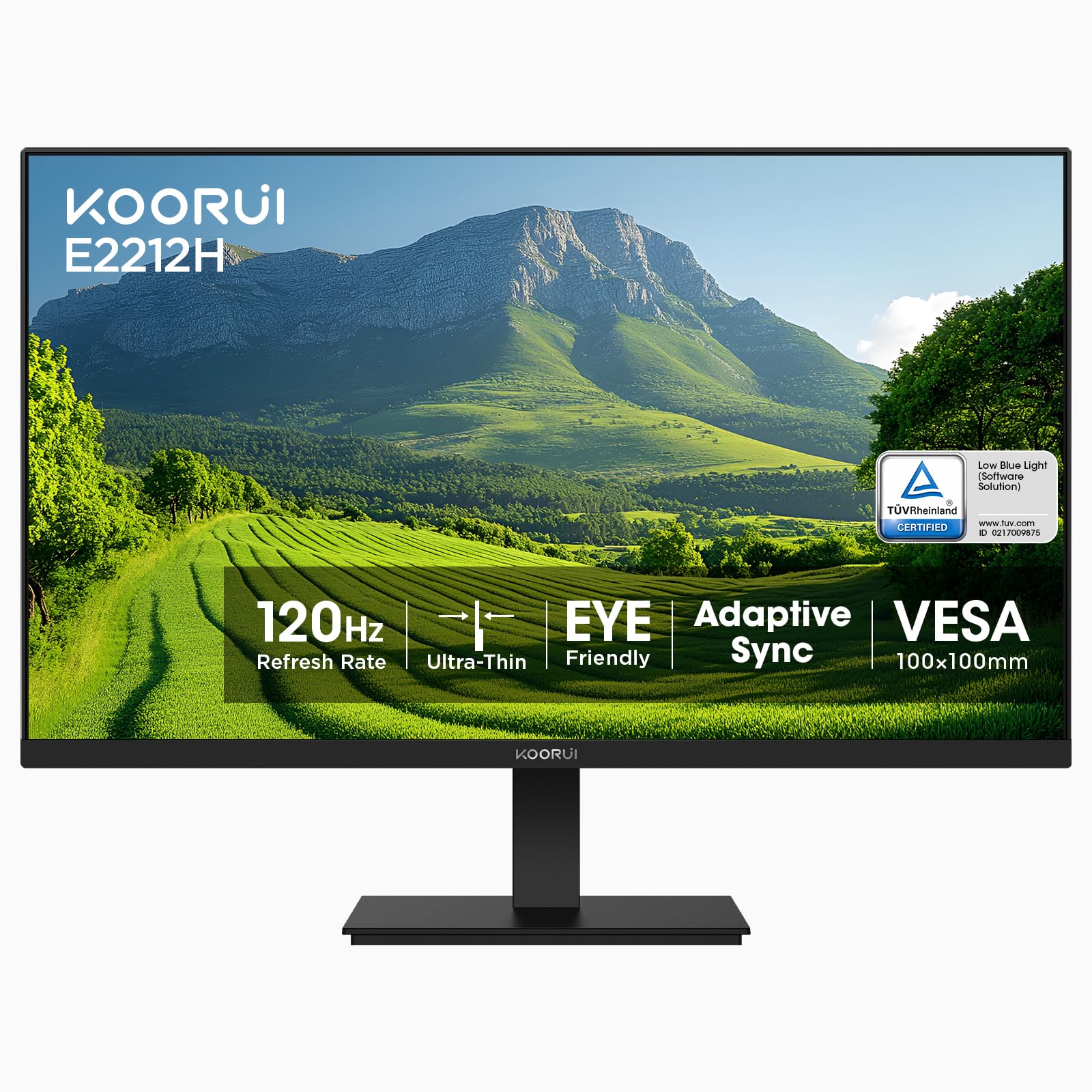
The KOORUI monitor represents the entry point into the world of feature-rich 1080p displays. For an incredibly accessible price, you get a 100Hz refresh rate, Adaptive-Sync, and a VA panel with a very high 4000:1 contrast ratio. It’s also TÜV Rheinland certified for low blue light and flicker-free operation, which is impressive at this tier.
It includes VESA mount compatibility and a basic tilt-adjustable stand, offering some flexibility in setup. The package comes with an HDMI cable and is backed by a multi-year warranty. For users building a first PC, needing a spare monitor, or simply wanting to maximize value, this KOORUI model checks many important boxes.
Feedback highlights its easy setup and the quality of the image for the cost. While it’s important to note it uses older VGA and HDMI connectivity (no DisplayPort) and has a more basic build, it consistently delivers performance that exceeds expectations for its category, making it a standout budget option.
Why it’s great
- Exceptional value with 100Hz, Adaptive-Sync, and high contrast VA panel.
- TÜV Rheinland certification for verified eye comfort.
- Includes VESA mount support and comes with an HDMI cable.
- Backed by a multi-year warranty for peace of mind.
Good to know
- Connectivity is limited to HDMI and VGA; not compatible with DisplayPort or USB-C.
- Build quality and stand are functional but basic.
- Some users report variability in long-term reliability.
Understanding the Specs
Refresh Rate (Hz)
This is how many times per second the monitor updates its image. 60Hz is standard, but 100Hz, 120Hz, or 165Hz makes everything look smoother, from mouse movement to video playback. For gaming, a higher refresh rate provides a tangible competitive and visual advantage.
Panel Type (IPS, VA, TN)
IPS offers the best color accuracy and viewing angles. VA provides deep blacks and high contrast for immersive media. TN panels are very fast but have poor viewing angles and color reproduction. For most users, IPS is the best all-around choice, with VA being a strong contender for media consumption.
Response Time (ms)
Measures how quickly a pixel can change color. A lower number (1ms to 5ms) reduces motion blur and ghosting in fast-moving scenes, which is critical for gaming. For office work and general use, a response time of 5ms or even 8ms is perfectly adequate and often not noticeable.
Adaptive-Sync (FreeSync, G-Sync Compatible)
This technology synchronizes the monitor’s refresh rate with your graphics card’s frame output. This eliminates screen tearing and stuttering for a perfectly smooth visual experience, especially in games. Most modern monitors support the AMD FreeSync standard, which is often compatible with NVIDIA cards as “G-Sync Compatible.”
FAQ
Is 1080p still good for a 27-inch monitor?
What is the most important spec for reducing eye strain?
Do I need a high refresh rate if I don’t game?
Final Thoughts: The Verdict
For most people, the 1080p monitor winner is the ViewSonic VA2456A-MHD because it masterfully blends a smooth 120Hz IPS panel with comprehensive connectivity and eye care features at a mid-range point. If you want pure gaming performance, grab the Acer Nitro KG241Y Sbiip for its 165Hz refresh and AMD FreeSync Premium. And for long-term ergonomic comfort in a home office, nothing beats the HP 24mh with its fully adjustable stand.

Mo Maruf
I created WellFizz to bridge the gap between vague wellness advice and actionable solutions. My mission is simple: to decode the research and give you practical tools you can actually use.
Beyond the data, I am a passionate traveler. I believe that stepping away from the screen to explore new environments is essential for mental clarity and physical vitality.