Our readers keep the lights on and my smoothie glass nicely filled. As an Amazon Associate, I earn from qualifying purchases.
Specs are compiled from manufacturer listings and verified buyer reviews and can change over time — please confirm the key details on the product page before buying.
Your new laptop probably skipped the disc drive entirely, and the moment you need to rip an old photo CD, install legacy software, or burn a mix for a car without Bluetooth, you are stuck. An external drive solves that in one plug-in, and the real choice depends on three things: how fast it reads and writes, whether it has extra ports for your other gear, and how it handles a desktop’s power demands versus a slim laptop’s. Here are the best external cd drive for pc options, sorted by what you actually do with them, with real specs and real owner experiences.
I’m Mohammad Maruf — the founder and writer behind WellFizz. This guide is built by comparing the manufacturers’ published specifications and the patterns across verified customer reviews, so you get each pick’s real strengths and trade-offs instead of marketing spin.
We weighed read and write speeds, portability, and compatibility to help you find the right external cd drive for pc for your setup without overpaying for features you won’t use.
Our Picks at a Glance

How To Choose The Best External CD Drive For PC
Every external drive on this list does the same core job: read and write CDs and DVDs over a USB connection. The differences that actually change your experience are speed, ports, and power delivery.
Speed: read speed vs. write speed
Check the media speed, not just the USB label. Most drives here hit a maximum 8x DVD read speed and 24x CD write/read speed. That 24x number matters when you are burning a full CD — it finishes noticeably faster than a 16x drive. USB 3.0 transfers data at up to 5 Gbps, but the disc’s own speed is the real bottleneck, so a fast USB port does not make a slow disc spin faster.
Ports: simple drive or multi-tool hub
Some drives are pure readers. Others double as a 5-in-1 or 7-in-1 hub, adding USB ports and SD/TF card slots. If you regularly offload camera photos or need to charge a phone while working, that built-in hub replaces a separate dongle. If you only need to play a DVD, the extra ports just add bulk and cost.
Power: the desktop vs. laptop trap
Thin laptops sometimes cannot deliver enough power over one USB port to spin a disc. Several drives include a second power cable for exactly this reason. On a desktop, the fix is simpler: plug into a high-power USB port on the back of the motherboard instead of the front panel. Ignore this and you may see the drive stutter or fail to read.
Quick Comparison
| Model | Best For | USB Interface | Max Speed | Extra Ports | Amazon |
|---|---|---|---|---|---|
| ORIGBELIE External DVD Drive★ Best Overall | Everyday plug-and-play | USB 3.0 + Type-C | 8x DVD / 24x CD | None | Amazon |
| Rioddas External DVD DriveRipper’s Pick | High-volume ripping | USB 3.0 | 5 Gbps transfer | None | Amazon |
| Wbacon 7-in-1 Drive | Hub + disc reader | USB 3.0 + Type-C | 8x DVD / 24x CD | USB 3.0, USB 2.0, 2x Type-C, TF, SD | Amazon |
| GODBPNYMU 5-in-1 Drive | Mac + PC compatibility | USB 3.0 + Type-C | 480 Mbps transfer | 2x USB 2.0, TF, SD | Amazon |
| Aumdie External DVD Drive | Compact card transfer | USB 3.0 + Type-C | 8x DVD / 24x CD | USB 3.0, USB 2.0, TF, SD | Amazon |
| Amicool Ultra-Slim Drive | Travel and legacy discs | USB 3.0 + Type-C | 24x CD / 8x DVD | None (extra power port) | Amazon |
In-Depth Reviews
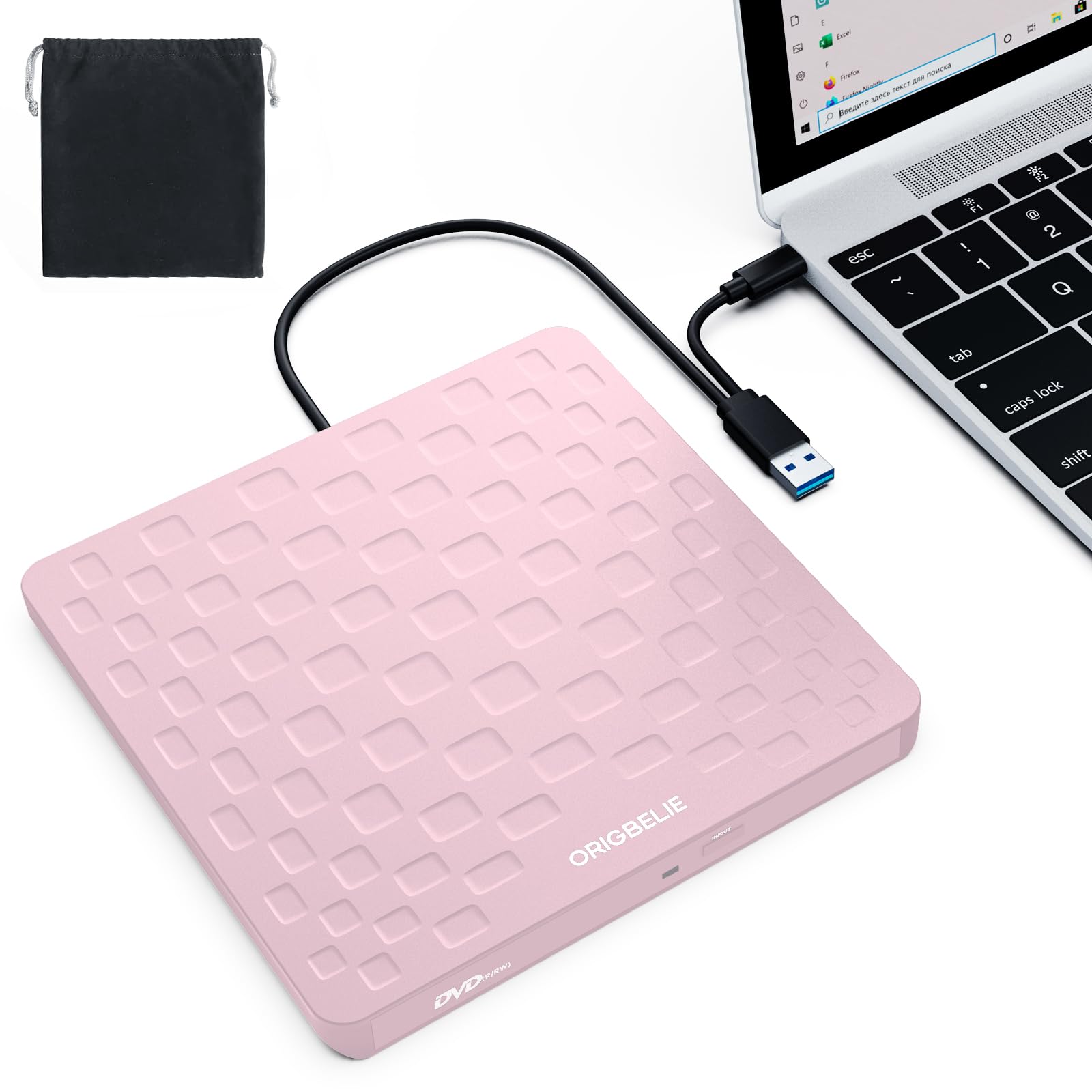
1. ORIGBELIE External CD DVD Drive
Our pick — over 4★ from 650+ verified ratings; the strongest balance of quality and price.
The crowd favorite that pairs true plug-and-play with a pocket-friendly 13mm body.
For most people, this is the one to buy. It connects via USB 3.0 or Type-C, and the moment you plug it in, your PC recognizes it — no drivers, no power adapter, no setup screens. The drive hits a maximum 8x DVD read/write speed and 24x CD read/write speed, so a standard music CD burns in a couple of minutes rather than a coffee break. Owners describe the experience in one repeated phrase: plug it in and it just works, whether they are burning a CD, watching a movie, or pulling old files off a disc.
The whole thing is 13mm thick and weighs 0.2 kg, which is why the portability and slim design get so much praise. The integrated data cable means you cannot lose the cord, and the anti-skid bottom keeps it stable on a desk. At 4.4 stars across 600+ ratings, it sits at the top of the heap. There is a small honesty check here: the slim plastic shell needs gentle handling, and the included USB cord runs short, so desktop users may want an extension.
Compatibility stretches wide — Windows 11/10/8/7, Linux, and Mac OS 10.6 or above. Just know it will not read Blu-ray discs, and it is not built for TVs, tablets, or game consoles. For a straightforward reader and burner on a laptop or desktop, it checks every box at an entry-level price.
What wins people over
- True plug-and-play with no driver install
- Ultra-slim 13mm and 0.2 kg for travel
- USB 3.0 speeds up to 5 Gbps
The trade-offs
- Plastic shell needs careful handling
- Short attached USB cable
- No Blu-ray or console support
Reach for this if: you want a no-fuss, budget-friendly drive that burns CDs and plays DVDs on day one.
Look elsewhere if: you need extra USB ports or card slots built into the drive itself.
2. Rioddas External CD/DVD Drive
The workhorse that ripped 70+ DVDs without a hiccup, built for heavy, repeated use.
If your project is bulk — ripping an entire DVD collection or backing up a shelf of discs — this drive earns its reputation. The standout real-world proof: one owner moved “70+ DVDs to Ubuntu server over months” and called the performance solid. That longevity is backed by a physical eject button that releases stuck discs even when the PC fails to recognize the drive, plus copper mesh technology for stable data transmission. USB 3.0 delivers transfers up to 5 Gbps, with backward compatibility to USB 2.0.
The brushed texture shell and embedded cable design keep it tidy in a bag. It is genuinely plug-and-play, powered entirely by the USB port with no external adapter needed. The functionality is the most-praised aspect here, with thousands of owners confirming reliable reads and burns across Windows, Linux, and macOS 10.16+ (though newer MacBook Pro models have reported issues, so check your specific machine). It also handles CD-ROM/R/RW, DVD-ROM/R±RW/R±DL, and VCD formats.
At 4.3 stars from a massive owner base, this is the safest bet for someone who wants proven endurance over flashy extras. The honest caveat is that a few units arrive with a loose front tray plate — easy to snap back but worth checking on arrival. If you just need occasional reads, this may be more machine than you need.
Built to last: the copper mesh and physical eject button are features you will appreciate months in, not just on day one.
Who it suits: archivists, Linux users, and anyone ripping large disc libraries.
3. Wbacon 7-in-1 External CD/DVD Drive

A disc drive and a 7-port hub in one slim shell, so you ditch the separate dongle.
This is the multi-tasker of the group. Beyond reading and burning CDs and DVDs at 8x DVD / 24x CD speeds, it packs a 7-in-1 USB hub: one USB 3.0 port, one USB 2.0 port, two Type-C ports, one TF slot, and one SD card slot. That means you can plug in a wireless mouse receiver, offload camera photos via the SD slot, and charge a phone — all while the drive sits on your desk. It is a genuine laptop companion for anyone who ran out of ports.
The plug-and-play setup needs no drivers, and the skip-proof rubber pad keeps it steady during burns. Reliability is the most-praised aspect, with owners noting it works well with Windows 11/10/8/7/XP and Linux. A quick note on the SD and TF slots: they cannot run at the same time, so pick one card at a time. The data transfer rate hits 5 Gbps over USB 3.0, roughly 10 times faster than USB 2.0, per the manufacturer.
Given its mid-range price, you get a lot of function per dollar. The mixed feedback on connectivity and ease of use is worth a shrug — the drive works as expected, but some users found the multi-port layout takes a moment to figure out. For a laptop user who needs both a disc reader and a port expander, this is the smartest single purchase on the list.
The extras that matter
- SD and TF card slots for camera transfers
- Two Type-C ports plus USB 3.0 and 2.0
- Rubber pad prevents desk sliding
Watch out for
- SD and TF slots work one at a time
- Surface Pro, Chromebook, and Blu-ray not supported
Pick this for: a compact desktop setup where ports are scarce and discs are still in rotation.
skip it if: you only need to play a single DVD and want the smallest, simplest drive possible.
4. GODBPNYMU 5-in-1 External CD/DVD Drive

A durable 5-in-1 drive with a 24-month warranty and support for nearly every OS and brand.
This one leans into confidence. The GODBPNYMU drive pairs a 5-in-1 hub — two USB 2.0 ports plus a TF and SD card slot — with a sturdy ABS build and a 24-month warranty that most rivals do not match. Compatibility is the name of the game here: it works with Windows 7/8.1/10/11/XP/Vista/2000/ME, Linux, and all versions of macOS, across brands like Apple, Dell, Sony, Toshiba, HP, Lenovo, ASUS, Samsung, and Acer. Functionality and compatibility are the two most-praised aspects, and for good reason.
The integrated cable design includes both USB-A and USB-C 3.0 tips, and a separate power cable handles laptops whose USB ports cannot deliver enough juice — a real issue on ultra-thins. At 6.1 x 5.87 x 0.59 inches, it is compact enough for a laptop bag. The notable spec difference: its data transfer rate is 480 Mbps (USB 2.0-class) rather than the 5 Gbps of the others, so bulk file transfers will run slower. Owners still call read and burn speeds fast and quiet in practice.
The honest trade-off is that transfer rate. If you are moving huge video files over the hub, the 480 Mbps ceiling will show. For everyday disc reading, burning, and card transfers, it is a reliable, well-supported pick that arrives in a leather-style box with a 5V/2A power cable for low-power ports.
Most dependable: the 24-month warranty and broad OS support make it the safest choice for mixed-device households.
Know the limit: the 480 Mbps transfer rate trails the USB 3.0 drives on this list for big file moves.
5. Aumdie External CD/DVD Drive
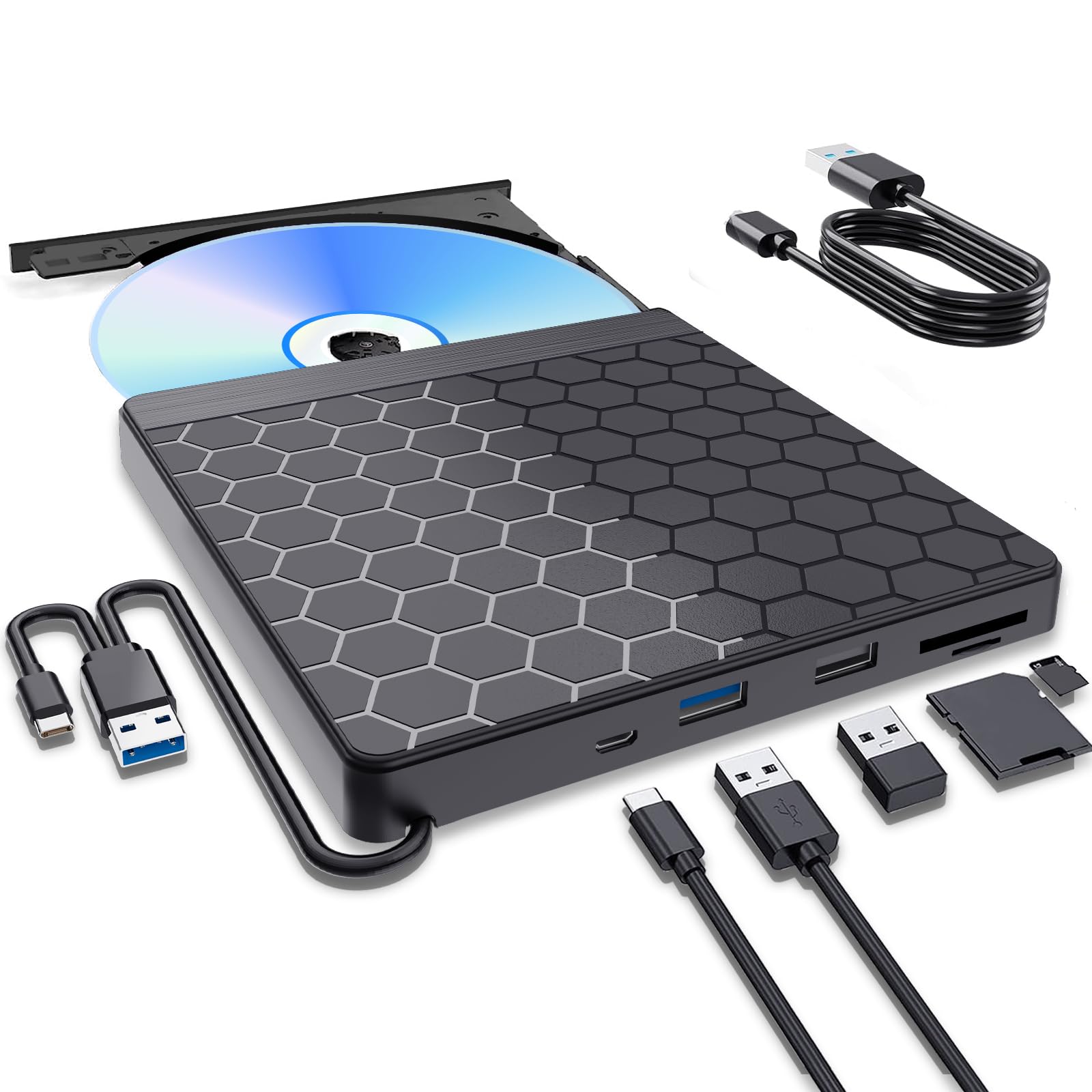
A slim 5-in-1 drive that reads discs and transfers camera cards with one USB 3.0 plug.
This drive earns its place for the photographer or videographer who still works with SD and TF cards. It offers an independent TF card slot and SD card slot (one at a time), plus a USB 3.0 port and a USB 2.0 port for connecting a U-disk or charging a phone. The USB 3.0 ports are color-coded blue so you instantly know which one is fast, and the drive hits a maximum 5 Gbps transfer speed with 8x DVD / 24x CD read and write speeds.
The compatibility picture is broad — Windows 11/10/8.1/7/XP/2003/Vista, Linux, and all Mac OS versions — with one significant exception: it does not support M1, M2, M3, or M4 chip Macs. If you have an Apple Silicon Mac, this is not the drive for you. That is the single biggest filter here. For PC users and Intel Macs, it is plug-and-play with a skip-proof rubber pad and embedded cable for tidy storage.
The build quality is the recurring area of feedback — owners praise the compact size and easy hookup, but a few note the casing feels flimsy and should be handled with care. At 4.3 stars with a modest owner base, it is a solid mid-range value, backed by a 1-year quality guarantee with free quick replacement on defects. For Windows users who want card slots and disc reading in one portable unit, it delivers.
Best for: Windows laptop owners who shoot with cameras and need SD/TF card transfers alongside DVD playback.
Not for: anyone with an M1/M2/M3/M4 Mac — look at the Rioddas or Amicool instead.
6. Amicool Ultra-Slim External DVD Drive
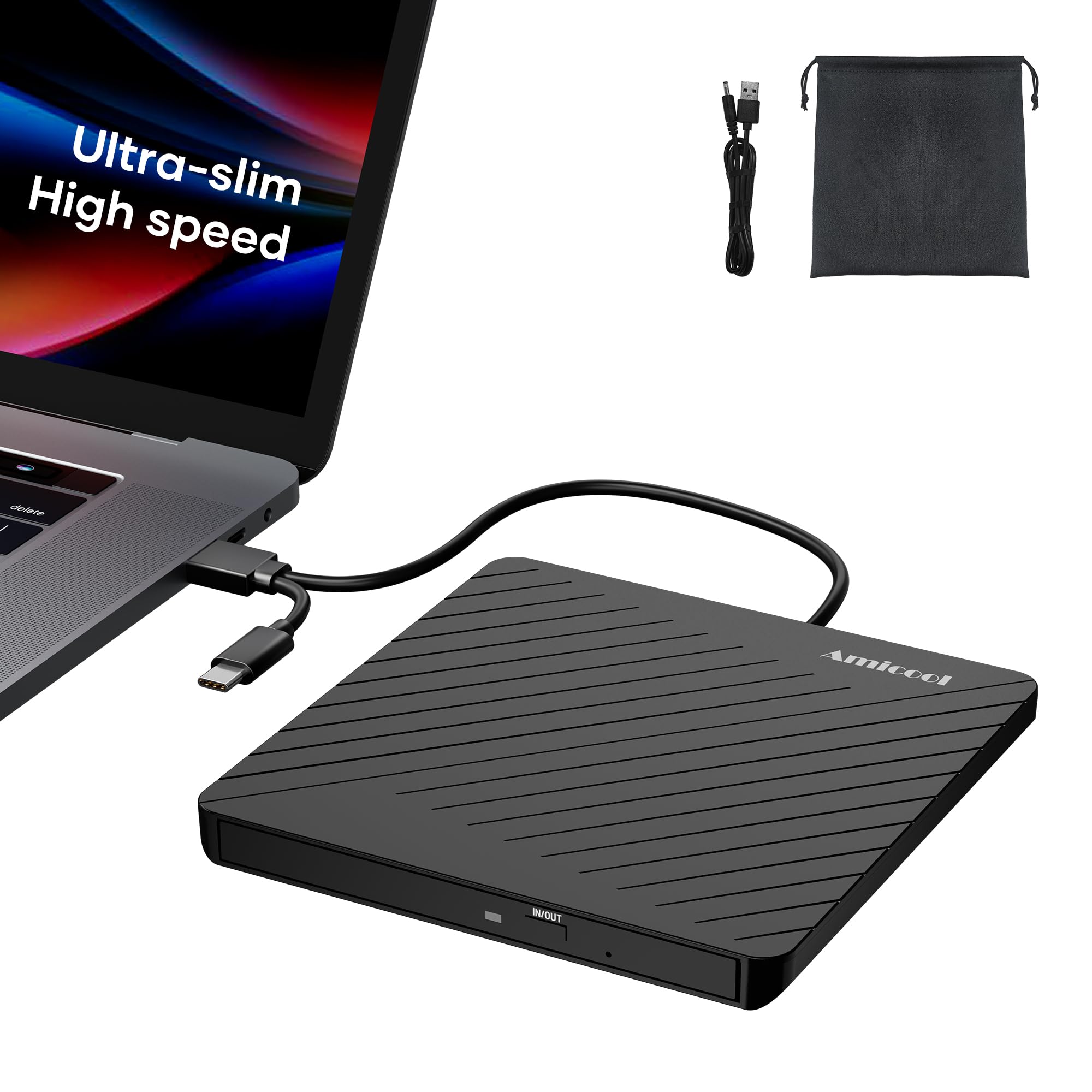
The thinnest drive here — 0.5 inches — with a dedicated charging port for underpowered laptops.
This is the premium travel pick, and its defining spec is the footprint: just 0.5 inches thick and 7.35 ounces, slimmer than most smartphones. The double-ended USB cord tucks into a groove on the bottom, so there is no loose cable rattling in your bag. It comes with a soft storage pouch to keep the drive and discs safe from dust and scratches — a genuinely useful extra that the cheaper drives skip.
The smart engineering here is the dedicated charging port with a separate power cord. Ultra-thin laptops often cannot feed enough power over one USB port to spin a disc reliably; this drive solves that with a second port so you get full-speed reads and burns without compromise. It burns at 24x CD / 8x DVD speeds and supports CD-ROM, CD-R, CD-RW, DVD-ROM, DVD-R/RW, DVD+R/RW, DVD-R DL, and DVD+R DL formats. The manual emergency eject hole (paperclip compatible) is a thoughtful safety net if software control fails.
It works with Windows 11/10/8/7/XP/Vista, Linux, and MacBook/iMac. The only real complaint in the feedback is the USB cord length — roughly 6 inches, which forces desktop users to grab an extension. For a laptop-focused buyer who travels and wants a premium, pocketable build, this is the most polished unit on the list.
Travel-ready design: the pouch, tangle-free cable groove, and emergency eject make it the most complete kit here.
One catch: the short 6-inch cable means desktop use almost certainly needs a USB extension.
Understanding the Specs
USB 3.0 vs. USB 2.0 transfer rates
USB 3.0 moves data at up to 5 Gbps, which is what most drives on this list advertise. The practical benefit shows up when you copy files from the drive to your PC or burn a disc — it finishes in seconds rather than minutes. The exception here is the GODBPNYMU drive at 480 Mbps, which is USB 2.0-class speed; fine for reading discs, slower for moving big files. If you mostly play DVDs, either speed works. If you rip libraries, chase 5 Gbps.
8x DVD / 24x CD media speed
These numbers describe how fast the drive spins a disc, not the USB connection. A maximum 8x DVD read/write speed and 24x CD read/write speed is the standard across this list and represents the physical limit of the laser. You cannot speed up a disc beyond this — the USB port just feeds data to the PC. For burning, 24x means a full music CD finishes in a few minutes, so the media speed matters most for heavy burners.
FAQ
Will an external CD drive work with my new MacBook that only has USB-C ports?
Why does my external DVD drive stutter or fail to read on my desktop?
Can I play Blu-ray discs with these external CD/DVD drives?
Do these drives work with game consoles like PS4, Xbox, or Switch?
What is the difference between a 5-in-1 hub drive and a simple external drive?
How fast does an external CD drive burn a music CD?
Can the SD and TF card slots be used at the same time?
Is an external CD/DVD drive powered by the USB port alone?
Will these drives read old burned discs from a decade ago?
Final Thoughts: The Verdict
For the majority of shoppers, the external cd drive for pc winner is the ORIGBELIE External DVD Drive because it nails the essentials — true plug-and-play, 8x DVD / 24x CD speeds, and a 13mm slim body — at an entry-level price. If you want to rip a large disc library and value endurance, grab the Rioddas instead. And for the traveler who wants the most polished, pocketable build with a storage pouch and emergency eject, the Amicool Ultra-Slim is the one to reach for.
How We Picked
We do not accept paid placement. Every pick is matched to a real buyer and a real use-case; we do not hands-on test units.
Sources & Methodology
Specifications: manufacturer listings and product documentation. Review insights: verified customer reviews, as of August 2026. Pricing: not shown on this page (it changes often); check the current price via the retailer link.
As an Amazon Associate, WellFizz earns from qualifying purchases. This does not affect which products we feature.
Related Guides

Mo Maruf
I created WellFizz to bridge the gap between vague wellness advice and actionable solutions. My mission is simple: to decode the research and give you practical tools you can actually use.
Beyond the data, I am a passionate traveler. I believe that stepping away from the screen to explore new environments is essential for mental clarity and physical vitality.