Our readers keep the lights on and my smoothie glass nicely filled. As an Amazon Associate, I earn from qualifying purchases.
Specs are compiled from manufacturer listings and verified buyer reviews and can change over time — please confirm the key details on the product page before buying.
Forget spreadsheets and the “I was here at 8:59” debates. A real time clock for your small business ends the guesswork by stamping a physical, undeniable record of when your team arrives, breaks, and leaves — so payroll stops being a trust exercise. For most small teams, a punch-card clock like the uPunch CR1000 offers zero learning curve, while a cloud model like the NGTeco suits remote managers.
I’m Mohammad Maruf — the founder and writer behind WellFizz. This guide is built by comparing the manufacturers’ published specifications and the patterns across verified customer reviews, so you get each pick’s real strengths and trade-offs instead of marketing spin.
Maybe you are torn between a traditional punch-card staple and a biometric app. This breakdown of the employee time clock for small business category shows exactly which features matter for a team of five versus fifty.
Our Picks at a Glance


How To Choose The Best Employee Time Clock For Small Business
A time clock should eliminate payroll guesswork, not add complexity. Choose a model that requires no training and prints legible, easy-to-read records. Start with how many people are punching in and whether they all work in one place.
Punch Cards vs. Biometric vs. Cloud
A classic punch-card clock is cheap, offline, and trusted by employees who like a tangible record. A biometric model with fingerprint or face scanning stops “buddy punching” — where one person clocks in for another — but costs more and needs power and mounting. Cloud models send data to an app so you can approve hours from home, yet many need good Wi-Fi to be useful.
Quick Comparison
| Model | Best For | Punch Method | Payroll Math | Power | Amazon |
|---|---|---|---|---|---|
| uPunch CR1000★ Best Overall | Classic 2-in-1 time & date stamp | Time Cards | None (manual) | CR2 battery | Amazon |
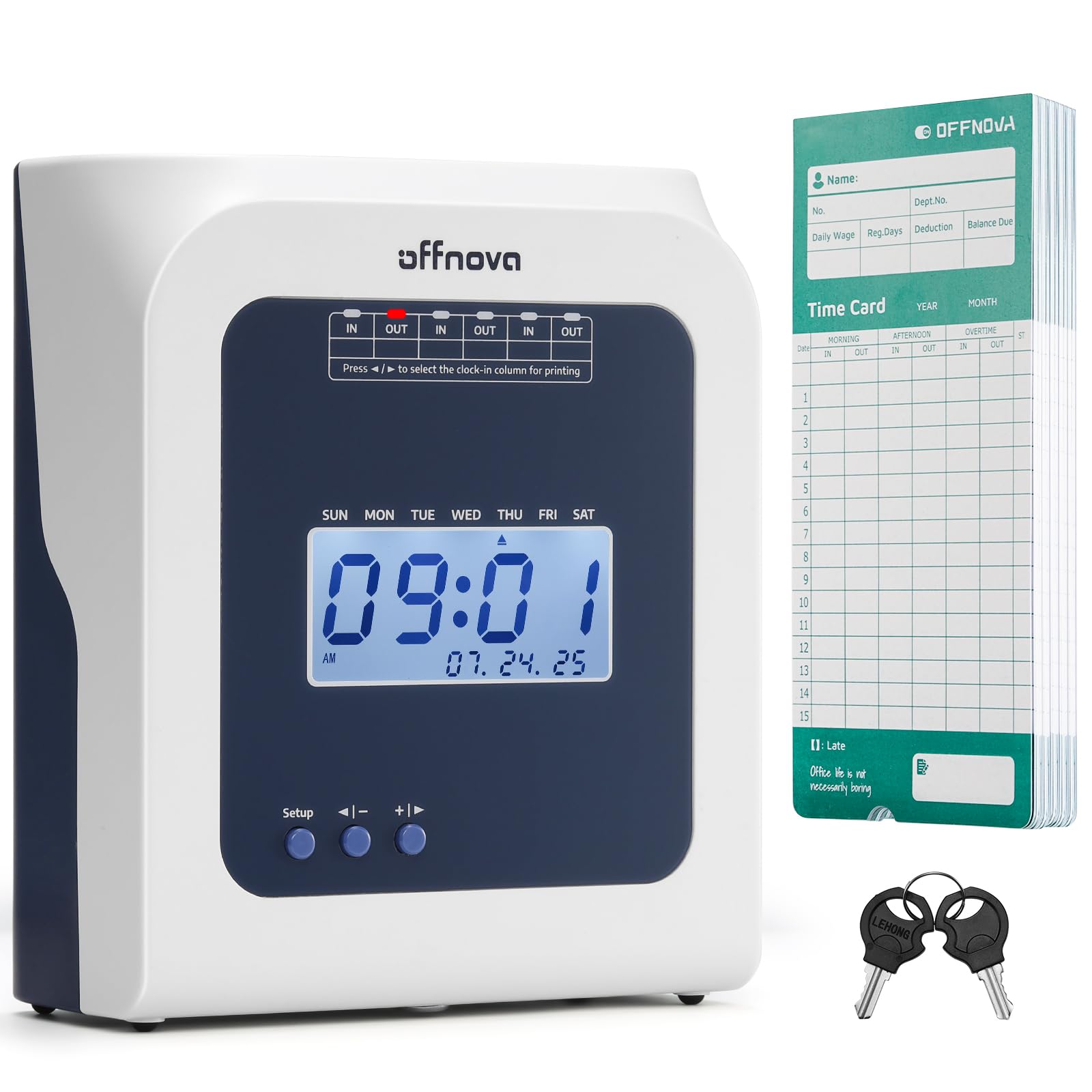
| OFFNOVA ThermalEasiest Setup | No-ink, no-network simplicity | Thermal Cards | None (manual) | Corded Electric | Amazon |
| Pyramid 2500 BundleBudget Champion | Lowest cost per employee | Time Cards | None (manual) | Corded Electric | Amazon |
| Pyramid 2500K1 | Complete rack & ribbon kit | Time Cards | None (manual) | Corded Electric | Amazon |
| uPunch HN4500 | Automatic overtime calculation | Time Cards | Auto (50 emp) | Corded Electric | Amazon |
| Allied AT-3000R | Document stamping + time clock | Time Cards | None (manual) | Corded Electric | Amazon |
| NGTeco TC1 Cloud | Remote access & multiple check-ins | Face/Finger/RFID/PIN | Auto (cloud) | Corded Electric | Amazon |
| Lathem 1600e | Project time to the minute | Time Cards | None (manual) | Corded Electric | Amazon |
| AMANO TCX-35 | Rugged durability, made in USA | Time Cards | None (manual) | Corded Electric | Amazon |
In‑Depth Reviews
1. uPunch CR1000 Digital Time Clock and Date Stamp
Our pick — 4.5★ from 600+ verified ratings; the strongest balance of quality and price.
The reliable stamp-and-punch workhorse that upgrades your old analog without an app or monthly fee.
This uPunch gives you two tools in one: it stamps employee time cards AND prints date-and-time proof on incoming documents. The built-in window in the cover makes loading cards straightforward, so staff can punch in and out without fiddling. It runs on a single included CR2 battery, which means you can place it anywhere without hunting for an outlet.
At 4.4 pounds, it is noticeably sturdier than the 3.1-pound Pyramid 2500, giving it a more solid footprint on a counter. It ships complete — 50 time cards, one ribbon, and 2 keys — so you have everything on day one. As owners put it, “Love the time clock – needed a new time clock for our 15 employee company,” and the print comes out “nice and dark on the time card.”
What wins people over is the combination of easy setup and dark, legible printing. Teams upgrading from an old analog unit find the digital display a relief, and several owners mention it works with their custom time cards. The date-stamp side with preset messages is a bonus for businesses that also need proof of receipt on paperwork.
What wins owners over
- Dark, legible print on standard time cards
- Dual function stamps documents too
- No software or network setup required
Who should think twice
- No automatic hour calculation
- Battery needs periodic replacement
Grab this if: you want a straightforward punch-card clock that also stamps documents, with zero software.
Look elsewhere if: you want the clock to add up hours for you.
2. OFFNOVA Thermal Time Clock
Plug it in, drop in a card, and walk away — thermal printing means no ribbons to swap.
This OFFNOVA is the closest thing to a set-and-forget clock. It uses thermal printing, so there is no ink ribbon to replace and no network to configure — just plug it in and it works. It automatically detects the front and back of the time card, then auto-feeds and aligns it, so employees only insert the card and let the machine do the rest.
The included 50 thermal time cards are a real convenience, saving you a separate purchase. Late arrivals and early departures get marked right on the card automatically. As owners put it: “Easiest time clock to set up. Works like a gem.”
The clear strength is the no-ink design, which keeps operating costs near zero after purchase. Buyers also appreciate the simple, plug-and-play nature for non-technical staff. The honest caveat is that it is intentionally low-tech — there is no automatic hour calculation, so you still total the columns yourself.
Why people love it
- No ink ribbons to buy or replace
- Auto-detects card front/back and aligns
- Truly plug-and-play setup
The trade-off
- You add up hours manually
- Thermal cards are a specific purchase
Reach for this if: your team is non-technical and you want the simplest possible punch machine.
Consider another if: you need calculating totals or payroll integration.
3. Pyramid Time Systems 2500 Bundle
Tracks unlimited employees on a 31-day card, all for a price that suits a growing shop.
Pyramid’s 2500 is built for the classic small business: it handles an unlimited number of employees, and each two-sided card covers up to 31 days. The six-column layout gives you three In/Out punch intervals per day — morning, lunch, and afternoon. At 3.1 pounds, it is lighter and more compact than the uPunch CR1000, which makes it easier to fit on a crowded desk.
The bundle includes 100 time cards, 2 security keys, and an ink ribbon cartridge, so you are fully stocked from the start. The top-loading, auto-aligning feed means there’s no precise slot to hit. As owners say, “Works perfect for our small business.”
The leading praise is how well it functions as a pure time tracker. Buyers highlight the easy setup and the auto-correct date feature that prevents over-stamping. The recurring minor gripe is that forgetting to press OUT can overstamp the IN time, and the manual math means you total hours yourself.
Best for: a small shop that wants a dependable, low-cost punch clock with no software. Keep in mind: you’ll do the payroll arithmetic by hand.
4. Pyramid Time Systems 2500 Auto-Aligning Bundle [2500K1]

A backlit display plus a 10-slot rack — the whole timekeeping station in one box.
This Pyramid 2500K1 bundle takes the same reliable core and adds everything around it. You get 100 time cards, 2 ink ribbon cartridges, 2 security keys, and a 10-slot rack to hold your team’s cards. The backlit display shows time, date, and day, so it’s readable even in a dim back room.
The auto-aligning punch keeps entries neat, and the clock adjusts for Daylight Saving Time and short months automatically. Double-sided printing lets one card span up to 31 days. The unit is compact enough for a desk or a wall mount, giving you placement flexibility.
Buyers who run construction sites and retail shops praise its reliability and how little training employees need. The strongest thread in the reviews is ease of use, with the auto-punch alignment getting called out as a reason the records stay legible. The honest note is that the time accuracy has mixed feedback, so keep an eye on it as the unit ages.
Why this bundle shines
- Everything included: cards, ribbons, rack, keys
- Backlit display readable in low light
- Auto DST and short-month adjustment
Watch out for
- Time accuracy reports are mixed
- Manual hour calculation required
Pick this if: you want a complete station with a rack so cards never scatter. skip it if: you need the clock to compute overtime for you.
5. uPunch HN4500 Advanced Calculating Time Clock

The only punch-card machine here that totals regular and overtime hours on its own.
If manual payroll math is your biggest headache, this uPunch is the standout. The HN4500 automatically computes regular and overtime hours for up to 50 employees, so you get a running total printed right on the card. That alone can save you real time each pay period. The bundle is generous: 200 time cards, two 10-slot racks, three ribbons, and 2 keys.
The AutoAlign technology keeps punches error-free across pay periods, and the reminder alarm alerts employees to missed punches. Setup is straightforward with clear instructions, backed by U.S.-based support. This is also the heaviest unit on the list at 8.8 pounds, which signals a rugged, pro-grade build.
The automatic calculations are the thing everyone raves about, with owners noting it beats simpler clocks that only stamp. Durability gets strong praise too, with one buyer running it in a dusty garage across extreme temps. The honest caveat: reviews on card-reading reliability and hour accuracy are mixed, so some owners still spot-check with manual records.
The payoff: automatic overtime totals for 50 employees — the closest thing to payroll software in a punch-card machine. The catch: a few buyers report occasional card-read errors.
6. Allied Time AT-3000R Digital Time Clock and Date Stamp

A dual-purpose desk unit that stamps time cards by day and documents by afternoon.
This Allied unit is built for businesses that track both people and paperwork. As a time clock, employees punch in and out on standard cards. As a document stamp, it prints the date, time, and one of 13 preset messages — including RCVD and FAXD — to prove when something was received or processed. You can set the print to the left or right with an adjustable depth margin.
Setup takes just a few minutes, and you can pick 12 or 24-hour format plus 60 or 100-minute increments for easier payroll math. An optional password keeps employees from tampering with the date and time. It also supports four languages — English, Spanish, French, and Portuguese — which helps diverse teams.
Owners consistently call it well-made and easy to use, with the dual stamping function a frequent highlight. The most-discussed challenge is aligning the time card in the print window, which a few buyers found fiddly at first. There is also no automatic hour calculation — expect to total the columns yourself.
Standout strengths
- Dual time clock + document stamp
- 13 preset stamp messages
- Adjustable print position and margin
Known friction
- Card alignment takes practice
- No automatic hour totals
Choose this for: a front office that stamps mail and invoices as well as tracking staff. Not ideal if: you want the machine to compute overtime.
7. NGTeco TC1 Cloud Time Clock
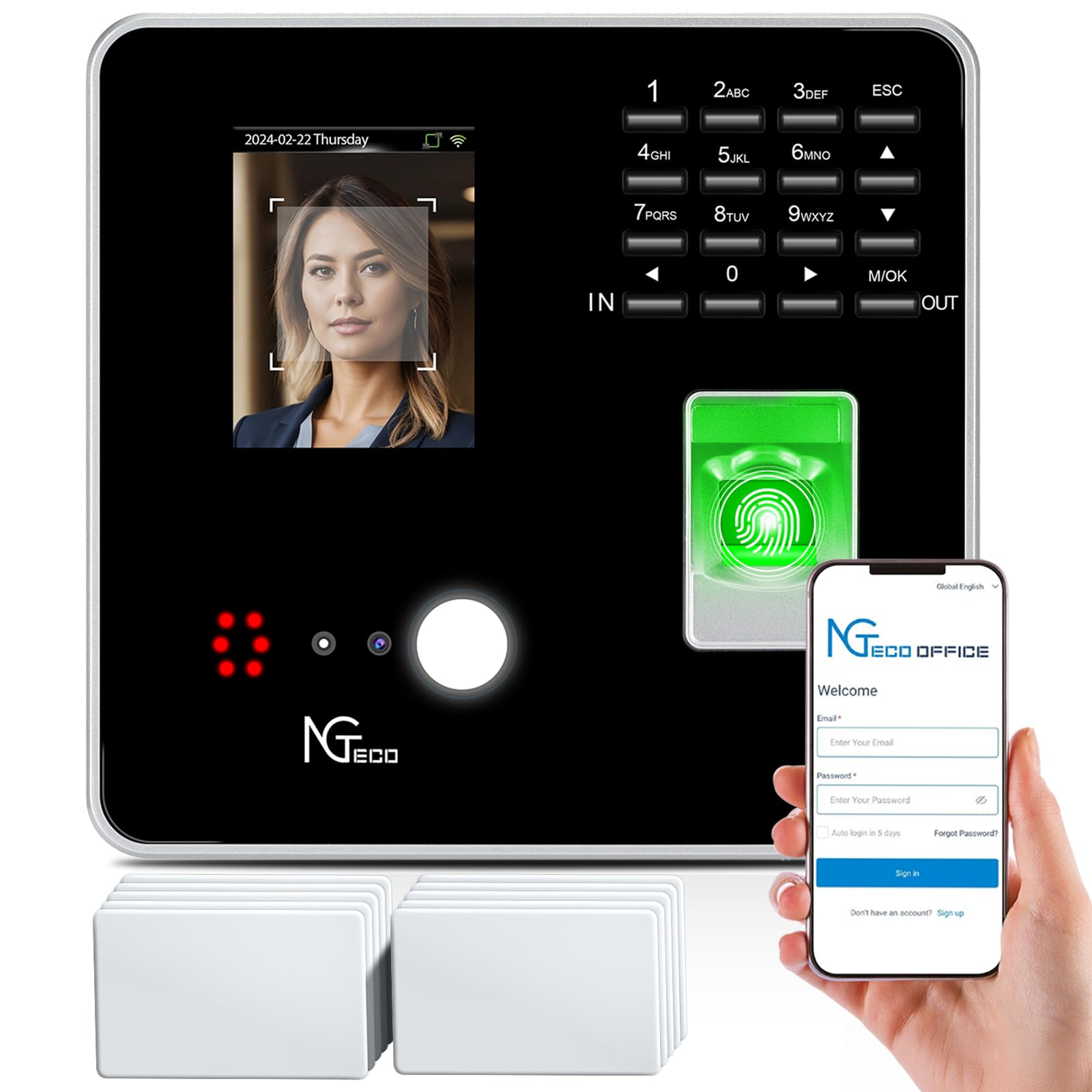
Face, fingerprint, RFID, or PIN — this wall-mounted cloud clock kills buddy punching for good.
The NGTeco is the modern answer for teams tired of physical cards. It offers four ways to check in — face, fingerprint, RFID card, or PIN — so you can match the method to each employee. Backed by the NGTeco Office software and app, you can pull real-time punch data from any browser, no matter where you are. It supports up to 200 users and 30,000 logs.
The cloud service runs on AWS US servers with encryption, and the core features — auto time calculation, storage, and basic reports — are free with no monthly fee. Offline punches sync automatically once the network returns, so a Wi-Fi dropout doesn’t lose data. Customizable shifts handle fixed, rotating, split, and flexible schedules.
The standout praised across reviews is the responsive customer support, with several owners noting patient, helpful reps who guided setup. The functionality and straightforward setup earn consistent praise. The honest caveat: reliability and accuracy get mixed feedback, so if your payroll depends on perfect auto-calculations, verify the totals in the first weeks.
Why go cloud
- Remote access from any browser
- No monthly subscription for core features
- Eliminates buddy punching with biometrics
What to verify
- Reliability and accuracy feedback is mixed
- Needs stable 2.4GHz Wi-Fi or LAN
Go with this if: you manage staff across locations and want real-time cloud data with no subscription. Think twice if: your Wi-Fi is unreliable or you prefer a fully offline system.
8. Lathem 1600e Time Clock Punch Machine & Document Stamp

Tracks time to the minute per project, so client invoices reflect every hour of work.
This Lathem is aimed at businesses that bill by the hour or track project costs. Beyond standard in/out times for payroll, it records project time to the minute for accurate invoicing. The Tru-Align cards keep punches perfectly aligned, and the included 25 cards get you started immediately. It prints the date, time, and up to 13 preset messages like SENT, PAID, FILED, and VOID on documents.
One of its best features is the continuous calendar that never needs resetting — it updates year, month, and date automatically until the year 2099. So you never worry about a clock error throwing off payroll. Built with an ABS frame, it is designed to take daily abuse.
Owners who run shops with 13-plus employees appreciate the reliable, basic clock-in/out function. Durability gets strong praise, with one buyer noting these units last about 5 to 6 years even in the severe heat of a Phoenix shop. The honest limitation: this is a manual machine with no hour calculation and no internet connectivity.
The draw: per-minute project tracking and a calendar that never needs resetting. The reality: you total hours by hand, and there’s no app or software.
9. AMANO TCX-35 Time Clock
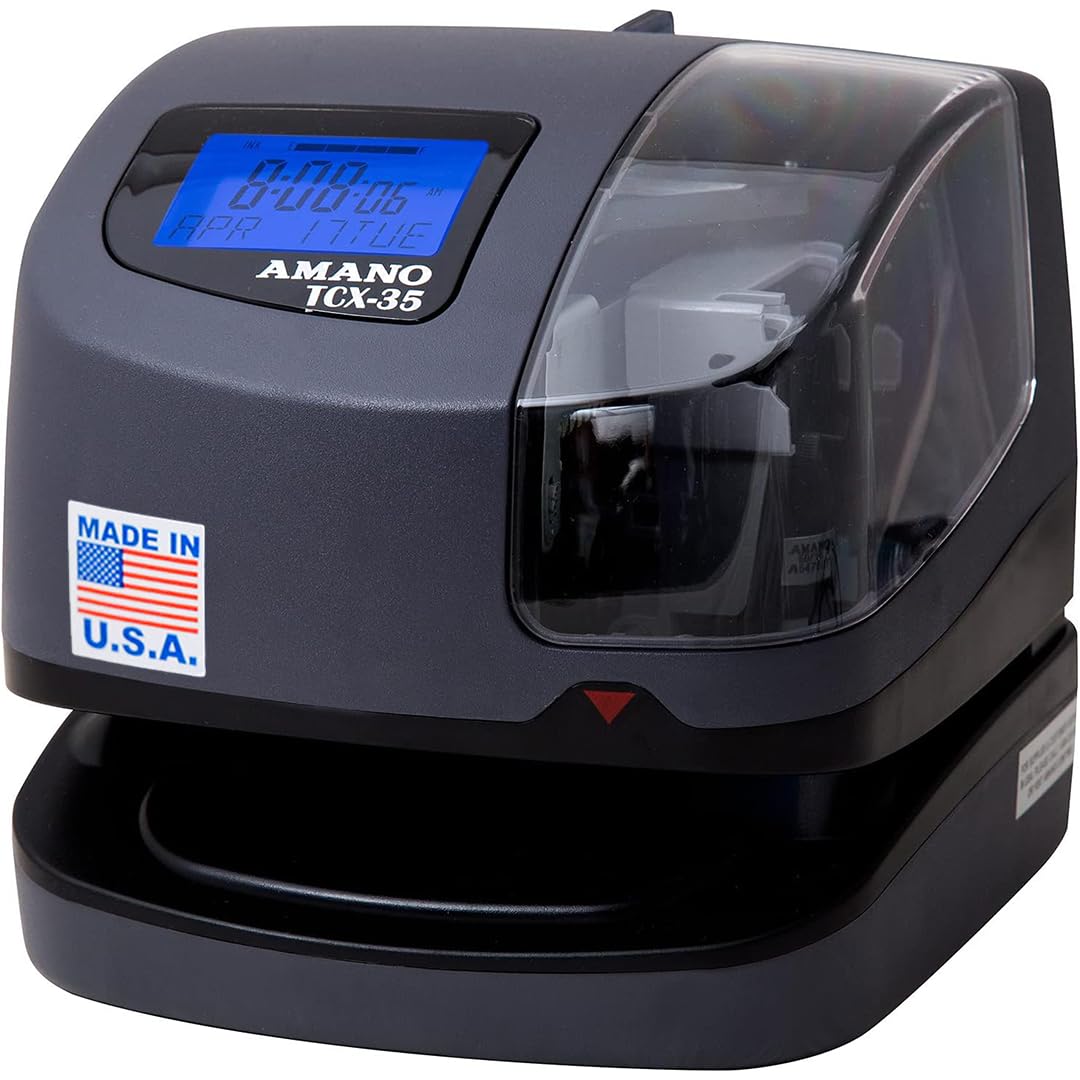
The rugged American-made classic that keeps perfect time even in a dirty repair shop.
The AMANO TCX-35 is the premium choice when you want a clock that simply doesn’t quit. Made in the USA with a one-year factory warranty, it automatically adjusts the year, month, date, and time — including leap years and daylight saving — so you never correct it manually. The ribbon ink capacity indicator tells you before it runs dry, preventing blank punches.
It prints custom messages like REC’D, PAID, and FILE, and supports multiple languages. The internal light, clear window, and film guide prevent double prints and keep timecard alignment simple for employees. Around 10 customizable time and date formats give you flexibility in how the stamp appears.
Owners praise how easily employees pick it up — one team said they love it over their old clock because it is so much easier to use. It has proven itself in tough settings, with a buyer running it in a dirty repair shop for technicians clocking on and off repair orders. The trade-off is the price tag, which sits at the top of this list, and the manual hour calculation.
The premium reasons
- Made in USA with 1-year warranty
- Auto leap year & DST adjustment
- Ribbon ink indicator prevents blank stamps
What you give up
- Most expensive unit in this guide
- No automatic hour totals
Worth it for: a workshop or office that needs a rugged, reliable, long-life clock. Not for: budget-first buyers or anyone wanting cloud features.
Understanding the Specs
Calculating vs. Non-Calculating
A calculating clock like the uPunch HN4500 adds up regular and overtime hours automatically, saving you payroll math. A non-calculating model — the majority here — simply stamps the time, and you total the columns yourself. Choose calculating if you have many hourly staff; choose basic if you don’t mind a few minutes of manual addition.
Ink Ribbon vs. Thermal Printing
Ribbon-based clocks print with an ink cartridge that eventually runs out and needs replacing — but the cards are cheap and standard. Thermal clocks like the OFFNOVA use heat to print on special thermal cards, so there’s no ink to buy, but the cards are a specific, ongoing purchase. If you hate consumables, thermal wins; if you want the lowest per-card cost, ribbon is better.
FAQ
How do I choose between a punch-card clock and a biometric cloud clock?
Do I need a time clock or will a spreadsheet work?
What is the difference between calculating and non-calculating time clocks?
Will a punch-card clock work with my existing time cards?
How often do I need to replace the ink ribbon?
Does a time clock need to be plugged in or can it run on batteries?
Can a time clock also stamp documents like invoices and mail?
How long does a punch-card time clock last?
Is a biometric time clock worth the extra cost?
Do cloud time clocks require a monthly subscription?
Final Thoughts: The Verdict
The crowd favorite — 4.5 stars across hundreds of owners — is the employee time clock for small business winner, the uPunch CR1000, because it balances dual stamping, dark print, and zero software at a fair price. If you want automatic overtime totals, grab the uPunch HN4500. And for remote access with no monthly fee, the NGTeco TC1 Cloud is the one to reach for.
How We Picked
We do not accept paid placement. Every pick is matched to a real buyer and a real use-case; we do not hands-on test units.
Sources & Methodology
Specifications: manufacturer listings and product documentation. Review insights: verified customer reviews, as of August 2026. Pricing: not shown on this page (it changes often); check the current price via the retailer link.
As an Amazon Associate, WellFizz earns from qualifying purchases. This does not affect which products we feature.
Related Guides

Mo Maruf
I created WellFizz to bridge the gap between vague wellness advice and actionable solutions. My mission is simple: to decode the research and give you practical tools you can actually use.
Beyond the data, I am a passionate traveler. I believe that stepping away from the screen to explore new environments is essential for mental clarity and physical vitality.