Our readers keep the lights on and my smoothie glass nicely filled. As an Amazon Associate, I earn from qualifying purchases.
Specs are compiled from manufacturer listings and verified buyer reviews and can change over time — please confirm the key details on the product page before buying.
The search for an Ergonomic Mechanical Keyboard usually starts with a simple complaint: your wrists ache by 4 p.m. The fix isn’t just any split board—it’s finding the one that matches your typing style and desk setup, from a budget tented split to a premium sculpted keywell. This guide sorts through the real ergonomic designs—split, tented, and curved Alice layouts—to tell you exactly which one ends the pain and which one will just sit there looking nice.
I’m Mohammad Maruf — the founder and writer behind WellFizz. This guide is built by comparing the manufacturers’ published specifications and the patterns across verified customer reviews, so you get each pick’s real strengths and trade-offs instead of marketing spin.
To save your wrists without wasting money, here are the ergonomic mechanical keyboard picks that deliver genuine split and tented comfort for long workdays.
Our Picks at a Glance


How To Choose The Best Ergonomic Mechanical Keyboard
The crowd favorite — a 4.7-star rating across 28 owners — belongs to the Keychron Q13 Max, which earns the top spot for its premium feel and Alice layout. But before you buy, you need to know three things: the layout type, the switch feel, and the connectivity options.
Anatomy of Ergonomics
A true ergonomic board separates your hands into two halves so your arms stay shoulder-width apart. Some designs add tenting, which tilts the keys up like a handshake. Others, like the Kinesis Advantage2, scoop the keys into bowl-shaped wells to reduce finger stretching. The Cloud Nine C989M can separate up to 8 inches, keeping arms and wrists aligned.
Switch Sensibility
Your finger joints care about the switch feel. Tactile switches (like Kailh Brown) give a physical bump without a loud click, making them a favorite for heavy typists. Linear switches (like the creamy ones in the RK S70) are smooth and quiet, which many find easier on the fingers during long sessions. The Kinesis Advantage2’s Cherry MX Brown switches are rated for 50 million key presses.
Connectivity and Desk Fit
Decide if you need a keyboard that stays on your desk or one you can move around. The EPOMAKER Split65 connects wirelessly to up to 5 devices using three modes: Bluetooth 5.0 (a short-range wireless standard), 2.4GHz (a faster wireless dongle), and USB-C (a wired cable). The Kinesis Advantage360 with Bluetooth runs for 2+ weeks between charges, so you won’t plug it in often. If you prefer simplicity, the Perixx PERIBOARD-535 uses a durable 5.9-ft USB cable—just plug it in and type.
Quick Comparison
| Model | Best For | Layout | Switch Type | Ergonomic Feature | Amazon |
|---|---|---|---|---|---|
| Cloud Nine C989M★ Best Overall | Full-size office work | 104-key Split | Kailh Brown Tactile | Up to 8″ Separation | Amazon |
| Perixx PERIBOARD-535BRBest Value | Windows/Mac versatility | 104-key Split | Brown Tactile | Adjustable Tilt Wrist Rest | Amazon |
| MechLands Feker Alice98Top Performer | Customization enthusiasts | 98-key Alice | Hot-Swappable | Angled Alice Layout | Amazon |
| RK Royal Kludge S70 | Wireless gamers | 75% Split | Linear Creamy | 8 Adjustable Feet | Amazon |
| EPOMAKER Split65 | Compact multi-device users | 65% Split | Wisteria Linear | Detachable Halves | Amazon |
| Cloud Nine ErgoTKL | Tenkeyless desk setups | 87-key Split | Kailh Brown | 6.5″ Separation | Amazon |
| Keychron Q13 Max | Premium metal builds | 96% Alice | Hot-Swappable Red | Full-Metal 6063 Aluminum | Amazon |
| Kinesis Advantage2 | Serious RSI relief | 87-key Keywell | Cherry MX Brown | 20° Tenting & Keywells | Amazon |
| Kinesis Advantage360 | Wireless keywell ergonomics | 87-key Keywell | Mechanical (Gateron) | Adjustable Tenting & Split | Amazon |
In-Depth Reviews
1. Cloud Nine C989M Ergonomic Mechanical Keyboard
Our pick — over 4★ from 650+ verified ratings; the strongest balance of quality and price.
The full-size split that keeps your number pad and keeps your wrists in line for 8-hour days.
This is the only split design here with a full number keypad, which matters if you crunch data all day. The halves can separate up to 8 inches to keep your arms and wrists ergonomically aligned, and the built-in wrist rests angle up 7 degrees to keep your hands in their natural position. The Kailh Brown switches give you tactile feedback without the racket.
The thing everyone raves about is the quality — it’s the most-praised feature by far, with ergonomics close behind. Buyers report the tenting and wrist rest are comfortable enough to game for 3-4 hours without wrist pain, a common complaint with regular boards. The 10 programmable macro keys and RGB lighting make it a legitimate gaming companion too, not just an office tool.
The catch is size and sensitivity. At 28.6 inches wide, it’s a substantial footprint, and the space between the halves can’t be locked, so you lift them separately. The reviews also note it’s quite sensitive to liquid — even a few drops can kill it until you clean it. A short connecting cable is a minor annoyance, but it uses standard USB-C, so replacements are cheap.
Reasons to grab it
- Built-in 7-degree tenting keeps wrists naturally angled
- Full number pad with 10 macro keys for office workflows
- Genuine relief — no wrist pain during long gaming sessions
Things to weigh
- Very wide footprint at 28.6 inches may not fit small desks
- Extremely sensitive to liquid; treat drinks with care
- Halves can’t lock together, making transport awkward
Ideal for: Office workers who refuse to give up their number pad but want genuine split ergonomics.
Think twice if: You have a cramped desk or tend to sip coffee while typing — this board demands space and dry hands.
2. Perixx PERIBOARD-535BR Wired Split Keyboard
A smaller, smarter split that proves you don’t need a giant frame for real wrist relief.
Owners mention this one beats the Cloud Nine — and the numbers back it up: at 18.66 inches wide versus the Cloud Nine C989M’s 28.6 inches, it keeps a full 104-key layout. The integrated palm rest adjusts through 0, -4, and -7 degrees to correct wrist pronation and prevent muscle strain. The brown tactile switches give clear feedback without the noisy click.
Ergonomics is what owners praise most, with keyboard quality right behind. The programmable software lets you remap keys, set custom actions, and use 4 macros, while dedicated Mac and Windows keys switch systems easily. It’s compatible with Windows 7, 8, 10, 11, Linux, and Mac OS X, and the 5.9-ft braided USB cable reaches most setups.
The honest trade-off is the palm rest. Several owners find the hard plastic a bit unforgiving, with sharp corners on a small rest. There’s no backlight either, so this is a daylight-and-desk-lamp board. The fn key also sends no OS signal, which matters if you rely on it for shortcuts.
Smart trade-off: You trade a little palm-rest plushness and backlighting for a footprint that slips into any desk scenario, plus full Mac/Windows flexibility.
Reach for this if: You need a space-saving split that switches between your work PC and home Mac without fuss.
Look elsewhere if: You’re a hardcore gamer needing per-key RGB or you want a padded, cushioned palm area.
3. MechLands Feker Alice98 Custom Keyboard
The angled-key Alice layout that molds to your hand’s natural position without losing the numpad.
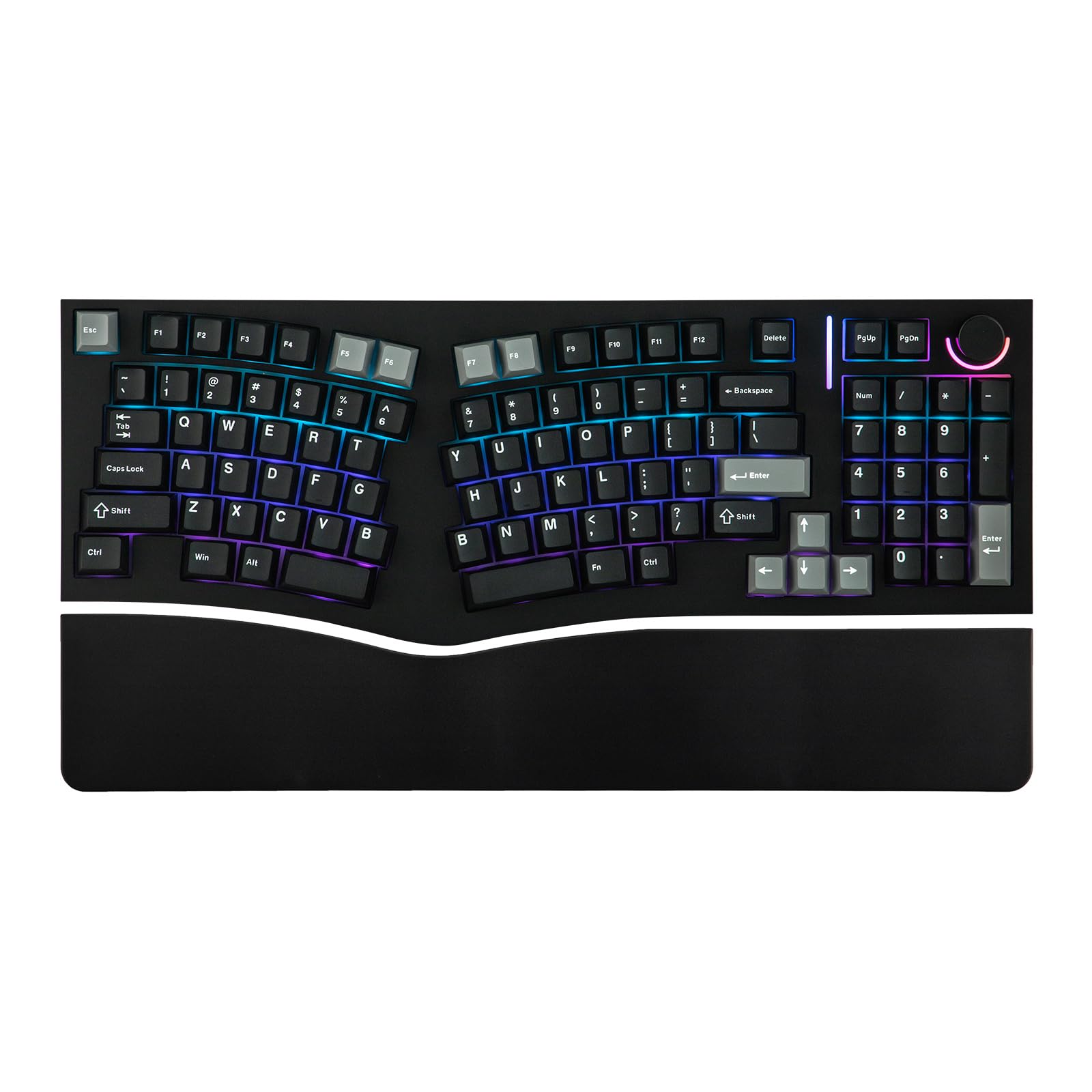
This is the Alice layout done right — angled keys align with your hands’ natural position, and a split spacebar accommodates that ergonomic design. It keeps a 98-key layout with the numpad included, so you gain comfort without sacrificing function. The gasket mount with PC plate gives a soft, consistent feel across the whole board.
Owners give the edge to sound and quality — the keys have a satisfying “clocky” sound and the build is praised. The VIA compatibility means you can remap keys, create macros, and set complex combos without proprietary software. A media control knob adds convenience, while the south-facing RGB offers 21 customizable lighting effects.
The honest concern here is reliability. While many owners have used it over a year with wrist pain reduced, a few report faulty keys on arrival or key chatter that persists even after swapping switches. The soft-touch finish can also discolor from skin oils over time. It’s a great value if you win the quality lottery, but the QC is inconsistent.
Why it stands out
- Full VIA programmability for total key remapping
- 5-layer sound padding for a rich, muffled thock
- Hot-swappable PCB — change switches without soldering
Watch for
- Occasional key chatter from the start
- Soft-touch finish shows skin oil stains
- Build quality varies between units
Perfect for: Customization tinkerers who want to fine-tune their layout and switches over time.
Not for: Buyers who want zero-fuss reliability straight from the box — plan for possible QC hiccups.
4. RK Royal Kludge S70 Split Keyboard

A wireless split with eight tenting angles and a battery that survives two weeks off the juice.
The standout feature is the 8 adjustable feet that let you tent the typing angle freely to find your natural position. The 3150mAh battery inside the left half lasts up to two weeks without backlight, giving you genuinely long wireless sessions. The 75% compact layout saves desk space without losing essential keys.
Build quality wins owners over, with keyboard feel right behind. The pre-lubed linear creamy switches deliver smooth keystrokes with a satisfying, quiet sound. The left half can even be used as a one-handed keyboard with its 5 programmable macro keys, and it works with Windows, Mac, and Android systems.
The recurring gripe is auto power-off, which happens even in USB mode — a firmware issue with no workaround. Some owners note the first keystroke is lost after wake, and battery life is shorter than hoped in practice. The fixed wrist rest is also unpadded, so plan for that if you lean heavily.
Versatile but quirky: The tenting range and wireless freedom are excellent, but auto-sleep behavior demands patience or a firmware update.
Pick this for: Gamers who want a compact wireless split with adjustable tenting and macro keys for one-handed play.
skip it if: You need a keyboard that stays awake in wired mode — the auto-off will test you.
5. EPOMAKER Split65 QMK/VIA Keyboard

The compact split that connect five devices at once and sounds like a creamy dream.
This 65% split detaches into halves you can angle and distance freely, reducing strain on wrists and forearms by letting you type in a natural posture. The top-mounted structure with 4 layers of sound dampening — Poron sandwich foam, IXPE switch pad, PET pad, and Poron socket pad — eliminates hollow noise for a pure “thocky” sound. It connects via Bluetooth 5.0, 2.4GHz, or USB-C.
Owners who switched from bigger boards report the split eased chest fatigue from wide builds, and the feel beats pricier splits. The rotary knob controls volume, brightness, and multimedia with a spin. With QMK/VIA support, you get real-time display configuration, and the NKRO ensures no chattering during fast typing.
The trade-off is the compact layout itself. Many find the transition from 75% to 65% hard, with a month-long adaptation period, and the missing F-row sent at least one owner back. The Linux support app is old and barely works, so Linux users may struggle with full programmability.
What you gain
- Connect to 5 paired devices without re-pairing
- 4-layer dampening for a premium “thocky” sound
- Detachable halves adapt to your typing posture
What you lose
- No F-row — a real adjustment if you use function keys
- Linux config tool is outdated and barely functional
- Steep learning curve from larger layouts
Best for: Multi-device users who want a compact split that follows them from PC to Mac to tablet.
Steer away if: You’re on Linux or you can’t live without a dedicated function row.
6. Cloud Nine ErgoTKL Tenkeyless Split Keyboard

The tenkeyless split with an aluminum wheel that controls everything from volume to scrolling.
This board separates up to 6.5 inches (16.5 cm) to keep hands and arms properly separated and help provide pain-free typing for 8+ hours. The built-in side slope of 7 degrees keeps hands at their natural inward angle without a separate tenting kit. It also works with standing desks, offering adjustable forward tilt of 0, -4, or -7 degrees.
Quality wins owners over, with customizability close behind. The aluminum smart wheel is the party piece, letting you control volume, switch applications, and scroll web pages with a spin, plus assign custom functions via the app. Programmable hotkeys and a USB pass-through port round out the feature set for work and play.
The noise gets mixed reviews — some find it acceptable for a mechanical, others report a metallic “ring” sound with every keystroke. The palm rest vinyl can flake after years of use, with few replacement parts available. It’s also a larger footprint than the Perixx, though the Kailh Browns offer a satisfying tactile experience.
Feature-rich option: The smart wheel and standing-desk tilt make this the most versatile Cloud Nine, if you can live with the acoustics.
Choose it for: Standing-desk workers who want an aluminum control wheel and programmable hotkeys in a tenkeyless split.
Pass on it if: You need a quiet board for a shared office or shared mic space.
7. Keychron Q13 Max Alice Wireless Keyboard
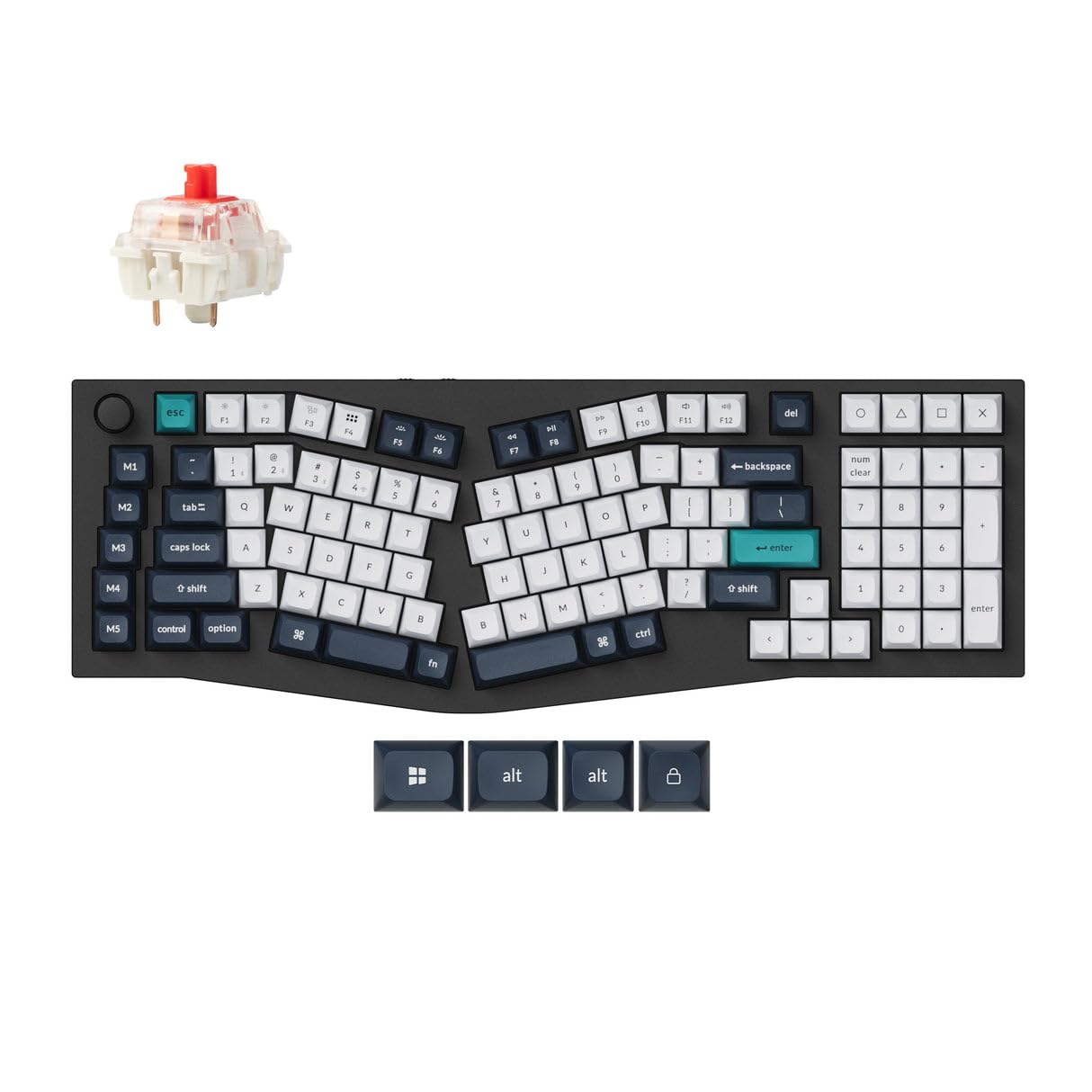
A full-metal work of art with a 1000 Hz polling rate that feels as good as it looks.
The entire body is crafted from 6063 aluminum, CNC-machined, polished, and sandblasted through 24 manufacturing stages — this thing is heavy, stable, and built to outlive you. It features a unique 96% Alice layout that keeps the numpad while angling keys to your hands’ natural position. The double-gasket design adds silicone pads between top and bottom cases to reduce acoustic resonance.
Owners rate this among the best they’ve owned, praising the sound dampening and satisfying key feel. With a 2.4GHz connection at a 1000 Hz polling rate, latency is hardly noticeable even in competitive games. The Bluetooth 5.2 connects to three devices, and the hot-swappable Gateron Red switches are smooth and easy to change.
The honest downsides: it weighs about 5 lbs, so it’s a desk fixture, not a portable board. The tall sculpted KSA keycaps aren’t translucent, so backlighting won’t shine through the legends. The config tool requires Chrome rather than Safari for Mac users, a small but real friction point.
Worth the premium
- Full-metal construction with exceptional sound dampening
- 1000 Hz polling rate on 2.4GHz and wired modes
- 96% Alice layout keeps the numpad
Prepare for
- 5 lbs of weight — it stays where you put it
- Non-translucent keycaps hide the RGB backlight
- Chrome-only config tool for Mac users
Ideal for: Typists who want a premium, heavy, stable board with the numpad and top-tier wireless performance.
Not for: Anyone wanting RGB shine-through legends or a keyboard to travel with.
8. Kinesis Advantage2 Ergonomic Keyboard

The bowl-shaped keywell that repositions your thumbs and ends wrist pain for serious RSI sufferers.
This is the gold standard for repetitive strain injury. The patented design features split keywells with a concave shape, thumb keys, orthogonal layout, and 20 degrees of tenting. The concave wells reduce hand and finger extension, while the thumb clusters handle Enter, Space, Backspace, and Delete — redistributing work from your weaker little fingers to stronger thumbs.
Customers note wrist and hand pain gone within two months, with some buying a second unit. The Cherry MX Brown switches have a low activation force and tactile feedback, rated for 50 million key presses. The Driverless Smart Set engine gives full onboard programmability in QWERTY or Dvorak, with settings saved to the keyboard’s 4MB flash memory.
The learning curve is real — expect about a month of adaptation. Modifier keys sit in thumb clusters, which is brilliant once learned but challenging initially. It’s loud, has a taller profile, and the plastic feels less premium than the price suggests. There’s no backlighting, and the glued-on legends can fade with heavy use.
Ergonomics first: No board here does more for serious wrist strain, but you pay for it with a steep learning curve and a large footprint.
Buy it for: Programmers and touch typists with genuine RSI who can commit to a month of retraining.
pass on it if: You’re a heavy 10-key user — the embedded numpad is hard to see — or you need a quiet board.
9. Kinesis Advantage360 Professional Split Keyboard

The wireless evolution of the keywell, with Bluetooth freedom and adjustable tenting for a true handshake posture.
This takes the Advantage2 design and splits it in two, positioning the keywells at shoulder-width to keep wrists straight and perpendicular to the home row. The vertical column layout reflects your fingers’ natural motion better than staggered keys. You get three tenting heights to reach a neutral “handshake” posture that reduces forearm pronation.
Owners love the ergonomics and comfort, noting reduced shoulder and wrist pain. The Bluetooth connectivity is flawless for many, with battery life stretching 2-3 months in some reports. It’s fully programmable with open-source ZMK firmware, and the thumb clusters handle frequent keys like Enter, Space, Backspace, and Delete.
The Bluetooth is the recurring weakness — some reviewers point out the left half frequently disconnecting from the right, or random disconnects during use. The ZMK remapping software is unfriendly, requiring GitHub and USB connection per half. A few units show double key-pressing even after replacement. It’s also heavy and expensive, though the concave wells and tenting make it the most ergonomic option here.
Why it leads
- True split keywells at shoulder-width for straight wrists
- 3-level tenting for a neutral handshake posture
- Pre-lubed Gateron browns feel smooth and responsive
Where it struggles
- Bluetooth half-to-half disconnections reported
- ZMK config requires GitHub and technical comfort
- Palm pads can drift and cause typos
For the dedicated: Ergonomists and programmers who will invest time in learning ZMK (an open-source wireless keyboard firmware) and accept occasional wireless hiccups will get the deepest keywell comfort—your fingers rest in a curved well that reduces stretching.
Pass if: You need plug-and-play simplicity or have had bad Bluetooth experiences.
Understanding the Specs
Split vs. Alice Layouts
True split keyboards separate the halves so you can position your arms at shoulder width. Alice layouts angle the keys inward within a single frame to match your hands’ natural splay. The Kinesis keywells go further, scooping keys into a bowl shape to reduce finger reach. Your choice depends on how much change you can handle — full splits feel dramatically different from normal boards.
Switch Types and Feel
Mechanical switches define your typing experience. Tactile switches (like Kailh Brown or Cherry MX Brown) give a bump at the actuation point without a loud click. Linear switches (like the creamy ones in the RK S70) move smoothly with no bump. Clicky switches add an audible click on top of the tactile bump, which some find satisfying but noisy. The right switch reduces finger fatigue during long sessions.
Connectivity and Power
Wired keyboards are plug-and-play—just connect the braided USB cable and type. Wireless models add Bluetooth or a 2.4GHz receiver; for gaming, look for a 1000 Hz polling rate (how often the keyboard reports your keystrokes to the PC), which the Keychron Q13 Max offers. Battery life varies: the RK S70 claims two weeks on a 3150mAh battery (a measure of battery capacity), while the Kinesis Advantage360 can last months. Think about if you need to pair with multiple devices or just want a tidy desk without cables.
Tenting and Adjustability
Tenting tilts the keywells up on a slope, putting your hands in a more neutral “handshake” position. The Kinesis boards offer 20 degrees or three selectable heights, while the RK S70 has 8 adjustable feet. This reduces forearm pronation — the rotation that causes strain. Fixed tenting, like the Cloud Nine’s 7-degree wrist rest, is simpler but less customizable to your body.
FAQ
What is the difference between a split keyboard and an Alice layout keyboard?
Will an ergonomic mechanical keyboard actually reduce wrist pain?
How long does it take to get used to a split keyboard?
Are tactile or linear switches better for typing long hours?
Can I use a Mac and Windows keyboard on the same ergonomic board?
What does a hot-swappable keyboard mean for me?
How long do the mechanical switches last?
Does an ergonomic keyboard need software to work?
Is a tenkeyless or full-size ergonomic keyboard better for me?
Final Thoughts: The Verdict
For most people, the ergonomic mechanical keyboard winner is the Cloud Nine C989M because it pairs genuine split ergonomics with a full number pad — the crowd favorite that keeps your workflow intact. If you want a lighter footprint and Mac/Windows flexibility, grab the Perixx PERIBOARD-535BR. If you’re dealing with serious repetitive strain and can handle a learning curve, the Kinesis Advantage2 is the specialist’s choice.
How We Picked
We do not accept paid placement. Every pick is matched to a real buyer and a real use-case; we do not hands-on test units.
Sources & Methodology
Specifications: manufacturer listings and product documentation. Review insights: verified customer reviews, as of August 2026. Pricing: not shown on this page (it changes often); check the current price via the retailer link.
As an Amazon Associate, WellFizz earns from qualifying purchases. This does not affect which products we feature.
Related Guides

Mo Maruf
I created WellFizz to bridge the gap between vague wellness advice and actionable solutions. My mission is simple: to decode the research and give you practical tools you can actually use.
Beyond the data, I am a passionate traveler. I believe that stepping away from the screen to explore new environments is essential for mental clarity and physical vitality.