Our readers keep the lights on and my smoothie glass nicely filled. As an Amazon Associate, I earn from qualifying purchases.
Specs are compiled from manufacturer listings and verified buyer reviews and can change over time — please confirm the key details on the product page before buying.
Juggling soccer practice, work meetings, dentist appointments, and date nights usually means one person becomes the family secretary. A family planner centralizes schedules, chores, and meals into one visible hub. You get two main styles to choose from: a paper wall calendar for the satisfying ritual of writing things down, or a touchscreen that syncs with your phone. This guide covers the best options in both styles, so you can pick the one that fits how your family actually operates.
I’m Mohammad Maruf — the founder and writer behind WellFizz. This guide is built by comparing the manufacturers’ published specifications and the patterns across verified customer reviews, so you get each pick’s real strengths and trade-offs instead of marketing spin.
Ready to end the chaos? Here are the family planner picks that actually keep households organized without adding more mental load to your day.
Our Picks at a Glance
How To Choose The Best Family Planner
Before you buy, think about where the planner will live and who needs to read it every day. A wall calendar works best in a high-traffic hallway, while a fridge magnet board suits a smaller kitchen, and a digital screen fits a family that already lives on shared phone calendars.
Match the format to your family’s habits
Paper planners give you a permanent visual record of the month and need zero setup, but they only update when you write on them. Dry-erase boards are endlessly reusable and great for quick changes, yet they ghost over time if you use the wrong markers. Digital touchscreens auto-sync from your phone and can show photos, but they cost more and need power and Wi-Fi.
Count the writing space, not just the inches
The most common complaint across every paper planner is tiny day boxes. A calendar labeled “large” is only useful if each date square actually fits multiple events. With four kids and two working parents, a single line per day becomes unreadable within a week, so look for grids that clearly hold several entries per date.
Check the hidden costs before you commit
Some digital planners promise the world but push premium features behind a subscription. Read carefully whether chore charts, meal planning, and photo screensavers are free or locked behind a monthly Plus plan. The same features can be free on one model and paid on another, which changes the real value instantly.
Quick Comparison
| Model | Best For | Format | Day Box Writing Space | Calendar Sync | Amazon |
|---|---|---|---|---|---|
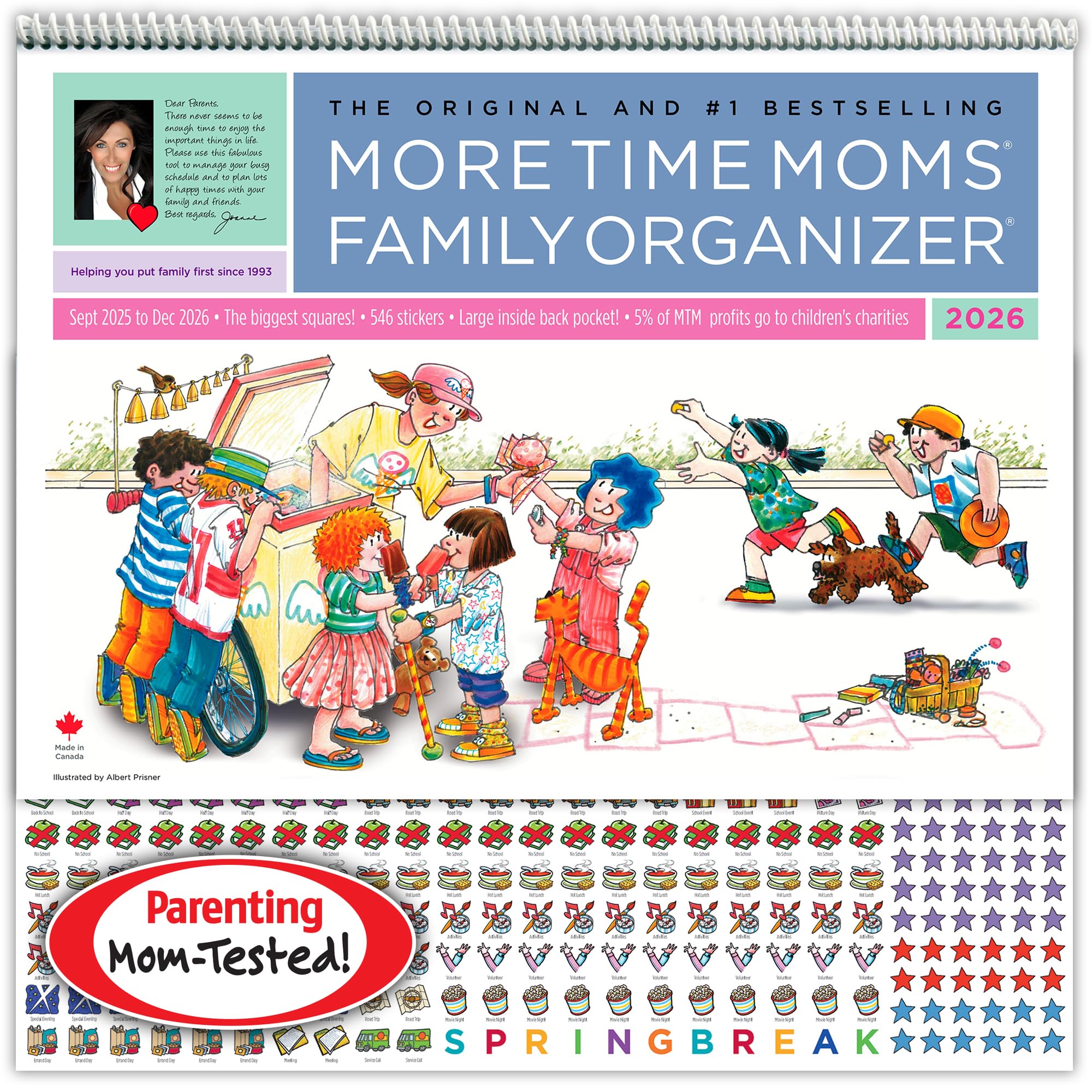
| More Time Moms Family Organizer★ Best Overall | Classic paper planning with stickers | Wall Calendar (15″x22″) | Large grid boxes | None (manual) | Amazon |
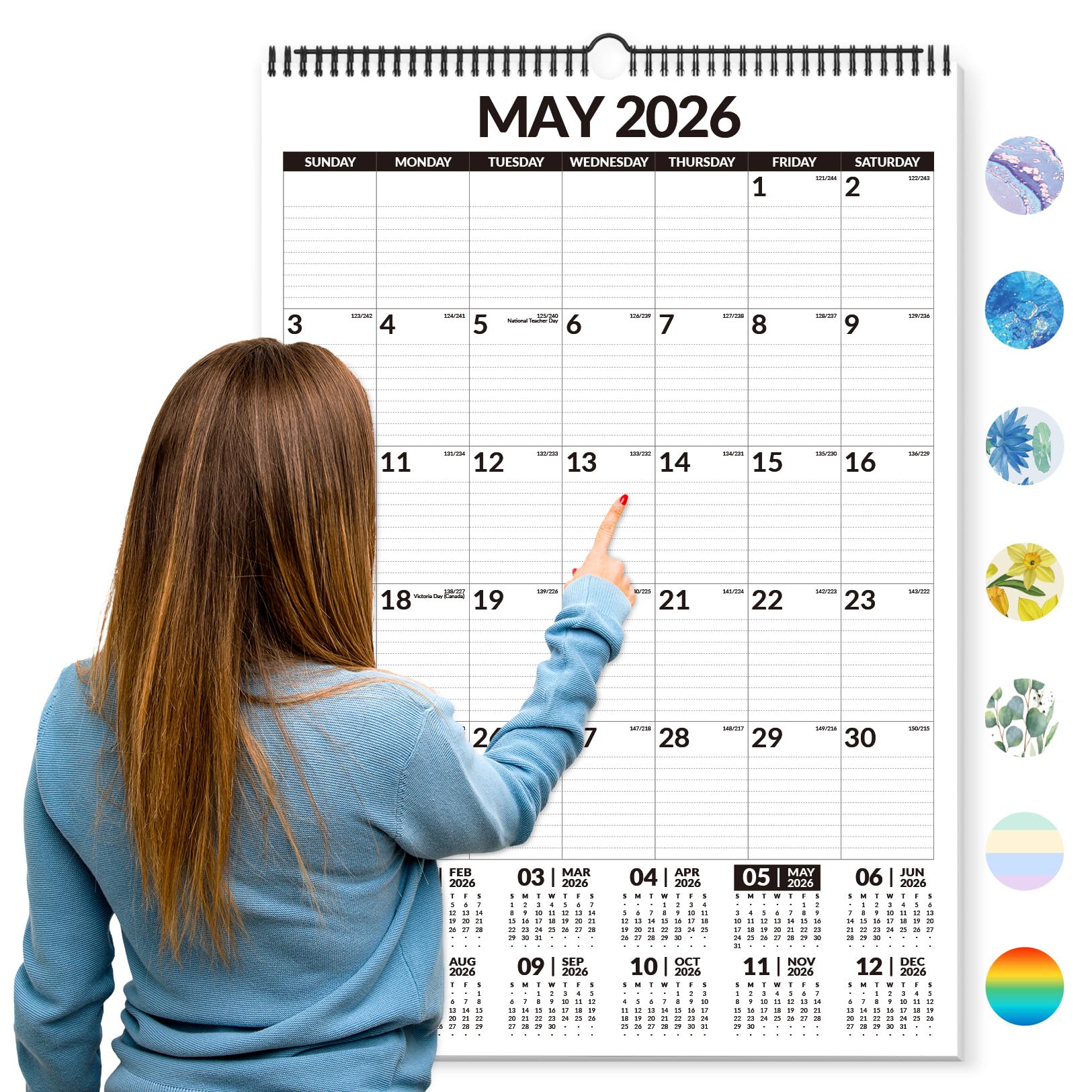
| Forvencer Calendar 2026-2027Best Value | Bold numbers for easy reading | Wall Calendar (22″x15″) | Lined daily blocks | None (manual) | Amazon |
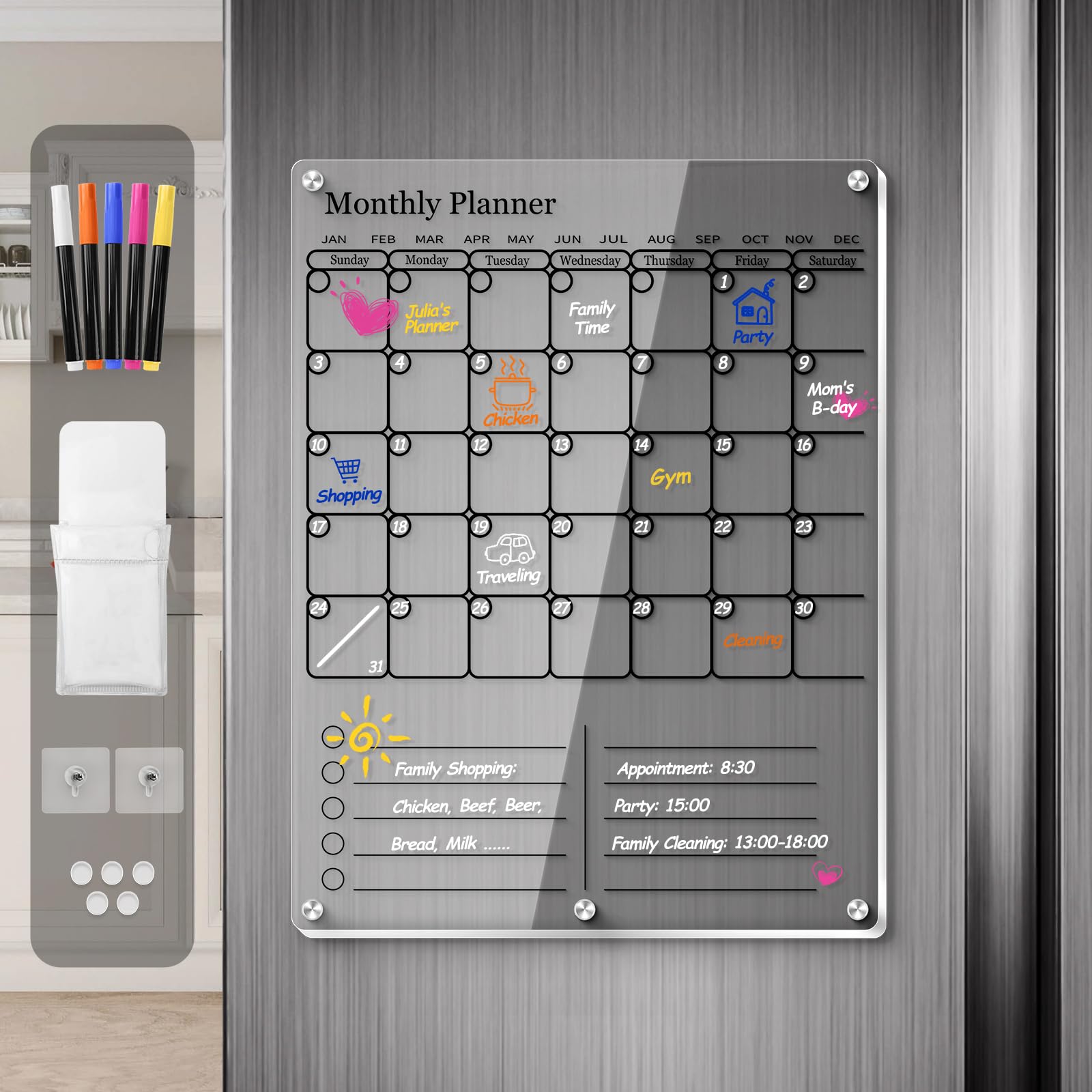
| IDEATECH Magnetic Fridge CalendarKitchen Favorite | Reusable fridge surface | Acrylic Dry-Erase (12″x16″) | 5-row monthly grid | None (manual) | Amazon |
| Dragon Touch TM10 | Entry-level digital planner | Touchscreen (10.1″) | App-based tasks | iOS & Google | Amazon |
| Herncptar Digital Calendar | Budget digital with photo frame | Touchscreen (10.1″) | App-based tasks | Wi-Fi sync | Amazon |
| Anyuse 16″ Digital Calendar | Large screen with reward system | Touchscreen (16″) | App-based tasks | Google, iCloud, Outlook, Cozi, Yahoo | Amazon |
| Apolosign 15.6″ | Tech-savvy families wanting Android apps | Touchscreen (15.6″) | App-based tasks | Google, iCloud, Outlook | Amazon |
| Yemsd 15.6″ | Photo display plus family hub | Touchscreen (15.6″) | App-based tasks | Google, Outlook, iCloud | Amazon |
| Skylight Calendar Max | Premium large display, entire week at a glance | Touchscreen (27″) | App-based tasks | Google, Apple, Outlook, Yahoo, Cozi | Amazon |
In‑Depth Reviews
1. More Time Moms Family Organizer 2026
Our pick — over 4.5★ from 300+ verified ratings; the strongest balance of quality and price.
The paper wall calendar that owners buy again every single year.
Its 15″x22″ pages offer large date boxes that fit multiple events per day. That alone solves the biggest paper-planner frustration, and it’s why loyal customers keep coming back season after season.
It runs 16 months starting August 30, 2025, so you get a planning cushion that most yearly calendars don’t offer. The spiral binding keeps pages flat against the wall, and three pre-punched hanging holes mean you avoid the torn-paper problem that plagues cheap calendars. With over 500 stickers included, you can flag birthdays, appointments, and deadlines at a glance — owners find them genuinely useful for spotting important days fast.
What wins people over is the at-a-glance layout. When you’re juggling multiple people and schedules, not having to decode tiny print is a relief. As buyers sum it up: “Great calendar, large size boxes so there’s room to write multiple events.”
What owners love
- Large date squares handle a full family’s events
- Spiral binding lays flat and turns easily
- Stickers are practical, not just decorative
Who should skip it
- No dry-erase surface — you can’t wipe and rewrite
- Manual updates only; no phone sync
Your next wall centerpiece: This is the pick for families that love the ritual of writing plans down and want maximum room to do it.
Not for digital-first homes: If you live on shared phone calendars, you’ll want a screen that syncs automatically instead.
2. Forvencer Calendar 2026-2027
A bold-print 22-inch wall calendar built for quick glances and easy daily notes.
While the More Time Moms calendar leads on stickers and sheer page count, the Forvencer counters with extra-large numbers and dark, clear print that make it a favorite for seniors and low-vision users. Each daily block has ruled lines, which buyers report makes for “easy daily notes and plenty of room for more” — the structure keeps handwriting tidy across multiple entries.
It covers July 2026 through December 2027, giving you an 18-month runway that beats most standard planners. The thick paper takes pen, marker, or pencil without bleed-through, and the spiral hook design means it hangs on a wall without pins or holes. Owners also highlight the color-coded dot stickers for flagging different family members’ commitments at a glance.
The trade-off versus the top pick is simple: you get fewer total months of stickers and a simpler, more basic design. But for a household that values readability over decoration, this is the smarter buy.
Why it wins
- Bold numbers readable from across the room
- Thick paper resists marker bleed-through
- Integrated hook means no wall holes
Keep in mind
- Basic styling — no monthly illustrations
- Better suited to walls than desks
The readability choice: Anyone who wants to see the whole month without squinting should put this on the wall.
Not the pick for decor lovers: If you want illustrated monthly scenes, the More Time Moms calendar delivers more visual charm.
3. IDEATECH Magnetic Fridge Calendar
A clear acrylic dry-erase board that turns your fridge into the family command center.
Unlike paper planners that fill up by mid-month, this 12″x16″ magnetic board is endlessly reusable — you wipe it clean and start fresh every week. The strong magnets are the standout feature, with owners reporting they stick firmly to both flat and curved stainless fridge doors without slipping.
You get a crisp writing surface that stays readable even at a glance, thanks to the 3mm scratch-resistant acrylic with laser-etched 2-inch grid lines. The layout is a true 2-in-1: a 5-row monthly calendar on top for appointments, and a 5-line ruled memo area below for grocery lists or chore charts. The included 5 colored markers have a dual-tip design — a 1.0mm fine point for notes and a chisel tip for headers — and ventilated caps keep them from drying out for 12+ months, so you won’t be replacing them mid-year.
There’s an honest caveat here: owners say the writing appears lighter than on a true whiteboard, and the included markers get mixed reviews for visibility and erasability. A few found white or yellow markers most legible, while some darker colors were hard to see. Budget for your own dry-erase markers if you want the brightest contrast.
The strengths
- Strong magnets conform to curved fridge doors
- Reusable surface — no wasted paper
- Dual-zone layout for dates and lists
The trade-offs
- Included markers can be hard to erase
- Writing looks lighter than a whiteboard
- No eraser included in the box
For quick resets: Families that want a wipe-clean weekly hub in the kitchen will love the flexibility here.
Skip for permanent records: If you need a written history of the month, a paper calendar gives you that — this board erases everything.
4. Dragon Touch 10.1″ Digital Calendar

A no-subscription touchscreen that brings shared calendars off your phone and onto the counter.
Setup takes less than 5 minutes — plug in, connect to Wi-Fi, and link your calendar through the mobile app. Once synced, it merges iOS and Google calendars into one unified display, so you ditch the back-and-forth of checking three separate apps. Each family member gets their own color-coded profile, making it obvious whose appointment is whose.
Beyond scheduling, the interactive chore chart keeps kids motivated by letting them check off tasks with repeatable assignments. The dinner planner ends the nightly “What’s for dinner?” argument by displaying the meal plan for everyone to see. When it’s not managing your life, the 10.1″ screen becomes a digital photo frame for family pictures.
The honest trade-off: some owners note occasional buffering pauses while loading, and multi-person tasks need manual edits per person. It also lacks automated phone reminders — you’ll still glance at the screen rather than get pinged. But as a wall-mountable or desk-sitting hub with a 2-year manufacturer warranty, it’s a strong entry into digital planning.
What stands out
- No monthly subscription required
- Color-coded profiles per family member
- Doubles as a digital photo frame
What to expect
- Occasional loading pauses reported
- No automated phone reminders
Right for first-timers: If you want to test whether a digital planner fits your home without a subscription commitment, start here.
Not for heavy automation needs: If you want your phone buzzing with reminders, this one relies on you checking the screen.
5. Herncptar 10.1″ Smart Digital Calendar
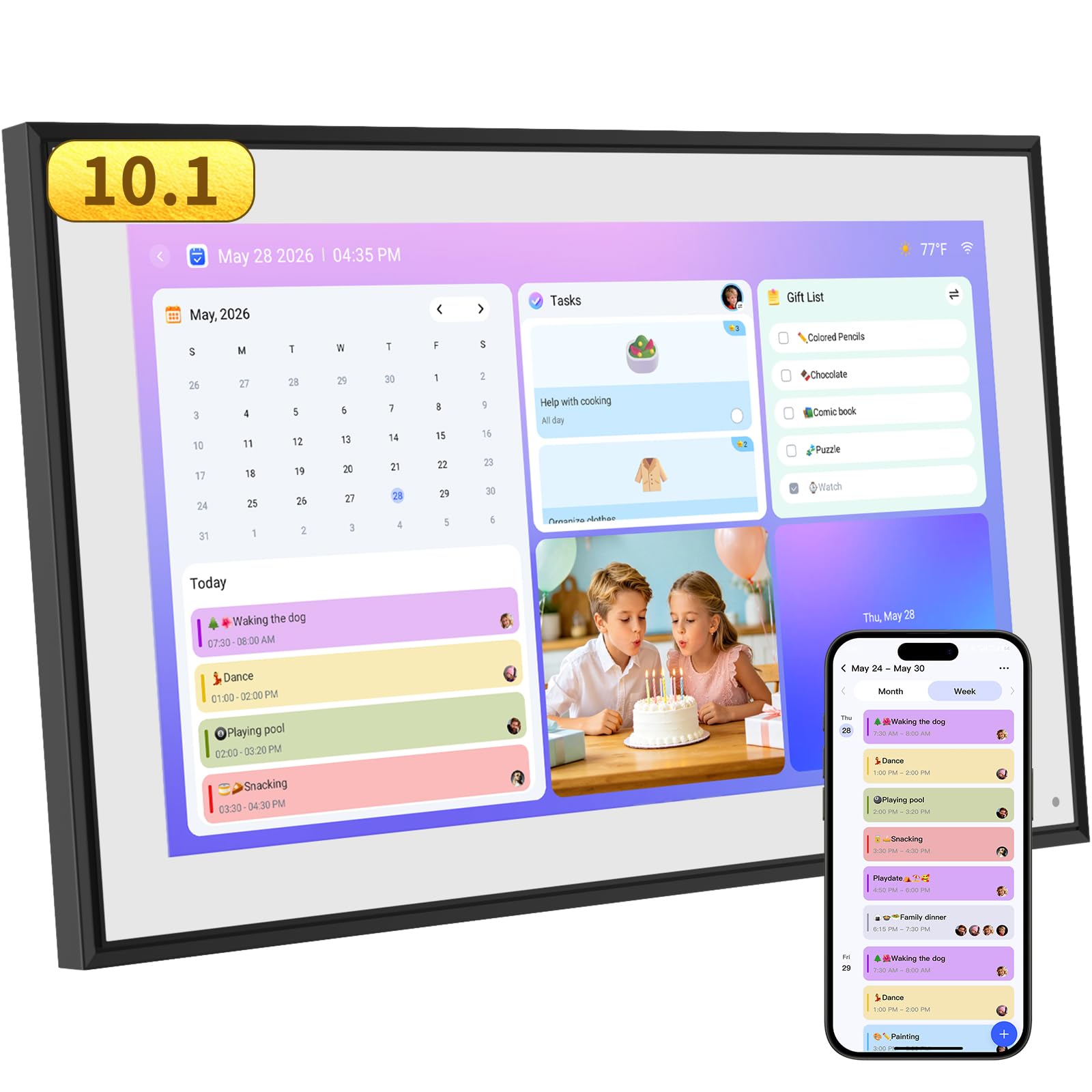
A family-focused touchscreen that imports calendars from your phone and turns chores into rewards.
This 10.1-inch planner imports calendars straight from iPhone and other apps, so your existing schedule appears without re-typing everything. The free companion app lets each child have their own profile with tasks and rewards — a system parents describe as a lifeline for kids who need visual reminders and incentives to stay on track.
It’s not just a calendar: the built-in grocery list, meal planning, and event alarms cover the full household workflow. At night, the screen dims automatically instead of blazing in the kitchen, and when idle it becomes a photo screensaver for family memories. Owners with multiple kids praise how it keeps everyone accountable, with repeatable tasks and correctable check-offs for younger children.
Compared to the Dragon Touch above, this one leans harder into the kids’ reward system while the Dragon Touch has the edge on photo display polish. Some owners wish it integrated with Google Tasks directly, and the visible power cord is a minor aesthetic gripe. But for the price, the functionality is hard to argue with.
Why it clicks
- Imports phone calendars instantly
- Per-child profiles with task rewards
- Free app with grocery and meal planning
Small frustrations
- Power cord isn’t recessed into the frame
- No direct Google Tasks integration
The kid-motivation pick: If your house runs on visual checklists and reward stars, this screen gets the whole family involved.
Not for tidy setups: The exposed cable might bother you if your kitchen decor is minimalist.
6. Anyuse 16″ Smart Digital Calendar

A 16-inch display with 4-level font sizing and 4 placement modes for every room in the house.
The 16″ HD touchscreen features adjustable font size and brightness for seniors, while kids find it easy to tap. Unlike smaller units fixed to one spot, this one mounts on the wall, sits on a desk, or hangs in either orientation, so it adapts to your kitchen, entryway, or home office.
Syncing is the other headline: it pulls in Google (2-way), iCloud, Outlook, Cozi, Yahoo, and TeamSnap calendars with auto-updates in seconds. Family members join via QR code or pairing code valid for 48 hours, and kids can get virtual profiles without needing an email address. The chore system uses color labels, deadlines, and star rewards that kids redeem for preset prizes like toys or outings.
The meal planner goes further than rivals with a built-in recipe library — you can assign multiple recipes to one meal and add cooking notes. A sleep mode with custom on/off times saves power, and 24-hour time format works for households that prefer it. Weighing 5.1 pounds, it’s a substantial unit that feels solid on the wall.
Why it’s a standout
- 4-level font size helps seniors read easily
- Syncs 6 calendar services with 2-way Google
- Recipe library for weekly meal planning
Things to weigh
- Heavier than smaller digital planners
- Wall mounting tools needed for setup
For multi-generational homes: If grandparents, parents, and kids all need to read the schedule, the adjustable font and big screen solve that.
Skip for tiny kitchens: At 16 inches, you need a clear wall or counter footprint to make this work.
7. Apolosign 15.6″ Digital Calendar
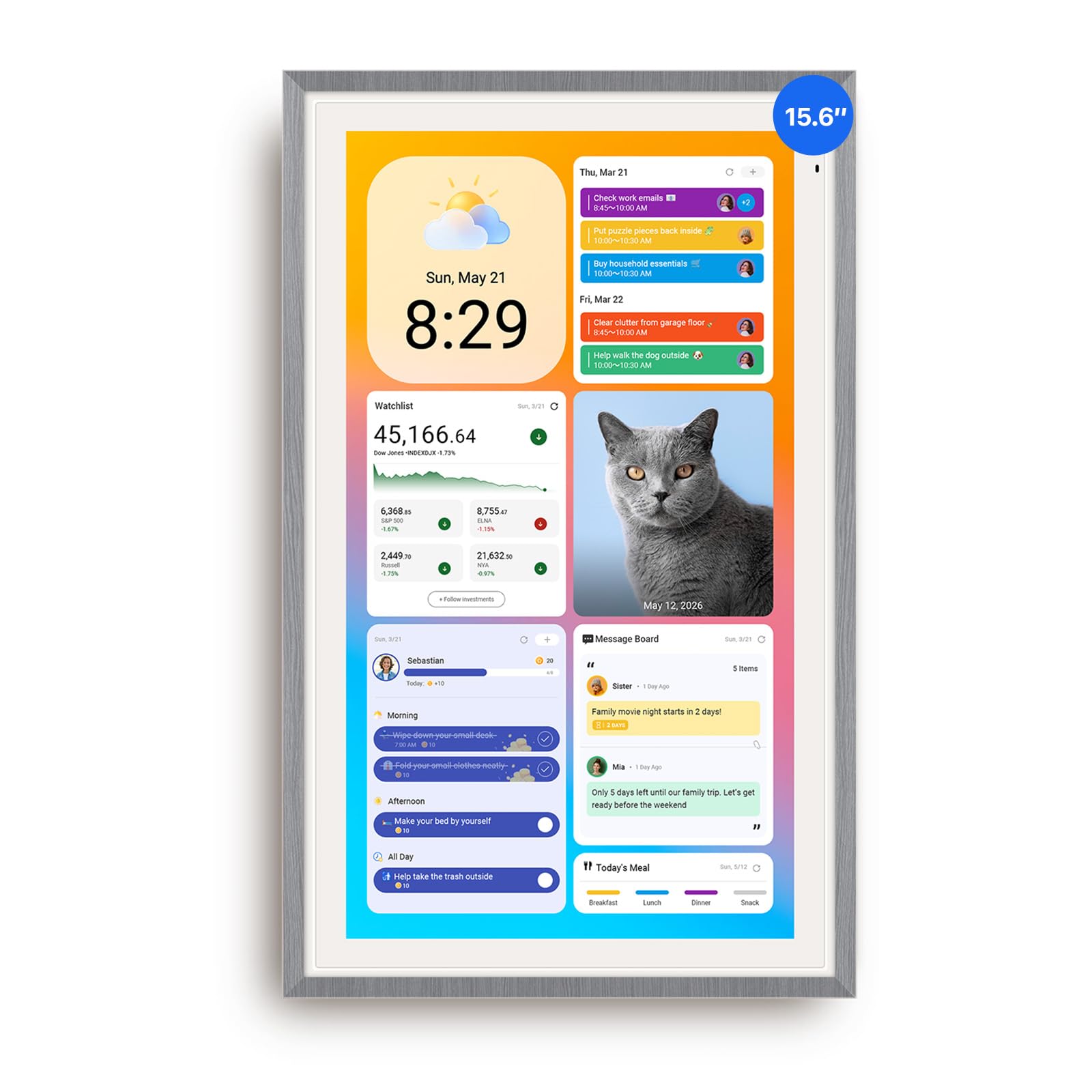
A 15.6-inch touchscreen that flips between a clean family calendar and a full Android tablet.
This is the pick for tech-savvy households because it offers a rare dual mode. Calendar Mode keeps things simple for family scheduling, while Android Mode open up a customizable dashboard where you can install apps, add widgets, and control smart home devices right from the screen.
Under the hood it syncs Google Calendar, iCloud, and Outlook, and the built-in Google Gemini voice assistant answers questions about your schedule, sets reminders, and checks the weather aloud. The 15.6″ anti-glare HD touchscreen auto-adjusts brightness and runs a sleep mode for comfortable nighttime viewing. Owners particularly enjoy installing YouTube or Netflix on it — it genuinely behaves like a family tablet when not managing chores.
The reward-based chore tracking makes routines engaging for kids, and the same app handles grocery lists, shopping lists, wish lists, and weekly meal planning. When idle, it pulls photos from Google Photos into an elegant slideshow. The one gripe: the Gemini voice feature draws mixed feedback for reliability, and the cable exits only down or left, which may affect your placement.
What makes it special
- Full Android Mode with Google Play apps
- Built-in voice assistant for hands-free checks
- Google Photos slideshow screensaver
Consider this
- Voice assistant reliability is mixed
- Cable exits down or left only
For the connected home: If you want a family calendar that also controls smart lights and runs your favorite apps, this is the one.
Not for simplicity seekers: If you just want dates and chores with zero tinkering, the simpler models above are easier day one.
8. Yemsd 15.6″ Digital Calendar
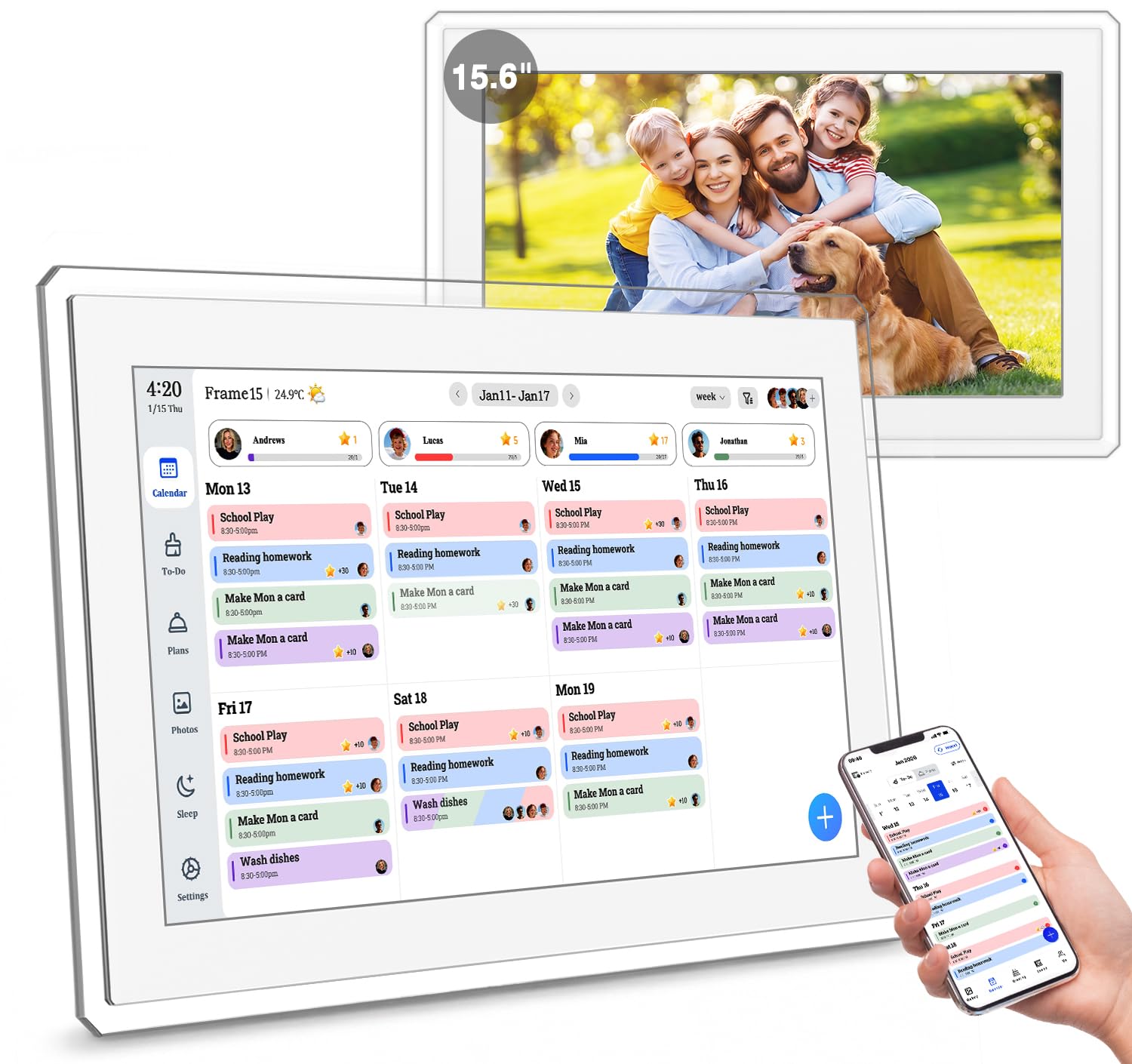
A 15.6-inch family hub that showcases photos beautifully while keeping schedules in sync.
Its 32GB expandable storage and AI photo restoration make it a standout photo display. With 32GB of storage that’s expandable, it holds a serious photo library, and the AI photo restoration feature automatically enhances old family images as they cycle through. Owners describe the screen as bright and clear enough to read from across the room, which makes it both a functional planner and a living piece of wall art.
Real-time sync covers Google, Outlook, and iCloud, letting multiple family members edit schedules simultaneously — no subscription fees attached. The built-in chore chart gamifies daily routines with reward points, and the meal planner keeps the weekly menu visible to everyone. A glare-free HD touchscreen and flexible mounting hardware let it work as a wall-mounted planner or a stylish desk calendar.
Compared to the Apolosign above, this model leans toward photo display polish rather than Android app flexibility. Set your expectations on the little things: the screen smudges easily (though it wipes clean), videos cap around 15 seconds, and there’s no remote control. The 24/7 support and 2-year warranty add confidence that some rivals don’t match, so if you value reliability over extra features, this is a safer bet.
Highlights
- 32GB expandable photo storage with AI enhancement
- Real-time multi-platform calendar sync
- No subscription fees for core features
Minor annoyances
- Screen smudges easily from touch
- Short video clips only — 15 seconds
- No remote control included
The memory keeper: If you want a wall display that celebrates family photos while managing the household, this balances both beautifully.
Not for app lovers: If you want to install third-party apps like Netflix, the Apolosign’s Android mode is the better match.
9. Skylight Calendar Max

The 27-inch display that lets the whole family see the entire week at one glance.
Its 27″ screen shows the entire week at a glance, eliminating scrolling or squinting. The 27″ HD touchscreen auto-adjusts between portrait and landscape, and swappable frame styles let you match your kitchen or entryway decor. It’s the command center for families that want everything — schedules, chores, meals, and photos — in one dominant focal point.
Syncing is easy: connect to Wi-Fi and it pulls from Google, Apple, Outlook, Yahoo, and Cozi automatically, with no manual updates. The free mobile app edits everything on the go, and color-coded profiles keep each person’s commitments distinct. Owners rave about the chore chart with fun completion effects that keep kids (even 5-year-olds) motivated, plus countdowns for upcoming events and routines that replace scattered sticky notes.
Here’s the honest catch: at 22.7 pounds, mounting requires two people, and the full feature set — including Magic Import and meal planning — lives behind the optional Plus Plan subscription. Some owners note the base features handle organization well, while the premium tier adds the extras. The SideKick AI feature digitizes paper schedules, which is a thoughtful touch for families moving off physical planners.
The big wins
- 27-inch screen shows the full week clearly
- Auto-syncs with 5 major calendar platforms
- Kid-friendly chore rewards and routines
Weigh these
- Premium features require the Plus Plan
- Very heavy — a two-person mounting job
The showpiece choice: If you want a true family command center that dominates the wall and impresses everyone who sees it, this delivers.
Not for budget planners: If monthly subscription fees are a dealbreaker, the subscription-free models above cover the essentials.
Understanding the Specs
Writing space per day
The single most important paper-planner spec is the size of each date box, because that determines how many events you can actually fit. Large grid boxes with room for multiple entries beat a bigger overall calendar with tiny squares. On digital planners, this translates to how many tasks you can display per day on the home screen before scrolling.
Calendar syncing
Digital planners differ hugely in what they connect to. Model-to-model, the range runs from basic Wi-Fi sync to full 2-way integration with Google, iCloud, Outlook, Cozi, and Yahoo. Before buying, check that your family’s primary calendar apps are on the supported list — otherwise you’ll spend your time re-typing events into a second system.
Subscription requirements
Some digital planners advertise a low device price but gate their best features — meal planning, photo screensavers, AI imports — behind a monthly or annual plan. Others include everything free with the hardware. Always read what’s included before you commit, because a subscription changes the true cost of ownership over a few years.
Mounting and placement options
Think about where the planner will live before you buy. Paper calendars and wall-mounted screens need clear wall space, magnetic boards need a metal fridge door, and desk models need counter footprint. Some touchscreens offer 4 placement modes — wall, desk, vertical, or horizontal — while others are fixed to one orientation.
FAQ
Will a wall calendar fit in my hallway or kitchen?
Which digital calendar syncs with my iPhone or Google Calendar?
Do I need a subscription for chore charts and meal planning?
How long does a paper family planner last?
Can kids use these planners independently?
Will a magnetic fridge calendar damage my refrigerator door?
What’s the difference between a dry-erase board and a paper planner?
Can I mount a digital calendar in portrait or landscape?
Is a 27-inch calendar too big for most homes?
Final Thoughts: The Verdict
For most households, the family planner winner is the More Time Moms Family Organizer because its spacious date boxes, 16-month coverage, and 500+ stickers deliver everything a paper planner should, at a price that makes annual replacement painless. If you want a bold-print calendar for seniors or low-vision readers, grab the Forvencer — it’s the readability champion. And for the connected household ready to go digital, the Anyuse 16-inch gives you the biggest screen and most calendar integrations without any subscription fees.
How We Picked
We do not accept paid placement. Every pick is matched to a real buyer and a real use-case; we do not hands-on test units.
Sources & Methodology
Specifications: manufacturer listings and product documentation. Review insights: verified customer reviews, as of August 2026. Pricing: not shown on this page (it changes often); check the current price via the retailer link.
As an Amazon Associate, WellFizz earns from qualifying purchases. This does not affect which products we feature.
Related Guides

Mo Maruf
I created WellFizz to bridge the gap between vague wellness advice and actionable solutions. My mission is simple: to decode the research and give you practical tools you can actually use.
Beyond the data, I am a passionate traveler. I believe that stepping away from the screen to explore new environments is essential for mental clarity and physical vitality.