Our readers keep the lights on and my smoothie glass nicely filled. As an Amazon Associate, I earn from qualifying purchases.
Specs are compiled from manufacturer listings and verified buyer reviews and can change over time — please confirm the key details on the product page before buying.
Modern laptops ditched the disc drive years ago, but your CD collection, software installers, and family DVDs didn’t disappear. An external DVD drive plugs into a USB port and brings that old optical functionality back, letting you play movies, burn backups, and rip music on any modern PC or Mac.
I’m Mohammad Maruf — the founder and writer behind WellFizz. This guide is built by comparing the manufacturers’ published specifications and the patterns across verified customer reviews, so you get each pick’s real strengths and trade-offs instead of marketing spin.
The best external dvd drive for you balances speed, portability, and compatibility with your specific laptop, so we broke down the top six models by real owner experience.
Our Picks at a Glance


How To Choose The Best External DVD Drive
The connection type, read speed, and power draw are what separate a smooth experience from a frustrating one.
USB 3.0 vs USB 2.0 Connections
USB 3.0 moves data at up to 5 Gbps, which is roughly ten times faster than the older USB 2.0 standard. That speed only matters when you are ripping large disc libraries, since a single movie plays fine over either connection, but a faster interface means fewer buffer stalls during burns.
Read and Write Speeds
DVD drives are rated by speed multipliers, with 8x being the common maximum for writing DVDs and 24x for CDs. The higher the multiplier, the quicker a full burn finishes, but real-world time also depends on the disc quality and your computer’s USB port power.
Compatibility and Power Draw
Most drives work with Windows, macOS, and Linux, but some lack the drivers for Apple Silicon Macs or draw too much power from low-output ports. Desktop PCs often need the drive plugged into a rear motherboard USB port to avoid power shortages, while laptops usually handle it fine on a direct connection.
Quick Comparison
| Model | Best For | Interface | Max DVD Speed | Weight | Amazon |
|---|---|---|---|---|---|
| Dell DW316★ Best Overall | Reliable everyday use | USB 2.0/3.0 | 8x | 200g | Amazon |
| AmicoolBest Value | Crowd-favorite all-rounder | USB 3.0 Type-C | 8x | — | Amazon |
| ORIGBELIE | Budget-friendly portability | USB 3.0 Type-C | 8x | 206.8g | Amazon |
| Wbacon 7-in-1 | Hub and drive combo | USB 3.0 Type-C | 8x | — | Amazon |
| Rioddas | Large disc ripping jobs | USB 3.0 Type-C | 3.6 MB/s | — | Amazon |
| LG GP65NB78 | Long-term archiving | USB 2.0 | 8x | — | Amazon |
In‑Depth Reviews
1. Dell External USB Slim DVD RW Drive DW316
Our pick — 4.5★ from 15,500+ verified ratings; the strongest balance of quality and price.
A dependable 14mm drive that sets up in 45 seconds and burns reliably for years.
You get a low-profile drive measuring just 14mm thick and weighing 200g, so it slips into a small workspace or a laptop bag without adding bulk. It is powered entirely by your laptop’s USB port, meaning no batteries or power cords to carry and no wall outlet required.
The pre-loaded CyberLink Media Suite handles playback and burning right away, and the drive is rated for Windows 11 or below. Buyers report ripping 30 CDs easily through Windows Media Player, though they note a loud whirring sound kicks in after about 10 discs and each CD takes 3-5 minutes to rip.
You get a drive that works reliably for everyday playback, and over 1,400 buyers specifically praise its functionality, build quality, and ease of use. Some hands find the disc tray flimsy, but the drive runs fine, and pairing it with the free VLC player covers all your playback needs without extra cost. The 1-Year Limited Hardware Warranty adds confidence.
What wins people over
- 45-second setup right from the start
- USB-powered, so no cords or batteries
- CyberLink Media Suite included for playback and burning
What to watch
- Disc tray feels flimsy to some users
- Gets loud after prolonged ripping sessions
Your daily driver: This is the pick for anyone who wants a dependable drive that just works on Windows, with setup measured in seconds.
Think twice if: You plan to rip hundreds of discs in one sitting, since the noise ramps up after the first ten or so.
2. Amicool External DVD Drive USB 3.0 USB C
A plug-and-play favorite that works instantly on MacBooks and Windows PCs without drivers.
This is the drive with the deepest buyer approval in the category, with functionality being the top praised aspect at over 4,200 mentions. It supports dual interfaces (USB 3.0 and Type-C) with data transfer speeds up to 5Gbps, and it reads DVD+R, DVD-R, CD-R, and CD-RW discs.
Compatibility spans Windows 11/10/8.1/7, Linux, and all macOS on both Intel and Apple Silicon chips, making it a safe bet for newer MacBook Air and Pro models. A built-in cable and slim matte finish make it ready for travel, and owners mention it works instantly with a 2021 MacBook Air with no software needed.
The honest catch is the integrated USB cord, which measures only about 6 inches — short enough that desktop users will want an extension. You also must avoid USB hubs and use a direct port, since low power is the usual reason the drive doesn’t appear on your laptop. The maker recommends a powered USB-C hub for M1/M2/M3 Macs to avoid power issues.
Why it leads on value: It delivers the same 8x DVD read speed as pricier rivals with broader system support, and the carry-friendly design removes the need for a separate cable pouch.
Reach for this if: You own a mix of Windows and modern Mac machines and want one drive that covers both without driver hunting.
Look elsewhere if: Your desktop setup lacks easy access to rear USB ports, because that 6-inch cord will likely frustrate you.
3. LG GP65NB78 8X USB 2.0 Super Multi Ultra Slim Portable DVD Writer
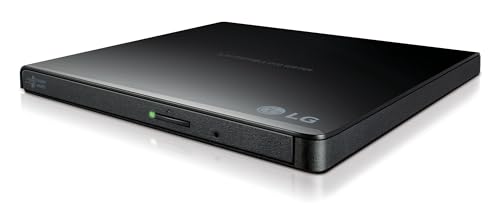
A 14mm LG drive with M-DISC support for long-term archival reliability.
LG brings a track record that buyers trust, with some owners buying this as their second unit after a previous one lasted over 10 years. It hits a maximum 8x DVD write speed and 24x CD write speed, and it includes CyberLink software for playback and burning from the start.
The standout feature here is M-DISC support, which lets you burn data onto M-DISC media designed for long-term archival without degradation. The drive connects via USB 2.0, which is compatible with USB 3.0 ports and moves data at up to 480 Mbit/s — plenty for standard disc work, if not the fastest on this list.
Customers note it works well with CyberLink applications, produces no error messages during burns, and plays even unusual formats like Sony mini discs when paired with Handbrake on a Mac. One owner’s honest note is that older versions lasted about two years before quitting, and they hope this updated model improves on that.
The lasting appeal
- M-DISC support for true long-term data archiving
- Proven LG build quality with decade-long owner loyalty
- CyberLink software included for instant use
Keep in mind
- USB 2.0 tops out at 480 Mbit/s, slower than USB 3.0 rivals
- Lifespan reports vary, with some units failing near two years
Best for archivists: If you are burning irreplaceable photos or documents and want M-DISC longevity, this is the drive to trust.
Not for speed chasers: USB 2.0 means large rips take longer than the USB 3.0 options above.
4. Wbacon 7 in 1 External CD/DVD Drive

A 7-in-1 drive that adds a USB hub, SD/TF card reader, and disc burner in one slim body.
This drive solves two problems at once for modern laptops that lack both disc drives and enough USB ports. It includes 1 USB 3.0 port, 1 USB 2.0 port, 2 Type-C ports, 1 TF slot, and 1 SD card slot, so you can plug in a wireless mouse, transfer camera photos, and burn a DVD all from one device.
Under the hood it delivers USB 3.0 data transfer rates of up to 5 Gigabits/s (625MB/s), roughly 10 times faster than USB 2.0, with maximum 8x DVD read and 24x CD write/read speeds. Reliability is what owners praise most, with performance and value for money close behind, and the skip-proof rubber pad keeps it stable on desk surfaces.
There is one quirk: the SD and TF card slots cannot be used simultaneously, so you must choose one card at a time. Connectivity and ease of use get mixed feedback, with some buyers finding setup easy while others report connection glitches. The embedded data cable keeps everything organized, and it works with Windows 11/10/8/7/XP, Linux, and Mac OS 10.6 or above.
The multi-tasker: Few drives earn their space by pulling triple duty as a burner, hub, and card reader, which makes this a smart buy for ultra-portable laptops.
Choose this for: A minimalist laptop setup where you need disc access plus extra USB and SD ports without a separate dock.
Be aware: If you routinely transfer from an SD card and TF card at the same time, the single-slot limitation will slow you down.
5. ORIGBELIE External CD DVD Drive USB 3.0 Type-C
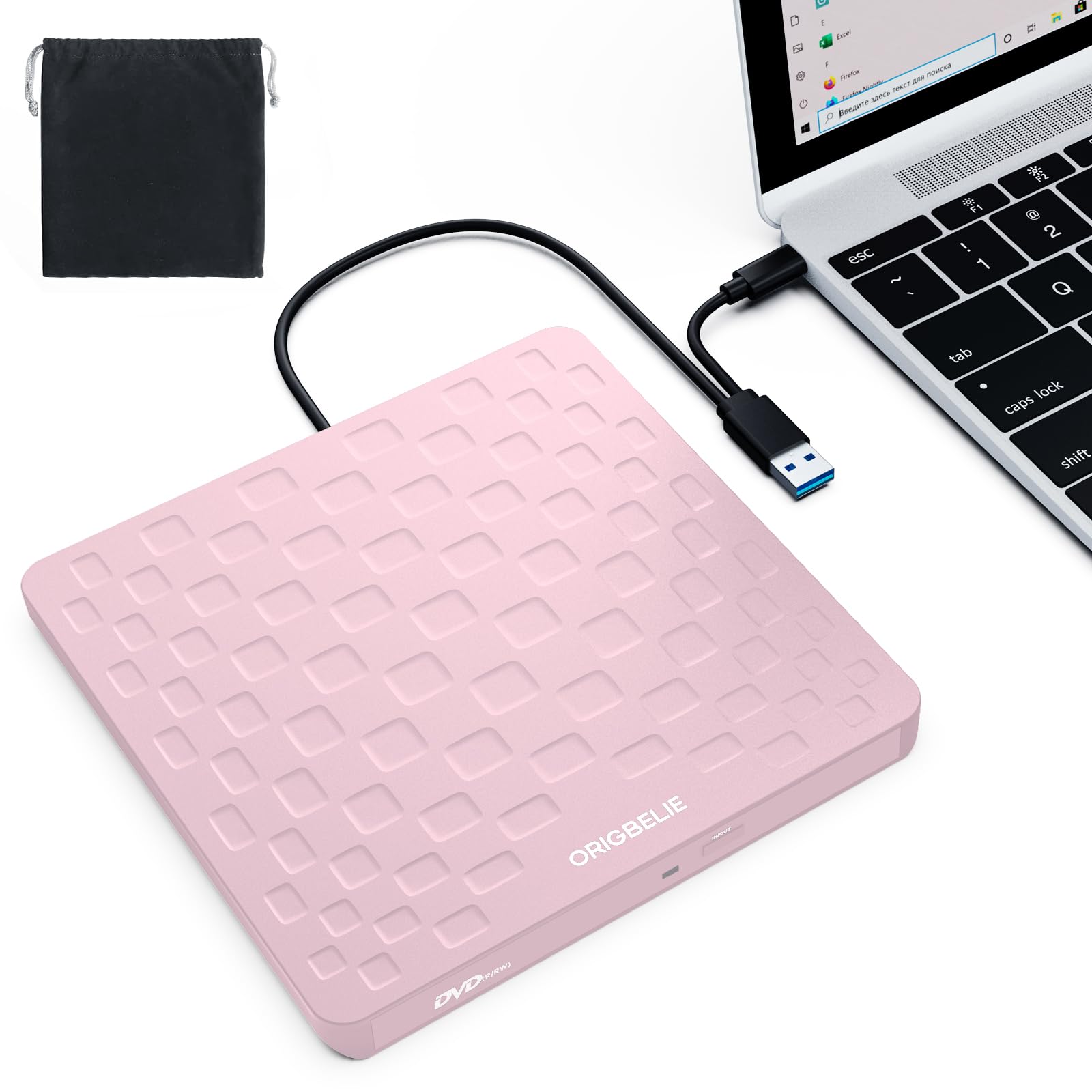
A 13mm, 0.2kg pocket drive that plugs in and plays within seconds on Windows.
At just 13mm thick and weighing only 0.2 kg, this is one of the slimmest drives you can carry, with an integrated data cable so you never lose the cord. It supports USB 3.0 high-speed transfer at up to 5 Gbps (625MB/s), backward compatible with USB 2.0 and 1.1, and delivers max 8x DVD read/write and 24x CD read/write speeds.
Compatibility is wide, covering Windows 11/10/8/7/XP/98 and Mac OS 10.6 or above, plus Linux, with buyers confirming it works flawlessly with Windows laptops and is recognized immediately on Windows 10. As owners put it: “This little device plus right into a computer and set up right away. I’ve used it to burn a CD and to watch movies. Works great.”
The honest trade-offs are the short USB cord and the plastic body, which some buyers describe as fragile, plus the fact that long-term reliability is unproven. It does come with an extra power cable and a cloth case, and the anti-skid bottom keeps it stable, but low-power USB ports may require the extra power line to burn reliably.
The budget appeal
- Ultra-slim 13mm design with built-in cable
- Recognized immediately on Windows with plug-and-play
- Comes with spare power cable and cloth case
The trade-offs
- Short USB cord limits desktop placement
- Plastic build feels fragile to some hands
Pick this for: A light traveler who needs occasional disc access on a Windows laptop and wants the smallest footprint possible.
skip it if: You burn discs daily on a desktop, since the short cord and plastic body are better suited to gentle laptop use.
6. Disk Duplicator Rioddas External DVD Drive

A marathon duplicator that ripped 2,800 CDs in three weeks without a hiccup on Windows.
This drive earns its “duplicator” name honestly, with one owner reporting a marathon session of 2,800 CDs ripped in three weeks nonstop without issues. It is a plug-and-play external burner with a 2MB cache, a USB 3.0 Type-C interface, and support for both USB-C and USB-A cables included in the box.
Buyers describe it as quiet, durable, and fast, with standard original retail CDs and normally-burned blank CD-R/CD-RW discs working perfectly. The maker is upfront that heavily scratched, encrypted, or copy-protected discs may fail to read, which is a compatibility reality across all drives rather than a defect in this one.
The honest split depends on platforms: it works great on Windows and even Chromebooks, but MacBook Pro users report intermittent errors after burning a few discs, making it a poor fit for Apple Silicon workflows. The media speed is rated at 3.6 MB/s, and while one owner loved the fast 24x ripping, another reported the reader refusing to power on after a few weeks — so durability varies by unit.
The marathon runner: For bulk CD archiving on Windows, this drive’s endurance is proven, but Mac users should stick with a Mac-friendly alternative.
Grab this for: Windows or Chromebook owners with a large disc library to digitize in one focused project.
Avoid for: MacBook Pro workflows, where compatibility issues make it unreliable despite strong Windows performance.
Understanding the Specs
Read and Write Speeds
The number before the “x” tells you how fast the drive spins discs relative to the original standard. An 8x DVD speed means it writes a full disc faster than a 4x model, while 24x CD speed handles music and data CDs quickly. Higher multipliers matter most when you are burning or ripping many discs, not when you just want to watch a movie.
Connection Type and Power
USB 3.0 and Type-C connections move data at up to 5 Gbps, far faster than USB 2.0’s 480 Mbit/s ceiling. Drives are powered by the USB port itself, so low-power ports on hubs or unplugged laptops can starve them. Desktop PCs usually need a direct rear motherboard port, and Apple Silicon Macs often require a powered hub for stable operation.
FAQ
Will an external DVD drive work with a modern laptop that has only USB-C ports?
Can I watch movies on a TV with an external DVD drive?
Why is my external DVD drive not showing up on my laptop?
Does an external DVD drive work with macOS and Apple Silicon Macs?
What is M-DISC support and do I need it?
How long does it take to rip a CD with an external DVD drive?
Can an external DVD drive burn discs as well as read them?
Why does my external drive need a powered connection on a desktop?
Is there a difference between a DVD drive and a Blu-ray drive?
Are all external DVD drives compatible with Windows 11?
Final Thoughts: The Verdict
If you want one dependable pick, the best external dvd drive winner is the Dell DW316 because it combines proven reliability, a 45-second setup, and bundled CyberLink software at a sensible price. If you want a single drive that works across Mac and Windows laptops, grab the Amicool with its USB 3.0 and Type-C compatibility. And for long-term data archiving with M-DISC support, the LG GP65NB78 is the one to reach for — its brand reputation is backed by owners who bought a second unit after a decade of use.
How We Picked
We do not accept paid placement. Every pick is matched to a real buyer and a real use-case; we do not hands-on test units.
Sources & Methodology
Specifications: manufacturer listings and product documentation. Review insights: verified customer reviews, as of August 2026. Pricing: not shown on this page (it changes often); check the current price via the retailer link.
As an Amazon Associate, WellFizz earns from qualifying purchases. This does not affect which products we feature.
Related Guides

Mo Maruf
I created WellFizz to bridge the gap between vague wellness advice and actionable solutions. My mission is simple: to decode the research and give you practical tools you can actually use.
Beyond the data, I am a passionate traveler. I believe that stepping away from the screen to explore new environments is essential for mental clarity and physical vitality.