Our readers keep the lights on and my smoothie glass nicely filled. As an Amazon Associate, I earn from qualifying purchases.
Specs are compiled from manufacturer listings and verified buyer reviews and can change over time — please confirm the key details on the product page before buying.
If you type for a living, the dull ache in your wrists and shoulders isn’t just an annoyance—it’s a signal that your hands are fighting your keyboard’s flat, cramped layout. An ergonomic keyboard reshapes that layout into a split, curved, or tented design that lets your hands rest in a natural position, so you can work longer without the nagging pain. The catch is that “ergonomic” covers everything from budget membrane boards to mechanical marvels, and The right pick depends on your typing volume, budget, and willingness to relearn muscle memory..
I’m Mohammad Maruf — the founder and writer behind WellFizz. This guide is built by comparing the manufacturers’ published specifications and the patterns across verified customer reviews, so you get each pick’s real strengths and trade-offs instead of marketing spin.
Whether you’re a coder, a writer, or a spreadsheet warrior, this roundup of the ergonomic keyboard options cuts through the jargon to show you which split layouts, tenting angles, and switch types are actually worth your money.
Our Picks at a Glance



How To Choose The Best Ergonomic Keyboard
Match the design to your specific pain points and typing habits.. A split keyboard helps if your wrists bend outward; a tented one helps if your forearms twist; a cushioned palm rest helps if your wrists press hard on the desk. Here’s what to weigh before you buy.
The Split and Tenting Difference
The two key ergonomic features are split and tenting.. A split design divides the keys into two halves so your hands can sit shoulder-width apart, which stops your wrists from bending inward. Tenting raises the middle of the keyboard so your hands tilt like they would when you hold a steering wheel, which reduces the twisting strain on your forearms. Some models let you adjust these angles to fit your body.
Don’t Skip the Wrist Rest
A well-designed palm rest keeps wrists neutral and straight, not bent backward or downward.. Look for a cushioned or padded rest that supports the base of your palm, not the wrist joint itself. Some rests are fixed, while others are adjustable, and the fit matters just as much as the padding.
Quick Comparison
| Model | Best For | Key Count | Connectivity | Switch Type | Amazon |
|---|---|---|---|---|---|
| Logitech Ergo K860 (Renewed)★ Best Overall | Best Overall | 78 keys | Bluetooth / USB | Membrane | Amazon |
| Nulea Split KeyboardBest Value | Best Value | 86 keys | Bluetooth / 2.4G | Membrane | Amazon |
| X9 Wireless Ergonomic KeyboardHigh-Capacity Keys | High-Capacity Keys | 110 keys | 2.4G RF | Membrane | Amazon |
| Logitech Wave Keys for Mac | Best for Apple Users | 78 keys | Bluetooth | Membrane | Amazon |
| Perixx PERIBOARD-535 | Best Mechanical Value | 104 keys | Wired USB | Blue Clicky | Amazon |
| KINESIS Freestyle2 | Most Adjustable | 94 keys | Wired USB | Membrane | Amazon |
| Cloud Nine C989M | Gaming + Ergo Combo | 104 keys | Wired USB | Kailh Brown | Amazon |
| Microsoft LXM-00004 | Simple, Proven Design | 104 keys | Wired USB | Membrane | Amazon |
| Kinesis Advantage2 | Serious Ergonomics | 87 keys | Wired USB | Cherry MX Brown | Amazon |
In‑Depth Reviews
1. Logitech Ergo K860 (Renewed)
Our pick — over 4★ from 850+ verified ratings; the strongest balance of quality and price.
The office favorite that proves how good a cushioned split keyboard can feel
If you’re dealing with wrist strain from a standard keyboard, the Logitech Ergo K860 is the safest, most proven upgrade you can make. Its split KeyFrame design lets your hands rest in a natural, relaxed position, and the pillowed wrist rest offers what Logitech says is 54% more support while reducing wrist bending by 25% compared to a standard board. Owners consistently call it comfortable for full workdays., with the crowd roundly praising the soft key feel and quiet sound.
You stretch your battery life here too — buyers report “still using the original battery after 7 months and still showing maximum battery life,” so the 2x AAAs inside are nearly a set-and-forget affair. It weighs 3.7 pounds, which is hefty enough to feel planted on a desk yet light enough to move between home and office setups. The adjustable palm lift gives you three tilt angles — 0°, -4°, or -7° — so you can dial in the exact slope that keeps your wrists flat.
The main trade-off is durability, which gets mixed feedback in the review data, with some units reported breaking within three months. This is a renewed (refurbished) unit, so it’s worth checking the specific seller’s warranty. That said, the ergonomics, comfort, and the fact that so many owners mention zero hand fatigue after long days make this the pick that most people should start with.
What Wins People Over
- Pillowed wrist rest cuts wrist bending by 25% vs. standard keyboards
- Three adjustable tilt angles (0°, -4°, -7°) for a custom slope
- Customers note months of battery life on the original AAs
- Quiet, soft-touch keys that feel crisp for long typing sessions
What to Watch
- Build durability gets mixed owner feedback, with some breakages reported within months
- A few owners hit connectivity or random key failures
- Renewed condition means checking the seller’s warranty
Start here if: you want the most proven, comfortable split keyboard for full-time work and don’t mind a refurbished unit.
Think twice if: you need a board you can drop-kick; the reported durability issues suggest treating it with care.
2. Nulea Wireless Ergonomic Keyboard
A rechargeable split keyboard that delivers 200 hours between charges without the premium price tag
The Nulea earns its “Best Value” badge by packing the ergonomic essentials into a friendly, wallet-conscious package. Its split design adapts to the natural alignment of your hands, and the oversized wrist rest wears a soft, skin-friendly leatherette cover that owners say keeps them comfortable through long days. The built-in 200-hour battery life is the headline spec here—buyers describe charging it about once a month even with heavy daily writing, and the sleep mode stretches that even further.
You can switch between your laptop and PC without re-pairing, thanks to dual-mode wireless (Bluetooth and a 2.4G USB dongle). The 86 keys include a full numpad, so spreadsheet users get quick number entry, and the adjustable tilt offers three angles to find your balance. Owners consistently say it “relieves hand tension after 9-hour days,” making it a real ergonomic tool rather than just a pretty desk ornament.
One buyer flagged a charging quirk—the indicator light can show red even after a full weekend charge—but the same review noted the battery lasts so long it’s easy to ignore. There’s also a lone dissenting voice about key responsiveness and layout after a month of use, and the command/alt keys sit in a swapped position for some Windows users, which can trip up touch typists. For the price, though, the balance of comfort, battery life, and features is hard to argue with.
Owner consensus: A comfortable, quiet, and long-lasting board for heavy daily use — the battery life is the thing people rave about most.
The fit note: If you’re a fast touch typist who demands exact Windows key placement, double-check the layout before you commit.
3. X9 Wireless Ergonomic Keyboard
A wave-shaped workhorse with 110 keys and a 600 mAh battery built for marathon typing
The X9 takes a “more is more” approach to ergonomics. That layout means you get every function, media, and navigation key plus a numpad, which owners say makes for an easy transition from a traditional full-size keyboard.
The battery is the other headline: a large 600 mAh internal cell that the maker says lasts months between charges. Real-world reports back that up, with owners charging roughly twice in five months and one loyal user noting the board survived four years of daily use before finally dying. The 2.4G wireless connection offers a 30 ft range through a USB-A receiver, so you can keep it on your desk without cable clutter.
There are two quirks in the data worth knowing. There’s no low-battery warning, so the board can just stop on you mid-sentence, and you can’t use it while it’s charging—the red light stays on for about an hour. Connectivity also gets mixed feedback, with a few owners reporting occasional disconnections. If you want a near-full-featured, wave-style board that genuinely relieves wrist and arm aches, the X9 is a strong, honest pick.
The Strong Suit
- 110 keys mean zero compromises on layout or numpad access
- 600 mAh battery lasts months between charges for most owners
- Reviewers point out a comfortable wave design that eases wrist and arm aches
The Quirks
- No low-battery warning, and it’s not usable while charging
- Wireless connection occasionally drops for some owners
- Replacement of the 25 durability complaints suggests treating it gently
Reach for this if: you want a full-featured, wave-style board with a long-lasting battery and don’t mind a rare reconnect.
Look elsewhere if: you absolutely need to keep typing while plugged in or want a low-battery indicator.
4. Logitech Wave Keys for Mac

The wave-shaped Mac companion that swaps between your MacBook, iPad, and iPhone with one tap
If you live in the Apple ecosystem, this is the ergonomic keyboard designed for you. The Wave Keys for Mac is ergo-certified, designed and approved by United States Ergonomics, and shaped with a gentle natural wave that owners say reduces wrist strain while keeping your hands in a comfortable position. It pairs via Bluetooth with macOS, iPadOS, and iOS, and the Easy-Switch keys let you jump between your MacBook and iPad or iPhone instantly.
The cushioned palm rest is the comfort centerpiece here, supporting your wrists through long hours on quiet keys. Battery life is rated up to 3 years (on 2 AAA batteries), so this is genuinely a buy-it-and-forget-it board — one owner reports a single battery change in 9 months of excellent use. It’s also built with 46% recycled plastic, and the Logi Options+ app lets you program time-saving shortcuts and Smart Actions.
The honest caveats: Bluetooth connectivity gets mixed feedback, with some owners hitting occasional connection issues, and the keys run slightly smaller than a standard board, which takes a little adjustment. Also, this “for Mac” version has its Ctrl/Fn and Alt/Windows keys swapped if you try to use it on a Windows PC, so it’s really best kept in Apple-land. For Mac users specifically, the comfort and multi-device switching are a winning combination.
The verdict: A comfortable, well-padded wave board that shines for Mac users juggling multiple Apple devices.
Keep in mind: It’s a Mac-first keyboard — Windows users will fight the swapped modifier keys.
5. Perixx PERIBOARD-535BL
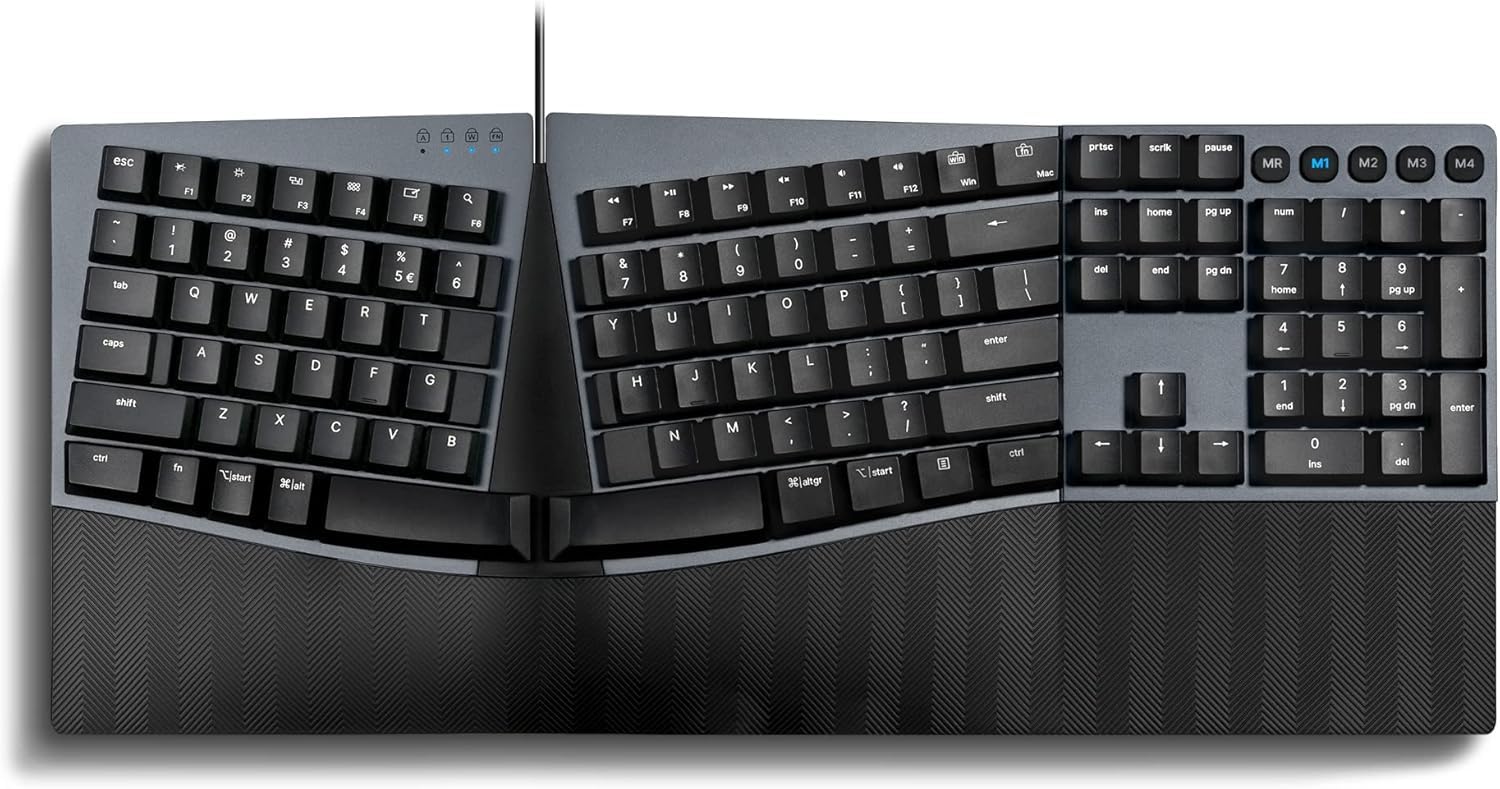
The full-size mechanical split that gives you a satisfying click without the premium markup
The Perixx PERIBOARD-535 is the budget gateway into mechanical ergonomic typing. Its split-key design and curved frame position your wrists and arms naturally, and the blue clicky switches deliver that loud, tactile key-press confirmation that coders and heavy typers love. The integrated palm rest adjusts to 0°, -4°, and -7° to correct wrist pronation—the awkward twisting that causes strain—and owners describe the typing feel as “typing heaven.”
This is also the most customizable board in the mid-range. The programmable software lets you rearrange keys, assign custom actions, and set up 4 macros to speed up repetitive tasks. It’s a true hybrid too: dedicated Win and Mac keys switch easily between OS X and Windows, and the braided USB cable runs 5.9 ft long. At 2.3 pounds, it’s light enough to move between workstations without a second thought.
There’s a clear split in owner opinion, though. Long-time mechanical fans call the click “not obnoxiously loud” and praise the large enter and shift keys, while others found the hard plastic palm rest digs into their palms and the keyboard shifts during aggressive typing. The blue switches aren’t quiet, so this is a board for people who love feedback—or who work alone. For the price, the mechanical switches plus programmability make it a standout value.
Why It’s a Bargain
- Genuine blue clicky mechanical switches give clear key-press feedback
- Programmable keys and 4 macros simplify repetitive workflows
- Adjustable palm rest (0°, -4°, -7°) targets wrist pronation
The Trade-Offs
- Hard plastic palm rest isn’t cushioned—some owners find it digs in
- Loud blue switches aren’t office-friendly in shared spaces
- Keyboard can shift around during fast, aggressive typing
Buy it if: you want the tactile, clicky feel of mechanical switches plus macro programmability without paying premium prices.
skip it if: you need a quiet board for a shared office or want a soft, cushioned wrist rest.
6. KINESIS Freestyle2

The split keyboard that lets you move each half to match your exact shoulder width
The Freestyle2 stands out because it’s not a fixed ergonomic shape—it’s a split keyboard that you physically adjust. The two key modules can rotate and separate up to 9″ apart, so you set the distance that matches your own shoulder width and body type. It comes pre-assembled with the VIP3 tenting accessory, which lets you choose 5°, 10°, or 15° of tenting, with integrated cushioned palm supports to keep your forearms neutral.
This is the board owners credit with “instant relief for wrist and shoulder pain,” thanks to the low-force membrane keys that use a light touch and reduce finger fatigue. It has a standard Windows layout with hotkeys for Cut, Copy, Paste, plus multimedia keys and an embedded 10-key, and it needs no software or special drivers—just plug in the USB and go. Longtime users report using it 8+ hours a day for two years and seeing their wrist and finger pain eliminated.
The cost is the obvious hurdle, and the value-for-money sentiment is genuinely split. The bigger layout has a learning curve, the Delete key is the same size as Backspace (causing occasional errors), and there’s no dedicated numpad. For anyone with real wrist, shoulder, or forearm strain who’s tired of one-size-fits-all boards, the adjustability here is a genuine relief, and it’s the lightest at 2 pounds.
Standout spec: 9″ of key-module separation plus 5°, 10°, or 15° tenting gives you the most body-specific fit in this lineup.
The honest trade: The split halves and steep learning curve mean it’s a commitment, and the value debate is real.
7. Cloud Nine C989M

The RGB-lit mechanical split that pulls double duty for office marathons and FPS sessions
The Cloud Nine C989M is for the gamer who also has a job. It’s a full-size split ergonomic keyboard built with Kailh tactile brown switches—responsive but quieter than blues—and it’s designed to keep your hands and arms aligned for “8 plus hours a day” of pain-free typing. The built-in tenting adds 7 degrees of angle into the wrist rests, so your hands sit in their natural position whether you’re drafting docs or raiding in an FPS.
You get pro-level features here: a full number pad, 10x programmable macro keys, and a USB pass-through port (so you can plug a mouse or headset directly into the keyboard). The RGB lighting offers 20+ patterns, and the split halves can separate up to 8 inches to keep your arms and wrists aligned. Owners consistently report no wrist or hand pain even after 3-4 hour gaming sessions, with the quality and tactile feedback earning the lion’s share of the praise.
The gripes are size and reliability. At 28.6″ wide, this is a massive board that pushes your mouse further away, and the two halves have no locking mechanism, so they can separate awkwardly when you lift it. Reliability gets mixed feedback, with some owners reporting keys not working properly over time, and the setup software has been flagged by some antivirus tools. For a true office-and-gaming hybrid with macros and RGB, though, it’s a compelling option.
The Pro Side
- Kailh brown switches offer tactile feedback without the loud click
- Full numpad, 10x macro keys, and a USB pass-through port
- Shoppers say no wrist pain even after 3-4 hour gaming sessions
The Con Side
- Large footprint (28.6″ wide) pushes your mouse further away
- Split halves don’t lock together, making it awkward to carry
- Reliability is mixed, with some keys failing over time
Choose this if: you want RGB, macros, and a numpad in a mechanical split for both work and play.
Pass if: you have a cramped desk or want a compact board that’s easy to move.
8. Microsoft LXM-00004

The no-nonsense wired ergonomic that carpal tunnel sufferers swear by for quick relief
Sometimes you want the simplest thing that works, and that’s the Microsoft LXM-00004. This is a wired ergonomic keyboard with an ergonomist-approved design, a split key layout, and a dedicated integrated numpad for crunching numbers fast. It’s about as straightforward as ergonomic keyboards get—no software, no Bluetooth pairing, just reliable, wired speed and accuracy with a long USB cable.
The comfort comes from the premium fabric-covered palm rest, which Microsoft says is ergonomically tested to promote a neutral wrist posture. The crowning testimony in the reviews is blunt: buyers with carpal tunnel report “my pain went away within a week” and that they’ve used this exact design for 10 years. The keys are responsive without being overly sensitive, which owners say prevents annoying accidental keystrokes like stray semicolons.
The downside is that it’s expensive for a membrane keyboard, and the value math doesn’t work for everyone. The keys need a slightly heavier touch, which takes adjustment, and the small white lettering can be hard to read for older users (some solved it with large-letter stickers). It’s also wired only—no wireless option here. For anyone who wants a proven, ergonomist-tested design and doesn’t mind the cord, this remains a beloved classic.
Owner sentiment: The design that carpal tunnel and RSI sufferers keep coming back to for years — simple, reliable, and effective.
Fair warning: It’s pricey for a membrane board, and the wired-only setup won’t suit everyone.
9. Kinesis Advantage2

The contoured mechanical marvel that programmers buy twice because the pain relief is real
The Kinesis Advantage2 is the endgame for people with serious, persistent wrist and hand pain. Instead of a flat split, it uses patented contoured keywells—two concave bowls that your fingers drop into naturally—plus thumb clusters for keys like Enter, Backspace, and Ctrl, and an orthogonal layout that eliminates awkward reaching. It offers 20 degrees of tenting and integrated palm supports with cushioned pads, so your hands hover in a truly neutral position.
Under the keys sit genuine Cherry MX Brown switches, rated for 50 million key presses, with a low activation force and tactile feedback that owners describe as crisp. The onboard Smart Set engine gives you full programmability: custom layouts in QWERTY or Dvorak, on-the-fly macro recording, and one-touch key remapping, all saved to the keyboard’s 4MB flash memory. It’s plug-and-play with Windows, Mac OS X, Linux, and Chrome, and comes with a 3-year manufacturer’s warranty.
The reviews are emphatic—Software engineers report wrist, shoulder, and neck pain resolved in about two months., and several bought a second one for home. But this is a serious investment and a serious commitment: there’s a steep learning curve (about a month), the tall profile takes desk space, and the concave wells make it hard to switch back and forth with a standard keyboard. It’s also the priciest board here. If your pain is chronic and you’re ready to relearn typing, this is the most effective tool money can buy.
What Makes It Special
- Concave keywells and thumb clusters eliminate wrist, shoulder, and neck strain
- Cherry MX Brown switches rated for 50 million key presses
- Fully programmable with on-the-fly macros and QWERTY or Dvorak layouts
What It Demands
- Steep learning curve—expect about a month of adjustment
- Tall profile and large footprint take up serious desk space
- Most expensive pick here, with the value debate still open
This is the one if: you have chronic wrist or hand pain and are willing to commit to relearning how you type.
Not for you if: you switch between keyboards often or want a board that feels familiar from day one.
Understanding the Specs
Split and Tenting Angles
A split design separates the keys into two halves so your hands can sit shoulder-width apart, preventing your wrists from bending inward. Tenting raises the middle of the board so your hands tilt like they would on a steering wheel, reducing forearm twist. Look for adjustable options—like the Freestyle2’s 5°, 10°, and 15° settings—to match your body’s natural alignment.
Switch Types
Membrane keys use a soft rubber dome that’s quiet and cheap, while mechanical switches use individual springs and provide tactile feedback. Blue switches are loud and clicky; brown switches are quieter but still tactile. If you type heavily and want feedback, mechanical is worth the extra money; if you’re in a shared office, a quiet membrane board is more courteous.
FAQ
How long does it take to get used to an ergonomic keyboard?
Is a split keyboard better than a curved one for wrist pain?
Can I use a Mac ergonomic keyboard on Windows?
How long does the battery last on a wireless ergonomic keyboard?
What is tenting and why does it matter?
Will an ergonomic keyboard actually help with carpal tunnel?
Are mechanical or membrane switches better for ergonomics?
What if I need a wireless ergonomic keyboard?
Do ergonomic keyboards get quieter or louder than standard ones?
Which ergonomic keyboard is best for heavy daily coding?
Final Thoughts: The Verdict
For most buyers, the ergonomic keyboard winner is the Logitech Ergo K860 because it combines the most proven split-design comfort with long battery life and adjustable tilt, and it’s the highest-rated board here by owner consensus. If you want the best value with a rechargeable battery and leatherette wrist rest, grab the Nulea. And for chronic wrist or hand pain, the Kinesis Advantage2 is the serious investment that Customers note it completely changes their daily comfort..
How We Picked
We do not accept paid placement. Every pick is matched to a real buyer and a real use-case; we do not hands-on test units.
Sources & Methodology
Specifications: manufacturer listings and product documentation. Review insights: verified customer reviews, as of August 2026. Pricing: not shown on this page (it changes often); check the current price via the retailer link.
As an Amazon Associate, WellFizz earns from qualifying purchases. This does not affect which products we feature.
Related Guides

Mo Maruf
I created WellFizz to bridge the gap between vague wellness advice and actionable solutions. My mission is simple: to decode the research and give you practical tools you can actually use.
Beyond the data, I am a passionate traveler. I believe that stepping away from the screen to explore new environments is essential for mental clarity and physical vitality.