Our readers keep the lights on and my smoothie glass nicely filled. As an Amazon Associate, I earn from qualifying purchases.
Specs are compiled from manufacturer listings and verified buyer reviews and can change over time — please confirm the key details on the product page before buying.
You want to learn electronics, but you are not sure which kit is the right starting point. The best choice depends on your goal: do you want to snap parts together with zero coding, or are you ready to program a real microcontroller board from scratch? This guide breaks down the top kits by what they actually teach, how much assembly they require, and which skills you will walk away with.
I’m Mohammad Maruf — the founder and writer behind WellFizz. This guide is built by comparing the manufacturers’ published specifications and the patterns across verified customer reviews, so you get each pick’s real strengths and trade-offs instead of marketing spin.
From no-code snap-together sets to full Arduino coding platforms, this roundup of electronic kits for adults covers ten projects, part counts, and the learning curve of each pick in plain language.
Our Picks at a Glance


How To Choose The Best Electronic Kits For Adults
Before you buy, ask yourself what you actually want to build: circuits, code, or a mechanical model. A kit that’s too basic loses your interest quickly, while one demanding soldering and coding can overwhelm a beginner. Choose a kit that fits your available time, existing tools, and learning objective.
Decide Between Snap-Together and Breadboard Kits
Snap-together kits like Snap Circuits use plastic clips and pre-built modules, so you never touch a wire or a solder joint. They are perfect for learning what a resistor or a switch does in a circuit. Breadboard kits, which you plug parts into a small plastic board with holes, teach you how components physically connect — a far more transferable skill if you plan to design your own projects later.
Check the Real Total Cost
The sticker price rarely covers batteries, a computer, or a USB cable you may need. Many kits need batteries you must buy separately, and a few demand an extra 9-volt battery for a multimeter or special nonstandard batteries for a motor. Some kits also expect you to have a computer and a USB cable to upload code. Add these hidden items to your budget before you choose.
Look at the Number of Parts and Projects
Higher part counts mean more projects and a longer learning curve. A 20-project kit runs out of ideas in a week, while a 750-project set can keep you busy for a year. If you want to build a specific thing, like a robot car or a solar tracker, the included parts matter more than the total count. Confirm the kit includes the sensors and motors you actually want to use.
Consider the Online Support
Strong online tutorials and video courses are as important as the printed manual. Some kits come with video courses, downloadable code libraries, and active forums where beginners get help. If you are teaching yourself, a kit with strong online resources will save you hours of frustration over one with a thin instruction booklet.
Quick Comparison
| Model | Best For | Projects | Core Board | Coding? | Amazon |
|---|---|---|---|---|---|
| Snap Circuits Extreme SC-750R★ Best Overall | No-code circuit learning | 750+ | Snap modules | No | Amazon |
| SunFounder Elite Explorer KitPremium Pick | All-around Arduino learning | 50 | Arduino Uno R4 WiFi | Yes | Amazon |
| ELEGOO Upgraded UNO R3 KitBest Value | Budget-friendly Arduino start | — | Arduino Uno R3 | Yes | Amazon |
| Arduino Student Kit | Structured self-paced learning | — | Arduino Uno R3 | Yes | Amazon |
| LAFVIN Project Super Starter Kit | Value Arduino components | 27 lessons | UNO R3, Mega2560, Nano | Yes | Amazon |
| Molence Components Assortment | Stocking up on loose parts | — | — | No | Amazon |
| ACEBOTT Smart Robot Car | Build a moving robot | 16 tutorials | ESP32 | Yes | Amazon |
| KEYESTUDIO Solar Tracking Kit | Solar and sensor projects | 11 tutorials | Arduino | Yes | Amazon |
| ROKR Marble Spaceport | Mechanical build, no electronics | 472 pieces | — | No | Amazon |
In‑Depth Reviews
1. Snap Circuits Extreme SC-750R Electronics Exploration Kit
Our pick — over 4.5★ from 650+ verified ratings; the strongest balance of quality and price.
The no-solder, no-code giant that teaches circuit logic through 750-plus snap-together projects.
This is the pick for anyone who wants to understand how circuits behave without learning to program first. You snap color-coded plastic modules onto a board, following an illustrated manual, and the circuit works the instant the pieces click. The kit covers over 750 unique projects with more than 80 parts, and it throws in extras like a solar cell, an electromagnet, a vibration switch, and an analog meter that most starter kits skip entirely.
The learning sticks because you can experiment freely. One family reported a 7-year-old completed 42 projects in just three sittings, then started designing custom circuits on his own — adding a resistor to lower volume and wiring in parallel wiring to change behavior. The kit’s own CI-73 computer interface shows you waveforms and frequencies on screen as your circuit runs, turning abstract theory into something you can see. Owners consistently call the labeled storage case and the well-written study guide the reasons this set stays out on the table instead of getting shoved in a closet.
What wins people over is the sheer build quality — it is the single most-praised trait of this kit, with owners noting the hard-shell case easily holds every part. The honest trade-off is durability: the primary switches are the one component that occasionally fails under heavy use, and the included breadboard is flimsy plastic that demands gentle handling. Buyers report one quirk: when snapping long wires down, press on the snaps themselves rather than the center of the wire to avoid bending the pins.
Why It’s the Top Pick
- 750+ projects with an 80+ part set that grows with you for years
- Award winner across multiple education and toy lists
- Included electromagnetic, solar cell, and analog meter add real depth
What to Watch
- Primary switches are the weak point under heavy use
- Breadboard is flimsy and needs gentle care
- Ages 8+ rating means the content is beginner-focused, not advanced
Grab it if: you want the deepest no-code circuit education with years of projects and a sturdy storage case.
Look elsewhere if: you already know circuit basics and want to write code — this kit has no programming component at all.
2. SunFounder Elite Explorer Kit
The complete Arduino course in a box, anchored by the brand-new Uno R4 WiFi board and 60-plus video lessons.
If you want one kit that takes you from your first blink to connected Internet-of-Things projects, this is the strongest all-rounder. It ships with the original Arduino Uno R4 WiFi board, which upgrades to a 32-bit processor with built-in WiFi and Bluetooth — so you can link projects to apps and the Arduino IoT Cloud, not just a USB cable. The kit packs 300-plus components and 50 projects split into 30 basic, 13 fun, and 8 IoT builds, with over 60 free video lessons co-created with educator Paul McWhorter.
The tutorials are the real superstar here — owners call them the most-praised feature by far, describing video courses that progress methodically from basic to advanced with no assumed knowledge. The consensus is that the kit suits both total beginners and experienced hobbyists, and one experienced builder even compared it to the 1970s Erector sets that taught a generation of engineers. It is RoHS compliant and backed by a 1-year guarantee from the manufacturer, which takes the risk out of a big purchase.
Sharing the top spot for praise is the component quality, with owners singling out the genuine Uno board and reliable sensors, motors, and LCD screens. The fair caveats are practical, not fatal: there is no storage case included, and the jumper wires are on the fragile side. Owners mention the instruction videos are excellent but the instructor can be a little repetitive — a minor price for such thorough teaching.
The Strong Points
- Original Arduino Uno R4 WiFi with 32-bit processor and built-in Bluetooth
- 300+ components with 50 projects including 8 IoT builds
- 60+ video lessons from a respected educator
The Fair Gripes
- No storage case for the 300+ parts
- Jumper wires are fragile and may need replacing
- Classic Arduino learning curve — expect to watch videos, not just snap parts
Perfect for: the beginner who wants a structured, video-led path into real Arduino coding with WiFi built in.
Think twice if: you want zero coding — this is a full programming kit, not a no-code toy.
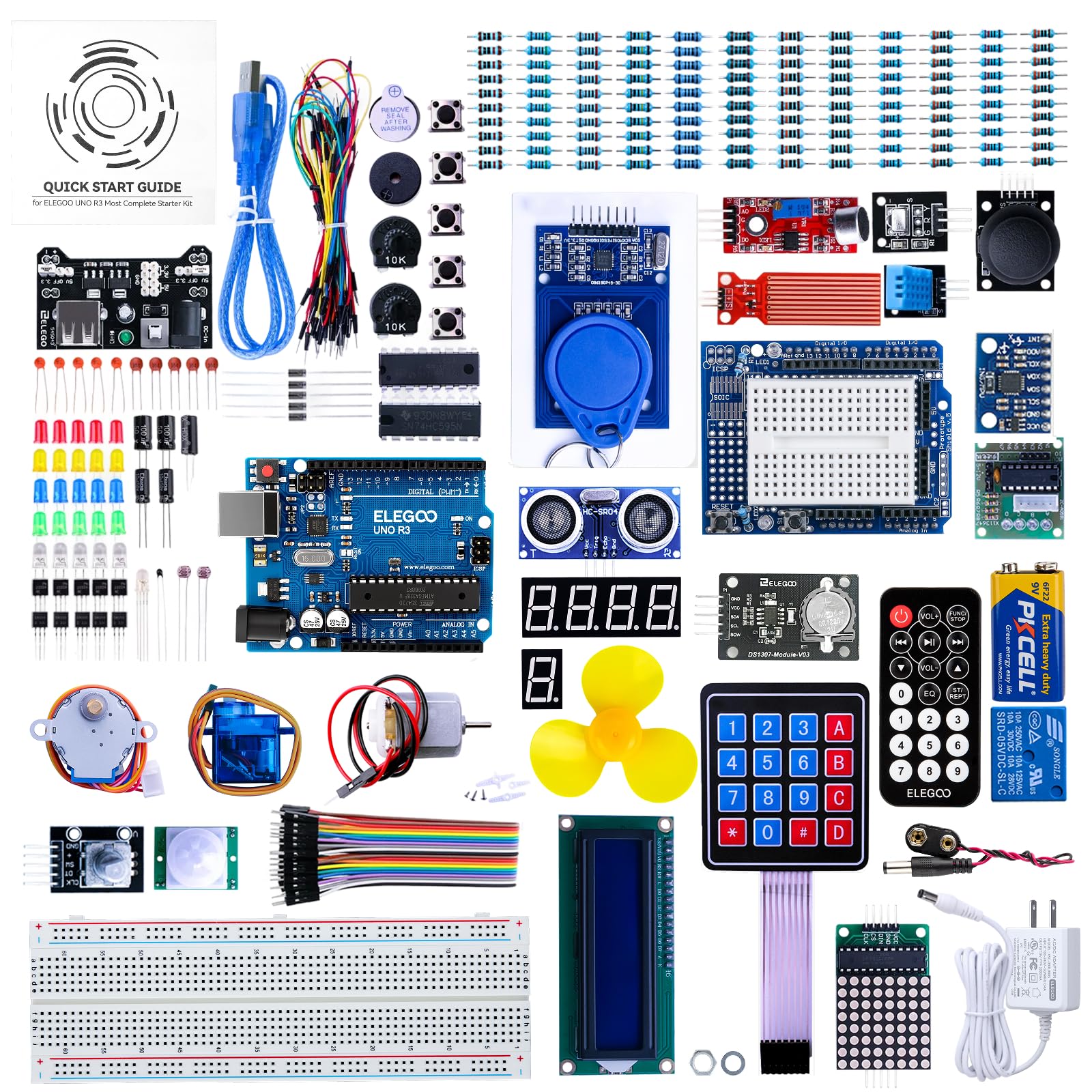
3. ELEGOO Upgraded UNO R3 Most Complete Starter Kit
A complete Arduino starter bundle that fixes the old kit’s weak spots with an all-in-one sensor shield.
The ELEGOO kit earns its “upgraded” name by solving the biggest beginner headache — messy wiring. It adds the ELEGOO UNO All-in-One Sensor Shield, an expansion board that plugs into most of the kit’s modules and simplifies connections so you make fewer mistakes. Along with 10 extra female-to-female wires, the kit is designed to be the most complete starter set for Arduino, and owner feedback suggests it delivers on that promise.
New courses were added to the tutorials too: basic C language grammar now gets explained whenever a new concept appears, and the FAQ was improved to fix the common “library missing” error. Fun new projects were added such as the Dice roll, Retro Snaker, Memory Game, and Induction night light, which keep learning playful rather than dry. The kit also includes instructions for setting up a development environment on Ubuntu, which is rare at this level.
Owners praise the overall quality as the top trait, and it is considered well-suited for beginners across the board. The recurring practical gripe is the breadboard — a few find the internal connections too tight, calling it next to useless and recommending a cheap replacement. The one-year manufacturer warranty adds confidence, and the parts arrive in a convenient, attractive container that keeps everything organized.
What Shines
- All-in-One Sensor Shield simplifies wiring and prevents mistakes
- Improved tutorials with basic C language grammar teaching
- One-year manufacturer warranty
What to Know
- The included breadboard has overly tight connections for some owners
- Ages 14+ rating assumes you can follow structured lessons
Ideal for: a teen or adult taking their first Arduino steps with a kit that already fixed its predecessor’s flaws.
skip it if: you have a large budget for a WiFi-capable board — this uses the older R3, not the R4 WiFi.
4. Arduino Student Kit

An official Arduino course with a curriculum designed so a beginner builds from zero knowledge upward.
When you buy the official Arduino-branded Student Kit, you are getting a structured lesson plan, not just a pile of parts. The kit walks you through projects like a traffic light system, a light-sensitive lamp, and a motion-activated alarm, each one teaching digital and analog circuits, sensors, and actuators through the Arduino IDE. It is designed for homeschool, self-teaching, and classroom use, assuming no prior knowledge and building concepts from the ground up.
Owners describe it as a terrific starter set with many quality electronic parts, and they appreciate that the lessons lead students through actual code writing rather than copy-paste. One uncle bought it to get a nephew into basic electronics development, and the experience felt like a freshman-level fundamentals of engineering lab — high praise for a hobby kit. It includes a multimeter (sold with a 9-volt battery note: you need to supply that battery yourself) and an Uno R3 board.
The top-praised trait is component quality, with comprehensiveness running a close second. The fair logistics catch: the 11 STEM lessons require an Arduino account and online access, and you cannot preview or download them all in advance. The Arduino IDE software itself needs around 540MB of disk space, although a web editor works as an alternative. For self-paced learners willing to make an account, this is an exceptionally thorough way to learn.
The Wins
- Official Arduino curriculum built to take a true beginner from zero
- Includes a multimeter for real measurement practice
- Quality parts praised as lab-grade by an engineering instructor
The Logistics
- Lessons need an Arduino online account and internet access
- Multimeter needs a separate 9-volt battery you must buy
- IDE install needs about 540MB of disk space
Best for: the self-taught learner who wants a true course structure with measurement tools included, not random projects.
Not for: anyone who dislikes making online accounts or who wants instant, offline-only tutorials.
5. LAFVIN Project Super Starter Kit

The bargain box that stuffs three Arduino-compatible boards and 27 lessons into one small package.
This kit gets you an enormous amount of hardware for the money. You get three compatible boards — the UNO R3, Mega2560, and Nano — plus sensors, a servo motor, a stepper motor, a DC motor, an LCD 1602 display, a 4-bit 7-segment display, and the usual resistors, LEDs, and jumpers. The included tutorial manual covers more than 20 lessons with code, libraries, and datasheets, making it a complete package for a beginner who wants to learn both electronics and programming together.
Owners describe the kit as packed with high-quality components and excellent value for money, saving the hassle of sourcing dozens of parts individually. The LCD 1602 module comes with a pin header, so you do not need to solder anything yourself — a thoughtful touch for newcomers. For a 5-star reviewer, the kit is ideal for a teen who shows engineering promise, and the clear instructions and diverse projects are praised for sparking creativity.
The obvious catch appears right in the manual: this kit is more suited to an adult or a very advanced child. One buyer bought it for an 11-year-old grandson, read the instructions, and decided it was far too advanced for that age, so he passed it on to a delighted young man instead. Quality control is the other real question — a few units arrive with individual dead spots, such as UNO R3 pins or a breadboard that does not connect on one side, and the sensor polarity marks are unclear enough that one owner accidentally fried a sensor. The manufacturer replaced damaged parts free, but the replacement shipped from China and took about four weeks.
The Perks
- Three Arduino-compatible boards for the price of one
- 27 lessons of tutorial, code, and datasheets included
- No soldering required for the LCD module
The Rough Edges
- Advanced content — not suited to young children
- Sensor polarity marks are unclear; read carefully before powering
- No red and black power wires included
Reach for this if: you are an adult beginner on a tight budget who wants maximum board variety to experiment with.
Look elsewhere if: you want a truly beginner-friendly labeled kit with crisp sensor markings — spend more and get the ELEGOO instead.
6. Molence 1818PCS DIY Electronics Components Kit

Not a project kit — a stockroom of 1,818 loose components for builders who already know what to make.
If you already own an Arduino or Raspberry Pi and keep running out of resistors or LEDs, this assortment is your refill pack. It holds 1,818 pieces of the most commonly needed parts: 820 metal film resistors, 300 ceramic capacitors, 120 aluminum electrolytic capacitors, 180 transistors, 200 LEDs, 100 diodes, 4 prototype PCBs, and a range of potentiometers and voltage regulators. Everything arrives organized in a reusable storage case that is convenient to carry and keeps small parts from ending up in a drawer.
This is the rare pick where the raw component quality is the story, and customers note the variety is particularly useful for repairing vintage hardware — a strong hint that the selection skews toward classic, useful parts rather than gimmicks. An electrical circuits instructor bought a set for the class, and the students loved designing and building their own circuits with the parts, calling it a fun, relaxing lesson before finals. Own the right tools and you can prototype almost any basic circuit without ordering parts one at a time.
The clearest honest truth in the reviews is the value proposition: quality matches the price point, with real component values that fluctuate a lot. That means you cannot trust every capacitor’s stated value without testing — one owner found several unmarked and way outside spec. For beginners doing simple projects, that is fine; for precision work, measure first. The basic components are the most-praised aspect, and practical value for learning and testing is the second.
The Upside
- 1,818 pieces of the most common electronic components
- Reusable storage case for organization and portability
- Particularly useful for vintage hardware repair
The Honest Catch
- Component values fluctuate a lot — test before precision work
- Some capacitors arrive blank with no value markings
- No tutorial, board, or project guide — this is bulk stock
Buy it if: you have a board already and want a deep, organized parts drawer for tinkering and repairs.
pass on it if: you are a first-time buyer who needs a board and instructions — this is a refill, not a starter kit.
7. ACEBOTT Smart Robot Car Kit
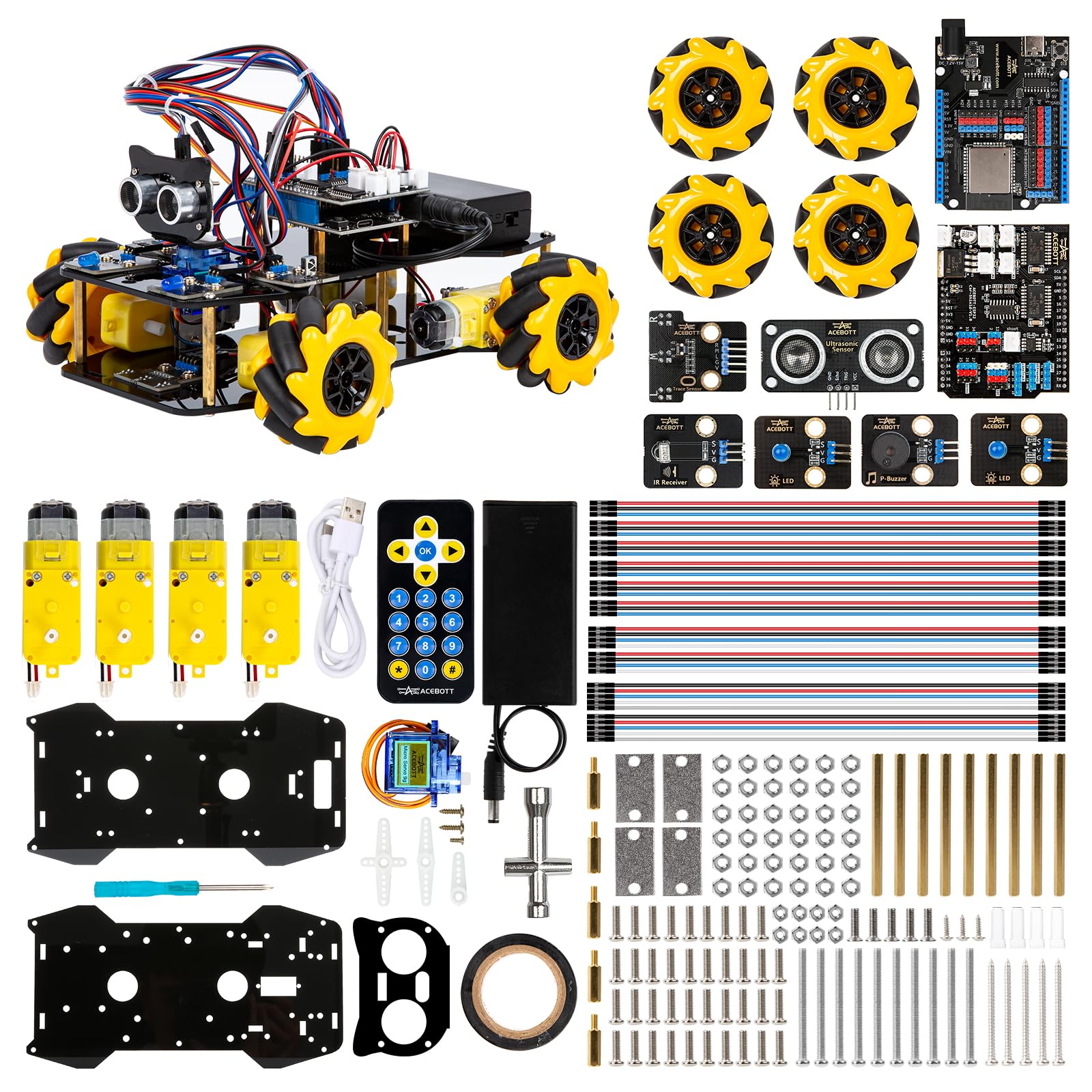
A four-wheeled bot with 360-degree mecanum wheels that teaches real robotics through 16 story-rich tutorials.
Building a robot that actually moves is the most satisfying way to learn programming, and this kit’s mecanum wheels make it genuinely impressive. The 6cm omnidirectional wheels let the car move forward, sideways, diagonally, and rotate in place, even drifting left and right — so you learn about motor control and kinematics, not just blinking LEDs. It is driven by an ESP32 controller board, and the 16 story-rich tutorials walk you through programming and electronic hardware principles step by step.
The kit is expandable too: camera, robotic arm, tank, and solar expansion packs can be added later, open up photo taking, image recognition, voice recognition, tracking mode, and multi-degree-of-freedom arms. You control the car via IR remote or app, and it offers path-planning cruise and multi-direction obstacle avoidance in follow mode. Owners describe quality as a genuine strength — the “best gift for a mechanically inclined youngster” and a fun hours-long project that genuinely taught robot-building skills.
The teaching content earns strong marks — the educational value is the second most-praised aspect, with one owner calling it a great way to teach electronics and programming. Reliability is the most-discussed trade-off, with several owners reporting functional quirks. The biggest practical warning: the car requires 2 nonstandard batteries that are not included, and it can be tricky to flash — you need to enter bootloader mode by shorting GPIO 0 to GND with the battery disconnected. It also ships as an acrylic build with many small parts, so do not lose the screws.
The Highlights
- 6cm mecanum wheels offer full 360-degree movement
- ESP32 board with 16 story-rich programming tutorials
- Expandable with camera, robotic arm, tank, and solar packs
The Realities
- Needs 2 nonstandard batteries that are not included
- Flashing firmware requires shorting GPIO 0 to GND
- Reliability is mixed — some units have functional issues
Suit it: to a mechanically minded adult or teen who wants a moving, app-controlled robot with room to grow.
Frustration risk: if you want plug-and-play — the bootloader setup and missing batteries will test your patience first.
8. KEYESTUDIO DIY Solar Tracking Electronic Kit

A hands-on solar tracker with 11 tutorials that teaches light-to-energy conversion, sensors, and smartphone charging.
This is the kit for the environmentally curious builder who wants a project with a clear real-world goal: converting sunlight into electricity. It is built around an Arduino-compatible board with 4 ambient light sensors, 2 DOF servos, and a solar panel, and it tracks the sun to keep the panel pointed at maximum light. Beyond the tracker, the kit includes a smartphone charging module, a temperature and humidity sensor, a BH1750 light sensor, a buzzer, an LCD1602 display, a push button module, and an LED module — so the lessons go well beyond just solar.
The 11 detailed online tutorials move from simple to complex, starting with controlling a single sensor and building up to the full integrated solar tracking project. The kit preserves IIC, UART, and SPI ports for expansion, so experienced builders can alter the code or connect extra sensors for their own experiments. Owners praise the easy setup and clear instructions, noting the build takes some time to complete and covers mechanics, circuitry, and coding all at once — a genuinely comprehensive learning tool for teens and adults rated 15+.
Packing and documentation are a strong suit — labeled bags, a phone-sized panel that is larger than expected, and an online Dropbox with instructions, an FAQ PDF, code, and software all earn praise. The fair warnings are about completeness and power: the kit is not assembled and code is not pre-burned, and batteries are not included. An occasional unit arrives missing several parts, and solar charging performance depends heavily on your location — do not expect instant phone charging on a cloudy day.
The Strengths
- Real solar tracking with 4 light sensors and 2 servos
- Charges smartphones directly from the solar panel
- Preserves IIC, UART, and SPI ports for expansion
The Caveats
- Not assembled and code not pre-burned — you build it all
- Batteries not included; solar output varies by location
- Some units arrive missing parts — check the box immediately
Choose this for: a builder drawn to renewable energy who enjoys a multi-hour build with a useful, charging result.
Pass it over: if you want instant gratification or live in a low-sun area — this is a science project, not a power station.
9. ROKR 3D Puzzles Marble Spaceport LGC01
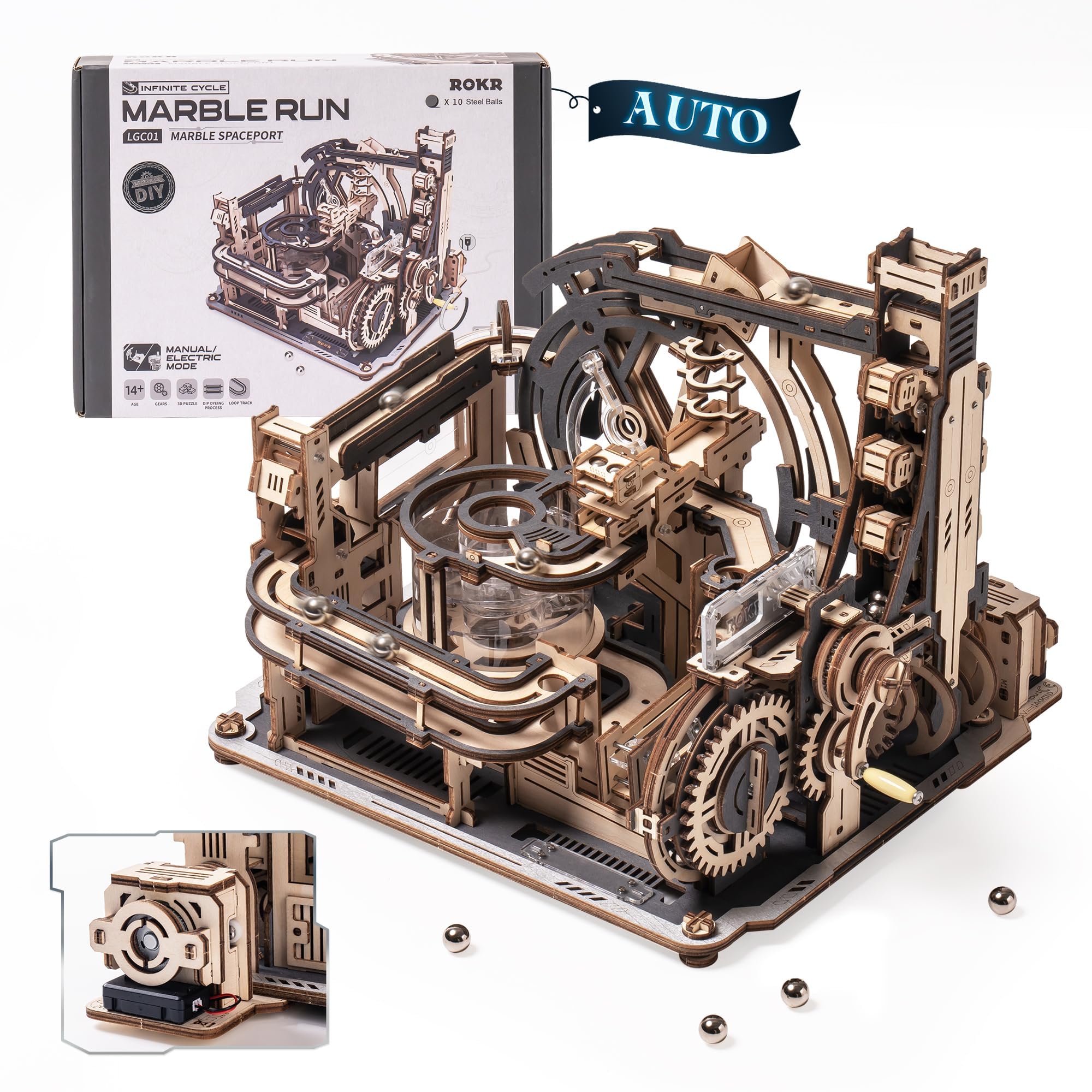
The 472-piece wooden marble run that keeps your hands busy and your desk decorated for weeks.
Not every electronics-adjacent kit involves a microcontroller — this one is pure mechanical engineering. The ROKR Marble Spaceport is a 3D wooden puzzle with 472 pieces that builds into a working marble run, and it supports switching between manual and electric automatic modes so the balls climb and roll on their own. The plywood is black-grey with acrylic accents, and the result is a showpiece that looks like a space station while demonstrating physics and hand-eye coordination in action.
Owners describe the build as challenging, fun, and entertaining — one 92-year-old who has built roughly 100 puzzles spent 40-45 hours on it, calling the instructions great and the process “really fun to assembly.” The fun and the assembly process are the two most-praised aspects, with quality close behind. No glue is needed — all tools come in the accessory package — and ROKR offers replacement parts guidance if you break a piece during the build. The detailed manual helps you identify parts, though a few owners recommend sanding edges and using wax to keep the marbles moving smoothly.
The reliability of the included motor is the honest weak point, with some owners reporting it burns out within a week — a real consideration if you plan to run it constantly in electric mode. Dimensions matter for placement: the finished model takes up desk space, and some parts are delicate enough that a towel underneath during assembly is a smart idea. This is a puzzling challenge for the mechanically minded, not an electronics lesson at all.
The Appeal
- 472 pieces for a long, rewarding 40-plus-hour build
- Dual manual and electric automatic modes
- No glue required — all tools included
The Trade-offs
- Motor can burn out within a week of heavy use
- Delicate parts may break — sand edges and use wax
- Not an electronics kit — it teaches mechanics, not circuits
Ideal for: puzzle lovers, clockmakers, or Lego fans who want a mechanical build with a satisfying physical payoff.
Wrong tool if: you want to learn circuits or code — there is no programming anywhere in this box.
Understanding the Specs
Project Count vs. Part Count
Project count tells you how many guided builds come in the manual. Part count tells you how many individual components are in the box. A 750-project kit with 80 snap-together parts teaches circuit logic fast. A 1,818-piece assortment with zero projects is for building your own designs. Decide which mode you want to learn in before comparing the two numbers.
Microcontroller and Coding Required
The board in the box determines whether you will write code. Snap Circuits needs no programming at all. Arduino and ESP32 kits require you to connect the board to a computer, write or upload code in the Arduino IDE, and troubleshoot when things do not work. If you want to learn both hardware and software, pick a coding kit; if you want pure circuits, go snap-together.
Batteries and Hidden Costs
Check the battery line in every spec before buying. The ACEBOTT robot needs 2 nonstandard batteries that are not included. The Arduino Student Kit’s multimeter needs a 9-volt battery. The KEYESTUDIO solar kit includes no batteries at all. Add these to your total cost, or you will unwrap your kit and discover you cannot power it.
Online Tutorials and Support
Clear, step-by-step instructions are the difference between a smooth build and a frustrating one. The best kits pair a printed manual with online video courses, downloadable code libraries, and forums for troubleshooting. The SunFounder kit includes 60+ video lessons, and the KEYESTUDIO kit hosts an online Dropbox with an FAQ and code. A budget kit with sparse instructions can waste hours of your time, regardless of component quality.
FAQ
What is the difference between a snap-together kit and a breadboard Arduino kit?
How long does it take to finish a 472-piece puzzle kit like the ROKR Spaceport?
Why do some kits need batteries that are not included?
Can a complete beginner learn to code with an Arduino kit?
Is the Snap Circuits Extreme SC-750R too childish for an adult?
What does a components assortment kit include, and do I need a board for it?
Why would I choose an ESP32 kit over a standard Arduino kit?
What should I do if parts arrive missing or damaged?
Can I use the same kit to learn both electronics and programming?
Final Thoughts: The Verdict
For most buyers, the electronic kits for adults winner is the Snap Circuits Extreme SC-750R because it delivers 750-plus projects with zero coding and a build quality that owners have trusted for over a decade. If you want to learn real Arduino programming with WiFi, grab the SunFounder Elite Explorer Kit. And for a mechanical brain-teaser with no electronics at all, the ROKR Marble Spaceport is the one to reach for. Pick the kit that targets the exact skill you want to learn next, whether that’s circuit logic, coding, or mechanical assembly.
How We Picked
We do not accept paid placement. Every pick is matched to a real buyer and a real use-case; we do not hands-on test units.
Sources & Methodology
Specifications: manufacturer listings and product documentation. Review insights: verified customer reviews, as of July 2026. Pricing: not shown on this page (it changes often); check the current price via the retailer link.
As an Amazon Associate, WellFizz earns from qualifying purchases. This does not affect which products we feature.
Related Guides

Mo Maruf
I created WellFizz to bridge the gap between vague wellness advice and actionable solutions. My mission is simple: to decode the research and give you practical tools you can actually use.
Beyond the data, I am a passionate traveler. I believe that stepping away from the screen to explore new environments is essential for mental clarity and physical vitality.