Our readers keep the lights on and my smoothie glass nicely filled. As an Amazon Associate, I earn from qualifying purchases.
Specs are compiled from manufacturer listings and verified buyer reviews and can change over time — please confirm the key details on the product page before buying.
The central problem with an electronic writing pad is that most of them feel nothing like paper, leaving you with a stiff, slippery screen that makes your handwriting look shaky. This guide cuts through that issue by focusing on the one thing that actually matters: the friction between the pen tip and the surface. You are after a digital notebook that lets your thoughts flow without the resistance of a bad screen.
I’m Mohammad Maruf — the founder and writer behind WellFizz. This guide is built by comparing the manufacturers’ published specifications and the patterns across verified customer reviews, so you get each pick’s real strengths and trade-offs instead of marketing spin.
Whether you are a student drowning in loose-leaf or a professional tired of losing meeting notes, the right electronic writing pad replaces entire stacks of paper with a reusable surface that saves your trees, your bag space, and your patience.
Our Picks at a Glance


How To Choose The Best Electronic Writing Pad
Electronic writing pads vary widely in screen type, pressure sensitivity, and software capabilities. A kids’ doodle board works fine for a 5-year-old, but a professional using one for meeting notes will hate it within a day. Screen type and intended use are the primary factors to consider. LCD pads are cheap and simple, perfect for quick lists and messages. E-Ink pads offer a much better writing feel, better for reading, and usually come with advanced note-taking software.
Screen vs. Writing Feel
An LCD writing pad is a low-power screen that shows a single color (usually a rainbow or green line) when you press on it. They are extremely thin, light, and cost very little. The writing feel is often a bit more slippery than paper. An E-Ink display, on the other hand, uses tiny microcapsules of pigment to create text and images that look just like ink on paper. The screen is matte and reflects light naturally, meaning zero glare in direct sun. The surface of E-Ink pads is usually textured to give you that satisfying, scratchy “paper feel.” Surface texture is the most important factor for comfort and legibility during extended use.
Pressure Sensitivity
Pressure sensitivity, measured in levels, determines how precisely the device distinguishes between light and heavy strokes. A basic LCD pad has no pressure sensitivity — every line is the same thickness. A decent E-Ink notepad offers around 4,096 levels, sufficient for natural handwriting. High-end creative tablets exceed 8,192 levels, enabling line-width control based on pressure for natural-looking notes and sketches. Professionals doing calligraphy or shading should prioritize the highest pressure levels.
Software and Connectivity
A simple LCD pad has no software. You write, you erase, you write again. This is fine for a grocery list. A serious electronic writing pad will connect via Bluetooth to an app on your phone or computer. This lets you sync your handwritten notes automatically, convert handwriting into typed text, organize pages into folders, and share them as PDFs or images. Some advanced pads, like those running on Android, can download apps like Kindle or Evernote directly, turning the writing pad into a full productivity tool without needing a computer nearby.
Quick Comparison
| Model | Best For | Screen Type | Write Surface Area | Pen Technology | Amazon |
|---|---|---|---|---|---|
| Wacom Intuos Small★ Best Overall | Digital Art / Design | Pressure-Sensitive | 6″ x 3.7″ | Battery-Free EMR | Amazon |
| 12 Pack LCD Writing TabletsParty Pack Champ | Kids Party Favors | LCD (Multicolor) | 8.5″ | Battery-Free Stylus | Amazon |
| Ksequ LCD Writing TabletDual-Side Writer | Quick Notes / Dual-Side | LCD (Monochrome) | 10.5″ Double-Sided | Battery-Free Stylus | Amazon |
| Amoretti Sonnet Foldable Tablet | Portable Note-Taking | LCD (Green Trace) | 14.3″ (Foldable) | Battery-Free Stylus | Amazon |
| HUION Note 2-in-1 | Real Paper + Digital Copy | None (Real Paper) | A5 Notepad | Ballpoint Refills + Plastic Nib | Amazon |
| BOOX Go Color 7 Gen II | Color E-Ink Reader / Note-Taking | E-Ink Kaleido 3 (Color) | 7″ | Active Stylus (Not Included) | Amazon |
| XPPen Magic Note Pad | Full Android Notepad / Drawing | LCD (AG Nano-Etched) | 10.95″ | X3 Pro Pencil 2 (Battery-Free) | Amazon |
| Penstar eNote2 | Pure Paper Feel / No Glare | E-Ink (No Touch Layer) | 10.3″ | Digital Stylus B5 (8192 Levels) | Amazon |
In‑Depth Reviews
1. Wacom Intuos Small, Wired Graphic Drawing Tablet
Our pick — over 4.5★ from 23,500+ verified ratings; the strongest balance of quality and price.
The industry standard that feels like pen on paper and never needs charging.
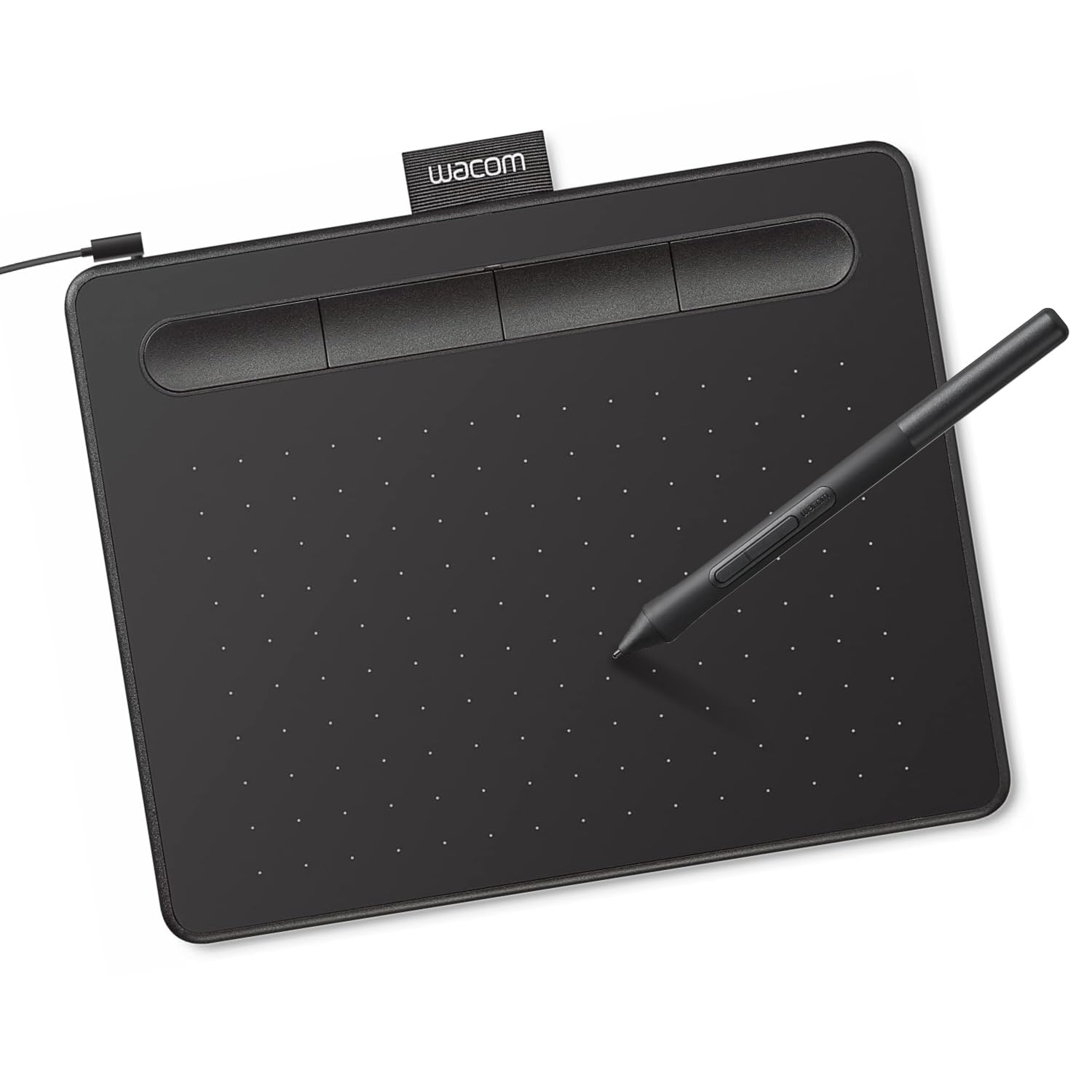
The Wacom Intuos Small is not a screen you look at; it is a surface you feel. Its Electro-Magnetic Resonance (EMR) technology makes the pen completely battery-free, so you never have to plug in a stylus. With 4,096 pressure levels, the reason this pad defines the category is right in your hand: the matte surface and slim rubber-grip pen give you a tactile, paper-feel experience that professional graphic designers actually use. The active surface area is a compact 6 by 3.7 inches, but the setup — plug the USB-A cable, install the driver, and you are done — is nearly instant.
The Intuos Small is a desktop tool. It works with almost any creative software, from Photoshop to Affinity Photo, and includes a generous bundle of creative apps with the purchase. The 4 ExpressKeys on the tablet are customizable shortcuts, and the clicky feedback makes them satisfying to press. What wins people over is the sheer quality of the build and the sensitivity — as owners put it: “the sensitivity is great, and the pen is comfortable in the hand.” It is also incredibly lightweight at 8.1 ounces, so it slides into a laptop bag without adding weight.
The main trade-off here is the wired connection. This version does not have Bluetooth, so you are tethered to your computer with the included L-shaped USB-A cable. Since drivers are required, it is a bad fit for OS-hopping admins.
Real Pen on Paper Feel
- Battery-free pen means zero downtime for charging — always ready.
- Matte surface and slim pen with rubber grip mimic real paper friction.
- 4,096 pressure levels (across 122-4095 range) give fine control for shading.
- Ultra-portable at 8.1 ounces; slips into any bag.
The Wired Limitation
- No Bluetooth; must stay plugged into the computer via USB-A.
- Small active area (6″ x 3.7″) means big arm movements feel cramped.
- Pen nibs wear down with heavy use and need replacement.
Best for: First-time digital artists, students learning drawing, or notary pros who need precision in a compact footprint.
Think twice if: You need to work totally wirelessly or prefer a larger drawing canvas.
2. 12 Pack LCD Writing Tablets for Kids Party Favors
The easiest way to keep a dozen kids busy without a single sheet of paper.
These are the simplest possible version of an electronic writing pad, and for the right buyer, they are perfect. Each 8.5-inch pad uses a pressure-sensitive LCD screen that shows rainbow-colored lines. There is no battery charging — the built-in CR2025 coin cell lasts for months and is easily replaceable. The pen is tethered to the board with a string, so it never goes missing. As buyers report: “I bought these for all the nieces and nephews for Christmas… they are perfect!! hours of fun, not only for the kids but also for the adults.”
The pads are designed for little hands. They are thin, lightweight, and have rounded corners that prevent scratches. A screen lock switch on the back prevents accidental erasing, and the front-facing erase button clears the whole screen instantly. The tablets come in a pack of 12, making them ideal for classroom goodie bags, birthday parties, or as a summer activity kit. The versatility gets praised most — across 20 positive mentions, buyers love using them for road trips, restaurants, and quiet time at home.
The honest downside is that the screen does not have a backlight, so writing requires decent ambient light. The erase function is all-or-nothing — you cannot selectively erase one word, you have to clear the whole board. Some buyers found the screens fading over months of heavy use, but at this price for a dozen units, the value is undeniable.
Smart Bulk Buy: Perfect for teachers, party planners, or parents of multiple kids who want a mess-free, screen-free creative outlet.
One Real Limit: No backlight means it’s useless in the dark, and you cannot erase just one line — it’s all or nothing.
3. Ksequ LCD Writing Tablet for Adults, 10.5″ Double-Sided
The only double-sided writing pad that gives you two screens in the size of one.
This pad stands out because you can write on both sides. The Ksequ LCD Writing Tablet is essentially two thin.2-inch boards that sandwich together, giving you a front surface and a back surface. Total writing capacity is effectively double that of a single-sided pad, and the included pen is stored in a magnet attachment. The screen uses a flexible LCD that produces a fine-point line, and the writing experience gets solid marks for being responsive and easy to erase. The built-in lock switch prevents the erase button from wiping your work accidentally.
The pad weighs only 6.8 ounces, making it truly portable. Buyers who use it for medical interpreting practice and quick office memos appreciate the two-sided design because it reduces the need to flip pages. The built-in claim of 50,000 to 100,000 writes means it will likely outlast most impulse purchases before needing a battery change. The simplicity is real — no drivers, no apps, no charging cable. It is a pure writing slate.
The catch is the screen brightness. The Ksequ’s LCD is not backlit, and many buyers find it “not as bright as advertised” and “difficult to see in normal room lighting.” The readability is the most frequently mentioned negative aspect, with 31 mentions. If you tend to work in dimly lit coffee shops or a softly lit living room, you will struggle to see your writing clearly. The size is also nominally 10.5 inches, but the active area feels smaller due to the bezel.
Reach for this if: You want a functional, two-sided scratch pad for well-lit desks and need the ability to protect a full page of work.
Look elsewhere if: You write in low light or need a bright, high-contrast display — the screen is dim compared to other LCD options.
4. Amoretti Sonnet 14.3in Foldable LCD Writing Tablet

A massive 14.3-inch canvas that folds to the size of a Moleskine.
This is the largest LCD pad in the lineup, but the trick is that it folds. Unlike the Ksequ, which is two separate boards, the Amoretti Sonnet uses a foldable design like a book. Open it up, and you get a 14.3-inch writing surface — big enough for detailed diagrams, complex formulas, or full-page meeting notes. Fold it closed, and it is slim enough (0.2 inches thick, weighing under a pound) to slide into a backpack pocket. The bezel-free design boost the writing area, and the screen displays a clean, single green trace on a dark background, which gives it a professional, premium look compared to rainbow-colored kid pads.
The build quality gets the most praise here, with 31 positive mentions. The included stylus nests securely in an edge channel, so it is always attached and never lost. The eraser works through the back of the pen, which owners mention is satisfying and clean. The pad uses a single nonstandard battery that lasts for months — no charging cables, no waiting. The fact that you can lock the screen with a physical switch to prevent accidental erasure is a simple but appreciated feature for saving a to-do list.
The main drawback is the lack of a selective erase function. If you make a mistake in one corner, you have to clear the entire 14.3-inch screen. The screen brightness is also mixed — some find the green trace clear; others wish it were more vivid. As one reviewer noted, “The 11.5 inch was smaller than a standard notebook,” meaning the folded panels are not full A4 pages individually. The lock button is also reported to be a bit stiff.
Perfect for: Architects, engineers, or meeting scribes who need a massive reusable canvas but want portability.
skip it if: You need to fix individual words or numbers without wiping the whole board — this is a one-button-erase device.
5. HUION Note 2-in-1 Digital Notebook Drawing Tablet

You write on real paper, and it sends a digital copy to your phone.
The HUION Note 2-in-1 takes a completely different approach. Instead of a screen, you use a real A5 paper notebook. A digital pen filled with a standard ballpoint refill writes normally on the page, while simultaneously capturing every stroke via Bluetooth 5.0 and sending it to the Huion Note app on your phone. The result is a tactile, no-compromise pen-and-paper experience that also gives you vector lines, searchable text, and instant sharing. The app allows you to merge, split, or move pages, and it even records audio that syncs to your handwriting — tap on a word, and the audio from that moment plays back.
This is the ideal solution for anyone who hates writing on glass but still wants digital organization. The unit comes with 50 pages of A5 paper, a magnetic pen sleeve, three ballpoint refills, three plastic pen nibs, and a USB-C cable. The battery lasts 18 hours of continuous use, and standby time is about 30 days. One artist buyer puts it simply: “I sketch better on paper and want it to be digital as well.” It also works as a drawing tablet when you swap the paper for the included graphics panel and connect to a PC via USB.
The biggest limitation is that the pen is proprietary — only the included Huion pen works. The pen tips are short, lasting about 400 meters of writing. The paper can be affected by humidity, which warps it slightly. Setting up the app connection is easy for most, but some find the initial Bluetooth pairing cumbersome. You cannot use this without a smartphone nearby; the app is required for the digital capture.
Best for: Artists and students who refuse to compromise on real pen-to-paper feel but need digital backups and sharing.
Not for: Anyone who wants to work without a phone or tablet companion app — this is a hybrid, not a standalone gadget.
6. BOOX Go Color 7 Gen II E Ink Tablet

A full-color E-Ink screen that lets you read comics, take notes, and run Android apps.
The BOOX Go Color 7 Gen II is for the person who wants both an e-reader and a note-taker in one device. Its 7-inch Kaleido 3 screen shows 4,096 colors, so you can read graphic novels, highlight in yellow, or annotate PDFs in color. The resolution is 1680 x 1264, giving you 300 pixels per inch (ppi) in black and white and 150 ppi in color — the color is noticeably muted compared to an LCD screen, but that is the nature of E-Ink. The tablet runs Android 13, so you can install the Kindle app, Google Play Books, Evernote, or any note-taking app directly. The battery is 2,300mAh, and customers note it lasting between one and three weeks depending on Wi-Fi and backlight use.
The build is lightweight at 6.9 ounces with a premium feel. It has page-turn buttons, a USB-C port that supports OTG, a microSD card slot for expandable storage of up to 1TB, and built-in speakers. The front light has warm and cold modes, so you can read comfortably in any light. This is the strongest option for people who want a single device for reading and occasional writing, rather than a dedicated writing pad.
The writing experience here is an afterthought. The device does not support EMR (Electro-Magnetic Resonance) pens — it only supports an Active Stylus, which is NOT included in the box. The stylus requires a battery, needs pairing, and is an extra cost. The color E-Ink screen is inherently darker and grayer than a standard Kindle, and owners note that the colors are “muted, not vivid.” The screen also has a known E-Ink issue of ghosting (a faint previous image remaining), which you can manage by adjusting the refresh mode, but it is not a low-maintenance device.
Ideal for: Comic readers and multi-format ebook enthusiasts who want a lightweight Android device with a paper-like color screen.
Think twice if: Your primary use is handwriting — the stylus is not included, costs extra, and the writing feel does not match a dedicated notepad.
7. XPPen 3-in-1 Color Digital Notebook Magic Note Pad

An Android tablet with a matte screen that finally feels like writing on paper.
The XPPen Magic Note Pad is an Android 14 tablet, not an E-Ink screen, but its AG (Anti-Glare) nano-etched glass surface changes the writing game. The surface texture reduces reflections and mimics paper friction, so your X3 Pro Pencil 2 glides with a satisfying scratch. The pen is battery-free and offers a staggering 16,384 pressure levels, meaning the line thickness and opacity respond to the tiniest changes in your grip. The screen itself is a 10.95-inch LCD with a 90Hz refresh rate, so there is zero lag or ghosting — your strokes appear instantly. It has three color modes: full color, monochrome LCD, and a nature color mode that emulates an e-paper look for focused reading.
This is a full productivity machine. The 8,000mAh battery charges quickly with a 20W charger, and the 128GB of onboard storage is enough for textbooks and note archives. The included XPPen Notes app is native and sturdy, offering handwriting-to-text conversion, audio recording synced to notes, AI summarization, and automatic cloud backup to OneDrive or Google Drive. The tablet also has a 13-megapixel front camera, two speakers, and two microphones for remote meetings. The writing experience is widely praised, with 35 positive mentions for “feeling great” and the touch sensitivity feeling “great in larger-than-normal hands.”
The biggest caveat is the narrow viewing angle. The etched glass that makes writing so wonderful also means the display looks dim and washed out if you are not looking directly at it from the front. This is a solo-use tool, not a tablet for showing videos to a group. The tablet runs a lite version of MS Word, which lacks some desktop features. The battery life is around 4 hours of active use, which is far less than any E-Ink pad. You can easily drain it in a single long study session.
Reach for this if: You need a single device for serious note-taking, reading, occasional drawing, and full Android app access.
Think twice if: You need all-day battery life or plan to share the screen with someone else — this is a solo-usage, front-view device.
8. Penstar eNote2 Paper Tablet

A distraction-free E-Ink notepad that feels so real, you forget it’s a screen.
The Penstar eNote2 makes a radical choice: it removed the capacitive touch layer entirely. This means you cannot tap on the screen with your finger — only the included Digital Stylus B5 works. The result is a display that looks noticeably whiter, sharper, and more transparent than any other E-Ink screen in this guide. The text sits closer to the surface, giving you a reading experience that looks like a finely printed book page, even in direct sunlight. The screen is 10.3 inches and supports 8,192 pressure levels, and the included two pens have a combined 10 spare nibs in the kit.
The eNote2 runs on a focused, minimalist OS. You can write on PDFs, use split-screen to read a book while taking notes, and convert handwriting to typed text with AI assistance. It also has a voice-to-text function that works in real time. The device packs a massive 6,500mAh battery that lasts up to 2 weeks on a single charge, and 128GB of internal storage. A built-in camera lets you scan documents directly into the device. At only 409 grams and 5.5 mm thin, it is lighter than most magazines and just as easy to hold. The bundle includes a magnetic leather folio cover that holds the pen securely.
The main trade-off is the lack of touchscreen navigation. You must use the pen to do anything — scroll, open a folder, turn a page. This is great for focus (no accidental taps), but frustrating for quick browsing. The calendar app does not sync with Google or Outlook, so it is not a full productivity replacement. The included case, while elegant, has been reported as fragile by some owners. The writing experience itself is excellent as long as you use the B5 pen; some users report other pens not working at all.
Reach for this if: You are a student or professional who wants a pure, distraction-free writing instrument for deep note-taking without the glare or distractions of an iPad.
Think twice if: You want to tap with your finger, browse the web, or need a device that syncs with online calendars — this is a dedicated writing slate only.
Understanding the Specs
Pressure Sensitivity
This number (measured in levels) tells you how many distinct pressure points the pen can detect. A simple LCD doodle pad has zero, so every stroke is the same thickness. A decent notepad has 4,096 levels, which is enough for natural handwriting variation. High-end tablets go up to 8,192 or even 16,384 levels, making shading and line width feel incredibly realistic — perfect for artists and calligraphers. For simple note-taking, you won’t notice the difference beyond 4,096 levels, but for drawing, the higher number wins every time.
Screen Technology
You have three main choices here. LCD is a standard low-power screen that shows a single color (like the Ksequ and Amoretti) — it is cheap, simple, and works only for writing, not reading books. E-Ink uses microcapsules of pigment that reflect light like real paper — it uses no power to hold a static image, is readable in sunlight, and is much easier on the eyes for long sessions. Then there is the hybrid approach of a matte-etched LCD (like the XPPen) which adds an anti-glare texture to a regular LCD screen, giving you a paper-like feel with fast refresh rates and full color.
FAQ
What is the difference between an LCD writing pad and an E-Ink writing pad?
Can I use any stylus with an electronic writing pad?
How long does the battery last on an electronic writing pad?
Do electronic writing pads have a backlight?
Can I save my notes or do I lose them forever?
Is an electronic writing pad good for drawing?
Will my electronic writing pad work in direct sunlight?
What file formats do electronic writing pads support?
How durable are electronic writing pads?
Final Thoughts: The Verdict
Across the board, the electronic writing pad winner is the Wacom Intuos Small because it delivers the industry-standard pen-on-paper feel for digital art at a price that beats pure note-taking pads on value. If you want a distraction-free notepad that feels exactly like writing on a printed page, grab the Penstar eNote2 Paper Tablet. And for the full Android experience with a paper-like screen, the XPPen Magic Note Pad is the smart all-in-one for students and professionals who need apps alongside their notes.
How We Picked
We do not accept paid placement. Every pick is matched to a real buyer and a real use-case; we do not hands-on test units.
Sources & Methodology
Specifications: manufacturer listings and product documentation. Review insights: verified customer reviews, as of July 2026. Pricing: not shown on this page (it changes often); check the current price via the retailer link.
As an Amazon Associate, WellFizz earns from qualifying purchases. This does not affect which products we feature.
Related Guides

Mo Maruf
I created WellFizz to bridge the gap between vague wellness advice and actionable solutions. My mission is simple: to decode the research and give you practical tools you can actually use.
Beyond the data, I am a passionate traveler. I believe that stepping away from the screen to explore new environments is essential for mental clarity and physical vitality.