Our readers keep the lights on and my smoothie glass nicely filled. As an Amazon Associate, I earn from qualifying purchases.
Specs are compiled from manufacturer listings and verified buyer reviews and can change over time — please confirm the key details on the product page before buying.
Reading for hours on a phone or tablet causes tired eyes and headaches, which E Ink eliminates. An E Ink device solves that because it reflects light like paper, so there’s no backlight blasting into your face. Your choice depends on if you need pure reading, note-taking, or a mix with color. This guide covers the best E Ink devices for each use case, key specs, and owner favorites.
I’m Mohammad Maruf — the founder and writer behind WellFizz. This guide is built by comparing the manufacturers’ published specifications and the patterns across verified customer reviews, so you get each pick’s real strengths and trade-offs instead of marketing spin.
A focused E Ink device with a long battery life transforms how you read and take notes. The crowd favorite — the Amazon Kindle Scribe Colorsoft 64GB — is a top pick for a best e-ink device that handles both reading and writing comfortably.
Our Picks at a Glance



How To Choose The Best E-Ink Device
Choosing an E Ink device involves a few key decisions. Are you mostly reading novels and articles, or do you need to take handwritten notes and draw? Do you want a simple, focused machine or an Android tablet that runs apps?
Screen Size, Color, and Resolution (PPI)
For pure reading, a 7-inch screen is portable and fine for novels. Larger 10.3-inch screens let you handle PDFs and two-column articles without constant zooming. Color E Ink (using Kaleido 3 technology) shows book covers and comics in color, but the image is noticeably darker and requires the front light to look good. Black-and-white screens are sharper and have better contrast. A PPI (pixels per inch) of 300 for black-and-white is the standard for crisp text; color screens deliver only about 150 PPI, which is fine for comics but softer than a tablet.
Operating System: Dedicated vs. Android
Dedicated e-readers like the Kobo and Kindle Scribe offer a simple, distraction-free interface that just works. Android-based devices (like the BOOX tablets) let you install almost any app from the Google Play Store — Kindle, Kobo, Libby, news apps, note-taking tools. That flexibility comes at the cost of complexity and sometimes slower performance because the apps are not built for E Ink screens.
Note-Taking and the Writing Feel
If you plan to write on the device, look for a pressured-sensitive stylus (measured in levels, like 4096 or 8192). A “paper-like” feel is critical — some screens use a textured surface that gives real friction, and the best pens (battery-free EMR pens) never need charging. Also consider whether the device can convert your handwriting to typed text and back up notes to cloud services like Google Drive and OneDrive.
Battery Life
E Ink uses almost no power when the screen is static, so reading-only devices can last weeks on a charge. Devices that handle constant writing and use a front light will drain faster — typically a few days to a week, depending on usage. Android devices with multiple apps running in the background use more power, so battery life can be unpredictable.
Quick Comparison
| Model | Best For | Screen Size | Storage | Stylus | Amazon |
|---|---|---|---|---|---|
| Kobo Libra Colour★ Best Overall | Portable color reading | 7″ | 32 GB | Sold separately | Amazon |
| Amazon Kindle Scribe Colorsoft 64GBAlso Great | All-around color device | 11″ | 64 GB | Premium Pen (included) | Amazon |
| Amazon Kindle Scribe 32GBTop Performer | Large-screen reading | 11″ | 32 GB | Premium Pen (included) | Amazon |
| BOOX Go Color 7 Gen II | Android-powered reading | 7″ | 64 GB | Not included | Amazon |
| Huion Ink EB1011 | Digital notebook + drawing | 10.3″ | 64 GB | Battery-free, 8192 pressure | Amazon |
| VIWOODS AiPaper Mini | Ultraportable reading | 8.2″ | 128 GB | W2 Stylus Pro | Amazon |
| reMarkable Paper Pro Move | Distraction-free writing | 7.3″ | — | Marker Plus | Amazon |
| Penstar eNote2 | Paper-like note-taking | 10.3″ | 128 GB | 8192 pressure, battery-free | Amazon |
| BOOX Note Air 5 C | Professional note-taking + Android | 10.3″ | 64 GB | 4096 pressure, stylus | Amazon |
In-Depth Reviews
1. Kobo Libra Colour eReader
Our pick — 4.5★ from 550+ verified ratings; the strongest balance of quality and price.
The lightweight color e-reader with physical page-turn buttons and waterproof protection.
The Kobo Libra Colour is a focused color e-reader that gets the basics right. It has a 7-inch E Ink Kaleido 3 display with 32GB of storage — enough to hold 24,000 eBooks or 150 audiobooks. The device is IPX8 waterproof, so you can take it to the bath or pool and read for 60 minutes in up to 2 meters of water. Ergonomics are a strong point: there are physical page-turn buttons, and the screen rotates to left or right for comfortable one-handed use. The device also supports audiobooks via Bluetooth.
Reviewers consistently praise the color features, especially the ability to highlight passages in color and see book covers in full color. The button controls are called “responsive,” and the interface is generally easy to navigate. The device supports OverDrive for borrowing library books, Dropbox for file syncing, and Google Drive. The catch is that the color screen is less sharp than a standard black-and-white E Ink, and some owners mention the colors appear washed out for vivid comic patterns. Additionally, the stylus is sold separately, so this is primarily a reader, not a note-taking powerhouse.
As owners put it: “Color e-ink and stylus for notes; longer battery life, lower price, small size, audio books.” It is a strong alternative to the Kindle ecosystem, especially if you already use library services like OverDrive.
Pure-reading design: Physical buttons, waterproofing, and weeks of battery life make this ideal for the dedicated reader who wants color without the Android complexity.
Not for heavy note-taking: The stylus is an extra purchase, and the 7-inch screen feels small for active writing or PDF annotation.
2. Amazon Kindle Scribe Colorsoft 64GB
The color E Ink flagship that handles reading, note-taking, and graphic novels with ease.
The Kindle Scribe Colorsoft is the most versatile E Ink device for most users. Its 11-inch Colorsoft display uses a custom oxide-based tech to deliver paper-like color without distracting flashes when you write. The screen is glare-free and easy on the eyes, even in direct sunlight. At 400g and 5.4mm thin, it is lighter and thinner than many competitors, making it comfortable for long reading sessions or one-handed writing. The included Premium Pen does not need charging — you just pick it up and write.
On the note-taking side, the built-in notebook lets you write directly into your books using Active Canvas, which makes space for your notes. The device also handles document imports from Google Drive and Microsoft OneDrive, and you can export notes to Microsoft OneNote. Owners praise the vibrant color for graphic novels and magazines, and they call the battery life “phenomenal,” lasting weeks on a single charge. The 64GB of storage gives plenty of room for books and notes. The only real trade-off is the price, but it delivers where it counts.
What owners rave about
- Paper-like color screen that’s easy on the eyes, with soft, vibrant hues
- Premium Pen feels like a real pen; no charging needed
- 11-inch display is perfect for note-taking and graphic novels
- Excellent battery life — lasts weeks on a single charge
- Works with Google Drive and OneDrive for document import/export
The honest trade-offs
- Higher price point than many black-and-white alternatives
- Color is softer than a regular tablet; not for video or heavy animation
- Some owners find the 11-inch size awkward for holding as a book
Best for all-around use: If you want one device for reading, note-taking, and color content, this is the strongest option.
Consider the budget B&W version if: You only read novels and do not need color — the standard Kindle Scribe is sharper and more affordable.
3. Amazon Kindle Scribe 32GB
The black-and-white powerhouse that offers the sharpest reading and writing experience.
If you do not need color, the standard Kindle Scribe 32GB is the sharpest, fastest option. Its 11-inch display features a glare-free design with a front light that automatically adjusts to your environment. The screen has a textured surface that makes writing feel genuinely paper-like, and the included Premium Pen has zero latency, so there is no lag. At 5.4mm thin and 400g light, it is redesigned for comfort, and owners say it is “40% faster” for writing and page turns compared to the previous generation.
This device is a delight for intensive readers and writers. The notebook system allows you to write directly inside books using Active Canvas, and AI tools can summarize, refine, or convert your handwriting to text. You can import documents from Google Drive and Microsoft OneDrive for markup and export to OneNote. The battery life is fantastic — weeks of reading and writing on one charge. Owners consistently mention the crisp, bright screen and the complete lack of ghosting. The main downsides are the lack of color and the fact that you are locked into the Amazon ecosystem. It is also not waterproof, which the Kobo Libra handles better.
What makes it a winner
- Sharpest, highest-contrast display of any Scribe model for pure reading
- Premium Pen feels like a real pen; no charging needed
- AI tools for handwriting recognition, summarization, and transcription
- Import/export documents via Google Drive, OneDrive, and OneNote
- Weeks of battery life; fast performance with minimal ghosting
What to be aware of
- No color — it is a pure black-and-white E Ink
- Locked into the Amazon ecosystem for store purchases
- Not waterproof; cannot take it to the bath or pool
Best for pure reading + writing: If you want the sharpest, fastest, most paper-like device for notes and books, and color is not a priority, this is the one.
skip it if: You need color for comics, magazines, or graphic novels — the Colorsoft is a better fit.
4. Penstar eNote2 Paper Tablet

The distraction-free paper tablet with a massive battery and pure, capacitive-layer-free screen.
The Penstar eNote2 is built for people who want a pure writing experience without the haze of a touchscreen layer. By removing the capacitive touch layer, the text sits closer to the surface, delivering noticeably whiter whites and punchier blacks. It reads like a finely printed book page, and owners say it feels “like writing in a notebook.” The 10.3-inch screen is paired with a 6500mAh battery (one of the largest in this roundup), which can last up to 2 weeks. It also packs 128GB of storage and a built-in camera for document scanning.
The writing experience is excellent. The included B5 pen offers 8192 levels of pressure sensitivity with no noticeable lag, and the device comes with two pens plus 10 extra nibs. It supports split-screen reading and writing, and has real-time AI voice-to-text and handwriting-to-text conversion. Owners note that file transfer via USB is easy, the build quality is solid, and customer service is responsive. The trade-offs: the screen is not touch-sensitive, so you navigate entirely with the pen, and the calendar cannot sync with Google or Outlook. A few owners also mention the device can be fragile, cracking from a drop of 3-4 feet.
Focus-first design: No touchscreen, no distractions — just you and the pen. Perfect for college note-taking and deep work.
The real limit: Lack of touch sensitivity makes navigation slower; the calendar is basic and does not sync with cloud calendars.
5. reMarkable Paper Pro Move

The sleek, pocketable digital notebook that mimics the feel and sound of real paper.
The reMarkable Paper Pro Move is designed for one thing: distraction-free handwriting. It features a 7.3-inch Canvas Color display that looks, feels, and even sounds like paper. The device is ultraportable at 248.4g, easily slipping into a jacket pocket. The Marker Plus requires no charging and offers a natural writing feel with multiple pen types and colors. The device also supports handwriting-to-text conversion and cloud syncing when you subscribe to Connect.
Owners love the portability and the writing experience, calling it a “new must-have” for daily workflow. The templates (meeting notes, daily journal, task lists) are a highlight. The screen is crisp with 9 pen types and colors. However, there are trade-offs. The device requires a Connect subscription for full features like search. The software is limited — no apps, no live calendar, no todo lists. It is mainly a PDF reader and notebook. The small screen size means more page scrolling compared to 10-inch tablets.
Top-tier writing feel: The pen-to-screen friction is the best in class; the color is useful for organization but not vibrant.
Not a productivity hub: If you need apps, an Android-based tablet like the BOOX will fit better. This is a focused tool.
6. Huion Ink EB1011 E Ink Tablet

The artist-friendly notebook that doubles as a professional pen tablet for your computer.
The Huion Ink EB1011 starts with a 10.3-inch display at 1404×1872 resolution (227 PPI) and a fully laminated, anti-glare glass surface that eliminates reflections. The screen is paired with a battery-free stylus offering 8192 levels of pressure sensitivity and a felt tip for authentic paper friction. The tail eraser lets you fix mistakes instantly. Beyond note-taking, the device doubles as a professional drawing tablet for your PC, which is a rare and powerful feature for artists.
On the software side, it runs Android 11 with 64GB of storage (expandable up to 2TB) and a 4650mAh battery that lasts up to 12 days. You get dual-color front light with preset modes (Day, Night, Bed) for comfortable reading in any light. The device supports handwriting-to-text conversion, split-screen reading/writing, and text-to-speech for long study sessions. Owners praise the build quality and the functionality, with one art student saying it “works as good as much more expensive options.” The main caveat is that backup to Google Drive uses a native Huion format that is unreadable on other devices without the Huion Note E app. There is a workaround through manual PDF export, but it is extra steps.
Standout features
- Battery-free stylus with 8192 pressure levels and felt tip
- Doubles as a professional pen tablet for your computer
- Dual-color front light with presets for day, night, and bedtime
- Expandable storage up to 2TB; 12-day battery life
- Handwriting-to-text and text-to-speech built in
Things to know
- Google Drive backup uses proprietary Huion format; workaround needed
- Screen is smaller than the 11-inch Scribe; may feel cramped for two-column articles
- Some owners mention a learning curve for the app ecosystem
Best for students and artists: The dual functionality as a stand-alone notebook and a PC pen tablet is class-leading in this price range.
Watch out for: The file backup workflow needs manual PDF export; it is not plug-and-play cloud storage.
7. BOOX Note Air 5 C

The open Android tablet for E Ink fans who want apps, color, and high-resolution handwriting.
The BOOX Note Air 5 C runs Android 15 from the start, which means you can install almost any app from the Google Play Store — Kindle, Kobo, Libby, news apps, and more. It has a 10.3-inch Kaleido 3 color screen with 4096 colors, though the resolution drops to 150 PPI in color mode (300 PPI in black and white). The device is powered by an octa-core processor with 6GB of RAM and 64GB of storage, plus a microSD card slot for expansion. It also has dual speakers and a microphone, so you can play music via Bluetooth or do voice dictation.
For note-taking, the included stylus offers 4096 levels of pressure sensitivity. The device supports offline handwriting-to-text conversion, and owners say the built-in writing app has no lag. The battery is a 3700mAh unit that lasts days with regular use. Owners also appreciate the lack of a mandatory subscription, unlike the reMarkable. The trade-offs are real: third-party apps (like Canvas) lag and ghost more than native apps, the pen magnet is weak, and the default software can feel unintuitive. The display is also noticeably darker than a standard e-reader, requiring the front light to be on most of the time.
Powerful flexibility: Android 15 gives you full app access, which is the main reason to choose this over a simpler e-reader.
Not beginner-friendly: The interface is more complex, and third-party app performance is inconsistent. It rewards tinkering.
8. BOOX Go Color 7 Gen II

The 7-inch Android e-reader that runs Kindle, Kobo, and Libby apps without compromise.
The BOOX Go Color 7 Gen II is perfect if you want a portable color e-reader that is not locked to one store. Its 7-inch Kaleido 3 screen runs at 300 PPI in black-and-white and 150 PPI in color, and it uses Android 13 with Google Play, so you can install your favorite reading apps (Kindle, Kobo, Libby, Chrome). The device has 4GB of RAM, 64GB of storage (Kobo Libra Colour has 32GB), and a microSD card slot for expansion. It also has page-turn buttons, a front light with warm and cold settings, and a G-sensor for auto rotation.
Buyers report that this is an “excellent e-reader for reading books, manga, and news via Android apps.” The device is lightweight (about 195g) and has configurable page-turn buttons. The battery lasts 1-3 weeks with aggressive power saving, though the ~1-minute startup time bothers some users. The main drawback is the screen. The Kaleido 3 color display is inherently darker and more muted than a standard tablet, and some owners were disappointed by this despite the manufacturer’s warnings. The device is also not waterproof, and the stylus is sold separately. It is not a turnkey experience; you will need to tinker with refresh modes (HD, Balanced, Fast, Ultrafast) to get the best performance for each app.
What gives it an edge
- Full Android 13 with Google Play — use Kindle, Kobo, Libby all on one device
- 64GB of storage (Kobo Libra Colour has 32GB)
- Lightweight design (195g) with physical page-turn buttons
- microSD card slot for expandable storage
What holds it back
- Color screen is dark and muted; needs front light on most of the time
- Not waterproof; poor battery life compared to dedicated e-readers
- Stylus not included; Kindle app can glitch (freezes, button issues)
Great for app-switchers: If you want one device that works with Kindle, Kobo, Libby, and Google Books, this is the most versatile 7-inch option.
Not for casual readers: The setup and tinkering expected; the screen has inherent color limitations that newcomers may find frustrating.
9. VIWOODS AiPaper Mini
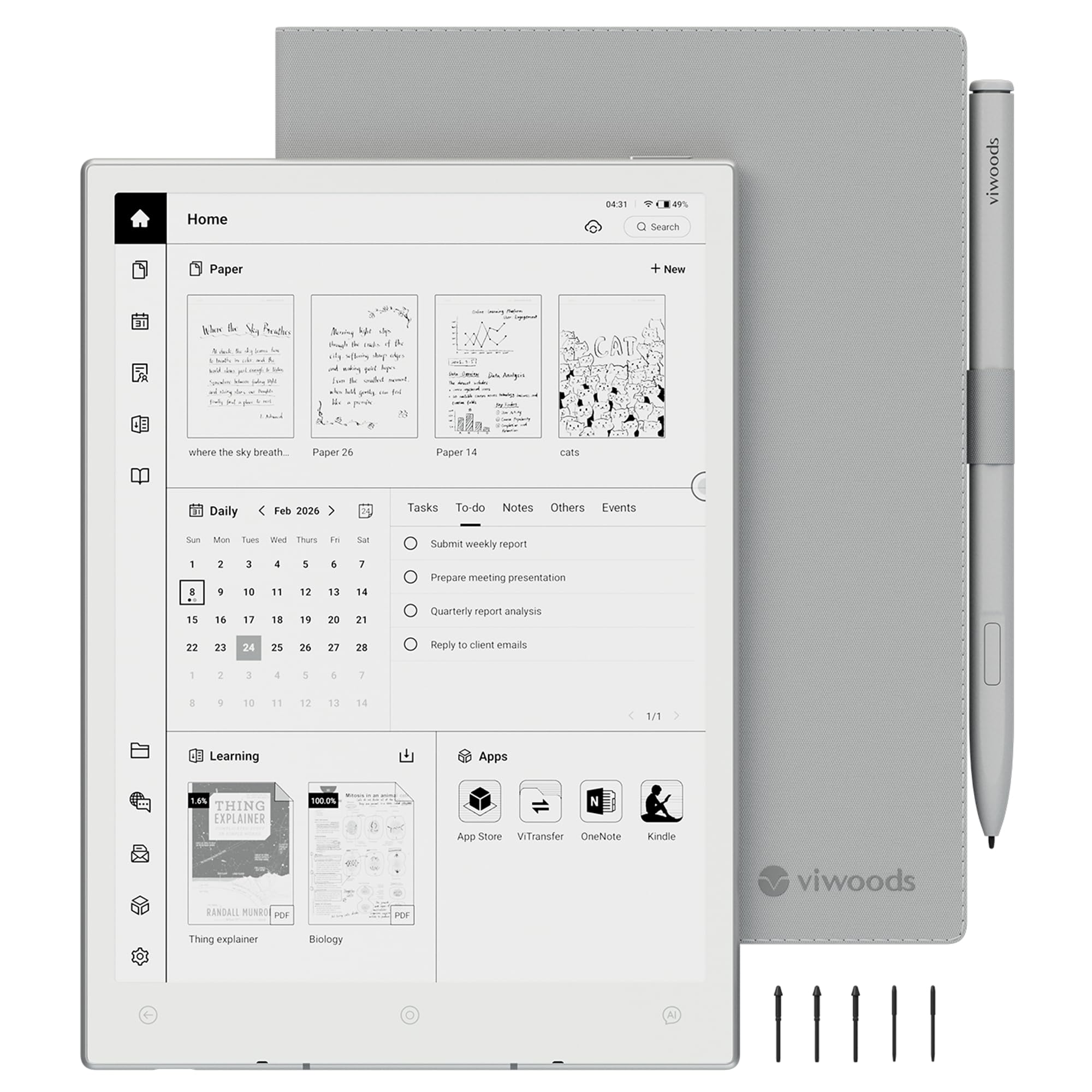
The lightest full-featured E Ink tablet that fits in your bag like a real notebook.
The VIWOODS AiPaper Mini is designed for portability. At just 230g, it is lighter than many 7-inch e-readers, yet it packs an 8.2-inch E Ink display with 292 PPI and 20 adjustable warm light levels. The screen uses a Carta 1000 panel, which owners describe as “crisp” with finely detailed images. It includes a W2 Stylus Pro, a protective folio cover, and 5 replacement nibs, making it a complete portable notebook kit right from the start.
Storage is a strong point — 128GB is more than most competitors, and you can sync files via OneDrive, Google Drive, Dropbox, WLAN, Bluetooth, or USB. The device runs Android 13, so you can install apps. However, some owners had issues: Google Play is not pre-installed, and some units experience “System UI isn’t responding” crashes and Google authentication loops. The battery drains in 3-5 days with the front light on, which is shorter than most dedicated e-readers. It is a promising device that needs firmware refinement.
Impressive hardware for the weight: The 128GB storage and crisp Carta 1000 screen in a 230g package is rare.
Software needs polish: Firmware issues (crashes, authentication loops) are reported, and Google Play is not ready to use from the start. This is best for buyers who are comfortable troubleshooting.
Understanding the Specs
PPI (Pixels Per Inch)
This is the measure of how sharp the text looks. For black-and-white text, a PPI of 300 is the standard for crisp, book-like readability. Color E Ink screens drop to half that — about 150 PPI — because they layer a color filter over the black-and-white pixels. Color is useful for highlighting and book covers, but text in black-and-white mode is always sharper.
E Ink Kaleido vs. B&W Carta
Kaleido is the color technology used in most modern color e-readers. It works by adding a color filter array on top of a standard E Ink panel. This makes the screen noticeably darker and slower to refresh than a pure black-and-white Carta screen. If you mostly read novels and want the sharpest image, a black-and-white Carta device is the better choice. If you read comics, graphic novels, or want to highlight in color, Kaleido is the way to go — just know you will need the front light on more often.
Front Light vs. Backlight
E Ink devices use a front light, which is a layer of LEDs along the edge of the screen that shines light onto the surface. This is different from a phone’s backlight, which shines directly into your eyes. A front light reflects off the E Ink surface, so it feels like you are reading a page with a lamp. Warm light (sometimes called CTM, or Color Temperature Management) lets you shift the light from cool white to warm amber, reducing eye strain at night.
Battery Life: Weeks vs. Days
E Ink battery life depends entirely on what you do. Reading a static page uses almost no power — the screen only consumes energy when you turn the page. A basic e-reader can last 4 weeks on one charge. An Android tablet with a color screen, Wi-Fi, and active writing will drain the battery faster, typically 1-3 days with heavy use. A larger battery (like the 6500mAh in the Penstar eNote2) extends this, but the general rule is: simpler devices last longer.
FAQ
Can I read Kindle books on a non-Kindle E Ink device?
Is color E Ink as vibrant as a tablet screen?
How long does the battery last on these devices?
Can I write on any E Ink device with a stylus?
What is the difference between an E Ink tablet and an Android tablet?
Are these devices waterproof?
Can I borrow library books on an E Ink device?
Why does the color screen look darker than a black-and-white screen?
Does the Kindle Scribe work with Google Drive or OneDrive?
What file formats do these devices support?
Final Thoughts: The Verdict
Across the board, the best E Ink device winner is the Amazon Kindle Scribe Colorsoft 64GB because it balances a large 11-inch color screen, excellent note-taking features, long battery life, and deep integration with cloud services — all in a package that is thinner and lighter than the competition. If you want the sharpest black-and-white reading experience and do not need color, the Amazon Kindle Scribe 32GB is a fantastic, more affordable choice with the best contrast. For note-taking focus and pure distraction-free writing, the Penstar eNote2 offers a massive battery and paper-like screen, and the Huion Ink EB1011 is the smartest pick for students and artists who also need a PC drawing tablet. Each device excels in its own lane; pick the one that matches your reading and writing habits.
How We Picked
We do not accept paid placement. Every pick is matched to a real buyer and a real use-case; we do not hands-on test units.
Sources & Methodology
Specifications: manufacturer listings and product documentation. Review insights: verified customer reviews, as of July 2026. Pricing: not shown on this page (it changes often); check the current price via the retailer link.
As an Amazon Associate, WellFizz earns from qualifying purchases. This does not affect which products we feature.
Related Guides

Mo Maruf
I created WellFizz to bridge the gap between vague wellness advice and actionable solutions. My mission is simple: to decode the research and give you practical tools you can actually use.
Beyond the data, I am a passionate traveler. I believe that stepping away from the screen to explore new environments is essential for mental clarity and physical vitality.