Our readers keep the lights on and my smoothie glass nicely filled. As an Amazon Associate, I earn from qualifying purchases.
Specs are compiled from manufacturer listings and verified buyer reviews and can change over time — please confirm the key details on the product page before buying.
That split second is every caregiver’s deepest fear. That split second is every caregiver’s deepest fear, and the reason an elderly fall detection watch exists. An elderly fall detection watch is built for the moment something goes wrong, not for counting steps. The right watch calls for help automatically, even if the wearer cannot press a button. The wrong watch is just a digital watch with a false sense of security.
I’m Mohammad Maruf — the founder and writer behind WellFizz. This guide is built by comparing the manufacturers’ published specifications and the patterns across verified customer reviews, so you get each pick’s real strengths and trade-offs instead of marketing spin.
You need a watch that calls for help automatically when you fall — not one that waits for you to press a button. That depends on three things: how sensitive its built-in motion sensors (accelerometer and gyroscope) are, whether its cellular connection stays reliable, and if it has true automatic fall detection instead of just a manual SOS button you must press yourself. This list finds the best elderly fall detection watch for independent living, whether you prefer a subscription-free model or the ecosystem advantage of an Apple Watch.
Our Picks at a Glance
![Apple Watch SE (2nd Gen) [GPS 40mm]](https://m.media-amazon.com/images/I/61umEhyV-UL.jpg)
How To Choose The Best Elderly Fall Detection Watch
Sorting through these watches for a parent or loved one means focusing on a few specific features that matter in an emergency. A dead battery or lost cellular signal cancels every safety promise. Three factors separate a reliable alert device from an expensive wrist ornament.
Automatic Fall Detection vs. Manual SOS Button
A manual SOS button requires the wearer to be conscious, oriented, and strong enough to press it after a fall. Automatic fall detection uses a G-sensor (a tiny motion sensor that detects a sudden, hard impact) and an accelerometer to recognize the specific pattern of a fall. If the wearer does not get up within a set countdown — usually 20 to 30 seconds — the watch sends an alert and places a call on its own. For seniors with mobility issues, memory loss, or conditions that cause unsteadiness, automatic detection is the feature that truly matters. Every watch on this list has it, but the sophistication of the sensor and the user’s ability to cancel a false alarm vary a lot.
Subscription-Free vs. Monthly Plan
Some watches come with a SIM card and a prepaid data plan already inside, so you pay nothing extra after the purchase. Others require a monthly subscription — often around to — to keep the cellular fall-alert service active. Neither option is inherently bad, but the real cost difference is dramatic over two or three years. A subscription-based watch that costs up front can wind up costing during its usable life. A one-time-purchase watch with no monthly fee has a higher upfront price but becomes much cheaper by the second year. Match your family’s budget to the long-term plan, not just the sticker price.
Water Resistance and Everyday Durability
A fall detection watch that cannot survive hand washing or a sudden rainstorm is not truly wearable all day. Look for an IP67 rating (protection against temporary submersion in water up to about one meter for 30 minutes) or specific water-resistance depths in feet or meters. Also consider the band material — silicone or rubber is flexible, easy to clean, and less likely to irritate sensitive skin than nylon or metal. An uncomfortable or hard-to-charge watch will end up in a drawer — the most expensive failure of all.
Quick Comparison
| Model | Best For | Fall Detection Type | Battery Life | Monthly Fee | Amazon |
|---|---|---|---|---|---|
| Apple Watch SE 2★ Best Overall | smooth iPhone Experience | Automatic + Crash Detection | ~24 hours | None (cellular optional via carrier) | Amazon |
| Fajocru GPS TrackerBest Value | No Monthly Fee Safety | Automatic SOS + GPS | ~2 days | None (1 year data included) | Amazon |
| Seculife Cellular AlertFull Coverage | Full Cellular Monitoring | Automatic + Hands-Free 2-Way | ~12 hours | per month | Amazon |
| Google Pixel Watch 2 (Renewed) | Android & Fitbit Integration | Automatic + Emergency SOS | ~24 hours | None (cellular optional via carrier) | Amazon |
| COCO BT2-X (2026) | Caregiver App & Remote Setup | Automatic + 20-second countdown | ~4 days | Subscription for premium features | Amazon |
| Generic Medical Alert Watch | One-Time Cost Simplicity | Automatic + Calls 911 | ~1-2 days | None | Amazon |
| Google Pixel Watch 2 (New) | Premium Android Health Suite | Automatic + ECG App | ~24 hours | None (cellular optional via carrier) | Amazon |
| Apple Watch Series 10 (Renewed) | iPhone Ecosystem & Cellular | Automatic + Crash Detection | ~16 hours | Cellular plan required for LTE | Amazon |
In‑Depth Reviews
1. Apple Watch SE (2nd Gen) [GPS 40mm]
Our pick — over 4.5★ from 13,000+ verified ratings; the strongest balance of quality and price.
A safety net that texts your grandkids, tracks your sleep, and times your eggs.
A fall detection watch that does not feel like a medical device — that is the real trick, and Apple’s SE 2nd Gen pulls it off exceptionally well. The automatic Fall Detection feature uses the built-in accelerometer and gyroscope (motion sensors) to spot a hard fall. If you are immobile for about a minute, the watch taps your wrist and sounds an alarm before placing a call to emergency services and messaging your emergency contacts. It also includes Crash Detection, which does the same thing if you are in a severe car accident. The 1.28-ounce weight and the starlight aluminum case mean the 40mm version is comfortable enough for a 70-year-old to wear all day and all night without complaint — and buyers report exactly that.
Where it falls short is the battery. The rechargeable lithium-ion battery lasts about one day, so you will need to charge it every evening. That nightly charge is also the moment the watch cannot detect a fall. The SE is water-resistant to 50 meters (which means it is safe for swimming, not just hand-washing), but several owners point out that it is not fully waterproof, so prolonged submersion should be avoided. The watch requires an iPhone to set up and use — it is not a stand-alone cellular device from the start. If your loved one does not carry an iPhone, this is not the right pick. But for families already in the Apple ecosystem, the crowd favorite — with thousands of owners — confirms that the quality and functionality win every time. The thing everyone raves about is how smoothly it works: fall detection, heart rate alerts, and activity rings all behave exactly as expected, with no awkward menus or confusing setup steps.
What Wins People Over
- Automatic fall detection and crash detection work without any setup beyond the initial pairing — it just runs in the background.
- smooth iPhone integration means you can share health data, location, and alerts with family members using the built-in Apple Health app.
- Lightweight (1.28 oz) and comfortable enough for all-day and overnight wear, which is critical for sleep tracking and fall protection at night.
The Trade-Offs
- Battery needs daily charging, which creates a window overnight where fall detection is not active.
- Requires an iPhone for full functionality — it will not work stand-alone as a dedicated senior alert device without a phone nearby.
- Water-resistant to 50 meters, but owners advise avoiding prolonged water exposure; it is not dive-proof.
Reach for this if: You or your loved one already uses an iPhone and wants a polished, all-in-one smartwatch that doubles as a safety device without feeling clinical.
Look elsewhere if: The senior does not own or carry an iPhone daily, or you need a watch that can go two or three days between charges without intervention.
2. Fajocru Fall Detection Watch for Seniors
A dedicated safety watch that gives you GPS tracking and fall alerts with zero ongoing fees.
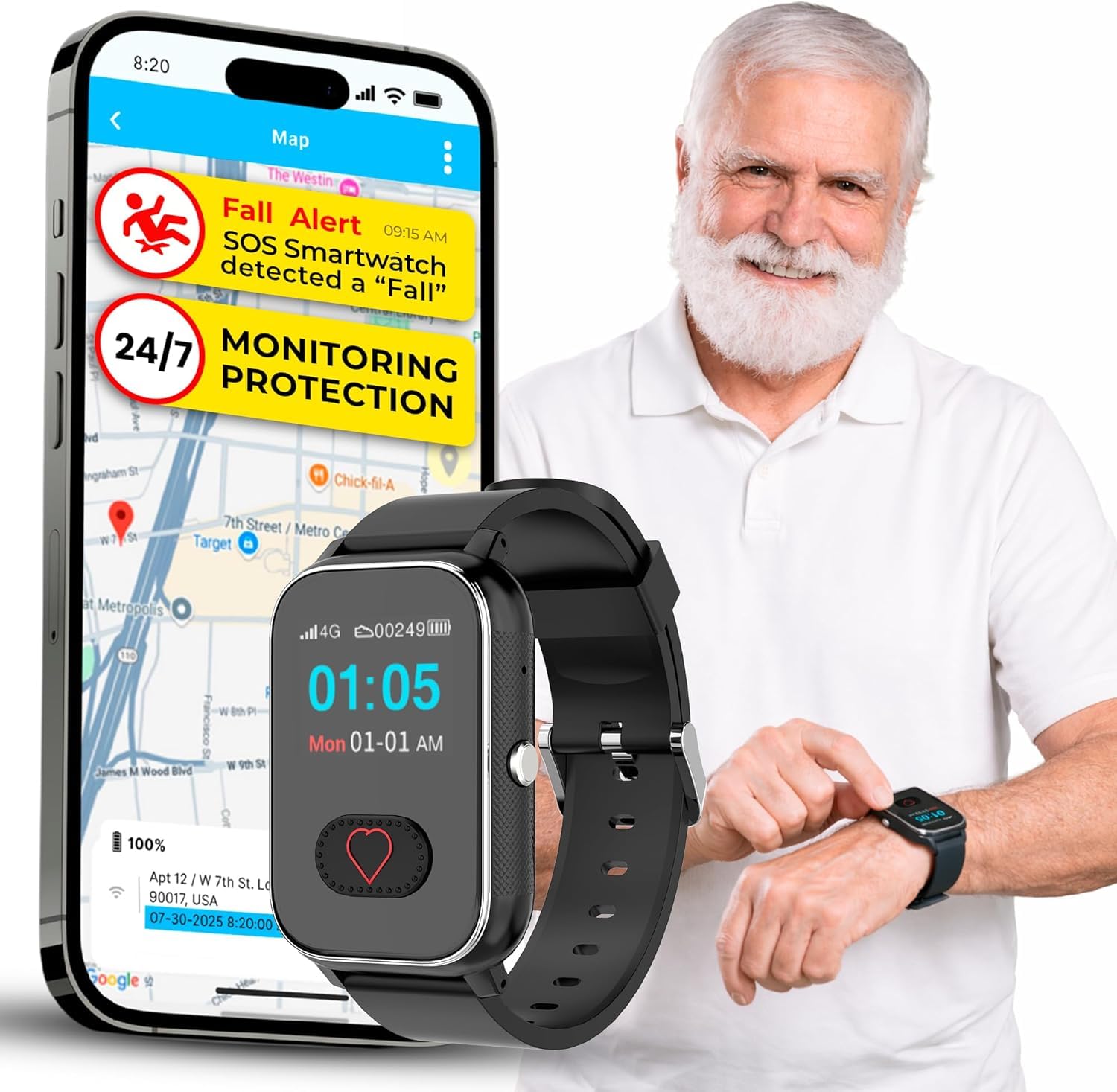
This is the rare subscription-free medical alert watch that actually includes a pre-installed SIM card with a one-year data plan — no monthly bill, no surprise charges for the first year. The 600 mAh battery means it lasts for days, not hours, which owners confirm is a huge relief for a senior who may forget to charge devices. The automatic fall detection triggers an SOS alarm to preset emergency contacts, and the real-time GPS tracking lets caregivers see exactly where the wearer is from a mobile app. It also supports geo-fencing, so you get an alert if your loved one wanders outside a safe zone you have drawn on a map — an essential tool for dementia and Alzheimer’s care.
The catch is the setup and cellular dependency. A few owners had trouble activating the device — though the company’s customer service was consistently described as responsive and helpful, even offering a full refund when the product did not work in a remote area. The watch runs on 4G cellular, so it needs a signal wherever the senior is. The screen and interface are tailored for older hands: a large, high-contrast touchscreen, a simple menu, and IP67 water resistance (safe for rain and hand-washing). The silicone band and plastic case make it lightweight and comfortable — one reviewer noted that their grandmother “loves it” because it fits easily and does not look like a bulky medical device. If you want a dedicated senior alert watch that does not tether to a smartphone and carries no subscription, this is the strongest candidate on the list.
One-Time Buy, Real Protection: The 600 mAh battery delivers multi-day life, and the included 1-year data SIM means you unbox it and it is ready. The GPS tracking and geo-fencing are a genuine advantage for wandering prevention, not just marketing fluff.
Check Your Coverage First: Works on the 4G network, so if you live in a rural area with spotty cellular coverage, the device may struggle to connect. Customer service is good about helping with returns if that happens.
Best for: Families who want a simple, stand-alone fall detection watch with GPS and no monthly fees — especially for seniors with dementia who tend to wander.
Think twice if: The wearer lives where cellular reception is unreliable, or they need the advanced health sensors and polished software of an Apple or Google ecosystem watch.
3. Seculife Cellular Medical Alert Smartwatch
A full cellular alert system strapped to a wrist, with hands-free two-way calling and a monthly monitoring center.
This is not a watch that relies on a nearby phone. When a fall is detected — automatically, with no button press — the watch places a hands-free call to the emergency monitoring team and to your pre-set contacts. The 650 mAh battery is the largest of the dedicated medical watches here, averaging about 12 hours of use, which is noticeably shorter than the Fajocru. The IP67 rating means it handles daily splashes and rain without issue, but it is not a swim watch.
The honest trade-off is reliability. The review pool is mixed: families who got it working are extremely happy — one buyer wrote that it gave them “confidence” for a relative living alone. But other owners mention persistent offline issues, a battery that cannot hold a full day’s charge, and an SOS feature that sent alerts to the wrong contacts during setup. Several noted the setup process was difficult and required multiple support calls. This watch seems best suited for a family willing to invest time in initial configuration and comfortable with a monthly fee. For those who want a simpler, subscription-free alternative, the Fajocru above or the COCO below may be more forgiving.
Monitoring Center Included: The monthly plan gives you a team that answers the call when a fall is detected — not just a text to a family member who may be in a meeting. That is a meaningful difference for a senior who lives alone.
Patience Required for Setup: The most consistent owner complaint is reliability glitches during the first few days. If you have the tech patience to work through it, the payoff is full 24/7 monitoring coverage.
Choose this for: A senior who lives alone and needs a professional monitoring center as the first responder, not just a family alert.
skip it if: You want a truly no-fee device or you are not prepared to help with an occasionally finicky initial setup.
4. Google Pixel Watch 2 (Renewed)

A smartwatch with Google’s and Fitbit’s combined smarts, for Android users who want proactive health alerts.
If the senior in your life uses an Android phone, the Pixel Watch 2 is the closest Apple-level companion experience. It comes with a multi-path heart rate sensor and an AI-driven algorithm for what the brand calls Fitbit’s most accurate heart rate tracking. The fall detection feature works the same way as Apple’s — a hard fall is detected, a countdown starts, and if you do not respond, emergency services are contacted. It also includes a body-response feature that identifies signs of stress (through changes in heart rate and skin temperature measured by a new sensor), so the wearer gets a nudge to pause and breathe before stress escalates.
The renewed unit we reviewed came at a significant discount, and buyers consistently praise the condition — one noted “pristine glass, a new band, and a full day of battery with limited screen use.” The battery is rated at 305 mAh, offering about 24 hours of use, which is average for this category. The 100% recycled aluminum housing makes it light and comfortable. Like the Apple Watch, though, this device is a smartwatch first and a fall detection device second: it needs to be paired with an Android phone for its full safety feature set. The 24-hour battery is a limitation for overnight fall protection, and a few customers note connectivity quirks with non-Pixel phones. But for the price of a dedicated medical alert watch, you get the entire Fitbit health suite and Google’s polished interface — a genuinely strong value for an active senior who already uses an Android phone.
Android’s Best Health Companion: The Fitbit integration is not a lightweight add-on — it is the same high-quality sleep, heart rate, and stress tracking that Fitbit built its reputation on. The body-response feature is a thoughtful addition for seniors managing anxiety.
Renewed Battery Risk: While most reviewers point out excellent condition, a few noted the battery was not as durable as expected. The 75-minute charge time is fast, but the 24-hour cycle means daily charging is non-negotiable.
Best fit for: An active, independent senior who has an Android phone, wants comprehensive health tracking, and will remember to charge the watch every evening.
Not ideal for: Anyone who does not use an Android phone or someone who needs a multi-day battery for confidence overnight.
5. COCO Emergency Alert Smartwatch BT2-X (2026)

A watch designed specifically for a caregiver’s smartphone, with remote medication reminders and fall alerts in one app.
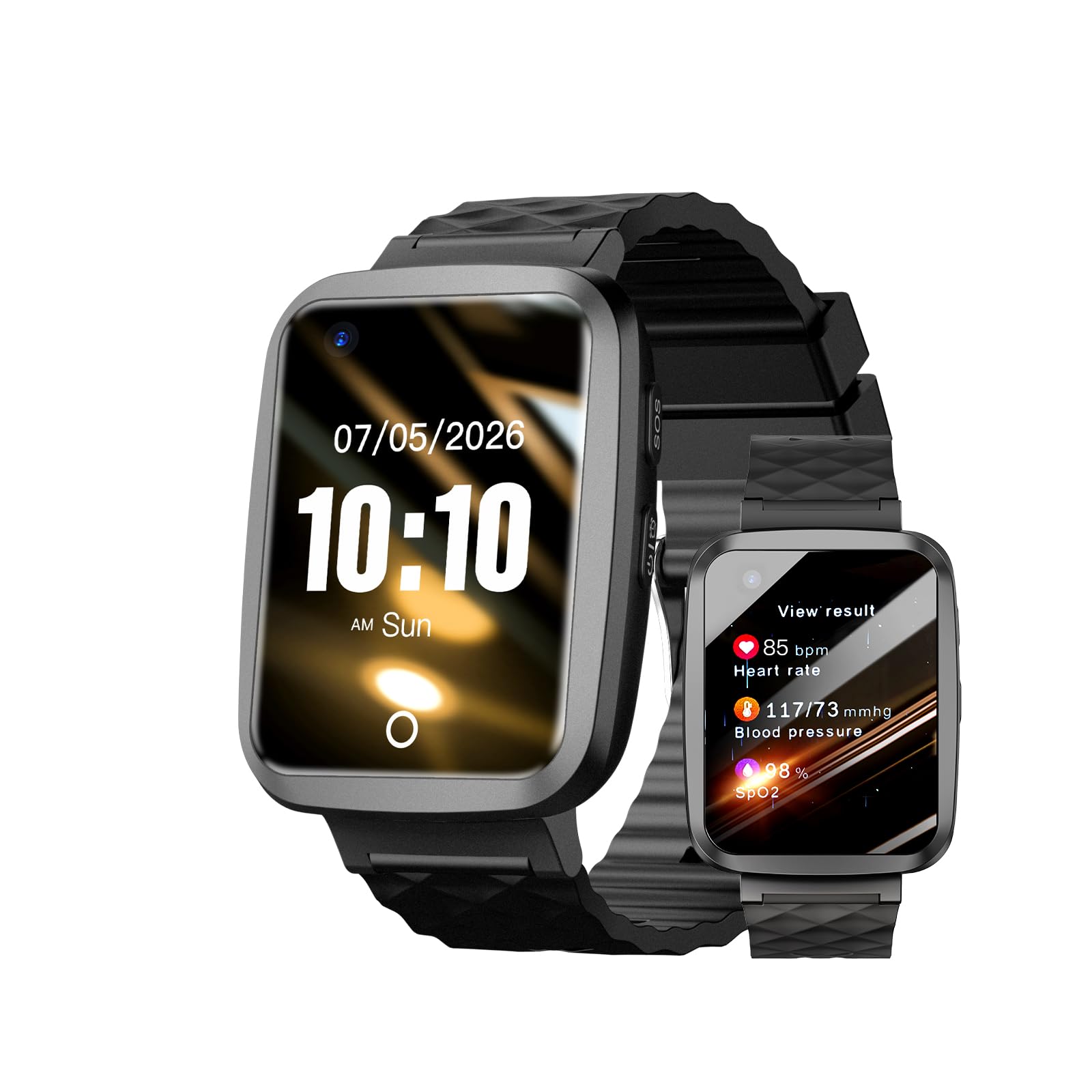
This is the only watch on the list that includes a dedicated caregiver app capable of remote control — you can set medication reminders, monitor heart rate and blood oxygen (SpO2), and adjust settings from your own phone, even if you are miles away. The fall detection works with a 20-second countdown: if the wearer does not cancel it, the watch automatically alerts their Emergency Care Team (ECT). The large 1.85-inch HD display and rotating crown make navigation simple for arthritic fingers, and the 280 mAh battery delivers about four days of use, which is the best endurance here for a smartwatch-style device. The case material is zinc alloy with sandblasting and PVD vacuum plating — a nice upgrade from the plastic of budget models.
The mixed ownership feedback centers on two things: complexity and subscription cost. While the watch is marketed as senior-friendly, several owners found the setup genuinely difficult, especially for a non-tech-savvy user. The app interface also frustrated some, with reports that adding emergency contacts does not always work as expected. On top of that, major features like geo-fencing and multiple ECT contacts require a premium subscription — a cost that is not obvious at first glance. The free tier includes fall detection, health monitoring, and SOS for one to two contacts. If you are willing to manage the setup and navigate the subscription model, the caregiver app is genuinely powerful. If you want a truly simple, no-fuss device, the Fajocru is the easier path.
The Caregiver Dashboard
- Remote medication reminders and real-time heart rate/SpO2 monitoring via the CoCo app — you see exactly what the senior sees.
- Long 4-day battery life means fewer charging interruptions and better overnight protection.
- Large 1.85-inch HD screen and zinc alloy case feel premium and are easy to read.
The Fine Print
- Fall detection reliability is inconsistent, with some owners reporting false alarms or missed falls during testing.
- Premium features require a monthly subscription after an initial period — not mentioned prominently enough on the box.
- Setup and the companion app are not as intuitive as marketed; a few owners found it frustrating even after several attempts.
Choose it for: A family caregiver who is comfortable with technology and wants to manage health alerts and reminders remotely — the app-based control is genuinely unique.
Avoid it if: The senior lives far from you and reliable setup support is not available, or you are opposed to any monthly fee beyond the initial purchase.
6. Generic No Contracts Medical Alert Watch (Model saw911-365)

A raw, no-frills fall watch that dials 911 directly — no subscriptions and no middleman.
This watch is the purest expression of the one-time-cost philosophy: you buy it, a SIM card is included, and it calls 911 when a fall is detected. There is no monitoring service, no app to install, and no monthly bill. The 1.59-inch display is large enough for most elderly users, and the magnetic-charging cable makes it easier to juice up than fiddling with a tiny USB plug. The silicone band and 4G cellular compatibility mean it works as a stand-alone device that does not lean on a smartphone.
The durability problem is real, though. Others noted that the display defaults to 24-hour military time with no way to switch to standard AM/PM, which is a surprising oversight for a device aimed at seniors. The brand is generic, so customer support is not as consistent as you would get from Apple or Google. If you need a simple, temporary solution and are willing to accept that the watch may not last a full year, the upfront simplicity is appealing. For a device you want to work reliably for two or three years, the Apple Watch SE or the Fajocru is a safer bet despite the higher initial cost.
The Pure One-Time Buy: No app, no monthly fee, no 24/7 monitoring center to call — just a watch that places a call to 911 automatically if you fall and do not get up.
Fragility and Time Display: The quality-control reports are too common to ignore: buttons fail, screens stop responding, and the military-time display is a genuine frustration for older eyes. This is a budget stopgap, not a long-term solution.
Works well as: An inexpensive secondary safety device or a short-term solution while you research a more durable primary one.
Not the best choice: For long-term daily wear or for anyone who cannot afford the risk of a sudden device failure.
7. Google Pixel Watch 2 (Previous Model, New)

A polished Android watch with an FDA-cleared ECG app and automatic fall detection that runs on Fitbit’s best sensors.
The new-in-box version of the Pixel Watch 2 includes everything the renewed version offers, plus an ECG app that can assess your heart rhythm for atrial fibrillation (an irregular heartbeat) and share the results directly with a doctor. That is a genuinely medical-grade capability that most dedicated senior alert watches lack. The fall detection and Emergency SOS features match the Apple Watch approach: a hard fall is sensed automatically, a countdown begins with an audible alarm, and if you do not respond, the watch calls emergency services and sends your location to your emergency contacts. The 300 mAh battery life is rated at 24 hours, which is typical but not class-leading, and the stainless steel band materials and polished silver aluminum case give it a refined look that some owners described as “elegant” and “stylish.”
The ownership feedback highlights the excellent tracking accuracy and smooth Google integration, but the battery life and occasional connectivity issues are the recurring themes. Several fans noted the battery “could be better,” requiring charging every other day. A small number of owners reported the watch stopped working after a few months with no clear path to support. For Android users who want the safest, most feature-rich smartwatch experience — including health insights that go beyond what a typical medical alert watch provides — this is the one. But it is also the most expensive non-renewed option here, and the fall detection feature is just one of many features, not the primary reason for the watch’s existence.
Advanced Health Arsenal
- ECG app can record and share atrial fibrillation readings with a doctor — a feature absent from every other pick here except the Apple Watch.
- Fitbit body-response feature and skin temperature sensor provide stress and sleep insights that go far beyond basic heart rate tracking.
- smooth integration with Google services (Maps, Calendar, Gmail) from the wrist, making it a true extension of an Android phone.
The Price of Polish
- Battery life of approximately 24 hours means it needs to come off for a charge every night, leaving a gap in fall protection.
- Some owners experienced device failures within a few months, with limited support windows making replacements difficult.
- Step tracking accuracy is occasionally reported as off by 200+ steps compared to a dedicated fitness tracker.
Best pick for: An Android-using senior who is relatively tech-savvy and wants the ECG feature and the full Fitbit health suite alongside automatic fall detection.
Consider an alternative if: You need a reliable device that costs less, or you want a simpler interface that does not require learning the Google ecosystem.
8. Apple Watch Series 10 [GPS + Cellular, 42mm] (Renewed)
The most advanced Apple safety watch, available at a renewed discount for those who want the latest sensor technology.
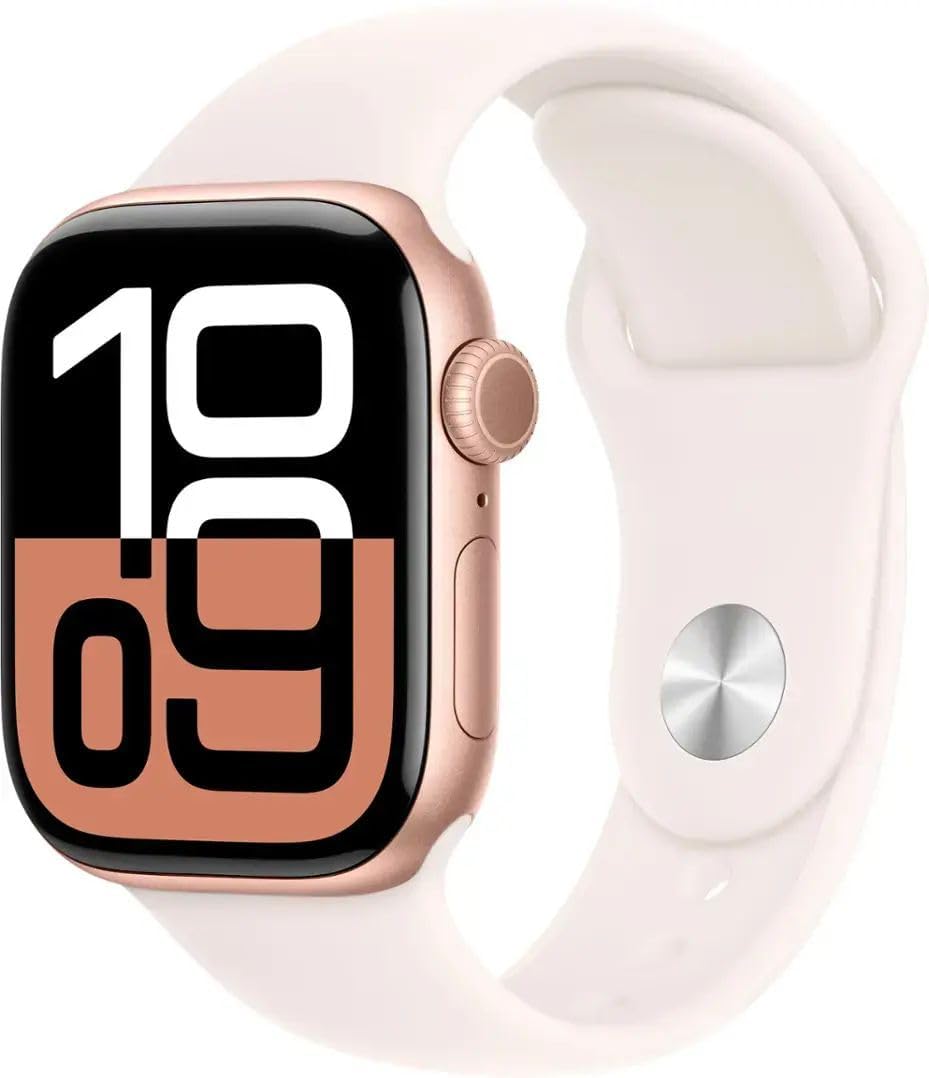
The Apple Watch Series 10 is the most up-to-date hardware in this lineup, with a faster processor, a larger and brighter always-on display, and the same reliable Fall Detection and Crash Detection features that make the SE 2 a top safety pick. The GPS + Cellular model (42mm) can make calls and send data without needing an iPhone nearby — it has its own eSIM (an embedded digital SIM that connects to the cellular network independently), so a senior can leave their phone at home and still be reachable and protected. The 327 mAh battery lasts approximately 16 hours, which is shorter than the SE 2’s reported day-long endurance, but the quick charge feature compensates by refilling quickly. The rose gold aluminum case with a light blush fluoroelastomer band is unmistakably an Apple Watch — it blends in with any wardrobe and does not announce itself as a medical alert device.
Because this is a renewed unit, the condition and battery health vary. The official Amazon-renewed guarantee promises a battery exceeding 80% of its original capacity, and buyer reports confirm units arriving with “no dents, no scratches, and 100% battery health.” That said, a few owners received a unit with a single scratch, and the charger included is not necessarily the original Apple cable. The need for nightly charging is the same limitation as the SE 2, but the Series 10 also requires a cellular plan if you want the stand-alone calling and fall detection to work away from an iPhone. For an older adult who is comfortable with Apple technology and already uses an iPhone, the Series 10 offers the most refined and well-supported fall detection experience available. The consensus among buyers is that it performs “like new” and is a great value compared to buying new.
Latest Hardware, Discounted: The Series 10 has the best screen and fastest processor in Apple’s watch lineup, and the renewed pricing undercuts the new model significantly while still including fall detection, crash detection, and cellular independence.
Shorter Battery, Same Charging Rhythm: With an average of 16 hours per charge, this has the shortest battery life on this list. It will need charging every evening and again in the morning if you want all-day cellular use. The quick charge helps, but the gap in overnight protection remains.
Ideal for: An active senior who is comfortable with Apple devices, wants the best display and processor available, and values having a stand-alone cellular connection for safety when away from the phone.
Not for: Anyone who will not charge a watch daily, or anyone who prefers a simpler interface without the full Apple ecosystem learning curve.
Understanding the Specs
Automatic Fall Detection Sensors
The core safety feature of these watches is not a button — it is a tiny accelerometer and gyroscope (motion sensors) that constantly measure orientation and shock. When the sensor detects a sudden downward acceleration followed by a hard stop, the watch begins a short countdown, typically 20 to 60 seconds. If the wearer does not tap the screen to say “I am fine,” the watch automatically dials an emergency contact or 911. The false-alarm cancellation is what separates a good watch from a frustrating one: some models let you cancel with a simple tap, while others require pressing a small button that a disoriented person may struggle to find.
GPS Tracking and Geo-Fencing
Real-time GPS (Global Positioning System) location tracking shows a senior’s current location on a map in your phone’s companion app. Geo-fencing takes that a step further: you draw a “safe zone” on the map (like the house and garden), and if the watch leaves that zone, the app sends you an alert. This is especially critical for seniors with dementia or Alzheimer’s who may wander and become disoriented. Not every watch has both features — check the spec details for “geo-fencing” and “real-time location tracking” separately.
FAQ
Can an elderly fall detection watch work without a smartphone nearby?
What is the difference between a manual SOS button and automatic fall detection?
How long does the battery last on a typical fall detection watch?
Is there a fall detection watch with no monthly fee?
Will a fall detection watch work if my loved one has dementia or Alzheimer’s?
How do I set up the emergency contacts on a fall detection watch?
Are these watches waterproof or just water-resistant?
Which is better for elderly fall detection: an Apple Watch or a dedicated medical alert watch?
Final Thoughts: The Verdict
For most families, the best elderly fall detection watch is the Apple Watch SE (2nd Gen) because it delivers reliable automatic fall detection, a proven track record from thousands of owners, and smooth integration with the Apple ecosystem that many families already live inside. If you want a dedicated stand-alone device with no monthly fees and GPS tracking for wandering prevention, grab the Fajocru Fall Detection Watch. And for an Android user who wants the advanced Fitbit health suite, including ECG readings, alongside fall detection, the Google Pixel Watch 2 is the one to reach for.
How We Picked
We do not accept paid placement. Every pick is matched to a real buyer and a real use-case; we do not hands-on test units.
Sources & Methodology
Specifications: manufacturer listings and product documentation. Review insights: verified customer reviews, as of July 2026. Pricing: not shown on this page (it changes often); check the current price via the retailer link.
As an Amazon Associate, WellFizz earns from qualifying purchases. This does not affect which products we feature.
Related Guides

Mo Maruf
I created WellFizz to bridge the gap between vague wellness advice and actionable solutions. My mission is simple: to decode the research and give you practical tools you can actually use.
Beyond the data, I am a passionate traveler. I believe that stepping away from the screen to explore new environments is essential for mental clarity and physical vitality.