Our readers keep the lights on and my smoothie glass nicely filled. As an Amazon Associate, I earn from qualifying purchases.
Specs are compiled from manufacturer listings and verified buyer reviews and can change over time — please confirm the key details on the product page before buying.
A duplex scanner grabs both sides of a page in a single pass — but pick the wrong one and you will waste time fighting software, clearing jams, or squinting at blurry output. This guide finds the models that deliver crisp double-sided scans without the daily headache.
I’m Mohammad Maruf — the founder and writer behind WellFizz. This guide is built by comparing the manufacturers’ published specifications and the patterns across verified customer reviews, so you get each pick’s real strengths and trade-offs instead of marketing spin.
Digitizing tax records or clearing a backlog of receipts? The right scanner saves you time and sanity. Here is how to find the best duplex scanner for your pile of paper.
Our Picks at a Glance


How To Choose The Best Duplex Scanner
Every scanner you will see here doubles as a single-pass duplex machine — it captures both sides in one go — but they differ in speed, paper handling, software reliability, and the job sizes each can handle.
Speed That Matches Your Workflow
Speed is measured in pages per minute (ppm) and images per minute (ipm). A duplex scan makes two images per page, so a 30-ppm scanner is also a 60-ipm scanner. If you scan ten pages a week, a 25-ppm model is enough. If you are emptying a filing cabinet, look for 35 ppm and up.
Auto Document Feeder (ADF) Capacity: The Batch Size Bottleneck
The ADF, or auto document feeder, is the tray that holds your stack of paper. A 20-sheet feeder means you reload often, which breaks your rhythm. A 50-sheet or 100-sheet feeder lets you walk away while the machine works. Choose the capacity based on how many pages you usually scan in one session.
Connectivity: Wired vs. Wireless
A USB connection is the most reliable — plug it in and it works every time. Wi-Fi adds convenience, especially if you want to scan from your phone or send files directly to cloud services (like Dropbox or Google Drive). But wireless can get flaky with multi-page batches at high resolution; a fast Ethernet connection (wired network) is often the happy medium for shared office use.
Quick Comparison
| Model | Best For | Speed (ppm / ipm) | ADF Capacity | Connectivity | Amazon |
|---|---|---|---|---|---|
| ScanSnap iX1500★ Best Overall | Touchscreen Simplicity | — | 50 sheets | USB, Wi-Fi | Amazon |
| Doxie ProBest Software | Compact Home Office | — | — | USB | Amazon |
| Canon imageFORMULA R30Big Job Champion | No-Software Bulk Jobs | 25 ppm / 50 ipm | 60 sheets | USB | Amazon |
| HP Compact Desktop Duplex | Portable Travel Use | 25 ppm | 25 sheets | USB | Amazon |
| Epson WorkForce ES-500W II | Wireless Office Workgroup | 35 ppm / 70 ipm | 50 sheets | Wi-Fi, USB | Amazon |
| Brother ADS-4300N | Networked Office Team | 40 ppm (duplex) | 80 sheets | Ethernet, USB | Amazon |
| Epson DS-530X | High-Volume Reliability | 45 ppm / 90 ipm | 100 sheets | USB | Amazon |
| ScanSnap iX2500 Premium | Premium All-in-One Speed | 45 ppm (double-sided) | 100 sheets | Wi-Fi 6, USB-C | Amazon |
In‑Depth Reviews
1. Fujitsu ScanSnap iX1500 Color Duplex Document Scanner
Our pick — over 4.5★ from 750+ verified ratings; the strongest balance of quality and price.
The crowd favorite that turns scanning into a one-tap affair with a dedicated touchscreen.
The iX1500 is built around a large 4.3-inch touch screen that puts your most-used scan destinations right on the panel — tap once to send to Google Drive, Dropbox, or a folder on your desktop. It connects over Wi-Fi and USB, so you can walk up, load the 50-sheet automatic document feeder (ADF), and be done in seconds without touching a computer. Owners consistently say it “just works,” with fast one-pass duplex scanning and a compact footprint roughly the size of a loaf of bread.
The trade-off emerges when you push the resolution high. Buyers report that wireless scanning fails at 600 DPI when you load more than five pages, so heavy archival work is best done over a USB connection. The 7.5-pound weight makes it a desk fixture, not a travel companion, and some owners note the output tray is a bit short for letter-size paper.
What wins people over is the ability to create custom scan profiles — set one profile for “Bills” (duplex, blank-page removal, 300 DPI) and another for “Receipts” (color, 600 DPI) — and the scanner remembers them. The “Scan to Folder” profile bypasses cloud services entirely, which appeals to privacy-minded users. For the buyer who wants a polished, few-fuss daily driver, this is still the benchmark.
Fast duplex scanning
- Large touch screen eliminates the need to switch between apps or computer settings.
- Custom scan profiles (duplex, blank-skip, resolution) are a genuine time-saver for recurring jobs.
- Wi-Fi and USB dual connectivity make it flexible for both shared and dedicated use.
Pricey for home use
- Wireless connection struggles with high-resolution batches larger than five pages.
- At 7.5 pounds, it is a permanent desktop fixture, not a portable device.
- Some owners find the output tray too short for letter paper, causing pages to overhang.
speed king: A smooth, app-free scanning experience with a touchscreen that makes daily document capture feel easy.
budget buster: You regularly scan very large batches at maximum resolution — the USB connection handles it fine, but the Wi-Fi mode hits a wall.
2. Doxie Pro Duplex Document Scanner
A compact, fast duplex scanner whose software actually feels modern and intuitive.
At just over 3 pounds, the Doxie Pro is noticeably lighter than most desktop scanners — compared to the 7.5-pound iX1500 — and folds into a compact brick that measures 11.75 x 4 x 3 inches. It relies on a USB connection (with both USB-A and USB-C cables included) rather than Wi-Fi, which keeps the setup simple and the connection stable. What makes this scanner stand out is its software: owners describe the interface as “vastly better than ScanSnap,” with automatic cropping, rotation, and contrast boost that produce clean scans without manual adjustments.
The Doxie Pro handles wrinkled pages well and includes a single-feed slot for delicate or thick paper. It scans at 300 dpi with good speed for typical office documents. The main caveat is that it is not built for relentless heavy use — occasional jams happen roughly once in every 300 pages — and there is no Chromebook app or Linux support. For a home office or a small business that wants a polished user experience while staying affordable, this is a top contender.
travel pal: You value a simple, reliable USB connection and think scanner software should be easy to use, not a chore to learn.
heavy user: You need to scan hundreds of pages daily without interruption, or you rely on a Chromebook.
3. Canon imageFORMULA R30 Office Document Scanner
A no-fuss bulk scanner that runs straight off a USB cable with zero software installation required.
The Canon imageFORMULA R30 is the rare scanner that requires no driver installation — plug it into your computer with the USB cable and the scanning software is already built into the device. It scans at 25 pages per minute (50 images per minute in duplex mode) and carries a 60-sheet automatic document feeder. The reliability of this setup is proven by real-world use: one owner reports scanning a 1,022-page diary in roughly two hours, an entire stack handled by the 60-plus-page feeder without incident.
The scanner handles mixed batches of documents, invoices, and business cards, and automatically converts them to searchable PDFs or JPGs. Customers describe the copy quality as excellent, with features like blank-page skip and auto-despeckle built in. The main downside reported is that Canon’s driver can be temperamental — a few owners experienced problems requiring reinstallation on every restart. For anyone tackling a massive digitization project who wants the simplest possible setup, this is the machine to grab.
office staple: A straightforward, high-volume digitization project where you need to plug in and get started immediately.
tight desk: You are sensitive to potential driver reliability issues, as a minority of owners mention needing to reinstall the software repeatedly.
4. HP Compact Desktop Duplex USB Mobile Document & Photo Scanner (HPPS200)

The lightest sheetfed scanner in its class designed to slip into a bag and travel between home and office.
The HPPS200 weighs 3.1 pounds and measures just 4.1 x 11.8 x 2.9 inches, making it genuinely portable. It offers a claimed 1200 dpi resolution and scans at 25 pages per minute, handling paper sizes from business cards up to legal (8.5 x 14 inches). The sheet capacity is 25 pages, which suits small-to-medium batch jobs. Owners praise its compact, fast performance and ease of setup for travel use.
The honest catch is that some customers note the 1200 dpi resolution does not actually function at that level in practice, with one experienced user stating the scanner only outputs at 200 ppi. A few others encountered persistent software errors or driver issues. This is a good pick for light-duty mobile scanning where portability matters more than flawless high-resolution output, but it does not replace a dedicated office workhorse.
mobile mate: A slim, portable scanner for occasional travel scanning of receipts, contracts, and small batches of documents.
batch jobs: High-resolution archival scanning (true 1200 dpi) or rock-solid software reliability are non-negotiable.
5. Epson WorkForce ES-500W II Wireless Color Duplex Desktop Scanner

The wireless office scanner that owners say can tackle a banker’s box of documents in a single sitting.
The ES-500W II scans at 35 ppm / 70 ipm and comes with a 50-sheet ADF, making it a strong choice for a small office or workgroup. It supports Wi-Fi connectivity and works with the Epson Smart Panel mobile app, so you can start a scan from your phone and send the results directly to Dropbox, Google Drive, or OneDrive. Owners consistently praise the scanning speed — one customer described it as handling “an entire banker’s box of documents” — and the dual-sided scanning feature is called out as a bonus by many.
Scanning speed is the most-discussed feature by a notable margin, and ease of use and scan quality also earn high marks. The main complaint is wireless setup can be tricky initially, and switching between Wi-Fi and USB mode is not smooth. A few owners also ran into memory overflow errors when scanning legal-size color documents at high resolution, though a driver update reportedly fixed that. For a wireless office scanner that balances speed, ADF capacity, and cloud integration, this is a dependable pick.
cable cutter: You want a wireless office scanner that handles large batches, integrates with cloud storage, and has a mobile app.
tech novice: The initial wireless setup can be fiddly, and high-resolution legal-size scans may need the latest driver to avoid memory errors.
6. Brother ADS-4300N Professional Desktop Scanner

A wired networking beast that makes a slow all-in-one feel like a relic from another decade.
The ADS-4300N scans up to 40 pages per minute in duplex mode and has an 80-page ADF, but its real standout feature is Ethernet connectivity — it plugs directly into your office network without relying on flaky Wi-Fi. It offers a wide driver support (TWAIN, WIA, ISIS, and SANE) for smooth integration into existing workflows. Owners who replaced older HP OfficeJets report the difference is dramatic: one described it as having “three days of work done in 20 minutes.”
The scanner handles creased or folded paper excellently, produces crisp scans with accurate OCR, and includes triple-layer security features for sensitive documents. The browser-based interface is functional but not the most intuitive, and some owners note occasional jams depending on how documents are loaded. This is a scanner built for a shared office environment where reliability and networking matter more than flashy extras.
IT favorite: A busy office where you need a scanner on the network that multiple people can access securely and reliably.
quiet room: You want a touchscreen, wireless-only convenience, or a lightweight desktop device.
7. Epson DS-530X Color Duplex Desktop Document Scanner
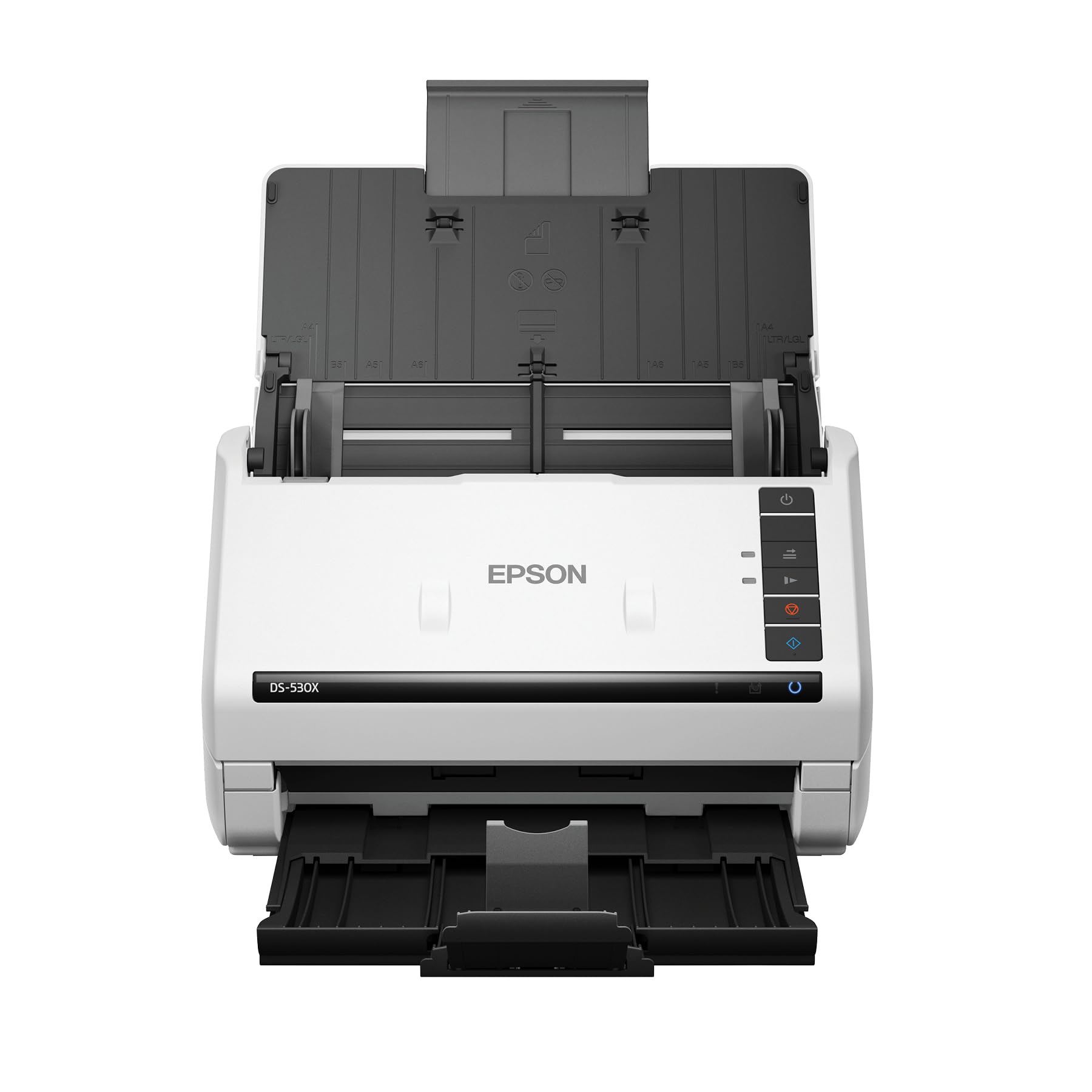
The fastest USB scanner in its class with a 100-sheet tray and a daily duty cycle of 7,000 sheets.
The DS-530X scans at up to 45 pages per minute (90 images per minute in duplex mode) and features a 100-page Automatic Document Feeder — the highest ADF capacity among TWAIN-enabled scanners in its class. It handles a peak daily duty cycle of 7,000 sheets, making it suited for offices that process documents constantly. It also handles extra-long pages up to 240 inches and folded papers up to 11 x 17 inches.
Owners consistently praise the scan quality and speed, with one buyer noting it handles small receipts without any issues. The included TWAIN and ISIS drivers make it easy to integrate with almost any document management system. The honest trade-off is that it is a single-function USB scanner with no Wi-Fi, and some customers find it expensive for what it does. One review notes that it “folds really small when not in use,” which is a nice bonus for a machine this capable.
color pro: You need a high-speed, ultra-reliable USB scanner with a massive ADF to process thousands of pages weekly.
speed demon: You prefer wireless connectivity or you are looking for the most budget-friendly option in this class.
8. ScanSnap iX2500 Premium Wireless or USB High-Speed Document Scanner

The most advanced ScanSnap yet, packing a large touchscreen, Wi-Fi 6, and a 100-sheet feeder into one premium package.
The iX2500 Premium is the newest and most capable scanner on this list. It scans double-sided at 45 pages per minute, has a 100-sheet ADF, and includes Wi-Fi 6 for the fastest and most stable wireless connection — reviewers point out it works flawlessly over WiFi, a clear improvement over earlier ScanSnap models. It also supports USB-C, making it future-proof for modern laptops. A 4-year protection plan is included with the purchase, which adds confidence.
Owners describe the scan quality as “pristine” and the software as “flawless, easy, flexible.” The customizable profiles are stored on the device and accessible from the large touchscreen, and the Quick Menu lets you scan and then drag-and-drop into apps. The downsides are that it is expensive, and like the iX1500, it lacks a TWAIN driver (a separate paid driver is needed for some third-party software). This is the scanner to buy if you want the absolute latest technology, the fastest speed, and a premium, low-maintenance experience.
speedster: A top-tier, future-proof scanner with blazing duplex speed, a huge ADF, and a 4-year warranty — the ultimate low-maintenance machine.
value seeker: Budget-conscious buyers or anyone who needs a TWAIN driver for third-party document management software without paying extra.
Understanding the Specs
Duplex Speed: ppm vs. ipm
Scanning speed is listed as pages per minute (ppm) and images per minute (ipm). Because a duplex scan captures both sides of a page, a scanner that runs at 30 ppm is also a 60 ipm scanner. This tells you how fast it processes a stack of two-sided paper. If you scan a lot of double-sided documents, ipm is the more useful number.
ADF Capacity: The Batch Size
The Auto Document Feeder (ADF) is the tray that holds your stack of paper. A 20-sheet ADF means you reload often. A 100-sheet ADF lets you load a whole ream at once and walk away. The daily duty cycle tells you how many sheets the scanner is rated to handle per day without wearing out — the Epson DS-530X is rated for 7,000 sheets daily.
CIS vs. CCD Sensors
Most modern compact document scanners use CIS (Contact Image Sensor) technology. It is thinner, lighter, and uses less power than the older CCD (Charge-Coupled Device) sensors found in high-end or flatbed scanners. CIS is perfectly fine for documents and receipts. CCD is generally superior for photos and books because it captures deeper depth of field and truer colors.
Resolution: What 600 dpi Actually Means
Most duplex document scanners offer 600 dpi (dots per inch) optical resolution. This is more than enough for clean text. Some models advertise higher numbers like 1200 dpi, but this is often interpolated (software-enhanced) rather than true optical. For scanning text, stick to 300 dpi for standard documents and 600 dpi for fine print or small receipts.
FAQ
What does “duplex scanning” mean exactly?
How fast should a duplex scanner be for home office use?
Can I scan photos with a duplex document scanner?
What is the difference between Wi-Fi and USB duplex scanners?
How many sheets can a duplex scanner handle at once?
Do I need special software to run a duplex scanner?
Can a duplex scanner also scan receipts and business cards?
What does OCR mean on a duplex scanner?
Is a 20-sheet ADF enough for a small business?
Do duplex scanners work with Macs?
Final Thoughts: The Verdict
If you want one dependable pick, the best duplex scanner winner is the Fujitsu ScanSnap iX1500 because it blends a large touchscreen, customizable profiles, and reliable Wi-Fi into a package that owners consistently call the most low-maintenance scanner they have owned. If you want a lightweight, travel-friendly machine with superior software, grab the Doxie Pro. And for high-volume office scanning where raw speed and a 100-sheet feeder are non-negotiable, the Epson DS-530X is the one to reach for. Whichever you choose, a good duplex scanner turns a morning chore into a minute-long routine.
How We Picked
We do not accept paid placement. Every pick is matched to a real buyer and a real use-case; we do not hands-on test units.
Sources & Methodology
Specifications: manufacturer listings and product documentation. Review insights: verified customer reviews, as of July 2026. Pricing: not shown on this page (it changes often); check the current price via the retailer link.
As an Amazon Associate, WellFizz earns from qualifying purchases. This does not affect which products we feature.
Related Guides

Mo Maruf
I created WellFizz to bridge the gap between vague wellness advice and actionable solutions. My mission is simple: to decode the research and give you practical tools you can actually use.
Beyond the data, I am a passionate traveler. I believe that stepping away from the screen to explore new environments is essential for mental clarity and physical vitality.