Our readers keep the lights on and my smoothie glass nicely filled. As an Amazon Associate, I earn from qualifying purchases.
Specs are compiled from manufacturer listings and verified buyer reviews and can change over time — please confirm the key details on the product page before buying.
You built a quiet PC, but the fans still sound like a small helicopter taking off whenever you open a browser tab. The real fix isn’t better fans — it’s giving them smarter instructions. A fan controller takes the guesswork (and the noise) out of cooling by letting you set exactly when fans spin up, how fast they go, and when they stay silent. This guide cuts through the specs to find the controller that actually matches your build, your noise tolerance, and your budget without turning your desk into a wind tunnel.
I’m Mohammad Maruf — the founder and writer behind WellFizz. This guide is built by comparing the manufacturers’ published specifications and the patterns across verified customer reviews, so you get each pick’s real strengths and trade-offs instead of marketing spin.
Whether you are cooling a network cabinet, a gaming PC, or a 3D printer enclosure, the right fan controller can cut noise, improve airflow, and protect your gear from heat damage — all without you needing to touch a BIOS setting.
Our Picks at a Glance


How To Choose The Best Fan Controller
Most people pick a controller based on price and end up with one that either can’t power all their fans or makes too much noise at the lowest setting. You want a controller that actually talks to your fans the right way and has enough power to run them all. Here are the three things to check before you buy.
PWM vs Voltage Control (4-Pin vs 3-Pin)
The most important compatibility question is whether your fans use a 3-pin or 4-pin connector. A 4-pin PWM (pulse-width modulation) connector allows the controller to vary fan speed electronically by sending rapid pulses — this gives you very low, silent speeds and smooth ramping. A 3-pin fan is controlled by changing the voltage, which is less precise and often means the fan can’t run as quietly at the bottom end. Some controllers handle both, but many newer ones only work with 4-pin PWM fans, so check your fan’s connector type first.
Power Budget and Fan Count
Every controller has a maximum current rating — measured in amps (A) and watts (W). Most standard PC fans draw about 0.1 to 0.3 amps each. If you plug six fans into a controller rated for 1 amp total, you risk overheating or damaging the controller. Look for the total wattage or amperage in the specs and add up your fans’ draw. A 60-watt controller, for example, can comfortably run six to ten standard 120mm fans even at full speed, but a cheap 36-watt unit may struggle with four high-static-pressure blowers.
Manual vs Automated (Thermal Probe vs Software)
Simple knob-based controllers are dead reliable — you set the speed and forget it. But they don’t respond to temperature changes, so your fans might run full speed even when your PC is idle. Controllers with a thermal probe (a small sensor you place near the hottest component) automatically raise or lower fan speed based on real heat. That means quiet operation when you’re browsing and full cooling when you’re gaming. Software-based controllers like NZXT CAM and Corsair iCUE give you even more precision — you can create custom fan curves and sync RGB lighting — but they require a USB connection to your motherboard and the software running in the background.
Quick Comparison
| Model | Best For | Control Type | Max Fan Count | Power Budget | Amazon |
|---|---|---|---|---|---|
| AC Infinity Controller 2★ Best Overall | Automated Cabinet Cooling | Thermal Probe / PWM | 6 | 5V wall adapter | Amazon |
| NZXT RGB & Fan ControllerBest Value | NZXT Ecosystem Builds | Software (CAM) / PWM | 9 | 12V SATA | Amazon |
| Corsair Commander DuoEcosystem Master | Mixed iCUE & PWM Fans | Software (iCUE) / PWM | 12 | SATA power | Amazon |
| OwlTree 4 Pin PWM (B0DPZM7T3Q) | USB-C Powered DIY Projects | PWM Knob | 5 (via hub) | 15-18W (depends on charger) | Amazon |
| OwlTree 12V PWM (B0FPCTW57S) | Compact Multi-Fan Stations | PWM Knob / LED | 6 | 60W (5A @ 12V) | Amazon |
| Wathai 36W 4-Pin | AC-Powered Voltage Control | Voltage (4-12V) | 4 | 36W (3A) | Amazon |
| TUMMASTER ARGB Hub | RGB & Fan Combo Control | PWM / ARGB Remote | 10 | SATA power | Amazon |
| KB Electronics 8811007 | AC Whole-House Fans | Solid-State Triac | 1 (high-amp motor) | 6A at 115V | Amazon |
| NZXT Control Hub | NZXT Single-Frame Fans | Software (CAM) / PWM | 5 | 8-pin combos | Amazon |
In‑Depth Reviews
1. AC Infinity Controller 2
Our pick — over 4.5★ from 900+ verified ratings; the strongest balance of quality and price.
The set-and-forget brain that watches the heat so you don’t have to.
This is the controller that understands what you actually need: it turns fans on when it gets hot and turns them off when it cools down, all by itself. An onboard processor reads a precision thermal probe (a small wired sensor you place on your warmest component) and adjusts six different fan speeds automatically. It works with up to six AC Infinity USB or cabinet fans, and the LCD screen lets you see the current temperature and your settings at a glance.
What makes this a crowd favorite is how well it handles real-world scenarios. Buyers report using it to cool a network rack by setting it to “85°F on and 81°F off” — the 4°F buffer (a small temperature gap) prevents the fans from clicking on and off endlessly. Another owner uses it to cool an Xbox Series X inside a cabinet, with the probe placed on the exhaust side, and says it completely stops thermal throttling (when your console slows down because it got too hot). The controller is 5.2 inches long and 3.1 inches tall — about the size of a deck of cards — and runs on a 5-volt wall adapter, so it fits neatly inside most AV cabinets without adding clutter.
The thing everyone raves about is the quiet operation — the lowest speed is essentially silent. The recurring complaint that comes up is that it is not designed to be flush-mounted into a wall, and some owners wish they could attach multiple temperature probes to control different zones at once. But for a single-zone, automated cooling brain, it is tough to top.
What makes it the top pick
- Automated temperature-based fan control removes all guesswork
- Quiet enough at the lowest setting for a bedroom cabinet
- Includes the thermal probe, screws, and power adapter in the box
- Memory function saves your settings if power cuts out
One honest trade-off
- Only works with AC Infinity’s own USB and cabinet fans — not standard PC fans
- No software or smartphone app; settings are made via buttons on the unit
Reach for this if: you want a hands-off cooling solution for a cabinet, network rack, or enclosed TV console and you are already using or willing to use AC Infinity fans.
Think twice if: you need to control standard 4-pin PC fans or want software-based fan curves for a gaming rig.
2. NZXT RGB & Fan Controller
Nine fans and six RGB channels, all tamed by one magnetic box.
For anyone building a PC with NZXT components — or even mixing in third-party gear — this is the hub that brings order to the cable spaghetti. It powers up to nine PWM fans (4-pin) across three fan channels and controls six independent RGB lighting channels, all managed through NZXT’s CAM software. The controller measures 5.31 inches long, mounts to any steel PC case with its built-in magnets, and also has screw holes for mounting in a 2.5-inch drive bay.
The thing that wins people over is how clean the installation is. The magnetic back lets you stick it to the back of the motherboard tray, and the software automatically detects connected devices so you can set fan curves and lighting effects from one dashboard. Owners running liquid-cooled builds pair it with NZXT Kraken AIOs (all-in-one coolers) to control both the radiator fans and the case fans without hogging motherboard headers. One thing to note: the 2-year warranty is a nice safety net if anything goes wrong.
Where it trips up is cable management with non-NZXT fans — the controller uses standard 4-pin headers, but the RGB side is designed around NZXT’s own lighting ecosystem. Owners mention that mixing brands can get fiddly. But if you are all-in on NZXT, this is a no-brainer.
The clear choice for NZXT fans: it handles nine PWM fans easily, the software is intuitive, and the magnetic mounting feels premium. The main compromise is that it adds cost if you are not already invested in NZXT gear — you may end up buying adapters to mix other brands.
Best for: a clean, software-controlled NZXT build where you want to manage fan speed and RGB from one place.
Look elsewhere if: you prefer a simple knob or hardware controls and do not want to keep CAM software running in the background.
3. Corsair Commander Duo
Two ecosystems under one roof — standard PWM fans and iCUE LINK gear play nice here.
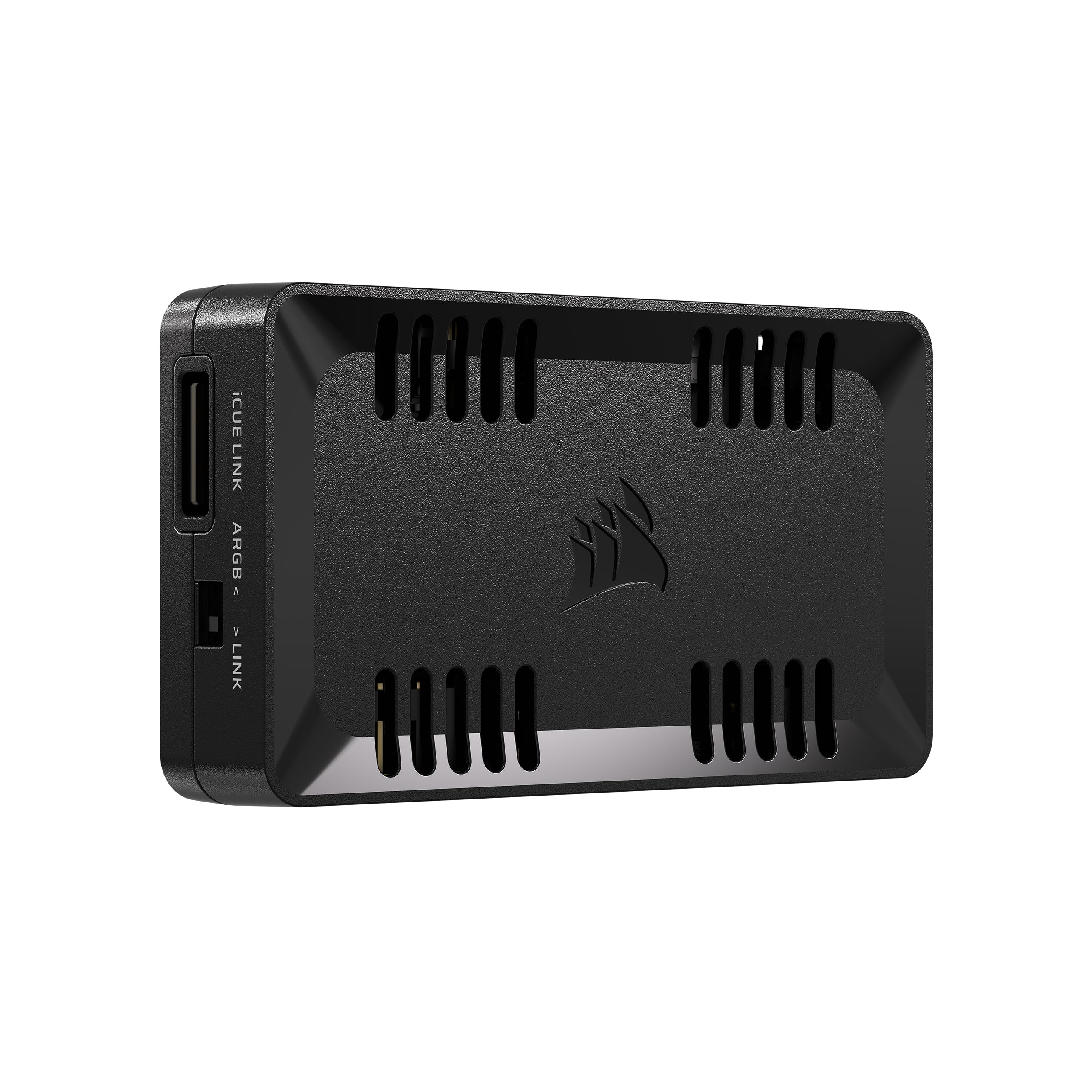
Corsair’s Commander Duo is the bridge controller for people who have a mix of older standard PWM fans and newer iCUE LINK devices. It packs two ARGB and PWM channels, each supporting up to six daisy-chained fans (for a total of 12 fans controlled at once), plus two flexible temperature sensors you can place anywhere in the case. It also supports up to 50 LEDs per ARGB channel, so you can sync lighting effects across a large build.
The dual-ecosystem trick is the standout feature here. One channel can control a row of standard Corsair PWM fans, while the other channel runs a daisy chain of iCUE LINK fans — all from the same iCUE software interface. Owners using 10 fans or more especially appreciate this, since most motherboard headers can only handle three fans each before hitting the amperage limit. The hub itself is magnetic and easily hides behind the motherboard tray. The unit is only 3.62 inches long and weighs a mere 1.86 ounces, so it does not add any bulk to your cable management.
The honest trade-off is that you are locked into Corsair’s iCUE ecosystem to get the most out of it. If you try to mix in components that lack Corsair support, you may lose some smart fan detection features. It also uses a USB 2.0 motherboard header for data, so make sure your board has a spare header available.
Why it stands out
- Two channels let you run both standard PWM fans and iCUE LINK fans from one box
- Daisy-chain up to 6 fans per channel, supporting large builds easily
- Includes two temperature probes for case-wide heat monitoring
- Magnetic and compact at 3.62 inches long
One honest limitation
- Software and fan-pinning are heavily tied to the iCUE ecosystem — mixing with non-Corsair fans can be tricky
- No standalone hardware controls; the PC must be running for fan adjustment
Ideal for: Corsair fans building a large PC with a mix of old and new Corsair cooling gear — especially if you already use iCUE for lighting.
Not for: builders who want a simple knob or a controller that works equally with any brand of fans without software.
4. OwlTree 12V PWM Fan Speed Controller (B0FPCTW57S)
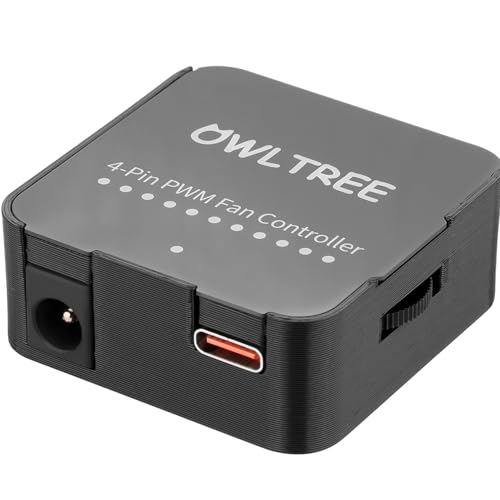
Tiny cube, 60 watts of juice, and a hidden LED trick.
This is the controller for anyone who needs a lot of power in a very small box. At just 1.7 inches on each side (making it 3.1 times smaller than the AC Infinity Controller 2), it supports up to six 4-pin PWM fans with a maximum total output of 60 watts (5 amps at 12 volts). Each of its six ports can handle up to 2 amps individually, as long as the total draw stays under 5 amps across all ports. That is enough to comfortably run six standard 120mm fans at full speed.
The 3D-printed housing with an acrylic faceplate feels a bit rough to the touch — as owners put it, it is “cheap but functional.” The built-in indicator lights show you your input voltage status: blue means you are getting a full 12V, orange means it is below 11.8V, and red means the supply is too weak to run the fans properly. There is also a hidden button under the brand text that turns off those indicator LEDs if you find them distracting. Most owners power it through a USB-C PD (Power Delivery) charger or a standard DC 5.5 x 2.1mm barrel jack, both of which support 12V input.
The firmware accepts both Type-C PD3.0/QC3.0 and DC 5521 inputs, giving you flexibility depending on what power bricks you already own. One owner noted that “with just a 36W PSU my MAX fan speed is way higher at max speed than I would ever use,” which tells you the controller’s throughput is generous for typical use. But the 3D-printed case has rough layer lines, and a few units arrived with scuffs that suggested they were not brand-new — so inspect your unit on arrival.
Small but mighty: the 60W power budget is the highest among the compact plug-and-play controllers here, and the dual-input design (USB-C and DC) fits almost any setup. The rough 3D-printed enclosure is the only obvious compromise.
Reach for this if: you need a hardwired knob that can run six fans at full speed from a single small box — perfect for a server rack or a workbench cooling station.
skip it if: you want a refined, store-bought look for a living-room PC build; the 3D-printed case is clearly DIY in appearance.
5. TUMMASTER ARGB Fan HUB

Ten fans and full RGB control, even on a motherboard without ARGB headers.
This hub solves a very specific frustration: you have a case full of ARGB fans (5V 3-pin), but your motherboard lacks the headers to control them. The TUMMASTER hub gives you 10 ports for PWM fan speed control plus 5V 3-pin ARGB lighting, all powered by a single SATA cable from your power supply. It comes with an RF remote that lets you change lighting colors and patterns without needing any software at all.
The layout stacks ARGB and PWM connections five to each side, and two magnetic feet on the bottom hold it firmly inside the case. Owners note that it handles 10x 120mm fans “flawlessly” and that the remote works even when you are away from the PC. A neat bonus: the hub saves your last-used RGB color so you do not have to reset it after a full shutdown. The case itself is only 0.6 inches thick, so it slides into tight spaces behind the motherboard tray easily.
The instructions are famously sparse — owners say they are “not helpful at all” — but the manual is available on the TUMMASTER website, which clears things up. Also note that this hub uses a 5V 3-pin ARGB standard and does not support older 12V 4-pin RGB equipment. Plugging a 12V RGB strip into it can damage both the strip and the hub.
What makes it a great hub
- 10 ports let you run a full case of fans from one hub, with no motherboard header clutter
- RF remote controls lighting without software — useful for builds without OS access
- Magnetic feet hold it securely inside almost any case
- Works with any 5V 3-pin ARGB fan, not just one brand
One thing to watch for
- Instructions are bare-bones; you will need the online manual to figure out the remote and connectors
- Does not support motherboard ARGB passthrough — lighting control is standalone via the remote only
Best for: builders with a large collection of ARGB fans and a motherboard that lacks ARGB headers — the hub adds full lighting and speed control for a low price.
Think twice if: you want to sync your fan RGB with your motherboard’s lighting software — this hub runs its own lighting via the remote, not motherboard pass-through.
6. OwlTree 4 Pin PWM Controller (B0DPZM7T3Q)

A tiny USB-C dongle that turns any five fans into a speed-controllable array.
This is the controller for the tinkerer — the person who wants to quiet down a 3D printer enclosure, build a DIY laptop cooler, or add variable-speed fans to a router cabinet without spending much. The main unit is a small puck with a USB-C input (5V) and a 4-pin output that boosts voltage to 12V using a built-in DC-DC boost circuit (a circuit that steps up the input voltage). It comes with a 5-way PWM splitter hub, so you can control up to five fans from a single controller. A smooth knob lets you dial the PWM duty cycle from 0 to 100 percent. Buyers using a 3D printer report that it “idles at 25-30 percent and ramps to 100 percent” smoothly, without any sudden jumps.
The construction is better than you would expect for the price. The cabling is woven nylon instead of the usual rubber, and the kit includes double-sided tape for mounting. One owner built a Franken-Fan project using a 200mm fan attached to a micro PC and said the controller “eliminated the annoying fan cycling noise” that the motherboard’s BIOS was causing. The controller is not compatible with 3-pin or 2-pin fans (it only works with standard 4-pin PWM fans), and it needs a charger that can supply enough power for all the fans connected — the maker recommends the charger’s power output should exceed the combined power draw of your fans. Some owners found the knob a little finicky at the very bottom of the range, where the fan may stutter before it starts spinning. But for the price, it punches well above its weight.
Great for small projects: the USB-C power input is incredibly convenient, and the 5-way hub lets you tidy up multiple fans into one cable. The short included cable is the only real nuisance — you may find yourself swapping it for a longer one depending on your setup.
Best for: a quick, low-cost PWM fix for a 3D printer, DIY PC mod, or small electronics cabinet where you want knob-based speed control.
Not for: controlling a full PC case of fans long-term — the power is limited by your USB charger’s output, and the knob lacks a thermal sensor for automatic adjustment.
7. NZXT Control Hub

The dedicated hub for NZXT’s single-frame fans — works beautifully, but only with them.
The NZXT Control Hub is designed specifically for the brand’s newer Core Single-Frame Fans, which use an 8-pin combo header for both power and RGB. It controls up to five such fans (or standard 4-pin PWM fans) and syncs their lighting through NZXT’s CAM software. The controller also includes a Zero RPM mode, which keeps fans completely stopped during low-load tasks like web browsing or document editing — a feature that matters a lot to silence seekers.
Installation is as easy as it gets: the controller has a magnetic base and also comes with 3M Dual Lock fasteners (heavy-duty Velcro-style strips) so you can mount it anywhere in the case. Owners mention that CAM software detects the hub instantly and lets you set independent fan curves and lighting profiles. They also appreciate that there are “no random disconnects,” which some had experienced with generic USB controllers.
The major catch — and it is a real one — is that the Control Hub uses proprietary NZXT connections for its full feature set. Standard fans need adapter cables to work with the 8-pin ports, and even then you may lose some software-based fan detection. If your build mixes NZXT and non-NZXT fans, you will likely need to connect the non-NZXT fans directly to the motherboard instead. One owner reported that theirs broke after a month of use, though that was an isolated case among mostly positive reviews.
What it does really well
- Perfect plug-and-play integration with NZXT Core Single-Frame Fans
- Zero RPM mode keeps fans off entirely during light use
- Magnetic and Dual Lock mounting makes placement flexible
- CAM software provides detailed fan curve and RGB customization
One clear limitation
- Proprietary 8-pin connectors mean you are essentially locked into NZXT fans — mixing brands requires workarounds
- Only supports 5 fans total, which may be limiting for large builds
Ideal for: a full-NZXT build using Core Single-Frame Fans where you want simple, software-based control of both speed and lighting.
pass on it if: you mix fan brands or need to control more than five fans from a single hub — the NZXT RGB & Fan Controller above handles nine fans instead.
8. KB Electronics 8811007 Solid State Controller
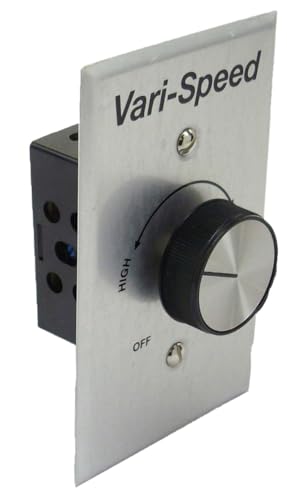
The heavy-duty dimmer-switch style controller for big AC motors — attic fans, not PC fans.
This is not a PC fan controller at all — it is a solid-state variable speed control for 115-volt AC motors. Think whole-house attic fans, fireplace blowers, shop ventilation fans, and large humidifiers. It is rated for 6 max amps at 115 volts and is designed to fit into a standard 2-by-4-inch electrical wall box, just like a light switch. The metal housing and built-in heat sink make it durable enough for industrial and HVAC use, and it is both UL and CSA approved for safety.
Owners use it for everything from slowing down a loud attic fan for comfortable 24-hour warm air circulation to controlling a submersible pump. The solid-state Triac circuit (the component that chops the AC waveform to vary speed) provides smooth, consistent speed changes without the mechanical wear of a traditional rheostat. A minimum speed adjustment screw lets you set the lowest possible fan speed so the motor never stalls — something several owners flagged as essential when running fans at very low RPMs, since AC motors can overheat and stop spinning if the voltage drops too far. Some owners wish the lowest speed was even lower, but that is a physics limit for this type of Triac-based control.
The key fact to remember: this controller cannot be used with capacitor-start or capacitor-run motors (common in some heavier workshop tools) because the switching action can damage those motors. For standard shaded-pole or PSC motors found in most residential fans and blowers, it is a reliable, long-lasting workhorse.
For whole-home cooling: if you have a loud attic fan or a fireplace blower that only runs at one speed, this controller lets you dial it down to a whisper for continuous gentle airflow. The 6-amp rating handles almost any residential fan motor, and the UL listing means an electrician can install it without a second thought.
Best for: anyone with a 115-volt AC fan or blower who wants variable speed control from a wall switch — perfect for attics, workshops, and fireplace inserts.
Not for: any PC, low-voltage (12V/5V) fan, or capacitor-start motor — this is strictly for mains-powered AC equipment.
9. Wathai 36W 4-Pin Fan Controller
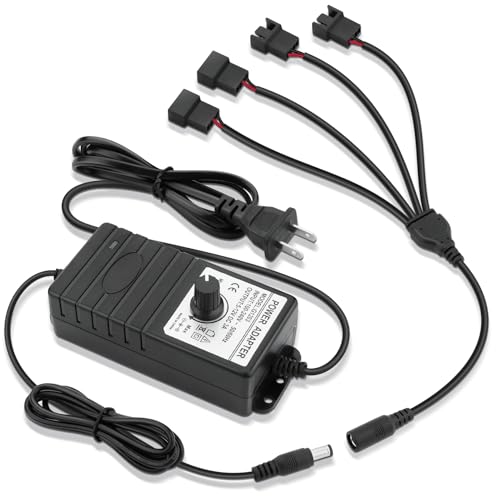
Plug it into a wall outlet, turn a knob, and your fans speed up or slow down — voltage control, plain and simple.
If all you want is to plug a few fans into a wall outlet and control their speed with a knob, this is the simplest path. The Wathai controller takes 110 to 240 volts AC from a standard wall socket and converts it to 4 to 12 volts DC at 3 amps (36 watts total). It has four separate ports that support both 3-pin and 4-pin fans, which makes it one of the few budget controllers that can handle older 3-pin voltage-controlled fans. The wide 4-volt to 12-volt output range lets you dial in very low speeds for quiet operation or crank it to max for heavy cooling.
The reviews here are a split story. Some owners use it to power two high-static-pressure 90mm blower fans at full blast and say it is “plenty powerful,” though it gets warm and needs to sit in a ventilated area. One long-time builder called it the best fan controller he has seen in 15 years and confirmed it handles 29 watts continuous output without issues. Others found that it did not run their fans simultaneously at full speed — likely because their fans drew more than 3 amps total combined. That mismatch between the controller’s 36-watt/3-amp limit and the actual draw of high-power blower fans is the main trap to watch for.
Worth noting: this is voltage-based speed control rather than true PWM. At low speeds, some 4-pin PWM fans may hum or behave inconsistently because they expect a PWM signal, not a reduced voltage. If you are using standard 3-pin DC fans (which change speed based on voltage), this controller works perfectly.
Why you would pick this
- Supports both 3-pin and 4-pin fans — more universal than most budget controllers
- 4V to 12V range gives fine control over fan speed, down to near-silent levels
- Plugs directly into a wall outlet; no PC or laptop needed
One real limitation
- 3-amp limit means you cannot run four high-performance blower fans at full speed — check your fans’ current draw
- Voltage-based control may not give the lowest idle speeds on some 4-pin PWM fans
Best for: a simple, AC-powered voltage controller for cooling an ITX build or a workbench where you want to run a few 3-pin or 4-pin fans from a wall outlet.
it’s not for you if: you need to run four high-amp fans simultaneously at full speed — the 36-watt ceiling is easy to exceed with powerful blowers.
Understanding the Specs
PWM Duty Cycle and Fan Connectors
PWM (Pulse Width Modulation) is the language your 4-pin fan speaks. The controller sends a rapid on-off signal to the fan’s fourth pin, and the fan’s internal chip interprets that signal as a speed command. A 0% duty cycle means the fan is off; 100% means it is at full speed. A knob or software setting that says “50%” runs the fan at roughly half speed, but in a much more controlled way than simply cutting the voltage in half. The key advantage is that PWM can drive a fan down to very low speeds — often 20 to 25 percent of max — without the motor stalling or humming. Standard 3-pin fans cannot use PWM signals; they rely on voltage reduction (lower volts = slower spin), which is less precise and may produce a buzzing sound at very low settings.
Power Budget: Watts and Amps
Every fan controller has a maximum amount of power it can safely deliver. This is usually stated in watts (W) or amps (A) at a specific voltage. A typical 120mm PC fan draws around 0.1 to 0.3 amps, or about 1.2 to 3.6 watts at 12 volts. If your controller is rated for 36 watts total (like the Wathai controller), you can safely run about 10 to 30 standard fans — but only four fans on that specific controller because it has only four ports. The real limit is the combination of port count and total power. High-static-pressure fans used in liquid-cooling radiators or 3D printer enclosures can draw 0.5 to 0.8 amps each, so you reach the amperage ceiling much faster. Always check the sum of your fans’ maximum current draw against the controller’s rating before buying — going over it can overheat the controller and cause a fire risk.
FAQ
Can I use a 4-pin PWM controller with 3-pin fans?
Will a fan controller work with my motherboard’s BIOS fan control?
How many fans can one controller handle?
What is a thermal probe, and do I need one?
Can I control RGB lighting through a fan controller?
Will this work with my 3D printer enclosure fans?
Is PWM control better than voltage control?
Can I use a PC fan controller for an attic fan or other AC appliance?
How do I know if my fans are 3-pin or 4-pin?
What is the difference between a fan hub and a fan controller?
Final Thoughts: The Verdict
For most people, the fan controller winner is the AC Infinity Controller 2 because it makes automated temperature-based cooling feel easy — you place the probe, set your target temperature, and it quietly does the rest. If you want full software control and RGB sync for a gaming PC, grab the NZXT RGB & Fan Controller. And for a simple, budget-friendly USB-C powered knob that tames a 3D printer or small project, the OwlTree 4 Pin PWM Controller is the one to reach for.
How We Picked
We do not accept paid placement. Every pick is matched to a real buyer and a real use-case; we do not hands-on test units.
Sources & Methodology
Specifications: manufacturer listings and product documentation. Review insights: verified customer reviews, as of July 2026. Pricing: not shown on this page (it changes often); check the current price via the retailer link.
As an Amazon Associate, WellFizz earns from qualifying purchases. This does not affect which products we feature.
Related Guides

Mo Maruf
I created WellFizz to bridge the gap between vague wellness advice and actionable solutions. My mission is simple: to decode the research and give you practical tools you can actually use.
Beyond the data, I am a passionate traveler. I believe that stepping away from the screen to explore new environments is essential for mental clarity and physical vitality.