Our readers keep the lights on and my smoothie glass nicely filled. As an Amazon Associate, I earn from qualifying purchases.
Specs are compiled from manufacturer listings and verified buyer reviews and can change over time — please confirm the key details on the product page before buying.
The most important thing to know when shopping for a 4K or 8K editing computer is that you do not need a gigantic tower. Many powerful editing computers now fit in the palm of your hand, with processors and graphics that handle professional suites like Adobe Premiere Pro or DaVinci Resolve easily.
I’m Mohammad Maruf — the founder and writer behind WellFizz. This guide is built by comparing the manufacturers’ published specifications and the patterns across verified customer reviews, so you get each pick’s real strengths and trade-offs instead of marketing spin.
You need an editing computer that keeps up with your timeline without freezing. The best editing computer for you depends on matching your specific workflow to the right processor, graphics, memory, and storage — and this guide cuts through the specs to tell you which one fits your work.
Our Picks at a Glance



How To Choose The Best Editing Computer
Choosing the right editing computer means matching the hardware to your specific daily workload. Video editing, photo editing, 3D rendering, and AI-assisted tools each stress the system differently — a machine that flies through a 4K timeline might choke on 8K RAW footage if the graphics card lacks muscle.
Processor & AI Performance
The central processor (CPU) handles core editing logic and timeline scrubbing. Modern editing software also leans on an NPU — a Neural Processing Unit built into the chip that accelerates AI features like object removal, automatic color matching, and speech-to-text. Look for an Intel Core Ultra or AMD Ryzen AI chip with a dedicated NPU if you use tools like Adobe Sensei or DaVinci Resolve’s Neural Engine.
Graphics Card (GPU) & Video RAM
The graphics card (GPU) renders your preview window and applies effects in real time. A dedicated GPU with its own video RAM (VRAM) is non-negotiable for 4K or 8K editing; integrated graphics on the CPU alone will stutter on layered timelines. For editing, an NVIDIA GeForce RTX series with at least 8GB of VRAM is the baseline for smooth playback and fast rendering.
Memory (RAM) & Storage
Editing software consumes memory quickly. A 4K project with multiple layers, effects, and high-res stills easily fills 32GB of RAM; 64GB is the balance for complex timelines. Storage speed matters just as much. A modern NVMe solid-state drive (SSD — a super-fast storage chip with no moving parts) loads project files and previews nearly instantly, while a traditional hard drive (HDD — a spinning disk drive) will leave you waiting. The ideal setup pairs a fast SSD for your operating system and current projects with a large HDD for archived footage.
Quick Comparison
| Model | Best For | Processor | RAM | Graphics | Amazon |
|---|---|---|---|---|---|
| GEEKOM IT15★ Best Overall | Ultra-compact 8K editing | Intel Ultra 9 285H | 32GB DDR5 | Intel Arc 140T | Amazon |
| HP Mini Desktop PCBest Value | Multi-monitor productivity | Intel i7-12700T | 32GB DDR4 | Intel UHD 770 | Amazon |
| GEEKOM A9 MaxAI Powerhouse | AI-assisted creative workflows | AMD Ryzen AI 9 HX 370 | 32GB DDR5 | Radeon 890M | Amazon |
| Lenovo Legion Tower 5i | Gaming & content creation | Intel Core Ultra 7 265F | 16GB DDR5 | RTX 5060 Ti 8GB | Amazon |
| Dell Pro Tower Plus | Business & professional editing | Intel Core Ultra 7 265 | 32GB DDR5 | Integrated Intel | Amazon |
| Alienware Aurora | High-end gaming & editing | Intel Core Ultra 7 265F | 32GB DDR5 | RTX 5070 12GB | Amazon |
| KOTIN Prebuilt Gaming | Smart display & 4K editing | AMD Ryzen 7 9700X | 32GB DDR5 | RTX 5070 12GB | Amazon |
| MSI Codex Z2 | High-frame-rate editing | AMD R7-8700F | 32GB DDR5 | RTX 5070 12GB | Amazon |
| Skytech King 95 | Liquid-cooled 1440p editing | AMD Ryzen 7 9700X | 32GB DDR5 | RTX 5070 12GB | Amazon |
| iBUYPOWER Y40 PRO | 3D rendering & video work | AMD Ryzen 9 7900X | 32GB DDR5 | RTX 5070 Ti 16GB | Amazon |
| HP Envy Desktop | Massive multitasking | Intel i9-14900K | 64GB DDR5 | RTX 3050 8GB | Amazon |
| CLX SET | Marathon rendering sessions | Intel i9-14900KF | 32GB DDR5 | RTX 4070 Super 12GB | Amazon |
| Dell Tower EBT2250 | Photoshop & creative suites | Intel Core Ultra 9 285 | 32GB DDR5 | RTX 5070 12GB | Amazon |
In-Depth Reviews
1. GEEKOM IT15 AI Mini PC
Our pick — 4.5★ from 300+ verified ratings; the strongest balance of quality and price.
A palm-sized powerhouse that edits 8K video without breaking a sweat.
If you are looking for an editing computer that vanishes on your desk but delivers desktop-class muscle, the GEEKOM IT15 is the answer. Its Intel Core Ultra 9 285H processor (16 cores, up to 5.4 GHz) and Intel Arc 140T graphics handle 4K and 8K timelines in Adobe Premiere Pro and DaVinci Resolve without stuttering. The machine generates 4K concept art in just 8.3 seconds, thanks to its 99 TOPS total AI performance — a blend of the CPU, GPU, and a dedicated NPU (13 TOPS) that accelerates AI-powered editing tools.
You can drive two 8K monitors and two more 4K displays simultaneously through the dual HDMI and dual USB4 ports, which is a standout for data-heavy workflows like stock trading or complex video compositing. The fan stays whisper-quiet even under load, and the metal frame is rated to withstand 441 lbs of pressure, so it survives travel or a crowded desk. The biggest trade-off here versus a traditional tower is the integrated graphics — it is fast for editing, but not designed for heavy AAA gaming at maximum settings.
What wins people over is the raw performance — it is the most-mentioned praise by a wide margin. The machine is also a joy to set up, with buyers noting its compact size and speed from the start. The only recurring note is the noise level, which some find a touch louder than expected during sustained loads, though it remains well within quiet territory.
What stands out
- Runs 8K video editing smoothly with 99 TOPS of AI power
- Supports quad displays (dual 8K + dual 4K) for a command-center setup
- Metal frame rated for 441 lbs pressure; durable enough for travel
What to consider
- Integrated Intel Arc 140T GPU is not built for hardcore gaming
- No option for 64GB RAM from the factory
Reach for this if: You want a tiny, silent editing workstation that handles 8K multi-display work and fits in a bag.
Think twice if: You need a dedicated gaming GPU or plan to run massive AI models locally that benefit from a full-size card.
2. HP Mini Desktop PC
A compact workstation that drives three 4K monitors for serious multitasking.
For editors and analysts who live across multiple screens, the HP Mini Desktop is an unusually complete package. The 12th Gen Intel i7-12700T (12 cores, up to 4.7 GHz) paired with 32GB of DDR4 RAM and a 1TB NVMe SSD boots in seconds and handles 50-plus browser tabs or a layered video timeline without slowdowns. The cache memory installed size is 25 MB — 1 MB more than the GEEKOM IT15’s 24 MB, which gives it a slight edge in certain data-processing tasks.
The headline feature is triple 4K output at 60 Hz via dual DisplayPort 1.4 and HDMI 2.1. That allows you to keep your timeline on one screen, your preview on a second, and your asset browser on a third — a workflow that many traditional towers cannot match without an extra graphics card. It also arrives with a wired keyboard and mouse and Windows 11 Pro, so you can unbox and start working immediately. The catch is the integrated Intel UHD 770 graphics, which is fine for 4K video editing but will not accelerate GPU-intensive effects like heavy 3D rendering.
The crowd-sentiment is that this machine “does the job” reliably. One buyer called it “a workhorse with zero issues” after a month of daily use. The main limitation to know: it uses DDR4 RAM instead of DDR5, which is slightly slower than the latest standard, but for most editing workflows the difference is imperceptible.
Dual-display champion: Drives three 4K monitors at 60Hz (60 refreshes per second) so you can spread your timeline, preview, and bins across a smooth editing command center.
The limitation: Integrated Intel UHD 770 graphics handle 4K editing well but lack the muscle for GPU-heavy 3D work.
Best for: Multi-monitor editors, stock traders, and data analysts who need maximum screen real estate on a budget.
Consider another if: Your editing relies heavily on GPU-accelerated effects or you plan to run demanding AI models locally.
3. GEEKOM A9 Max AI Mini PC
An AMD-powered mini PC that brings AI acceleration to your editing timeline.
The GEEKOM A9 Max is engineered for creators who use AI-assisted tools. Its AMD Ryzen AI 9 HX 370 chip delivers up to 80 TOPS of total AI performance, with a dedicated XDNA 2 NPU providing 50 TOPS specifically for accelerating machine learning tasks. This means local AI workflows — like running Stable Diffusion for image generation or using AI upscaling in DaVinci Resolve — happen fast and without relying on cloud servers.
The 12-core, 24-thread Zen 5 processor and Radeon 890M graphics (with 16 RDNA 3.5 Compute Units) handle 4K video editing in Adobe Premiere Pro, Photoshop, and Blender with ease. The all-metal chassis and IceBlast 2.0 cooling system keep the system quiet and thermally stable even during long rendering sessions. A notable difference from the GEEKOM IT15: the A9 Max supports up to 128GB of DDR5 memory and dual PCIe Gen4 SSDs up to 8TB, making it more future-proof for heavy workloads. However, the Wi-Fi here is Wi-Fi 7, matching the IT15, but its Bluetooth 5.4 is the same generation.
Buyers praise the overall performance — it is fast, quiet, and compact. Setup is straightforward, with Windows 11 Pro pre-installed. Pick the A9 Max over the IT15 if you plan to run local AI models or upgrade your RAM and storage over time, but note that the IT15 holds a higher overall satisfaction rating and a larger review base.
AI-tune workhorse: 80 TOPS total AI performance with 50 TOPS from the dedicated NPU accelerates local AI tools.
Future-ready expansion: Supports 128GB DDR5 RAM and dual PCIe Gen4 SSDs up to 8TB for growing project libraries.
Ideal for: Creators who lean on AI-assisted editing, image generation, and machine learning workflows.
Skip if: Your editing is purely timeline-based with no AI tools — the IT15 offers similar performance for less.
4. Lenovo Legion Tower 5i

A full-tower gaming desktop that doubles as a capable editing station.
If your editing doubles as gaming, the Lenovo Legion Tower 5i is a versatile desktop that delivers on both fronts. The Intel Core Ultra 7 265F processor and NVIDIA GeForce RTX 5060 Ti (8GB GDDR6) provide smooth 4K timeline playback and can handle modern AAA games at high settings. The 16GB of DDR5 RAM is expandable up to 128GB, which is important because 16GB is a bit lean for complex editing timelines — upgrading is the first thing you will want to do.
The tool-less transparent side panel makes upgrades easy, and the customizable RGB lighting adds a personal touch. It comes with 2.5G Ethernet and Wi-Fi 6E for fast file transfers and includes 3 months of Xbox Game Pass. The trade-off is the starting 16GB of RAM; most editing workloads today benefit from 32GB, so factor in the cost of an extra memory kit.
Buyers consistently describe it as fast and quiet, with one owner noting it runs Cyberpunk 2077 on high-max settings silently. The Legion Tower 5i is a solid choice if you want a single machine for both gaming and content creation, but the GEEKOM IT15 above offers similar editing performance in a fraction of the size.
Gaming meets editing: RTX 5060 Ti handles 4K timelines and modern AAA titles smoothly.
Upgrade required: 16GB RAM is underpowered for heavy editing; budget for a 32GB upgrade.
Great for: Gamers who also edit video and want a single, expandable tower.
Consider something else if: You need 32GB of RAM from the start or prefer a compact, silent mini PC.
5. Dell Pro Tower Plus
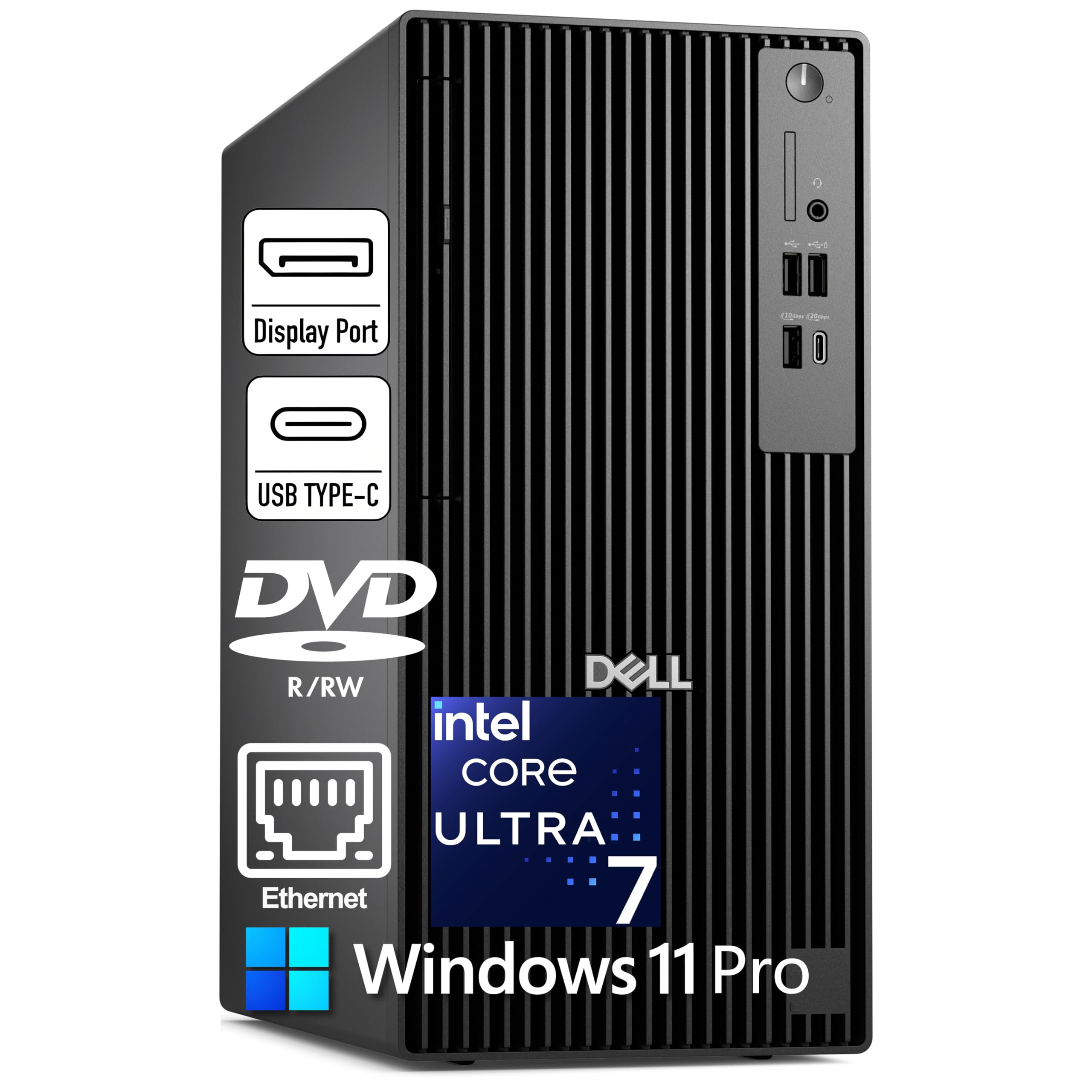
A no-nonsense tower with massive storage and three 4K DisplayPort outputs.
The Dell Pro Tower Plus is built for professionals who need reliability, expandability, and triple 4K display support from the start. Its Intel Core Ultra 7 265 processor (20 cores, up to 5.3 GHz, 30 MB cache) includes a 13 TOPS NPU for AI acceleration, and the 32GB of DDR5 RAM handles heavy multitasking with ease. The 2TB PCIe NVMe SSD provides generous storage for current projects, and the DVD+/-RW drive is still useful for legacy media.
The rear ports include three DisplayPort 1.4a connections for driving three 4K monitors at once, plus a USB-C port (10Gbps) and multiple USB-A ports. One important note: this system has no built-in Wi-Fi — it relies on wired Ethernet, so you will need a USB Wi-Fi adapter if you do not have Ethernet nearby. The 260W Bronze PSU is adequate for the integrated graphics but leaves no headroom for a dedicated GPU upgrade.
Buyers report fast boot times and quiet operation, with one buyer calling it “a great computer” that performs well for work and light gaming. The lack of Wi-Fi is the most common real-world friction point, so factor that into your setup planning.
Triple 4K from the start: Three DisplayPort 1.4a ports drive three 4K monitors without an extra card.
The catch: No built-in Wi-Fi — you will need a USB adapter or a wired Ethernet connection.
Best for: Business editors and power users who need a reliable, expandable tower with massive storage.
Skip if: You require Wi-Fi from the start or plan to install a powerful dedicated GPU.
6. Alienware Aurora Gaming Desktop

Alienware’s legendary gaming chassis with RTX 5070 power for demanding editing.
The Alienware Aurora is a premium gaming desktop that turns its high-end gaming hardware into exceptional editing performance. The NVIDIA GeForce RTX 5070 (12GB GDDR7 — the latest generation of graphics memory) on NVIDIA’s Blackwell architecture handles ray tracing (realistic lighting effects) and rasterization (standard 3D rendering) so fast that GPU-accelerated effects in Premiere Pro and DaVinci Resolve finish quickly. The Intel Core Ultra 7 265F processor (up to 5.3 GHz) keeps timelines responsive, and the 32GB of DDR5 RAM is the balance for complex multi-layer edits.
The design is unmistakably Alienware — a matte basalt black finish with customizable AlienFX stadium lighting. It ships with Wi-Fi 7, Bluetooth, and Killer 2.5Gb Ethernet for fast network transfers, plus a 1-year Dell onsite service warranty. The machine is remarkably quiet under load, a point owners consistently praise. However, reviews note that some units have arrived with incorrect specifications — an occasional quality-control issue to be aware of. The Aurora is also larger and heavier than the mini PC options, so it requires dedicated desk space.
Performance is the top praise by a wide margin. One owner says it “runs Escape from Tarkov and Delta Force with ease” and stays cool and quiet. The Aurora is the pick for editors who also want a top-tier gaming machine and value Dell’s onsite service.
Standout features
- RTX 5070 12GB with Blackwell architecture for GPU-heavy editing and gaming
- Very quiet operation even under sustained load
- 1-year Dell onsite service for confidence
Things to note
- Occasional reports of incorrect specs upon arrival
- Large tower requires dedicated desk space
Perfect for: Editors who are also serious gamers and want a single, premium desktop with onsite service.
Think twice if: You prefer a compact, travel-friendly form factor like the GEEKOM IT15.
7. KOTIN Prebuilt Gaming PC
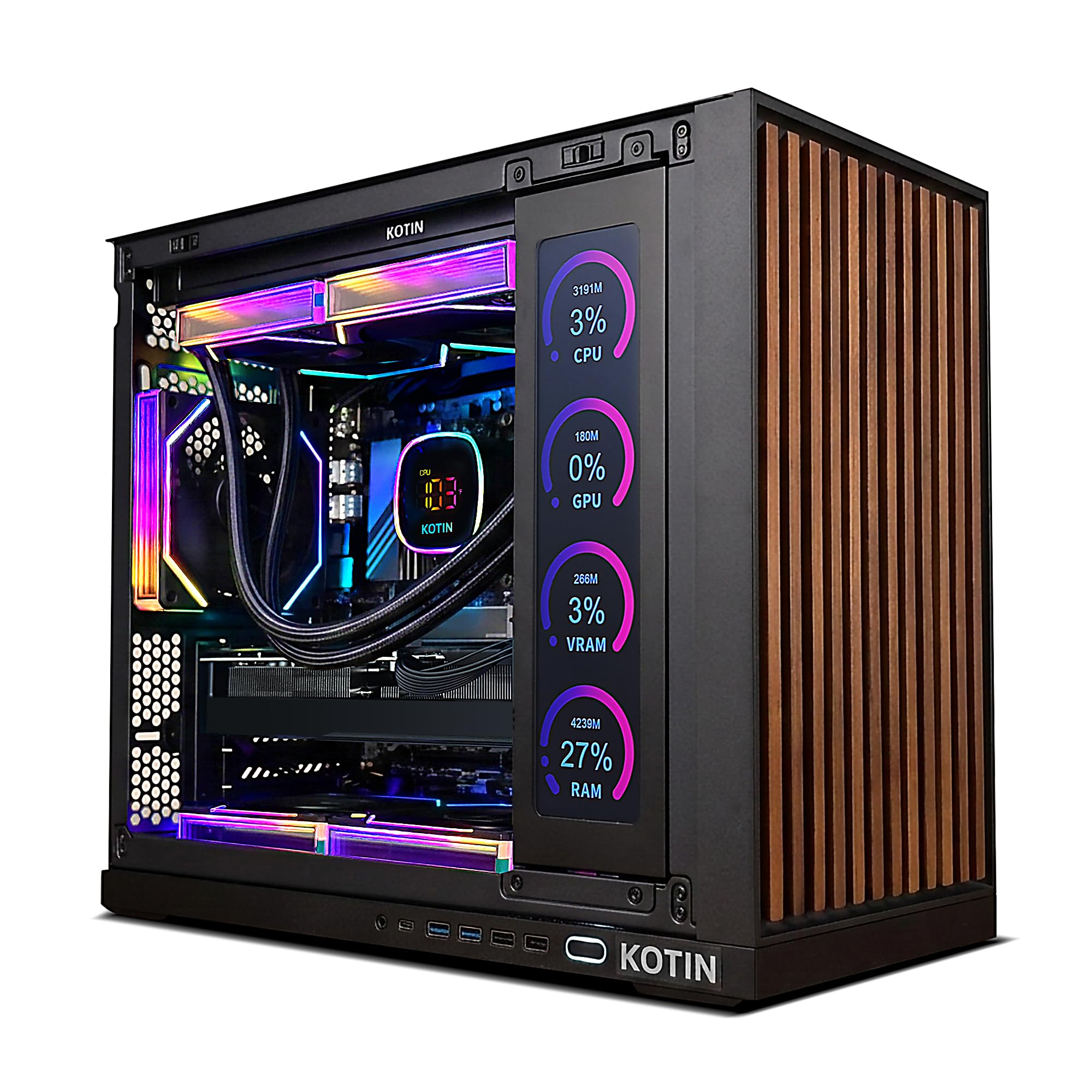
A pre-built gaming rig with a unique built-in smart display for real-time monitoring.
The KOTIN stands out in the crowd with an integrated 11.3-inch smart display that shows your CPU and GPU temperatures, usage, and even the weather while you work. Beneath that flashy feature is serious editing hardware: an AMD Ryzen 7 9700X (8 cores, up to 5.5 GHz) paired with a GeForce RTX 5070 12GB GDDR7 graphics card and 32GB of DDR5 6000MHz RAM. The 1TB NVMe SSD provides fast storage for your active projects.
The 850W 80+ Gold power supply provides ample headroom for future upgrades, and the 360mm liquid cooler keeps the Ryzen 7 chip running cool even during extended rendering sessions. It ships with Windows 11 Home and is assembled in the USA, backed by a one-year warranty and lifetime free technical support. The main trade-off is that the hardware has received mixed feedback in reviews — while performance is generally praised, there are occasional reports of issues like faulty screens or intermittent booting.
One buyer who uses it for Unity and gaming reports “no problems at all.” Performance is the top positive aspect noted by owners, and the installation process is described as plug-and-play. The KOTIN is an notable choice if you want a conversation-piece desktop with liquid cooling and the unique smart screen.
Built-in smart display: 11.3-inch screen shows real-time CPU/GPU stats, usage, and weather.
Liquid-cooled & expandable: 360mm AIO cooler and 850W Gold PSU keep things cool and ready for future upgrades.
Ideal for: Creators who want a visually striking, liquid-cooled PC with a real-time monitoring display.
Consider alternatives if: Hardware consistency and support responsiveness are your top priorities.
8. MSI Codex Z2 Gaming Desktop

A well-rounded gaming desktop that brings RTX 5070 power to content creation.
The MSI Codex Z2 is a strong mid-range contender for editors who also game. Its AMD Ryzen 7 8700F (8 cores, up to 5.0 GHz) and NVIDIA GeForce RTX 5070 (12GB GDDR7) provide smooth 4K timeline playback and fast rendering in Premiere Pro and DaVinci Resolve. The 32GB of DDR5 RAM and 2TB NVMe SSD give you plenty of memory for layered edits and generous storage for project files.
MSI focused on cooling here — four system fans (three front intake, one rear exhaust) pull cool air through the case and push heat out efficiently. The built-in RGB lighting can be customized via the MSI Center software or cycled through with the front-panel LED button. It also includes a premium-feeling RGB keyboard and mouse. The main drawback shared by owners is that the Bluetooth module is weak and may need upgrading for reliable use with peripherals.
One owner describes it as “solid build with good airflow, stays cool” and notes it handles multitasking easily. Another calls it “great for first PC” and says it plays AAA games perfectly. The Codex Z2 is a reliable, well-cooled choice that balances editing and gaming performance in a stylish black chassis.
Well-cooled design: Four system fans (three front, one rear) keep the system cool under sustained loads.
Bluetooth limitation: The integrated Bluetooth module is weak; many owners recommend an upgrade adapter.
Great for: First-time desktop buyers who want a balanced editing and gaming machine with good cooling.
Consider another if: Reliable Bluetooth connectivity from the start is a must for your workflow.
9. Skytech King 95 Gaming PC

A liquid-cooled 1440p editing powerhouse with a stunning case showcase.
The Skytech King 95 is designed for editors who push their hardware to the limit. Its AMD Ryzen 7 9700X (3.8 GHz base, 5.5 GHz turbo boost) and NVIDIA GeForce RTX 5070 12GB GDDR7 graphics handle 1440p editing and 60+ FPS gameplay on ultra settings. The 360mm AIO liquid cooler keeps temperatures in check during long rendering sessions, and the 32GB of DDR5 6000MHz RGB memory ensures smooth multitasking.
The King 95 case is a showpiece — a striking black tower with tempered glass panels that let you show off the ARGB fans and liquid cooler. It includes a free gaming keyboard and mouse, and is assembled in the USA with a one-year warranty. The main trade-offs noted by owners are limited USB 3.0 ports and a basic SSD. The WiFi and Bluetooth connectivity has also drawn criticism for being unreliable, with some reporting dropped connections during use.
Owners praise the excellent build quality and cable management. One says it “performs as spec (9700X, RTX 5070) with great cooling and quiet operation.” The King 95 is an excellent choice if you value aesthetics and liquid cooling and primarily edit at 1440p.
Overkill cooling: 360mm AIO liquid cooler prevents thermal throttling during marathon rendering sessions.
Connectivity concerns: WiFi and Bluetooth can be unreliable; some owners recommend aftermarket antennas.
Best for: Creators who want a liquid-cooled, visually stunning tower for 1440p editing and gaming.
Think twice if: You rely on stable built-in WiFi and Bluetooth for your daily workflow.
10. iBUYPOWER Y40 PRO

A Ryzen 9 and RTX 5070 Ti beast built for 3D rendering and heavy video work.
The iBUYPOWER Y40 PRO is aimed squarely at creators who work in Blender, Unreal Engine 5, and demanding video editing suites. The AMD Ryzen 9 7900X (12 cores, up to 5.6 GHz) paired with the NVIDIA GeForce RTX 5070 Ti (16GB GDDR6) delivers transformative GPU-accelerated performance for video editing, 3D rendering, and design workflows. The 32GB of DDR5 5200MHz RAM and 2TB NVMe SSD provide ample memory and lightning-fast storage for large projects.
The Y40 PRO comes in a tempered glass RGB case with 16-color lighting and includes a free iBUYPOWER gaming keyboard and mouse. It is Wi-Fi and Bluetooth ready, and ships with no bloatware. The most significant concern shared by owners is power supply reliability — a small but notable number report the PSU failing after several months of use. The one-year warranty covers it, but the process for replacement requires some upfront cost.
One buyer calls it “a beast of a gaming machine” that handles ultra settings, ray tracing, and VR flawlessly. Another says it powers through Blender and Unreal Engine 5 “without any issues.” If your work involves 3D rendering or VR development, the Y40 PRO’s 16GB of VRAM (video memory dedicated to graphics) is a real advantage over the 12GB cards in this list.
Why it excels
- RTX 5070 Ti with 16GB GDDR6 for heavy 3D rendering and VR workflows
- 12-core Ryzen 9 7900X handles multi-threaded rendering and multitasking with ease
- 2TB NVMe SSD provides ample fast storage for large project files
Potential issues
- Some owners mention power supply failures after several months
- Warranty replacement process requires upfront payment for the part
Ideal for: 3D artists, video editors, and VR developers who need 16GB of VRAM and 12 CPU cores.
Consider another if: You are concerned about long-term power supply reliability and prefer a simpler warranty process.
11. HP Envy Desktop

An i9-14900K desktop with 64GB of RAM for the most demanding editing timelines.
The HP Envy Desktop is built for editors who fill their timelines with dozens of layers, high-res stills, and effects. Its Intel Core i9-14900K processor (24 cores, turbo boost to 6.0 GHz) is one of the fastest consumer CPUs available, and the 64GB of DDR5 RAM ensures you will never hit a memory ceiling during complex projects. The 2TB SSD provides generous storage for video files, and the NVIDIA GeForce RTX 3050 with 8GB GDDR6 handles 4K playback and effects reasonably well.
The connectivity is solid: Realtek Wi-Fi 6 (2×2), Bluetooth 5.3, Ethernet RJ45, plus a USB-C 5Gbps port and multiple USB-A ports at 10Gbps and 5Gbps. It ships with Windows 11 Pro. The obvious trade-off is the graphics card — the RTX 3050 is a capable entry-level card, but it is the weakest GPU in this price tier. If your workflow relies heavily on GPU acceleration for effects or 3D rendering, you would be better served by a machine with an RTX 4070-class card.
One owner who uses it for stock trading with four 4K displays says “processor loading rarely exceeds 20%” and memory usage stays under 30%, confirming the system has headroom for any editing workload. The HP Envy is the right pick if you prioritize massive RAM and CPU power over raw GPU muscle.
class-leading multitasking: 64GB of DDR5 RAM and a 24-core i9-14900K handle the heaviest timelines without slowing down.
GPU compromise: The RTX 3050 8GB is a weak link for GPU-accelerated effects and 3D rendering at this price point.
Best for: Editors who need maximum RAM and CPU performance for complex, multi-layer timelines without heavy GPU workloads.
Skip if: Your workflow relies on GPU-accelerated effects — look at the iBUYPOWER Y40 PRO instead.
12. CLX SET Liquid Cooled Gaming Desktop

A liquid-cooled i9 machine with a massive 4TB HDD for archiving footage.
The CLX SET is a custom-built gaming desktop designed for creators who accumulate terabytes of footage. The Intel Core i9-14900KF (24 cores, up to 5.3 GHz) and GeForce RTX 4070 SUPER (12GB GDDR6) provide excellent editing and rendering performance. The 360mm AIO liquid cooling system keeps the processor cool during extended sessions, and the 32GB of DDR5 RGB memory handles multitasking smoothly.
The standout storage configuration pairs a 1TB NVMe M.2 SSD for your operating system and active projects with a 4TB HDD for archiving completed work and storing raw footage. This is a practical setup for editors who do not want to constantly offload files to external drives. The case includes about 11 external USB ports (including two USB 3.2, one Type-C, and one BIOS port), offering generous connectivity. The system ships with Windows 11 Home.
One owner calls it “very good pc” that runs great on every game tried, is surprisingly quiet, and looks amazing. Another says the GPU is “sick fast” and notes no bloatware. The CLX SET is a strong choice if you want a liquid-cooled, ready-to-go editing rig with both fast SSD storage and massive HDD capacity.
top-tier storage: 1TB NVMe SSD for speed + 4TB HDD for archiving footage and games.
Liquid-cooled reliability: 360mm AIO cooler keeps the i9-14900KF running cool during marathon rendering.
Perfect for: Editors who need onboard archival storage and prefer a liquid-cooled, custom-built desktop.
Consider another if: You prefer a smaller form factor or do not need the 4TB HDD for archiving.
13. Dell Tower Desktop EBT2250

A Dell tower with Intel’s latest Core Ultra 9 and RTX 5070 for Photoshop and video work.
The Dell Tower EBT2250 is the most premium option in this list, built around Intel’s new Core Ultra 9-285 processor — a chip with three dedicated AI engines (CPU, GPU, and NPU — Neural Processing Unit, a chip designed for AI tasks) that accelerate creative workflows in Photoshop, Premiere Pro, and other AI-capable apps. The NVIDIA GeForce RTX 5070 with 12GB of GDDR7 graphics memory provides excellent GPU acceleration for effects and rendering. The 32GB of DDR5 RAM and 2TB SSD round out a well-balanced specification.
Dell designed the chassis for quiet airflow and easy upgrades, with tool-less access to internal components. It ships with Wi-Fi 7 and a 1-year Dell onsite service warranty. The main trade-off — and it is a meaningful one — is that the 2TB SSD is actually two separate 1TB drives (non-upgradable beyond 1TB each), which is a disappointment at this price point. Also, the price has fluctuated significantly, with some buyers finding it cheaper weeks after purchase.
One owner who uses it for Photoshop work calls it “worth it” and the most they have ever spent on a computer. Another says “Dell stands out as most cost effective” for ease of configuration and file transfer. The EBT2250 is the pick for professionals who need Dell’s onsite service, the latest Intel AI processor, and a clean, upgradeable tower.
Three AI engines: CPU, GPU, and NPU work together to accelerate AI features in creative software.
Storage caveat: The 2TB is split into two 1TB drives; neither can be upgraded beyond 1TB.
Ideal for: Creative professionals who need Dell’s onsite service and the latest Intel Core Ultra 9 AI processor.
Consider alternatives if: You need a single large SSD or are sensitive to potential price drops shortly after purchase.
Understanding the Specs
TOPS & the NPU
TOPS stands for Trillions of Operations Per Second — it is a measure of how fast the dedicated AI engine (the NPU, or Neural Processing Unit) inside the processor can run machine-learning tasks. In editing, a higher TOPS number means faster AI features like object removal, automatic color matching, and speech-to-text in software like Adobe Premiere Pro and DaVinci Resolve. A chip with 50 TOPS or more can handle real-time AI effects without bogging down the main processor.
VRAM & Dedicated Graphics
VRAM (Video Random Access Memory) is the dedicated memory on your graphics card that stores textures, frame buffers, and effects data. For 4K video editing, 8GB of VRAM is the baseline for smooth playback; 12GB or 16GB is ideal for 8K timelines or complex 3D rendering. An integrated GPU (built into the CPU) shares system RAM and is not sufficient for professional video editing — a dedicated GPU with its own VRAM is a must.
FAQ
Can a mini PC really handle 4K video editing?
How much RAM do I need for 4K video editing?
Is a dedicated graphics card necessary for video editing?
What is an NPU and why does it matter for editing?
Should I get a tower or a mini PC for editing?
How important is the SSD speed for video editing?
Will a gaming desktop work well for video editing?
What is TOPS and how does it affect AI editing features?
Final Thoughts: The Verdict
If you want one dependable pick, the best editing computer winner is the GEEKOM IT15 AI Mini PC because it packs the latest Intel processor, fast RAM, and multi-display 8K support into a tiny, quiet chassis that disappears on your desk. If you want a full tower with dedicated GPU power for both gaming and editing, grab the Alienware Aurora Gaming Desktop. And for pure AI-heavy creative work with massive CPU power, the HP Envy Desktop with 64GB of RAM is the one to reach for.
How We Picked
We do not accept paid placement. Every pick is matched to a real buyer and a real use-case; we do not hands-on test units.
Sources & Methodology
Specifications: manufacturer listings and product documentation. Review insights: verified customer reviews, as of July 2026. Pricing: not shown on this page (it changes often); check the current price via the retailer link.
As an Amazon Associate, WellFizz earns from qualifying purchases. This does not affect which products we feature.
Related Guides

Mo Maruf
I created WellFizz to bridge the gap between vague wellness advice and actionable solutions. My mission is simple: to decode the research and give you practical tools you can actually use.
Beyond the data, I am a passionate traveler. I believe that stepping away from the screen to explore new environments is essential for mental clarity and physical vitality.