Our readers keep the lights on and my smoothie glass nicely filled. As an Amazon Associate, I earn from qualifying purchases.
Specs are compiled from manufacturer listings and verified buyer reviews and can change over time — please confirm the key details on the product page before buying.
A family charging station turns one wall outlet into a central hub, ending the daily fight for an open plug.
I’m Mohammad Maruf — the founder and writer behind WellFizz. This guide is built by comparing the manufacturers’ published specifications and the patterns across verified customer reviews, so you get each pick’s real strengths and trade-offs instead of marketing spin.
Whether you are wrangling a handful of phones on a nightstand or a full desk of laptops and tablets, these are the best family charging station models that keep everyone powered without the mess.
Our Picks at a Glance
How To Choose The Best Family Charging Station
With many port and power options, choosing the right station can feel overwhelming. Focus on these key factors to find what your family actually needs.
Total Power vs. Per-Device Speed
The total wattage (like 100W or 750W) is the pool of power the station can draw from. This number is split across all connected devices. A station with a high total can handle a mix of fast-charging laptops and phones without slowing down each one. A station with lower total wattage will still charge everything, but a big laptop may charge slowly if several other devices are plugged in at the same time.
Port Types and Count
USB-C ports typically deliver more power than USB-A ports, making them necessary for modern laptops and newer phones that support fast charging. If your family uses a mix of older devices (like Kindles or older iPhones with Lightning connectors), a good number of USB-A ports is still important. Look for at least two or three USB-C ports for the fastest charging, and enough USB-A ports for the rest.
Form Factor: Organizer vs. Tower
Organizer-style stations have slots or dividers to hold devices upright, keeping your desk or counter tidy. Tower-style power strips save space vertically and often include AC outlets for plugging in things like lamps or fans. Choose an organizer for a desk or a tower for the floor or behind furniture.
Quick Comparison
| Model | Best For | Total Wattage | USB-C Ports | USB-A Ports | Amazon |
|---|---|---|---|---|---|
| Zobirez 10-Port 750W★ Best Overall | Highest power output | 750W | 5 | 5 | Amazon |
| kakyanill 17-in-1 TowerSpace-Saving Tower | Most AC outlets + USB | 1875W AC / 4.8A USB | 4 | 4 | Amazon |
| TenTrend 14-in-1 TowerBest Value Tower | Compact tower with fast USB-C | 230W | 4 | 4 | Amazon |
| MSTJRY 6-Port Organizer | Simple family desk organizer | 2.4A per port | 0 | 6 | Amazon |
| HSicily 95W 6-Port | Organizer with watch/airpod stands | 95W | 2 | 4 | Amazon |
| UGREEN 100W GaN | Small desktop hub for power users | 100W | 4 | 2 | Amazon |
| Hostena 30W Wireless | Apple-focused wireless + clock | 30W | 2 | 0 | Amazon |
| Rocoren 400W 10-Port | High power for laptops + organization | 400W | 6 | 4 | Amazon |
| Anker Nano 7-in-1 | Premium desk decluttering | 100W | 3 | 1 | Amazon |
In‑Depth Reviews
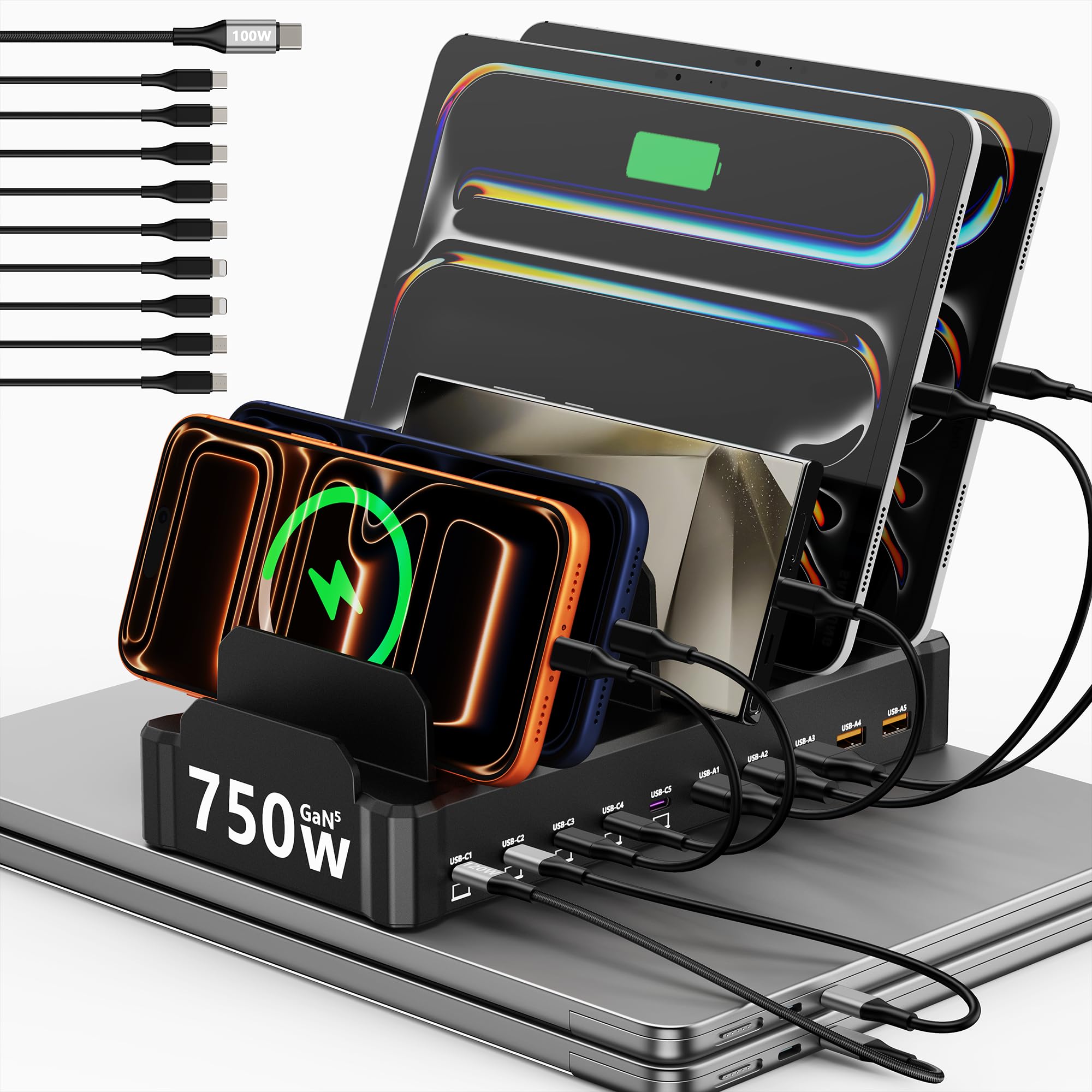
1. Zobirez 750W 10-Port Charging Station
Our pick — over 4.5★ from 250+ verified ratings; the strongest balance of quality and price.
Delivers up to 120W per USB-C port for laptops.
If your family has a mix of high-powered laptops, tablets, and phones, this is the station that solves the bottleneck. It delivers a massive 750W total output split across 10 ports — 5 USB-C that each push up to 120W and 5 USB-A that each push up to 30W. In plain terms, you can plug in multiple MacBooks or gaming laptops and still have power left over for everyone’s phone and earbuds.
The design is built for daily family chaos. The slots are a durable one-piece construction (no flimsy removable dividers), and there are two wide center bays that fit a laptop or a tablet with a thick protective case. The included cable kit covers everything: 9 short cables (USB-A, USB-C, Micro-USB, Lightning) and one 100W long USB-C cable. The crowd of over 290 owners gives it a near-perfect 4.8 stars, with the most common praise being the sheer power output and how it stays cool even under load.
The weighted base makes it a permanent desk fixture, not a travel-friendly gadget. It also lacks standard AC outlets, so if you need to plug in a lamp or fan, you will still need a separate power strip.
What wins families over
- Massive 750W total power — enough for multiple laptops at once.
- 5 USB-C ports at 120W each, outpacing most rivals that offer just 65W.
- Comes with 10 cables including a 100W USB-C cable for a thick laptop.
The honest fit-notes
- No standard AC outlets for plugging in non-USB gadgets.
- Heavier and less portable than simple organizer docks.
Reach for this if: your household has multiple laptops or tablets that need fast, simultaneous charging without any slowdown.
Look elsewhere if: you need to plug in a desk lamp or other AC-powered devices along with your electronics.
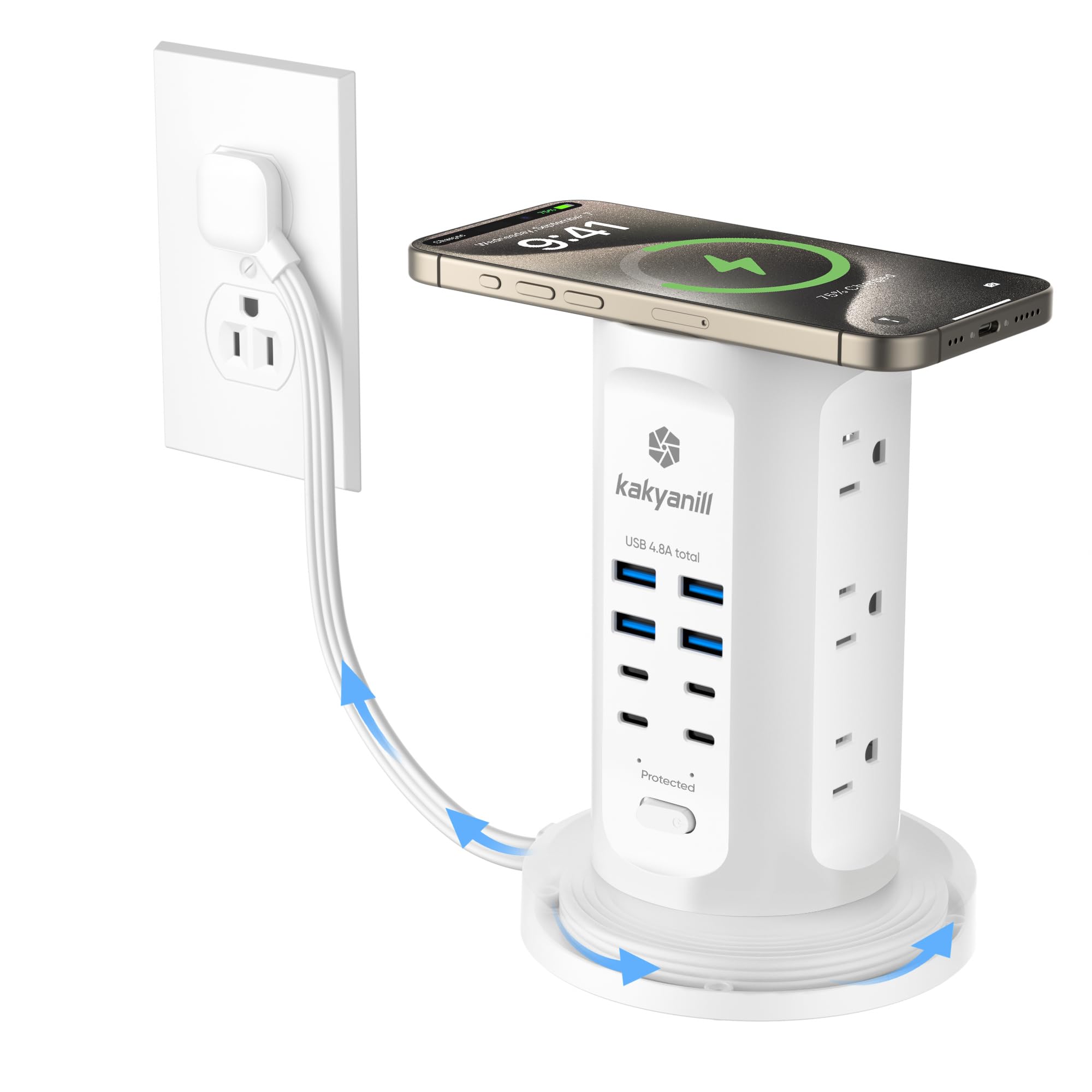
2. kakyanill Power Strip Tower, 17-in-1
The vertical hub that handles AC appliances and USB gear in one tidy tower.
This model is for the family that still needs standard wall outlets. It packs 9 AC outlets (spaced 1.5 inches apart for bulky adapters) alongside 8 USB ports (4 USB-C and 4 USB-A). The total USB output is 4.8A, which as buyers put it, delivers “higher USB amperage for faster charging” than many simple strips. The retractable 6-foot cord is a standout feature — you pull out what you need and wind the rest back up, keeping the floor totally clear.
The flat 0.35-inch plug and 45-degree angle let you push the tower right behind furniture or a desk without bending the cord. Over 840 buyers give it a 4.6-star rating, and the reliability of the components is the most-discussed positive aspect, mentioned by 71 owners. The wireless charging pad on top is a nice convenience for phones that support it.
USB charging speed is slower than a dedicated GaN charger. One owner noted the cable can tangle slightly when retracted, so setting the length once and avoiding frequent winding is the best approach.
Best fit: Families who need one hub for both electronics and small appliances like a printer, lamp, or mini-fridge.
Who it serves: Anyone looking to replace a tangle of extension cords with a single, tidy tower that has a retractable cable.
Who should pass: If you need ultra-fast USB-C laptop charging (over 65W), this station’s USB ports are best for phones and tablets.
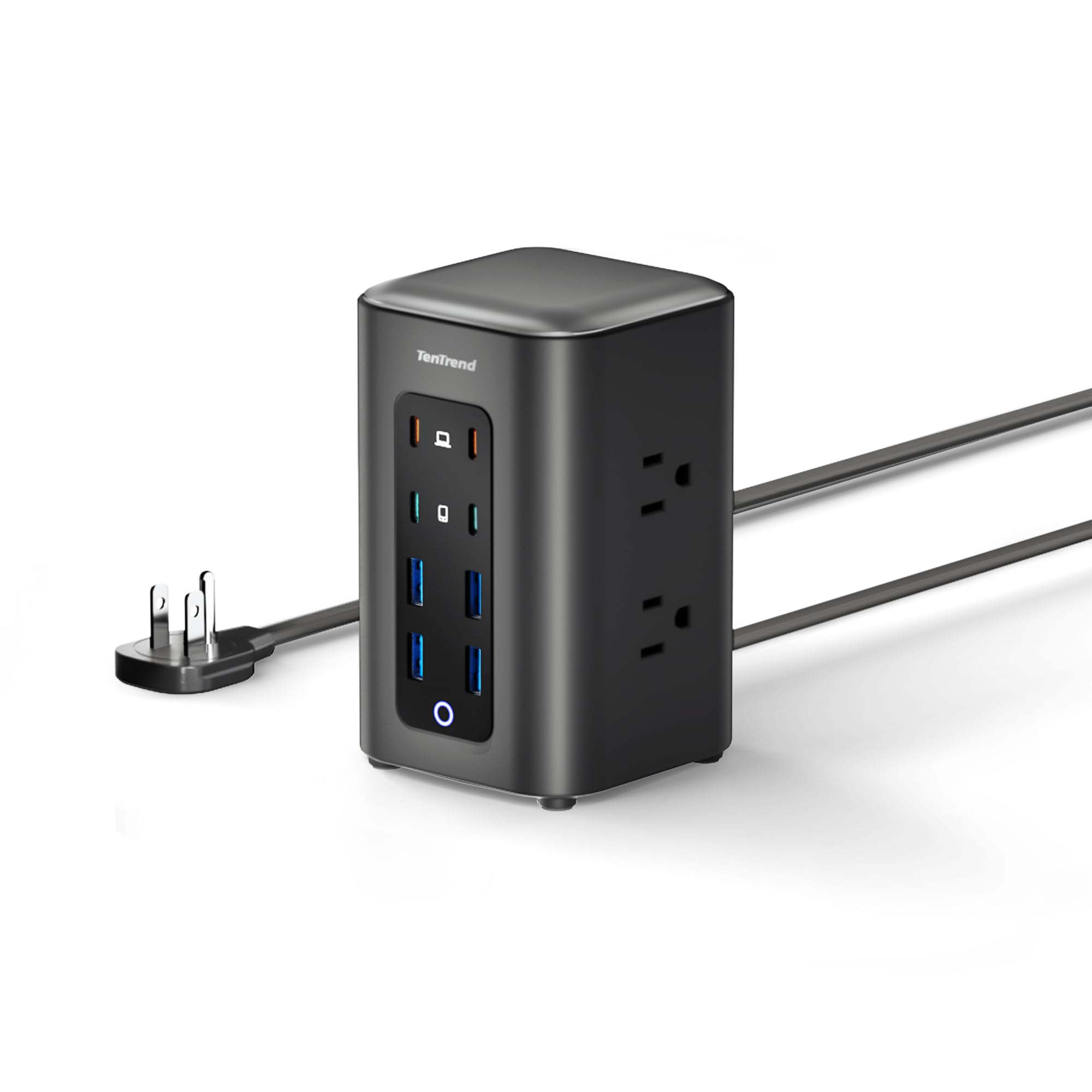
3. TenTrend 230W Power Strip Tower
A soda-can-sized tower that packs laptop-grade USB-C and AC outlets.
At roughly the size of a soda can (3.15 x 3.15 x 5.12 inches), this tower is a masterclass in space efficiency. It offers 6 AC outlets and 8 USB ports, including two orange USB-C ports that deliver up to 65W each — enough to fast-charge a MacBook Air or a Dell XPS. Two more green USB-C ports provide 20W each for phones, and four blue USB-A ports deliver 15W for older gear.
The 230W total USB output is a healthy step up from basic towers that only manage 15W per port. The flat 0.31-inch plug sits flush against the wall, and the 5-foot flat cable lies flat on the floor to avoid tripping. Owners consistently highlight the charging capability (27 positive mentions) and the sheer functionality (25 mentions) as the top reasons to buy, placing it at a solid 4.5 stars from 278 ratings.
The limitation is the 10A/1250W rating for the AC outlets, which is lower than the 15A rating on some other towers. That means you should avoid plugging in high-wattage appliances like a space heater or a large microwave alongside your electronics.
Why it stands out
- Compact tower with two 65W USB-C ports for fast laptop charging.
- 230W total USB power is strong for its size.
- Ultra-flat plug for tight spaces behind furniture.
Keep in mind
- AC outlets are rated for 10A, not 15A — not for high-power appliances.
- Shorter 5-foot cord may limit placement in larger rooms.
Ideal for: A dorm desk, a small home office, or a shared nightstand where both a laptop and several phones need a spot.
skip it if: You plan to run power-hungry appliances from the AC sockets.
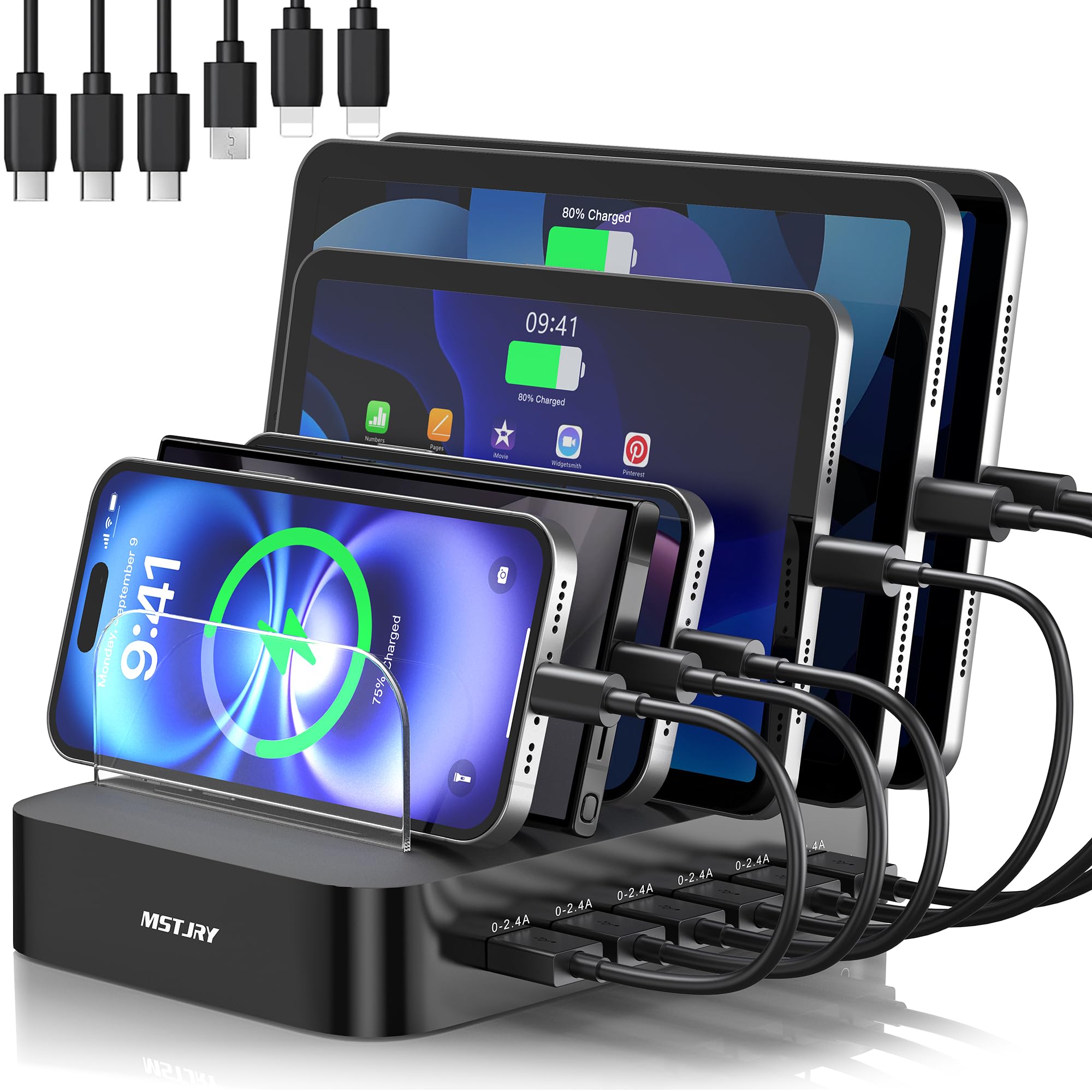
4. MSTJRY 6-Port USB Charging Station
The neat organizer that turns a cluttered desk into a device shelf.
This is the simplest solution for a family that just wants to stop hunting for cables. It offers 6 USB-A ports (2.4A each) and comes with 6 short cables: 2 Lightning, 3 USB-C, and 1 Micro-USB. The 7 removable dividers include 2 extra-tall slots designed specifically for thick-case iPads or bulky tablets, so everything stands upright like a bookshelf.
The build uses flame-retardant ABS plastic with anti-slip pads, and there is a dedicated power switch for quick control. Over 600 buyers give it a 4.3-star rating, and reliability is the top praise from 73 owners. The compact footprint means it fits easily on a kitchen counter or a side table without dominating the space.
The catch is that this is a USB-A-only station — it lacks any USB-C Power Delivery ports, so charging speeds are standard, not fast. Durability is also a mixed note from 30 buyers, so it is best treated as a tidy, everyday organizer rather than a heavy-duty charging powerhouse.
What works well
- Tall dividers fit iPads and tablets with protective cases.
- Includes 6 short mixed cables so you are ready day one.
- Small footprint with flame-retardant housing for daily confidence.
The honest honest note
- No USB-C PD ports — not suitable for fast laptop or tablet charging.
- Some owners note the overall durability has room for improvement.
Great for: A family with mostly older phones (iPhone 14 and earlier) and Android devices that charge via USB-A.
Not for: Anyone who needs to fast-charge a modern USB-C laptop or iPad Pro, as the 2.4A output is slow for those.
5. HSicily 95W 6-Port Charging Station

A 6-port hub with dedicated perches for an Apple Watch and AirPods.
This station is built for the Apple-heavy household. It has 2 USB-C Power Delivery ports (for fast-charging a phone or iPad), 4 USB-A ports (3A total), and comes with 8 mixed cables including a USB-C to iPhone cable. The real differentiators are the two built-in stands — one holds an Apple Watch charger (you supply the actual watch charger puck) and one holds an AirPods case, so your wearables have a designated spot.
The electronics use a smart GaN chip that automatically detects the connected device and delivers the right voltage, which is a nice safety touch. The bottom has non-slip pads to keep the station planted on the desk. The 4.5-star rating from 485 buyers reflects strong satisfaction, with owners praising how it organizes everything at once.
The main thing to know: the Apple Watch stand is just a holder for your own charging puck — the station does not include an actual Apple Watch charger. A few owners wish that was clearer, but once you supply your own puck, the setup is very clean.
Smart pick if: You want a single station that handles two phones, an iPad, an Apple Watch, and AirPods without needing separate wall warts for each.
Best for: Apple device owners who want a tidy, all-in-one charging dock with dedicated spots for a watch and earbuds.
Not for: People who need to charge a large laptop like a 16-inch MacBook Pro — the 95W total is better suited for phones and iPads.
6. UGREEN 100W GaN USB C Charging Station

The desk-friendly GaN charger that shrinks power delivery without the heat.
UGREEN uses Gallium Nitride (GaN) chips to pack 100W of power into a much smaller body than traditional silicon chargers. This is a pure USB hub — no AC outlets — with 4 USB-C and 2 USB-A ports. The two main USB-C ports (C1 and C2) can each deliver up to 65W, enough to charge a MacBook Air or a Dell XPS at full speed. The two secondary USB-C ports (C3 and C4) handle up to 35W, and the USB-A ports manage up to 22.5W, with smart power distribution that adjusts based on what you plug in.
The vertical layout saves desk space, and the included AC extension cord gives you flexible placement. Owners give it 4.6 stars from 333 ratings, with charging performance being the top praise (32 mentions). The build quality and the fact it runs cool even under load are also frequently noted. It is also compact enough to toss in a bag for travel.
The honest limitation is the total 100W budget. If you plug in two laptops that each need 65W, the charger will share the power — meaning each gets less than peak speed. It is best thought of as a powerful hub for one laptop plus several phones and accessories, rather than a full multi-laptop charger.
Why it is a top pick
- Small GaN design saves desk space and runs cooler than old chargers.
- 65W per USB-C port is enough for most modern laptops.
- Smart power distribution prevents overloads.
A realistic trade-off
- Total 100W is shared — two hungry laptops will charge slower together.
- No AC outlets for non-USB devices.
Ideal for: Someone with one primary laptop and a few phones/tablets who wants the smallest possible desktop charger.
Not ideal for: A family that regularly needs to fast-charge two or more full-size laptops simultaneously.
7. Hostena 30W Wireless Charging Station
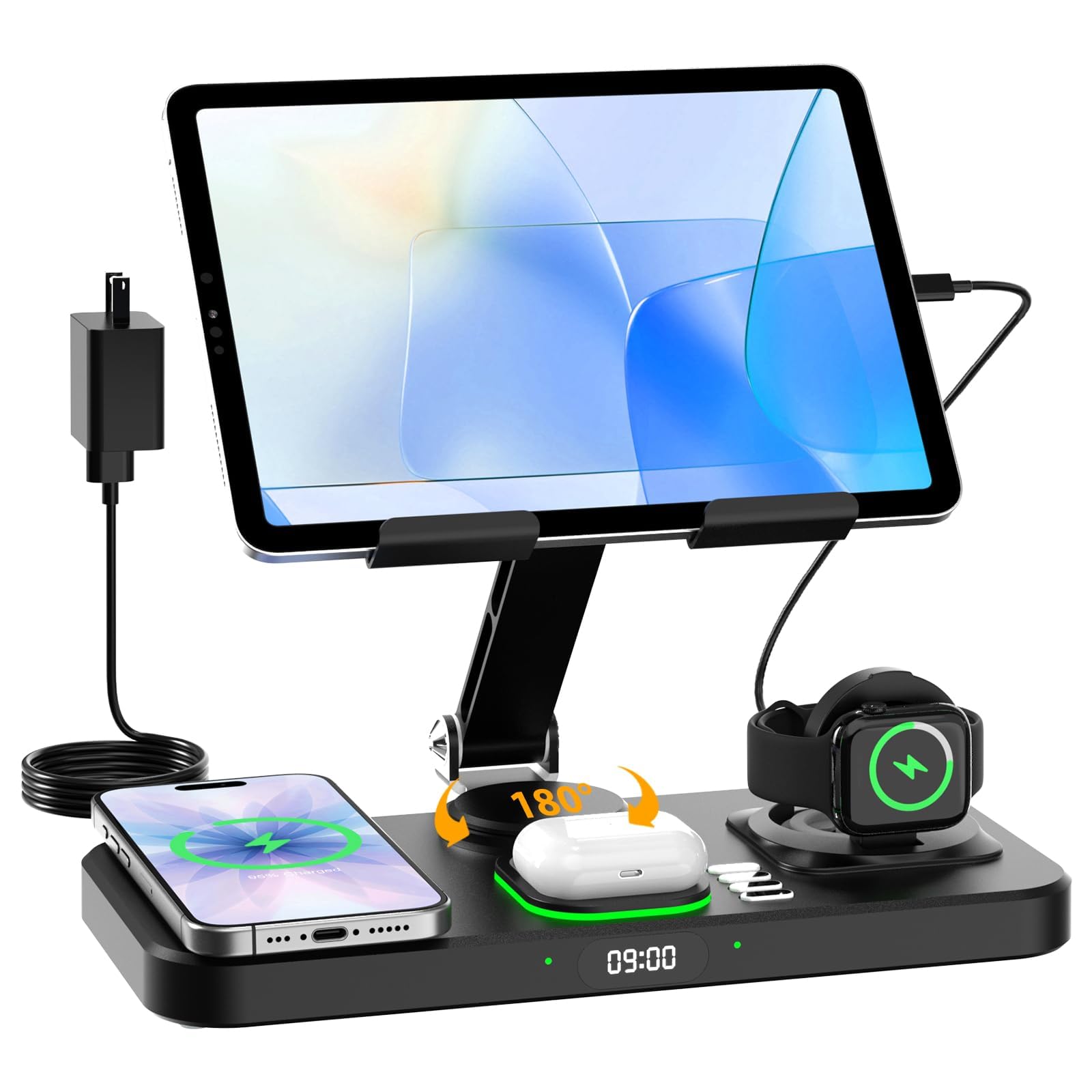
A foldable nightstand companion that wirelessly charges your Apple trio with a built-in clock.
This station is designed specifically for the Apple ecosystem. It wirelessly charges your iPhone (placed on the magnetic pad), your Apple Watch (only Apple Watch, no other brands supported), and your AirPods (wireless charging case required) all at once. It also has two USB-C ports for wired charging of an iPad or tablet, which is a welcome addition since the tablet sits on the foldable stand at eye level.
The 7-color ambient light and digital clock (12-hour format) add bedside-table convenience. The whole thing is foldable, making it reasonably portable for travel. The 30W total power means wireless charging is at a standard speed, not fast, but the convenience of just placing your phone down without cables is the appeal.
The durability is the main concern here — a small number of owners have reported the unit failing after a few months. It is also exclusively for Apple Watch, so Android watch users are out of luck. This pick is best viewed as an elegant nightly docking station rather than a heavy-duty family powerhouse.
Best fit: A household where everyone uses an iPhone, Apple Watch, and AirPods, and you want a clean, cable-free spot on a nightstand or desk.
Great for: Apple fans who want a pretty, all-in-one wireless dock that also shows the time and has a mood light.
Not for: Android users, or anyone needing high-speed wired charging for multiple laptops.
8. Rocoren 400W 10-Port Charging Station
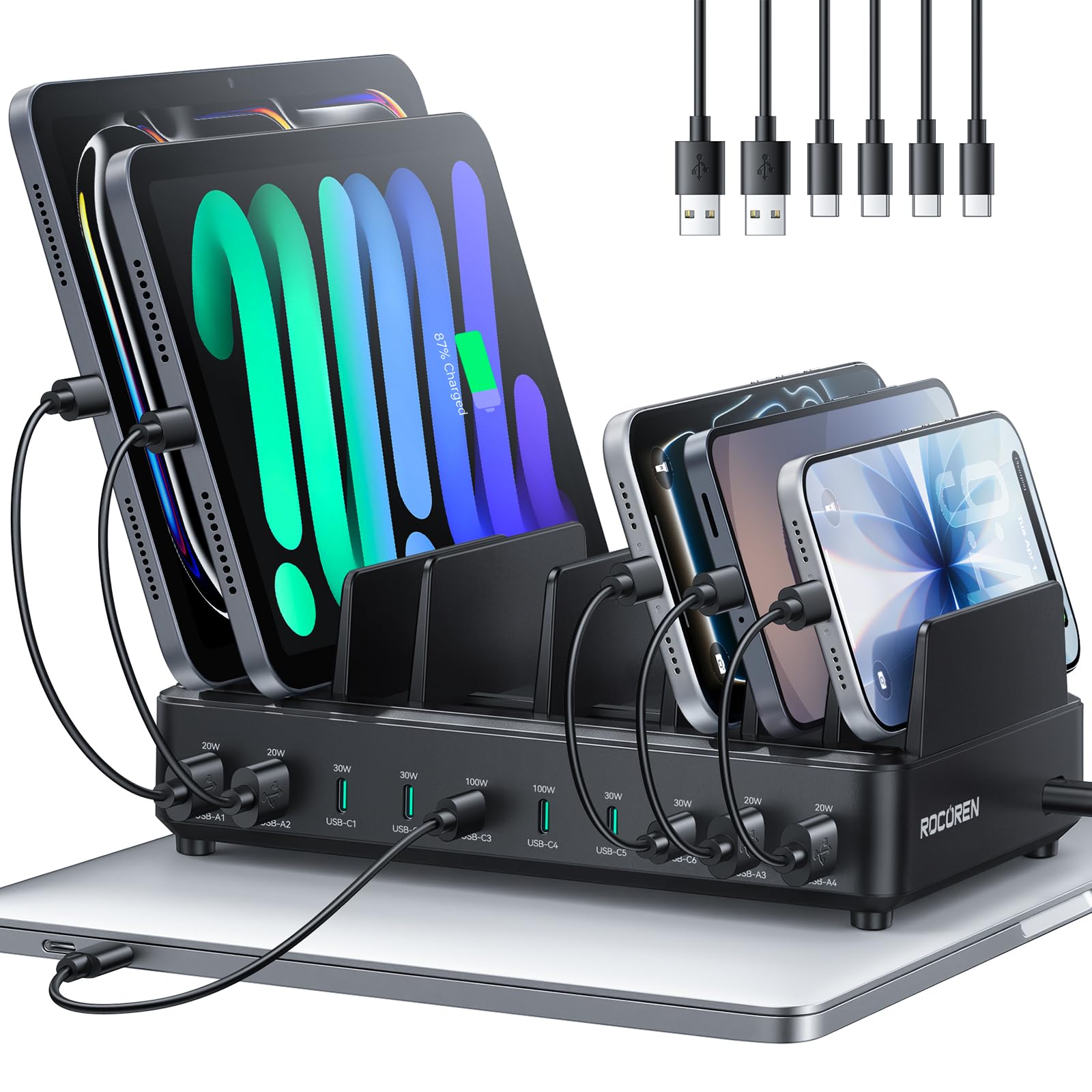
A 400W workhorse with dual 100W ports for the fastest laptop charging.
If the Zobirez 750W is overkill for your needs but you still need serious laptop power, this Rocoren station hits a strong middle ground at 400W total. It features 6 USB-C ports, including two that offer Power Delivery (PD) at 100W each — ideal for charging a 16-inch MacBook Pro or a high-end Dell at its full speed. The remaining 4 USB-C ports and 4 USB-A ports handle phones, tablets, and accessories at efficient speeds.
The organizer slots have a soft silicone strip on top to prevent scratches, and the dividers are taller and wider than average to accommodate devices with cases. The raised rubber feet improve airflow underneath, helping the station stay cool. Over 360 buyers give it 4.4 stars, with the general sentiment being that it is fast, solid, and good value for the port count.
The honest flaw is that not all ports are equal — some are low-speed, and the labeling on the station can make it hard to tell which is which. One owner noted a star deduction for that exact reason, so you may need to test and remember which ports to use for your fastest devices.
The standouts
- Dual 100W PD ports for two hungry laptops.
- 10 ports total keeps a large family or office desk fully organized.
- Sturdy build with protective silicone pad on top.
The fine print
- Port speeds vary and are not clearly marked on the unit.
- Requires extra cables (not a full set included) to fill all 10 ports.
Perfect for: A family or small office with two laptop users and a pile of phones and tablets that need one central tidy hub.
pass on it if: You want a simple plug-and-play setup with clear labeling on every port.
9. Anker Nano Charging Station, 7-in-1

A premium desk hub with retractable cables and a live power display.
You get a tidy desktop because the two built-in USB-C cables retract smoothly at the push of a button, extending up to 2.3 feet (70 cm) — that alone stops the cable tangles most desks suffer. The Anker Nano 7-in-1 station also has 3 USB-C ports (100W max each), 1 USB-A port, and 3 AC outlets. An LCD display shows the real-time charging wattage for each device, which buyers call a “cool factor” feature that lets you see how fast your gear is pulling power.
At 1.4 pounds (21.69 oz — about the same as a 13-inch iPad Air), it is heavier than it looks but sits solidly on a desk. The adhesive pad included can add extra stability if you need it. The 4.6-star rating from 680 buyers is well-earned, with “Charging” (76 mentions) and “Quality” (62 mentions) being the most-discussed positive aspects. The retractable cables are praised by 59 owners as a genuine daily convenience.
The catch is the shared power budget. With multiple devices connected, the 100W total gets split, so speeds slow down. The built-in cables are also short (2.3 ft) and the unit itself is not very travel-friendly due to its weight. It is best thought of as a permanent desk upgrade rather than a portable companion.
Why it is a desk favorite
- Two retractable USB-C cables keep the desk spotless.
- LCD display shows real-time charging speed per device.
- Premium build with 3 AC outlets for flexibility.
Reality check
- 100W total is shared across all ports — charging speed drops with more devices.
- Heavy and has short cables, so it is not a travel charger.
Best for: The dedicated home office user who values a clean, cable-free desk above all else and is happy to pay for the convenience of retractable cords.
Not for: A big family that needs to charge two laptops and five phones at full speed simultaneously — the shared power budget will not keep up.
Understanding the Specs
Total Wattage vs. Per-Port Wattage
Total wattage (for example, 100W or 750W) is the absolute maximum power the station can pull from the wall at one time. It then splits that power across your connected devices. Per-port wattage tells you the maximum speed a single port can deliver. If you plug a laptop that needs 65W into a 100W station that also has three phones connected, the station will share the power, so the laptop may get less than 65W. Higher total wattage gives you more headroom to run fast devices simultaneously without slowing each other down.
USB-C Power Delivery (PD)
USB-C PD is a fast-charging standard that lets a USB-C port deliver much higher wattage (like 65W or 100W) than a standard USB-A port. This is what allows a charging station to power a full-size laptop. A station with USB-C PD ports marked as 65W or 100W can charge a MacBook Air or Dell XPS at its native speed. Regular USB-A ports typically top out at around 12W to 30W, which is fine for phones but too slow for a modern laptop.
FAQ
Can a family charging station charge a laptop and a phone at the same time?
What is the difference between GaN and regular charging stations?
How many USB-C ports do I really need for a family?
Is it safe to leave devices on a charging station overnight?
Can I travel with a charging station?
Will a charging station charge my smartwatch?
My phone has a thick case — will it fit in the charging slots?
How long is the power cord on most charging stations?
What does “smart power distribution” mean?
Can I use a charging station to power a mini-fridge or printer?
Final Thoughts: The Verdict
For most buyers, the family charging station winner is the Zobirez 750W 10-Port because its class-leading total wattage and per-port laptop-class power make it the one station that can keep a whole household’s modern gear running at full speed. If you want a tidy tower that also powers desk appliances, grab the kakyanill 17-in-1. And for a premium, cable-free desktop experience, the Anker Nano 7-in-1 is the one to reach for.
How We Picked
We do not accept paid placement. Every pick is matched to a real buyer and a real use-case; we do not hands-on test units.
Sources & Methodology
Specifications: manufacturer listings and product documentation. Review insights: verified customer reviews, as of July 2026. Pricing: not shown on this page (it changes often); check the current price via the retailer link.
As an Amazon Associate, WellFizz earns from qualifying purchases. This does not affect which products we feature.
Related Guides

Mo Maruf
I created WellFizz to bridge the gap between vague wellness advice and actionable solutions. My mission is simple: to decode the research and give you practical tools you can actually use.
Beyond the data, I am a passionate traveler. I believe that stepping away from the screen to explore new environments is essential for mental clarity and physical vitality.