Our readers keep the lights on and my smoothie glass nicely filled. As an Amazon Associate, I earn from qualifying purchases.
Specs are compiled from manufacturer listings and verified buyer reviews and can change over time — please confirm the key details on the product page before buying.
If your shoulder aches just thinking about cranking a handle through another sheet of thick cardstock, an electric die cutting machine is the upgrade that changes everything. Instead of manual force, a motor drives the rollers, so you get clean cuts and embossed details with zero arm strain — and some of these models are whisper-quiet enough to use while the rest of the house sleeps.
I’m Mohammad Maruf — the founder and writer behind WellFizz. This guide is built by comparing the manufacturers’ published specifications and the patterns across verified customer reviews, so you get each pick’s real strengths and trade-offs instead of marketing spin.
The hard part is choosing which powered model fits your projects, space, and budget. This guide breaks down the nine top contenders for the best electric die cutting machine market, from compact vinyl cutters to professional wide-format beasts.
Our Picks at a Glance
How To Choose The Best Electric Die Cutting Machine
Every electric machine on this list eliminates the manual crank, but they split into two distinct families. Knowing which family you need is the fastest way to narrow your search.
The Two Families: Electric Roller vs. Vinyl Cutter
An electric roller machine (like the CraftGenes or Anna Griffin) uses a motor to turn the rollers that push a “sandwich” of plates and dies through the machine. This is the direct powered replacement for a manual die-cutting machine — you use steel-rule dies and embossing folders. A vinyl / electronic cutter (like the Silhouette or Cricut) uses a motor to move a blade (or a pen) across the surface of the material. It cuts designs you send from software on your computer or phone. These machines do not use metal dies for cutting; they cut anything a blade can trace, like vinyl, paper, and heat transfer material.
Active Surface Area — The Real Workspace Limit
This is the maximum size of the material the machine can handle. For a vinyl cutter, look at the maximum width (9 inches, 12 inches, 24 inches). For an electric roller machine, it is the area of the largest plate sandwich. A bigger area means fewer joins on large projects (like a wall decal) and the ability to use oversize dies. Check this number first — picking a 9-inch machine for a job that needs 12-inch material is a frustrating mistake.
Software and Subscription Trap
Some machines, particularly from major brands, lock advanced design features and a significant portion of their image library behind a monthly or annual subscription. Others let you import your own SVG files and use the software for free. If you plan to design your own artwork or buy individual files from independent shops, a subscription-free machine saves you real money over a few years.
Quick Comparison
| Model | Best For | Cutting Width | Motor / Drive | Key Feature | Amazon |
|---|---|---|---|---|---|
| Silhouette Portrait 4★ Best Overall | Budget vinyl cutting | 9 in | Belt-driven (SNA) | IPT tension-free cutting | Amazon |
| CraftGenes A4Best Value | Electric roller cutting (200W) | 9 in (220 mm) | 200W motor | Starter kit included | Amazon |
| Find Scrapblooms A4Compact Starter | Budget electric embossing | 9 in | Electric motor | Portable with top handle | Amazon |
| Cricut Joy Xtra | Compact beginner setup | 9 in (smart materials) | Automatic | 1,500,000+ image library | Amazon |
| Silhouette Cameo 5 Alpha | Quiet, high-speed cutting | 12 in | Motor (400mm/s) | 4-point registration system | Amazon |
| Anna Griffin Empress Elite | Premium electric embossing | Large plates (51.2 sq in) | Electric | 360-degree turntable | Amazon |
| Brother ScanNCut SDX125EGY | Scan-and-cut precision | 11.7 in | Automatic | Built-in scanner | Amazon |
| Siser Romeo 24″ Deluxe | Large-format vinyl cutting | 24 in | Automatic | Bundle with vinyl & HTV | Amazon |
| Siser Romeo Pioneer Bundle | Professional high-speed cutting | 24 in (576 sq in) | Advanced motor | Matless cutting | Amazon |
In‑Depth Reviews
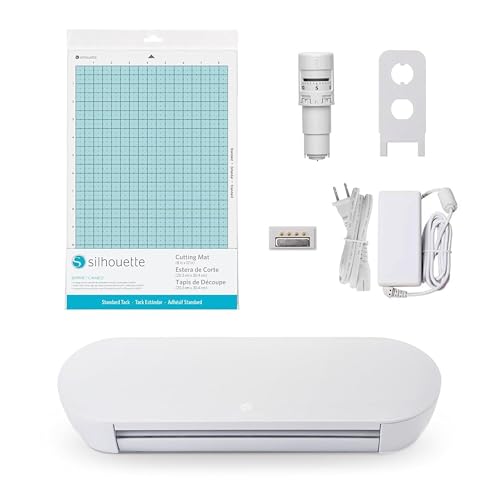
1. Silhouette Portrait 4
Our pick — over 4★ from 2,500+ verified ratings; the strongest balance of quality and price.
The silent belt-driven cutter that makes vinyl projects subscription-free.
This is the crowd favorite for a reason. The Silhouette Portrait 4 is a complete redesign of the 9-inch cutter, and the thing everyone raves about is the machine quality — owners consistently praise how well it is built. The new belt-driven chassis (which Silhouette calls SNA) is quieter and more precise than older gear-driven models. You get Bluetooth and USB connectivity, it works with an AutoBlade 2, and it runs at about 50 decibels (about as loud as a quiet conversation).
The active surface area is 81 square inches — enough for standard 8.5 x 11 inch paper with a larger cut border than comparable machines. The software is straightforward; buyers report it is “intuitive like Adobe” and even an 11-year-old can master the basics in minutes. The real advantage here is the cost: designs start at each, and there are weekly free designs — no subscription required to use your own files.
The one catch is the mat. Buyers consistently report the new mat is “too sticky for standard paper” and recommend breaking it in with a t-shirt or thick cardstock first. A tip from the review pages: “reduce blade setting by 0.5-1 to avoid cutting mat.” At 18 inches deep by 9 inches wide by 9 inches tall, it is compact enough to store on a shelf.
What Owners Love
- Build quality is the top praise — 244 buyers single out the machine’s solid feel
- Ease of use is close behind (146 mentions), with a fast learning curve
- No mandatory subscription — pay per design or use free weekly files
Honest Trade-Offs
- Mat adhesive is too aggressive for plain paper from the start
- Functionality (216 mentions) and cutting performance (97) draw mixed feedback — some owners find the learning curve for registration frustrating
- Software (57 mentions) is rated mixed; experienced users note a few quirks with print-and-cut registration on glossy paper
Grab It For: Anyone who wants a versatile, affordable vinyl and paper cutter without being locked into a monthly subscription fee — the top-rated build quality makes this a reliable long-term tool.
Think Twice If: You need to cut materials thicker than cardstock or heavy plastic — this machine is designed for lighter media and will struggle there.
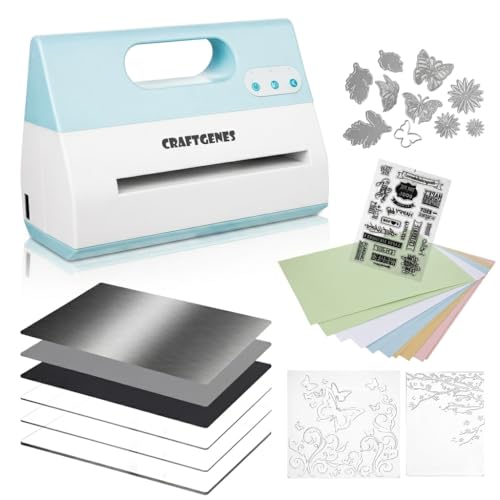
2. CraftGenes A4 Electric Die Cutting and Embossing Machine
The 200W electric roller that trades speed for perfect cuts and no more shoulder pain.
If manual cranking is the reason you are shopping, this CraftGenes is your most direct upgrade. It is a pure electric roller machine — you build a “sandwich” of plates and dies, the 200W motor pulls it through, and your shoulder gets a break. The active surface area is 114.89 square inches, versus the Silhouette Portrait 4 at 81 square inches, making it the better pick for big embossing folders or scrapbook layouts.
The trade-off is right there in the reviews: the machine “works slowly but does a perfect cut.” Owners who hate the slow speed still prefer it to a manual crank because “no more pain in my shoulder.” The included starter kit is generous — you get 1 C plate, 2 B plates, 2 embossing folders, 3 die sets, 1 stamp set, a magnetic sheet, a silicone mat, a plastic shim, and 10 cardstock sheets — enough to get started immediately without buying extras.
The biggest honest caution here is performance — while 15 owners mention it, the reviews are mixed. A few units arrive with issues; one owner reported it “doesn’t cut the dies out of any paper.” The maker recommends keeping your plate sandwich between 8 and 9 mm thick and adding the plastic shim gradually. If you get a properly working unit, the ease of use (14 positive mentions) and build quality (5 positive mentions) make it a strong value against manual machines.
Perfect Cuts, Patient Pace: The motor is not fast — owners describe it as “horribly slow” — but the cutting quality is consistently praised. If speed matters more than precision, look at the Siser Romeo instead.
Reach For This If: You already have a collection of steel-rule dies and embossing folders and just want to stop cranking — this is the most affordable powered roller machine that includes a full starter kit.
Look Elsewhere If: A small risk of receiving a defective unit worries you, or if cutting speed is your top priority (this is a slow machine by design).
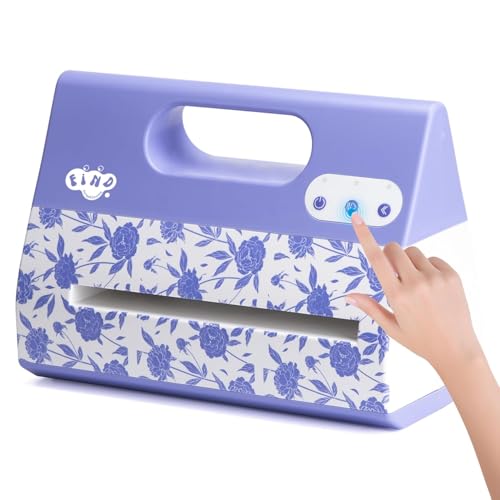
3. Find Scrapblooms Portable Automatic A4 Die Cutting Machine
A purple-powered embosser that handles large dies in one smooth pass.
This Find Scrapblooms machine is the entry-level electric roller for crafters who want quick results without a big investment. The cutting performance is the most-discussed positive feature — 10 owners praise it, noting it “cuts intricate dies in one pass without extra sandwiches.” The 9-inch model is comparable in width to the CraftGenes, but it is lighter and has a top handle for carrying to crop parties or classes.
The real-world difference here versus manual machines is dramatic. Owners with arthritis or repetitive strain injuries specifically note this machine saves their hands. One reviewer sums it up: “so easy with no ‘wear and tear’ to my hand and arm.” The unit comes with a magnet sheet and works with universal dies and embossing folders from all major brands.
The honest downside is speed — it is “a bit slower” than some expected, though not a dealbreaker for most. A small number of owners mention trouble cutting through paper; one review specifically asks for help getting clean cuts. If you primarily use crepe paper and thin cardstock, this machine will work well, but for thicker materials you might need to adjust your sandwich more carefully than with the CraftGenes.
Gentle on Hands, Light on Features: This machine excels at one thing — eliminating the crank for basic die cutting and embossing. It lacks the extras of the CraftGenes (no included stamp sets or multiple B plates) but costs comparably to many manual machines.
Good For: A crafter with hand pain who wants the simplest possible electric roller machine — set it up, feed your sandwich, and go.
Not Ideal For: Anyone who needs to cut through thick chipboard or heavy fabric regularly — the inconsistent performance reported by some owners makes this a risk for heavy-duty use.
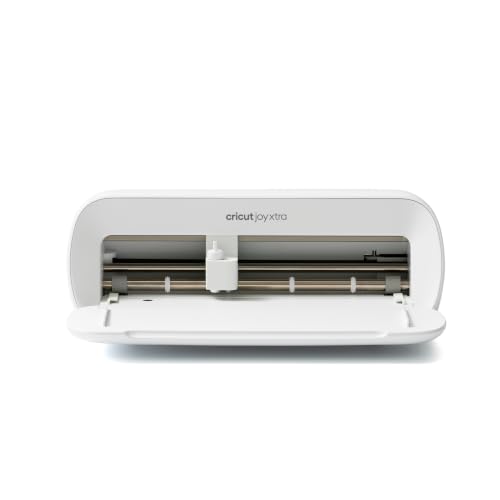
4. Cricut Joy Xtra
The compact Cricut that cuts, draws, foils, and works with 50+ materials.
Cricut is the household name in electronic cutting, and the Joy Xtra is the mid-range model that hits a balance between size and capability. It has an active surface area of 95.94 square inches and works with 50+ materials including vinyl, iron-on HTV, and cardstock. The bundle includes a fine-point blade, fine-point pen, mini weeder, and 30 bonus images in the Design Space app.
The ease of use is a major highlight — the compact size (13 mentions) and portability (9 mentions) are praised by owners who take their crafting to classes or work on a small desk. The machine uses Bluetooth connectivity to talk to your phone or tablet, though this is the weakest link: 11 owners flag Bluetooth connectivity as a negative, with reports of it dropping the connection frequently. For consistent use, a wired USB connection is more reliable.
The cutting performance gets mixed feedback — about half of owners are thrilled with the precision, while others run into “nonstop detection failures” with the print-and-cut feature. The biggest ongoing cost is the Cricut Access subscription if you want access to the full library of 1.5 million images and 1,000+ fonts. Without it, you still get 3,000+ free images and 100+ free fonts, which is enough for most beginners.
Standout Strengths
- Quality and ease of use are the top positives — 27 and 15 mentions respectively
- Compact enough to store in a drawer (18″ D x 9″ W x 9″ H)
- Works with 50+ materials and includes a Print-Then-Cut feature for full-color stickers
Known Weaknesses
- Bluetooth connectivity is the most-praised negative on the list — 11 customers note unreliable connections
- Value for money is rated mixed (11 mentions); the subscription model adds ongoing cost
- Cutting performance (15 mentions) is mixed — some machines have registration issues
Pick This For: A beginner who wants the Cricut ecosystem with its massive design library and community support, and who values a tiny footprint on the craft desk.
Skip It For: Anyone who does not want to pay for a subscription to open up the full feature set — or anyone who needs reliable wireless cutting without connection drops.
5. Silhouette America Cameo 5 Alpha

A 12-inch whisper-quiet cutter with a 4-point registration system for flawless stickers.
If you are ready to move beyond 9-inch width, the Cameo 5 Alpha is the step-up. It cuts material up to 12 inches wide and 24 inches long, with an active surface area of 12 x 24 inches. The new 4-point registration system is a genuine improvement — it makes print-and-cut alignment far more accurate than older systems, especially for stickers and heat transfers where misalignment ruins a whole sheet.
The speed is another standout feature. The motor cuts at up to 400 mm/s, and the Fast Sketch Mode lets you draw designs at higher speeds without losing detail. Combined with the Intelligent Path Technology (IPT), which tune the cutting order, this machine produces smoother cuts with less stress on the material. It is also genuinely quiet — owners call it “whisper-quiet” and note it is ideal for shared workspaces or late-night crafting.
The main frustration is the initial setup. The machine ships with outdated firmware, which blocks Bluetooth pairing until it is updated. The fix requires a printer cable (not included) for the first USB connection. Owners also note the included mat is “very sticky” — similar to the Portrait 4 issue. Once running, the cut quality matches the previous Cameo 4, and the soft-close lid is a nice premium touch.
Fast, Quiet, Precise: The speed (400mm/s) and the 4-point registration system make this the best pick for anyone selling stickers or running a small craft business from home — if you can handle the initial firmware hurdle.
Best For: A home-based small business owner or serious hobbyist who needs 12-inch width, fast production speed, and a machine quiet enough to run while taking client calls.
Not For: Anyone who expects plug-and-play Bluetooth right from the start — have a USB printer cable ready for the mandatory firmware update.
6. Anna Griffin Empress Elite

A gold-accented electric roller that turns card making into a silent, easy luxury.
The Anna Griffin Empress Elite is the premium electric roller machine for the dedicated card maker. The 360-degree turntable is a genuinely useful innovation — you can position the plates at any angle without reaching around the machine. Owners who have owned multiple die-cutting machines call this the best one they have ever used, with one reviewer noting “precision cuts in the first pass” and “simple stack every time with no hand cranking and cracking plates.”
The active surface area is 51.2 square inches, which is smaller than the CraftGenes but the trade-off is build quality and consistency. The machine is heavy — 15.1 pounds — and one owner flags the weight as a downside, calling it hard to move around. The turntable helps, but this is not a machine you will toss in a bag for a crop event. At 4.6 stars across a small but enthusiastic pool of owners, the Empress Elite earns the highest average rating in this guide.
The cost is the barrier here. The machine itself is a premium investment, and the included components are minimal — just the die cut machine itself. You will need to buy Anna Griffin plates and dies separately. For owners who value quiet operation, consistent results, and a beautiful gold finish that stands out on the craft table, the price is worth it. As one owner put it: “I wish I had gotten it many years ago.”
Card Crafter’s Dream: The consistent, quiet electric feed and the smart turntable make repetitive embossing and die cutting a pleasure rather than a chore. The heft is a sign of sturdy build, not a flaw.
Ideal For: A serious card maker who is tired of cracked plates and inconsistent crank pressure from manual machines — the smooth electric feed ensures every pass is identical.
Consider Another If: You need a portable machine or want a large active surface area for scrapbook layouts — the 51.2 square inches and 15.1-pound weight are limiting.
7. Brother ScanNCut SDX125EGY

The only cutting machine that scans your hand-drawn art and cuts it automatically.
This is the most versatile machine on the list because of one feature: a built-in scanner. You can draw a design on paper, put it on the scanning bed, and the Brother ScanNCut converts it into a cut file without needing a computer or a separate scanner. This is a genuine for artists who draw by hand or want to cut around printed stickers without the registration marks required by other machines.
The machine includes 682 built-in designs (including 100 quilting patterns) and 9 fonts, plus an auto blade that uses “true automatic material sensor technology” — it detects the thickness of the material and adjusts automatically, so you do not have to dial in blade depth. The touchscreen is a 5-inch LCD, and the machine cuts material up to 3 millimeters thick (about 0.1 inches), which includes balsa wood, chipboard, and felt.
Owners who switched from Cricut are generally happier with this machine, citing its faster cutting speed and the lack of a subscription. However, the machine “needs constant attention” — paper can buckle during cutting, and using high-quality paper firmly stuck to the mat is essential. The registration area is also a limitation: above 11 x 11 inches, the print-and-cut feature struggles with reliable cuts, despite the machine claiming 12 x 12 inch capacity.
Your Own Design, No Subscription: The built-in scanner and 682 free designs mean you can create without ever paying a monthly fee. The auto blade eliminates guesswork, but you must supervise each cut closely.
Perfect For: An artist or designer who wants to skip the computer entirely — scan your hand-drawn sketches and cut them directly, with no subscription fees.
Not Great For: High-volume production or long unattended runs — this machine rewards supervision and patience, not speed.
8. Siser Romeo 24″ Professional Vinyl Cutter Deluxe Bundle
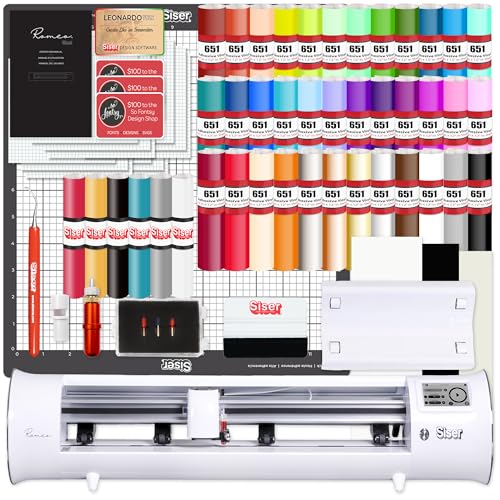
A 24-inch beast that cuts oversized vinyl projects in a single pass.
If your projects involve large wall decals, car graphics, or production runs of heat transfer vinyl, the 9-inch and 12-inch machines feel cramped fast. The Siser Romeo 24-inch is the solution. This bundle includes a vinyl roll feeder, a 12 x 12 inch strong tack mat, adjustable blade housing, two 45-degree cutting blades, one 60-degree blade, a marker/pen adapter, and a hook weeding tool — plus 26 sheets of glossy 651 vinyl, 12 sheets of matte 651 vinyl, 12 sheets of transfer tape, and 6 sheets of Siser Easyweed heat transfer vinyl.
The machine uses an integrated camera for print-and-cut alignment and is described by owners as “fast cuts very good” and a “nice cutter.” The Leonardo Design Studio software is included for both Mac and PC, and you get 300 designs from So Fontsy to start. This is a pro-level tool aimed at small businesses rather than hobbyists.
The honesty here is that the software has a learning curve — one owner calls it “the worst machine program I have ever used” and reports that the paid Pro version never updated properly. Not everyone has this experience, but it is the most common negative thread: the hardware is excellent, but the software is polarizing. If you are comfortable learning new design software, this bundle gives you an incredible amount of materials and tools for the investment.
Pro Materials, Pro Learning Curve: The hardware is fast and precise for large-format work, and the included vinyl and HTV bundles save you hundreds versus buying separately. The software demands patience.
Designed For: A small business or dedicated hobbyist who needs 24-inch cutting width for signage, decals, or bulk HTV production and wants a complete starter bundle of materials.
Not For: A beginner who expects a smooth software experience — budget time for a learning curve with Leonardo Studio.
9. Siser Romeo Pioneer Bundle
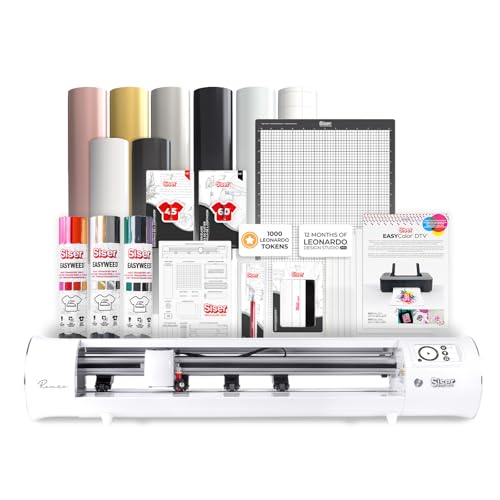
A 24-inch high-definition cutter.
This is the top-tier Siser model, and it is built for speed and volume. The Romeo boasts a full 24-inch cutting area (576 square inches) and a motor that the company claims is up to 60% faster than traditional desktop cutters. The performance is the most-discussed positive feature — 45 owners single it out, praising its precision and speed. Owners who switched from Cricut Maker 3 and Silhouette Cameo 4 report it is “much faster and more accurate” than both, handling.05-inch edges in a single pass.
The Pioneer Bundle includes the high-definition cutter and a roll holder accessory. A standout feature is matless cutting — you can load material directly without a mat and still use the full cutting area. The machine also features an intuitive touch-screen interface for beginners, but includes professional features like adjustable pinch rollers and variable grit rollers that experienced users will appreciate.
The honest trade-off is the learning curve. The Leonardo design software is powerful but has a steep slope; owners note that invisible pen lines from Adobe Illustrator do not transfer correctly, and the Pro version is subscription-based. Reliability also draws mixed feedback — 35 owners mention it, with some machines stopping working during use. For production runs over 40 inches of HTV, one owner warns that material creep becomes an issue and recommends a higher-quality servo motor machine instead.
Why It Shines
- Performance is the top praise (45 mentions) — owners call it “insanely accurate”
- Speed is a major strength (22 mentions); matless cutting saves material and time
- Noise level is very low (17 mentions) for a machine this fast
The Catch
- Reliability is rated mixed (35 mentions) — some units fail during long runs or stop working entirely
- Leonardo software has a steep learning curve and the Pro version costs extra monthly
- Cutting accuracy (12 mentions) is praised, but only within the machine’s designed limits
Built For: A professional crafter or small business owner who needs high-speed, high-accuracy production on a 24-inch width and is comfortable investing time in learning premium software.
Proceed With Caution: The mixed reliability reports suggest buying from a retailer with a good return policy — and expect to keep a close eye on the machine during long production runs.
Understanding the Specs
Active Surface Area
This is the total usable area the machine can cut or emboss. A larger area means you can work with bigger dies or cut larger designs without having to piece them together. For electric roller machines, it is the area of the plate sandwich. For vinyl cutters, it is the maximum material width (like 9 inches or 12 inches) multiplied by the cut length. Always match this to the typical size of your projects.
Motor Power & Speed
For electric roller machines, motor power (measured in watts, like 200W) determines how easily the machine drives thick stacks of plates and dies. Higher wattage is better for thicker materials and denser dies. For vinyl cutters, speed is often measured in millimeters per second (mm/s). A faster machine (like the Cameo 5 Alpha at 400 mm/s) can produce more projects in less time, but speed usually increases noise level too.
Software & Subscription Model
Every electronic vinyl cutter requires design software to tell the blade what to cut. Some brands give you the software for free and do not require a subscription to use your own files (Silhouette, Brother). Others limit the free library and charge a monthly fee for the full catalog (Cricut). If you plan to buy individual designs from independent shops, a subscription-free machine saves you money over time. Electric roller machines do not use design software in the same way — you just need physical dies.
Material Compatibility (Thickness)
This is the maximum material thickness the machine can handle, often listed in millimeters. A machine rated for 3 mm can cut chipboard, balsa wood, and thick felt. Machines limited to cardstock and thin vinyl (0.5 mm or less) will not handle fabric or craft foam well. For electric roller machines, the limit depends on how thick a plate sandwich you can feed through the rollers (8-9 mm is a common safe range).
FAQ
What is the difference between an electric die cutting machine and a manual one?
Can an electric die cutting machine cut vinyl?
Will my existing manual dies work in an electric die cutting machine?
How loud is an electric die cutting machine?
Do I need a subscription to use a Cricut or Silhouette machine?
What is the largest size material I can cut?
Can I cut fabric with an electric die cutting machine?
How thick of material can a die cutting machine handle?
Is a 9-inch machine enough for card making?
Which machine is best for a beginner?
Final Thoughts: The Verdict
Across the board, the best electric die cutting machine winner is the Silhouette Portrait 4 because it combines the highest build quality rating with no mandatory subscription fees and a generous 81-square-inch cutting area. If you want a pure electric roller machine to retire your manual crank, grab the CraftGenes A4 — its 200W motor and included starter kit offer the best value for card makers. And for serious small-business production, the Siser Romeo Pioneer Bundle sets the speed and accuracy standard, with a 24-inch cutting width.
How We Picked
We do not accept paid placement. Every pick is matched to a real buyer and a real use-case; we do not hands-on test units.
Sources & Methodology
Specifications: manufacturer listings and product documentation. Review insights: verified customer reviews, as of July 2026. Pricing: not shown on this page (it changes often); check the current price via the retailer link.
As an Amazon Associate, WellFizz earns from qualifying purchases. This does not affect which products we feature.
Related Guides

Mo Maruf
I created WellFizz to bridge the gap between vague wellness advice and actionable solutions. My mission is simple: to decode the research and give you practical tools you can actually use.
Beyond the data, I am a passionate traveler. I believe that stepping away from the screen to explore new environments is essential for mental clarity and physical vitality.