Our readers keep the lights on and my smoothie glass nicely filled. As an Amazon Associate, I earn from qualifying purchases.
Specs are compiled from manufacturer listings and verified buyer reviews and can change over time — please confirm the key details on the product page before buying.
Starting your embroidery journey is notable, but the sheer number of machines and specs can quickly turn that excitement into confusion. The single biggest choice you will make is the size of the embroidery field — that is, the maximum area the machine can stitch in one go, measured in inches. A 4″ x 4″ hoop is common for hats and small patches, while a 5″ x 7″ hoop lets you tackle shirt fronts and larger designs without repositioning the fabric. The wrong size means you are re-hooping constantly or flat-out unable to stitch the project you imagined.
I’m Mohammad Maruf — the founder and writer behind WellFizz. This guide is built by comparing the manufacturers’ published specifications and the patterns across verified customer reviews, so you get each pick’s real strengths and trade-offs instead of marketing spin.
if you want to monogram towels, stitch patches, or run a small side hustle, this breakdown of the best embroidery machine for beginners will help you match a machine to your actual ambitions.
Our Picks at a Glance


How To Choose The Best Embroidery Machine For Beginners
Picking your first embroidery machine means balancing creative desires with practical limits. Small spec-sheet details — design transfer method and built-in stitch count — determine your first-week experience.
Combo vs. Embroidery-Only: Which path fits?
A combo machine lets you both sew and embroider without switching machines. This is a space-saver and a joy if you plan to sew seams and add decorative stitches on the same project. An embroidery-only machine is often simpler to learn and cheaper, but you will need a separate sewing machine to construct garments before you decorate them. Consider your existing sewing machine and your primary project goals.
The 4×4 vs. 5×7 dilemma
A 4″ x 4″ embroidery field is the standard entry size. It will handle a standard shirt pocket area, small towel monograms, and hat fronts beautifully. A 5″ x 7″ field is 25% larger by area — it fits a full chest design on a t-shirt or the back of a baby blanket without you having to move the hoop and line up a second stitch. A larger hoop eliminates re-hooping for full-chest or blanket-back designs.
Designs, fonts, and connectivity
Every machine comes with built-in embroidery designs and fonts. More built-in designs let you start stitching immediately without downloading files. WiFi or Bluetooth transfer lets you send designs from a PC or tablet without a USB cable. Some machines require a companion app (like Brother’s Artspira) to open up free designs and editing tools, so check if that app is something you enjoy using.
Quick Comparison
| Model | Best For | Hoop Size | Built-in Designs | Type | Amazon |
|---|---|---|---|---|---|
| Brother SE1900 | Best Overall Combo | 5″ x 7″ | 138 | Combo | Amazon |
| Brother SE700 | Best Value Combo | 4″ x 4″ | 135 | Combo | Amazon |
| Poolin EOC07 | Large Format Freedom | 15″ x 7.9″ | 200 | Embroidery Only | Amazon |
| Poolin EOC05 | Beginner Large Hoop | 4″ x 9.25″ | 130 | Embroidery Only | Amazon |
In‑Depth Reviews
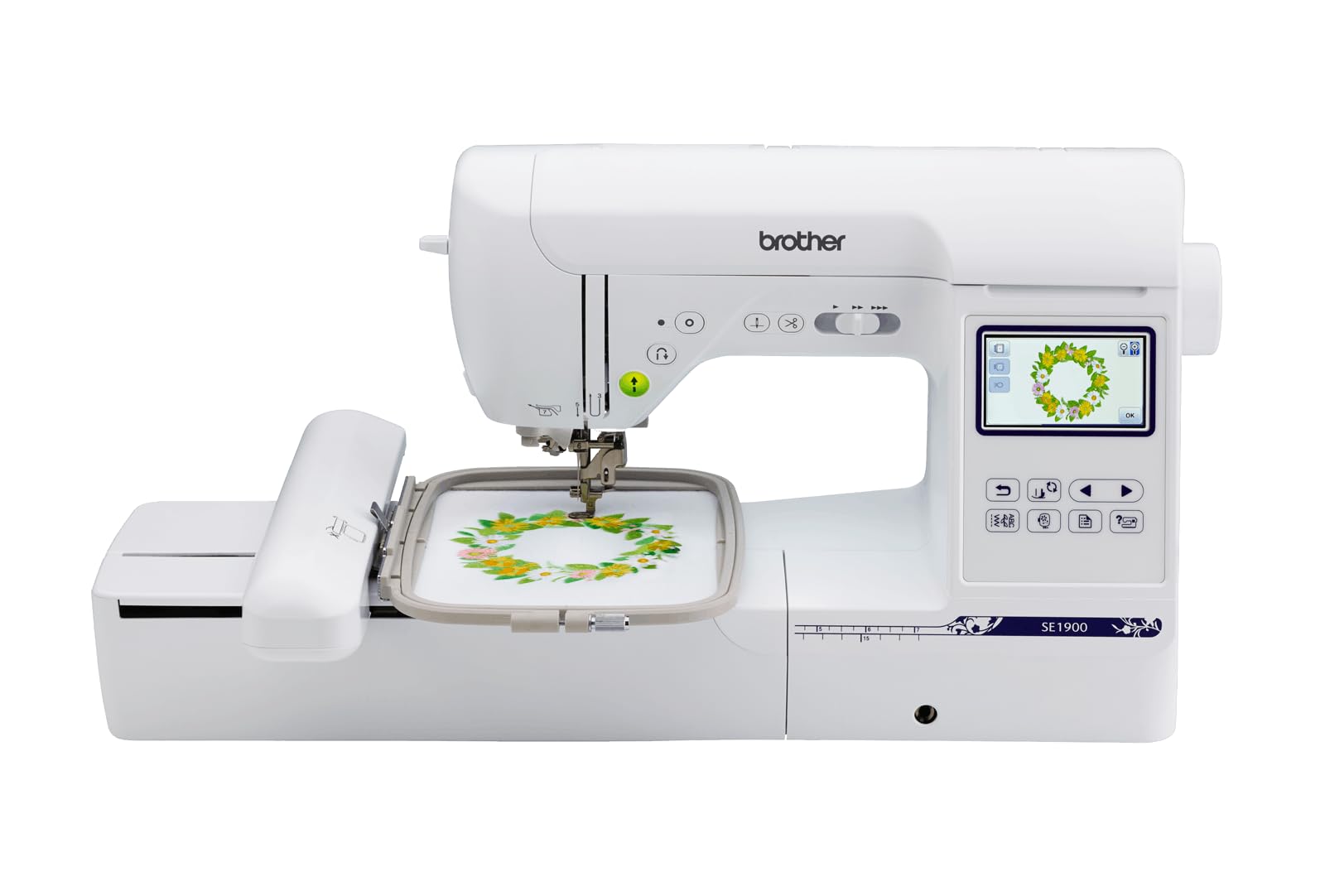
1. Brother SE1900 Sewing and Embroidery Machine
The combo machine that does both jobs well, with a big hoop and a huge library of stitches.
This is the crowd favorite for a reason. The Brother SE1900 is a sewing and embroidery combo machine that gives you a 5″ x 7″ embroidery field — noticeably larger than the 4″ x 4″ entry standard, so you can stitch a full chest logo on a t-shirt without moving the hoop. It comes with 138 built-in embroidery designs and 11 embroidery fonts for monogramming, plus 240 built-in sewing stitches and 10 styles of auto-size buttonholes. The 3.2″ LCD touchscreen lets you preview and edit designs before you stitch. What wins people over is the sheer performance and ease of use; the thing everyone raves about is how reliably it handles multiple layers — buyers report it goes through six layers of fabric without skipping a beat. The advanced needle threader and jam-resistant drop-in top bobbin make setup straightforward, even for a first-time owner.
The trade-off is the auto needle threader, which some find finicky when the embroidery foot is attached. And while the built-in fonts are great, the additional font set only lets you embroider one letter at a time, so multi-letter monograms require a bit more manual step-by-step setup. The 22.1-pound weight means it is not a machine you casually move from room to room, but it is solid and stable once set up on a dedicated table. Those who plan to do heavy free-motion quilting might also want an extension table (SAWT4) and a walking foot for easier handling. Still, for a beginner who wants one machine that sews beautifully and embroiders larger designs, this is the one to reach for.
Solid build and extensive stitch library let you grow into this machine rather than outgrow it. It also includes 8 sewing feet, an embroidery arm, and the 5″ x 7″ hoop right in the box, so you are not hunting for accessories on day one. This workhorse keeps the learning curve manageable.
Versatile combo machine
- Generous 5×7 hoop means fewer re-hoops for larger designs
- 138 built-in designs and 240 stitches mean you start creating instantly
- Sews through thick layers (up to 6 layers of fabric) without hesitation
- Quiet operation and smooth stitching even at higher speeds
Limited embroidery area
- Auto needle threader can be unreliable when the embroidery foot is on
- Additional lettering fonts only monogram one character at a time
- Requires optional extension table and walking foot for large quilting projects
Best for beginners: you want one machine that handles both sewing and embroidery with a generous hoop size for bigger projects.
Skip for pros: you only need embroidery and want a lighter, simpler machine — or if you sew as a side-hustle and need a dedicated quilter’s throat space.
2. Brother SE700 Sewing and Embroidery Machine
A beginner-friendly combo machine that keeps your budget happy and your learning curve short.
The Brother SE700 is a sewing and embroidery combo machine built around a standard 4″ x 4″ embroidery field — perfect for hat fronts, shirt pockets, and small to medium monograms. It comes loaded with 135 built-in designs and 10 embroidery lettering fonts for personalization, plus 103 sewing stitches and 10 one-step buttonhole styles. The 3.7-inch LCD color touchscreen is sharp and responsive, letting you drag, drop, and preview designs before you commit thread to fabric. It has wireless LAN connectivity, so you can send designs from your PC or use the Artspira mobile app to draw and transfer custom patterns directly to the machine. The auto needle threader and jam-resistant drop-in top bobbin make setup quick.
The machine quality and ease of use are the top two things owners consistently praise. It handles regular cotton and polyester fabric well and is quiet enough that you will not dread having it running in the same room. The footprint (16.5″D x 7.76″W x 12.09″H) is compact enough to sit on a typical desk without dominating the space. A few owners note that the auto threader can occasionally cause threads to bind up if the bobbin is not precisely wound, but remedial rethreading usually fixes it. The throat space (the area to the right of the needle) is tight for large quilting projects, but for trimming and smaller craft sewing it is just fine. At 55% of the field area of the SE1900, this is a real starter’s gateway — and many owners say they wished they had bought the larger hoop from the start once they fell in love with embroidery.
This machine makes learning easy. The Artspira app gives you access to free designs and fonts, and the built-in tutorial videos on the touchscreen walk you through the basics. It also includes 8 sewing feet, so you have the right foot for zigzag, zipper, buttonhole, and embroidery work right from the start. For the price-conscious beginner who wants both sewing and embroidery in one tidy package, this is an excellent starting point.
Compact and affordable
- Great machine quality for the price — solid metal frame with plastic outer shell
- Easy to learn with touchscreen guides, Artspira app, and YouTube tutorials
- Compact footprint fits well on a typical desk
- Wireless design transfer via WiFi or USB is fast and simple
Small hoop size
- The 4×4 hoop is small for large chest designs or full-back patches
- Some owners find the auto threader can bind if the bobbin is not perfectly wound
- The throat space is tight for large quilting projects
Reach for budget: you are on a budget and want a reliable combo machine that will teach you the basics without frustration.
Look elsewhere for large: you already know you want to stitch large designs (5×7+) or run a small business with big formats from day one.
3. Brother SE2000 Sewing and Embroidery Machine

Mid-range price, high-end features — a serious combo machine that grows with your skills.
The Brother SE2000 is a sewing and embroidery combo machine that packs a 5″ x 7″ embroidery field, 193 built-in designs plus 50 bonus downloadable designs (243 total), and 241 sewing stitches. This means you get a 25% larger embroidery area than the 4×4 standard, and a massive library of patterns to start creating. The 3.7-inch LCD touchscreen is crisp and supports on-screen editing like letter editing, zocreen that makes design previews and stitch progress tracking clear. The machine is powered by the Institch OS3 system, which is designed for easy learning and smooth operation. It supports Wi-Fi design transfer through the Institch website, and also works with a USB drive for traditional file transfer.
The embroidery quality is the standout — it stitches smoothly and consistently, with owners saying it “stitches like a professional multi-needle machine.” This is a single-needle machine (you change thread colors manually for each color change), but the large format makes it ideal for a home business. The customer support is exceptional, with engineers available for one-on-one support and an active Facebook user group for sharing tips. The downsides: the machine has a large footprint (23″D x 27″W x 12.5″H) and you will need about 3.5 feet of clearance behind it when using the big hoop. Setting up precise threading is also a must to avoid jams. A few owners note that the manual has some translation errors, but video tutorials fill that gap well.
This machine comes with a full starter kit: 6 rolls of thread, 20 pieces of cut stabilizer, 25 pre-wound bobbins, and a thread rack stand. You can start stitching immediately. For the beginner who knows they want to make large items — think backpacks, hoodies, and home decor — and who wants room to grow into a small business, this is a remarkable value.
User-friendly interface
- Massive 15×7.9 inch hoop for large garment backs and panels
- 200 built-in designs and 8 fonts in 10 languages
- Excellent after-sales support with engineers and a Facebook user group
- Comes with a full starter kit — thread, stabilizers, bobbins
Limited design library
- Large footprint needs a dedicated table and 3.5 ft rear clearance
- Single-needle means manual color changes for multi-color designs
- Precise threading is critical to avoid bobbin jams
Ideal for novices: the beginner who wants to start with large-format items and has the workspace to accommodate it.
Not ideal for experts: anyone with a cramped craft room or who wants a compact machine that can be tucked away.
4. Poolin EOC05 Embroidery Machine

A beginner-tune machine that trades a 4×4 for a long 4×9.25 hoop — perfect for sleeves and long items.
The Poolin EOC05 is an embroidery-only machine designed specifically for beginners and home DIY users. It sports a 4″ x 9.25″ embroidery area (which is significantly longer than a standard 4×4), making it ideal for items like sleeves, pant legs, long towel monograms, and tote bags. The large 7-inch color touchscreen provides clear guidance and simple navigation, and the machine is powered by the Institch OS2 system for intuitive operation. It supports both WiFi and USB design transfer, and includes two embroidery hoops (4×9.25 and 4×4) and a full starter kit with 6 rolls of thread, 30 pieces of stabilizer, 25 pre-wound bobbins, and 9 needles.
Owners consistently report that this machine is remarkably quiet and easy to use, with beautiful stitch quality right from the start. The customer service is a standout — buyers mention that the team proactively reaches out with support, offers engineer video calls, and provides step-by-step troubleshooting. The machine works very well for personal projects like clothing, accessories, and home décor. A small minority of owners have experienced bobbin jamming or false re-thread errors, though support addressed those quickly. The machine is not meant for commercial mass production — it is a focused home hobbyist tool. For beginners who want a slightly larger format than the standard 4×4 without jumping to a premium price
The included accessories package is generous enough that you will not need to buy extra supplies for your first several projects. The DIY-friendly focus of this machine makes it a stress-free entry point for anyone nervous about complex setups.
Portable and lightweight
- Longer 4×9.25 inch hoop for sleeves and larger monograms
- Remarkably quiet operation with beautiful stitch quality
- Exceptional customer service with proactive support and video calls
- Full starter kit lets you stitch immediately — thread, stabilizers, bobbins
Slower stitching speed
- A few units experience bobbin jamming and sporadic re-thread errors
- Not intended for commercial mass production — strictly home hobbyist
- Embroidery-only, so you need a separate sewing machine for construction
Reach for travel: you want a larger format than 4×4 without the price jump, and you value responsive customer support.
Skip for speed: you need a combo machine or plan to run a high-volume embroidery business.
5. Brother PE545 Wireless Embroidery Machine
For the majority of shoppers, the best embroidery machine for beginners winner is the Brother SE1900 because its 5×7 hoop, 138 built-in designs, and smooth combo sewing-embroidery capability give you the most room to grow without an immediate upgrade. If you want a budget-friendly entry with sewing and embroidery in one compact package, grab the Brother SE700. And for the beginner who already knows they want a large embroidery field for bigger projects, the Poolin EOC05 is the one to reach for. We do not accept paid placement. Every pick is matched to a real buyer and a real use-case; we do not hands-on test units. Specifications: manufacturer listings and product documentation. Review insights: verified customer reviews, as of July 2026. Pricing: not shown on this page (it changes often); check the current price via the retailer link. As an Amazon Associate, WellFizz earns from qualifying purchases. This does not affect which products we feature.
I created WellFizz to bridge the gap between vague wellness advice and actionable solutions. My mission is simple: to decode the research and give you practical tools you can actually use. Beyond the data, I am a passionate traveler. I believe that stepping away from the screen to explore new environments is essential for mental clarity and physical vitality.FAQ
Can I use a 4×4 hoop to embroider the chest of a t-shirt?
Do I need a separate sewing machine if I buy an embroidery-only machine?
What is the Artspira app and do I need it?
How many built-in designs do I actually need as a beginner?
Is a combo machine heavier than an embroidery-only machine?
Can I embroider designs I bought on Etsy or other sites?
How long does it take to set up a beginner embroidery machine?
What is the difference between a single-needle and a multi-needle machine?
Will a 4×4 machine handle denim and thick fabrics?
What stabilizer should I use for my first project?
Final Thoughts: The Verdict
How We Picked
Sources & Methodology
Related Guides

Mo Maruf