Our readers keep the lights on and my smoothie glass nicely filled. As an Amazon Associate, I earn from qualifying purchases.
Specs are compiled from manufacturer listings and verified buyer reviews and can change over time — please confirm the key details on the product page before buying.
You probably think “dual core” sounds like something from a decade ago. But for a home server, a quiet office PC, or reviving an old computer, a dual-core CPU is still the smartest, most cost-effective choice. The trick is picking the right one — some sip power and run cool, others bring enough speed for light gaming, and a few are built for industrial setups where quiet reliability matters most.
I’m Mohammad Maruf — the founder and writer behind WellFizz. This guide is built by comparing the manufacturers’ published specifications and the patterns across verified customer reviews, so you get each pick’s real strengths and trade-offs instead of marketing spin.
if you need a budget headless server, a silent mini PC for your desk, or a cheap upgrade for an old LGA 775 machine, the right dual core cpu delivers the performance you actually use — without the wasted cost or heat of cores you never touch.
Our Picks at a Glance


How To Choose The Best Dual Core CPU
The best dual-core CPU for you is the one that fits your motherboard’s socket and your specific workload. If you are building a new budget PC, a modern Celeron on LGA 1200 makes sense. If you are reviving a ten-year-old Dell, you want a Core 2 Duo or Pentium D on LGA 775. And if you need a silent, always-on server, a complete mini PC with an i5 is the better buy.
Match the Socket, Not Just the Specs
The socket type (LGA 1151, LGA 1200, LGA 775 — different physical and electrical connectors) determines whether a CPU fits your motherboard. A Celeron G-5900 uses LGA 1200 and works with Intel 400-series chipsets. A Core 2 Duo E8500 uses LGA 775 and works in much older boards. Buying the wrong socket means the CPU simply will not install. Check your motherboard’s socket before anything else.
Cache Memory: Why 2 MB versus 6 MB Matters
The CPU cache (a small pool of ultra-fast memory the processor uses for data it needs again and again) affects how snappy your system feels. A larger cache (like the 6 MB on the Core 2 Duo E8500) means fewer trips to the slower system RAM, so everyday tasks feel faster. A smaller cache (2 MB on most Celerons) is fine for basic server and office duties but can feel sluggish if you multitask heavily.
Power Draw and Heat Output
Dual-core CPUs are naturally efficient, but there is still a big spread. A modern Celeron G-5900 runs at 58W TDP (thermal design power — the amount of heat the cooling system has to handle) and includes a stock cooler. An older Pentium D 945 runs hotter and may need an upgraded fan, especially if you are dropping it into an old PC that came with a single-core chip. For a silent mini PC, a fanless i5 design draws much less power and produces zero noise.
Quick Comparison
| Model | Best For | Clock Speed | Cache | Socket | Amazon |
|---|---|---|---|---|---|
| Celeron G3900★ Best Overall | Budget Server / BIOS Tool | 2.80 GHz | 2 MB | LGA 1151 | Amazon |
| Core i3-4130Silent Power Pick | Low-Power HTPC | 3.4 GHz | 3 MB | LGA 1155 | Amazon |
| Celeron G3900 (SR2HV)Light Office Build | Light Office Build | 2.80 GHz | 2 MB | LGA 1151 | Amazon |
| Celeron G-5900 | Diagnostic / Server | 3.4 GHz | 2 MB | LGA 1200 | Amazon |
| Core 2 Duo E8500 | LGA 775 Upgrade | 3.16 GHz | 6 MB | LGA 775 | Amazon |
| Pentium D 925 | Old PC Revival | 3 GHz | 4 MB | LGA 775 | Amazon |
| Pentium D 945 | High-Clock LGA 775 | 3.4 GHz | 2 MB | PLGA775 | Amazon |
| KINGDEL Mini PC i5 | Silent Desktop / Server | 2.6 GHz Turbo | 3 MB | N/A (Complete PC) | Amazon |
In‑Depth Reviews
1. Intel CPU BX80662G3900 Celeron G3900
Our pick — over 4.5★ from 500+ verified ratings; the strongest balance of quality and price.
The budget champ that runs cool enough to forget it is even there.
You get reliable, cool-running performance for a home server or budget office build at the lowest cost of entry with the Celeron G3900. At 2.80 GHz on an LGA 1151 socket, it is fast enough for a headless server (one you control remotely, without a keyboard or monitor), a BIOS update tool, or a GPU mining rig where every dollar matters. The thing that wins owners over is the uncanny cooling: with a thermal-glued heatsink, buyers report the CPU stays under 70°C even under sustained load, and one owner running it on an H110M board with 4GB of DDR4 noted the stock cooler keeps it at 30°C during regular use. That is cool enough that you can tuck it in a cabinet or closet without worrying about airflow.
Performance is the most-discussed aspect — 75 people single it out, and nearly all agree that for a locked 2-core, 2-thread chip with a weak integrated GPU, it delivers what it promises. It is not a chip for gaming or heavy multitasking. The integrated graphics are weak, and you will feel the 2 MB cache compared to chips that carry 6 MB, but at this cost the trade-off is fair. For anyone building a dirt-cheap system for web browsing, office work, or a lightweight server, this is the one to reach for.
Cool, cheap, dependable: The G3900 is the textbook definition of “good enough” for a budget build, with a crowd of owners proving it works day in and day out for servers and basic desktops.
Best for: Anyone building a headless home server, a NAS (network-attached storage), or a budget office PC who values low heat and low power draw over raw speed.
Look elsewhere if: You need integrated graphics for gaming or plan to multitask heavily — the locked 2 cores and 2 MB cache will feel cramped.
2. Intel Core i3-4130
A fourth-gen Haswell that sips 18 watts while watching HD video.
The Core i3-4130 keeps video playback quiet and power-efficient thanks to its 22nm (nanometer) Haswell architecture. It runs at 3.4 GHz with 3 MB of cache and, unlike a standard Celeron, it gives you hyper-threading — so the operating system sees four logical threads instead of two, making multitasking smoother. The thing that stuns owners the most is the power draw: one builder measured total system power at just 18W while watching HD video, and the stock cooler keeps the chip under 60°C at only 20% fan speed. That means you can barely hear it running, which is a huge win for a home theater PC (HTPC) or a quiet desk setup.
Buyers consistently note the integrated graphics are good enough for apps, web video, and even some light gaming, though you will want a dedicated GPU for any modern titles. Compared to an older Core 2 Quad like the Q8400, the i3-4130 outperforms it at 75% lower cost, making it a smart upgrade for anyone on an older LGA 1155 board. The 3 MB cache is 50% larger than the 2 MB on a Celeron G3900, which helps everyday multitasking feel noticeably snappier.
Why owners love it
- 18W system power during video playback — among the most efficient dual-core chips available.
- Hyper-threading gives you four logical threads for much smoother multitasking.
- Stock cooler is whisper-quiet and keeps temps under 60°C.
The honest trade-off
- Needs a dedicated GPU for any modern gaming above basic titles.
- Limited to LGA 1155 motherboards, which are hard to find new.
Reach for this if: You are building a low-power HTPC, a silent office machine, or upgrading an old LGA 1155 board and want the best mix of speed, efficiency, and silence.
skip it if: You need a modern socket like LGA 1200, or you plan to game without a dedicated graphics card.
3. Intel Celeron G3900 (SR2HV)
The simplest “bang for your buck” dual-core you can drop into an LGA 1151 board.
This is essentially the same chip as product 1 but sold as a tray unit (SR2HV), meaning it comes without a fan or thermal paste. The specs are identical — 2.80 GHz base frequency, 2 MB cache, integrated Intel HD Graphics 510, and a 51W TDP — so it delivers the same reliable, cool-running performance for basic tasks. Owners building standard office machines and media rigs are the target here, though a few noted the packaging could be better. One buyer who received two units found that neither worked, which is an occasional risk with tray CPUs that lack retail packaging protection.
The real appeal is the support for ECC memory (error-correcting code memory, which fixes single-bit data errors), which is rare at this price level and matters if you are building a home server that needs reliable RAM. The integrated HD Graphics 510 is fine for spreadsheets, YouTube, and even some light indie games, but do not expect to run modern 3D titles. At this cost, you get a clean, functional LGA 1151 chip that does what it says — just make sure you have a cooler ready, because one is not included.
Right fit for: A basic LGA 1151 office PC or a home server that needs ECC memory support at the lowest possible cost.
Best for: Someone who already has a cooler and thermal paste and just wants the cheapest LGA 1151 chip that works.
Skip if: You want a low-maintenance drop-in with a box and warranty, or if you need a cooler included.
4. Intel Celeron G-5900

The modern Celeron that runs a Minecraft server without breaking a sweat.
The Celeron G-5900 is the most recent dual-core chip on this list, built for Intel’s LGA 1200 socket and compatible with the 400-series chipset. Its 3.4 GHz clock is a 21% speed advantage over the 2.80 GHz Celeron G3900, making it a better fit if you need that extra headroom for a home server or lightweight game server. As owners put it: one user runs a Minecraft 1.19.3 server on it and reports it runs “well, a little slow to render chunks” but better than expected from a budget CPU. It is also a popular choice as a diagnostic chip for troubleshooting Z490 and Z590 boards, since it is cheap and lets you update BIOS without risking a more expensive CPU.
The trade-off is the same as any Celeron — 2 cores, 2 threads, and a 2 MB cache that feels small compared to the 6 MB on a Core 2 Duo E8500. The G-5900 is not for gaming or heavy multitasking, and it only supports memory up to DDR4-2666. But for a NAS, a small Minecraft server, or an office PC handling web and document work, it is a perfectly capable modern chip that includes a stock cooler and runs at a 58W TDP.
Strengths at a glance
- 3.4 GHz clock speed is the fastest among the Celerons here, offering a 21% boost over the G3900.
- Includes a stock cooler and supports Intel Optane Memory.
- LGA 1200 socket is current enough for 400-series motherboards.
Where it falls short
- 2 MB cache is small compared to older chips like the Core 2 Duo E8500 with 6 MB.
- Not suited for gaming or heavy multitasking — the two threads will max out quickly.
Reach for this if: You are building a modern budget PC on an LGA 1200 board and need the fastest Celeron option for a small server or diagnostic tool.
Look elsewhere if: You need a chip for everyday multitasking with many apps open — the 2 MB cache and 2 threads will cause stuttering.
5. Intel Core 2 Duo E8500

The 6 MB cache king that breathes new life into a ten-year-old Dell.
If you have an old desktop gathering dust with an LGA 775 socket, the Core 2 Duo E8500 might be the best low-cost upgrade you can make. Running at 3.16 GHz with 6 MB of L2 cache — three times the size of a Celeron G3900’s 2 MB — this chip makes everyday tasks like web browsing, streaming, and office work feel snappy again. Owners consistently call it a “fantastic value” for upgrading older machines like the Vostro 200 or Inspiron 560, with one user reporting a “night-and-day” improvement when switching from an E4500, and another seeing their Windows Experience Index jump from 2.9 to 3.5.
The E8500 is not built for modern gaming, and owners note it will bottleneck demanding titles like Crysis 3 or Battlefield 4 when paired with a GPU. But for basic use — Office, Photoshop, emulated GameCube and PS2 games at 30 fps — it is a reliable workhorse. The big caveat is the LGA 775 socket: some older motherboards need a BIOS update before they will boot with the E8500. One owner had to update the BIOS on a GIGABYTE GA-965P-DS3 board, after which it worked fine and delivered a 42% speed increase over the original E6600.
Revival specialist: With more cache than any other dual-core here, the E8500 is the best way to make an old LGA 775 computer usable again for daily tasks.
Best for: Anyone with an old LGA 775 desktop who wants a cheap, noticeable speed boost for web, streaming, and office work.
Skip if: You need a modern motherboard socket, or you want to play recent AAA games without a significant GPU bottleneck.
6. Intel Pentium D 925

A 65nm dual-core that runs 20°C cooler than the old Pentium 4 it replaces.
The Pentium D 925 is the chip you reach for when you want to pull that old Dell Dimension or HP Pavilion out of the closet and make it usable again. Running at 3 GHz with a 4 MB L2 cache and an 800 MHz front-side bus (the data pathway between the CPU and the rest of the system) on the LGA 775 socket, it doubles the performance of a single-core Pentium 4 — and thanks to its 65nm (nanometer) manufacturing process, it runs significantly cooler. One owner who upgraded from a 90nm 3 GHz P4 reported the 925 was “20°C cooler” under load when paired with good thermal paste, and Prime95 ran without the case fan even kicking in.
Buyers praise the performance — 22 owners mention it — and the speed is enough for light gaming like Minecraft, Far Cry 3, and Battlefield 3 when paired with a decent GPU like an Nvidia 9800. The D 925 is an older chip (Socket 775, 64-bit support), so double-check your motherboard’s compatibility. Some units arrive with a heatsink and thermal paste included, which is a nice bonus for a quick install. If you need a reliable drop-in upgrade for a 32-bit Vista system, just confirm your OS supports 64-bit — one owner learned that lesson the hard way.
What owners appreciate
- Doubles the speed of an old Pentium 4 single-core, making the whole system feel much faster.
- Runs 20°C cooler than the older 90nm chips thanks to the 65nm process.
- Includes thermal paste and sometimes a heatsink, making the install a 5-minute job.
The catch
- Obsolete socket — only fits LGA 775 boards, which are hard to find new.
- Runs warmer than a modern chip; you may need to upgrade the case fan for best results.
Reach for this if: You have an old LGA 775 PC running a single-core Pentium and want a cheap, noticeable upgrade for everyday tasks and light gaming.
Look elsewhere if: You want a modern platform with a warranty, or you need a chip that supports newer OS features.
7. Intel Pentium D 945

The fastest Pentium D for your old Dell — 3.4 GHz per core on the LGA 775 socket.
The Pentium D 945 is essentially the top-tier option for anyone maxing out a legacy LGA 775 system. With a 3.4 GHz clock speed and a 2 MB L2 cache, it is the fastest dual-core Pentium D you can drop into compatible motherboards like the Dell Dimension E510 or HP dc7600. Owners consistently report that Windows detects both cores immediately, and the upgrade from a slower Pentium D 940 (3.2 GHz) is smooth — the BIOS recognizes the new chip without any “incompatible processor” error. One owner doing a basic swap from a 2.8 GHz chip to this 3.4 GHz found that operations and games became noticeably faster and smoother.
Performance is the top-praised aspect here — 65 owners single it out — and the value for money is strong, with 19 owners mentioning it as a smart, inexpensive upgrade. The chip does run warm, and the cooling aspect is rated as “mixed” by owners. Some say it runs cool with the right heatsink, while others needed to install a Cooler Master 2-pipe radiator to keep temperatures in check. If you are dropping this into a cramped OEM case with poor airflow, plan for a better fan. It is a no-fuss, instant drop-in for anyone with a 775 board who wants the fastest clock speed available for that socket.
Max-out upgrade: The D 945 is the fastest drop-in dual-core for many old LGA 775 boards, giving you the best clock speed that socket can offer.
Best for: Someone with a Dell or HP machine on an LGA 775 board who wants to push the absolute fastest Pentium D into it.
Keep in mind: The chip runs warm and may require a better cooler than the stock OEM fan, especially in a tight case.
8. KINGDEL Mini Desktop Computer (i5-3317U)
A silent, fanless mini PC with dual LAN ports — zero noise, zero moving parts.
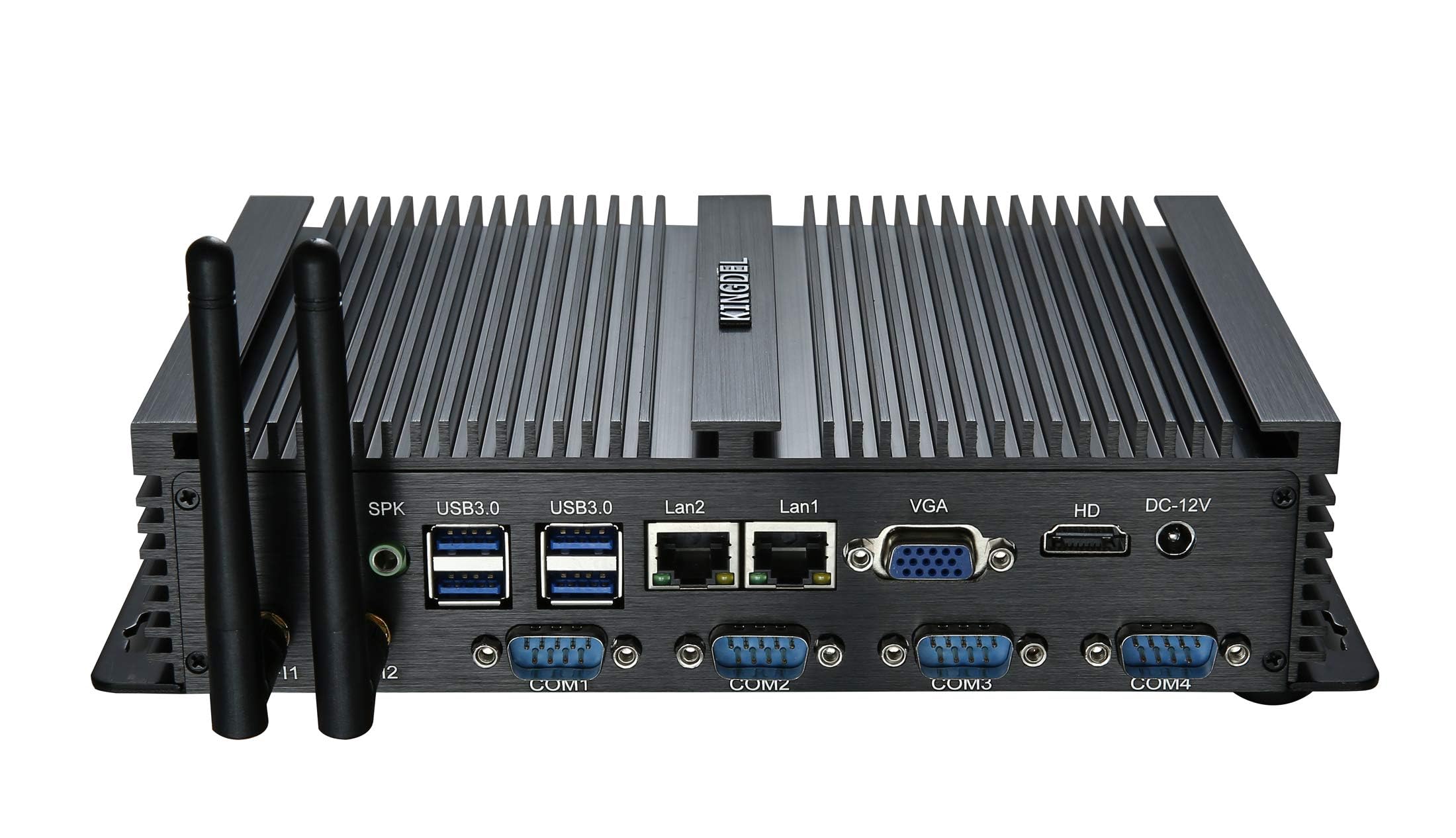
The KINGDEL is an entirely different animal from the bare CPUs above: it is a complete, fanless mini desktop computer powered by a Core i5-3317U dual-core processor. This is a 1.7 GHz chip that can turbo boost (automatically increase its speed) up to 2.6 GHz, with 3 MB of smart cache and HD Graphics 4000. It comes with 8GB of DDR3L RAM and a 128GB mSATA SSD, all packed into a full metal case that doubles as a heatsink — so there is no fan at all. For anyone building a silent work PC, a networking appliance, or a 24/7 home server, the total absence of noise is the standout feature. Owners call it “oddly awesome” for general purpose and server work, with one user running it as a headless VoIP server and router with zero issues across multiple units.
Reliability is the top praised aspect — 19 owners mention it — and the port selection is a big part of the appeal: 2x Gigabit NICs (Network Interface Cards), 4x COM RS232 ports, 4x USB 3.0, 4x USB 2.0, HD Port, and VGA. That is an unusual amount of I/O (input/output connections) for such a small box, and it makes the KINGDEL a natural fit for industrial control, point-of-sale, or networking tasks. The downside is that the hardware is older — the i5-3317U is a laptop CPU from the Ivy Bridge era, and the integrated graphics are not meant for gaming or heavy rendering. One owner summed it up as “outdated hardware, great networking appliance.” For a silent desktop or a specialized server, the trade-off is well worth it.
Why owners swear by it
- Completely silent operation — no fan means zero noise, even under sustained load.
- Dual Gigabit NICs make it a perfect firewall, router, or industrial networking appliance.
- Compact, full metal case that stays cool by passively dissipating heat.
The honest limitation
- The i5-3317U is an older laptop CPU; it is not designed for gaming or heavy rendering.
- 8GB RAM and 128GB SSD are fine for servers but small for a general desktop user.
Reach for this if: You need a completely silent fanless PC for networking, industrial control, or a 24/7 home server where noise and reliability matter more than raw power.
pass on it if: You want a general-purpose desktop for gaming, video editing, or any task that needs a modern GPU.
Understanding the Specs
Clock Speed (GHz)
The clock speed, measured in gigahertz (GHz), tells you how many cycles per second the processor can execute. A higher number means the CPU can work through calculations faster, which helps with tasks like rendering chunks in a game server or launching applications quickly. But clock speed is not the whole story — a chip with a larger cache or hyper-threading can feel faster than a higher-clocked chip with less cache, even if the GHz number is lower.
Cache Memory (MB)
The cache (a small pool of ultra-fast memory built directly into the CPU) stores data the processor uses repeatedly, so it does not have to wait for the slower system RAM. A larger cache (like 6 MB on the Core 2 Duo E8500) means everyday tasks like opening programs and switching between tabs feel snappier. A smaller cache (2 MB on most Celerons) is fine for lightweight server and office work but can feel sluggish if you run many applications at once.
FAQ
Will a dual core CPU work with my existing motherboard?
Is a dual core CPU enough for a home server or NAS?
Can I play games with a dual core CPU?
What is the difference between a Celeron and a Core i3 dual core?
How important is the cache size on a dual core CPU?
Do I need a special cooler for an old LGA 775 processor?
Can I use a dual core CPU for a silent or fanless build?
What is the fastest dual core CPU I can put in an old Dell Dimension?
How much power does a dual core CPU typically use?
Is a dual core CPU from 2024 better than an old Core 2 Duo?
Final Thoughts: The Verdict
For most people, the dual core cpu winner is the Intel Celeron G3900 because it delivers reliable, cool-running performance for a home server or budget office build at the lowest cost of entry — and its 2.80 GHz clock and 2 MB cache are more than enough for a headless system that runs silently for years. If you want the fastest drop-in for an old LGA 775 machine, grab the Core 2 Duo E8500 with its massive 6 MB cache. And for a completely silent, fanless desktop with dual LAN ports and industrial I/O, the KINGDEL Mini PC is the one to reach for.
How We Picked
We do not accept paid placement. Every pick is matched to a real buyer and a real use-case; we do not hands-on test units.
Sources & Methodology
Specifications: manufacturer listings and product documentation. Review insights: verified customer reviews, as of July 2026. Pricing: not shown on this page (it changes often); check the current price via the retailer link.
As an Amazon Associate, WellFizz earns from qualifying purchases. This does not affect which products we feature.
Related Guides

Mo Maruf
I created WellFizz to bridge the gap between vague wellness advice and actionable solutions. My mission is simple: to decode the research and give you practical tools you can actually use.
Beyond the data, I am a passionate traveler. I believe that stepping away from the screen to explore new environments is essential for mental clarity and physical vitality.