Our readers keep the lights on and my smoothie glass nicely filled. As an Amazon Associate, I earn from qualifying purchases.
Specs are compiled from manufacturer listings and verified buyer reviews and can change over time — please confirm the key details on the product page before buying.
Walking into 3D printing for the first time is a mix of excitement and dread. You want to design and hold something real in your hands, but you have heard the horror stories of fiddling with bed leveling for hours and watching your first dozen prints turn into a tangled plastic nest. The right machine sidesteps all of that, letting you focus on creating rather than calibrating.
I’m Mohammad Maruf — the founder and writer behind WellFizz. This guide is built by comparing the manufacturers’ published specifications and the patterns across verified customer reviews, so you get each pick’s real strengths and trade-offs instead of marketing spin.
Whether you are buying for a curious kid or trying the hobby yourself, these eight machines remove the guesswork from picking a reliable starter. This is your straight-to-the-point breakdown of the best entry level 3d printer options available right now.
Our Picks at a Glance


How To Choose The Best Entry Level 3D Printer
The best first printer isn’t the cheapest or the fastest. It is the one that consistently works with minimal tinkering so you actually enjoy the hobby. Pay attention to these four factors.
Auto Bed Leveling Is Non-Negotiable
Manual bed leveling is the top reason beginners quit. A machine that level itself — using a sensor to map the bed and adjust the nozzle height automatically — saves you that frustration every single time you print. Every machine on this list includes it, and you should not buy one that does not.
Fully Assembled vs. Kit
A kit printer costs less but demands an hour or two of careful building. If you enjoy assembly and troubleshooting, a kit can be a good learning experience. For everyone else, a fully assembled machine that prints fifteen minutes after opening the box is the safer bet. Most entry-level picks here arrive mostly or fully assembled.
Build Volume Matters Less Than You Think
A bigger print area sounds better, but most beginners print small objects: phone stands, toys, tools, and figurines. A 220x220x220mm volume handles the vast majority of projects. A larger machine also takes up more desk space and may be heavier, which is a real consideration for a home office or a kid’s room.
Speed and Noise Trade-Offs
Faster printers (600mm/s and up) complete a small print in 15 minutes instead of an hour. But speed often brings vibration and noise. If the printer will sit next to you while you work, look for models that advertise quiet operation (around 45 dB or less). The trade-off is real: a screaming fast machine can be distracting in a shared space.
Quick Comparison
| Model | Best For | Print Speed | Build Volume | Weight | Amazon |
|---|---|---|---|---|---|
| Bambu Lab A1★ Best Overall | Reliability & print quality | 10,000 mm/s² accel | — | 18.26 lbs | Amazon |
| Tina2 Complete StarBest Value | Kids & absolute beginners | — | 8.3 x 8.3 x 11.4 in | 6.4 lbs | Amazon |
| Entina Tina2 PlusFast & Compact | Fast printing on a desk | 250 mm/s | 11.4 x 8.6 x 8.6 in | 9.98 lbs | Amazon |
| Entina Tina2C | Complete starter bundle | — | 3.9 x 3.9 x 3.9 in | 11.68 lbs | Amazon |
| Flashforge Adv 5M | Speed & value for money | 600 mm/s | 220 x 220 x 220 mm | 23.8 lbs | Amazon |
| ELEGOO Centauri C | High-speed enclosed printing | 500 mm/s | 256 x 256 x 256 mm | 38.5 lbs | Amazon |
| Anycubic Kobra X | Multi-color entry | 600 mm/s | 260 x 260 x 260 mm | 20.9 lbs | Amazon |
| Flashforge AD5X | Multi-color & precision | 600 mm/s | 220 x 220 x 220 mm | 24.2 lbs | Amazon |
In‑Depth Reviews
1. Bambu Lab A1 3D Printer
Our pick — over 4.5★ from 550+ verified ratings; the strongest balance of quality and price.
The printer that makes even a Prusa owner admit Bambu Lab does it better.
Print quality is the number one thing owners praise here — it dominates the conversation with 76 mentions, far ahead of any other aspect. The secret sauce is an acceleration of 10,000 mm/s² combined with active flow rate compensation, meaning the machine constantly adjusts the filament extrusion in real time. The result is smooth, accurate layers that look like they came off a much more expensive unit.
Ease of use runs a close second in owner feedback. Full-auto calibration handles Z-offset and bed leveling for you, and the 1-Clip quick swap nozzle makes changing sizes a ten-second job. The whole machine runs at 48 dB or quieter, which is quiet enough to sit on your desk while you take a call. One owner called it “very reliable, user-friendly, low maintenance” after four months of daily use. Durability gets a mixed note in the review data — the machine holds up well under heavy workloads for most, though a few owners note physical damage over time. For a first printer, this is the one that removes the variables that cause beginners to quit.
Why It Wins Beginners Over
- Print quality is the most-praised aspect (76 mentions) — parts come out detailed and consistent
- Full-auto calibration means zero bed-leveling frustration; just load filament and go
- Active motor noise canceling keeps operation whisper-quiet at ≤48 dB, ideal for home use
The Honest Trade-Off
- Durability gets mixed marks from owners — a small number report physical damage over extended use
- Multi-color printing requires buying the separate AMS Lite unit (not included here)
Your best bet if: You want the highest print quality from the start with zero calibration headache — this machine is the crowd favorite for a reason.
Think twice if: You plan to run it 24/7 for months on end in a print farm environment; a few owners hit durability limits under extreme use.
2. Fully Assembled Mini 3D Printer (TINA2S)
A 6.4-pound featherweight that prints in minutes, not hours of assembly.
This is the lightest machine in the lineup — at 6.4 pounds (compared to the Bambu Lab A1’s 18.26 pounds) and takes up a compact 8.3 x 8.3 x 11.4 inches. That fact alone makes it the pick for a crowded dorm room desk or a child’s bedroom shelf. It arrives fully assembled, so the time from opening the box to your first print is genuinely about 15 minutes, as owners confirm.
You get precise prints even in a small space thanks to auto leveling (the printer measures and adjusts the print bed height automatically) and a dual Z-axis rail (two vertical guide rods that keep the print head stable). The flexible magnetic build plate lets you pop finished parts off with a simple bend. One-touch filament loading means you press a button to load or retract 1.75mm PLA filament (the standard plastic used in most 3D printers). A few owners note the build feels less sturdy than heavier machines, and very occasional units arrive with alignment quirks, but the overwhelming majority call it a perfect first printer for young kids and absolute beginners.
Small machine, big starter appeal: At 6.4 pounds and fully assembled, it removes every barrier for a child or first-time user — just add filament and imagination.
The catch: The compact size means smaller print capacity, and a handful of buyers report fiddly setup that contradicts the “plug-and-play” promise; check it thoroughly early in your return window.
Reach for this if: You are buying for a young child or a complete beginner who needs the simplest possible experience on a small budget.
Look elsewhere if: You want to print larger objects or need a machine that feels substantial on a desk — the 6.4-pound build is deliberately light and compact.
3. Entina Tina2 Plus 250mm/s Fast 3D Printer
A ceramic hotend that hits printing temperature in 40 seconds flat.
Compared to the basic Tina2 model above, the Tina2 Plus adds real speed — printing up to 250 mm/s, which cuts a typical small project from a couple of hours down to under an hour. The high-efficiency ceramic hotend reaching full temperature in 40 seconds is not a marketing line; owners familiar with older printers notice the difference immediately on startup and between prints.
The Poloprint Cloud app gives you access to over 1,500 printable models, so a beginner never hits the “what do I print now” wall. The auto-leveling and dual Z-axis structure help reduce print failures, though a small number of owners mention occasional nozzle clogs or spotty results. At 9.98 pounds, it is still light enough to move around the house, and the compact 11.4 x 8.6 x 8.6-inch footprint fits comfortably on a classroom desk. This is the middle-ground pick for a family that wants faster prints without jumping to a full-size machine.
Where It Pulls Ahead
- 40-second heat-up from the ceramic hotend gets you printing faster than almost any other entry-level machine
- Access to 1,500+ models via the Poloprint app removes the “what do I print” friction for beginners
- Dual Z-axis rail and auto-leveling provide real stability for a fast, compact printer
Where It Stumbles
- A minority of customers note frustrating print failures and filament clogs from the start
- The app catalog can feel limited for users who want to move beyond pre-loaded designs quickly
Best suited for: A family or classroom that wants noticeably faster prints than basic mini models, with a huge library of ready-to-print designs.
Not ideal if: You prefer a fully open-source workflow with freedom from any single app ecosystem.
4. Entina Tina2C Mini 3D Printer Starter Bundle
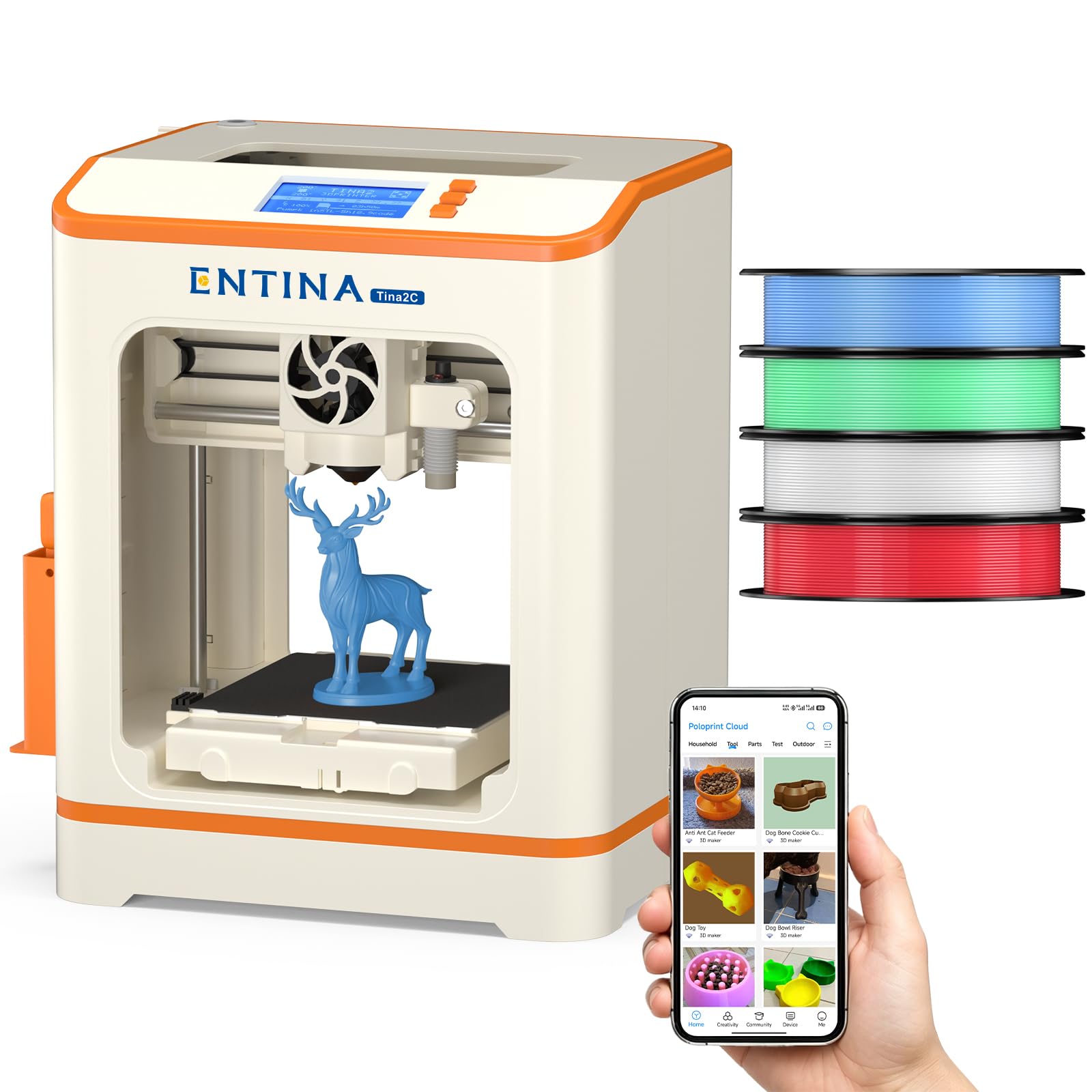
Everything you need in one box — including four spools of PLA filament.
This bundle is the closest thing to a gift-ready package on the list. It ships with four vibrant PLA filament colors totaling about 1 kg, so the recipient can start printing immediately without a separate filament order. The printer itself is a compact unit with a 3.9 x 3.9 x 3.9-inch build area — small, yes, but perfect for the toys, keychains, and STEM projects that beginners actually make.
The Poloprint app provides over 1,500 models plus 20+ DIY project templates and AI-powered search. Auto leveling and power-loss recovery (which resumes a print after an interruption) reduce waste and frustration. Owners consistently call it quiet and kid-friendly, with several noting it was a hit with children as young as 7. The small build size is the real constraint here; anyone who outgrows it quickly will want a larger machine within months. For a first printer for a young child, the all-in-one bundle removes every possible barrier to starting.
All-in-one convenience: Four PLA colors included (total ~1kg) plus 1,500+ app models means the buyer buys nothing else — just open the box and choose a design.
The size reality: The 3.9-inch cube build volume is genuinely small; a fast-learning kid will hit its limits within a few months, so treat this as a low-stakes entry point, not a long-term machine.
Perfect for: A parent buying a gift for a child aged 7-10 who wants to explore 3D printing without a big investment in separate supplies.
skip it if: You (or your kid) are likely to want bigger prints within the first few weeks — go straight to a 220mm machine instead.
5. FLASHFORGE Adventurer 5M 3D Printer

A 600mm/s CoreXY rocket that goes from zero to full speed in 0.025 seconds.
The Adventurer 5M is the speed king of the value tier. It accelerates at 20,000 mm/s² and hits a maximum of 600 mm/s, completing a Benchy boat in a fraction of the time a slower printer would take. The CoreXY motion structure keeps movement stable at those speeds, and vibration compensation eliminates ghosting in the print surface. A nozzle with 32mm³/s flow and 50W heating power reaches 200°C in 35 seconds.
Owners praise print quality and ease of use most consistently — with 57 and 38 mentions respectively. The one-click auto leveling and flexible PEI steel plate make first-layer success routine. However, reliability is a mixed note in the review data, with some owners reporting zero issues while others encounter adhesion problems or firmware freezes. The built volume is 220 x 220 x 220mm, which is standard but not generous. For a beginner who values speed above all else and is comfortable with occasional troubleshooting, this machine delivers stunning results when it runs.
Speed Highlights
- 600 mm/s max speed with 20,000 mm/s² acceleration — one of the fastest machines at this price point
- Vibration compensation and a 32mm³/s flow nozzle produce clean, ghost-free prints even at high speeds
- Filament run-out sensor and power-loss recovery prevent wasted prints
Speed Trade-Offs
- Reliability gets mixed feedback — some units have firmware freezes or inconsistent extrusion from the start
- Noise level is higher during fast printing, and the build volume is only average (220mm cube)
Go for it if: You want the fastest prints your money can buy at this level and are ready to do a little initial testing to confirm your unit is solid.
Think twice if: You need a dead-silent printer for a shared bedroom — the speed generates noticeable noise.
6. ELEGOO Centauri Carbon 3D Printer

A 38.5-pound rock-solid frame that handles carbon fiber filament without flinching.
This is the heaviest machine on the list at 38.5 pounds, and that weight is a feature, not a bug. The die-cast aluminum frame minimizes vibration at high speeds, so the printer stays stable when printing at 500 mm/s with 20,000 mm/s² acceleration. The enclosed chamber and 320°C brass-hardened steel nozzle let it handle advanced materials like carbon-fiber-reinforced filament — something most entry-level machines cannot do.
Owners rave about quality (198 mentions) and value for money (113 mentions), calling it an impressive machine that works flawlessly from the start. The dual-sided PEI plate includes a PLA-specific surface for excellent adhesion at lower bed temperatures. The built-in camera with dual LED lighting lets you monitor prints remotely and capture time-lapse videos. The main caveats are noise — the enclosed chamber and powerful fans make it louder than open-frame printers — and the massive weight, which means you really need a sturdy dedicated desk. Reliability also gets a mixed note, with a significant number of owners reporting failures or defects that required support intervention.
Premium Strengths
- 320°C nozzle and enclosed chamber open up advanced filaments like carbon fiber, not just PLA
- Die-cast aluminum frame eliminates vibrations for consistent high-speed quality
- Built-in camera with dual LEDs enables real-time remote monitoring and time-lapse recording
Premium Compromises
- At 38.5 pounds, this is a permanent desk fixture — not portable or easy to move
- Reliability data is mixed; a significant share of shoppers say defects or failures that require support
Choose this if: You want an enclosed printer that can handle more than just PLA, with a rigid frame and smart monitoring features usually found on much more expensive machines.
Avoid if: You need a quiet, portable printer or cannot tolerate the risk of dealing with customer support for a defective unit.
7. Anycubic Kobra X Multicolor 3D Printer

Born with four color slots built in — no separate add-on purchase required.
Most multi-color printers require a separate unit (like Bambu Lab’s AMS Lite) that costs extra and takes up more space. The Kobra X includes four color slots in the base machine, supporting up to 19 colors if you add three more ACE 2 Pro units. The machine reduces purge waste by 81.25% compared to typical multi-color systems, so you are not throwing away half a spool of filament every time you switch colors.
Print quality and ease of use lead owner feedback, with 29 and 24 mentions respectively. The LeviQ 3.0 auto-leveling system uses a 49-point calibration map for precise first layers. The 600 mm/s max speed completes a Benchy in about 14 minutes. The AI camera detects spaghetti failures and foreign objects, which is a real time-saver when you are not watching the print. On the downside, the software and slicer get sharp criticism from some owners — WiFi connection issues and unintuitive menus are a recurring complaint. The 260mm cubic build volume is the largest on this list, giving you room for bigger projects from day one.
Color without the cost: Four built-in filament slots and an 81.25% purge reduction make this the most efficient multi-color entry point for a beginner curious about full-color prints.
The software wall: A vocal minority of buyers find the slicer and WiFi app frustrating enough to return the unit — expect a learning curve on the software side, even if the hardware is solid.
Perfect for: A beginner who is specifically interested in multi-color printing and wants the largest build volume (260mm cube) at this price tier.
pass on it if: You want a simple, one-color-first experience without dealing with finicky multi-color software on day one.
8. FLASHFORGE AD5X Multi-Color 3D Printer

A 600mm/s CoreXY that swaps between four colors automatically.
The AD5X combines a CoreXY motion system at 600 mm/s with a 4-color filament switcher, meaning you can print a single-color prototype in 15 minutes or a full-color model without manual filament changes. The 300°C direct-drive extruder handles a wide range of materials, and the four nozzle size options (0.25mm to 0.8mm) give you control over detail versus speed.
Print quality gets 169 mentions in owner feedback, making it the top positive talking point by a wide margin. Ease of use is the second most-discussed aspect at 108 mentions. The 1-click auto leveling and dual-channel cooling fan contribute to reliable first layers and sharp overhangs. However, the mixed reliability data (150 mentions) is impossible to ignore: a meaningful number of buyers report failures like nozzle fusing to the bed, filament jams at the four-in-one connector, or unresponsive touchscreens. Noise level also gets mixed reviews at 31 mentions. One owner who logged over 3,000 hours called it excellent for speed and accuracy when it works, but acknowledged a major failure around 300 hours that required replacement parts. This is a high-risk, high-reward machine for a beginner who wants multi-color capability at a relatively low price.
Multi-Color Muscle
- 600 mm/s CoreXY with auto 4-color switching for fast, colorful prints without manual filament changes
- Four nozzle options (0.25mm to 0.8mm) give you control over detail vs. speed for any project
- Vibration compensation and a 300°C direct-drive extruder deliver high print quality across materials
The Reliability Reality
- Reliability is a major mixed point (150 mentions) — nozzle fusing, filament jams, and touchscreen issues appear in reviews
- Noise level is higher than average; not suitable for a quiet bedroom environment
Go for it if: You are willing to accept some reliability risk in exchange for the fastest multi-color CoreXY experience at this price.
Stick with a simpler pick if: You want a frustration-free first printer and are not ready to troubleshoot filament jams or support replacements.
Understanding the Specs
Auto Bed Leveling
This is the feature that determines whether your first hour with a 3D printer is fun or infuriating. A machine with auto leveling uses a small sensor to measure the distance between the nozzle and the print bed at multiple points. It then compensates automatically so the first layer sticks evenly across the entire surface. Without it, you would manually turn screws under the bed while sliding a sheet of paper between the nozzle and the bed — a process that is fiddly and easy to get wrong. Every printer on this list has it.
Print Speed (mm/s)
Print speed is measured in millimeters per second — how fast the print head moves while laying down plastic. A typical entry-level machine prints at 50-80 mm/s. Faster machines (250-600 mm/s) use a CoreXY belt-driven motion system to move the head more efficiently. A 600 mm/s printer can finish a small toy in about 15 minutes, while a 50 mm/s printer takes over an hour for the same object. The trade-off is that higher speeds can introduce vibration artifacts (ghosting) unless the machine has vibration compensation.
Build Volume
The build volume is the maximum size of object you can print, measured in millimeters (X, Y, Z axes) or inches. A 220 x 220 x 220mm volume (roughly 8.7 inches cube) can print most things a beginner would want: phone cases, desk organizers, action figures, and simple tools. Smaller machines (like the Entina Tina2C with a 3.9-inch cube) are cheaper but limit you to keychains and small toys. Larger volumes (256mm or 260mm cube) let you print helmets, large vases, or functional brackets in one piece. Always check the volume against what you actually intend to print.
Nozzle Temperature
The nozzle temperature determines what materials your printer can melt and extrude. PLA (the standard beginner filament) melts around 190-220°C. PETG and TPU need roughly 220-260°C. Advanced filaments like polycarbonate or carbon-fiber-reinforced nylon require 280-320°C. A printer with a 300°C or higher nozzle gives you room to experiment beyond basic PLA later. The nozzle is also user-swappable on many models, letting you switch between a fine 0.25mm nozzle for detailed miniatures and a 0.8mm nozzle for fast, sturdy parts.
FAQ
Do I need a fully assembled printer or is a kit fine for a beginner?
Can an entry-level 3D printer print in multiple colors?
How loud is a 3D printer? Can I run it in my bedroom?
What is PLA filament and should I start with it?
How long does a typical beginner print take?
What does “auto leveling” actually do and why is it important?
Will a small build volume be a problem for me later?
What maintenance does a beginner 3D printer need?
Is it safe to leave a 3D printer running overnight?
Can I print from my phone, or do I need a computer?
Final Thoughts: The Verdict
For most people, the entry level 3d printer winner is the Bambu Lab A1 because it combines industry-leading auto calibration, whisper-quiet operation at under 48 dB (quieter than a library), and the best print quality in its class — backed by over 500 owners who rate it extremely highly. If you want a lightweight, kid-friendly machine that prints within minutes of opening the box, the TINA2S Complete Star delivers at a lower weight and price. And for a fast CoreXY printer (a design where the print head moves on two belts for speed) with tool-free nozzle swaps, the FLASHFORGE AD5M is the one to reach for. Every machine on this list will get you printing real objects — not just tinkering with the printer itself.
How We Picked
We do not accept paid placement. Every pick is matched to a real buyer and a real use-case; we do not hands-on test units.
Sources & Methodology
Specifications: manufacturer listings and product documentation. Review insights: verified customer reviews, as of July 2026. Pricing: not shown on this page (it changes often); check the current price via the retailer link.
As an Amazon Associate, WellFizz earns from qualifying purchases. This does not affect which products we feature.
Related Guides

Mo Maruf
I created WellFizz to bridge the gap between vague wellness advice and actionable solutions. My mission is simple: to decode the research and give you practical tools you can actually use.
Beyond the data, I am a passionate traveler. I believe that stepping away from the screen to explore new environments is essential for mental clarity and physical vitality.