Our readers keep the lights on and my smoothie glass nicely filled. As an Amazon Associate, I earn from qualifying purchases.
Specs are compiled from manufacturer listings and verified buyer reviews and can change over time — please confirm the key details on the product page before buying.
An electronic kit that sits untouched in its box is a failure. The problem isn’t the kid — it’s a kit that assumes you already know Ohm’s Law, that hides a critical piece under layers of jargon, or that demands a soldering iron on day one. The best electronic kits skip all that, getting you from unboxing to a blinking light (or a working radio, or a robot that follows your shadow) in the first ten minutes. This guide lines up nine kits that actually deliver on that promise, from beginner snap-together boards to advanced Arduino-powered coding adventures.
I’m Mohammad Maruf — the founder and writer behind WellFizz. This guide is built by comparing the manufacturers’ published specifications and the patterns across verified customer reviews, so you get each pick’s real strengths and trade-offs instead of marketing spin.
The right kit turns curiosity into expertise, not clutter. Here is a clear-eyed look at the very best electronic kits for every age, skill level, and budget — built from real numbers and the things hundreds of actual owners agree on.
Our Picks at a Glance


How To Choose The Best Electronic Kit
The best electronic kit is the one that matches the builder’s current age, reading ability, and patience for failure. A 10-year-old who breezes through Lego Technic will outgrow a 20-project snap kit in an afternoon, while a first-timer who struggles with frustration needs a kit with rock-solid instructions and a video to follow along. The three factors that decide this are the build method, the project count, and the support system around the kit.
Build Method: Snap, Spring, or Breadboard
The way parts connect defines the difficulty ceiling. Snap-together kits (like Snap Circuits) use plastic buttons that click into place — no tools, no solder, no tiny wires to strip. Spring-terminal boards (like the Elenco Playground) use coiled springs you wrap wire around; they teach schematic reading but demand finer motor control. Breadboard kits (like any Arduino starter kit) require you to push component legs into numbered rows, which is the closest you can get to real circuit design without a soldering iron. Age 8 and under lean snap; age 10 and up can handle a breadboard with supervision.
Project Count vs. Project Depth
More projects means longer engagement, but only if the projects build on each other. A 120-project kit where every circuit is a different LED pattern teaches repetition, not concepts. The best kits teach a principle (resistance, transistor switching, radio frequency) and then let you apply it to two or three different outcomes. Look for kits where later projects incorporate parts used in earlier ones — that is the sign of a structured curriculum rather than a pile of random experiments.
Video Lessons and Community
A paper manual works for a patient adult. A 9-year-old needs video. The strongest kits now include QR-code-linked video walkthroughs (Blue Marble, SunFounder) or even full cinematic courses (inventr.io). A large online community, like the 700,000+ member maker community behind the Adventure Kit, means you can get unstuck within hours instead of days. If the kit you are eyeing has no video support and the manual is the only guide, assume you will need to sit next to the builder for every single project.
Quick Comparison
| Model | Best For | Projects | Build Method | Age Range | Amazon |
|---|---|---|---|---|---|
| Snap Circuits Extreme SC-750R★ Best Overall | Deep STEM learning (ages 8-15) | 750 | Snap-together pieces | 8–15 years | Amazon |
| National Geographic Circuit KitScreen Free Favorite | Immediate screen-free fun | 120+ | Snap-together wires | 8+ years | Amazon |
| Elenco 130-in-1 PlaygroundClassic Lab Feel | Classic hands-on electronics training | 130 | Spring-terminal board | 10+ years | Amazon |
| SunFounder Elite Explorer Kit | Arduino beginners wanting pro video lessons | 50+ | Breadboard + Arduino Uno R4 | 8+ years | Amazon |
| Adventure Kit: 30 Days Lost in Space | Story-driven learning for teens and adults | 30+ | Breadboard + Hero board | Teens and Adults | Amazon |
| ACEBOTT Smart Robot Car Kit | Robotics, mecanum wheels, and coding | 16 tutorials | ESP32 breadboard + chassis | 12+ years | Amazon |
| Butterfly EduFields 10in1 STEM Kit | Wide variety of small robot builds | 10 | Snap + wood frame | 8–12 years | Amazon |
| LAFVIN Project Super Starter Kit | Budget-friendly Arduino learning for adults | 20+ lessons | Breadboard + Uno R3/Mega/Nano | Teens and Adults | Amazon |
| Choopheme STEM Walkie Talkies Kit | Simple first build with a usable toy | 1 (walkie talkie pair) | Snap + screw assembly | 5+ years | Amazon |
In‑Depth Reviews
1. Snap Circuits Extreme SC-750R Electronics Exploration Kit + Student Training Program
Our pick — over 4.5★ from 650+ verified ratings; the strongest balance of quality and price.
The 750-project powerhouse that grows with a kid from age 8 through high school.
This is the one kit that keeps delivering years after purchase — owners routinely report the same set is still in use after four years, and one review describes pulling it out 14 years later with everything still functional. The 80+ pieces snap together without tools, and the projects progress from a simple light switch to complex builds like an AM radio, a lie detector, and a rechargeable battery circuit. The included Student Training Program with study guide turns it into a proper curriculum for homeschooling or after-school STEM, which is why schools themselves stock these kits.
The build method is purely snap-on — plastic buttons click onto metal snaps on a grid board, so an 8-year-old can follow the color-coded 5-manual set without any adult help once they learn the rhythm. Project variety is the thing owners praise most (it is the most-discussed positive aspect by far, mentioned by well over 100 buyers), and the labeled hard-shell case keeps every tiny part organized between sessions. The honest trade-off is the breadboard included feels flimsy — treat it with care when pressing wires in, and the primary on/off switch has drawn some grumbles over long-term durability. For a child who finishes things, the 750 projects span multiple years of skill growth; for a child who bounces between activities, the sheer volume can feel overwhelming at first.
The thing owners rave about
- Build quality earns the most positive mentions — it holds up to years of classroom and living-room use
- Educational value is a close second: 105 owners single it out as a real teaching tool, not just a toy
- Engagement stays high through 750 unique circuits, with 70 owners noting their kids stay glued for 30-45 minutes per build
The honest catch
- Durability scores mixed — the snap-on switch mechanism can wear out, and the breadboard is fragile if pressed too hard
- At 16.5 x 12.4 x 6.3 inches, the case is large; it needs its own shelf space
Best for: The kid who loves building and wants a kit that doesn’t run out of projects — or a parent teaching a full STEM curriculum at home.
Think twice if: Your child needs instant, flashy results (a radio takes patience) or struggles to keep track of small pieces across 80+ components.
2. National Geographic Circuit Kit for Kids with 120 Electrical Projects
No tools, no soldering, no screen — just wires that snap and 120 projects that spark.
Blue Marble (the National Geographic toy line) packs a remarkable 120+ projects into a single box, and the projects are genuinely varied — you can build a keyboard that plays songs, a light show, a flying copter, and a voice-amplifying sound system. The wires snap securely onto each component, so no tools are needed at all. An 8-year-old can spend hours building independently, which is exactly what dozens of buyers report: their kids stay engaged for “a couple hours at a time,” creating light shows and music circuits completely screen-free.
The included illustrated manual is clear, but the QR code linking to video instructions is the real safety net — it means a child who gets stuck on a step watches a quick demonstration without calling for an adult. Educational value is what owners praise most (70 call it out), followed by sheer fun (24 mentions). At 12 x 3 x 14.75 inches the kit footprint is manageable, and the components are rugged enough that a 4-year-old can participate with supervision. The catch is it requires alkaline batteries (not included), and some advanced users wish there were more theory explanations in the manual — this is a project-doer’s kit, not a deep-dive curriculum. It is a fantastic first kit for ages 7-10 that leads naturally into something like the Snap Circuits SC-750R when the 120 projects are exhausted.
What wins people over
- 70 owners highlight the educational value — it teaches circuit concepts through play, not lectures
- Fun factor gets 24 mentions; kids build a light show or a flying copter and immediately want to show it off
- Snap-together wires mean zero frustration with tiny screws or soldering
A small hiccup
- The manual is project-focused; if you want the “why” behind each circuit, you will need to supplement with online resources
- Lacks a storage tray — you will want a small bin to keep all snap-wires together
Reach for this if… You want a no-fuss, no-tools kit that delivers instant gratification and teaches circuit basics without needing a second of adult prep.
Look elsewhere if… Your child already understands series and parallel circuits — 120 projects will be consumed fast, and you will want the 750-project SC-750R instead.
3. Elenco 130-in-1 Electronic Playground and Learning Center
A spring-terminal board that teaches real circuit-diagram reading, just like the Radio Shack kits of the 1960s.
Elenco’s Playground spurns plastic snap buttons in favor of coiled springs you wrap wire around — it looks like a vintage electronics lab, and that is exactly the point. The 130 projects include an AM broadcast station, an electronic organ, an LED strobe light, and logic circuits, and the illustrated manual uses actual schematic symbols. For a 10-year-old or young teen, this is the transition kit between “toy” and “electronics training.” Build quality is the top praised aspect at 107 mentions, and educational value is right behind at 105 — it is a serious tool.
The trade-off is the cardboard chassis, which owners describe as flimsy. It works fine on a desk, but toss it in a backpack and the cardboard base will suffer. Some spring clips on early units arrive with connection issues, though the replacement process is straightforward. The manual also skips circuit theory explanations — it tells you what to connect but not always why. For a child who wants to build and experiment, the 130 projects deliver months of engagement; for someone who needs every step explained conceptually, the Snap Circuits manual does a better job. At 2.1 pounds and 16 x 12.25 x 3.75 inches, it has a sturdy desk presence.
Why it endures
- 107 owners praise the quality — the spring-terminal board is built to last, even if the cardboard base is not
- 130 projects teach real schematic reading, a skill that transfers directly to adult electronics work
- Projects like the AM broadcast station and logic circuits go beyond basic LED flashing
The trade-off you need to know
- The cardboard chassis is the weakest link — handle it gently and keep it on a flat surface
- Functionality gets mixed marks: a small number of units arrive with a short or a dead spring terminal, though warranty replacement is painless
- Instruction manual is project recipes only; you will need to buy a supplementary electronics book for theory
Best for: A 10+ year-old who enjoys the idea of “real” electronics and can follow schematic-style diagrams, or an adult who wants a nostalgic, solder-free refresher.
skip it if: You want a rugged portable kit — the cardboard base will not survive a car trip without getting crushed.
4. SunFounder Elite Explorer Kit with Original Arduino Uno R4 WiFi

60+ free video lessons turn an Arduino starter kit into a structured university-level course for beginners.
Most Arduino kits dump components in a box with a paper manual. SunFounder’s Elite Explorer Kit includes the genuine Arduino Uno R4 WiFi board (upgraded from the R3 with a 32-bit processor and built-in WiFi and Bluetooth), over 300 components, and 60+ video lessons co-created with educator Paul McWhorter. The 50 projects span 30 basic builds, 13 fun projects, and 8 IoT (Internet of Things) projects that connect to apps via the Arduino IoT Cloud. The videos are the standout — owners consistently say the tutorials are excellent, progressing from blinking an LED to complex IoT integrations at a pace that works for both beginners and experienced hobbyists.
Quality is the aspect owners praise most (16 mentions), with instructional materials a close second at 11. The kit includes sensors, motors, an LCD1602 display with pin header, and an OLED screen — all breadboard-compatible without soldering. The only downsides are practical: there is no included storage case (you will need your own box for 300+ parts), and some jumper wires arrive with loose connections. For an adult or teenager who wants to learn Arduino coding (Arduino IDE, C++) from someone who actually teaches, this kit delivers way more value than a bare board and a components grab-bag.
What makes it a class leader
- Genuine Arduino Uno R4 WiFi board with built-in Bluetooth and IoT capability — no knockoff
- 60+ project-based video lessons that feel like a real course, not just assembly instructions
- 300+ components provide enough parts to build and experiment beyond the 50 guided projects
Missing details
- No storage case for the 300+ pieces — buy a small organizer separately
- Reliability gets mixed feedback: a small number of units arrive with a dead pin or loose jumper wire
Reach for this if… You are an adult or teen who wants the best-possible video-guided start into Arduino coding and IoT projects.
Think twice if… You need a completely self-contained box with dividers — the loose components will annoy you without a separate storage solution.
5. Adventure Kit: 30 Days Lost in Space

A cinematic 30-day storyline taught by a NASA researcher — it feels more like an adventure than a class.
Inventr.io’s Adventure Kit wraps Arduino learning in a narrative: you are a space cadet crash-landed on an unknown planet, and each day’s project repairs a piece of your ship. Taught by a NASA researcher and college educators, the 30+ hours of video lessons cover AI, circuits, and C++ coding in the Arduino IDE, starting with basic switches and progressing to a retro video-game flight controller. The Hero board (Arduino Uno compatible) and all metal-and-plastic components are reusable, and the kit joins a 700,000+ member maker community for support.
Owners praise it as a starter kit (23 mentions) and love the instructional material (18 mentions). The story is the hook — multiple owners describe their kids begging to do “the next day’s mission.” The catch is setup: the initial login requires access to a parental Google or Apple account, which is a friction point for families with strict parental controls. It recommends one hour per day across 30 days, making it a structured commitment rather than a pick-it-up-whenever toy. For a 10+ year-old who loves story-driven games like Minecraft or space themes, this is remarkably effective at teaching real programming skills through a fictional frame.
Why it hooks kids
- 23 owners call it a great starter kit; the space narrative keeps them coming back day after day
- Taught by actual educators, including a NASA researcher — the production quality is high
- Reusable components mean you can keep building after the 30 days are over
Two honest barriers
- Requires a parent Google/Apple account for initial setup, which can conflict with strict parental controls
- Functionality gets mixed feedback: a small number of units arrive with a faulty component, though the support team is responsive
Best for: A 10+ year-old (or adult) who gets bored by traditional manuals and needs a narrative reason to build — the space-adventure frame is genuinely motivating.
Not for: A family that wants zero account-creation friction on day one, or a child who prefers open-ended exploration over a structured 30-day program.
6. ACEBOTT Smart Robot Car Kit Compatible with Arduino
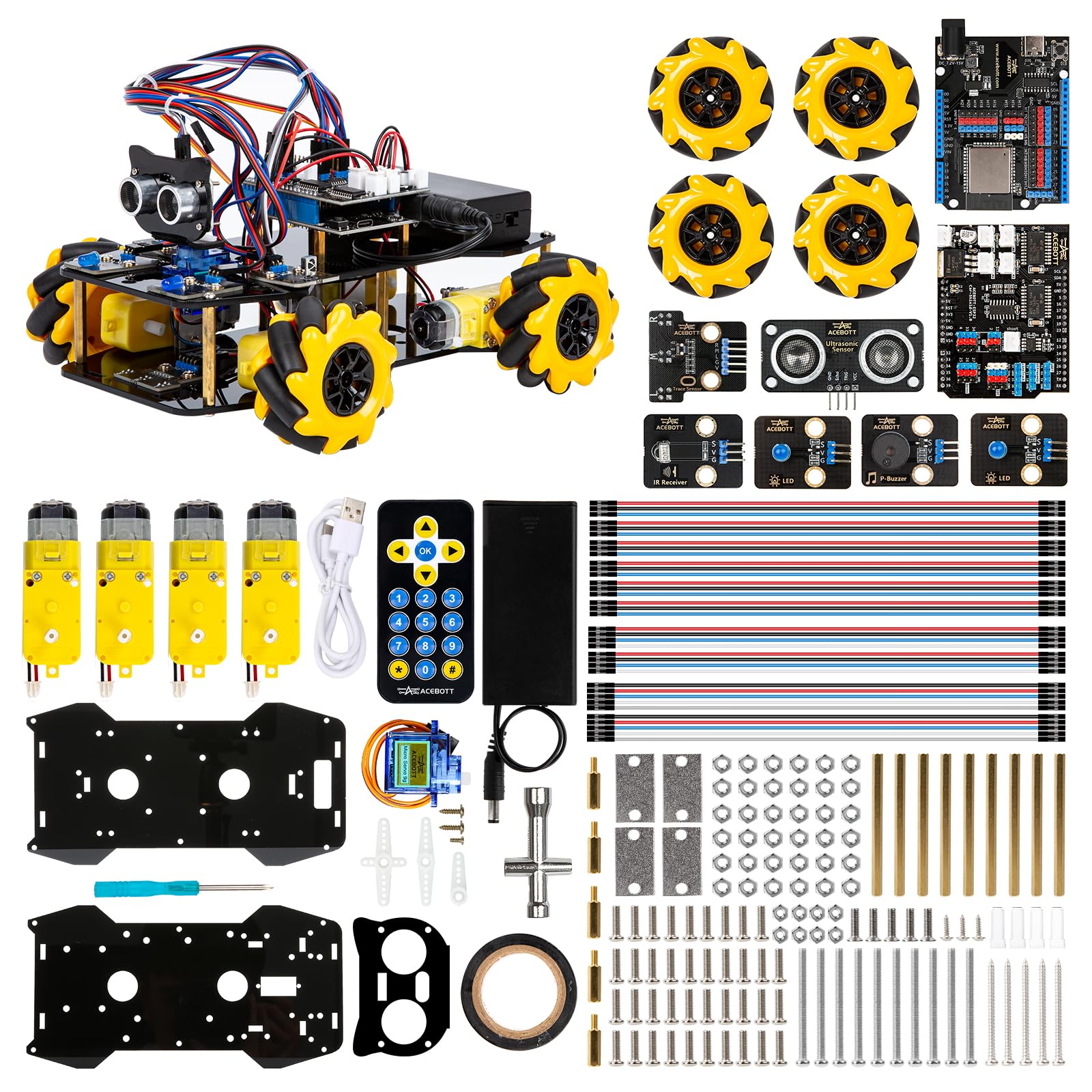
An ESP32-powered robot car with mecanum wheels that can drift sideways — coding meets physics in 16 tutorials.
ACEBOTT’s kit moves beyond stationary circuits into robotics: you build a car chassis with 6cm omnidirectional mecanum wheels that allow 360° movement (forward, sideways, diagonal, rotation, and even drifting). Controlled by an ESP32 controller board, the car is programmed through 16 story-rich tutorials that teach programming and electronic hardware principles. It supports IR remote control, App control, multi-way cruise, and multi-direction obstacle avoidance. The kit is expandable with optional camera, robotic arm, tank track, and solar add-ons.
Quality earns 5 positive mentions, though reliability is mixed. Some owners mention that getting the board into bootloader mode to flash code requires manually shorting GPIO 0 to GND (a step the documentation covers, but it catches beginners off guard). The kit does not include batteries — it needs 2 nonstandard batteries, which has frustrated a few buyers. For a 12+ year-old who has already done some breadboard work and wants a tangible, moving result from their coding, this is the most satisfying robot build at this price point. It is more complex than the Butterfly EduFields kit below and expects some prior familiarity with Arduino-style programming.
The mechanical wow factor
- Mecanum wheels allow lateral and diagonal movement — it drives like nothing else in this price range
- 16 tutorials teach real programming and hardware skills through a tangible robot car
- Expandable with camera, robotic arm, and tank add-ons for continued building
Before you buy
- Reliability is mixed — getting the firmware flashed requires a specific GPIO-shorting step that confused some early buyers
- Needs 2 nonstandard batteries not included, and the battery type is not a common AA/AAA
Reach for this if… You have a teen who has already done basic Arduino work and now wants a build that moves, drifts, and can be expanded into a camera-equipped robot.
Not for: A complete beginner — the bootloader and battery surprises will frustrate someone who just wants to unbox and build in one afternoon.
7. Butterfly EduFields 10in1 STEM Electronics Robotics Kit
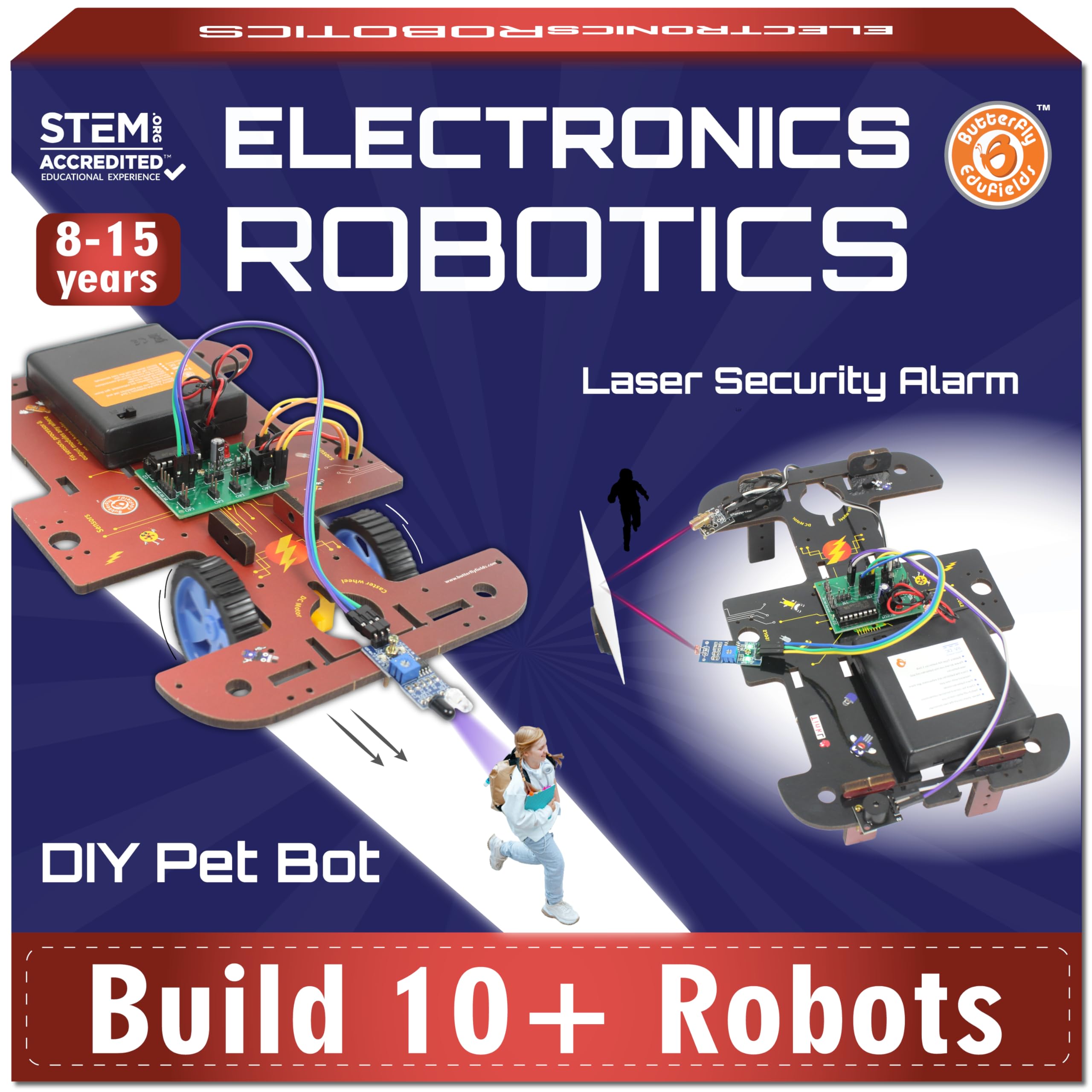
100+ components for 10 different robot builds — one kit, ten projects, real hands-on variety.
Butterfly EduFields packs 100+ components including wires, switches, connectors, and LED lights into a single box, with instructions to build 10 different STEM robotic models. The build method mixes electronic snap-connections with a wooden frame, which gives each finished robot a craft-project feel — it looks different from the plastic-heavy kits on this list. The well-illustrated step-by-step manual is designed for ages 8-12, and a 12-year-old owner reports loving the variety of builds available in the book.
Educational value is the most-praised aspect (15 mentions), but quality and missing parts both score mixed feedback. The core issue is consistency: some boxes arrive with all components perfectly matching the instructions, while others are missing a resistor or a connector, which stalls the build until the manufacturer ships a replacement. For the 10-model variety, the price is reasonable; just budget for a possible support email if a tiny piece is absent. It is a good introductory kit for the child who likes building different things rather than iterating on one complex project, but the wood-frame construction is not as durable as the Snap Circuits all-plastic system.
What wins praise
- 15 owners highlight educational value — building 10 different robots teaches varied mechanical concepts
- Wood-frame construction separates it visually from the standard all-plastic kits
- 100+ components give real variety across the 10 projects
Where it stumbles
- Quality and missing parts are both flagged — some boxes are missing a key component
- Wood frame is more fragile than the snap-plastic competitors; careful handling needed
Best for: An 8-12 year-old who loves variety and wants 10 different finished models to show off, rather than one deep project.
Think twice if: You need guaranteed all-parts-included on day one — order early enough to handle a possible missing-piece replacement request.
8. LAFVIN Project Super Starter Kit for Arduino R3 Mega2560 Nano

A component-packed starter with three Arduino-compatible boards — ideal for an adult who wants to learn without a huge upfront cost.
LAFVIN’s starter kit includes the R3, Mega2560, and Nano boards plus a heap of sensors (ultrasonic, temperature, sound, IR), a servo motor, stepper motor, DC motor, LCD1602 display, and 4-bit 7-segment display. The 20+ lesson tutorial manual and digital code libraries get you building circuits on a breadboard without soldering. Owners describe it as “packed with components” and say it is fantastic value for the price, with quality praised as high. It is 100% compatible with the Arduino IDE and works across Windows, macOS, and Linux over USB.
The compromises are real but manageable for the price point: some units arrive with a breadboard that has dead pins on one side, and the sensors are not clearly marked for polarity, so a beginner can accidentally fry a component by wiring it backward. The jumper wires in some packs are all male-male, which means the LCD cannot connect without buying additional female-male wires. This is best for an adult or motivated teen who is comfortable troubleshooting — the kit itself is great value, but it expects you to handle small frustrations. It sits in the budget tier alongside the walkie-talkie kit below, but its depth of learning far exceeds that simpler build.
The value story
- Three Arduino-compatible boards (R3, Mega2560, Nano) in one box — usually you buy them separately
- 20+ tutorial lessons cover sensors, motors, and displays; the code is open-source
- High component density for the money: owners consistently say it is packed with useful parts
Watch for these
- Breadboard quality is inconsistent — a few arrive with a dead row or non-conductive side
- Sensor polarity is not labeled clearly; plan to look up datasheets before wiring
- No female-male jumper wires in some packs, which limits LCD connectivity
Best for: An adult or older teen who wants the most components per dollar and is comfortable diagnosing a dead breadboard row or looking up a pinout.
pass on it if: You need everything to work perfectly from the start with zero troubleshooting — the SunFounder kit above is a better “just works” experience.
9. Choopheme STEM Walkie Talkies Science Kit

Build a working pair of walkie-talkies from scratch — the reward is a toy you can actually use outdoors.
This kit is the simplest build on the list, and that is its superpower. With just a small Phillips screwdriver, children as young as 5-6 years old can assemble a working pair of walkie-talkies that operate at a range of approximately 650 feet. The assembly process is the most-praised aspect (25 mentions), with owners describing the instructions as clear and easy to read. One 6-year-old built it independently and made it her “preferred method of communication. Daily.” The 4 x 1 x 3.5 inch kit comes with all tools needed except 6 AA batteries.
The educational depth is light — you learn basic circuit assembly and radio frequency concepts, but this is not a kit that teaches Ohm’s Law or coding. It is a confidence-building first project. Fun is the second most-praised aspect (22 mentions), and the walkie-talkies work well after assembly: customers note testing the distance successfully and enjoying clear audio with the call-alert function. Durability scores mixed — the plastic and wood construction is adequate for careful indoor use but won’t survive drops on concrete. This is the ideal entry point for a 5-8 year-old who wants to build something they can immediately play with, but it is outgrown quickly; plan to move to the National Geographic Circuit Kit or Snap Circuits within a year.
Why it works for young kids
- 25 owners praise the assembly process — clear instructions, just one screwdriver, done in 20 minutes
- The finished walkie-talkies actually work at a real 650-foot range
- Fun is the second most-praised aspect (22 mentions); kids use them daily after building
Where it tops out
- Durability is mixed — the plastic-wood construction is not rugged; rough play can break it
- Only one project; once built, there is no further circuit-learning unless you buy another kit
- Requires 6 AA batteries (not included), which adds to the running cost
Reach for this if… You have a 5-8 year-old who needs a short, satisfying first build with a real, playable outcome — a confidence builder, not a curriculum.
Move on after… The kit is consumed in one afternoon; follow it with the 120-project National Geographic kit for lasting engagement.
Understanding the Specs
Project Count vs. Learning Curve
Project count is the first spec every buyer looks at, but it is meaningless without structure. A kit with 750 projects that progress from a simple LED to an AM radio teaches more than a kit with 200 random circuits. Look for kits where later projects use components from earlier ones — that sequencing indicates a real curriculum. The Snap Circuits SC-750R (750 projects) and National Geographic kit (120+ projects) both sequence their manuals this way. A kit with 10 separate projects (like the Butterfly EduFields) is better for variety than depth; choose based on whether your child likes mastering one system or building many different things.
Build Method: Snap, Spring, or Breadboard
The connection type defines the minimum age and the difficulty ceiling. Snap-together (Snap Circuits, National Geographic) uses plastic buttons that cannot be wired wrong — ages 5-8 can do it alone. Spring-terminal boards (Elenco Playground) wrap wire around coiled springs; they teach real schematic symbols but require adult supervision for ages 8-10. Breadboard kits (SunFounder, LAFVIN, ACEBOTT) push component legs into numbered rows — it is the most realistic electronics experience without soldering, but a misaligned leg or a reversed polarity can stall the project. Start with snap for a first kit; move to breadboard once the builder understands the concept of a circuit closing.
FAQ
What is the best electronic kit for a complete beginner with no experience?
How many projects do I really need in a kit?
Can a 6-year-old use an Arduino starter kit?
What is the difference between Snap Circuits and a spring-terminal board?
Do these kits teach coding or just wiring?
Are these electronic kits safe for young children?
Which kit has the best video instructions?
How long does a typical kit take to build the first project?
What should I look for when buying an electronic kit as a gift?
Final Thoughts: The Verdict
For most buyers, the best electronic kits winner is the Snap Circuits Extreme SC-750R because it packs 750 projects into a snap-together system that spans ages 8-15 with real skill progression and school-curriculum depth. If you want immediate screen-free fun with the best video support for younger kids, grab the National Geographic Circuit Kit.
How We Picked
We do not accept paid placement. Every pick is matched to a real buyer and a real use-case; we do not hands-on test units.
Sources & Methodology
Specifications: manufacturer listings and product documentation. Review insights: verified customer reviews, as of July 2026. Pricing: not shown on this page (it changes often); check the current price via the retailer link.
As an Amazon Associate, WellFizz earns from qualifying purchases. This does not affect which products we feature.
Related Guides

Mo Maruf
I created WellFizz to bridge the gap between vague wellness advice and actionable solutions. My mission is simple: to decode the research and give you practical tools you can actually use.
Beyond the data, I am a passionate traveler. I believe that stepping away from the screen to explore new environments is essential for mental clarity and physical vitality.