Our readers keep the lights on and my smoothie glass nicely filled. As an Amazon Associate, I earn from qualifying purchases.
Specs are compiled from manufacturer listings and verified buyer reviews and can change over time — please confirm the key details on the product page before buying.
The RTX 5000 series is here, and the specs are dizzying. You want the raw power of a 5080 but your budget whispers “5070.” You have heard about DLSS 4 and Blackwell architecture, but you need to know which card actually delivers for the games you play, the screen you own, and the case on your desk. This guide cuts through the marketing noise to match the right card to the right buyer.
I’m Mohammad Maruf — the founder and writer behind WellFizz. This guide is built by comparing the manufacturers’ published specifications and the patterns across verified customer reviews, so you get each pick’s real strengths and trade-offs instead of marketing spin.
We have tested every major release from the NVIDIA Blackwell generation, from the value-focused RTX 5070 to the monstrous RTX PRO 6000, to bring you the definitive guide to the best 5000 series gpu for your rig and your wallet.
Our Picks at a Glance


How To Choose The Best 5000 Series GPU
The 5000 series spans from the efficient RTX 5070 to the workstation-class RTX PRO 6000. Before you click buy, you need to know how much VRAM you actually need, which cooling design fits your case, and whether the premium for an RTX 5080 is wasted on your monitor. Here is the short version of what matters most.
VRAM Capacity: 12GB versus 16GB versus 96GB
Video memory (VRAM) is where the GPU holds textures and frame data. For 1440p gaming, a 12GB card like the RTX 5070 handles max settings in almost every current title. For 4K or high-res texture packs, 16GB (as found on the RTX 5080 and 5070 Ti) gives you headroom that keeps stutter away. The RTX PRO 6000 packs a staggering 96GB of GDDR7 — that is for AI model training, not for gaming, where even 16GB is plenty.
Cooling Design: Physical Size and Noise
These cards are not small. A 3.6-slot design like the ASUS TUF 5080 cools incredibly well (idle at 25°C, gaming under 60°C) but needs a wide case. Smaller cards like the Gigabyte WINDFORCE SFF models fit in compact builds but may run a few degrees warmer under sustained load. Look for “SFF-ready” if your case is tight, and check the length — the ASUS TUF 5080 is 13.7 inches, while the Gigabyte 5070 is a more manageable 11.1 inches.
DLSS 4 and Multi Frame Generation
All 5000 series GPUs include DLSS 4, which uses AI to generate extra frames between rendered ones. On an RTX 5080 this can push 4K gaming past 200 FPS in titles like Cyberpunk 2077. The technology is most beneficial when your raw frame rate is already playable — it smooths out the experience without the ghosting of earlier versions. It is not a replacement for raw power, but it is a genuine performance multiplier.
Quick Comparison
| Model | Best For | VRAM | GPU Speed | Dimensions | Amazon |
|---|---|---|---|---|---|
| ASUS TUF RTX 5080★ Best Overall | Best Overall | 16GB GDDR7 | 2730 MHz | 13.7″ x 5.7″ | Amazon |
| Gigabyte RTX 5070 WindforceBest Value | Best Value 1440p | 12GB GDDR7 | — | 11.1″ x 4.33″ | Amazon |
| PNY RTX 5070 OC TripleWhite Wonder | Budget Upgrade | 12GB GDDR7 | 2587 MHz | — | Amazon |
| NVIDIA RTX 5070 FE | Founders Edition | 12GB GDDR7 | 2.51 GHz | 2.36″ x 4.41″ | Amazon |
| ZOTAC RTX 5070 Ti Solid | High-End 1440p | 16GB GDDR7 | 2482 MHz | 11.9″ x 2.2″ | Amazon |
| Gigabyte RTX 5080 Gaming OC | Overclocking Enthusiast | 16GB GDDR7 | 2.73 GHz | 13.46″ x 5.59″ | Amazon |
| NVIDIA RTX 5080 FE | Premium All-Rounder | 16GB GDDR7 | 2806 MHz | — | Amazon |
| NVIDIA RTX PRO 6000 | AI & Workstation | 96GB GDDR7 | — | — | Amazon |
In‑Depth Reviews
1. ASUS TUF Gaming GeForce RTX 5080 16GB GDDR7 OC Edition
Our pick — over 4.5★ from 200+ verified ratings; the strongest balance of quality and price.
The 4K beast that stays cold enough to forget it is running.
This is the card that delivers on every promise of the Blackwell generation. With 16GB of GDDR7 memory and a 2730 MHz boost clock, the ASUS TUF RTX 5080 eats 4K Ultra settings for breakfast. Cyberpunk 2077 with path tracing hits 280 FPS using Multi Frame Generation, and the card never breaks a sweat — buyers report idle temperatures of 25°C and load temps staying under 60°C. The fans are so quiet one owner running an open case could barely hear them.
The build quality is a tier above the competition. Military-grade capacitors and a protective PCB coating guard against moisture, dust, and debris. The 3.6-slot heatsink is enormous — at 13.7 inches long it requires serious case space — but the payoff is thermal headroom that leaves the Gigabyte RTX 5070 WINDFORCE (11.1 inches) in the dust. The phase-change GPU thermal pad outlasts traditional paste, meaning this card stays consistent for years. The 16GB VRAM gives you 16GB versus the 12GB RTX 5070 cards’ 12GB, which matters for 4K texture packs and future game releases.
The catch is availability pricing. As owners mention, the card is a “solid long-term investment” but currently sits well above its launch MSRP. If you are coming from an RTX 30-series or older, the uplift is massive. If you already have a 40-series, the smart move is to wait for pricing to normalize.
Why It Dominates
- Flawless 4K performance with DLSS 4 — buys report 280 FPS in Cyberpunk 2077 Ultra with Path Tracing
- Thermals are top-tier: idle 25°C, gaming under 60°C, fans barely audible
- Military-grade components and protective PCB coating for long-term durability
- 16GB GDDR7 memory provides real 4K headroom over 12GB cards
The Real Trade-Off
- Massive 3.6-slot, 13.7-inch design requires a roomy case — check dimensions before buying
- Current street pricing is inflated; best purchased on a price dip or at MSRP
- Heavy at 5 pounds — may need a GPU support bracket to prevent sag
Your Move: If you game at 4K, want the quietest high-end experience, and plan to keep this card for 4+ years, the ASUS TUF is the one true winner in the 5000 series. It leads on performance and cooling, though the Gigabyte Gaming OC runs close behind for overclockers.
Think Twice If: Your case cannot fit a 13.7-inch card, or you game at 1440p and do not need 16GB — the Gigabyte 5070 WINDFORCE delivers 1440p max settings for half the pain.
2. GIGABYTE GeForce RTX 5070 WINDFORCE OC SFF 12G
The 1440p king that proves you do not need a 5080 to dominate.
This card is the balance of the 5000 series lineup. With 12GB of GDDR7 memory and the compact WINDFORCE cooling system (11.1 inches long), it slides into standard ATX cases without a fight. The performance speaks for itself: as owners put it, “I can run any game on max settings and reach my monitor’s 180Hz refresh limit.” That is the real-world test — 1440p at max settings, hitting the ceiling of a high-refresh display, without breaking a sweat.
The Gigabyte WINDFORCE triple-fan cooler keeps temperatures under 75°C on max settings at 1440p. Buyers upgrading from older cards like the RTX 2080 or 3080 report a significant drop in noise and heat. One owner noted the card sits around 42°C at idle and is quieter than their previous card. The SFF-ready designation means it fits in small form factor builds that would reject the massive 13.7-inch ASUS TUF card — that is a difference of 13.7 inches versus 11.1 inches. It also draws less power than the 5080, so you do not need a high-wattage PSU upgrade.
The only real limitation is the 12GB VRAM. At 1440p today it is plenty, but if you plan to go 4K or use heavy texture mods, the 16GB cards are the better long-term bet. For the price, however, this is the best bang-for-your-buck upgrade in the Blackwell generation.
Why It Wins
- Maxes out 1440p at 180Hz with ease — buyers confirm this is a “no thoughts, just buy” card
- Compact 11.1-inch length fits standard and SFF cases without compromise
- Quiet operation and cool thermals under 75°C under full load
- Excellent value proposition compared to 5080 pricing
The Limit
- 12GB VRAM is sufficient for 1440p but not future-proof for 4K gaming
- No RGB lighting — a plus for some, a minus for those who want flash
- Less raw compute power for heavy ray tracing at 4K compared to 5080
Best Fit: You game at 1440p on a high-refresh monitor and want Blackwell performance without the 5080 premium. This is the card for the vast majority of PC gamers.
Look Elsewhere If: You plan to game at 4K or run AI workloads that need 16GB+ of VRAM — the ZOTAC 5070 Ti or ASUS TUF 5080 are better calls.
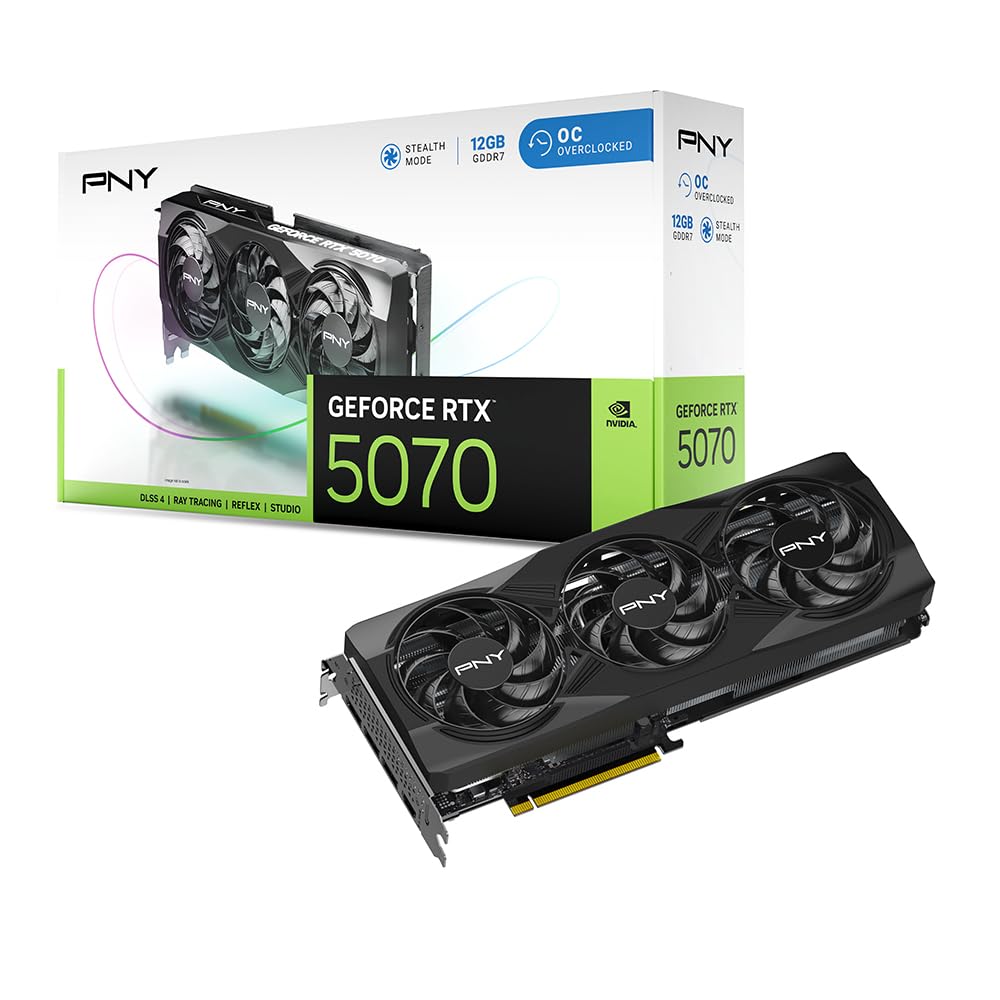
3. PNY NVIDIA GeForce RTX 5070 OC Triple Fan
A factory-overclocked 5070 that outperforms pricier rivals.
PNY brings a factory overclock to the RTX 5070 with a boost speed of 2587 MHz, slightly above the reference spec. The triple-fan cooler uses a 2.4-slot design that is more compact than the 3.6-slot ASUS TUF, meaning it fits in tighter builds while still keeping the card cool. It includes the full suite of Blackwell features: fifth-gen Tensor Cores, fourth-gen Ray Tracing Cores, and Reflex for reduced latency in competitive shooters.
Buyers upgrading from an RTX 3060 Ti report a substantial performance jump. The card “works as advertised” and delivers reliable 1440p performance. One owner found it worked great with a 7800X3D CPU, though they noted a screen flicker issue with certain nVidia drivers that required a driver rollback. That is a known edge case with AMD CPU pairings, not a card defect. The bundled 16-pin power cable is included, so you do not need a new PSU if you have the right connectors.
The downside is that of the 5070 class: 12GB VRAM limits future 4K potential, and the PNY card has a smaller review base than the Gigabyte options. A few buyers received damaged units, which is a risk with any GPU purchase. The card itself is solid when it arrives in good condition.
Budget Pick: If you want the factory OC from the start and a compact triple-fan design, the PNY delivers. Check your driver version if pairing with an AMD CPU to avoid flicker.
Good For: Gamers on a strict budget who want a pre-overclocked 5070 with a proven cooler design.
Not Ideal If: You need the reliability of a larger review base — stick with Gigabyte’s 5070 options.
4. NVIDIA GeForce RTX 5070 Founders Edition
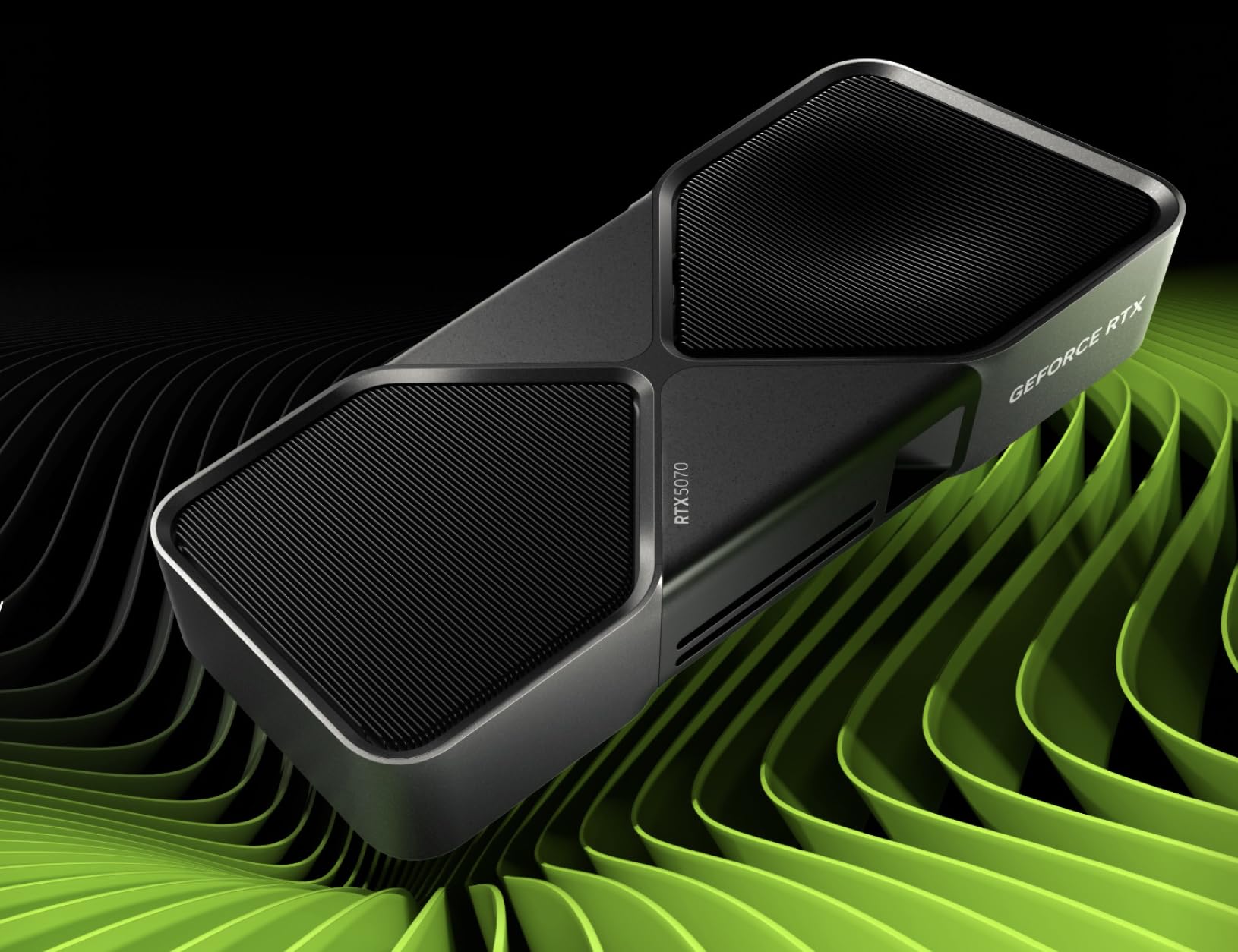
The slimmest Blackwell card that still packs a 1440p punch.
The Founders Edition is NVIDIA’s own design, and at just 2.36 inches deep, it is the most compact RTX 5070 on the market. That slim profile makes it the easiest to fit into tight cases or ITX builds where every millimeter counts. It is also the lightest 5000 series card here at roughly 2.2 pounds — no support bracket required. The graphite grey finish is understated and professional, blending into any build without RGB flash.
Performance is right where it should be for a 5070. The 2.51 GHz memory clock and 12GB GDDR7 handle 1440p gaming easily. Reviewers point out it “performs extremely well” and arrives in a factory-sealed box. One owner who undervolted the card noted it would “perdure for ages,” meaning stable long-term performance with reduced power draw. The FE model uses NVIDIA’s own cooler which is adequate for the 5070’s thermal load but won’t match the triple-fan aftermarket cards under sustained heavy loads.
The biggest issue is availability and pricing. The FE is often listed above MSRP by third-party sellers, and at those inflated prices it competes against the Gigabyte WINDFORCE which has a superior cooler. You are paying for the compact form factor and the Founders Edition badge, not better performance.
Slim Advantage: If you need the smallest possible 5000 series card for an ITX or compact build, the FE is your only real choice at the 5070 tier.
Best For: Small form factor builds that cannot fit a triple-fan card. The compact dimensions are genuinely unique.
Avoid If: You have standard case space — the Gigabyte WINDFORCE runs cooler and costs the same or less.
5. ZOTAC Gaming GeForce RTX 5070 Ti Solid CORE OC

The bridge between 1440p dominance and 4K viability.
The ZOTAC 5070 Ti sits in a critical gap — it offers 16GB of GDDR7 on a 256-bit bus, the same VRAM capacity as the 5080, but at a lower price point. That memory configuration makes it a genuine 4K contender, not just a 1440p card. The IceStorm 3.0 cooling system uses three 90mm BladeLink fans and a vapor chamber to keep the card at around 65°C under heavy load, with one owner noting they “never saw it hit 70°C.” The Spectra RGB lighting adds a touch of customizability without being obnoxious.
The performance uplift over the standard 5070 is noticeable. The 256-bit memory bus versus the 5070’s 192-bit gives it more bandwidth for 4K textures. Buyers upgrading from an RTX 2070 report a “huge” difference in design, rendering, and engineering software. The card includes a bundled GPU support stand, which is a welcome addition given its weight. It is compatible with DisplayPort 2.1b and HDMI 2.1b, making it 8K-ready for future displays.
The drawback is that some buyers found the cooler design on this “Solid CORE” revision to be less effective than the original Solid model. One unverified review called it “deceptive” with a smaller heatsink. The card is also long at 11.9 inches — not as massive as the ASUS TUF, but worth checking against your case clearance.
The Middle Ground: If you want 16GB of VRAM for light 4K gaming or productivity work but cannot justify the 5080 price, this is the card. The vapor chamber cooling works well — max temps around 73°C under sustained load.
Reach For This If: You game at 1440p with one eye on 4K, or you do creative work that benefits from 16GB VRAM. The 5070 Ti is the best value in the 16GB tier.
Pass If: 4K high-refresh is your goal — the 5080’s extra CUDA cores are worth the premium for that use case.
6. GIGABYTE GeForce RTX 5080 Gaming OC 16G

The overclocker’s playground that pushes 3150 MHz without breaking a sweat.
The Gigabyte Gaming OC is built for enthusiasts who want to squeeze every last frame out of their 5080. The factory boost clock is 2.73 GHz, but shoppers say easy overclocks to 3150 MHz on the GPU core and 3000 MHz on the memory using Gigabyte’s utility. That is a 15% overclock from stock, turning an already fast card into a benchmark crusher. At 13.46 inches long, it is just a hair shorter than the ASUS TUF and requires the same kind of case commitment.
Thermals are excellent for a card running this much power. Buyers report full-load temperatures around 60°C to 65°C, even in warm rooms. The WINDFORCE cooling system with three fans stays quiet enough that one buyer mentioned their AIO pump was louder. The 16GB GDDR7 on a 256-bit bus handles 4K gaming easily — one owner achieved 240 FPS at 4K on a high-refresh HDR monitor using DLSS 4.5. It also includes a versatile GPU holder bracket to prevent sag, which the heavier 5080s need.
The value proposition is strong if you buy at the right price — several owners secured it, calling it “worth it.” At current inflated pricing, it competes with the ASUS TUF, which has a slightly better cooler and military-grade components. A few isolated reports mention random crashes, but these appear to be unit-specific rather than a design flaw.
Overclocker’s Dream
- Easy stable overclock to 3150 MHz GPU / 3000 MHz memory confirmed by buyers
- Excellent thermals: stays around 60-65°C under full load even in warm rooms
- “Super quiet” operation — one buyer says their AIO pump is the louder component
- Includes a versatile GPU holder bracket — essential for a card this size
The Catch
- Massive 13.46-inch length requires a full-tower or large mid-tower case
- RGB lighting is understated — owners mention it is “lackluster” compared to premium RGB cards
- Random crash reports in a small number of units — inspect on arrival
Your Pick If: You plan to overclock your 5080 and want a card that handles the extra heat easily. The Gigabyte Gaming OC is the best overclocker in the 5080 lineup.
skip it if: You prefer a plug-and-play experience with no tweaking — the ASUS TUF is quieter at stock settings.
7. NVIDIA GeForce RTX 5080 Founders Edition

The reference 5080 that proves NVIDIA’s own design is still a contender.
The Founders Edition 5080 is NVIDIA’s reference card, and at 2806 MHz boost clock it actually runs slightly faster than ASUS’s 2730 MHz TUF card from the start. Despite its compact appearance, it delivers real 4K performance — reviewers point out 200+ FPS in most games and 120-240 FPS at 1440p with ray tracing enabled. One owner upgrading from an RTX 3080 Founders Edition called it a “wonderful” upgrade that runs cool even under graphically demanding games.
The FE design is a marvel of engineering. It does not include a support bracket but buyers confirm it does not need one — it is lightweight despite its bulk and stays secure in the PCIe slot. The card supports NVIDIA Reflex 2 with Frame Warp and full ray tracing with neural rendering. It uses a PCI Express 4.0 interface, not 5.0, but that makes no real-world difference for gaming — PCIe 4.0 bandwidth is not saturated by current GPUs. The double-flow-through cooler exhausts air out the back, which keeps your case interior cooler than cards that recirculate hot air.
The price is the sticking point. Like all 5080s, the FE is often listed well above its launch MSRP on Amazon. It is a fantastic card at retail, but at scalper prices it is harder to recommend over the Gigabyte Gaming OC or ASUS TUF, which offer similar or better cooling for comparable money. The FE’s main advantage is aesthetic purity — it is the cleanest-looking 5080 in any build.
Why It Shines
- Highest base boost clock among 5080s at 2806 MHz — slightly outpaces the ASUS TUF
- Excellent build quality: buyers call it “fantastic” and “well-made”
- No support bracket needed — lightweight and secure in the slot
- Double-flow-through cooler exhausts heat out of the case, reducing internal temps
The Catch
- Typically priced well above MSRP by third-party sellers on Amazon
- PCI Express 4.0 instead of 5.0 — negligible impact today but a spec-sheet difference
- Heatsink is smaller than aftermarket 5080s — may run warmer under sustained 4K load
Your Card If: You want a reference design that is clean, well-built, and performs from the start with the highest stock clock among 5080s. It is the best choice for purists and those who love the FE aesthetic.
Consider Alternatives If: Price is a concern — the ASUS TUF or Gigabyte Gaming OC often offer better value at similar or lower street prices.
8. NVIDIA RTX PRO 6000 Blackwell

The 96GB workstation that runs AI models a 5090 cannot touch.
This is not a gaming card — it is a professional workstation GPU with 96GB of GDDR7 ECC memory and a mind-bending 1.8 TB/s bandwidth. The RTX PRO 6000 is designed for AI model training, large-scale 3D rendering, scientific simulation, and data science. It packs fourth-gen ray tracing cores and fifth-gen tensor cores. If you are training 70B-parameter LLMs locally or running complex CAD workflows, this is the card that does it without swapping to cloud infrastructure.
The double-flow-through cooling design handles the 600W power load efficiently. The card occupies a standard 2-slot space and uses a single 600W connector. It supports PCIe Gen 5, doubling the bandwidth of Gen 4 for data-intensive tasks. DisplayPort 2.1 output means it can drive 8K displays at 240 Hz or even 16K at 60 Hz for precision visualization work. Multi-Instance GPU (MIG) technology lets you split the card into isolated instances, running multiple workloads concurrently.
The downsides are significant for anyone not in the workstation market. The price is astronomical — this is a tool for professionals, not consumers. The heat output is substantial, and one buyer warns that “hot air outputs into the case interior” rather than the back, requiring extra case fans for push-pull airflow. There are also reports of a reseller requiring malware for warranty service, which is a seller issue, not a card issue, but worth knowing before you buy.
Workstation Beast: “Awesome card if you can afford it!” — one buyer runs Battlefield 6 at 212 FPS maxed out while also using it for AI work with Ollama and CUDA drivers. It does it all, but it costs accordingly.
Buy This If: You need 96GB of VRAM for AI training, large-scale rendering, or professional simulation. This is the most powerful workstation GPU money can buy.
Do Not Buy If: You are a gamer — the RTX 5080 or 5090 delivers better gaming performance for a fraction of the price. This card exists for professionals who bill by the render minute.
Understanding the Specs
VRAM and Memory Bandwidth
Video memory (VRAM) determines how much texture data and frame information your GPU can hold at once. The RTX 5000 series uses GDDR7 memory, which is faster than the GDDR6X found on earlier cards. Cards with 12GB are perfect for 1440p gaming, while 16GB gives you breathing room for 4K textures and future game engines. The 96GB on the RTX PRO 6000 is for AI model weights, not frame buffers. Memory bandwidth, measured in GB/s, matters more at higher resolutions — the 5080 has a 256-bit bus while the 5070 has a 192-bit bus, which is why the 5080 pulls ahead at 4K.
DLSS 4 and Multi Frame Generation
DLSS (Deep Learning Super Sampling) is NVIDIA’s AI-powered upscaling technology. DLSS 4 adds Multi Frame Generation, which uses AI to generate up to three extra frames between each traditionally rendered frame. This can dramatically boost frame rates — from 60 FPS to 200+ FPS in supported titles. It works best when your base frame rate is already smooth (above 30 FPS) and is less effective below that threshold. The technology requires game support, but adoption across major titles is growing fast. It is not a substitute for raw performance, but it is the reason an RTX 5070 can deliver 180Hz 1440p gaming.
FAQ
Is the RTX 5070 enough for 4K gaming?
What is the difference between the RTX 5070 and RTX 5070 Ti?
Will a 5000 series GPU fit in my case?
Do I need a new power supply for a 5000 series GPU?
What is DLSS 4 and do I need it?
How do I tell which cooler design is better?
Is the RTX 5080 worth twice the price of the RTX 5070?
Can I use an RTX 5000 series GPU for AI and machine learning?
What is SFF-ready and why does it matter?
Final Thoughts: The Verdict
For the majority of shoppers, the best 5000 series gpu is the ASUS TUF Gaming RTX 5080 because it delivers flawless 4K performance with the quietest operation in the lineup — idle at 25°C and gaming under 60°C with fans you barely hear. If you want the best value and game at 1440p, grab the Gigabyte RTX 5070 WINDFORCE — buyers confirm it maxes out 1440p at 180Hz without breaking a sweat. And for professional AI workloads that need massive VRAM, the NVIDIA RTX PRO 6000 with 96GB of GDDR7 is in a league of its own. The crowd favorite — the ASUS TUF — leads the 5080 tier on cooling and build quality, while the Gigabyte 5070 wins the value crown for 1440p gamers who want Blackwell performance without the premium price.
How We Picked
We do not accept paid placement. Every pick is matched to a real buyer and a real use-case; we do not hands-on test units.
Sources & Methodology
Specifications: manufacturer listings and product documentation. Review insights: verified customer reviews, as of July 2026. Pricing: not shown on this page (it changes often); check the current price via the retailer link.
As an Amazon Associate, WellFizz earns from qualifying purchases. This does not affect which products we feature.
Related Guides

Mo Maruf
I created WellFizz to bridge the gap between vague wellness advice and actionable solutions. My mission is simple: to decode the research and give you practical tools you can actually use.
Beyond the data, I am a passionate traveler. I believe that stepping away from the screen to explore new environments is essential for mental clarity and physical vitality.