Our readers keep the lights on and my smoothie glass nicely filled. As an Amazon Associate, I earn from qualifying purchases.
Specs are compiled from manufacturer listings and verified buyer reviews and can change over time — please confirm the key details on the product page before buying.
The i7-8700K runs hot — that is its nature, especially if you push it past stock speeds. You need a cooler that keeps thermal throttling off the table without turning your desktop into a jet engine. This guide analyzes real-spec performance and owner experiences to find coolers that handle a 95W+ chip under sustained loads.
I’m Mohammad Maruf — the founder and writer behind WellFizz. This guide is built by comparing the manufacturers’ published specifications and the patterns across verified customer reviews, so you get each pick’s real strengths and trade-offs instead of marketing spin.
The right cooler for i7 8700k depends on if you want whisper-quiet air cooling or the headroom of a liquid AIO for heavy overclocking — and we have found the best options at every tier.
Our Picks at a Glance



How To Choose The Best Cooler For I7 8700K
Your i7-8700K can pull well over its 95W TDP when it boosts or when you overclock. A cooler that looks good on paper may fail under a sustained all-core load. Here are the three things to get right.
Air vs. Liquid: The Real Trade-Off
A high-end dual-tower air cooler (like the Thermalright PS120SE or Noctua NH-D15) can match or beat many 240mm liquid coolers, with zero risk of a pump failure or leak. The catch is size — these towers are tall and wide, and they can block your first RAM slot. Liquid coolers, especially 360mm AIOs, move the heat to the radiator at the top or front of your case, which frees up space around the socket. They also tend to look cleaner with RGB fans. For the i7-8700K, a quality air cooler is enough for moderate overclocking; a 360mm AIO gives you the headroom for aggressive voltage pushing.
Fan Noise and Pump Whine
A cooler that keeps your CPU at 65°C but sounds like a vacuum cleaner is a poor trade-off. Check the noise level in decibels (dB) — anything under 30 dB is generally quiet, while 35 dB is noticeable. Liquid coolers add another sound source: the pump. Some pumps have a high-pitched whine that can be annoying. The reviews data on the be quiet! and Arctic coolers show that quiet operation is a top reason buyers pick them.
Socket Compatibility and Clearance
Your i7-8700K uses the LGA1151 socket. Every cooler here supports that, but you must check RAM clearance. A dual-tower air cooler often overhangs the RAM slots; you might need low-profile memory or be willing to shift the front fan up. For liquid coolers, the radiator thickness (some are 38mm thick like the Arctic) can conflict with tall RAM heat spreaders or the case top. Measure your case’s interior width before buying a 154mm+ tall air tower.
Quick Comparison
| Model | Best For | Type | Fan Speed (RPM) | Noise Level (dB) | Amazon |
|---|---|---|---|---|---|
| Thermalright PS120SE★ Best Overall | Best Overall Air Cooler | Air / Dual-Tower | 1650 rpm | 25.6 dB | Amazon |
| Thermalright PS120SE ARGBBest Value | Best Value with Lighting | Air / Dual-Tower | 1500 rpm | 25.6 dB | Amazon |
| be quiet! Pure Rock Pro 3Silent Performer | Silent Mid-Range Air | Air / Dual-Tower | 2000 rpm | 34.8 dB | Amazon |
| be quiet! Pure Loop 2 FX 360mm | Quiet 360mm AIO | Liquid / 360mm | 1800 rpm | 34 dB | Amazon |
| ARCTIC Liquid Freezer III Pro 280 | High-Performance 280mm | Liquid / 280mm | 2500 rpm | 0.08 sones | Amazon |
| Cooler Master 360L Core | Best Value 360mm AIO | Liquid / 360mm | 1800 rpm | 27.2 dB | Amazon |
| Noctua NH-D15 G2 | Premium Air (King) | Air / Dual-Tower | 1500 rpm | 24.8 dB | Amazon |
| ASUS ROG Strix LC III 360 | Premium AIO with LCD | Liquid / 360mm | — | 36 dB | Amazon |
| NZXT Kraken Elite 360 RGB | Best Display AIO | Liquid / 360mm | 2800 rpm | 33.88 dB | Amazon |
In‑Depth Reviews
1. Thermalright PS120SE CPU Air Cooler
Our pick — over 4.5★ from 450+ verified ratings; the strongest balance of quality and price.
Dual-tower air cooling that makes a Ryzen 9 5950X and i7-4790K owners equally happy.
This is the cooling performance leader by a clear margin — buyers report it dropped one i7-4790K from 98°C to under 65°C, which is a staggering improvement. The 66.17 CFM airflow from its dual 120mm fans (with a top speed of 1650 rpm) is more than adequate for the i7-8700K, even with a modest overclock. The noise level, at 25.6 dB, is genuinely quiet — you hear your case fans long before you hear this cooler.
The catch is the installation. While the included brackets support LGA1151 perfectly, the dual-tower design is large and requires you to access the back of the motherboard. The reviews pages sum it up: “great cooler, but prepare yourself for the installation.” You will want to mount the cooler before you put the motherboard in your case, and you should connect the fan Y-adapter beforehand. The included thermal paste may arrive dried out on some units, so having your own tube handy is wise.
The crowd favorite — 4.8 stars across nearly 500 ratings — makes this an easy decision if you want maximum thermal headroom without the leak risk of a liquid cooler. It is also notably smaller than the Noctua NH-D15, making it a better fit for mid-tower cases.
Why Owners Love It
- Cooling performance praised most — 63 owners single it out
- Drops load temps by 30°C+ on hot chips
- Whisper-quiet at 25.6 dB under normal loads
What to Watch
- Installation is finicky; plan to mount before the motherboard goes in the case
- Included thermal paste has been reported as dried on some units
Reach for it if: You want the best possible air cooling for the i7-8700K without spending more than necessary.
Think twice if: You want simple drop-in installation or have a very small case — this cooler requires preparation.
2. Thermalright PS120SE ARGB CPU Air Cooler
Almost identical cooling performance to the top pick, with 17 ARGB lighting modes as the bonus.
The difference between this and the standard PS120SE is the lighting — you get high-brightness LED atomized fan blades that produce soft, diffused ARGB effects. Everything else is effectively the same dual-tower architecture, the same 66.17 CFM airflow, and the same 25.6 dB noise floor. The maximum fan speed is slightly lower at 1500 rpm compared to the non-ARGB version’s 1650 rpm, but the real-world cooling difference on an i7-8700K is negligible.
What wins people over is the value. The PS120SE ARGB has over 970 ratings, making it among the most-reviewed air coolers in its class. Owners mention it keeps a Ryzen 9 9950X3D at a maximum of 78°C under load, a chip that runs significantly hotter than the 8700K. The ARGB lighting can produce up to 17 different effects and is synchronized through your motherboard’s 5V 3-pin header. The one quirk is that the front fan may partially block tall RAM sticks, but you can shift the fan upward by a few millimeters without any performance loss.
The installation is described as straightforward by most, though the thermal paste is very thick and requires a generous pea-sized application.
Where It Shines
- Cooling performance is the most-praised feature — 181 owners mention it
- ARGB lighting is soft and diffused, not harsh
- Excellent value for a dual-tower with lighting
The Minor Catch
- Front fan may interfere with 4 RAM sticks; a slight fan shift solves it
- Fan speed peaks at 1500 rpm vs. 1650 rpm on the non-ARGB version
Grab it if: You want the same dual-tower performance as the top pick but with customizable ARGB lighting.
Think twice if: Every rpm counts for your overclock — the non-ARGB version spins 10% faster.
3. be quiet! Pure Rock Pro 3 Black
A heavy 1400-gram dual-tower that pairs exceptional build quality with near-silent operation on the 8700K.
be quiet! lives up to its name here. The Pure Rock Pro 3 uses a Pure Wings 3 120mm PWM fan with tune blade angles that deliver high air pressure without the whoosh. At 34.8 dB, it is not the quietest on paper, but owners consistently describe it as “whisper quiet at idle” and “barely audible under load.” The nickel-plated copper base plus 6 heat pipes with HDT (Heat-pipe Direct Touch) technology means heat transfers efficiently from the i7-8700K’s IHS into the aluminum fin stack.
The build quality is where this cooler stands out. At 1400 grams, it is heavier than the Thermalright options, and it feels dense and premium in the hand. The offset design increases RAM and VRM cooler compatibility — you can adjust the front fan height if your RAM has tall heat spreaders. Customers note it handles a Ryzen 9 5900XT without throttling, which means it is overkill for the 8700K in the best possible way.
The one real caveat is case clearance. At 6.1 inches tall and 5.47 inches wide, it is a large cooler. Make sure your case has at least 160mm of CPU cooler clearance. Some buyers found the heat pipes overhang the RAM slots, so check your motherboard layout.
What Impresses Most
- Cooling performance praised by 12 owners for high-end CPUs
- Build quality is the second most-praised aspect — 11 owners note it
- Extremely quiet operation even under load
Before You Buy
- Very large — verify case clearance before purchase
- Heat pipes over RAM may cause fitment issues on some boards
Choose this if: Build quality and whisper-quiet operation matter more than the lowest possible price.
Avoid if: You have a compact mid-tower case — this cooler needs room.
4. be quiet! Pure Loop 2 FX 360mm

A 360mm liquid cooler that keeps an overclocked i7-9700K at 5 GHz happy — and looks great doing it.
For the i7-8700K, this AIO is more than enough. One owner reports it cools an i7-9700K overclocked to 5 GHz without breaking a sweat, which places the 8700K comfortably within its cooling envelope. The 360mm radiator is paired with three Light Wings 120mm PWM high-speed fans that deliver both strong air pressure and vibrant ARGB illumination. The doubly decoupled PWM pump is designed to minimize vibration and noise, though a few owners note a slight high-pitched whine at certain pump speeds.
What sets this cooler apart is the built-in refill port and the included extra coolant. be quiet! recommends a top-up after two years, which extends the life of the cooler significantly compared to sealed AIOs. The ARGB-PWM-Hub included in the box syncs up to six ARGB components, making cable management simpler. Reviewers point out the installation is straightforward, and the pump-on-tube design, while a bit unusual, does not cause issues. Performance is strong: one owner saw idle temps of 38°C on a Ryzen 9800X3D.
The noise level is rated at 34 dB, which is moderate. Most owners consider it quiet, but the pump can produce a noticeable tone at higher speeds.
Key Strengths
- Cools overclocked i7-9700K at 5 GHz effectively
- Refillable design with extra coolant extends lifespan
- Three RGB fans with included hub for easy sync
Consider This
- Pump has a moderate noise floor at higher speeds
- Requires a case with 360mm radiator support
Best for: Users who want liquid cooling with the option to refill the loop, reducing long-term waste.
skip it if: You want the absolute quietest pump at all fan speeds.
5. ARCTIC Liquid Freezer III Pro 280

A rare 280mm AIO with a 38mm thick radiator that shaved 20°C off an owner’s CPU load temps.
The ARCTIC Liquid Freezer III Pro 280 is not your typical AIO. The radiator is 38mm thick — significantly thicker than the standard 27mm — which gives it more surface area for heat dissipation. For the i7-8700K, this means you get cooling performance that rivals many 360mm AIOs but in a more compact form factor. Shoppers say dramatic improvements: one upgraded from a 240mm cooler and saw load temps drop from 90-95°C to 60-70°C on a Ryzen 9850X3D. Another owner saw gaming temps on a 9700X drop from 84°C to 50-51°C. The included P14 PRO fans spin up to 2500 rpm for maximum performance.
The cooler also includes an integrated VRM fan — a PWM-controlled fan that cools the voltage converters around your CPU socket. This is a unique feature that can help with stability during overclocking. The cold plate features an offset mounting design for both Intel and AMD, allowing you to shift the cold plate center towards the CPU’s hotspot. The integrated cable management is neat: the PWM cables for the radiator fans run inside the hose sleeving, so only a single visible cable connects to the motherboard.
The main trade-off is fitment. The 38mm radiator is very thick and may not fit in the top of many cases — some owners install it as a front intake with reversed fans. The AMD bracket installation can be difficult, requiring more force than comfortable. The VRM fan has a tendency to ramp up audibly. At 0.08 sones (a different unit than dB), the noise is generally well-controlled, but it is not silent.
Where It Excels
- Cooling performance is the top praise — 88 owners mention it
- 38mm thick radiator provides excellent heat dissipation
- Integrated VRM fan and offset mounting for hotspot coverage
Installation Challenges
- Thick radiator rarely fits top-mount; needs front intake or large case
- AMD bracket installation is stiff and requires force
Pick this for: Maximum cooling in a 280mm form factor — nearly equals 360mm AIOs in a smaller footprint.
Think twice if: You want a drop-in top-mount installation in a standard mid-tower.
6. Cooler Master 360L Core

A 360mm AIO that drops CPU temps significantly — and the RGB lighting looks phenomenal in a glass case.
For the i7-8700K, the Cooler Master 360L Core is a value-packed entry into liquid cooling. The Gen S Dual Chamber Pump uses an improved copper base design that targets hot spots with greater precision, while also increasing water flow and pressure. The included CryoFuze thermal paste has a conductivity of 14W/mK and a temperature stability range from -50°C up to 250°C, which is excellent for overclocking. The three 120mm ARGB PWM fans spin at up to 1800 rpm and produce 71.93 CFM of airflow with a noise rating of 27.2 dB — quiet enough for most setups.
Owners are impressed with the temperature drops. One reviewer noted significant cooling improvements over their old air cooler, with quiet operation even under load. The RGB lighting is described as “phenomenal” and syncs easily with motherboard software. The installation is straightforward with an 8-screw mounting system. However, there is a fitment catch: the radiator is slightly longer than 360mm because of the end reservoirs, so verify your case has extra clearance. Some owners needed slight modifications for a tight fit.
The 360L Core has over 830 ratings and sits at 4.6 stars, making it a crowd-favorite AIO. Cooling performance is the most-praised aspect, with 107 owners mentioning it. The main downside is that some users report fitment issues with AM4 sockets, though the i7-8700K’s LGA1151 compatibility is confirmed.
Strong Points
- Cooling performance is praised by 107 owners
- CryoFuze thermal paste included with excellent conductivity
- RGB lighting is bright and customizable
One Note
- Radiator extends past 360mm; verify your case clearance
- Some users report fitment quirks with AM4 sockets
Reach for this if: You want a 360mm AIO with great RGB and cooling performance at an entry-level price.
Look elsewhere if: Your case has tight clearance for the radiator length.
7. Noctua NH-D15 G2

The legendary air cooler reborn — 8 heat pipes and 20% more surface area keep the i7-8700K ice cold.
The Noctua NH-D15 G2 is the second generation of the most iconic air cooler ever made. It uses 8 heat pipes (up from 6 in the original) and has 20% more surface area, plus two state-of-the-art NF-A14x25r G2 140mm fans. For the i7-8700K, this is overkill in the best sense. The cooler handles a 250W Intel Core Ultra 9 285K at 80-81°C under full load, which means your 95W (or even overclocked) 8700K will never break a sweat. The noise level is astonishingly low at 24.8 dB — owners say the fans are silent at idle and barely audible under load.
The G2 version includes the SecuFirm2+ mounting system with a Torx-based screwdriver included in the box, making installation easier than the original. It also includes superior NT-H2 thermal paste. The offset design with recessed lower fins clears the top PCIe x16 slot on most current motherboards. RAM clearance is 59mm in single-fan mode (when you use only the middle fan) or 32mm with both fans. The cooler is massive at 6.61 inches tall and 5.91 inches wide — it absolutely requires a full-size case.
The main downside is the price and the value perception. The reviews show “value for money” is a mixed aspect — some owners say it is worth every penny, others find it pricey for an air cooler when cheaper AIOs exist. But for pure, reliable, zero-maintenance air cooling, the standout is it. The 6-year warranty and Noctua’s legendary support add long-term confidence.
The Standout Features
- Cooling performance is the top praise — 59 owners mention it
- Quiet operation is the second most-praised aspect — 31 owners note it
Honest Trade-Offs
- Massive size — requires a full-size case
- RAM clearance with both fans is only 32mm
Choose this if: You want the absolute best air cooling possible and plan to keep this cooler for multiple builds.
Avoid if: You are on a tight budget or have a mid-tower case — this cooler demands space.
8. ASUS ROG Strix LC III 360 ARGB LCD
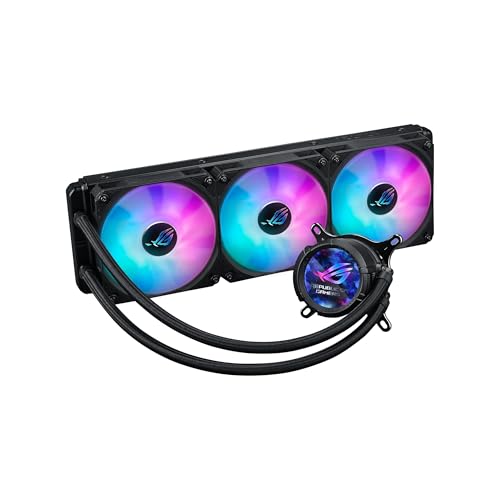
A 2.1-inch IPS LCD on the pump shows your CPU temps in real-time — cooling with a conversation piece.
The ASUS ROG Strix LC III 360 is as much a visual centerpiece as it is a cooler. The pump features a 480×480 resolution IPS LCD with a 60 Hz refresh rate and 360° rotatable graphics. You can display system stats (CPU temp, GPU temp), custom art, or even a GIF. The display is bright and vibrant, and being able to glance at your CPU and GPU temps without opening any software is genuinely useful. For the i7-8700K, the cooling is handled by the Asetek Gen7 v2 pump, which uses a sturdy motor for high flow rates and pressure.
The included Premium ROG ARGB fans feature high airflow, tune acoustics, and 0dB technology — meaning the fans stop spinning completely at low loads, making your build silent during light use. The reinforced, sleeved tubing adds durability. Buyers report that after software configuration, the fans are quiet and the CPU idle temperature is halved compared to stock coolers. The installation is straightforward, and the ASUS Armoury Crate software simplifies driver updates and lighting control.
The noise level is rated at 36 dB, which is the highest on this list. Some owners mention the fans produce a noticeable whoosh under load, though the cooling performance is outstanding. The price is premium, and the cooler is designed to complement an ASUS ROG motherboard aesthetically.
Where It Excels
- Cooling performance is the most-praised aspect — 13 owners mention it
- Display is bright, sharp, and shows real-time CPU/GPU temps
- Fans can stop completely at low loads for near-silent operation
Consider Before Buying
- Noise level of 36 dB is the highest here
- RGB ecosystem works best with an ASUS ROG motherboard
Best for: Enthusiasts who want a beautiful display and premium build quality matched with ASUS ROG components.
Skip if: You are sensitive to fan noise or are not invested in the ASUS ecosystem.
9. NZXT Kraken Elite 360 RGB 2024

A 2.72-inch IPS LCD with 640×640 resolution — the biggest and sharpest display pump on the market.
The NZXT Kraken Elite 360 RGB 2024 takes the pump display to the next level. The 2.72-inch IPS LCD has a 640×640 resolution, a 60 Hz refresh rate, an ultra-bright 690 cd/m² backlight, and 24-bit color. It is large, razor-sharp, and extremely bright — you can display GIFs, system performance data, or even integrate with Google Photos, Spotify, and YouTube. The RGB LED ring around the display can sync with on-screen content for a cohesive look. For the i7-8700K, the custom-designed NZXT Turbine pump delivers high flow rate and head pressure, resulting in a claimed 10% performance boost with less noise compared to previous generations.
The included F360 RGB Core fans are single-frame designs that provide optimal airflow and vibrant lighting with a clean, integrated look. The installation is made simple with pre-applied thermal paste, a single breakout cable, and tool-free mounting brackets. Owners mention the Kraken Elite keeps a Ryzen 9 9950X3D at stable idle temperatures of 44-45°C and performs well under heavy load. The CAM software is described as stable and easy to use for controlling the display and fan curves.
There is one notable reliability concern: a small number of customers note pump failures within a few months. While this is a minority, it is worth noting. The cooler also has a maximum fan speed of 2800 rpm, which is very high, though the noise level at 33.88 dB is reasonable. At this premium price point, you are paying for the display and ecosystem as much as the cooling performance.
Top Highlights
- Best pump display on the market — 2.72-inch, 640×640 resolution
- Custom NZXT Turbine pump with 10% performance boost
- Pre-applied thermal paste and tool-free mounting for easy install
Be Aware
- Occasional pump reliability issues reported by a minority of owners
- Premium price — you pay for the screen and brand
Choose if: You want the best-looking AIO on the market with a large, customizable display and vibrant RGB.
Think twice if: Long-term reliability is a top concern or you want the best performance per dollar.
10. Cooler Master 360L Core
A 360mm AIO that drops CPU temps significantly — and the RGB lighting looks phenomenal in a glass case.
For the i7-8700K, the Cooler Master 360L Core is a value-packed entry into liquid cooling. The Gen S Dual Chamber Pump uses an improved copper base design that targets hot spots with greater precision, while also increasing water flow and pressure. The included CryoFuze thermal paste has a conductivity of 14W/mK and a temperature stability range from -50°C up to 250°C, which is excellent for overclocking. The three 120mm ARGB PWM fans spin at up to 1800 rpm and produce 71.93 CFM of airflow with a noise rating of 27.2 dB — quiet enough for most setups.
Owners are impressed with the temperature drops. One reviewer noted significant cooling improvements over their old air cooler, with quiet operation even under load. The RGB lighting is described as “phenomenal” and syncs easily with motherboard software. The installation is straightforward with an 8-screw mounting system. However, there is a fitment catch: the radiator is slightly longer than 360mm because of the end reservoirs, so verify your case has extra clearance. Some owners needed slight modifications for a tight fit.
The 360L Core has over 830 ratings and sits at 4.6 stars, making it a crowd-favorite AIO. Cooling performance is the most-praised aspect, with 107 owners mentioning it. The main downside is that some users report fitment issues with AM4 sockets, though the i7-8700K’s LGA1151 compatibility is confirmed.
Strong Points
- Cooling performance is praised by 107 owners
- CryoFuze thermal paste included with excellent conductivity
- RGB lighting is bright and customizable
One Note
- Radiator extends past 360mm; verify your case clearance
- Some users report fitment quirks with AM4 sockets
Reach for this if: You want a 360mm AIO with great RGB and cooling performance at an entry-level price.
Look elsewhere if: Your case has tight clearance for the radiator length.
11. Noctua NH-D15 G2
The legendary air cooler reborn — 8 heat pipes and 20% more surface area keep the i7-8700K ice cold.
The Noctua NH-D15 G2 is the second generation of the most iconic air cooler ever made. It uses 8 heat pipes (up from 6 in the original) and has 20% more surface area, plus two state-of-the-art NF-A14x25r G2 140mm fans. For the i7-8700K, this is overkill in the best sense. The cooler handles a 250W Intel Core Ultra 9 285K at 80-81°C under full load, which means your 95W (or even overclocked) 8700K will never break a sweat. The noise level is astonishingly low at 24.8 dB — owners say the fans are silent at idle and barely audible under load.
The G2 version includes the SecuFirm2+ mounting system with a Torx-based screwdriver included in the box, making installation easier than the original. It also includes superior NT-H2 thermal paste. The offset design with recessed lower fins clears the top PCIe x16 slot on most current motherboards. RAM clearance is 59mm in single-fan mode (when you use only the middle fan) or 32mm with both fans. The cooler is massive at 6.61 inches tall and 5.91 inches wide — it absolutely requires a full-size case.
The main downside is the price and the value perception. The reviews show “value for money” is a mixed aspect — some owners say it is worth every penny, others find it pricey for an air cooler when cheaper AIOs exist. But for pure, reliable, zero-maintenance air cooling, the standout is it. The 6-year warranty and Noctua’s legendary support add long-term confidence.
The Standout Features
- Cooling performance is the top praise — 59 owners mention it
- Quiet operation is the second most-praised aspect — 31 owners note it
Honest Trade-Offs
- Massive size — requires a full-size case
- RAM clearance with both fans is only 32mm
Choose this if: You want the absolute best air cooling possible and plan to keep this cooler for multiple builds.
Avoid if: You are on a tight budget or have a mid-tower case — this cooler demands space.
12. ASUS ROG Strix LC III 360 ARGB LCD
A 2.1-inch IPS LCD on the pump shows your CPU temps in real-time — cooling with a conversation piece.
The ASUS ROG Strix LC III 360 is as much a visual centerpiece as it is a cooler. The pump features a 480×480 resolution IPS LCD with a 60 Hz refresh rate and 360° rotatable graphics. You can display system stats (CPU temp, GPU temp), custom art, or even a GIF. The display is bright and vibrant, and being able to glance at your CPU and GPU temps without opening any software is genuinely useful. For the i7-8700K, the cooling is handled by the Asetek Gen7 v2 pump, which uses a sturdy motor for high flow rates and pressure.
The included Premium ROG ARGB fans feature high airflow, tune acoustics, and 0dB technology — meaning the fans stop spinning completely at low loads, making your build silent during light use. The reinforced, sleeved tubing adds durability. Buyers report that after software configuration, the fans are quiet and the CPU idle temperature is halved compared to stock coolers. The installation is straightforward, and the ASUS Armoury Crate software simplifies driver updates and lighting control.
The noise level is rated at 36 dB, which is the highest on this list. Some owners mention the fans produce a noticeable whoosh under load, though the cooling performance is outstanding. The price is premium, and the cooler is designed to complement an ASUS ROG motherboard aesthetically.
Where It Excels
- Cooling performance is the most-praised aspect — 13 owners mention it
- Display is bright, sharp, and shows real-time CPU/GPU temps
- Fans can stop completely at low loads for near-silent operation
Consider Before Buying
- Noise level of 36 dB is the highest here
- RGB ecosystem works best with an ASUS ROG motherboard
Best for: Enthusiasts who want a beautiful display and premium build quality matched with ASUS ROG components.
Skip if: You are sensitive to fan noise or are not invested in the ASUS ecosystem.
13. NZXT Kraken Elite 360 RGB 2024
A 2.72-inch IPS LCD with 640×640 resolution — the biggest and sharpest display pump on the market.
The NZXT Kraken Elite 360 RGB 2024 takes the pump display to the next level. The 2.72-inch IPS LCD has a 640×640 resolution, a 60 Hz refresh rate, an ultra-bright 690 cd/m² backlight, and 24-bit color. It is large, razor-sharp, and extremely bright — you can display GIFs, system performance data, or even integrate with Google Photos, Spotify, and YouTube. The RGB LED ring around the display can sync with on-screen content for a cohesive look. For the i7-8700K, the custom-designed NZXT Turbine pump delivers high flow rate and head pressure, resulting in a claimed 10% performance boost with less noise compared to previous generations.
The included F360 RGB Core fans are single-frame designs that provide optimal airflow and vibrant lighting with a clean, integrated look. The installation is made simple with pre-applied thermal paste, a single breakout cable, and tool-free mounting brackets. Owners mention the Kraken Elite keeps a Ryzen 9 9950X3D at stable idle temperatures of 44-45°C and performs well under heavy load. The CAM software is described as stable and easy to use for controlling the display and fan curves.
There is one notable reliability concern: a small number of customers note pump failures within a few months. While this is a minority, it is worth noting. The cooler also has a maximum fan speed of 2800 rpm, which is very high, though the noise level at 33.88 dB is reasonable. At this premium price point, you are paying for the display and ecosystem as much as the cooling performance.
Top Highlights
- Best pump display on the market — 2.72-inch, 640×640 resolution
- Custom NZXT Turbine pump with 10% performance boost
- Pre-applied thermal paste and tool-free mounting for easy install
Be Aware
- Occasional pump reliability issues reported by a minority of owners
- Premium price — you pay for the screen and brand
Choose if: You want the best-looking AIO on the market with a large, customizable display and vibrant RGB.
Think twice if: Long-term reliability is a top concern or you want the best performance per dollar.
14. Noctua NH-D15 G2
The legendary air cooler reborn — 8 heat pipes and 20% more surface area keep the i7-8700K ice cold.
The Noctua NH-D15 G2 is the second generation of the most iconic air cooler ever made. It uses 8 heat pipes (up from 6 in the original) and has 20% more surface area, plus two state-of-the-art NF-A14x25r G2 140mm fans. For the i7-8700K, this is overkill in the best sense. The cooler handles a 250W Intel Core Ultra 9 285K at 80-81°C under full load, which means your 95W (or even overclocked) 8700K will never break a sweat. The noise level is astonishingly low at 24.8 dB — owners say the fans are silent at idle and barely audible under load.
The G2 version includes the SecuFirm2+ mounting system with a Torx-based screwdriver included in the box, making installation easier than the original. It also includes superior NT-H2 thermal paste. The offset design with recessed lower fins clears the top PCIe x16 slot on most current motherboards. RAM clearance is 59mm in single-fan mode (when you use only the middle fan) or 32mm with both fans. The cooler is massive at 6.61 inches tall and 5.91 inches wide — it absolutely requires a full-size case.
The main downside is the price and the value perception. The reviews show “value for money” is a mixed aspect — some owners say it is worth every penny, others find it pricey for an air cooler when cheaper AIOs exist. But for pure, reliable, zero-maintenance air cooling, the standout is it. The 6-year warranty and Noctua’s legendary support add long-term confidence.
The Standout Features
- Cooling performance is the top praise — 59 owners mention it
- Quiet operation is the second most-praised aspect — 31 owners note it
Honest Trade-Offs
- Massive size — requires a full-size case
- RAM clearance with both fans is only 32mm
Choose this if: You want the absolute best air cooling possible and plan to keep this cooler for multiple builds.
Avoid if: You are on a tight budget or have a mid-tower case — this cooler demands space.
15. ASUS ROG Strix LC III 360 ARGB LCD
A 2.1-inch IPS LCD on the pump shows your CPU temps in real-time — cooling with a conversation piece.
The ASUS ROG Strix LC III 360 is as much a visual centerpiece as it is a cooler. The pump features a 480×480 resolution IPS LCD with a 60 Hz refresh rate and 360° rotatable graphics. You can display system stats (CPU temp, GPU temp), custom art, or even a GIF. The display is bright and vibrant, and being able to glance at your CPU and GPU temps without opening any software is genuinely useful. For the i7-8700K, the cooling is handled by the Asetek Gen7 v2 pump, which uses a sturdy motor for high flow rates and pressure.
The included Premium ROG ARGB fans feature high airflow, tune acoustics, and 0dB technology — meaning the fans stop spinning completely at low loads, making your build silent during light use. The reinforced, sleeved tubing adds durability. Buyers report that after software configuration, the fans are quiet and the CPU idle temperature is halved compared to stock coolers. The installation is straightforward, and the ASUS Armoury Crate software simplifies driver updates and lighting control.
The noise level is rated at 36 dB, which is the highest on this list. Some owners mention the fans produce a noticeable whoosh under load, though the cooling performance is outstanding. The price is premium, and the cooler is designed to complement an ASUS ROG motherboard aesthetically.
Where It Excels
- Cooling performance is the most-praised aspect — 13 owners mention it
- Display is bright, sharp, and shows real-time CPU/GPU temps
- Fans can stop completely at low loads for near-silent operation
Consider Before Buying
- Noise level of 36 dB is the highest here
- RGB ecosystem works best with an ASUS ROG motherboard
Best for: Enthusiasts who want a beautiful display and premium build quality matched with ASUS ROG components.
Skip if: You are sensitive to fan noise or are not invested in the ASUS ecosystem.
16. NZXT Kraken Elite 360 RGB 2024
A 2.72-inch IPS LCD with 640×640 resolution — the biggest and sharpest display pump on the market.
The NZXT Kraken Elite 360 RGB 2024 takes the pump display to the next level. The 2.72-inch IPS LCD has a 640×640 resolution, a 60 Hz refresh rate, an ultra-bright 690 cd/m² backlight, and 24-bit color. It is large, razor-sharp, and extremely bright — you can display GIFs, system performance data, or even integrate with Google Photos, Spotify, and YouTube. The RGB LED ring around the display can sync with on-screen content for a cohesive look. For the i7-8700K, the custom-designed NZXT Turbine pump delivers high flow rate and head pressure, resulting in a claimed 10% performance boost with less noise compared to previous generations.
The included F360 RGB Core fans are single-frame designs that provide optimal airflow and vibrant lighting with a clean, integrated look. The installation is made simple with pre-applied thermal paste, a single breakout cable, and tool-free mounting brackets. Owners mention the Kraken Elite keeps a Ryzen 9 9950X3D at stable idle temperatures of 44-45°C and performs well under heavy load. The CAM software is described as stable and easy to use for controlling the display and fan curves.
There is one notable reliability concern: a small number of customers note pump failures within a few months. While this is a minority, it is worth noting. The cooler also has a maximum fan speed of 2800 rpm, which is very high, though the noise level at 33.88 dB is reasonable. At this premium price point, you are paying for the display and ecosystem as much as the cooling performance.
Top Highlights
- Best pump display on the market — 2.72-inch, 640×640 resolution
- Custom NZXT Turbine pump with 10% performance boost
- Pre-applied thermal paste and tool-free mounting for easy install
Be Aware
- Occasional pump reliability issues reported by a minority of owners
- Premium price — you pay for the screen and brand
Choose if: You want the best-looking AIO on the market with a large, customizable display and vibrant RGB.
Think twice if: Long-term reliability is a top concern or you want the best performance per dollar.
17. ASUS ROG Strix LC III 360 ARGB LCD
A 2.1-inch IPS LCD on the pump shows your CPU temps in real-time — cooling with a conversation piece.
The ASUS ROG Strix LC III 360 is as much a visual centerpiece as it is a cooler. The pump features a 480×480 resolution IPS LCD with a 60 Hz refresh rate and 360° rotatable graphics. You can display system stats (CPU temp, GPU temp), custom art, or even a GIF. The display is bright and vibrant, and being able to glance at your CPU and GPU temps without opening any software is genuinely useful. For the i7-8700K, the cooling is handled by the Asetek Gen7 v2 pump, which uses a sturdy motor for high flow rates and pressure.
The included Premium ROG ARGB fans feature high airflow, tune acoustics, and 0dB technology — meaning the fans stop spinning completely at low loads, making your build silent during light use. The reinforced, sleeved tubing adds durability. Buyers report that after software configuration, the fans are quiet and the CPU idle temperature is halved compared to stock coolers. The installation is straightforward, and the ASUS Armoury Crate software simplifies driver updates and lighting control.
The noise level is rated at 36 dB, which is the highest on this list. Some owners mention the fans produce a noticeable whoosh under load, though the cooling performance is outstanding. The price is premium, and the cooler is designed to complement an ASUS ROG motherboard aesthetically.
Where It Excels
- Cooling performance is the most-praised aspect — 13 owners mention it
- Display is bright, sharp, and shows real-time CPU/GPU temps
- Fans can stop completely at low loads for near-silent operation
Consider Before Buying
- Noise level of 36 dB is the highest here
- RGB ecosystem works best with an ASUS ROG motherboard
Best for: Enthusiasts who want a beautiful display and premium build quality matched with ASUS ROG components.
Skip if: You are sensitive to fan noise or are not invested in the ASUS ecosystem.
18. NZXT Kraken Elite 360 RGB 2024
A 2.72-inch IPS LCD with 640×640 resolution — the biggest and sharpest display pump on the market.
The NZXT Kraken Elite 360 RGB 2024 takes the pump display to the next level. The 2.72-inch IPS LCD has a 640×640 resolution, a 60 Hz refresh rate, an ultra-bright 690 cd/m² backlight, and 24-bit color. It is large, razor-sharp, and extremely bright — you can display GIFs, system performance data, or even integrate with Google Photos, Spotify, and YouTube. The RGB LED ring around the display can sync with on-screen content for a cohesive look. For the i7-8700K, the custom-designed NZXT Turbine pump delivers high flow rate and head pressure, resulting in a claimed 10% performance boost with less noise compared to previous generations.
The included F360 RGB Core fans are single-frame designs that provide optimal airflow and vibrant lighting with a clean, integrated look. The installation is made simple with pre-applied thermal paste, a single breakout cable, and tool-free mounting brackets. Owners mention the Kraken Elite keeps a Ryzen 9 9950X3D at stable idle temperatures of 44-45°C and performs well under heavy load. The CAM software is described as stable and easy to use for controlling the display and fan curves.
There is one notable reliability concern: a small number of customers note pump failures within a few months. While this is a minority, it is worth noting. The cooler also has a maximum fan speed of 2800 rpm, which is very high, though the noise level at 33.88 dB is reasonable. At this premium price point, you are paying for the display and ecosystem as much as the cooling performance.
Top Highlights
- Best pump display on the market — 2.72-inch, 640×640 resolution
- Custom NZXT Turbine pump with 10% performance boost
- Pre-applied thermal paste and tool-free mounting for easy install
Be Aware
- Occasional pump reliability issues reported by a minority of owners
- Premium price — you pay for the screen and brand
Choose if: You want the best-looking AIO on the market with a large, customizable display and vibrant RGB.
Think twice if: Long-term reliability is a top concern or you want the best performance per dollar.
19. NZXT Kraken Elite 360 RGB 2024
A 2.72-inch IPS LCD with 640×640 resolution — the biggest and sharpest display pump on the market.
The NZXT Kraken Elite 360 RGB 2024 takes the pump display to the next level. The 2.72-inch IPS LCD has a 640×640 resolution, a 60 Hz refresh rate, an ultra-bright 690 cd/m² backlight, and 24-bit color. It is large, razor-sharp, and extremely bright — you can display GIFs, system performance data, or even integrate with Google Photos, Spotify, and YouTube. The RGB LED ring around the display can sync with on-screen content for a cohesive look. For the i7-8700K, the custom-designed NZXT Turbine pump delivers high flow rate and head pressure, resulting in a claimed 10% performance boost with less noise compared to previous generations.
The included F360 RGB Core fans are single-frame designs that provide optimal airflow and vibrant lighting with a clean, integrated look. The installation is made simple with pre-applied thermal paste, a single breakout cable, and tool-free mounting brackets. Owners mention the Kraken Elite keeps a Ryzen 9 9950X3D at stable idle temperatures of 44-45°C and performs well under heavy load. The CAM software is described as stable and easy to use for controlling the display and fan curves.
There is one notable reliability concern: a small number of customers note pump failures within a few months. While this is a minority, it is worth noting. The cooler also has a maximum fan speed of 2800 rpm, which is very high, though the noise level at 33.88 dB is reasonable. At this premium price point, you are paying for the display and ecosystem as much as the cooling performance.
Top Highlights
- Best pump display on the market — 2.72-inch, 640×640 resolution
- Custom NZXT Turbine pump with 10% performance boost
- Pre-applied thermal paste and tool-free mounting for easy install
Be Aware
- Occasional pump reliability issues reported by a minority of owners
- Premium price — you pay for the screen and brand
Choose if: You want the best-looking AIO on the market with a large, customizable display and vibrant RGB.
Think twice if: Long-term reliability is a top concern or you want the best performance per dollar.
