Our readers keep the lights on and my smoothie glass nicely filled. As an Amazon Associate, I earn from qualifying purchases.
Specs are compiled from manufacturer listings and verified buyer reviews and can change over time — please confirm the key details on the product page before buying.
The biggest mistake parents make when buying a computer for kids is over-spending on raw power their child will never touch, or under-shooting on reliability and ending up with a machine that freezes during homework. A kid’s computer needs a careful balance: fast enough for school research and video calls, sturdy enough to survive a backpack or a busy desk, and easy enough to set up that you are not the family IT department all year. This guide walks through the nine best options across desktop towers, all-in-ones, and laptops — each one chosen for a specific age group and use-case, so you pick the right fit the first time.
I’m Mohammad Maruf — the founder and writer behind WellFizz. This guide is built by comparing the manufacturers’ published specifications and the patterns across verified customer reviews, so you get each pick’s real strengths and trade-offs instead of marketing spin.
Whether your child needs a rugged desktop for homework or a portable laptop for school projects, the right computer for kids balances performance with a realistic budget — and this guide sorts out exactly which models deliver on that promise year after year.
Our Picks at a Glance


How To Choose The Best Computer For Kids
A child’s first computer is a big purchase. You want something that handles schoolwork without lag, but you also want to keep your wallet happy. The key is knowing which specifications actually matter for a young student and which ones are just marketing fluff.
RAM is the real speed controller
Think of RAM as your child’s desk space. A bigger desk means they can spread out their textbooks, open a browser for research, run a video call for class, and play a music app — all at the same time — without bumping into each other. For a student computer, 8GB of RAM is the balance. It handles several browser tabs and Office documents smoothly. 16GB gives extra room for multitasking and light gaming. Less than 8GB will frustrate your child with slowdowns the minute they open a couple of apps.
Storage type changes everything about daily use
The biggest difference in how a computer feels day-to-day comes from the storage drive. An SSD (Solid State Drive) makes a computer boot up in seconds and open apps instantly. An old-school HDD (Hard Disk Drive) makes everything feel sluggish. For a kid’s computer, an SSD is a must — 128GB is enough for school files and a few games, while 256GB or 512GB gives breathing room. Skip anything that still relies on an HDD as the main drive; the wait times will test everyone’s patience.
Form factor: desktop tower, all-in-one, or laptop?
A desktop tower and monitor combination gives you the best value for your money — you get more performance per dollar, and if something breaks, you can replace just one piece. An all-in-one (like the Dell ec24250) saves desk space because the computer is built into the monitor, with a single power cord for a clean look. A laptop gives your child the freedom to work anywhere in the house, but you pay a premium for the portability. For a dedicated homework station at a desk, a desktop or all-in-one is generally the smarter buy.
Refurbished business PCs are a hidden goldmine
Many of the best values in this guide are refurbished business-class computers from Dell, HP, and Lenovo. These were originally built for corporate offices, meaning they were designed to be reliable, quiet, and easy to service. A few years later, they get sold as refurbished units with Windows pre-installed. You often get an i7 processor and 16GB of RAM for the price of a new budget laptop. Just ensure the seller offers a 90-day warranty or longer.
Quick Comparison
| Model | Best For | Processor | RAM | Storage | Amazon |
|---|---|---|---|---|---|
| Dell 24 All-in-One ec24250★ Best Overall | Best Overall | Intel Core 3 100U (4.7 GHz) | 8GB DDR5 | 512GB SSD | Amazon |
| Dell Optiplex 7010 PackageBudget Hero | Budget Desktop | Intel i5 (3.4 GHz) | 8GB | 500GB HDD | Amazon |
| Lenovo ThinkCentre M625Space Saver | Compact Desktop | AMD A4-9120C (2.4 GHz) | 8GB | 128GB SSD | Amazon |
| HP ProDesk SFF Bundle | Family Starter Set | Intel i5 8th Gen | 16GB DDR4 | 500GB SSD | Amazon |
| MOONFISH 15.6″ Laptop | Portable Student | Intel 4425Y | 16GB | 256GB SSD | Amazon |
| STGAubron Gaming PC | Entry-Level Gaming | Intel i5 (3.7 GHz) | 16GB | 512GB SSD | Amazon |
| HP 22″ All-in-One | Premium All-in-One | Intel N100 (3.4 GHz) | 8GB DDR5 | 128GB SSD | Amazon |
In‑Depth Reviews
1. Dell 24 All-in-One Desktop ec24250
Our pick — over 4.5★ from 200+ verified ratings; the strongest balance of quality and price.
The all-in-one that feels like a fresh start — fast, quiet, and desk-clutter-free.
This Dell ec24250 is built around a 23.8-inch Full HD IPS display that covers 99% of the sRGB color spectrum, so a research project with color charts or a science video looks crisp and true-to-life. The Intel Core 3 100U processor runs at up to 4.7 GHz, compared with the Lenovo mini desktop’s 2.4 GHz — meaning this machine handles multiple browser tabs, video calls, and light gaming without hesitation. Owners confirm it is “fast for research, good storage, easy setup” and stays silent while working. The 512GB SSD gives your child enough room for school files, photos, and a handful of games without running out of space.
The 5MP infrared webcam includes HDR technology so your child looks clear on class video calls even in dim lighting, and the built-in Dolby Atmos speakers produce loud, clear audio without needing external speakers. Dell’s ComfortView Plus reduces blue light emissions, which matters when a kid spends a couple of hours on homework. The included wireless keyboard and mouse arrive in the box, and Dell covers this with a 1-year onsite service — a technician will come to your home if something goes wrong.
The real-world feel: The review pages consistently praise the performance — it is the most-mentioned positive aspect. Setup takes minutes, and the machine handles everything from research to streaming. The 8GB DDR5 RAM and 512GB SSD make it feel snappier than most laptops in this range.
The trade-off: At 8GB of RAM, heavy multitaskers (a teen running a dozen browser tabs plus a video editor) may eventually want more. For a younger student, it is more than enough. The 60Hz refresh rate is standard; the previous generation was even slower, so this is an upgrade worth noting.
Reach for this if: You want a no-fuss, all-in-one homework station that boots fast, looks clean on a desk, and includes a reliable webcam and speakers for school video calls.
Consider another if: Your child needs to run intensive creative software or wants the absolute most RAM for the money — a refurbished business PC offers more for less raw power.
2. Dell Desktop Computer Package (Optiplex 7010, Renewed)
The budget-friendly bundle that includes everything — monitor, keyboard, and mouse.
This is the computer that covers the basics without emptying your wallet. The package comes with a Dell Optiplex 7010 tower, a 19-inch LCD monitor, keyboard, mouse, Wi-Fi adapter, and Windows 11 Pro already installed. The Intel Quad Core i5 processor runs at 3.2 GHz (boostable to 3.4 GHz), and the 8GB of RAM handles school assignments, web browsing, and streaming. The 500GB HDD is the one place where this machine shows its age — it is slower to boot than an SSD, but it offers plenty of storage for a student’s files. Buyers report it works as “a perfect backup computer for basic web browsing” and that “easy setup, low expectations met.”
The display resolution supports up to 3840×2160 (4K) if you connect a newer monitor later. The included 19-inch LCD is fine for homework, though you may want to upgrade to a larger screen for comfortable reading. The biggest point of caution: this is a renewed unit with a 90-day warranty. Most units work great, but a few owners mention issues with startup or missing cables — the seller’s customer service generally resolves these. The consensus among the many reviews is that when it works, it offers tremendous value for a first computer.
What makes it worthwhile
- Complete set with monitor, keyboard, and mouse — no extra purchases needed
- Windows 11 Pro installed free of bloatware; runs smoothly for web and Office tasks
- Up to 4K display support means you can use a better monitor later
Where it shows its age
- 500GB HDD is slower to boot than an SSD; your child will wait 30-60 seconds on startup
- Refurbished quality varies — a minority of customers note DOA units or missing cables
- 19-inch monitor is small; upgrading to a 24-inch screen costs extra
Best for: A family on a tight budget who needs a complete, functional computer for basic homework and web browsing with no assembly required.
skip it if: You want a fast, modern boot experience — the HDD will frustrate anyone used to an SSD. Also pass if you need a reliable machine without any setup troubleshooting.
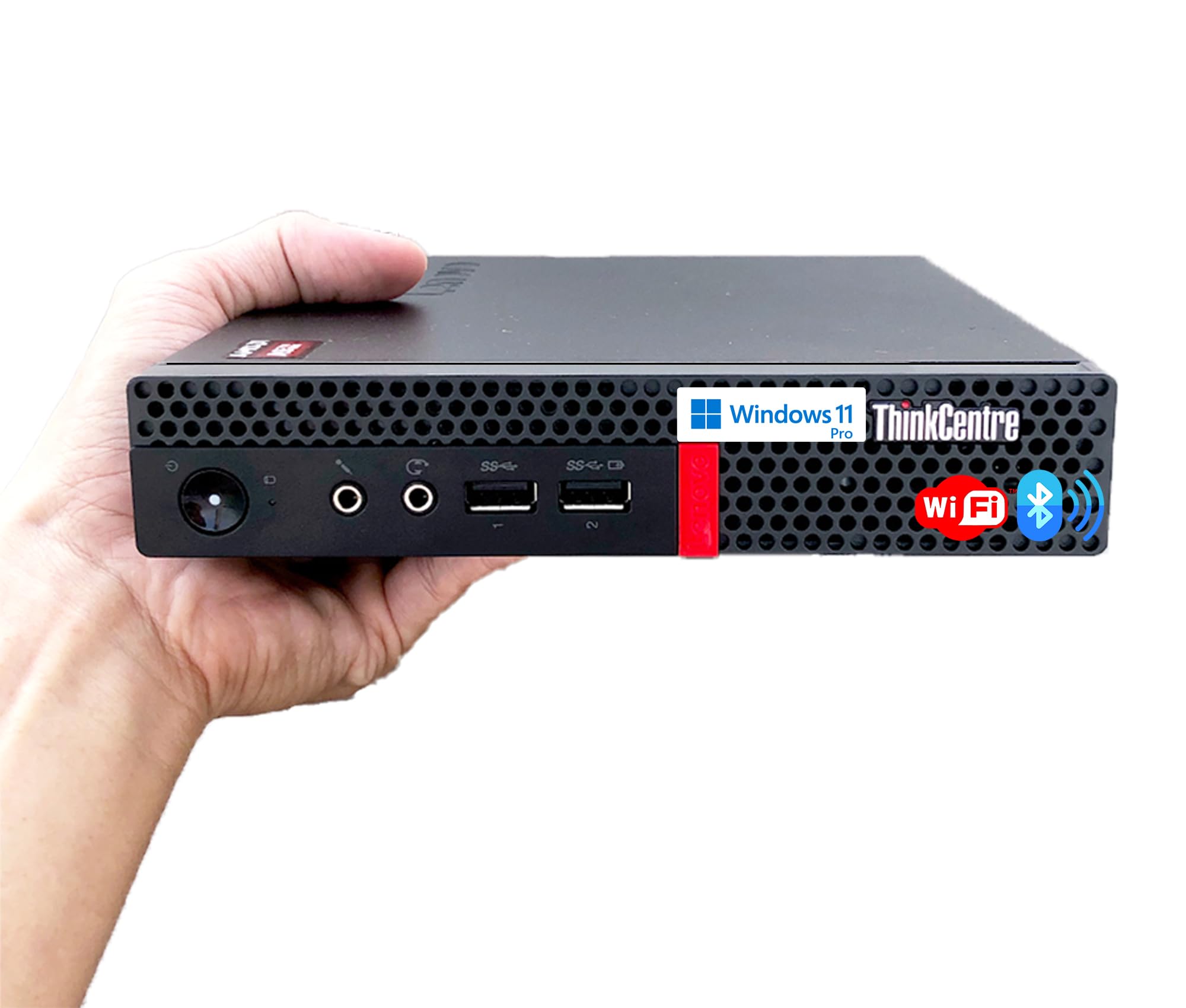
3. Lenovo Business Mini Desktop PC (ThinkCentre M625)
A tiny, silent desktop that hides behind a monitor or under a desk.
This Lenovo ThinkCentre M625 is 96% smaller than a traditional desktop tower — it measures just 1 liter in volume and can be mounted on a wall, behind a monitor, or placed horizontally on a desk. The fan-free design means it produces almost no sound, which is a huge benefit in a bedroom where a child is doing homework without a distracting hum. The AMD A4-9120C processor runs at 1.6 GHz base (up to 2.4 GHz turbo), which is enough for web browsing, Word documents, and educational apps. Buyers describe it as a “great office or school PC — not for gaming but great for everything else.”
The 8GB of DDR4 RAM and 128GB SSD provide a smooth, responsive experience for basic tasks, and the machine supports dual displays via its DisplayPort and USB ports. It comes with a keyboard and mouse included. The ThinkCentre is built tough — it can operate in temperatures from -4°F to 140°F, so a hot or cold room won’t bother it. The built-in Trusted Platform Module (TPM) encrypts data and passwords, which is a nice layer of security for a family computer. The main trade-off: the processor is on the weaker side, so it will struggle with any gaming or heavy multitasking beyond a few browser tabs.
The standout feature: The absolute silence. A child can work on homework without hearing a fan spin up, and the tiny footprint leaves almost no desk clutter. Owners love the compact design and how easy it is to set up.
The honest limit: This is not a machine for gaming or video editing. Stick to school apps, web research, and document work. The 2.4 GHz processor is slower than most other options here, so do not expect snappy performance with many apps open.
Grab it for: A young student (elementary or middle school) who needs a quiet, unobtrusive homework machine that takes up almost no room and is dead simple to set up.
Skip it for: A teenager who wants to play games or run creative software. The processor is too weak for anything beyond basic computing and light office work.
4. Dell Optiplex 5050 Small Form Factor (Renewed)

A complete desktop set with a 24-inch monitor, RGB keyboard, and webcam for the whole family.
This HP bundle is designed to be everything a family needs in one box. The HP ProDesk Small Form Factor tower packs an Intel Core i5 8th Gen hexa-core processor, 16GB of DDR4 RAM, and a 500GB SSD — enough power for schoolwork, streaming, and light creative tasks. The package includes a Grade A 24-inch monitor, an RGB backlit keyboard and mouse combo (which kids love), a pair of speakers, and a 2K webcam. The whole setup arrives pre-loaded with Windows 11 Pro. Owners mention the “easy setup to no tools needed” and say the “quality” is the most praised aspect, with many calling it a great value for the price.
The 24-inch monitor provides a comfortable viewing area, and the RGB lighting adds a fun, personalized touch that appeals to kids and teenagers. The built-in Wi-Fi 6 and Bluetooth 5.0 provide fast, modern wireless connectivity. The main concern from reviews centers on reliability — a portion of reviewers point out issues with the monitor failing or the computer not powering on, and the overall reliability rating is mixed. This is a refurbished unit, so the experience depends on how well the seller inspected it. The seller includes a 90-day warranty, and some shoppers say good customer service resolving issues quickly.
The all-in-one appeal: You literally open the box, plug in a few cables, and have a complete computer with monitor, keyboard, mouse, speakers, and webcam. The 16GB RAM is future-proof for years of school use.
The honest caution: Reliability is the most-discussed aspect and it is marked mixed — some units have issues from the start. Make sure you are comfortable with the seller’s return policy. The quality when it works is excellent.
Reach for this if: You want a single-box solution for a family computer and value the included 24-inch monitor, webcam, and RGB keyboard for a young student.
Think twice if: You need rock-solid reliability with no chance of setup issues — the 90-day warranty provides a safety net, but some buyers have had to use it.
5. MOONFISH 15.6 Inch Laptop
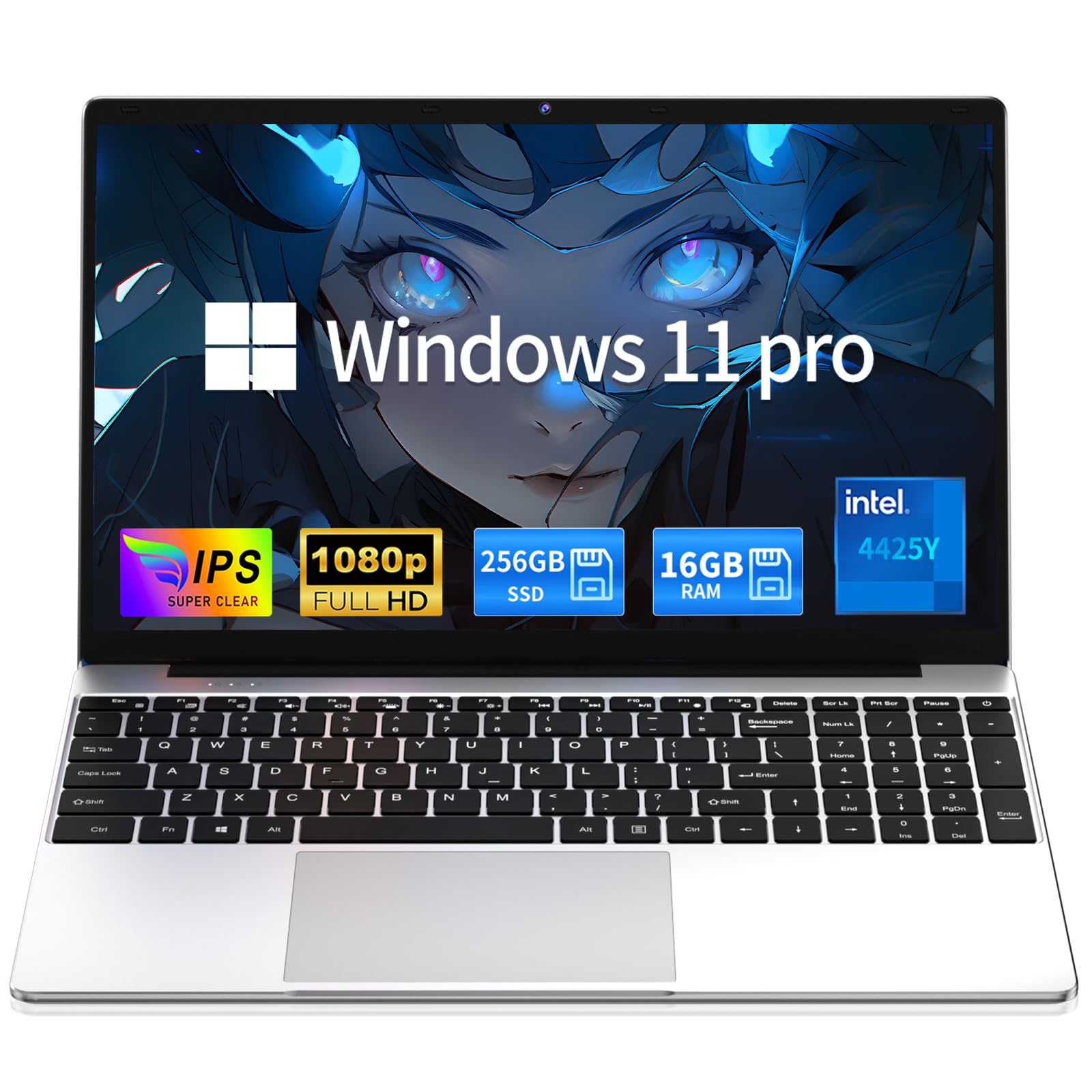
A budget-friendly laptop that packs 16GB of RAM into a lightweight, portable frame.
If your child needs to take their computer between home and school or work in different rooms of the house, this MOONFISH laptop is a practical choice. It features a 15.6-inch Full HD IPS display, 16GB of RAM, and a 256GB SSD — a combination that handles multitasking and everyday school tasks smoothly. The Intel 4425Y processor is a lower-tier chip, but the generous RAM compensates for it, keeping things running without lag when switching between apps. Buyers report it “runs fast and is very smooth” and that “there is no lag even when using Zoom and Discord.” The included 5000mAh battery provides a full school day of use, and the laptop weighs just 3.5 pounds, making it easy to carry in a backpack.
The 0.8-inch slim profile and sleek silver design look modern, and the full keyboard with a large touchpad makes typing comfortable for long study sessions. Ports include USB 3.0, Mini HDMI, and a micro SD card slot. It comes with Windows 11 Pro and includes Microsoft Office. The 2-year warranty and 6-month free returns provide reassurance. The main limitation is the processor — it is a 7th-generation lower-tier chip without a dedicated graphics card, so it is not suitable for gaming or heavy video editing. For schoolwork, web browsing, and streaming, though, it performs admirably.
The highlights
- 16GB RAM provides smooth multitasking, better than most laptops in this price range
- Lightweight at 3.5 lbs and 0.8-inch slim profile; fits easily in a backpack
- 2-year warranty and responsive customer support included
The limitations
- Processor is lower-tier 7th-gen; not fast enough for gaming or heavy creative apps
- No dedicated graphics; fine for school work but pass on it if your kid wants to play games
- 256GB SSD is adequate but fills up quickly with games and media files
Best for: A high school or middle school student who needs a portable laptop for school projects, note-taking, and streaming at home or in class.
Not for: A child who wants to play modern PC games. The processor and integrated graphics are too weak for anything beyond casual 2D games.
6. STGAubron Prebuilt Gaming PC Desktop

The entry-level gaming rig that handles Fortnite, Roblox, and Minecraft from the start.
If your child has moved past homework-only computing and wants to play games with friends, this STGAubron desktop is the right upgrade. It comes with an AMD Radeon RX 560 4GB dedicated graphics card, an Intel Core i5 processor (up to 3.7 GHz), 16GB of RAM, and a 512GB SSD. The dedicated GPU is the key difference from the other desktops here — it allows the computer to run Fortnite, Roblox, Minecraft, Apex Legends, Valorant, and Overwatch at 60+ FPS on decent settings. Buyers confirm that “on high quality with no lagging” the machine delivers for games like Rocket League. The included RGB gaming keyboard and mouse add to the fun.
The PC also features Wi-Fi 6 and Bluetooth 5.0 for fast wireless connections, plus dual RGB fans for cooling. Setup takes about five minutes. The main trade-off is that the internal components (CPU, GPU, power supply, cooling) are budget-tier generic parts. One-year parts and labor warranty plus free lifetime tech support are included. Over the long term (several years), some customers note components starting to fail. For a teenager’s first gaming PC that runs today’s popular school-yard games well, this is a solid entry point. For hardcore gaming, you would need a more expensive build.
What it does well
- Dedicated Radeon RX 560 4GB graphics card runs popular kid games at 60+ FPS
- 16GB RAM and 512GB SSD handle multitasking and fast boot times
- Wi-Fi 6 and Bluetooth 5.0 provide modern, fast wireless connectivity
What to know
- Uses budget components; long-term durability has been questioned by some buyers
- Not powerful enough for the latest AAA games at high settings
- Some units arrive with issues, though customer support resolves most problems
Best for: A teenager who wants to play Fortnite, Roblox, and Minecraft with friends and needs a dedicated graphics card to do it smoothly.
Not for: A family that wants a rock-solid, long-term desktop for basic schoolwork. The budget component quality makes it less ideal for pure productivity.
7. HP 2025 22″ All-in-One Desktop

The premium all-in-one with a clean, space-saving design that suits a modern home office or kid’s desk.
This HP all-in-one wraps the latest 13th Gen Intel N100 quad-core processor, 8GB of DDR5 RAM, and a 128GB SSD into a sleek 21.5-inch Full HD IPS display with an anti-glare coating. The design is the standout feature — a single cable from the wall powers the whole machine, and the Cashmere White finish looks clean and modern on any desk. The integrated HD webcam includes a privacy shutter, which is a thoughtful touch for a child’s online safety. Reviewers point out it has “faster load times and stronger WiFi than a more expensive laptop” and that setup is “very easy.” The performance is the most-praised aspect, with owners noting it is suitable for home office use and everyday school work.
The N100 processor is efficient and silent (no fan noise), but it is not a powerhouse. It handles research, Office apps, streaming, and video calls smoothly. The 128GB SSD is on the small side — your child will need to use cloud storage or an external drive for media files. The included keyboard is functional. Ports include USB Type-C (data only), two USB Type-A (Hi-Speed), one fast USB Type-A, HDMI-out, and RJ-45 Ethernet, plus Wi-Fi 6 and Bluetooth 5.3. This machine is best suited for a younger student in elementary or middle school who needs a clean, reliable homework station without the clutter of a tower.
The standout advantage: The fanless, silent operation and single-cable setup make this the cleanest, most child-friendly desktop in the lineup. The anti-glare screen reduces eye strain during long study sessions.
The trade-off: 128GB of storage fills up fast, and the N100 processor, while efficient, is significantly less powerful than the i7 options above. This is a homework machine, not a multitasking or gaming computer.
Reach for this if: You want a beautiful, silent, and simple all-in-one for a young student’s desk — no tower to hide, no fan noise, just clean all-in-one computing.
Consider another if: Your child needs more than 128GB of storage or wants to run multiple demanding apps at once. The Dell ec24250 above offers more storage and a faster processor.
Understanding the Specs
RAM (Memory)
RAM is your computer’s short-term memory. It holds everything open and running right now — your browser tabs, your Word document, your music player. More RAM means you can have more things open without the computer slowing down. For a child’s computer, 8GB is the minimum for a smooth experience. 16GB is a great upgrade if your child tends to keep a dozen browser tabs open while running a video call and a game at the same time. Anything less than 8GB will feel sluggish.
The type also matters: DDR5 is the newest standard and offers faster speeds than DDR4. The Dell ec24250 uses DDR5, while the refurbished business PCs use DDR4 — both are fine, but DDR5 is a bonus for future-proofing.
SSD vs. HDD (Storage)
The type of storage drive affects how fast the computer feels every single day. An SSD (Solid State Drive) has no moving parts and loads the operating system and apps in seconds. An HDD (Hard Disk Drive) uses spinning disks and is much slower. The difference is dramatic: a computer with an SSD boots up in 10-15 seconds; one with an HDD can take a minute or more. Every computer on this list except the budget Dell Optiplex 7010 package uses an SSD as the main drive. That one uses a 500GB HDD, which is fine for storage space but noticeably slower for everyday use.
For a student, 128GB of SSD space is the minimum. 256GB gives comfortable room for school files and some games. 512GB is generous and will last through the school years without worry.
Processor (CPU)
The processor is the brain of the computer. Its speed (measured in GHz) and the number of cores determine how quickly it can process instructions. For schoolwork like web browsing, word processing, and video calls, even a modest processor works fine. The Lenovo mini desktop’s 2.4 GHz AMD A4 is at the low end and will feel slow if too many apps are open. The Dell ec24250’s Intel Core 3 at 4.7 GHz is at the top — it blazes through tasks. The i5 and i7 processors in the refurbished Dell machines offer a great balance of speed and value.
A key thing to know: a newer generation processor is not always faster than an older one. The Intel N100 in the HP all-in-one is a modern efficient chip, but an older i7 from a generation or two ago will outperform it in raw speed. Do not get hung up on the generation number; look at the actual clock speed and user reviews.
Graphics (Integrated vs. Dedicated)
Most computers for kids have integrated graphics — the graphics processor is built into the main processor. That is perfectly fine for schoolwork, streaming video, and older or simpler games. Dedicated graphics means there is a separate graphics card (GPU) with its own memory. This is only needed for modern 3D gaming, video editing, or 3D modeling. The STGAubron desktop is the only pick here with a dedicated graphics card (Radeon RX 560 4GB), which lets it run games like Fortnite and Minecraft smoothly.
Unless your child is gaming, integrated graphics are all you need. Paying extra for a dedicated GPU in a homework computer is a waste of money.
