Our readers keep the lights on and my smoothie glass nicely filled. As an Amazon Associate, I earn from qualifying purchases.
Specs are compiled from manufacturer listings and verified buyer reviews and can change over time — please confirm the key details on the product page before buying.
That old PlayStation 2 or DVD player you have packed away still works fine — the problem is your new TV dropped the component video jacks a few years ago. A component-to-HDMI converter bridges that gap by taking the red, green, and blue (YPbPr — the three-cable video standard used by older gear) cables from your retro device and turning them into a single HDMI signal your modern screen understands. The catch is most of these tiny boxes are passive passthrough devices: they do not upscale, so you get exactly the resolution your old console outputs, warts and all.
I’m Mohammad Maruf — the founder and writer behind WellFizz. This guide is built by comparing the manufacturers’ published specifications and the patterns across verified customer reviews, so you get each pick’s real strengths and trade-offs instead of marketing spin.
After digging through real owner experiences, one thing is clear: not every box handles every console the same way. Match the right adapter to your exact device for a stable picture without frustration. The honest breakdown of the best component to hdmi converter starts with what each model actually does well — and where it stumbles.
Our Picks at a Glance


How To Choose The Best Component To HDMI Converter
Buying the wrong converter is the fastest way to end up with a blank screen or a garbled picture. The key specs are straightforward once you understand them. Focus on these three factors to pick the right converter the first time.
Resolution Passthrough vs. Scaling
Nearly all budget converters are “passthrough” devices. They take the 480i (standard-definition interlaced video), 480p (standard-definition progressive scan), 720p (high-definition), or 1080p (full high-definition) signal your old console sends and output the exact same resolution. If your PlayStation 2 sends 480i, the TV sees 480i. A converter with a built-in “scaler” can upscale that 480i to 720p or 1080p, giving you a sharper image on a big screen. Decide if you need a scaler before purchasing.
Input Signal Compatibility (YPbPr vs. Composite)
These converters only accept component video (the three cables — red, green, blue) plus two audio cables (red and white). They do not accept the old single yellow composite cable that came with a classic NES or SNES. Plugging a composite signal into the green jack will give you a black-and-white picture or nothing at all. If your console only has composite output, you need a different device.
Power Source
Every converter needs external power to do the conversion. Some include a wall plug, some use a USB cable you can plug into your TV’s USB port, and a rare few draw power from the HDMI port. The USB-powered ones are the cleanest option since the converter powers on and off with your TV — no extra brick behind the entertainment center.
Quick Comparison
| Model | Best For | Resolution Support | Built-in Scaler | Power Source | Amazon |
|---|---|---|---|---|---|
| Koopman YPbPr Converter★ Best Overall | PS2 & Xbox on budget | Up to 1080p@60Hz | No (passthrough) | USB (brick included) | Amazon |
| Portta Component Converter (standalone)Best for Audio | Wii & Xbox 360 | Up to 1080p@60Hz | No (passthrough) | USB (brick included) | Amazon |
| GUETAD Aluminum Converter | Original Xbox & durability | Up to 1080p@60Hz | No (passthrough) | USB-Micro (cable included) | Amazon |
| NEWCARE Aluminum Converter | Wii U revival | Up to 1080p@60Hz | No (passthrough) | 5V power adapter | Amazon |
| Portta Converter (with HDMI cable) | Wii &Xbox 360 | Up to 1080p@60Hz | No (passthrough) | USB (brick included) | Amazon |
| Generic Male-Input Converter | DVD & VHS players | Up to 1080p (passthrough) | No (passthrough) | USB-Micro (cable included) | Amazon |
| YPbPr Converter w/ Scaler | Upscaling 480i consoles | Multi-res input/output | Yes (upscales & downscales) | 5V DC (plug included) | Amazon |
In‑Depth Reviews
1. Koopman YPbPr to HDMI Converter
Our pick — over 4★ from 950+ verified ratings; the strongest balance of quality and price.
The most popular converter for PS2 owners seeking a stable picture on a modern screen.
The Koopman is the crowd favorite for a reason — it just works for most people. Buyers report it works well for PS2 on modern TVs lacking component inputs, and the picture comes through lag-free, though picture quality receives mixed feedback; some find it wonderful, while others note it’s not enhanced and doesn’t upscale images. It supports component video resolutions from 480i all the way up to 1080p@60Hz, so whether you are plugging in a PlayStation 2, a Wii, or an old DVD player, the converter passes the signal through without fuss. It draws 1 Amp of current, while the Portta draws 1.5 Amps, and it measures 3.15 x 1.97 x 0.79 inches, compared to the Portta’s 3.78 x 2.36 x 0.79 inches.
Users praise its easy setup.: plug in the five RCA cables (the three component video cables and the two audio cables), connect the USB power (the brick is included), and the HDMI out goes straight to your TV. No drivers, no menus. The caveat is that this is a pure passthrough box — it does not upscale. A 480i signal stays 480i, which means older consoles can look soft on a big 4K display. The metal casing and reset button (a button that forces the converter to re-handshake with the source and TV, fixing a black screen) — a rare feature at this price — add confidence, but an occasional unit arrives dead on arrival, so test it within the return window.
What Owners Love
- Rock-solid plug-and-play setup works with PS2, Xbox, and PC Engine Duo
- Compact footprint saves space behind the TV — at 3.15 x 1.97 x 0.79 inches, versus the Portta’s 3.78 x 2.36 x 0.79 inches
- Reset button on the unit for quick troubleshooting if the signal drops
- Lower power draw (1 Amp) means less heat over long gaming sessions
The Real Trade-off
- No upscaling — 240p (a low-resolution standard used by older consoles) and 480i signals look the same on a big 4K screen
- Does not accept composite video (the single yellow RCA cable)
- An occasional unit arrives with no signal output; test immediately
- HDMI cable not included in the box
Reliable, compact, and proven across thousands of PS2 and Xbox setups — if your console outputs component video and you just need a bridge to HDMI, this is it. But skip it if you need upscaling for 240p retro consoles or you expect to plug in an old NES with a composite yellow cable.
2. Portta Component to HDMI Converter (standalone)
A veteran converter with a five-year warranty backing its longevity.
The Portta is one of the oldest and most-reviewed converters on this list, with thousands of owners running it. what separates it is the audio handling. It supports uncompressed 2-channel LPCM (Linear Pulse-Code Modulation — a digital audio format that preserves sound without compression) audio through a 165MHz/1.65Gbps per channel bandwidth, ensuring no distortion or delay. That matters if you are running a DVD player or gaming console where lip-sync issues are annoying. The converter supports resolutions from 480i to 1080p@60Hz and is compliant with HDMI 1.3 (a version of the HDMI standard) and HDCP 1.2/1.3 (High-bandwidth Digital Content Protection, a copy-protection handshake between the device and TV).
The honest catch is longevity — some owners mention audio failure after one year. That is a real risk with any powered converter, and this one draws 1.5 Amps, while the Koopman draws 1 Amp. The heavier current draw means more heat inside the chassis over time. On the plus side, the 5-year warranty is the best coverage in this group, and the unit weighs 2.8 ounces, compared to the Koopman’s 3.35 ounces. It is also slightly larger at 3.78 x 2.36 x 0.79 inches. Some owners found that the PS2 must be set to YPbPr output (not RGB) or the picture disappears — a simple setting check before you start troubleshooting.
Audio-first pick: If clean digital audio with zero delay is your priority, the Portta’s 1.65Gbps per channel bandwidth and LPCM support lead the pack.
The durability asterisk: A small number of customers note audio failure after a year of use, so the 5-year warranty is worth registering.
Reach for this if: You are connecting an Xbox 360 or a DVD player and want the best audio quality without lip-sync drift.
Better suited for lighter use: If you plan on daily 8-hour gaming sessions, the higher current draw may shorten the lifespan over years of heavy use.
3. GUETAD Aluminum Component to HDMI Converter
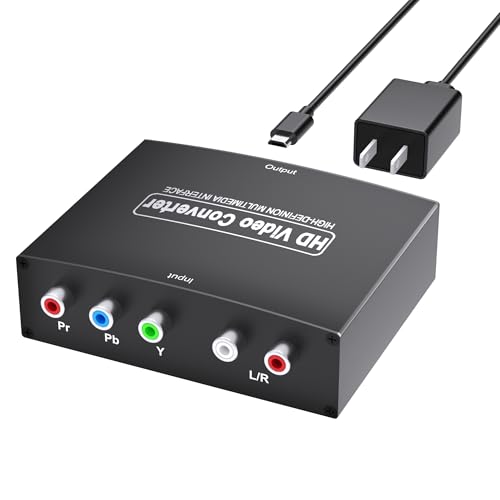
The aluminum shell makes this one feel tougher than the plastic boxes — and it runs cooler, too.
Where most converters use a plastic casing that can trap heat, the GUETAD wraps its circuitry in an aluminum alloy shell that acts as a heatsink (a material that draws heat away from electronics). That is a genuine advantage if you plan to leave the converter plugged in 24/7. The unit supports the same resolution range as the others — 480i through 1080p@60Hz — but what surprised owners is how clean the picture is with the Original Xbox at 480p. Reviewers point out no audio or video delay, and the 5W power draw is low enough that the chassis stays cool to the touch.
It uses USB-Micro (a small, rectangular USB connector) for power, and the cable is included in the box. The converter is plug-and-play with no drivers needed. The trade-off is that it has no built-in scaler, so a 480i signal stays 480i. A few owners mentioned that gaming monitors may not expand limited RGB (Red, Green, Blue color range) to full range, causing grayish blacks on certain displays — that is a monitor-side issue, not a defect. The 1-year warranty is shorter than Portta’s 5-year, but the aluminum build suggests this unit will physically hold up longer than the plastic alternatives.
Durability choice: The aluminum alloy shell dissipates heat better than any plastic converter here, making it a smart pick for always-on setups.
Display note: Some gaming monitors need their HDMI range set to “limited” to avoid washed-out blacks — test your specific screen.
Grab this if: You are keeping the converter plugged in permanently behind a TV or monitor and want the metal build to last.
Pass it by if: You need TOSLINK optical audio (a digital audio connection using fiber optic cable) — this unit only has analog R/L input and no optical output.
4. NEWCARE Aluminum Alloy Converter

The converter that saved at least one Wii U — it revived a console whose HDMI chip had failed.
The NEWCARE shares the same aluminum alloy build advantage as the GUETAD, but what makes it stand out is the specific scenario it handles. Shoppers say it works with a Wii U that lost its internal HDMI output — the adapter plus a Retro HD YPbPr cable restored full 1080p output with no noticeable delay. That is a narrow use case, but if you are nursing a dying console, it matters. The adapter measures 3.4 x 2.6 x 0.98 inches (a bit taller than the Koopman) and weighs 0.12 Kilograms. It accepts 5 Volts input through the included power adapter.
The honest fit note is that not every unit works from the start. The most-discussed aspect is functionality, and the feedback is mixed — some owners say it works perfectly with PS2 games, others report a black screen. The most common fix is a simple one: you must change your Wii U’s output setting to Component > 1080p, or the picture appears black-and-white. The same applies for PS2 — set the console to YPbPr mode, not RGB. If you skip that step, the converter looks broken when it is really just a setting mismatch.
Console revival specialist: Multiple owners confirmed it works when a console’s native HDMI output has failed — a true niche win.
Requires the right setting: The console must output YPbPr component, not RGB; otherwise you get a black-and-white or blank screen.
Best for: PS2, Wii U, or Xbox owners who need a second chance at 1080p after their console’s HDMI port died.
pass on it if: You want a guaranteed plug-and-play experience — the setting mismatch on some consoles means you will have to troubleshoot before it works.
5. Portta Component Converter with HDMI Cable

The same Portta reliability as the standalone version, but with an HDMI cable thrown in so you can start immediately.
This is essentially the same converter as product #2 — same 165MHz/1.65Gbps bandwidth, same 1.5 Amps current rating, same resolution support up to 1080p@60Hz — but it ships with an HDMI cable, saving you a trip to the store. Owners love using it with the Wii, since the USB power can be drawn from the TV’s USB port, creating a clean setup with no extra wall wart. Buyers report no lag and no drop in image quality, and the 5-year warranty covers both the converter and the cable.
The difference between this and the standalone Portta is the included cable and the slightly different model number (PETRH vs N3CVRHP). The same caveat applies: the PS2 must be set to YPbPr output, and the converter does not upscale. A few owners mentioned that copy-protected DVDs (like rental discs) will not show properly through the converter — that is an HDCP copy protection issue, not a fault of the adapter. The box is the same 3.78 x 2.36 x 0.79 inches size, and the weight is 0.18 Kilograms.
All-in-one convenience: Having the HDMI cable in the box means zero extra purchases — plug and play the moment it arrives.
Same durability note: Like the standalone Portta, some owners mention audio failure over long-term use, so the 5-year warranty is a key safety net.
Pick this if: You are buying for a Wii or Xbox 360 and want one box that includes everything you need to connect.
Choose the standalone instead if: You already have spare HDMI cables and want to save a few dollars on the exact same converter.
6. Generic Male-Input Converter (with Cables)

The rare converter that includes both the HDMI and component cables — you truly need nothing else to get started.
Every other converter on this list expects you to supply your own component cables and HDMI cable. This one includes both, which is a significant convenience if you do not already own a component cable for your console. The design uses a male component input — meaning the five-pin connector plugs directly into a female component output on your DVD player or VCR (a video cassette recorder). That is perfect for devices like a VHS combo deck where the ports are fixed on the back. It supports up to 1080p resolution passthrough and draws a modest 1 Amp at 5 Volts (5 Watts nominal power).
The catch is that this converter works specifically with devices that have female component outputs — typically DVD players, set-top boxes, and VCRs. It is not the best fit for consoles like the PS2, which usually have a multi-AV port requiring a separate component cable anyway. The most-discussed aspect is compatibility, and owners say it connects smoothly to HDMI and mini USB sockets. An honest note: the red RCA plugs are unlabeled for audio vs video, so you will need to test which is which. The short cable design actually reduces clutter, and owners praise the build quality for the price.
No-cable-hassle setup: The included cables make this the only truly out-of-the-box solution for DVD and VHS owners.
Console caveat: The male component input is designed for fixed female ports on players, not for consoles that use multi-AV-out cables.
Reach for this if: You are connecting a DVD player, VCR, or set-top box and want everything in one package with zero hidden costs.
Better suited for players, not consoles: If you are connecting a PS2 or Xbox and already own a component cable, the male input may not suit your setup.
7. YPbPr Converter with Built-in Scaler
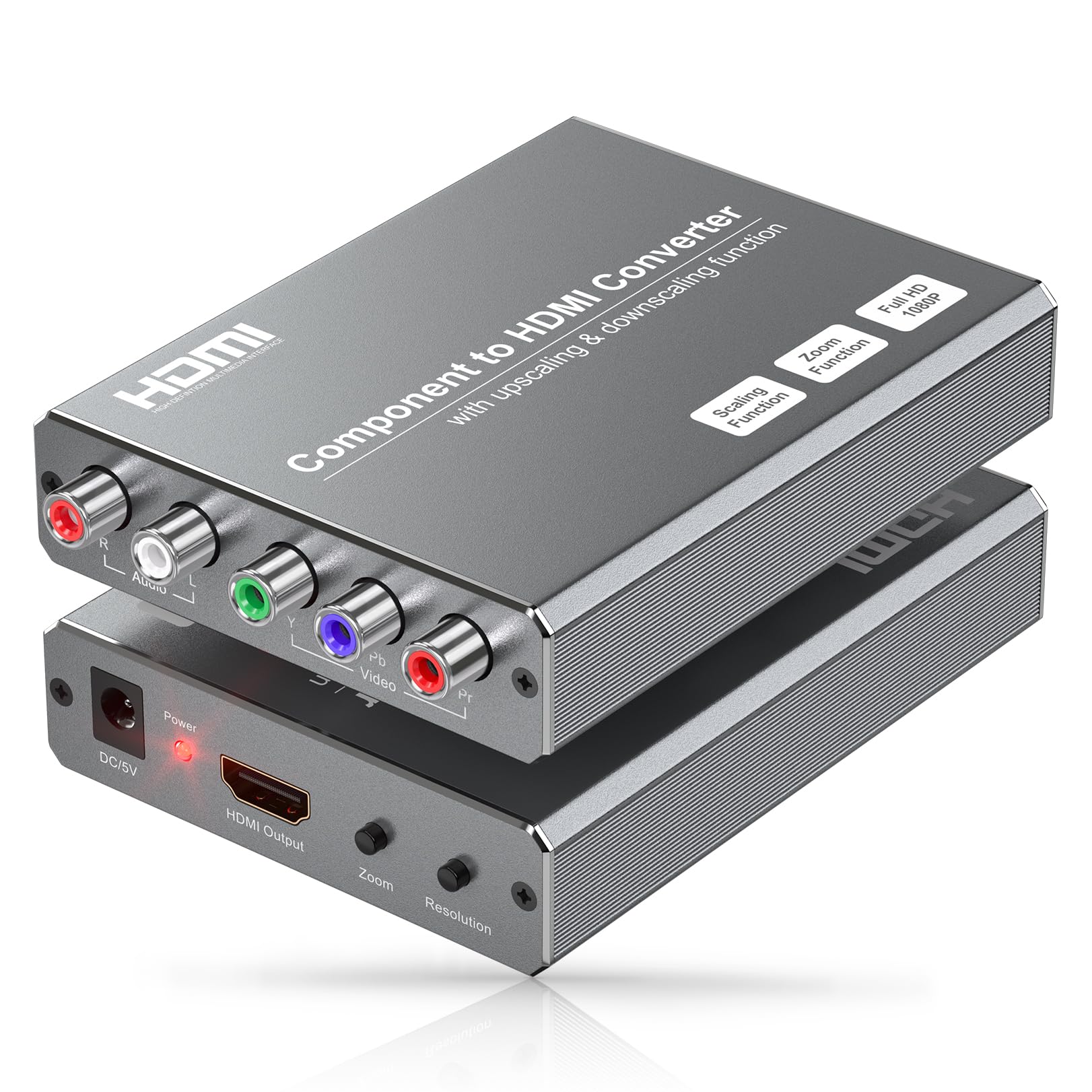
The only converter here that can actually upscale a 480i signal to 1080p — a genuine difference for retro gaming.
Every other converter on this list is a pure passthrough device: the signal goes in at 480i and comes out at 480i. This one has a built-in scaler engine (an electronic processor that changes the resolution of a video signal, either enlarging or shrinking it) that can upscale lower resolutions (like 480i) all the way to 1080p, or downscale a 1080p signal to 720p if your TV prefers that. It also has five picture zoom modes for cropping edge distortions or enlarging specific parts of the image. You switch between output resolutions using a physical button on the converter — no software required. Input resolutions range from 480i@60Hz up to 1080p@60Hz, and the HDMI output can be set to 800 x 600, 1024 x 768, 1280 x 1024, 720p, or 1080p.
The honest truth is that this converter has the lowest owner satisfaction in the group. Several customers note a glitch every 20-30 seconds where the screen artifacts or freezes momentarily. One described the quality as “more like composite than component with how muddy and blurry the picture becomes.” The upscaler works — it makes a 480i game fill a 1080p screen — but the stability issues mean it is a gamble. The 1-year warranty covers defects, but the recurring glitch pattern across multiple reviews suggests a design limitation rather than a batch issue. It is the premium option on paper but the riskiest in practice.
The Upscaler Advantage
- Only converter here with a real scaler — upscales 480i to crisp 1080p
- Five picture zoom modes fix edge distortions from old consoles
- Physical resolution-switch button — no menu digging
The Stability Problem
- Multiple reviewers point out screen glitches every 20-30 seconds
- Picture may look muddy — “more like composite than component” per one owner
- Some glitches resolved by avoiding HDMI switches, but not guaranteed
Try this if: You absolutely need upscaling and are willing to test your specific setup — it works great for some owners with direct TV connection.
Stick with a passthrough if: You want a guaranteed stable picture and your TV already handles upscaling reasonably well.
Understanding the Specs
Resolution Passthrough vs. Upscaling
Most converters in this price range are “passthrough” devices. They take whatever resolution your console sends (480i, 480p, 720p, 1080p) and send it directly to the TV without changing it. A converter with a “scaler” can boost a low 480i signal to 720p or 1080p, making it look sharper on a big modern screen. If you play 480i PlayStation 2 games on a 65-inch TV, a scaler makes a visible difference. If you use a 1080p Xbox 360, passthrough is all you need.
HDCP Copy Protection
HDCP is a handshake between the device and the TV that prevents recording protected content. Some converters pass HDCP through, and some do not. If you are playing a copy-protected DVD (most commercial discs), the converter needs to support HDCP or the screen will go black. The Portta converters explicitly support HDCP 1.2/1.3, which covers most DVD players. For gaming consoles (PS2, Wii, Xbox) HDCP is not an issue since games do not use it — only DVD movie playback triggers it.
FAQ
Can I use a component to HDMI converter in reverse (HDMI to component)?
Will a component to HDMI converter upscale my PS2 games to 1080p?
Does this work with the old yellow composite video cable (RCA)?
Why does my screen go black when I play a DVD?
Do I need a separate power adapter for these converters?
Will this work with my Nintendo Wii?
What does the reset button on some converters do?
Is there any input lag with these converters?
How long do these converters last?
Can I use these converters with a monitor instead of a TV?
Final Thoughts: The Verdict
For most buyers, the component to hdmi converter winner is the Koopman YPbPr Converter because it offers the best balance of reliability, compact size, and a proven track record with thousands of owners across PS2, Xbox, and Wii. If you need clean audio with a 5-year safety net, grab the Portta standalone. And for the rare buyer who needs actual upscaling of 480i consoles, the YPbPr Converter with Scaler offers the feature but comes with a stability warning — test it quickly within the return window.
How We Picked
We do not accept paid placement. Every pick is matched to a real buyer and a real use-case; we do not hands-on test units.
Sources & Methodology
Specifications: manufacturer listings and product documentation. Review insights: verified customer reviews, as of July 2026. Pricing: not shown on this page (it changes often); check the current price via the retailer link.
As an Amazon Associate, WellFizz earns from qualifying purchases. This does not affect which products we feature.
Related Guides

Mo Maruf
I created WellFizz to bridge the gap between vague wellness advice and actionable solutions. My mission is simple: to decode the research and give you practical tools you can actually use.
Beyond the data, I am a passionate traveler. I believe that stepping away from the screen to explore new environments is essential for mental clarity and physical vitality.