Our readers keep the lights on and my smoothie glass nicely filled. As an Amazon Associate, I earn from qualifying purchases.
Specs are compiled from manufacturer listings and verified buyer reviews and can change over time — please confirm the key details on the product page before buying.
If you are reading this, your wrist has probably already sent its first serious warning — that dull ache after a long workday, the sharp twinge when you reach for the mouse first thing in the morning, or the creeping numbness that makes you shake your hand out at your desk. You are not imagining it, and you are not alone. The standard flat mouse forces your forearm into a twist that your body was never designed to hold for eight hours a day. The fix is a vertical or contoured mouse that rotates your hand into a neutral handshake position, and
I’m Mohammad Maruf — the founder and writer behind WellFizz. This guide is built by comparing the manufacturers’ published specifications and the patterns across verified customer reviews, so you get each pick’s real strengths and trade-offs instead of marketing spin.
Here is the short version: the best computer mouse for wrist pain puts your hand at a natural angle (vertical mice typically tilt 57 to 65 degrees), uses a thumb-operated trackball or a sculpted grip to keep your arm still, and delivers quiet clicks so you stop waking the whole house during late-night sessions.
Our Picks at a Glance


How To Choose The Best Computer Mouse For Wrist Pain
Not every ergonomic mouse works the same way for every wrist. Some people need the full vertical tilt that forces the whole arm into a neutral posture. Others benefit more from a trackball that keeps the hand still while the thumb does the cursor work. The three specs that matter most are the tilt angle (how vertical the grip is), the type of sensor (optical or laser, and its DPI range), and how you charge it (replaceable batteries vs a built-in rechargeable cell).
Vertical Tilt Angle: The Core of Wrist Relief
The angle at which the mouse holds your hand determines how much forearm rotation it prevents. A typical flat mouse keeps your palm parallel to the desk, forcing the radius and ulna bones to cross. A vertical mouse tilts your palm anywhere from 57 to 65 degrees. That handshake posture keeps the bones aligned and the tendons relaxed. If you already have carpal tunnel or tendinitis, a tilt angle in the upper 50s or low 60s provides the fastest relief. Some adjustable models let you switch between 0 and 18 degrees, but the fixed 57-to-65 range is the proven zone for wrist-pain buyers.
Trackball vs Vertical: Which Movement Pattern Suits You
A vertical mouse still requires you to move your whole arm across the desk, but with the wrist in a neutral position. A trackball mouse keeps the mouse body stationary while your thumb (or fingers) rolls a ball to move the cursor. This zero-arm-movement design is ideal if desk space is tight, if you have shoulder pain on top of the wrist pain, or if you want to eliminate every bit of arm travel. The trade-off is a short learning curve — your thumb needs a day or two to build the fine motor control that your wrist used to handle.
Connectivity and Battery Life: How You Stay Untethered
Wireless freedom matters when you are already dealing with wrist discomfort because one less cable means one less thing to adjust. Most ergonomic mice connect via a tiny 2.4 GHz USB receiver (stored in the mouse base) or Bluetooth. Some models let you switch between three devices with a button press. Battery life ranges from a few weeks (rechargeable models with 500 to 600 mAh batteries) to up to 24 months (AA/AAA-powered models). If you hate hunting for batteries at the worst moment, a rechargeable mouse with a USB-C cable — and a quick 5-minute top-up that gives you an hour of use — removes that headache.
Quick Comparison
| Model | Best For | Type & Angle | Connectivity | Buttons | Amazon |
|---|---|---|---|---|---|
| PHILIPS Ergonomic Wireless Mouse★ Best Overall | Multi-device productivity | Vertical contoured / 5-level DPI (800-4000) | Bluetooth + 2.4G (USB-A/C) + 3 devices | 5 | Amazon |
| Anker 2.4G Wireless Vertical Ergonomic MouseBudget Champion | Budget-conscious first-time vertical users | Vertical / 800/1200/1600 DPI | 2.4G USB receiver | 5 | Amazon |
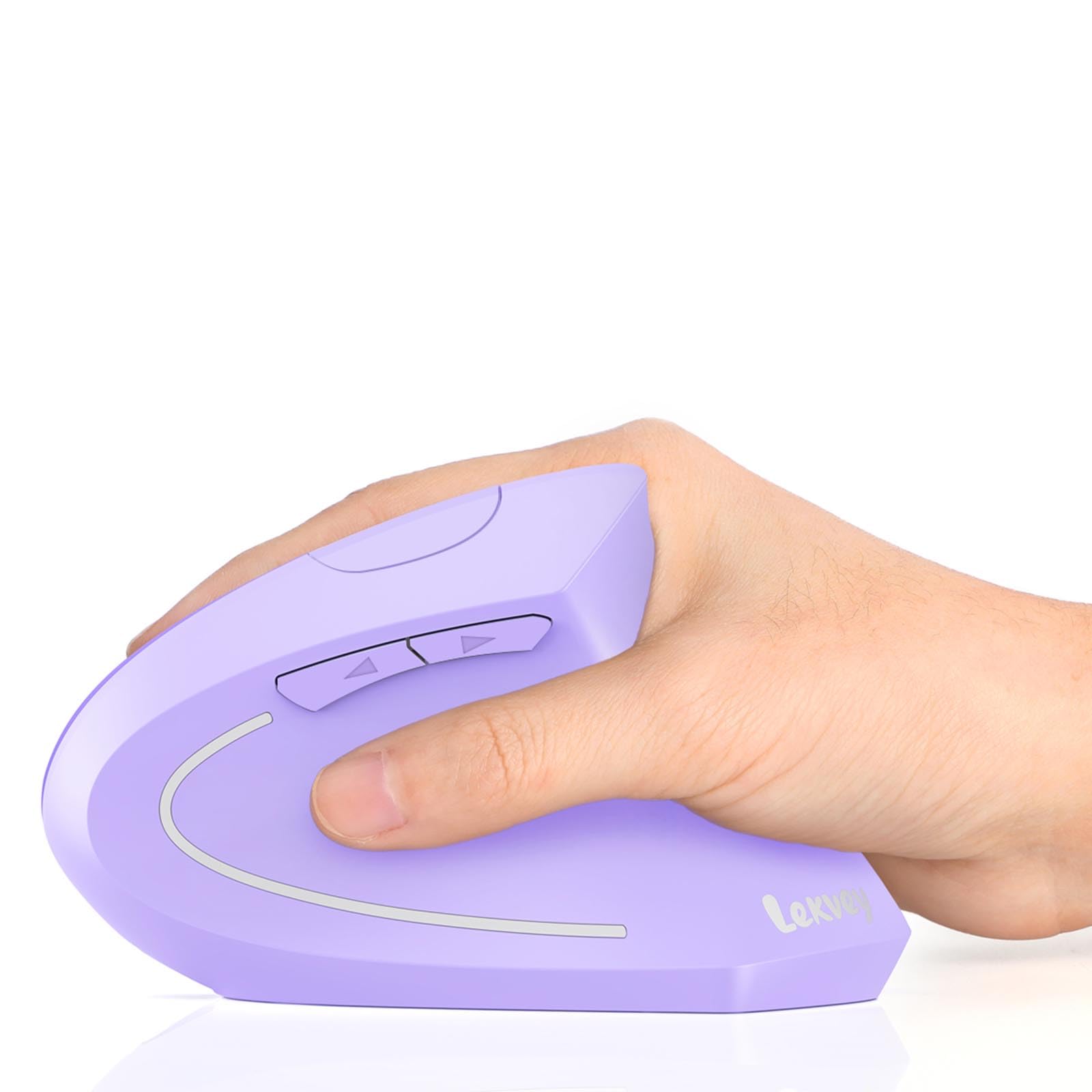
| Lekvey Ergonomic Mouse Vertical WirelessBest Value | Users wanting a rechargeable vertical at a mid-range price | Vertical / 1000/1200/1600 DPI | 2.4G USB receiver | 6 | Amazon |
| Nulea M514 Wireless Trackball Mouse | Compact desk / zero-arm-movement needs | Vertical 65° + thumb trackball / 600/800/1000 DPI | Bluetooth + USB receiver, 3 devices | 6 | Amazon |
| SABLUTE MAM1 Pro Trackball Mouse | Adjustable-angle trackball fans | Trackball / adjustable 0°-18° / 800-4800 DPI | Bluetooth + 2.4G USB, 3 devices | 8 | Amazon |
| Logitech Lift Vertical Ergonomic Mouse (Renewed) | Small to medium hands needing a brand-name vertical | Vertical 57° / SmartWheel scroll | Bluetooth LE + Logi Bolt USB | 4 | Amazon |
| Evoluent VM4S Vertical Mouse Right Hand Small | Small-hand users with severe wrist pain | Vertical wired / 4 speed levels | Wired USB | 6 | Amazon |
| Evoluent VM4L Vertical Mouse Left Hand | Left-handed users needing serious ergonomic support | Vertical wired / 4 speed levels (400-2000 cpi) | Wired USB | 6 | Amazon |
| Razer Pro Click V2 Vertical Wireless | Power users who want RGB, AI shortcuts, and top-tier tracking | Vertical / Focus Pro 30K Optical Sensor | 2.4GHz + Bluetooth + USB-C, up to 5 devices | 6 | Amazon |
In‑Depth Reviews
1. PHILIPS Ergonomic Wireless Mouse, Multi-Device Bluetooth (USB-A/C)
Our pick — over 4.5★ from 950+ verified ratings; the strongest balance of quality and price.
The workplace wizard that kills dongle life and rescues your wrist on three devices at once.
The thing that wins people over here is the sheer utility packed into one shell. You get a contoured right-handed shape with an anti-slip thumb rest that supports a natural wider grip — exactly what cuts daily fatigue. The 500mAh rechargeable battery delivers 200 hours of average life, and if you forget to charge it before a call, a 5-minute emergency top-up gives you a full hour of tracking. That is a real safety net for anyone whose day depends on a working mouse.
It connects to up to three devices (via Bluetooth or the included dual USB-A/C receiver) and switches between them instantly — no hub, no re-pairing. The 5-level adjustable DPI (from 800 to 4000) means you can dial the sensitivity down for detailed design work or up for fast multi-monitor cursor travel. A horizontal scroll wheel on the thumb side makes slicing through spreadsheet columns easy. The only recurring gripe, as buyers report, is the scroll wheel texture — it uses a dotted finish instead of ridges, and after extended use that dotted pattern can cause a blister. Buyers also note the USB plug can require slight upward pressure to maintain connection over time. If you need a single mouse for a laptop, tablet, and desktop at a reasonable price, this is the one.
The Smart Stuff
- Emergency 5-minute charge gives 1 hour of use — a genuine lifesaver
- Dual USB-A/C receiver plus Bluetooth covers almost any device
- 5 DPI levels (800-4000) adapt from pixel-precise editing to rapid multi-monitor work
The Honest Trade-Offs
- Scroll wheel dotted texture (not ridges) can irritate after extended use — owners note it causes a blister after about 4 hours
- USB receiver connection may need slight upward pressure to stay secure over time
Reach for this if: you juggle multiple devices daily, want a rechargeable vertical that does not need batteries, and need emergency quick-charge backup.
Look elsewhere if: you have a very small hand or scroll for hours at a stretch — the dotted wheel texture may bother you.
2. Anker 2.4G Wireless Vertical Ergonomic Optical Mouse
The entry-level vertical that converted thousands of skeptics into handshake-grip believers.
This is the mouse that taught an entire generation of office workers that a vertical shape does not have to cost a lot. It uses a 2.4 GHz wireless connection (not Bluetooth) via a USB receiver stored in the bottom, and it runs on 2 AAA batteries (not included). After 8 minutes of inactivity it enters a power-saving mode that disconnects power entirely — a press of any button wakes it instantly. That matters because the crowd favorite story here is real: owners mention that after a year of use, the mouse becomes second nature and “significantly reduces pain, ache, and numbness.”
Where It Shines
- Remarkably low price for a proven vertical shape with a 65-degree wrist angle
- 3.4 oz weight makes it easy to carry between workstations
- Power-saving sleep mode after 8 minutes of inactivity preserves battery life
Where It Falls Short
- No pinky rest — the side of your hand can drag on your desk or mouse pad
- 2 AAA batteries required and not included
- Forward/back buttons can be pressed accidentally during a normal grip
Best for: first-time vertical users who want minimal financial risk while testing the handshake grip.
Think twice if: you want Bluetooth connectivity or a built-in rechargeable battery — this model uses replaceable AAAs and a USB receiver only.
3. Lekvey Ergonomic Mouse, Vertical Wireless Mouse, Rechargeable 2.4G
The rechargeable vertical that does not make you hunt for batteries at midnight.
The single biggest frustration with wireless ergonomic mice is the moment they die mid-afternoon — you have no spare AAA in the drawer. The Lekvey solves that with a built-in 600mAh Li-Ion battery that delivers 150 hours of use from a 3-hour charge. When you are not using it, an auto-sleep mode kicks in after 20 minutes of inactivity. That combination means a single weekend charge can cover two full work weeks. The thing owners praise most is the ergonomics, and the second-most-discussed trait is reliability — the vertical shape is what immediately reduces wrist discomfort.
It offers 3 adjustable DPI levels (1000/1200/1600), whisper-quiet left and right clicks, and a compact 5.0 x 3.0 x 2.5 inch profile rated for medium and large hands. The forward and back buttons enhance browsing efficiency. However, the data notes a key limitation for Mac users: the forward and back buttons are not compatible with Mac OS systems. It also has a 2-week recommended adjustment period for first-time vertical users. If you work on a Windows PC and want a rechargeable vertical that fits medium-to-large palms, this is a strong mid-range pick.
What You Get
- 600mAh rechargeable battery delivers 150 hours of use — no AAA batteries to buy
- Whisper-quiet left and right clicks keep shared offices and libraries peaceful
- Compact 5.0 x 3.0 inch size fits medium to large hands
What To Know
- Forward and back buttons are not compatible with Mac OS
- Recommended 1-2 week adjustment period for first-time users
- Designed for medium and large hands — small-hand users may find it too large
Reach for this if: you are a Windows user who wants a rechargeable vertical without the hassle of replacing batteries.
skip it if: you use a Mac and need those forward/back navigation buttons.
4. Nulea M514 Wireless Trackball Mouse

The stationary mouse that lets your wrist rest while your thumb does the driving.
If your desk is cluttered or you work in tight spaces like an airplane tray or a café table, a traditional vertical mouse still forces you to move your arm around. The Nulea M514 keeps the mouse body perfectly still — the cursor moves when you roll the thumb trackball. The vertical body itself holds your hand at a 65-degree angle, and the wave-textured surface provides a secure grip. Build quality is the most-discussed positive trait, and responsiveness runs a close second — the trackball glides with no dead zones or hesitation.
It connects to three devices via Bluetooth or the included USB receiver, and you switch between them with a single tap. The smart infinite scroll wheel automatically switches between precise and fast scrolling based on how quickly you spin it — a nice touch for long documents. On the downside, the trackball approach gets mixed feedback on ergonomics specifically: while some owners say it is comfortable, others find the thumb-operated design causes strain in a different set of tendons during the learning curve. If you have significant thumb arthritis, this may not be your best option. It weighs 151.5 grams and is built for right-handed users.
Why You Want It
- Zero arm movement required — cursor control stays entirely in your thumb
- 65-degree vertical angle with wave-textured grip keeps the wrist in neutral position
- Smart infinite scroll wheel auto-switches between precise and fast modes
Who Should Hesitate
- Thumb-operated trackball may aggravate existing thumb arthritis or tendonitis
- Mixed feedback on comfort — some owners find it less comfortable than a pure vertical mouse
- Build quality, while positive, feels less premium compared to higher-end trackballs like the MX Ergo S
Best for: users with limited desk space who want to eliminate all arm movement and rely on thumb control.
Think twice if: you have pre-existing thumb pain — a pure vertical mouse may serve you better.
5. SABLUTE MAM1 Pro Ergonomic Wireless Trackball Mouse

The trackball mouse that tilts itself to match your natural resting posture.
Unlike fixed-angle trackballs, the SABLUTE MAM1 Pro lets you choose between a flat 0-degree position or an 18-degree tilt that follows your wrist’s natural resting posture. That adjustability is rare in this category and means you can fine-tune the grip to your specific anatomy. It connects to three devices (via dual Bluetooth or a 2.4G USB receiver), and the range reaches up to 33 feet. The 5 adjustable DPI levels range from 800 to 4800, giving you a wide sweep of sensitivity for everything from graphic design to multi-monitor work.
The clicks are ultra-quiet — customers note up to 95% reduced click noise — and it runs on a built-in rechargeable battery with USB-C charging. A soft ambient backlight can be turned on or off. The build quality gets consistent praise, with owners noting the metal and plastic body feels hefty and stable thanks to a metallic base. The scroll wheel is smooth and quiet, and the trackball glides well. On the caution side, the thumb-operated backward and forward buttons sit in a position that can lead to accidental clicks, and the button press itself requires noticeable force. The driver for full customization is available only for Windows, not Mac OS. If you want adjustability and software fine-tuning, this is the most flexible trackball on the list.
The Highlights
- Adjustable 0° or 18° tilt lets you match your wrist’s natural resting posture
- 5 DPI levels (800-4800) cover everything from slow precise work to fast multi-screen cursor travel
- Rechargeable with USB-C and a soft ambient backlight that can be toggled off
The Catch
- Driver for full customization works only on Windows, not Mac OS
- Thumb buttons can be clicked accidentally and require noticeable force to press
- Adjustable trackball angle is a narrow 0-18 degree range — not a full vertical posture
Reach for this if: you want to dial in the perfect trackball angle yourself and enjoy RGB backlight customization.
Look elsewhere if: you are on a Mac and want button remapping — the software is Windows-only.
6. Logitech Lift Vertical Ergonomic Mouse (Renewed)

The brand-name vertical that fits small hands like a tailored glove.
Most vertical mice are designed for medium-to-large hands, which leaves smaller-palmed owners struggling to reach the buttons. The Logitech Lift was built specifically for small to medium right hands, and the 57-degree vertical angle promotes a natural forearm posture. The softly textured grip and snug thumb rest keep your hand in place all day. The crowd favorite take here is clear: owners say it provides a relaxed hand position that is much easier on the wrist and forearm, with one buyer noting their chiropractor noticed the improvement. The things people rave about most are comfort and ergonomics, in that order.
It connects via Bluetooth Low Energy or the Logi Bolt USB receiver, and it works with Windows, macOS, iPadOS, Chrome OS, and Linux. The battery lasts up to 2 years on a single set of batteries — a standout spec in a category where rechargeable mice need weekly top-ups. The SmartWheel scroll is smooth and smooth, and the clicks are whisper-quiet. This is a renewed (factory-refurbished) model, which is why the price lands lower than the new retail version. The main practical drawback: the tall vertical shape is easy to knock over accidentally. If you have very small hands and want a brand you trust, this is your pick. But at only 4 buttons, it lacks the extra programmable options that power users may expect.
What Stands Out
- Designed specifically for small to medium hands — rare in a vertical mouse
- Up to 2 years of battery life from a single set of batteries
- Ergo-certified by leading ergonomists for posture support
What To Note
- Only 4 buttons — less programmable flexibility than competitors with 6 or 8 buttons
- Tall vertical profile is easy to knock over on a cluttered desk
- Renewed (refurbished) model — not brand-new retail packaging
Best for: people with smaller hands who need a trusted, ergonomically validated vertical mice at a reduced price.
pass on it if: you need a lot of programmable buttons or hate buying refurbished electronics.
7. Evoluent VM4S Ergonomic Vertical Mouse Right Hand Small

The original vertical mouse that has been saving wrists since before smartphone touchscreens existed.
Jack Lo invented the vertical mouse in 1994 and founded Evoluent in 2002 — the company has over 30 years of vertical mouse design experience. The VM4S Small is the result of that history, and the numbers in the review data tell the story: wrist comfort is the most-praised aspect by a wide margin, with quality running second. Wired USB connection means zero latency, no batteries, and no pairing — you plug it in and it works. The 4 adjustable pointer speeds are controlled through top-mounted buttons with indicator lights, and the 6 customizable buttons (in Windows) reduce many repetitive hand movements to single clicks.
It includes a pinky support lip that prevents your small finger from rubbing against the desk — a detail many budget verticals omit. Buyers with small hands (under 7 inches from wrist to fingertip) report that it eliminated palm pain and wrist swelling in as little as one week. The sensor tracks reliably on a wide variety of surfaces. The honest trade-offs: at this price point, you are getting a wired mouse with no wireless flexibility, and the glossy finish can feel less secure than a rubberized grip. But if you want the proven, no-battery, no-lag solution that has accumulated decades of positive feedback, this is it.
The Proven Strengths
- Over 30 years of vertical mouse design expertise behind the shape
- Pinky support lip prevents finger from rubbing against the desk
- Wrist comfort and quality are the two most-discussed positive traits by a large margin
The Limitations
- Wired USB only — no wireless flexibility for a tidy desk or traveling
- Glossy finish can feel slippery compared to soft-touch coatings on newer competitors
- Premium price reflects the brand history and single-purpose design focus
Reach for this if: you have a small hand with severe wrist pain and want a no-compromise wired vertical from the inventor of the category.
Look elsewhere if: you need wireless connectivity or prefer a soft-touch, grippy texture.
8. Evoluent VM4L Ergonomic Vertical Mouse Left Hand Wired USB

The left-hander’s vertical that finally makes the non-dominant hand feel supported.
Left-handed users face a cruel reality: most ergonomic mice are right-hand-only, and the few ambidextrous options are compromised on comfort. The Evoluent VM4L is a dedicated left-handed vertical mouse, and it does not cut corners. The side-button layout, the pinky support lip (which prevents the left pinky from rubbing the desk), and the scroll wheel are all mirrored for left-hand use. The sensitivity spans from 400 to 2000 CPI and works without drivers — the mouse is plug-and-play on Windows, Mac OS, and Linux. Buyers with rheumatoid arthritis and chronic hand pain report noticeable improvement within days, with a short learning curve of one to two days.
The build quality and wrist comfort are consistently praised. The wired 6-foot cord gives you plenty of reach, and the optical tracking rivals gaming mice. The main complaints center on the glossy finish (which some find slippery) and the fact that the soft-touch coating can degrade over years. The buttons are sensitive to light touches, which can cause accidental clicks until you adjust your grip. This is not a budget option, but for a left-handed user who has been suffering through right-handed or flat mice, the price represents the only real dedicated solution in the category.
Why It Matters
- True left-handed vertical design — not an ambidextrous compromise
- 6 programmable buttons with software customization for Windows
- 6-foot wired cord provides reliable, zero-lag connectivity
The Downsides
- Glossy finish can feel slippery; soft-touch coating may degrade over years
- Light button touch sensitivity can cause accidental clicks during adjustment
- Premium price for a wired-only mouse with no wireless option
Best for: left-handed users with significant wrist pain who need a dedicated ergonomic solution, not a mirrored right-hand design.
Think twice if: you prefer wireless, want a rubberized grip, or are on a tight budget.
9. Razer Pro Click V2 Vertical Wireless Mouse

The high-tech vertical that tracks on glass and writes your emails with AI.
This is the only vertical mouse on the list that pairs serious ergonomics with bleeding-edge sensor technology. The Razer Pro Click V2 uses a Focus Pro 30K Optical Sensor that delivers 99.8% resolution accuracy and tracks smoothly even on glass surfaces — no mouse pad required. It connects to up to 5 devices across 2.4GHz HyperSpeed Wireless, Bluetooth (3 hosts), and USB-C wired mode. The battery lasts up to 6 months, and a 5-minute charge gives you 3 working days of use. The base support improve your wrist to minimize friction while you move the mouse.
Ergonomics and quality are the most-discussed positive traits — owners praise the natural handshake grip and premium build. The 6-button design includes an AI prompt button that can summarize text or draft emails with one click via Razer Synapse 4, and the 18-zone Chroma RGB underglow is customizable across 16.8 million colors. The honest downsides: the mouse is on the heavier side, and some owners find the button placement causes accidental presses. Battery life with RGB lighting on is significantly shorter than the 6-month claim. The reliability feedback is mixed — a minority of units show connectivity or sensor issues. If you want the most technologically advanced vertical mouse available and you are willing to pay for it, this is the one. It is built for right-handed users who appreciate a premium, well-built product.
The Cutting Edge
- Focus Pro 30K Optical Sensor tracks with 99.8% accuracy on any surface, including glass
- Multi-device connectivity for up to 5 devices (2.4GHz, Bluetooth, USB-C)
- 5-minute charge provides 3 working days of use
The Honest Trade-Offs
- Heavier than most vertical mice — some find it fatiguing to move around all day
- Battery life with RGB lighting active is much shorter than the rated 6 months
- Reliability feedback is mixed — a minority report connectivity or sensor issues
Reach for this if: you want the most advanced sensor and RGB customization available in a vertical mouse, and you work on multiple devices.
Look elsewhere if: you need a lighter vertical mouse or want the most reliable track record possible — the mixed reliability feedback is a real consideration.
Understanding the Specs
DPI: What Mouse Sensitivity Actually Means
DPI stands for dots per inch, and it measures how far the cursor moves when you move the mouse one inch. A higher DPI value (like 4000) makes the cursor zoom across the screen with a tiny hand movement. A lower DPI (like 800) gives you precise, slow control — useful for detail work in photo editing or spreadsheet cells. Most ergonomic mice offer switchable DPI levels, often between 800 and 4800. For wrist pain, a moderate DPI (1200 to 1600) often works best because it reduces the distance your arm has to travel without forcing you to overshoot your targets.
Vertical Angle and Handshake Position
The key number in any vertical mouse is its tilt angle, usually measured from the horizontal desk surface. A flat mouse sits at 0 degrees. A vertical mouse tilts your palm to around 57 to 65 degrees, which places your hand in the same orientation as a handshake. This neutral posture keeps the bones of your forearm (the radius and ulna) parallel instead of crossed, which stops the tendons from rubbing against each other — the root cause of many repetitive strain injuries. If the product data does not specify an angle, the mouse is likely a contoured (not fully vertical) design.
FAQ
How long does it take to adjust to a vertical mouse?
Will a vertical mouse fit my small or large hand?
Is a trackball mouse better than a vertical mouse for wrist pain?
Can I use a vertical mouse for gaming?
What does DPI mean on an ergonomic mouse?
Do vertical mice work with Mac computers?
How do I charge or power my vertical mouse?
What is the difference between Bluetooth and a 2.4GHz USB receiver?
How long does a vertical mouse typically last?
Can a vertical mouse cure carpal tunnel syndrome?
Final Thoughts: The Verdict
For most buyers, the best computer mouse for wrist pain is the PHILIPS Ergonomic Wireless Mouse because it combines a contoured right-handed shell, a 500mAh rechargeable battery with emergency 5-minute top-up, 5-level DPI (800-4000), and multi-device connectivity (Bluetooth and dual USB-A/C) at a price that undercuts most competitors. If you want a proven vertical shape from the inventor of the category and you do not mind the wire, grab the Evoluent VM4S Small — it has over 30 years of design refinement and the best wrist-comfort reviews measured across nearly a thousand owners. And for the left-handed user who has been suffering through right-handed mice, the Evoluent VM4L Left Hand is the only dedicated left-handed vertical on this list, offering the same pinky-support lip and proven ergonomic shape in a mirrored layout.
How We Picked
We do not accept paid placement. Every pick is matched to a real buyer and a real use-case; we do not hands-on test units.
Sources & Methodology
Specifications: manufacturer listings and product documentation. Review insights: verified customer reviews, as of July 2026. Pricing: not shown on this page (it changes often); check the current price via the retailer link.
As an Amazon Associate, WellFizz earns from qualifying purchases. This does not affect which products we feature.
Related Guides

Mo Maruf
I created WellFizz to bridge the gap between vague wellness advice and actionable solutions. My mission is simple: to decode the research and give you practical tools you can actually use.
Beyond the data, I am a passionate traveler. I believe that stepping away from the screen to explore new environments is essential for mental clarity and physical vitality.