Our readers keep the lights on and my smoothie glass nicely filled. As an Amazon Associate, I earn from qualifying purchases.
Specs are compiled from manufacturer listings and verified buyer reviews and can change over time — please confirm the key details on the product page before buying.
The speakers built into your monitor or laptop are almost certainly holding your audio hostage—muffled dialogue, muddy bass, and a total lack of presence. Whether you are deep into a remote work session, a competitive game, or just want your music to actually fill the room, chasing computer speakers under 100 means finding a real upgrade without draining your wallet. This guide cuts through the noise, from ultra-compact desk savers to full 2.1 systems that rattle the floorboards, so you know exactly where your money goes and which set truly transforms your daily listening.
I’m Mohammad Maruf — the founder and writer behind WellFizz. This guide is built by comparing the manufacturers’ published specifications and the patterns across verified customer reviews, so you get each pick’s real strengths and trade-offs instead of marketing spin.
You want great sound from your computer without spending a fortune. The right pair of desktop speakers can make movies feel bigger, calls clearer, and music more enjoyable. Here are seven computer speakers under 100 that actually deliver on that promise.
Our Picks at a Glance

How To Choose The Best Computer Speakers Under 100
Picking the right speakers in this budget range means focusing on what actually makes a difference for your desk, not just the biggest number on the box. Here is how to weigh the trade-offs.
2.0 Stereo vs 2.1 With Subwoofer
This is the most important fork in the road. A 2.0 system (two satellite speakers) keeps your desk clean and usually delivers clearer mid-range for dialogue and music. A 2.1 system adds a separate subwoofer, which handles low-end rumble that small satellite speakers simply cannot produce. If you watch action movies or play bass-heavy games, the subwoofer is transformative. If your main use is YouTube, podcasts, or video calls, a good 2.0 set often sounds tighter and saves space.
Connectivity That Fits Your Gear
Most speakers under 100 use a standard 3.5mm auxiliary input, but you should check your computer’s ports. USB-powered speakers are convenient for clean cable management. USB-C audio bypasses your computer’s built-in sound card for cleaner output. Bluetooth is great for streaming from your phone, but be aware that basic Bluetooth codecs (SBC) can introduce audio delay, which is a problem for gaming. Optical input is rare at this price but offers the highest fidelity if your motherboard or monitor supports it.
Power, Volume, and Distortion
Wattage is often misunderstood. Look at RMS (continuous) power, not peak power. A 30W RMS system gets genuinely loud in a medium room. At this budget, a speaker with a dedicated amplifier inside (active speakers) will almost always sound cleaner than one that relies on your computer’s weak built-in amp. A good rule of thumb: a set with larger driver cones (3 inches vs 2 inches) will produce fuller sound without straining at high volumes.
Quick Comparison
| Model | Best For | Configuration | Peak Power | Key Connection | Amazon |
|---|---|---|---|---|---|
| Amazon Basics Stereo 2.0★ Best Overall | Ultra-budget desk upgrade | 2.0 | — | USB / 3.5mm AUX | Amazon |
| H1Also Great | All-around audio quality | 2.0 | 60W | USB-C / Optical / Bluetooth | Amazon |
| Logitech Z313 | Affordable bass with subwoofer | 2.1 | 50W | 3.5mm AUX | Amazon |
| Bluedee 2.1 | Modern connections and RGB style | 2.1 | 80W | Bluetooth 5.4 / USB-C / AUX | Amazon |
| Edifier G1000 II | Gaming versatility and EQ modes | 2.0 | — | Bluetooth 5.4 / USB-C / AUX | Amazon |
| Creative T60 | Dialogue clarity and desk calls | 2.0 | 60W | USB-C / Bluetooth 5.0 | Amazon |
| ROSON Compact | Small footprint, loud output | 2.0 | 6W | USB / 3.5mm AUX | Amazon |
In‑Depth Reviews
1. Amazon Basics Stereo 2.0 Speakers
The cheapest real upgrade for a laptop that has none.
If your only goal is to get sound out of a desktop or laptop that has terrible built-in speakers, this is your no-brainer. The Amazon Basics Stereo 2.0 speakers are USB-powered, so there is no wall plug needed—just plug the USB into your computer, connect the 3.5mm aux cable, and you are done. The in-line volume control is a simple rolling wheel, and the compact size (small enough to fit under a monitor) makes them virtually invisible. Buyers report them as a “great little speaker for my laptop” and praise the easy, plug-and-play setup. The bottom radiator design adds a touch of “springy” bass that is surprising for the size.
The sound is clear for basic tasks: YouTube, video calls, casual music, and lectures. It is not going to fill a room or handle bass-heavy tracks. The blue LED lights add a modern look if that matters to you. The main caveat is that they are best used with a PC or laptop via USB and aux. Some owners have tried them with game consoles and found the sound quality and bass ceiling to be poor in that context. Stick to computer use and you will be very happy for the price.
Compared to the ROSON speakers below, the Amazon Basics set has a much larger owner base and a slightly higher rating, though both serve the same basic function.
Who this is for: the student or budget user who just needs audible, clear sound from their computer without any hassle or extra cables.
Perfect if: you have a computer with no speakers or terrible ones and you want the cheapest possible fix.
Skip if: you want bass, gaming immersion, or any wireless features.
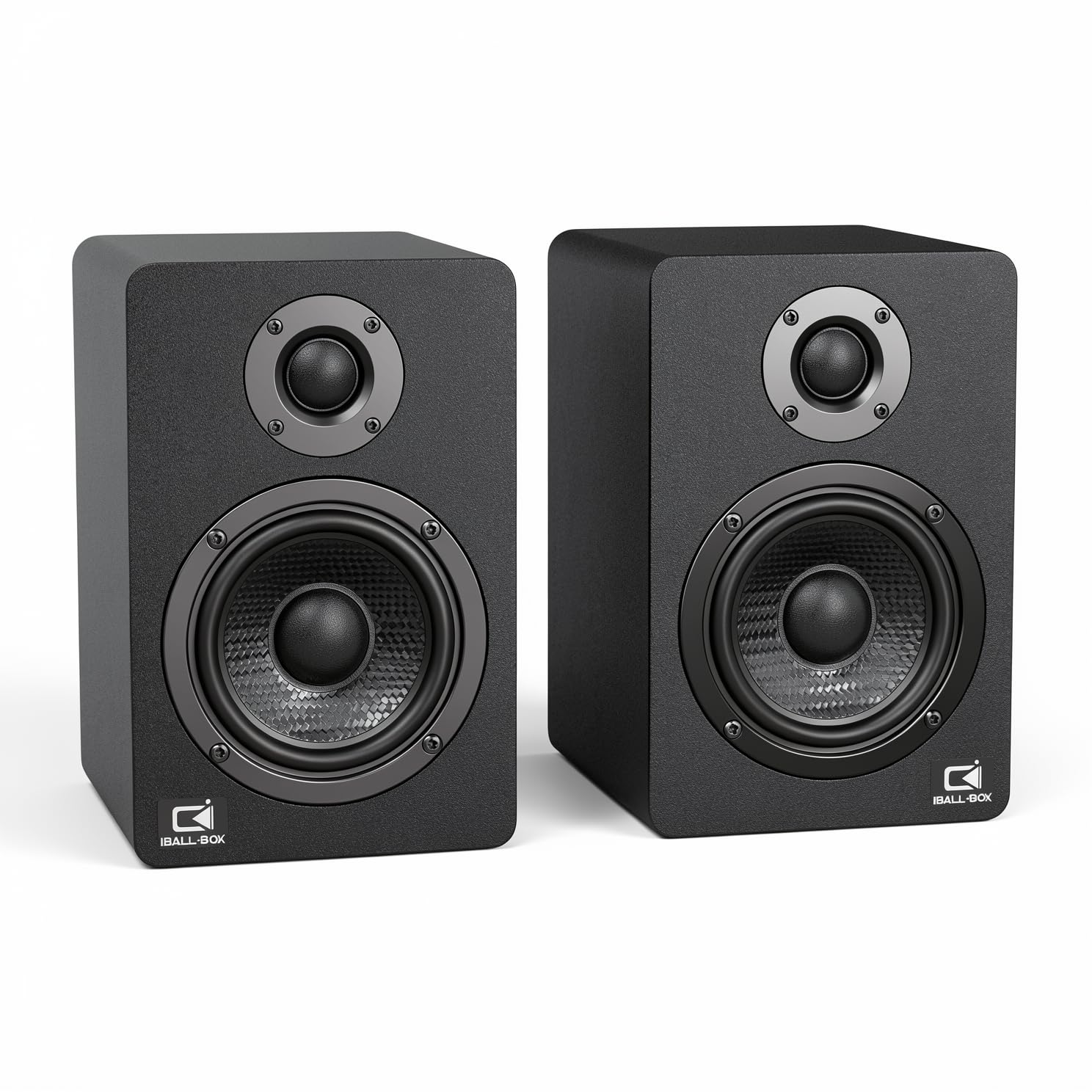
2. H1 Computer Speakers
The quiet workhorse that leaves bulky speakers in the dust.
This is the set that does everything right without calling attention to itself. The H1 delivers 60W of peak power through a clever pairing of dual 3-inch carbon-fiber woofers and dual 1-inch silk-dome tweeters, covering a frequency range of 40Hz-20KHz with a signal-to-noise ratio of at least 95dB. That translates to cleaner highs that do not hiss, fuller mids for vocal clarity, and bass that actually has texture instead of just thud. You get real bass and treble controls right on the front panel, which means you can dial in the perfect sound for a tense gaming session or a quiet acoustic playlist without opening any software.
What really pushes this ahead of the pack is the connectivity. The H1 supports 24-bit wired playback through a USB-C DAC, an optical input, and a standard 3.5mm AUX, plus Bluetooth for wireless convenience. The optical input is a rarity at this price point and makes a noticeable difference if your motherboard or monitor supports it—you are bypassing your computer’s internal sound card cleaner audio. Owners consistently call it a massive upgrade over stock PC speakers, with sound quality being the most-praised feature by a wide margin. The design is compact enough to fit under a monitor without looking cluttered, in a dark gray finish that reads more premium than its price suggests.
If there is a catch, it is that this is a 2.0 system, so you will not get the seismic subwoofer rumble of a 2.1 setup. For deep, room-shaking explosions in action films, the H1’s rear bass reflex port does solid work, but it cannot replace a dedicated subwoofer. This set is for someone who values clarity, flexibility, and a clean desk—not chest-rattling bass.
What wins people over
- Optical, USB-C, and Bluetooth inputs for nearly any device
- Front bass and treble knobs for instant tuning
- Silk-dome tweeters deliver smooth, non-fatiguing highs
The honest trade-off
- 2.0 system lacks the deep bass of a 2.1 with subwoofer
- Optical cable bevel alignment can be a bit tricky on first setup
Reach for this if: you want the best all-around sound quality and connectivity options at this price.
Look elsewhere if: chest-thumping bass for movies is your non-negotiable priority.
3. Logitech Z313 2.1 Multimedia Speaker System

The classic recipe for bass while staying affordable.
If your primary need is effective low-end for movies and gaming, the Z313 is the proven choice. It is a 2.1 system that delivers 25W RMS (50W peak) through a compact subwoofer and two satellite speakers. The subwoofer does the heavy lifting for explosions, soundtracks, and deep game audio, while the satellites handle the mid-range and highs. The setup is famously simple: plug in the subwoofer, connect the satellites, and control everything from a wired control pod on your desk. Sound quality is the most praised aspect by a huge margin, with owners consistently noting that it is a massive step up from built-in monitor audio.
That said, the Z313 is showing its age in a few ways. The subwoofer lacks any dedicated tuning control, so you are stuck with the bass level as designed. Some owners find it can be a bit too boomy for music, and the control pod does not have a headphone toggle, which can wear out your plug over time. The bass quality and volume both receive mixed feedback from the community—it is loud enough for most, but not the most refined sound. Still, for pure value, this set has been a crowd favorite for years, and its simplicity is a strength for anyone who just wants plug-and-play rumble.
Compared to the IBALL·BOX H1 above, the Z313 trades connectivity and audio fidelity for subwoofer depth. It uses only a 3.5mm AUX connection, so no Bluetooth, USB-C, or optical. It is a straightforward, no-fuss option for dedicated desktop use.
The core truth: A reliable, bass-forward system that won’t break the bank, but one that relies on a single analog connection and gives you no subwoofer adjustment.
Best for: gamers and movie watchers who want that cinema rumble without spending a fortune.
skip it if: you need Bluetooth streaming or precise bass control for music production.
4. Bluedee Computer Speakers with Subwoofer, 2.1

Modern desktop audio that brings the boom and the baubles.
The Bluedee 2.1 system takes everything the Logitech Z313 does and adds modern connectivity and a bit of flair. It delivers 80W peak power through a dedicated subwoofer and two satellite speakers, with built-in DSP tuning (digital signal processing) that reduces distortion and harsh highs for a smoother, more comfortable listening experience. You get Bluetooth 5.4 (the latest standard for lower latency and better range), plus USB-A, USB-C, and 3.5mm AUX connections. That makes it far more versatile than the Z313—you can stream wirelessly from your phone or hook it directly to a laptop via USB-C without an adapter.
Owners rave about the sound, with the subwoofer getting particular praise for being powerful without muddying the vocals. The all-in-one control knob on the front lets you adjust volume, play or pause, change the RGB lighting effects, and switch input modes. The RGB lighting is desk-friendly—you can choose dynamic colors or a soft static glow—so it is not an obnoxious rainbow unless you want it to be. The main honest note is that at very high volumes or on bass-heavy tracks, the sound can distort a little. It is a minor trade-off given the features packed in, but worth knowing if you like to push things to 11.
Compared to the Logitech Z313, the Bluedee is the clear winner for connectivity and modern features, though the Logitech has the benefit of decades of community trust and a slightly more refined subwoofer tuning from the start.
Who it works for: if you want a subwoofer for movies and games but also need Bluetooth and USB-C for a modern laptop or phone setup.
Grab this for: the best balance of deep bass, wireless freedom, and desk-friendly RGB styling.
Think twice if: you are a purist who prioritizes maximum volume clarity over added features.
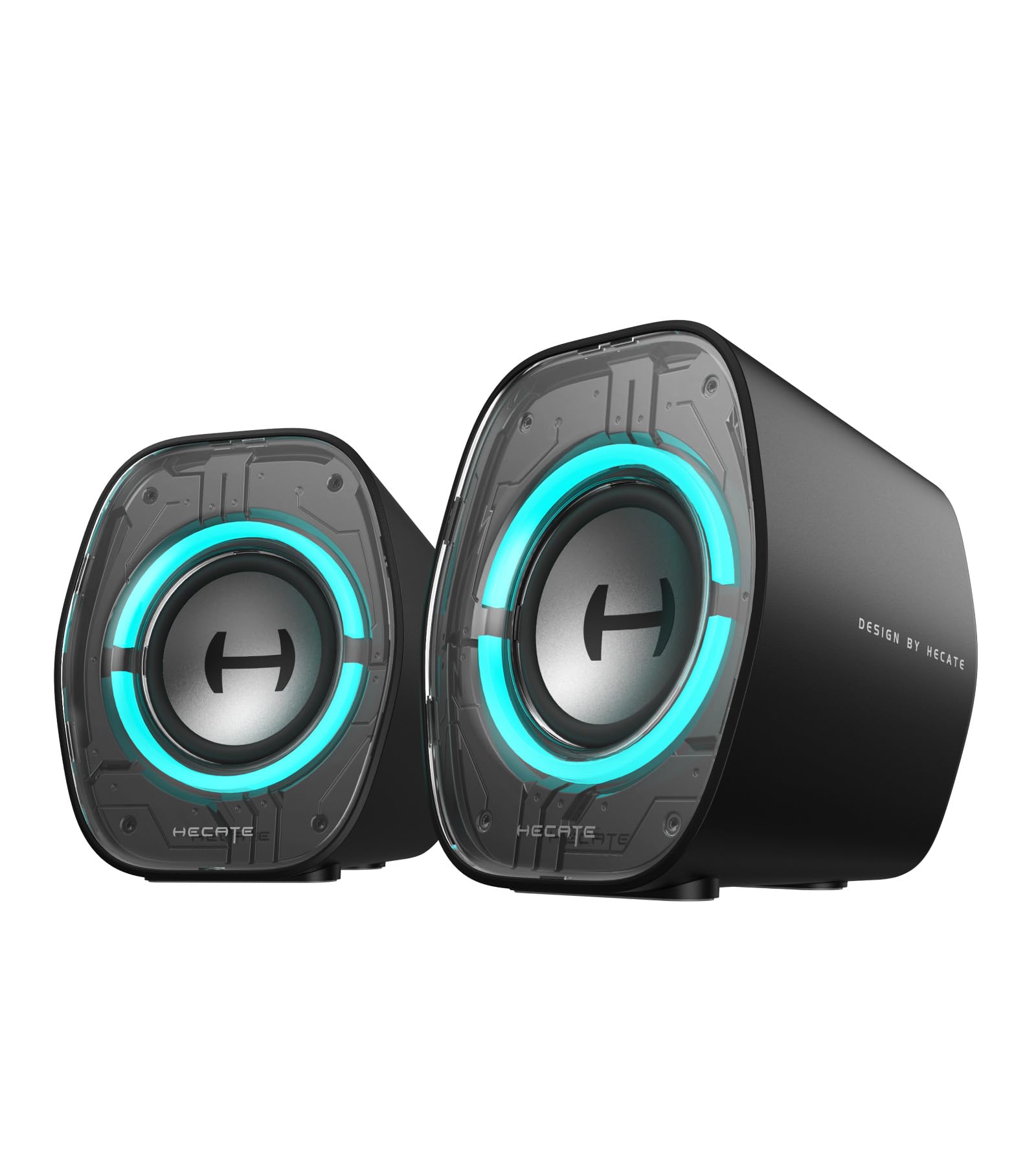
5. Edifier G1000 II Desktop Computer Speakers
A cyber-chic companion that adapts to your game, music, or movie.
The G1000 II is built for versatility, and it shows. These 2.0 speakers use a 2.5-inch full-range driver with a 16-core high-magnetic system and a racetrack bass reflex port to deepen low frequencies. The standout feature is the three preset EQ modes (Music, Gaming, Movie), which are expertly tuned to make each scenario sound noticeably better—not just a marketing checkbox. You also get 9 dynamic RGB lighting modes that you can cycle through, from static to breathing to color cycle, letting you match your desk’s aesthetic. The 10-degree tilted baffle reduces desk reflections, and the ultra-slim 3.6-inch width fits cramped setups easily.
Connectivity is strong for a 2.0 set: Bluetooth 5.4 with low latency (≤40ms), USB-C, USB-A, and 3.5mm AUX. You can even customize sound tuning via the EDIFIER ConneX app, which is a rare feature at this price. Sound quality is the most praised aspect, with owners noting it does not distort at full volume and is a massive upgrade over built-in monitor speakers. The most common comparison is against the Creative Pebble line—the G1000 II is generally considered the better all-rounder, though some note that to get really satisfying bass, you will need to spend more on a 2.1 system.
One honest opinion from the review data is that, while the design and features are excellent, the sound, while very good for the size, is not as rich as some cheaper portable speakers. It is a premium 2.0 experience, not a bass-monster.
What makes it stand out
- Three dedicated EQ modes for gaming, music, and movies
- App-based customization for fine-tuning
- Low-latency Bluetooth 5.4 for wireless gaming
The one drawback
- 2.0 system cannot compete with a 2.1 for deep bass
- Some owners feel the price is a touch high for the sound quality
Best suited for: the gamer who wants EQ presets, app control, and a stylish desk setup without a subwoofer.
Pass if: deep, room-shaking bass is your number one requirement.
6. Creative T60 2.0 Compact Hi-Fi Desktop Speakers

The desk companion that lets you ditch the subtitles.
The Creative T60 solves a very specific problem: poor dialogue clarity from computer speakers. It features Clear Dialog and Surround audio technologies powered by Sound Blaster, which are designed to make spoken words cut through the mix so you do not have to read subtitles during quiet scenes or action-heavy gaming. You can toggle these features on or off directly via buttons on the front of the right speaker. The T60 delivers 30W RMS (60W peak) through two 2.75-inch full-range drivers with a built-in digital amplifier, plus BasXPort technology that enhances bass without needing a separate subwoofer. It gets very loud and stays clean doing it.
Connectivity is excellent for work and play: USB-C audio for high-quality connection to laptops and desktops, Bluetooth 5.0 for wireless streaming, built-in 3.5mm headset and microphone jacks for calls, and a standard 3.5mm AUX-in. The headset and speakers switch is a standout feature for anyone working from home—you can switch from speakers to your headset with one push of a button, no plugging or unplugging required. Sound quality is the most praised feature, with owners specifically calling out its voice clarity for Zoom calls. The compact design sits discreetly on a desk.
The honest trade-offs are that Bluetooth is limited to the SBC codec, so it is not ideal for critical music listening, and the included AUX cable and TRRS adapter are of low quality. Some owners also find the virtual surround and clear dialogue features unnecessary, but they are there if you need them. Bass is decent for a 2.0 set, but cannot match a 2.1 system.
The bottom line: if you spend your day on video calls and your evenings watching movies, the T60’s dialogue clarity and headset switch make it uniquely valuable.
Ideal for: remote workers and movie fans who prioritize clear voice reproduction.
Not for: audiophiles seeking high-bitrate Bluetooth codecs or thunderous bass.
7. ROSON Computer Speaker, Compact Size

Tiny body, big sound, and a headphone jack right on the front.
The ROSON computer speaker is a minimalist’s dream. It is a compact set (6.96 x 3.34 x 3.14 inches) that delivers a maximum power of 3W x 2 through advanced full-range 2.0 channel stereo drivers. It is plug-and-play via USB for power and a standard 3.5mm aux cable for audio. The front-mounted volume control and headphone jack are a thoughtful touch, letting you plug in your headphones without reaching behind your tower. “The speakers play loud & clear,” as owners mention, and they are described as a good purchase that fits perfectly on either side of a monitor. The design is plain and reliable, with soft foam feet to prevent sliding.
At this size and power, you have to manage expectations. The speakers do not handle low-volume bass well—the driver assembly can resonate with bass frequencies, lowering sound quality. They sound decent for the price, but are not comparable to more expensive sets like the Creative T60 or the IBALL·BOX H1. They are a good value desktop speaker for someone who needs basic, loud, and clear audio for work or casual use, and who values the small footprint and the convenient headphone jack.
The honest comparison with the Amazon Basics speakers: the ROSON set offers a more convenient front-facing headphone jack and volume control, but the Amazon Basics have a larger community of owners and a slightly higher overall rating.
The real-world view: decent sound, easy setup, and a perfect fit for cramped desks, but bass is a weak point and the wires could be longer.
Choose this for: a tiny, capable speaker with a front headphone port for a tidy desk.
Look elsewhere if: you need bass response or plan to listen at very low volumes where the resonance is noticeable.
Understanding the Specs
RMS vs Peak Power
RMS (Root Mean Square) is the continuous power a speaker can handle without distortion. Peak power is the maximum burst it can take for a split second. A speaker with 25W RMS will sound louder and cleaner than one claiming 50W peak but only 10W RMS. Always compare RMS first—it tells you the real-world loudness and clarity the speaker can sustain during an action movie or a full-volume gaming session.
2.0 vs 2.1 Speaker Configuration
A 2.0 system uses two satellite speakers to handle all sound. A 2.1 system adds a separate subwoofer (a box that produces deep bass). That subwoofer takes over the low rumbles, so the small speakers can focus on voices and instruments. For music and calls, a good 2.0 set sounds clear. For games and movies, a 2.1 system fills the room with deeper, more rich sound that small speakers alone cannot match.
Digital-to-Analog Converters (DAC)
A DAC converts digital audio from your computer into analog sound waves your speakers can play. Most computers have a basic built-in DAC that can introduce noise or limit audio quality. Speakers with a built-in USB-C DAC (like the H1) bypass your computer’s sound card entirely, giving you a cleaner, less noisy audio signal. You will hear this as a blacker background—fewer hisses and hums, especially during quiet passages.
Bluetooth Codecs and Latency
Bluetooth transmits audio using a codec (a compression method). The most common, SBC, is fine for music but can introduce a noticeable delay (latency) of 200ms or more, making games and videos feel out of sync. Newer standards like Bluetooth 5.4 with low-latency modes (≤40ms) drastically reduce this lag. For gaming, a wired connection (USB-C or AUX) is still the gold standard, but a modern Bluetooth 5.4 speaker is close enough for casual use.
FAQ
Can I use computer speakers under 100 with a gaming console?
Do USB-powered speakers sound worse than AC-powered ones?
What is a subwoofer and do I need one?
How do I reduce speaker static or hiss?
Can I connect Bluetooth speakers to a computer without Bluetooth?
How long do computer speakers last?
What is the difference between 2.0 and 2.1 for music?
Does speaker size matter for sound quality?
Are RGB speakers worth it?
Can I use these speakers for a TV?
Final Thoughts: The Verdict
For most people, the best all-around pick for computer speakers under 100 is the H1. It balances clear audio, multiple connection options, and solid build quality at a price that is tough to top. If you want deep, cinematic bass for movies and games, choose the Bluedee 2.1. And if you spend your day on video calls, the Creative T60 is the one to reach for—its clear dialogue and built-in headset switch make it uniquely suited for the home office.
How We Picked
We do not accept paid placement. Every pick is matched to a real buyer and a real use-case; we do not hands-on test units.
Sources & Methodology
Specifications: manufacturer listings and product documentation. Review insights: verified customer reviews, as of July 2026. Pricing: not shown on this page (it changes often); check the current price via the retailer link.
As an Amazon Associate, WellFizz earns from qualifying purchases. This does not affect which products we feature.
Related Guides

Mo Maruf
I created WellFizz to bridge the gap between vague wellness advice and actionable solutions. My mission is simple: to decode the research and give you practical tools you can actually use.
Beyond the data, I am a passionate traveler. I believe that stepping away from the screen to explore new environments is essential for mental clarity and physical vitality.