Our readers keep the lights on and my smoothie glass nicely filled. As an Amazon Associate, I earn from qualifying purchases.
Specs are compiled from manufacturer listings and verified buyer reviews and can change over time — please confirm the key details on the product page before buying.
Picking a printer for a small business that actually runs feels harder than the work itself. You need something that cranks out stacks of documents without constant jams, expensive toner surprises, or a repair bill that eats your entire month. The trick is knowing which specs translate into real, reliable speed — and which ones are just marketing numbers that look good on a box.
I’m Mohammad Maruf — the founder and writer behind WellFizz. This guide is built by comparing the manufacturers’ published specifications and the patterns across verified customer reviews, so you get each pick’s real strengths and trade-offs instead of marketing spin.
Whether you are printing invoices, shipping labels, or client proposals, the right commercial printer for small business balances raw speed with low operating costs, and this guide breaks down the 11 top contenders to help you spend your money on output, not headaches.
Our Picks at a Glance


How To Choose The Best Commercial Printer For Small Business
A business printer is a long-term investment, not a casual desk accessory. Before you look at models, narrow your thinking to three things: what you print (pure text or marketing materials), how fast you need it, and what each page really costs you over a year.
Mono Laser vs Color Laser vs Inkjet
Mono lasers (black-and-white) are the cheapest per page and the fastest for text. If you only print invoices, forms, or internal documents, a mono laser is the smartest spend. Color lasers add versatility for presentations or client-facing materials, but they cost more upfront and per page. An inkjet, specifically a supertank model, delivers the lowest cost per color page but is slower, and the ink can dry out if you do not use it regularly.
Speed and Duty Cycle
Pages per minute (ppm) tells you how fast a single document prints, but the monthly duty cycle (the maximum pages the printer is built to handle) tells you if it will survive your workload. A printer rated for 40,000 pages per month will hold up far better under daily use than one rated for 10,000, even if the spec sheet says both do 40 ppm.
Total Cost of Ownership
The sticker price is only a fraction of what you will spend over three years. Toner yield — how many pages a single cartridge prints — and the availability of high-yield cartridges matter enormously. A cheap printer that uses a cartridge every 1,000 pages becomes vastly more expensive than a moderately priced one whose high-yield cartridge lasts 10,000 pages.
Quick Comparison
| Model | Best For | Type | Print Speed | Duplex | Amazon |
|---|---|---|---|---|---|
| Canon imageCLASS MF445dw★ Best Overall | Best Overall Mono All-in-One | Laser (B&W) | 40 ppm | Auto | Amazon |
| Brother HL-L3280CDWCompact Color King | Compact Color Laser | Laser (Color) | 27 ppm | Auto | Amazon |
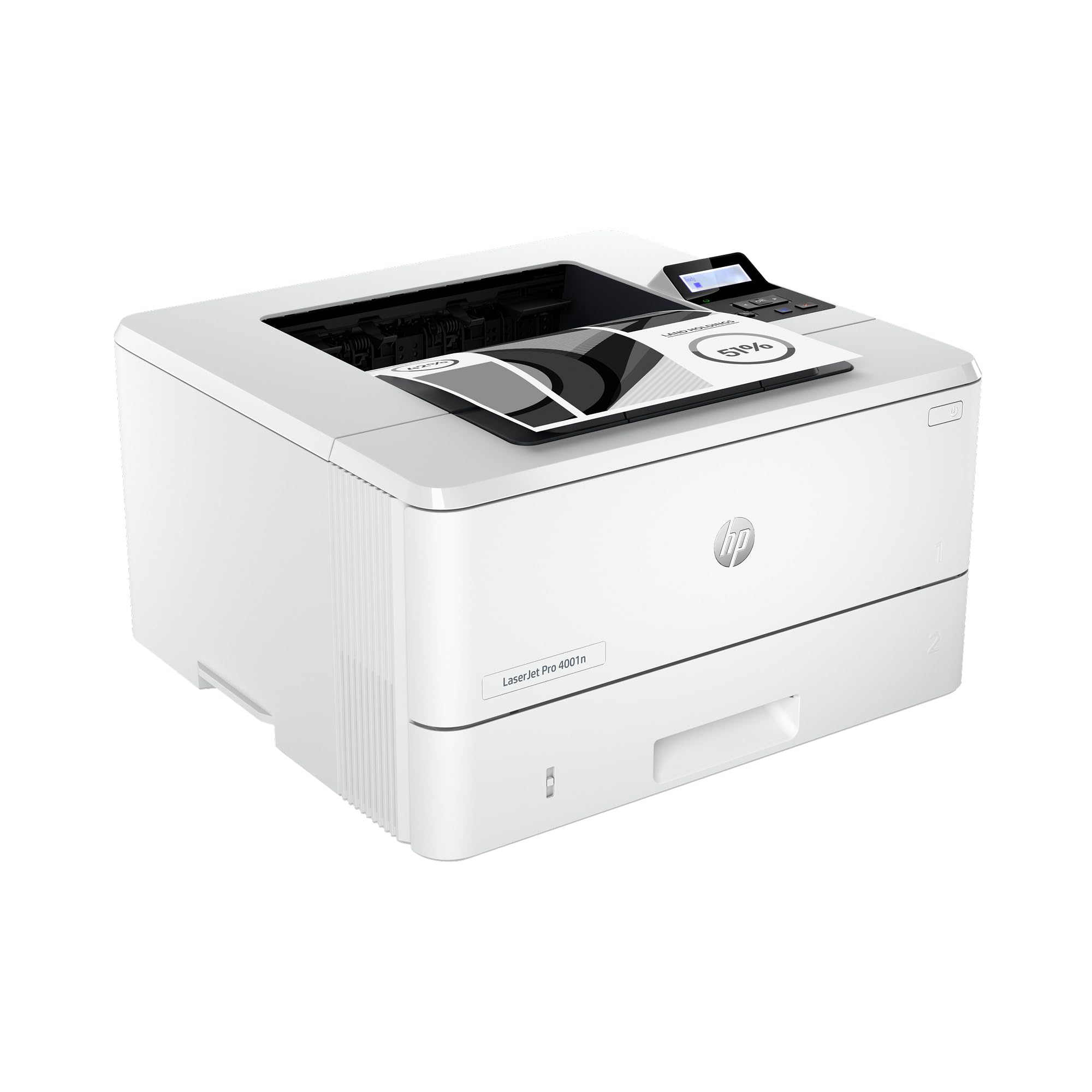
| HP LaserJet Pro 4001nSpeed Champion | High-Speed Mono Team Printer | Laser (B&W) | 42 ppm | Auto | Amazon |
| Xerox C235dni | Budget Color All-in-One | Laser (Color) | 24 ppm | Auto | Amazon |
| Canon Color imageCLASS MF665Cdw | Color All-in-One with 3yr Warranty | Laser (Color) | 26 ppm | Auto | Amazon |
| Brother MFC-L3720CDW | Highly-Rated Color MFP | Laser (Color) | 19 ppm | Auto | Amazon |
| Canon Color imageCLASS MF753Cdw II | Fast Color All-in-One | Laser (Color) | 35 ppm | Auto | Amazon |
| HP Color LaserJet Pro MFP 3301fdw | Business Color MFP | Laser (Color) | 26 ppm | Auto | Amazon |
| HP Laserjet Pro MFP 4101fdw | High-Speed Mono MFP | Laser (B&W) | 42 ppm | Auto | Amazon |
| Epson EcoTank Pro ET-16600 | Wide-Format Super Tank | Inkjet (Color) | 25 ppm B&W | Auto | Amazon |
| Lexmark MS823dn | High-Volume Mono Workhorse | Laser (B&W) | 65 ppm | Auto | Amazon |
In‑Depth Reviews
1. Canon imageCLASS MF445dw
Our pick — over 4★ from 800+ verified ratings; the strongest balance of quality and price.
The all-in-one workhorse that packs a 3-year warranty and a full 3100-page cartridge in the box.
You get print, scan, copy, and fax in a single machine, but the real headline here is the included supplies and the confidence. The 3-year warranty is rare for this class, and the starter toner is a full-size 3,100-page cartridge, not a tiny sample — so your first few months of printing are essentially free. The 40 ppm monochrome speed pulls ahead of most mid-range lasers, and the crowd agrees: printer quality is what wins people over, with 66 owners praising it.
The 5-inch color touchscreen with customizable shortcuts makes daily tasks feel quicker, and it even has Wi-Fi hotspot mode to connect a phone directly when your office network is down. The single-pass duplex auto document feeder is a major time saver for scanning stacks of two-sided documents. One recurring theme from owners is the fast, quiet sleep mode.
Buyers report that the machine handles the heavy lifting for small teams easily. The 40 ppm pace is noticeably quicker than the 27 ppm from Brother HL-L3280CDW when you are running a stack of reports. The main limitation is that it is monochrome-only, so if you need color documents, look further down this list.
What Owners Love
- Full 3-year warranty included standard.
- Prints at 40 ppm, and the first page appears in as fast as 5.3 seconds.
- Duplex single-pass scanner is fast and supports OCR for searchable PDFs.
A Few Trade-offs
- Monochrome only — no color printing.
- No cheap third-party toner yet, so when the starter runs out, cartridge replacements are a real cost.
- Scan-to-email setup can take a while if your IT environment is finicky.
The Solo Owner’s Pick: If you need a rock-solid mono all-in-one with a long warranty, this is the one to buy.
Think Twice If: Any color output is required for client presentations or marketing materials.
2. Brother HL-L3280CDW
A compact color laser that delivers sharp, vibrant prints without taking over your whole desk.
This is a print-only machine (no scanner, no copier, no fax), which keeps the footprint small and the price reasonable for a color laser. The print speed of 27 ppm is strong for its size, and owners consistently praise the output quality, with 128 buyers calling out the print quality as excellent. Wireless setup is famously easy — owners mention being up and running in around ten minutes.
The 2.7-inch color touchscreen lets you print directly from cloud-based apps like Google Drive and Dropbox, which is handy if you manage documents on the go. The auto-duplex printing saves paper, and the 250-sheet tray holds a full ream. However, this is a model where wireless connectivity has drawn mixed feedback; some find it stable, while others report intermittent drops that require a power cycle.
Compared to the Canon MF445dw above, the Brother HL-L3280CDW brings color at the cost of speed — 27 ppm versus 40 ppm — and it lacks any scanning or copying functions. You are trading versatility for vibrant output and a lower entry price. Buyers also note that an occasional unit has a critical part failure after the warranty period ends.
What Stands Out
- Excellent print quality at a color laser price that won’t shock you.
- Small footprint with built-in lifting handles for easy placement.
- Cloud printing from Google Drive, Dropbox, and EverNote.
What to Watch
- Print-only — you will need a separate scanner or all-in-one for copying.
- Wi-Fi connectivity can be inconsistent for some users.
- Toner costs are higher than monochrome, and high-yield cartridges are the way to go.
Reach for This If: Color documents are a must and you do not need scanning capabilities in one box.
Look Elsewhere If: You need a scanner, copier, or a higher duty cycle for a busy office.
3. HP LaserJet Pro 4001n
A monochrome speed demon at 42 ppm designed for small teams that live on documents.
HP positions this for up to 10 users, and the 42-black-and-white-ppm pace makes that realistic. It is a print-only model with Ethernet and USB connectivity — no Wi-Fi built in, which is note if you are used to wireless. The print quality gets strong marks from owners (48 praise it), and the setup is straightforward. You also get HP Wolf Pro Security, which adds configurable security settings for protecting business data.
The packaging includes a starter toner, and the high-yield 148X cartridge can run up to 9,500 pages, which keeps the per-page cost low for a busy workspace. Owners call the prints clear and sharp, and the speed is a standout in the mono printer category. The catch is the noise level — a few owners mention it is louder than expected during operation.
When set alongside the Canon MF445dw, the 4001n is faster at 42 ppm versus 40 ppm and is purely a printer, while the Canon adds scan, copy, and fax. You are choosing between raw speed with top-tier security versus an all-in-one setup. An occasional owner reports paper size and type errors that appear to be firmware-related, though most units run flawlessly.
Best for Speedy Text: If your team churns out black-and-white documents all day and you want the fastest speed in this price range, this is it.
The Trade-off: No Wi-Fi and no scanner/copier — you need a wired connection and separate scanning hardware.
4. Xerox C235dni

A color all-in-one laser that brings Xerox brand reliability to a budget-friendly price.
The Xerox C235dni prints, scans, copies, and faxes at 24 ppm in both color and black-and-white. Print quality is the strongest aspect, with 35 owners calling it out as sharp and vibrant for business documents. It supports wireless and mobile printing via Apple AirPrint and Mopria, and the setup app guides you through a straightforward process on a 2.4 GHz Wi-Fi network.
One thing to know up front: it includes starter toner cartridges with a 500-page yield, so you will be buying replacements fairly quickly if you print a lot. The high-yield cartridges are available to bring the running cost down. Connectivity is a point of mixed feedback — it does not support 5GHz Wi-Fi, so your phone or laptop must be on the 2.4 GHz band to connect wirelessly.
Owners find that using higher-quality paper, like Hammermill Premium, makes a big difference in print darkness and clarity. Some units have arrived appearing previously used, with flimsy cartridge door hinges, which is worth inspecting on arrival. The Xerox C235dni is a solid entry point into color laser if your budget is tight, but the slower 24 ppm pace and starter toner limitations mean it suits a lower-volume office better than a busy one.
Good Fit For: A small home office that needs occasional color documents and wants an all-in-one at a low entry cost.
skip it if: You print more than 1,500 pages a month — the starter cartridges and monthly duty cycle will feel restrictive.
5. Canon Color imageCLASS MF665Cdw

A 4-in-1 color laser with a 3-year limited warranty and a 5-inch color touchscreen.
The MF665Cdw prints, scans, copies, and faxes at up to 26 ppm in both color and monochrome. The first page comes out in around 10.3 seconds, so you are not waiting around. Print quality earns top marks from 57 owners, who describe it as looking professional and accurate. The 5-inch touchscreen with the Application Library makes navigating shortcuts and settings fast once you learn the layout.
It uses Canon Genuine Toner 075 cartridges, with high-capacity options to reduce how often you swap them out. The 50-sheet duplex automatic document feeder handles two-sided scanning in a single pass, which is genuinely useful for archiving multi-page contracts. Some owners found the scan-to-email and address book setup to be more complex than expected, and the initial setup experience draws mixed feedback — easy for some, frustrating for others.
Apple AirPrint and Mopria are built in for mobile printing, though one owner noted AirPrint did not auto-detect the printer and required a manual URL entry. The scanner lid feels sturdy, but the ADF can jam after a handful of pages in some units, which is an occasional gripe. At its core, the MF665Cdw delivers very good color output and a strong warranty, but it demands a bit more IT patience during the initial configuration compared to a Brother model.
Who It Works For: Small offices that value print quality and a 3-year warranty over the simplest possible setup.
Keep in Mind: Setup can be bumpy, and the starter toner yields (500 CMY, 700 Black) run out quickly with regular use.
6. Brother MFC-L3720CDW

A feature-packed color all-in-one that balances speed, smarts, and a huge owner fanbase.
With over 960 ratings, this is among the most-vetted printers on the list. The MFC-L3720CDW delivers print, scan, copy, and fax at 19 ppm in color and black-and-white. Quality is the standout — 144 owners single it out as excellent for the price. It comes with dual-band Wi-Fi (2.4GHz/5GHz), Wi-Fi Direct, and a 3.5-inch color touchscreen with 48 customizable shortcuts.
The 50-sheet auto document feeder and 250-sheet tray are standard, and auto-duplex printing saves paper. You can print directly from Google Drive, Dropbox, and OneNote. The mobile companion app lets you monitor toner levels from your phone. Owners love the easy wireless setup — 91 praise it — and the sharp, vibrant output.
The speed is slower than some competitors at 19 ppm, which matters if you regularly print 50+ page documents. Reliability draws mixed feedback, with some owners reporting the “No Waste Toner Detected” error bricking the printer after around two years of use, even with genuine parts. This makes it a strong choice for a low-to-moderate volume office, but if you need 40+ ppm pace, the HP 4001n or Canon MF445dw are better fits.
Great For: A home office or small team that wants reliable color printing with a sturdy set of smart features.
Not Ideal If: You need high-speed output or plan to push beyond 1,000 pages per month.
7. Canon Color imageCLASS MF753Cdw II

A color laser that blazes at 35 ppm in both color and black-and-white, making it one of the fastest in its class.
Speed is the defining trait here. The MF753Cdw II hits 35 ppm for both color and monochrome, and the first page is out in around 7 seconds. That puts it well ahead of the Brother MFC-L3720CDW (19 ppm) and the Canon MF665Cdw (26 ppm) for anyone who regularly prints lengthy color presentations or reports. The 5-inch color touchscreen with Application Library keeps navigation quick.
It is a true 4-in-1: print, scan, copy, and fax. The 50-sheet duplex ADF handles two-sided scanning in a single pass. The paper input is 250 sheets standard plus a 50-sheet multipurpose tray, and you can add an optional 550-sheet cassette. It uses Canon Genuine Toner 069 cartridges, and the starter toners yield 1,100 pages for CMY and 2,100 pages for black, which is more generous than many competitors.
Owners consistently praise the quiet operation and the excellent print resolution. A few mention that the Canon website blocked 403 errors and the software setup on Windows 11 had firewall hiccups, though the hardware itself is plug-and-play friendly, especially with native Windows drivers. The legal paper handling requires using the bypass tray, which means you cannot load legal sheets in the main cassette without reducing capacity.
Best Pick For: A fast-growing small business that needs color documents quickly and wants expandable paper capacity.
Watch For: Canon’s software and driver website can be frustrating; use the native OS driver if possible.
8. HP Color LaserJet Pro MFP 3301fdw

An HP color all-in-one that uses TerraJet toner for more vivid colors in a compact chassis.
The 3301fdw prints, scans, copies, and faxes at up to 26 ppm in both color and black-and-white. HP’s TerraJet toner is the highlight here — it is designed to deliver richer, more saturated colors than previous generations, which matters for client-facing materials. The dual-band Wi-Fi with a self-reset feature automatically fixes connection drops, which is a smart touch for offices that cannot babysit a network connection.
Setup is fast for a managed office printer, and the auto-duplex single-pass scanner lets you copy both sides of a document in one run. The 250-sheet input tray is standard. Owners who have a good unit report excellent print quality with sharp text and vibrant colors, and the build is sturdy. The HP Smart app is widely considered convenient for monitoring and managing the printer remotely.
However, the experience is uneven. A number of customers note severe color print defects (streaks and toner not fusing properly) right from the start, and HP support has struggled to send replacement toner because the model is newer. The introductory toner depletes very quickly — some reviewers point out under 50 pages — which stings given the premium price tier. This model has the widest quality spread of any pick here; your experience depends heavily on getting a fully functional unit.
Risky but Rewarding: If you get a good unit, the color quality and Wi-Fi stability are top-tier for a compact MFP.
The Honest Caution: Quality control on new units and supply chain support have been inconsistent — consider an extended return window.
9. HP Laserjet Pro MFP 4101fdw

A mono all-in-one that matches the speed of the 4001n but adds full scan, copy, and fax capabilities.
If you liked the HP 4001n but wished it could scan and copy, this is the answer. The 4101fdw prints at 42 ppm, same as the 4001n, but it adds a scanner, copier, fax, and an auto document feeder. Print quality is the most-praised feature, with 85 owners calling it excellent. The color touchscreen makes navigation straightforward, and it includes HP Wolf Pro Security to safeguard business data.
Wireless connectivity is handled by intelligent Wi-Fi that looks for the best signal to stay connected. Shoppers say fast, sharp text output and a sturdy build that is quiet for its speed. The duplex printing and scanning save significant time. It also works with Bluetooth for easy pairing with mobile devices, alongside the standard Ethernet and USB.
The main downside is the initial cost of replacement cartridges — the 148X high-yield toner is expensive, and HP blocks third-party cartridges through firmware updates, locking you into HP’s supply chain. The size is also bulky, so you need dedicated floor or desk space. If your office runs through thousands of mono pages weekly and needs scanning, this is the complete package, but the per-page cost demands attention.
Ideal For: A busy small office that needs fast mono printing and scanning wrapped in a single machine.
Stay Away If: You want to use third-party toner to cut costs — HP’s Dynamic Security feature blocks non-HP cartridges.
10. Epson EcoTank Pro ET-16600

The only wide-format pick here, printing up to 11×17, with refillable ink tanks that slash per-page costs.
This is a unique entry because it is an inkjet supertank, not a laser. The ET-16600 prints, scans, copies, and faxes, and it can handle tabloid-sized (11×17) documents — something no other pick on this list can do. Print speed is 25 ppm in black-and-white and 12 ppm in color, which is slower than laser, but the running cost is dramatically lower thanks to the refillable ink bottles. The 127 mL black bottle and 70 mL color bottles mean you print thousands of pages before needing a refill.
The 4.3-inch touchscreen controls the workflow, and the 50-sheet ADF handles two-sided scanning. The monthly duty cycle is rated at 66,000 pages, which sounds massive, but that is at typical office coverage. It supports wired and wireless networking. Owners praise the crisp print quality and the engineering of the ink bottle system — no spills, clean refills.
Some buyers report the bottom cassette needs careful handling, and an occasional printhead failure after a year led to a warranty denial. It is also enormous — 20.3 inches wide and 19.7 inches deep — so measure your space first.
Perfect For: An architecture, engineering, or creative office that needs 11×17 color output without paying a fortune per page.
pass on it if: You are a standard document office that prints mostly text — a mono laser will be faster and more reliable.
11. Lexmark MS823dn

A low-volume print-only monster hitting 65 pages per minute for businesses that burn through paper.
The Lexmark MS823dn is built for one thing: ripping through black-and-white documents faster than almost any other printer in the business segment. At 65 ppm with a first page out in just 4.2 seconds, it is the undisputed speed king of this list — at 65 ppm versus the 42 ppm of the HP models. It supports up to 4,400 sheets of input capacity, and the high-yield toner cartridges can go as high as 55,000 pages each, making the per-page cost remarkably low for very high volume.
The steel frame construction is designed to survive harsh environments and heavy use. Full-spectrum security is baked in to protect document data on the device and over the network. It is also EPEAT Silver and ENERGY STAR certified. Owners who get a properly functioning unit call it a “good workhorse” with no issues.
The catch is that this is a print-only, monochrome-only device — no scanning, no color. And the customer reviews are a mixed bag due to fulfillment issues: some owners mention receiving a used or refurbished unit instead of a new one, with missing imaging units or signs of wear. The lack of Wi-Fi is also notable — the Wi-Fi capability advertised requires a separate USB adapter that costs extra. This is a serious piece of hardware for a serious print volume, but only if you buy from a trusted seller who explicitly guarantees a new, complete unit.
Who It’s For: A high-volume office that prints thousands of black-and-white pages daily and needs a machine that can keep up for years.
Who Should Pass: Anyone needing color, scanning, or a simple plug-and-play experience — and definitely avoid buying from third-party marketplace sellers.
Understanding the Specs
Pages Per Minute (ppm)
This is the speed rating you see on every box. It tells you how many pages the printer can output in one minute under ideal conditions. For a busy small business, look for at least 30 ppm for monochrome and 24 ppm for color. That pace means a 10-page document is done in around 20 seconds, so you are not standing at the machine waiting.
Duty Cycle vs Recommended Monthly Volume
The duty cycle is the maximum number of pages the manufacturer says the printer can handle in a month without breaking down, but running at that level every month will wear parts out fast. The “recommended monthly volume” — usually a much lower figure — is the balance for keeping the machine healthy. For a small business, a duty cycle around 40,000 pages and a recommended volume of 2,000 to 6,000 pages is a realistic target.
FAQ
Is a color laser printer more expensive to run than a monochrome one?
What does “Auto Duplex” mean and why does it matter?
Can I use third-party toner cartridges in a laser printer?
How many pages should I expect a commercial printer to last?
Is a wired Ethernet connection better than Wi-Fi for a business printer?
What size printer do I need for a small business?
What does “duty cycle” actually tell me about a printer?
Should I get an all-in-one or a separate printer and scanner?
How do I know if a printer is “commercial grade” versus a home office model?
Final Thoughts: The Verdict
If you want one dependable pick, the commercial printer for small business winner is the Canon imageCLASS MF445dw because it wraps 40 ppm speed, a full all-in-one feature set, and a 3-year warranty into a single package that owners consistently praise for print quality. If you need color printing in a compact size, grab the Brother HL-L3280CDW. And for extremely high-volume mono output with blazing speed, the Lexmark MS823dn is the one to reach for, provided you buy from a verified seller.
How We Picked
We do not accept paid placement. Every pick is matched to a real buyer and a real use-case; we do not hands-on test units.
Sources & Methodology
Specifications: manufacturer listings and product documentation. Review insights: verified customer reviews, as of July 2026. Pricing: not shown on this page (it changes often); check the current price via the retailer link.
As an Amazon Associate, WellFizz earns from qualifying purchases. This does not affect which products we feature.
Related Guides

Mo Maruf
I created WellFizz to bridge the gap between vague wellness advice and actionable solutions. My mission is simple: to decode the research and give you practical tools you can actually use.
Beyond the data, I am a passionate traveler. I believe that stepping away from the screen to explore new environments is essential for mental clarity and physical vitality.