Our readers keep the lights on and my smoothie glass nicely filled. As an Amazon Associate, I earn from qualifying purchases.
Specs are compiled from manufacturer listings and verified buyer reviews and can change over time — please confirm the key details on the product page before buying.
Video editing is a brutal test of a computer. The timeline stutters, exports crawl, and previews drop frames the moment you stack a few effects. You need a machine that translates every click into instant playback and every render into a finished file — fast. This guide cuts through the spec-sheet noise and compares the computers that actually deliver that experience for the long haul.
I’m Mohammad Maruf — the founder and writer behind WellFizz. This guide is built by comparing the manufacturers’ published specifications and the patterns across verified customer reviews, so you get each pick’s real strengths and trade-offs instead of marketing spin.
Whether you are cutting 4K multicam or color grading for clients, the right computer for video editing depends on a balance of CPU power, GPU acceleration, and RAM capacity that your budget will allow.
Our Picks at a Glance



How To Choose The Best Computer For Video Editing
A video editing computer demands sustained high performance that a general-use PC cannot deliver. The software demands high sustained performance, and cutting the wrong corner will cost you hours of waiting. Here are the key specs to prioritize.
CPU: Core Count and Clock Speed Matter
The processor drives every timeline action and export. 12 or more CPU cores accelerate rendering and exporting, while a 4.0 GHz+ clock speed keeps timeline scrubbing responsive.
GPU: Dedicated Graphics with Plenty of VRAM
A dedicated graphics card is essential for smooth 4K timelines and GPU-accelerated effects. Look for at least 8GB of VRAM to handle 4K timelines, effects, and color grading smoothly. Cards like the NVIDIA GeForce RTX series use specialized cores for encoding and decoding, which speeds up exports significantly.
RAM: The More You Have, The Smoother It Runs
16GB is the minimum for 1080p editing; 32GB or 64GB is ideal for 4K work and heavy multitasking. DDR5 memory provides higher bandwidth for faster data transfer between the processor and RAM.
Storage: Speed Is Everything
Install your OS and editing software on a fast NVMe SSD for near-instant booting and loading. A secondary drive for media storage is also valuable. An NVMe SSD opens projects in seconds, while a hard drive takes minutes.
Quick Comparison
| Model | Best For | CPU | GPU | RAM | Amazon |
|---|---|---|---|---|---|
| Apple Mac mini M4 Pro★ Best Overall | Pro-level Power/Size | M4 Pro 12‑core | 16‑core GPU | 24GB Unified | Amazon |
| ZYNEEX Ryzen 5500/RTX 3050Budget Champion | Entry-level Editing | Ryzen 5 5500 | RTX 3050 6GB | 16GB DDR4 | Amazon |
| HP Mini i7-12700TMini Workstation | Compact Office Editing | i7-12700T | Intel UHD 770 | 32GB DDR4 | Amazon |
| Dell Pro Tower i7-14700 | Business Workflows | i7-14700 | Integrated | 16GB DDR5 | Amazon |
| Skytech Archangel 5 i5/RTX 5060 | Balanced Gaming/Creating | i5 14400F | RTX 5060 8GB | 16GB DDR5 | Amazon |
| WIWB i9-14900HX/RTX 5060 Ti | High-end 4K Work | i9-14900HX | RTX 5060 Ti 8GB | 16GB DDR5 | Amazon |
| Alienware Aurora RTX 5070 | Marathon Gaming/Creation | Ultra 7 265F | RTX 5070 | 32GB DDR5 | Amazon |
| Thermaltake LCGS i9/RTX 5070 | Silent Liquid-Cooled Build | i9-14900KF | RTX 5070 12GB | 32GB DDR5 | Amazon |
| iBUYPOWER Y40 PRO Ryzen 9/RTX 5070 Ti | Workstation-Level Power | Ryzen 9 7900X | RTX 5070 Ti 16GB | 32GB DDR5 | Amazon |
| HP Envy i9-14900K / RTX 3050 | Ultra-High RAM Workloads | i9-14900K | RTX 3050 8GB | 64GB DDR? | Amazon |
| CLX i9-14900KF / RTX 4070 Super | Massive Storage + GPU | i9-14900KF | RTX 4070 Super 12GB | 32GB DDR5 | Amazon |
| Dell Tower Plus Ultra 9/RTX 5070 | Future-Proof AI Workflows | Ultra 9 285 | RTX 5070 12GB | 32GB DDR5 | Amazon |
In‑Depth Reviews
1. Apple 2024 Mac mini with M4 Pro chip
Our pick — over 4.5★ from 200+ verified ratings; the strongest balance of quality and price.
Unreal power in a five-inch square that vanishes on your desk.
For pure video editing performance per cubic inch, nothing in this list touches it. The M4 Pro chip packs a 12-core CPU and a 16-core GPU, and owners consistently call it “incredibly fast, quiet, and compact.” Performance is the most-discussed trait by a wide margin — the thing everyone raves about is how easily it handles daily creative tasks, multitasking, and complex timelines. At just 1.6 pounds and measuring 5 x 5 x 2 inches, you can tuck it behind a monitor and forget the tower ever existed.
That 24GB of unified memory is shared between the CPU and GPU, so you never run into a bottleneck that requires paging. Buyers report it drives a pair of 34-inch ultrawide displays without breaking a sweat. The catch with the Apple silicon ecosystem is port selection — you may need a dock for legacy USB-A devices or certain peripherals that rely on DisplayLink drivers. The consensus is to favor plug-and-play hardware for the smoothest experience.
While the Skytech and WIWB picks have more raw GPU VRAM, the M4 Pro’s unified architecture makes it feel snappier in day-to-day pro-res editing. It is a tough beat for pure creative latency.
Editors’ Edge
- 12-core CPU and 16-core GPU handle 4K timelines with zero stutter
- 24GB unified memory means fewer export wait times
- Near-silent operation even under sustained load
- Compact enough to travel between editing bays
Consider This
- You need a dongle or dock for older USB-A peripherals
- Not ideal if you are locked into Windows-only NLEs
- Top-tier performance requires a good external monitor investment
Reach for it if: you want a professional-grade editing powerhouse that takes up no space and runs macOS for Final Cut or DaVinci Resolve.
Look elsewhere if: your workflow demands a Windows environment or you rely heavily on older USB peripherals without a dock.
2. ZYNEEX Prebuilt Gaming Desktop (Ryzen 5 5500, RTX 3050)
Affordable 1080p editing that proves you do not need a flagship.
This is the entry-level pick for someone cutting 1080p projects or learning color grading without a massive investment. The Ryzen 5 5500 processor (6 cores, up to 4.2 GHz) and the dedicated GeForce RTX 3050 with 6GB of VRAM let you run Premiere Pro or DaVinci Resolve at 1080p with basic effects. The 16GB of DDR4 3200MHz RAM keeps a few apps open alongside your timeline, and the 1TB NVMe SSD means project files load fast.
The most common sentiment from owners is that performance is solid for the price point, with many noting it handles games and light editing without issues. A few owners mention the setup process can be slightly quirky — one had to use a keyboard to navigate initial settings — but once past that, the machine settles into a reliable workhorse. The fan noise is manageable, and the ARGB cooling system does its job during longer sessions. The GPU is the clear weak point for heavy 4K work, so keep your timelines at 1080p and you will be happy.
Smart start: A wallet-friendly entry into dedicated-GPU editing that leaves room for future upgrades like more RAM or storage.
Best suited for: the beginner editor on a strict budget who needs a dedicated GPU and does not need 4K timeline performance.
Not ideal if: you regularly cut 4K multicam projects or use heavy effects; you will hit the RTX 3050’s VRAM ceiling quickly.
3. HP Mini Desktop (i7-12700T, 32GB RAM)
A tiny tower that drives three 4K monitors for a multi-window edit bay.
If desk space is at a premium and you need multiple reference monitors for your editing suite, the HP Mini is a clever pick. The 12th Gen Intel Core i7-12700T (12 cores up to 4.7 GHz) and 32GB of DDR4 RAM provide enough grunt for serious multitasking — 50+ browser tabs, a chat app, and your NLE all at once. The dual DisplayPort 1.4 and HDMI 2.1 ports support three 4K displays at 60Hz, ideal for a timeline, preview, and scopes view.
Owners consistently report that this machine “does the job” for office and editing tasks with zero fuss. Its whisper-quiet operation is a bonus in a quiet studio. The catch is the integrated Intel UHD 770 graphics — this is not for GPU-accelerated effects or heavy 4K grading. You are leaning on the CPU and RAM here. The included keyboard and mouse sweeten the deal for a complete unbox-and-edit experience. The 1TB NVMe SSD keeps your OS and software fast, but heavy project files will need external media storage.
Desktop efficiency: Perfect for the editor who values a clutter-free desk, multi-monitor workflow, and quiet operation over raw GPU power.
Reach for it if: you need a compact, quiet system for a multi-display 1080p/1440p editing rig and do not rely on GPU effects.
Think twice if: your work involves heavy color grading, complex transitions, or any task that benefits from a dedicated graphics card.
4. Dell Pro Tower Desktop (i7-14700, 16GB DDR5)
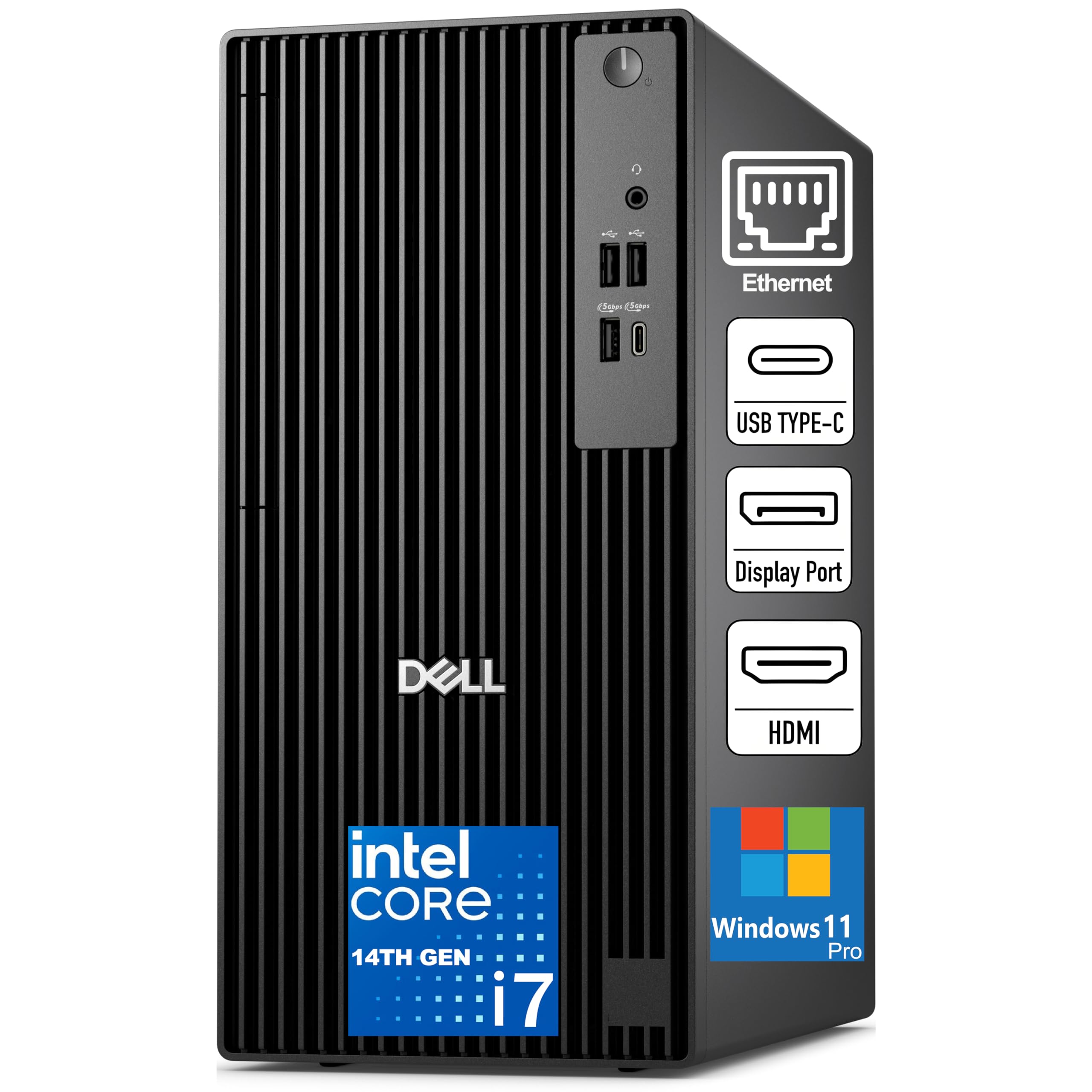
A business-grade tower with a powerful CPU for efficient multitasking.
The Dell Pro Tower is designed for the professional who needs a reliable machine for video calls, data processing, and light to moderate editing. The Intel Core i7-14700 processor (20 cores, up to 5.4 GHz) provides serious multi-threaded power for tasks like exporting and rendering, while the 16GB of DDR5 memory at 5600 MT/s keeps your system responsive. The 512GB SSD TLC is enough for the OS and applications, but you will want external storage for footage.
The key trade-off here is the integrated graphics — you are relying on the CPU’s UHD graphics for display output. This machine is best for light 1080p edits and proxy workflows. Owners praise its speed and quality, but the most mentioned aspect is the network connectivity, which is mixed. Some note the onboard WiFi only works on 2.4 GHz networks, so a wired Ethernet connection or a better wireless card might be your first upgrade. The compact black tower design and TPM 2.0 security make it a solid fit for a professional office environment.
Productive foundation: A solid CPU-first machine for office editing, multitasking, and coding, but plan for a dedicated GPU and better WiFi if you edit regularly.
Best suited for: a business editor or remote worker who needs a fast, secure tower for light video work, data analysis, and general productivity.
Not ideal if: you rely on timeline GPU acceleration or need to cut 4K content without proxies.
5. Skytech Gaming Archangel 5 (i5 14400F, RTX 5060)

the balance between gaming muscle and editing stamina.
The Skytech Archangel 5 is the mid-range hero for editors who also game. It pairs an Intel Core i5 14400F processor (up to 4.7 GHz) with an NVIDIA GeForce RTX 5060 that has 8GB of GDDR7 VRAM — a strong combination for 1080p and even some 4K timeline work. The 16GB of DDR5 RAM running at 6000 MT/s with a heat spreader keeps your system cool and snappy, and the 1TB NVMe SSD boots your NLE in seconds.
The build quality and value are the most praised aspects. Owners mention smooth 60+ FPS in games and praise the quiet ARGB air cooler for keeping temperatures in check during long sessions. The case is a clean white with tempered glass, and the included keyboard and mouse get you started immediately. The 750W Gold PSU gives you headroom for future upgrades. An occasional owner mentions a fan bearing issue over time, but the 1-year warranty on parts and labor provides a solid safety net. The RAM is a bit lean for heavy 4K projects; 32GB would be ideal for that.
Balanced power: The RTX 5060’s GDDR7 memory and the fast DDR5 RAM make this a zippy editing companion for the price.
Reach for it if: you want a capable editing PC that doubles as a great gaming rig, without stepping into premium pricing.
Look elsewhere if: your primary workload is 4K multi-layer editing with heavy effects; 16GB of RAM will start feeling tight.
6. WIWB Gaming PC (i9-14900HX, RTX 5060 Ti)

A CPU monster that chews through complex timelines and high-level rendering.
The WIWB build is for editors who push their CPU to the limit with heavy rendering, live streaming, and simultaneous video editing. The Intel Core i9-14900HX (up to 5.4 GHz) is a mobile-class processor that, in this desktop form, delivers outstanding multi-threaded performance for exports. The RTX 5060 Ti with 8GB of GDDR7 VRAM provides AI-powered DLSS 4.0 capabilities that accelerate your previews in supported NLEs.
The 16GB of DDR5 RAM is the main bottleneck here; you will want to upgrade to 32GB for busy 4K timelines. The 1TB NVMe 3.0 SSD is fast for loading assets. Owners note it handles “high-level rendering, live streaming, and gaming without latency or frame drops.” Some mention the lack of a USB-C port, so check your peripherals. For pure CPU-bound export speed at this price tier, it outperforms many similarly priced Intel options.
Render fast: The i9-14900HX is a multi-threaded export beast, but plan for a RAM upgrade and a USB-C hub to open up its full editing potential.
Best for: the power user who needs maximum CPU performance for rendering and encoding, especially in a streaming or live production pipeline.
Not ideal if: you are on a strict “out-of-the-box” budget; you will need to factor in a RAM upgrade.
7. Alienware Aurora Gaming Desktop (RTX 5070, 32GB DDR5)

Silent power in a stadium-lit chassis built for marathon sessions.
The Alienware Aurora is a statement piece that backs its looks with performance. The Intel Core Ultra 7 265F (up to 5.3 GHz) and the NVIDIA GeForce RTX 5070 GPU handle 4K timelines and AAA gaming with equal ease. The 32GB of DDR5 RAM is the balance for video editing, and the 1TB SSD is a good start for your OS and active projects. The 1000W Platinum-rated PSU ensures stable power delivery for long renders.
The most praised features are its quiet operation and excellent cooling — owners are “extremely happy with it,” noting it remains cool and runs even demanding games like Escape from Tarkov without breaking a sweat. The Alienware Command Center software lets you control the stadium lighting and performance profiles. The most common issue reported is receiving incorrect specifications on a small number of units, so it is worth double-checking your configuration upon arrival. The 1-year Dell onsite service is a reassuring safety net for a machine at this level.
Silent powerhouse: A premium, quiet build with excellent thermals and a 1000W PSU, ideal for long editing sessions and high-end gaming.
Reach for it if: you want a quiet, cool-running, high-performance machine for both editing and gaming, with professional support.
Check closely if: you are wary of pre-built configuration errors; inspect the spec sheet against the unit you receive.
8. Thermaltake LCGS View i570-170 (i9-14900KF, RTX 5070)

Liquid-cooled silence and top-tier specs for the discerning editor.
Thermaltake’s in-house build is a showcase of premium components and excellent thermal design. The Intel Core i9-14900KF (up to 6.0 GHz) and the NVIDIA GeForce RTX 5070 with 12GB of VRAM are kept cool by a 240mm closed-loop liquid cooler, meaning sustained export sessions do not lead to thermal throttling. The 32GB of DDR5-6000 RGB memory is the ideal amount for smooth 4K editing, and the 1TB NVMe SSD provides fast storage.
Buyers are nearly universal in their praise, calling it “an all around beast of a machine.” The consensus is that it runs “crisp” and handles heavy titles like Cyberpunk and Helldivers 2 flawlessly. The 240mm AIO does a fantastic job keeping noise levels low — owners note it is “very quiet” even under load. The 2x USB 3.0 ports on the front are handy for quick project transfers. The only minor note is some owners find the fans “very slightly noisy,” but it is never a dealbreaker. The RGB lighting via the Thermaltake ecosystem is a bonus for those who enjoy aesthetic builds.
Chill under pressure: The liquid cooling and 32GB of RAM make this a silent, thermally-stable partner for all-day editing marathons.
Reach for it if: you want a whisper-quiet, top-tier editing machine with excellent cooling and no bloatware.
Not ideal if: you are sensitive to any fan noise at all; while quiet, it is not silent.
9. iBUYPOWER Y40 PRO (Ryzen 9 7900X, RTX 5070 Ti)

This is the card with the most VRAM, and it shows in every effect-heavy timeline.
The iBUYPOWER Y40 PRO is a workstation-grade machine that is designed to please video editors and 3D artists alike. The Ryzen 9 7900X (12 cores, up to 5.6 GHz) and the RTX 5070 Ti with a massive 16GB of VRAM are a dream team for GPU-accelerated rendering, color grading, and high-resolution playback. The 32GB of DDR5 RGB memory is exactly what you need for a fluid 4K workflow, and the 2TB NVMe SSD provides ample primary storage for OS and active projects.
Owners describe it as a “beast of a gaming machine” that runs everything on ultra settings with ray tracing on and “no stutter.” The build quality and airflow receive high marks. It ships with a free gaming keyboard and mouse, and the tempered glass case with 16-color RGB lighting makes it a centerpiece. The most substantial risk in the data is the power supply: a few customers note PSU failures after about six months of occasional use, and the standard 1-year warranty requires the user to pay shipping for repairs. An extended warranty is a wise investment here.
VRAM king: The RTX 5070 Ti’s 16GB of VRAM is class-leading in this list, ideal for complex compositing and heavy grading projects.
Best for: the professional editor or 3D artist who needs the most GPU VRAM for demanding renders and complex scenes.
Consider carefully if: you are concerned about long-term PSU reliability; an extended warranty is highly recommended.
10. HP Envy Desktop (i9-14900K, 64GB RAM, RTX 3050)

An extreme RAM loadout for the most memory-hungry creative workflows.
The HP Envy Desktop makes a unique bet: stack the processor to the moon with 64GB of RAM and a lightning-fast Intel Core i9-14900K (up to 6.0 GHz), then pair it with a capable but not top-tier RTX 3050 8GB GPU. This is the machine for the editor who works with massive after-effects comps, hundreds of browser tabs, and multiple virtual machines simultaneously. The 2TB SSD means you can keep your entire active library onboard.
Owners praise it as “fast and powerful with Win11,” noting it handles “stock charting” with “many data streams” and four 4K displays without processor loading exceeding 20%. For pure multitasking and memory-bound tasks, it is tough to top at this price point. The catch is the GPU gap: the RTX 3050 8GB is the same card found in the budget ZYNEEX pick. You are getting a CPU and RAM powerhouse that is bottlenecked for GPU-intensive effects. This is for editors who prioritize sheer memory capacity over timeline acceleration.
Memory monster: 64GB of RAM and the i9-14900K make this a beast for memory-heavy tasks, but the GPU is a stark compromise for GPU rendering.
Reach for it if: your work is defined by massive project files, heavy multitasking, and running multiple creative apps at once.
Not ideal if: you rely on GPU acceleration for rendering, effects, or color grading; the RTX 3050 will hold you back.
11. CLX Gaming PC (i9-14900KF, RTX 4070 Super, 4TB HDD)

A massive 5TB storage pool for a library of project archives and game installations.
The CLX build solves one of the biggest editing headaches: storage space. It pairs an Intel Core i9-14900KF (up to 6.0 GHz) with the powerful RTX 4070 Super 12GB GPU, 32GB of DDR5 RGB memory, a fast 1TB NVMe SSD for your OS and active work, and a massive 4TB HDD for archiving finished projects and raw footage. The 360mm AIO liquid cooler keeps everything stable during long exports.
Owners say it “works perfectly from the start with no bloatware” and that “the GPU is sick fast.” The LED fans are a nice touch. The case offers about 11 external USB ports, including two USB 3.2 and one USB-C, giving you plenty of connectivity for card readers and drives. The RTX 4070 Super is a fantastic GPU for video editing, offering performance very close to the RTX 5070 and above the RTX 5060 Ti. This is a strong all-rounder for an editor who does not want to micro-manage storage decks.
Liquid-cooled archive: A premium GPU, ample RAM, and a 5TB storage solution from the start make this a low-hassle buy for big project hoarders.
Best for: the editor who needs a large primary storage pool for active projects and a high-performance GPU, all in a liquid-cooled chassis.
Not ideal if: you prefer all-flash storage; the 4TB HDD is slower for file transfers than an SSD.
12. Dell Tower Plus Desktop (Ultra 9 285, RTX 5070)

AI-enhanced processing and future-proof connectivity for the early adopter.
The Dell Tower Plus is built around the new Intel Core Ultra 9-285 processor, which features three dedicated AI engines (CPU, GPU, and NPU). This is a machine designed to leverage upcoming AI-powered features in creative software. It comes with 32GB of DDR5 RAM, a 2TB SSD, and the NVIDIA GeForce RTX 5070 with 12GB of GDDR7 VRAM. Intel Wi-Fi 7 ensures the fastest possible wireless network speeds for cloud workflows.
The box also includes a Dell wired keyboard and mouse for a complete setup. The thermal design is purpose-built for 65W CPUs and excellent airflow. Dell’s 1-year onsite service is a valuable inclusion. The trade-off is the most mixed review profile in this list. While one owner says it “handles Photoshop work beautifully,” others report it arriving with two separate 1TB chip drives instead of a single 2TB SSD, which prevents internal expansion beyond 1TB per drive. Another unit was dead on arrival after a memory issue. This is a high-risk, high-reward machine; careful inspection upon delivery is mandatory.
AI forward: The Intel Ultra 9 processor and Wi-Fi 7 are cutting-edge, but Dell’s quality control on this specific model is inconsistent based on reviews.
Reach for it if: you want the latest Intel AI-enhanced processor and Wi-Fi 7, and you are prepared to inspect and potentially return a defective unit.
Proceed with caution if: you need a reliable machine from the start; the failure rate in reviews is higher than other picks.
Understanding the Specs
CPU Cores and Clock Speed
The processor is your editing command center. More cores (12 or more) help with exporting and rendering 4K video, while a higher clock speed (4.0 GHz and above) keeps your timeline responsive when you scrub through footage. A balance of both is ideal.
GPU VRAM (Video RAM)
Think of VRAM as the graphics card’s short-term memory for textures and effects. For 1080p editing, 6GB to 8GB is enough. For 4K work with heavy color grading, compositing, or 3D elements, 12GB to 16GB is the balance. More VRAM means smoother playback of complex layers.
RAM (Memory) Capacity and Speed
RAM is your system’s workspace. 16GB is the bare minimum for 1080p editing. 32GB is the modern standard for smooth 4K timeline work and multitasking. 64GB is for professionals with enormous projects or who run multiple creative apps at once. Faster DDR5 RAM improves data transfer speeds between the processor and memory.
NVMe SSD Storage
NVMe (Non-Volatile Memory Express) SSDs are the fastest consumer storage available. They drastically reduce boot times, application loading, and project file access compared to traditional hard drives. A 1TB NVMe SSD is a great start for your OS, software, and active projects. A secondary drive for media storage is a huge workflow benefit.
