Our readers keep the lights on and my smoothie glass nicely filled. As an Amazon Associate, I earn from qualifying purchases.
Specs are compiled from manufacturer listings and verified buyer reviews and can change over time — please confirm the key details on the product page before buying.
If you manage an office, Airbnb, or apartment building, the worst thing a lock can do is lock the wrong person out — or let the wrong person in. This guide breaks down four real commercial-grade options, from a heavyweight standalone digital lock to an all-in-one fingerprint deadbolt with remote Wi-Fi control, so you know exactly where your budget buys reliability.
I’m Mohammad Maruf — the founder and writer behind WellFizz. This guide is built by comparing the manufacturers’ published specifications and the patterns across verified customer reviews, so you get each pick’s real strengths and trade-offs instead of marketing spin.
The commercial smart lock that fits your building depends on how many users you manage and how much structural security your door actually demands.
Our Picks at a Glance

How To Choose The Best Commercial Smart Lock
Focus on three things: the ANSI grade (how much force the lock withstands before breaking), the number of user codes it holds (how many people can have unique access), and if you need remote management (Wi-Fi/Bluetooth) or a standalone keypad is enough. A fire rating (UL10B/10C) is non-negotiable if you are installing on a fire door in a commercial building.
ANSI Grade — Your Crash Barrier
ANSI/BHMA grades (American National Standards Institute / Builders Hardware Manufacturers Association standards) range from 3 (residential light-duty) to 1 (maximum security for high-traffic doors). Grade 1 locks, like the ULTRALOQ U-Bolt Pro, survive 250,000 cycles and withstand 150 pounds of applied force — three times the strength of a standard residential lock. Grade 2 locks, like the BRINKS model, pass 150,000 cycles and handle 125 pounds. For any office or multi-tenant door that opens and closes dozens of times a day, Grade 1 is the better investment.
User-Code Capacity — The Real Headache
A lock that holds only 10 codes forces you to delete and reassign credentials every time someone leaves the team. Commercial locks should handle at least 99 unique user codes (the BRINKS) or 100 codes (the Alarm Lock). Some smart locks, like the ULTRALOQ, let you share unlimited eKeys via an app, so you never physically reprogram a keypad — you just revoke a virtual invitation from your phone.
Fire Rating — A Costly Legal Requirement
If your building code requires a fire-rated door assembly, the lock must carry a UL10B or UL10C fire-rating label (Underwriters Laboratories test for withstanding heat up to 1700°F for 60 minutes). A non-rated lock voids the door’s fire rating during inspection and creates a serious liability. Among the picks here, only the Lockly Guard Secure Pro carries a UL10B/10C fire rating, making it the only legal choice for many commercial fire-door installations.
Quick Comparison
| Model | Best For | ANSI Grade | User Codes | Connectivity | Amazon |
|---|---|---|---|---|---|
| Alarm Lock DL270026D★ Best Overall | Standalone high-security keypad | Not listed (heavy-duty commercial) | 100 | None (standalone) | Amazon |
| BRINKS ANSI Grade 2 | Budget-friendly commercial keypad | Grade 2 | 99 | None (standalone) | Amazon |
| ULTRALOQ U-Bolt Pro WiFi | Remote management + fingerprint | Grade 1 | Unlimited eKeys | WiFi + Bluetooth + App | Amazon |
| Lockly Guard Secure Pro | Fire-rated commercial smart lock | BHMA Certified | eKeys + Offline Codes | WiFi + Bluetooth + App | Amazon |
In‑Depth Reviews
1. Alarm Lock DL270026D Trilogy T2
Our pick — over 4★ from 300+ verified ratings; the strongest balance of quality and price.
A tank of a lock with zero wireless features — just a solid keypad, 100 codes, and a schedule timer for quiet doors.
This is the lock you pick when you want maximum hardware reliability and zero reliance on Wi-Fi, Bluetooth, or batteries dying mid-month. The Alarm Lock DL270026D is a standalone electronic digital lockset programmed entirely through its keypad. It holds 100 unique user entry codes, which is enough for a medium-sized office, a warehouse, or a storage facility. The cylindrical mechanism includes a fixed 6-pin key cylinder with an SC1 keyway (a standard keyway profile common in commercial locks) for a backup mechanical key override, so if the electronics ever fail, the key still works.
The build tells you this is commercial-grade gear. The trim is stainless steel with a satin chrome finish (color: Chrome) that resists corrosion. The lever handle is reversible for right- or left-hand doors, and the lock fits door thickness 1 5/8″ to 1 7/8″. It has real-time automated lock/open up schedules — you program the exact times the door open up in the morning and locks in the evening — saving staff from manually changing settings. Unlike the ULTRALOQ, this lock has no app, no fingerprint sensor, no voice control, and no Wi-Fi. At 8 pounds (compared to 3.53 pounds for the ULTRALOQ), it is noticeably heavier to install.
The drawback is obvious: no remote management. If an employee leaves at midnight, you cannot revoke their code from your phone — you have to walk to the keypad. Buyers (329 ratings, 4.4 out of 5) consistently note the lock “feels built to survive a truck,” but several mention the code programming process takes some patience to learn.
Built like a vault door
- 100 user entry codes — enough credentials for a mid-sized team without resetting weekly
- Real-time programmable lock/open up schedules, ideal for offices with fixed hours
- Stainless steel satin chrome trim resists corrosion and physical wear
- SC1 keyway with mechanical key override for total electronic failure
Missing for 2024 expectations
- No Wi-Fi, Bluetooth, or app — every code change requires walking to the door and programming the keypad
- Heavier than most smart locks, making installation more effort
- Fire rating not specified in the data
Your lock if: You need a no-fuss, no-cloud, purely mechanical-keypad lock for a door that opens at 8 AM and locks at 6 PM every day, and you do not need remote control.
Not your lock if: You need to revoke access codes remotely or connect the lock to an alarm system or Wi-Fi network.
2. ULTRALOQ U-Bolt Pro WiFi Smart Lock with Handle

The only lock here that reads your fingerprint and lets you manage access from your phone, anywhere.
You get eight ways in — fingerprint, anti-peep keypad (a keypad where you can enter extra digits to hide your real code), smartphone app, auto-open up as you approach, a web portal, eKey sharing, voice control with Alexa and Google Assistant, and the two backup mechanical keys. This lock connects directly to your home or office Wi-Fi on a 2.4GHz network — no extra hub needed — so you can lock, open up, share access, and see an entry log from anywhere using the U Home app.
The security rating is its strongest card. It meets ANSI Grade 1, the highest standard for strength and cycle testing. The manufacturer claims it withstands up to 35 times the force of a standard residential lock and lasts seven times longer. Its IP65 rating resists dust and water jets, so it handles rain, snow, and heat. Buyers report the auto-lock feature works reliably — the deadbolt engages as soon as the door closes — which eliminates the “did I forget to lock it?” stress. At 3.53 pounds, it is the lightest lock here by a wide margin (the Alarm Lock weighs 8 pounds, a 2.3x gap), which makes installation easier on a standard pre-drilled door.
One real-world trade-off: it requires 2.4GHz Wi-Fi only, so if your building runs a 5GHz-only mesh network (a network using only the 5GHz frequency band which does not support this lock), you will need a separate 2.4GHz access point. Also, the electronic warranty runs 18 months (the mechanical parts are lifetime), which is shorter than the 10-year warranty on the BRINKS lock.
Why the grade 1 shines
- ANSI Grade 1 certified — built for high-traffic doors with frequent daily cycles
- Built-in Wi-Fi (no hub required) for remote lock/open up and real-time entry logs
- Eight entry methods, including a fast fingerprint reader and voice control with Alexa/Google
- Auto-lock on door close and auto-open up on approach via smartphone
The honest trade-offs
- No UL fire rating — cannot be used on a fire-rated door assembly
- Requires 2.4GHz Wi-Fi (5GHz-only networks need a separate access point)
- Electronic components carry only an 18-month warranty
Reach for this if: You manage a small office, Airbnb, or multi-unit building and need remote access control, fingerprint convenience, and the highest ANSI strength grade available in a smart lock.
Look elsewhere if: Your door is a fire-rated assembly (UL 10B/10C required) or your tech team is not willing to set up a 2.4GHz Wi-Fi bridge.
3. Lockly Guard Secure Pro Deadbolt PGD728WPU
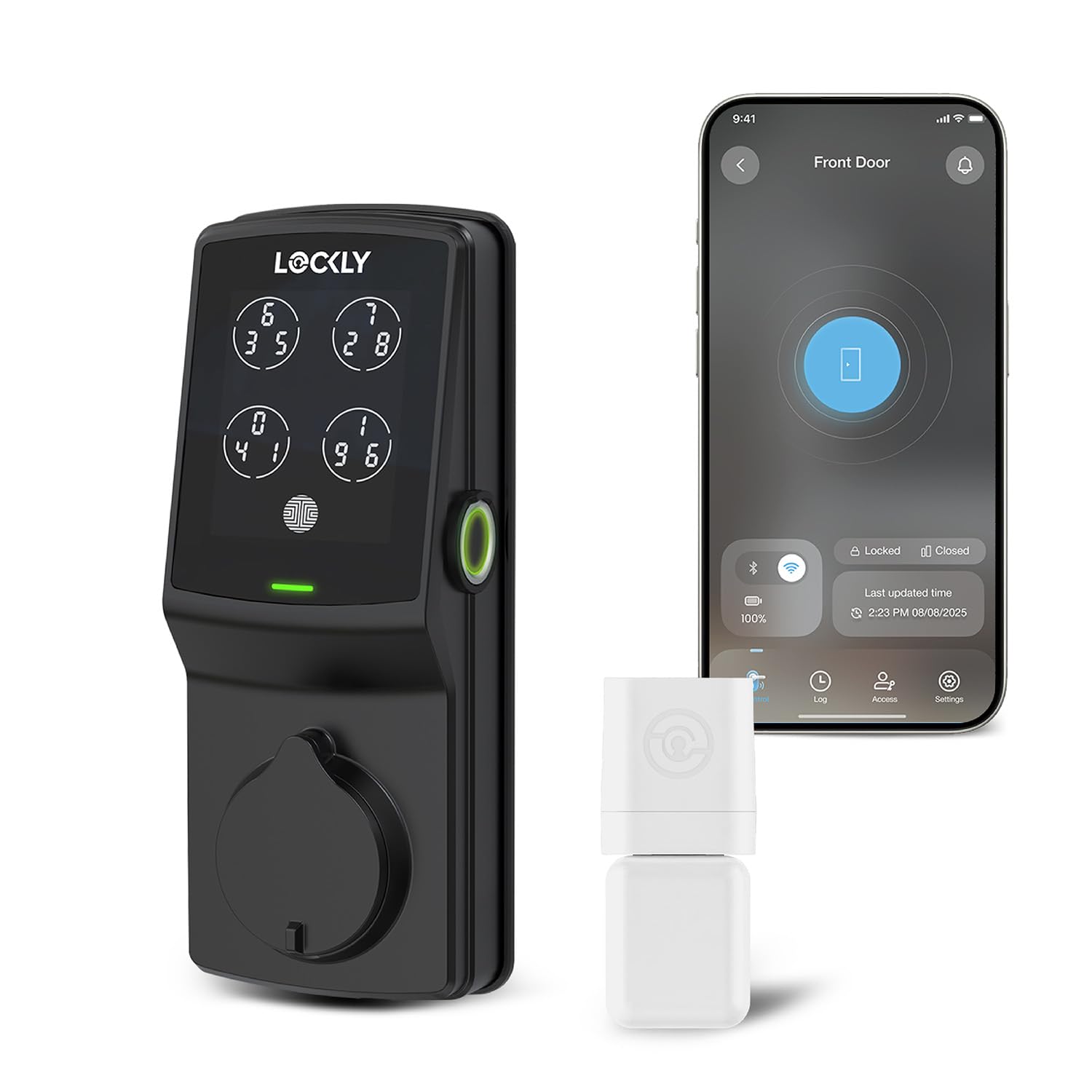
The only lock on this list that passes a one-hour fire test, purpose-built for commercial doors that cannot skip fire code.
If your building inspector requires a fire-rated lock on every exit door, the Lockly Guard Secure Pro is your only legal option among these four picks. It carries the UL10B and UL10C fire rating, meaning it has been tested to survive one hour of direct flame without failing. That is a hard requirement for offices, schools, and multi-unit residential buildings with fire-rated door assemblies. The lock runs on 8 AA batteries (included) for “extended operation and uptime” — nearly double the battery capacity of most residential smart locks — so it does not die mid-week in a high-traffic hallway.
Beyond the fire rating, the access control is genuinely enterprise-grade. The 3D fingerprint sensor (the Lockly F1) recognizes a finger in about 0.3 seconds, and the patented PIN Genie keypad randomizes the number positions on the screen each time you use it — so even if someone watches you enter your code, they get nothing useful. The lock pairs with a separate Secure Link Wi-Fi Hub (included in the box) for remote management through the Lockly Manager app or the LocklyOS cloud platform — though the cloud platform needs a subscription. You can grant, modify, or revoke access codes, eKeys, and eBadges from anywhere, and the rekeyable deadbolt cylinder simplifies maintenance when a key is lost or a tenant moves out.
The catch is weight and installation complexity. At roughly 8.4 x 8.8 x 4.6 inches, it is a big unit, and the separate Wi-Fi hub adds a piece you have to plug in near your router. It does not work with storm doors or round latch holes. Reviewers (24 ratings, a 4.8 out of 5 average) praise the solid, heavy feel and the silent operation, calling it “clearly built for pros.”
Why commercial property managers choose it
- UL10B/10C fire-rated — the only pick legal for fire-rated doors in most commercial building codes
- 8 AA batteries for extended runtime between changes compared to smaller battery setups
- PIN Genie keypad randomizes numbers to block shoulder-surfing code theft
- Separate Secure Link Wi-Fi Hub included — no extra purchase needed for remote access
The honest trade-offs
- Cloud subscription required for full LocklyOS platform management (not a one-time purchase)
- Bulkier than most locks — the dimensions (8.4 x 8.8 x 4.6 inches) require door clearance
- Not compatible with storm doors or round latch holes
Best for fire-code compliance: If your door assembly is fire-rated and you need remote access management across multiple units, this is the legal, durable choice.
skip it if: You do not need a fire rating or you want a simpler lock without a separate hub and cloud subscription.
4. BRINKS ANSI Grade 2 Keypad Door Lock with Handle
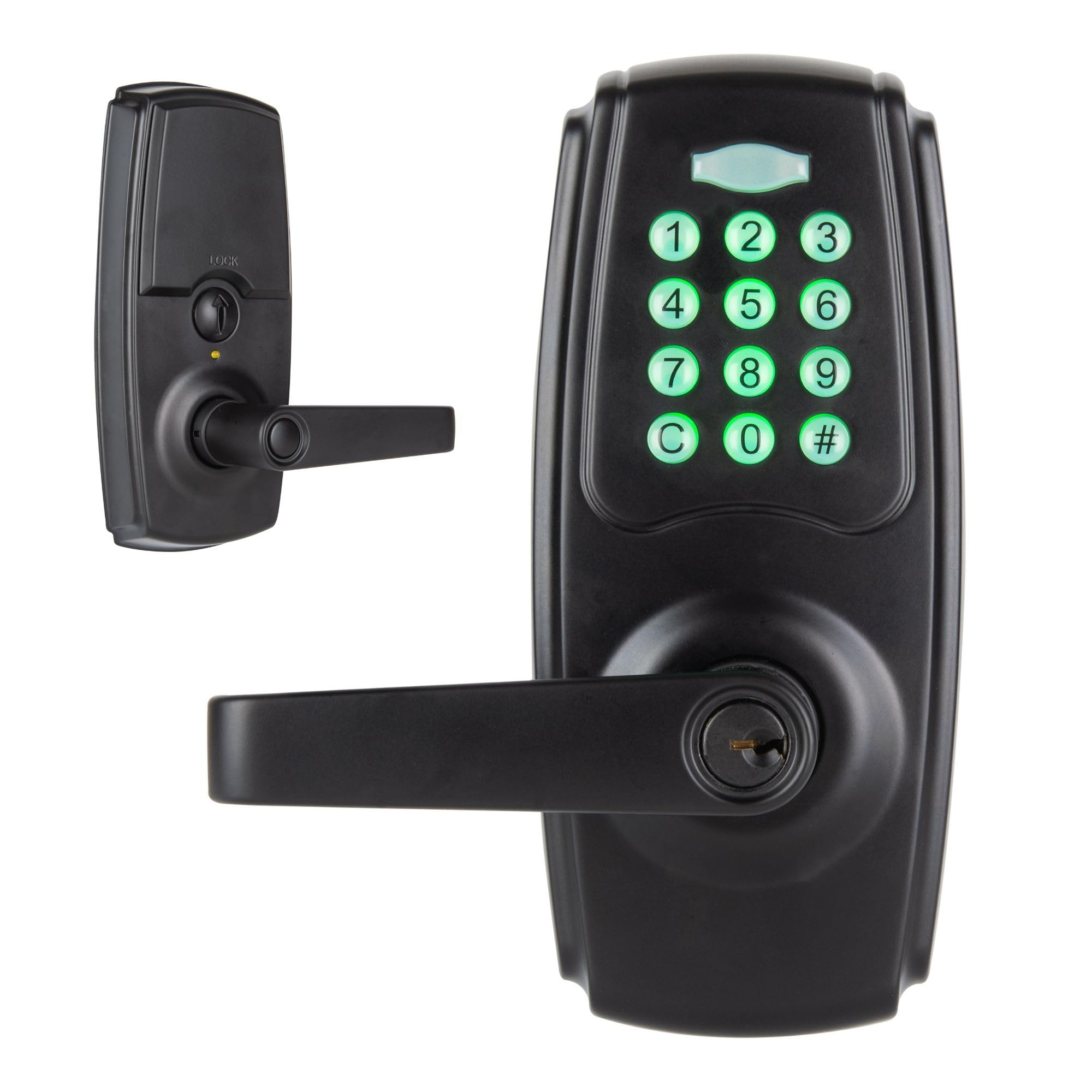
The entry-level commercial lock that holds 99 codes — not smart, just solid — for a price that fits tighter budgets.
If your commercial door needs an ANSI Grade 2 lock and does not require Wi-Fi, fingerprint scanning, or fire ratings, the BRINKS keypad lock gets the job done at the lowest cost of any pick here. It holds a 6-digit master code plus 99 additional user codes — pushing credential capacity right up to the 100-code range of the more expensive Alarm Lock. The keypad buttons illuminate in low light, so staff can enter codes in a dark hallway or parking lot entry. The auto-relock feature has an adjustable delay: you set how many seconds after the door closes before the deadbolt engages.
The lock runs on 4 AA batteries and includes a low-battery alert plus a 6-pin SC4 cylinder backup keyway (a standard residential keyway type) with two spare keys, so if the batteries die, the key still opens the door. It fits doors 1-3/8″ to 2″ thick with an adjustable latch and works on both left- and right-handed doors with no wiring required. At 4 x 7.5 x 7.63 inches, it is more compact than the Alarm Lock (which is 9 x 11.8 x 11.9 inches, a 2.2x gap in volume) and easier to store and ship. BRINKS backs it with a 10-year limited warranty, which is a nice safety net for a budget buy.
The big limitations: it is not smart-home compatible — no app, no Wi-Fi, no voice control — so you cannot check who entered or open up remotely. Reviews (84 ratings, 4.0 out of 5) are generally positive, with several buyers noting the installation was straightforward but the lock feels slightly less rugged than the ULTRALOQ’s Grade 1 unit.
The smart budget move
- 99 user codes — capacity that matches locks costing twice as much
- ANSI Grade 2 rated for 150,000 cycles, suitable for moderate commercial traffic
- 10-year limited warranty provides long-term confidence
- Compact dimensions (4 x 7.5 x 7.63 inches) for easy shipping and storage
Where it falls short
- No smart connectivity — cannot manage codes or see entry logs remotely
- Lacks a fire rating, so it is not approved for fire-rated door assemblies
- Build quality feels lighter than Grade 1 locks according to some buyer feedback
Best for a side door or budget build: If you need a simple, ANSI Grade 2 keypad lock with 99 codes and a 10-year warranty, this is the affordable workhorse.
pass on it if: You need remote access, a fire rating, or higher security than Grade 2 for a main entry point.
Understanding the Specs
ANSI Grade — the strength you cannot see
The American National Standards Institute (ANSI) and the Builders Hardware Manufacturers Association (BHMA) grade locks from 3 to 1. Grade 1 is the highest — tested to endure 250,000 cycles (roughly 40 years in a home, 5-7 years in a busy office) and withstand 150 pounds of applied force. Grade 2 handles 150,000 cycles and 125 pounds. Grade 3 is residential-only. Always match the grade to your door’s traffic: a Grade 1 lock is safer for a front office door opening 50+ times a day.
User Code Capacity — how many people get in
Every commercial lock stores a finite number of unique entry codes in its memory. A lock holding 10 codes (common in residential models) forces you to manually delete old codes and assign new ones whenever someone leaves or a guest arrives. Commercial locks should hold at least 99 or 100 unique codes, or better yet, support “unlimited” cloud-based eKeys (like the ULTRALOQ) that you add or revoke from an app. More codes mean less maintenance work for you.
FAQ
Can I install a commercial smart lock on any door?
What is the difference between ANSI Grade 1 and Grade 2 for a commercial lock?
Do all commercial smart locks need Wi-Fi to work?
What does it mean if a lock has a UL10B or UL10C fire rating?
How many user codes does a commercial smart lock need for a mid-sized office?
Will a commercial smart lock work with Alexa or Google Assistant?
What happens if the battery dies in a commercial smart lock?
Can I use a residential smart lock on a commercial door?
Is a fingerprint lock more secure than a keypad lock for commercial use?
Can a commercial smart lock be rekeyed if a key is lost?
Final Thoughts: The Verdict
For the majority of shoppers, the commercial smart lock winner is the ULTRALOQ U-Bolt Pro WiFi because it combines ANSI Grade 1 strength, fingerprint convenience, built-in Wi-Fi remote management, and eight entry methods at a price that undercuts the more niche Lockly. If you manage a fire-rated door and cannot skip code compliance, grab the Lockly Guard Secure Pro — it is the only pick here with a UL10B/10C fire rating and enterprise-grade access control. And for a low-traffic budget door that just needs a solid keypad and 99 codes, the BRINKS ANSI Grade 2 is the affordable workhorse.
How We Picked
We do not accept paid placement. Every pick is matched to a real buyer and a real use-case; we do not hands-on test units.
Sources & Methodology
Specifications: manufacturer listings and product documentation. Review insights: verified customer reviews, as of July 2026. Pricing: not shown on this page (it changes often); check the current price via the retailer link.
As an Amazon Associate, WellFizz earns from qualifying purchases. This does not affect which products we feature.
Related Guides

Mo Maruf
I created WellFizz to bridge the gap between vague wellness advice and actionable solutions. My mission is simple: to decode the research and give you practical tools you can actually use.
Beyond the data, I am a passionate traveler. I believe that stepping away from the screen to explore new environments is essential for mental clarity and physical vitality.