Our readers keep the lights on and my smoothie glass nicely filled. As an Amazon Associate, I earn from qualifying purchases.
Specs are compiled from manufacturer listings and verified buyer reviews and can change over time — please confirm the key details on the product page before buying.
A 2.1 computer speaker system adds a dedicated subwoofer that handles the low frequencies, so you feel the rumble of an explosion or the thump of a kick drum while the satellite speakers keep dialogue and vocals crisp. The tricky part is finding a set where the bass stays punchy without drowning out the mids — and that has the right connections to fit your desk setup. This guide cuts through the options with seven real contenders, from budget-friendly workhorses to premium systems built for critical listening.
I’m Mohammad Maruf — the founder and writer behind WellFizz. This guide is built by comparing the manufacturers’ published specifications and the patterns across verified customer reviews, so you get each pick’s real strengths and trade-offs instead of marketing spin.
Whether you are gaming late into the night or producing audio at your desk, finding the right computer speakers 2.1 means balancing power, connectivity, and desk space to get sound that actually fits your room and your ears.
Our Picks at a Glance

How To Choose The Best Computer Speakers 2.1
Picking a 2.1 system is not just about raw wattage. You need to match the power to your room, check what connections your computer or monitor offers, and decide whether you care about extras like RGB lighting or a remote control. Here are the three factors that make or break a desktop audio purchase.
Power Ratings: RMS vs. Peak
RMS (Root Mean Square) is the real-world power a speaker can sustain without distortion during a long gaming session or album. Peak power is the burst it can handle for a fraction of a second — impressive on the box but less useful during actual listening. For a typical desk setup in a small to medium room, look for at least 20W to 40W RMS total. Systems above 60W RMS can fill a larger room or a living room without straining.
Connections: What Your Setup Needs
Most 2.1 speakers use a 3.5mm AUX cable to connect to your computer’s headphone jack. If your PC has USB-C, a direct USB connection can deliver power and audio over a single cable. Bluetooth is handy for streaming from your phone or switching between devices without unplugging wires. Optical inputs connect directly to a TV or monitor for digital audio. Make sure the speakers have the right ports for your devices before buying — an optical-only set is useless if your computer only has a 3.5mm jack.
Subwoofer Size and Placement
A subwoofer’s driver size, measured in inches, roughly indicates how deep and loud the bass can go. A 4-inch sub fits under most desks without dominating the room. A 5-inch or larger sub (like the 5-inch in the HiVi-Swans) delivers more authority but needs a bit more floor space. Down-firing subs (like the Creative Pebble Plus) shoot bass toward the floor, which can give a more diffuse, room-filling feel. Front-firing subs produce more directional bass you can feel directly.
Quick Comparison
| Model | Best For | Total Power | Sub Driver | Wireless | Amazon |
|---|---|---|---|---|---|
| Logitech Z623★ Best Overall | Serious Gaming & Movies | 400W Peak / 200W RMS | — | No (wired only) | Amazon |
| Klipsch ProMedia LuminaPremium Pick | Premium Desk Upgrade | — | 9.75 Inches | Bluetooth 5.3 | Amazon |
| HiVi-Swans M10 Plus | Hi-Fi Listening | 60W RMS | 5 Inches | Bluetooth 5.0 | Amazon |
| Creative Pebble X Plus | Compact USB-C Setup | — | — | No | Amazon |
| Bluedee 2.1 | Modern All-in-One Desk | 80W Peak | — | Bluetooth 5.4 | Amazon |
| FIFINE AmpliGame A22 | Gaming with RGB | — | — | Bluetooth | Amazon |
| Creative Pebble Plus | Budget USB Desk | 8W RMS | 4 Inches | No | Amazon |
In‑Depth Reviews
1. Logitech Z623
Our pick — over 4.5★ from 11,000+ verified ratings; the strongest balance of quality and price.
THX certification that fills your room with studio-quality audio.
Getting sound that is big enough for a living room but precise enough for desktop gaming is rare, but the Logitech Z623 pulls it off with 400 Watts Peak power and 200 Watts RMS. That THX certification (a rigorous audio standard from a major studio) means the sound is tuned for accuracy across music, movies, and games — not just loudness. You get two satellite speakers each delivering 35 Watts and a 130-Watt subwoofer that handles the deep lows without rattling.
Connectivity is straightforward but versatile: RCA and 3.5-millimeter inputs let you hook up your computer, a game console, a DVD player, or even a smartphone at the same time. The subwoofer measures 11.2 x 12.0 x 10.5 inches, so clear some floor space under your desk before ordering. Buyers report that the system sounds clean even at high volumes, and the three-device switching is genuinely convenient for a multi-console setup.
Unlike the Creative Pebble Plus, which tops out at 8W RMS and needs a USB power adapter, the Z623 plugs straight into a wall outlet and delivers enough headroom for a large entertainment room without clipping. This is the pick if you want one system that does duty for your PC, your PlayStation, and your movie nights.
Where It Wins
- THX certification ensures balanced, distortion-free audio
- 200W RMS delivers room-filling power without strain
- Three simultaneous inputs via RCA and 3.5mm
One Thing to Know
- No Bluetooth — it is a purely wired system
Best for: Anyone who wants THX-certified audio that can fill a living room or large desk area and connect multiple devices at once.
skip it if: You need wireless streaming from your phone — there is no Bluetooth here.
2. Klipsch ProMedia Lumina
A legendary desktop icon reimagined with modern connectivity.
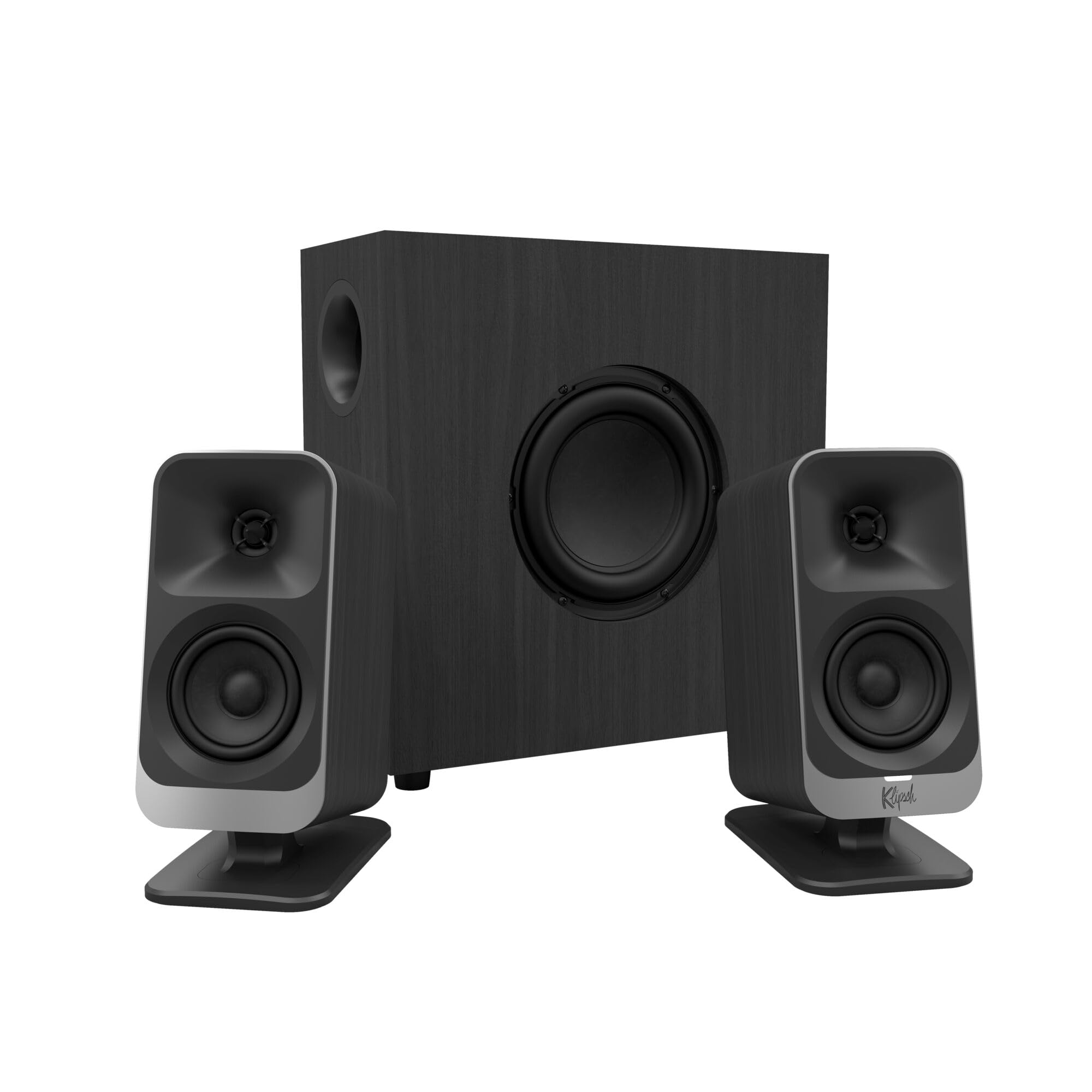
The Klipsch ProMedia line first launched in 1999 and became one of the best-selling desktop speaker systems ever. The Lumina is the newly redesigned successor with a completely reenvisioned cabinet, tiltable satellite stands, and a low-profile subwoofer that measures 9.75 inches tall. That subwoofer includes an adjustable gain knob, so you dial in exactly how deep the bass goes without overwhelming your desk.
Connectivity is modern and flexible: it connects via USB-C for digital audio from a modern laptop, AUX for older devices, and Bluetooth 5.3 for wireless streaming. The Klipsch Control desktop app lets you fine-tune the EQ, adjust RGB lighting effects, and toggle features like Night Mode (which compresses dynamic range so explosions do not wake the house). Three color-changing lighting options let you match the glow to your workspace.
Where the Logitech Z623 plays it safe with wired-only inputs, the Lumina adds USB-C and Bluetooth 5.3. The subwoofer’s 9.75-inch driver is noticeably larger than the HiVi-Swans’ 5-inch unit, giving you more physical bass authority in a compact low-profile cabinet. This is the system for someone who wants a premium brand legacy with modern features and real bass control.
What Stands Out
- USB-C, AUX, and Bluetooth 5.3 inputs cover every modern device
- Klipsch Control app for EQ, lighting, and Night Mode
- Tiltable stands and adjustable sub gain for personalized sound
What to Consider
- Premium price — this is the most expensive pick on the list
Grab it for: The person who wants a legendary desktop speaker brand with USB-C connectivity, app-based EQ control, and a subwoofer that can shake the floor.
Look elsewhere if: Your budget is tight — this is the most expensive 2.1 system here by a significant margin.
3. Bluedee 2.1 Computer Speakers

DSP tuning and Bluetooth 5.4 for a modern desk at a mid-range price.
What makes the Bluedee 2.1 interesting is the DSP (Digital Signal Processing) tuning built into the system — it actively reduces distortion and harsh highs, so vocals stay clear and the bass remains punchy without muddying the mids. The system delivers 80W Peak power through an independent subwoofer, with the satellite speakers staying clean because the sub handles all the low-frequency work. That subwoofer means you get deep, punchy bass for movies and games without the sound turning into a blurry mess.
Connectivity is excellent for the price tier: Bluetooth 5.4 (the latest version for stable wireless streaming over 10 meters), plus USB-A, USB-C, and 3.5mm AUX inputs. The adapter-powered design means you just plug into a wall outlet and connect to your computer — no batteries or software drivers needed. The all-in-one control knob on the speaker handles volume, playback, lighting effects, and input switching, keeping the desk clean. Owners mention that the RGB lighting adds a modern touch without being distracting, and the Bluetooth pairing is reliable across devices.
You get four common inputs on the Bluedee, but it skips the optical port for TVs — unlike the FIFINE AmpliGame A22 which adds optical and OTG (On-The-Go) connections. If you want Bluetooth 5.3 (the latest standard for stable wireless range) and a simple knob control without cycling through multiple EQ modes, this is the value pick for you.
The Strong Points
- DSP tuning for clearer vocals and reduced distortion
- Bluetooth 5.4 provides stable wireless streaming
- One control knob handles volume, playback, lighting, and mode switching
The Trade-Off
- No optical input for connecting a TV or monitor digitally
Reach for this if: You want Bluetooth 5.4, DSP-tuned sound that reduces harshness, and a simple one-knob control for your daily desktop use.
Pass if: You need an optical audio input for a TV or monitor connection.
4. HiVi-Swans M10 Plus

Open, accurate sound from a brand known for audiophile engineering.
The HiVi-Swans M10 Plus is built for people who notice the difference between good and great sound. It uses a 5-inch subwoofer that handles all frequencies below 140Hz, so the satellite speakers do not have to strain. The satellites use a 20mm soft dome tweeter (a small fabric-covered driver for high frequencies) with an tune magnetic circuit, delivering clear, airy highs without harshness. A 3-inch long-stroke mid-low speaker handles the vocal range, and two separate amplification chips drive the subwoofer and satellites independently for stable power. The total RMS output is 60W — less raw wattage than the Logitech Z623’s 200W RMS, but tuned for accuracy rather than sheer volume.
Connectivity is versatile: you can use Bluetooth 5.0 with aptX (a codec that preserves more detail over wireless), plus line, coaxial, and optical inputs for connecting a TV, record player, or game console. The back-placed double inverter tube design reduces wind noise at the resonance frequency for cleaner bass — a detail that matters for critical listening. A remote control is included, and the Swan logo changes color to indicate which input mode you are using. Customers note that the system sounds significantly more detailed than typical gaming 2.1 setups, especially in the mid and high frequencies.
Unlike the Klipsch ProMedia Lumina, which focuses on gaming features and app control, the M10 Plus is designed for audio fidelity first — no EQ gimmicks, just clean stereo. It is the right choice if you care more about how your music sounds than about RGB lighting or app presets.
What Shines
- 20mm soft dome tweeter for clear, detailed highs
- Bluetooth 5.0 with aptX for high-quality wireless streaming
- Optical and coaxial inputs for TV and digital sources
What to Know
- Only 60W RMS — not as powerful as the Logitech Z623 for large rooms
Ideal for: Audiophiles and music lovers who want accurate, detailed sound from a 2.1 system with optical input, Bluetooth aptX, and a real remote control.
Not for: Anyone who needs maximum volume for filling a large living room — the 60W RMS is tuned for fidelity, not raw output.
5. Creative Labs Pebble X Plus

USB-C simplicity with Bass Boost for a tidy desktop.
The Creative Pebble X Plus is the mid-range upgrade from the standard Pebble Plus, offering a 2.1 channel configuration through a USB Type-C connection. It supports Hi-Res Audio (a standard for higher sample-rate audio files) and includes a Bass Boost feature for extra low-end punch when you need it. The design is compact with a touch-based control method, so there are no physical knobs to collect dust. Connectivity is exclusively wired through USB — no Bluetooth, no AUX, just a single USB-C cable that handles both power and audio.
This simplicity is its main strength for a clutter-free desk. You plug the USB-C into your laptop or desktop, and the system works instantly without drivers or extra power bricks. The satellites are angled to point toward your ears, and the subwoofer is compact enough to sit under most monitors. Reviewers point out that the Bass Boost makes a tangible difference for action movies and bass-heavy music, though the lack of Bluetooth means you cannot stream from your phone without unplugging.
Compared to the Bluedee 2.1, which gives you Bluetooth 5.4 and AUX input, the Pebble X Plus is more restricted. If your computer has USB-C and you want a clean one-cable setup with Hi-Res Audio support, this is a strong pick. If you switch between a laptop and phone all day, look at the Bluedee instead.
The Upside
- Single USB-C cable for power and audio — clean desk setup
- Hi-Res Audio support for higher-quality music files
- Touch controls keep the surface free of dust-catching knobs
The Downside
- No Bluetooth or AUX input — USB-C only
Choose this if: You have a USB-C laptop and want a one-cable 2.1 system with Hi-Res Audio and Bass Boost for a clean, modern desk.
pass on it if: You need to connect multiple devices or want Bluetooth streaming — this is USB-only.
6. FIFINE AmpliGame A22

RGB lighting that syncs with your audio and four input modes.
Gamers who want rich audio and a light show that moves with the music should look at the FIFINE AmpliGame A22. It has 18 different RGB lighting modes, including audio-sync (colors pulse and shift in real time with the bass and beat), breathing mode, and color cycle. A long press turns the lighting completely off if you need a dark room for focus or sleep. The AC-powered drivers deliver clear treble and deep bass that keeps explosions punchy and footsteps precise in competitive games, according to buyer reviews.
Connection options are the most varied on this list: you can use OTG (On-The-Go) for a direct digital connection to your phone or computer, optical for a TV or monitor, AUX for any device with a headphone jack, or Bluetooth for wireless convenience. The top-mounted function buttons let you adjust volume, play/pause, skip tracks, and cycle through three EQ modes (Game, Movie, and Music) without opening any software — each mode is tuned for its specific content type.
Compared to the Bluedee 2.1, which has simpler controls and no optical input, the FIFINE gives you more connectivity and visual customization. The trade-off is that the RGB system can be distracting if you prefer a minimal, professional-looking desk. Shoppers say that the EQ presets make a noticeable difference — switching to Game mode sharpens footsteps, while Music mode opens up the soundstage for albums.
Why Gamers Like It
- 18 RGB lighting modes with audio beat sync for a dynamic desk look
- Four input modes: OTG, optical, AUX, and Bluetooth
- Dedicated EQ presets (Game, Movie, Music) tuned per content type
The Catch
- RGB lighting may be too flashy for a professional or minimalist workspace
Ideal for: Gamers who want RGB that responds to audio, plus four different connection methods and EQ modes that actually change the sound profile.
Not ideal for: A distraction-free office where you need a clean, professional look — the RGB stays on unless you long-press to disable it.
7. Creative Pebble Plus

USB-powered 2.1 sound that does not need a wall outlet.
The Creative Pebble Plus is the most affordable way to get a real 2.1 system with a dedicated subwoofer. It features a 4-inch down-firing ported subwoofer that pushes bass toward the floor for a room-filling feel, and 2-inch mid-range drivers in the satellite speakers that are angled at 45 degrees toward your ears. That angle is intentional — it improves the soundstage by aiming the drivers directly at your listening position, so the stereo image feels wider and more precise. The system is powered entirely by USB, meaning you plug one cable into your computer and you get both power and audio — no separate AC adapter needed for the satellites.
There is a High Gain Mode that boosts the output to 8W RMS when you connect a 5V 2A USB adapter (not included) to the subwoofer. Without that adapter, the system runs at a lower power level, so you may want to add one if you like louder volumes. The volume controls are located on the front of the right satellite for easy access. Connection is purely through a 3.5mm AUX cable, so it works with any computer or laptop that has a headphone jack.
Where the FIFINE AmpliGame A22 offers Bluetooth, optical, and RGB lighting, the Pebble Plus is deliberately barebones — a wired USB system that just works. It is perfect for a student dorm or an office where the priority is getting 2.1 separation without the complexity. Buyers mention that the down-firing subwoofer produces impressive bass for its size, though 8W RMS is obviously not going to shake the walls like the Logitech Z623.
The Simple Wins
- USB-powered — no separate wall plug needed for the satellites
- 45-degree angled drivers improve the stereo soundstage
- 4-inch down-firing sub adds real low-end presence for the size
The Limits
- Only 8W RMS — not loud enough for a large room or noisy environment
- High Gain Mode requires a separate 5V 2A USB adapter (not included)
Pick this if: You want the most affordable 2.1 system with a real subwoofer, USB power, and angled drivers for better sound staging — ideal for a small desk or dorm room.
Avoid it if: You need high volume or Bluetooth — the 8W RMS and wired-only connection limit its reach.
Understanding the Specs
RMS vs. Peak Power
RMS (Root Mean Square) is the sustained power a speaker can deliver continuously without distorting. That number tells you how loud and clean the system can play over a full album or a long gaming session. Peak power is the instantaneous burst a speaker can handle for a split second — impressive on paper but not what you hear most of the time. For a typical desk setup, aim for at least 20W to 40W RMS. The Logitech Z623 delivers 200W RMS, which is genuinely powerful enough for a large room. The Creative Pebble Plus tops out at 8W RMS, which is fine for a small desk but will not fill a living room.
THX Certification
THX is a rigorous audio quality standard developed by a major film studio to ensure accurate, distortion-free sound reproduction across a range of volumes. A THX-certified speaker system has passed testing for frequency response, output levels, and crosstalk performance. It means the Logitech Z623 is tuned to sound balanced whether you are watching a quiet dialogue scene or a full-action explosion — not just loud, but accurate.
Bluetooth Codecs and Version
Bluetooth version numbers (5.0, 5.3, 5.4) indicate the wireless standard’s range, stability, and energy efficiency — higher is newer and generally better. The codec (like aptX on the HiVi-Swans M10 Plus) matters for sound quality: aptX preserves more audio detail during wireless transmission than the standard SBC codec. If you are a serious listener, look for aptX support. For casual streaming, standard Bluetooth 5.3 or 5.4 works well.
Subwoofer Driver Size and Configuration
The driver size (measured in inches) roughly determines how deep and powerful the bass can get. A 4-inch sub (Creative Pebble Plus) works for small desks. A 5-inch sub (HiVi-Swans M10 Plus) adds authority. The Klipsch ProMedia Lumina uses a 9.75-inch driver for the most physical bass presence. Down-firing subs shoot sound toward the floor for a diffuse, room-filling feel — front-firing subs produce more directional thump. Both are fine; choose based on your floor surface and how close the sub sits to your listening position.
FAQ
Do I need a sound card to use 2.1 computer speakers?
Can I connect 2.1 computer speakers to a TV?
What does RMS power mean and how much do I need?
Is a 2.1 system better than a soundbar for computer use?
Can I use Bluetooth 2.1 speakers with a non-Bluetooth computer?
How long do 2.1 computer speakers last?
What is the difference between a down-firing and front-firing subwoofer?
Will 2.1 speakers work with a PlayStation or Xbox?
Can I use 2.1 speakers for music production?
Do I need to break in new 2.1 speakers?
Final Thoughts: The Verdict
For the majority of shoppers, the computer speakers 2.1 winner is the Logitech Z623 because it delivers THX-certified audio (a rigorous quality standard for accurate sound) with 200W RMS of clean power and versatile wired inputs for any setup. If you want a modern system with USB-C connectivity, app-based EQ, and a subwoofer that shakes the floor, grab the Klipsch ProMedia Lumina. And for a budget-friendly desk upgrade that still gives you a real 4-inch down-firing subwoofer and USB power, the Creative Pebble Plus is the affordable pick.
How We Picked
We do not accept paid placement. Every pick is matched to a real buyer and a real use-case; we do not hands-on test units.
Sources & Methodology
Specifications: manufacturer listings and product documentation. Review insights: verified customer reviews, as of July 2026. Pricing: not shown on this page (it changes often); check the current price via the retailer link.
As an Amazon Associate, WellFizz earns from qualifying purchases. This does not affect which products we feature.
Related Guides

Mo Maruf
I created WellFizz to bridge the gap between vague wellness advice and actionable solutions. My mission is simple: to decode the research and give you practical tools you can actually use.
Beyond the data, I am a passionate traveler. I believe that stepping away from the screen to explore new environments is essential for mental clarity and physical vitality.