Our readers keep the lights on and my smoothie glass nicely filled. As an Amazon Associate, I earn from qualifying purchases.
Specs are compiled from manufacturer listings and verified buyer reviews and can change over time — please confirm the key details on the product page before buying.
If your wrists ache after a day at the keyboard, you already know a standard flat board is part of the problem. The best solution shifts your hands into a natural, neutral position — a split layout, a tented angle, or a curved wave that follows your fingers instead of fighting them. This guide compares seven actual ergonomic keyboards built to reduce wrist strain directly, with real specs and real buyer feedback so you can pick without guessing.
I’m Mohammad Maruf — the founder and writer behind WellFizz. This guide is built by comparing the manufacturers’ published specifications and the patterns across verified customer reviews, so you get each pick’s real strengths and trade-offs instead of marketing spin.
Every model here targets a different need — from budget-friendly wave boards to premium split mechanical options — but each one is designed to relieve pressure on your median nerve and help your wrists stay comfortable all day. If you are shopping for a computer keyboard for carpal tunnel, this article walks through the specific features that matter most and reviews the top models available right now.
Our Picks at a Glance


How To Choose The Best Computer Keyboard For Carpal Tunnel
The goal is simple: keep your wrists straight, not bent up or twisted sideways. A well-designed ergonomic keyboard does that by changing the layout, the angle, or both. Here are the three specs that separate a helpful board from a useless one.
Split vs Wave vs Standard Layout
A split keyboard divides the key set into left and right halves, letting you rotate each half outward so your arms stay shoulder-width apart. A wave keyboard curves the rows upward in the center so your fingers reach each key with less stretching. Both are better than a flat, straight board, which forces your wrists to angle inward. Many ergonomists recommend split over wave because it gives you more control over arm alignment.
Wrist Rest and Tenting
A cushioned palm rest supports the heel of your hand so your wrist does not rest on the hard desk edge. Look for high-density memory foam or a silicone fill that does not flatten over time. Tenting refers to lifting the center of the keyboard so your palms face each other slightly, like holding a book. A tilt leg that adjusts between 0 and 7 degrees is the range most people need. The Logitech K860 offers a -7° tilt, for example.
Key Switch Feel
Membrane keys are softer and quieter — they require less force to press, which can reduce finger strain. Mechanical keys give a more defined click and last longer but need a slightly higher actuation force. Some people with carpal tunnel prefer low-force mechanical switches (like Kailh Browns) because the tactile bump helps the finger know the key registered without bottoming out hard. Try both if you can.
Quick Comparison
| Model | Best For | Layout Type | Connectivity | Weight | Amazon |
|---|---|---|---|---|---|
| Logitech Ergo K860★ Best Overall | Serious ergonomic split design | Split | Bluetooth + USB | 3.65 Pounds | Amazon |
| TECKNET ErgonomicBest Value Split | Budget split with long battery | Split + Curved | Bluetooth 5.0 + 2.4G | Not listed | Amazon |
| Nulea RT08 Wave Keys | Easy transition from flat keyboard | Wave | 2.4G | Not listed | Amazon |
| Logitech Wave Keys for Mac | Apple ecosystem comfort | Wave | Bluetooth | Not listed | Amazon |
| ProtoArc EKM01 Plus | Full-size split with included mouse | Split + Curved | Bluetooth + USB | 1.91 kg | Amazon |
| X9 Ergonomic Combo | Multi-device split combo | Split | Bluetooth + 2.4G | 1.54 kg | Amazon |
| Cloud Nine C989M | Mechanical split with tenting | Split (separates up to 8 inches) | USB | Not listed | Amazon |
In‑Depth Reviews
1. Logitech Ergo K860 Wireless Ergonomic Keyboard
Our pick — over 4★ from 850+ verified ratings; the strongest balance of quality and price.
The split-frame benchmark that aligns your shoulders and wrists without any learning curve.
Your hands sit naturally apart with the K860’s unique split KeyFrame design — it promotes a more natural typing position by letting each arm stay shoulder-width instead of angling inward. The pillowed wrist rest offers 54% more support than a standard keyboard., and The manufacturer states it reduces wrist bending by 25%.. That is a measurable drop in the kind of strain that aggravates carpal tunnel symptoms.
You get three tilt options — 0°, -4°, or -7° — so you can dial in exactly how much palm lift feels right. It connects via Bluetooth or USB, works with both Windows and Mac, and uses 78 quiet keys. The renewed version at a mid-range price makes the premium split-design accessible for most budgets. Buyers report the wrist rest stays comfortable over long days and that the split layout felt natural after just a few hours.
The main trade-off is the 3.65-pound weight — it is heavier than most wave-style boards, so it is not ideal for frequent travel. Also, unlike the Cloud Nine C989M, it does not separate into two halves, so you cannot space the left and right sides independently. For a fixed split board with excellent wrist support, this is the one to beat.
What makes it stand out
- Split KeyFrame design proven to improve typing posture right away.
- Pillowed wrist rest offers 54% more support than standard keyboards.
- Adjustable palm lift with three tilt settings: 0°, -4°, -7°.
The downsides to know
- Heavier than many ergo boards at 3.65 pounds.
- Does not let you separate the two halves like the C989M.
- Renewed condition may have minor wear.
Who it suits: Typists who want a proven split layout with a plush wrist rest and do not need to move the board around much.
One real limitation: The fixed split width cannot be widened beyond the built-in KeyFrame, so if you have very broad shoulders you may still feel some inward angle.
2. TECKNET Wireless Ergonomic Keyboard Rechargeable
A split-and-curve hybrid with a battery that lasts nearly a month on a single charge.
This TECKNET combines a split layout with a curved key arrangement so your fingers follow their natural arc without lateral stretching. The built-in wrist rest has a dual-density design — a high-density foam bottom that stops your wrist from sinking, topped with a slow-rebound memory foam layer that conforms to your hand shape. That matters because a wrist rest that squishes flat after an hour is worse than none at all.
It supports Bluetooth 5.0 for up to three devices plus a USB wireless dongle, so you can switch between a computer, tablet, and phone with one shortcut key. The 500mAh rechargeable battery charges fully in 4 hours and delivers up to 200 hours of continuous use. Four-stage adjustable feet give tilt options of 0°, 1.2°, 3°, and 6.2°. Unlike the Logitech K860, it offers more angle options but lacks the ergonomist certification. Owners mention the memory foam stays supportive even after weeks of daily coding.
The catch is the plastic body — it feels lighter and less premium than the Logitech Wave Keys or the ProtoArc combo. It also only lists Windows 10 as the minimum OS, so Mac users should check compatibility. For a budget-friendly split that does not skimp on wrist support or battery life, this one delivers serious value.
Smart for: Anyone on a tight budget who wants a real split-and-curve layout plus a battery that can go weeks between charges.
Not for: Mac users looking for native macOS key caps or anyone who prefers a heavier, more solid desk feel.
Who it fits: Budget-conscious buyers who type all day and want a genuine ergonomic split board that stays charged through a work week and then some.
The limitation: Plastic chassis with no backlighting — fine for offices, less ideal for dim-lit rooms.
3. Nulea RT08 Wave Keys Wireless Ergonomic Keyboard
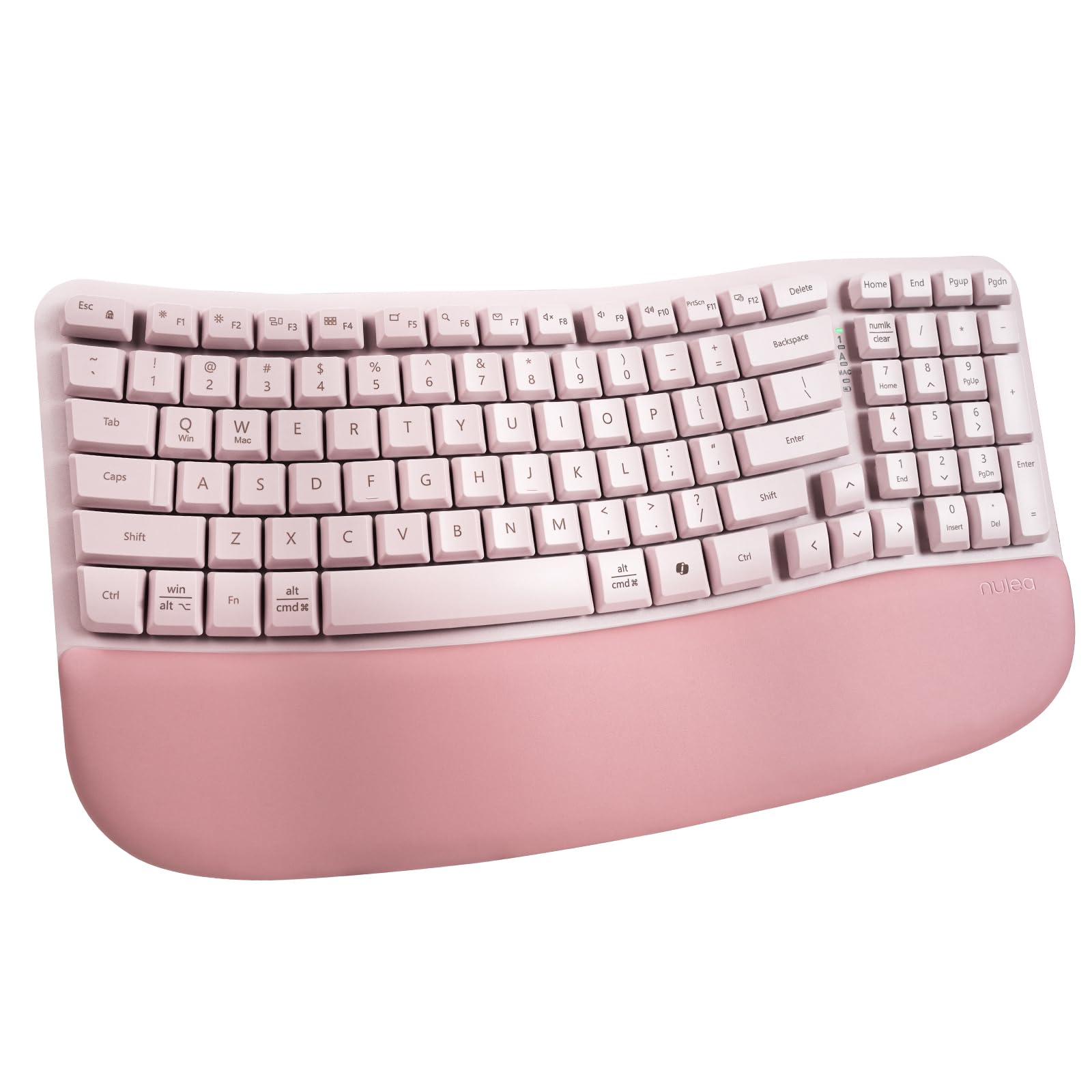
A wave-shaped board that keeps the familiar QWERTY layout so you skip the split keyboard learning curve.
The Nulea RT08 does not split the keyboard in half — instead it curves each row of keys upward in a wave that follows the natural reach of your fingers. The company says the arc of each row is “carefully crafted” to reduce finger stretching during long typing sessions. For someone with carpal tunnel who is not ready to learn a split layout, this wave design is less intimidating because every key is where you expect it to be.
It uses a 2.4G wireless connection, has a full key layout, and comes with an oversized wrist rest covered in soft leatherette. The rear footrests let you tilt the board to your preferred angle. Each key has a crater-shaped depression — The manufacturer designed it so the press and rebound force feel uniform across every key.. It works with Windows and Mac laptops and desktops.
The main downside is the membrane keys — they are quiet but lack the crisp tactile feedback of a mechanical switch like the Kailh Browns in the Cloud Nine C989M. The pink color option is also polarizing for office use. For an easy ergonomic upgrade without retraining your fingers, this wave design is a solid entry point.
Why it works
- Wave shape fits natural finger arc without a split learning curve.
- Oversized leatherette wrist rest prevents fatigue.
- Adjustable tilt legs for personalized typing posture.
What you give up
- Membrane keys lack tactile feedback of mechanical switches.
- Only one connectivity option — 2.4G, no Bluetooth.
- Pink color may not suit every office.
Best for: People who want ergonomic relief but feel overwhelmed by split keyboards and need a familiar layout they can use immediately.
skip it if: You already own a split board and want the advanced separation and tenting of the C989M or K860.
4. Logitech Wave Keys for Mac Wireless Ergonomic Keyboard

If you use a Mac, this wave-shaped keyboard connects to all your Apple devices and lets you switch between them instantly via Bluetooth — no cables or re-pairing needed.
Logitech designed this keyboard with a cushioned palm rest and a wave layout that supports your wrists during long typing sessions. It is tune for macOS, iPadOS, and iOS — the key caps match Mac legends, and the Easy-Switch keys let you bounce between a MacBook, iPhone, and iPad with a single tap. The company claims up to a 3-year battery life on the included AA batteries., which crushes the rechargeable cycles of most competitors.
The keyboard is approved by United States Ergonomics for reducing muscle strain. It is made with 46% recycled plastic — a detail for anyone tracking environmental footprint. Buyers appreciate that the cushioned palm rest stays supportive without getting sticky, and that the quiet keys do not disturb coworkers in open offices. Compared to the TECKNET, the Wave Keys for Mac has a more premium feel in the plastic but is significantly thicker due to the palm rest.
The limitation is the lack of a split design — it is a wave, not a split, so your wrists still angle inward slightly. It also only has Bluetooth, with no 2.4G dongle option for older computers without Bluetooth. For Apple users who want ergonomic support without leaving the Apple ecosystem, this is the best match on the list.
Mac’s ergonomic balance: This certified wave-shaped keyboard pairs smoothly with every Apple device you own, and its battery lasts years — not weeks — so you rarely need to recharge.
The catch: No split halves and no USB dongle — if your desktop lacks Bluetooth, you need an adapter.
Perfect for: Apple users who switch between a MacBook, iPad, and iPhone every day and want one ergonomic keyboard that handles all three without cable swapping.
Not for: Those who want the split positioning of the K860 or a mechanical typing feel.
5. ProtoArc EKM01 Plus Ergonomic Keyboard Mouse Combo

A complete split-keyboard-and-mouse package designed for all-day typists who want one purchase to cover both hands.
The ProtoArc EKM01 Plus is a full-size ergonomic keyboard with a curved, split keyframe that positions your wrists and forearms in a more natural relaxed posture. It comes with a contoured ergonomic mouse that has a palm and thumb rest, plus forward and backward browsing buttons. The mouse uses 2000 DPI for precise tracking — helpful for graphic work or spreadsheet navigation without raising your wrist.
The keyboard uses a soft memory foam wrist rest with four adjustable tilt legs so you can find your preferred angle while sitting or standing. Both the keyboard and mouse are rechargeable via USB-C, each with a 500mAh battery. After a 2-hour full charge, the set offers 250 hours of standby time and an auto sleep mode that kicks in after 30 minutes of no operation. It connects to up to three devices simultaneously using either the USB receiver or Bluetooth. Customers note that having a matching ergonomic mouse eliminates the common problem of a split keyboard paired with a traditional mouse that forces the wrist back into a strained position.
The keyboard is not backlit — the manufacturer explicitly notes that. It also takes up significant desk space at 20.75 inches long by 11 inches wide, which the manufacturer warns buyers to measure ahead of time. Compared to the X9 combo below, the ProtoArc mouse has a more pronounced thumb rest that some find more comfortable for long hours. For anyone wanting a full ergonomic workstation upgrade in one box, this is a turnkey option.
What you get
- Full set: ergonomic split keyboard and contoured mouse with palm rest.
- Rechargeable with 250-hour standby and auto sleep.
- Switches smoothly between 3 devices via Bluetooth or USB.
Trade-offs to note
- No backlighting — not an option at any price point.
- Very wide footprint — measure your desk before buying.
- Plastic build does not feel as premium as the Cloud Nine mechanical board.
Ideal for: Anyone who wants both an ergonomic keyboard AND mouse together, so the carpal tunnel relief is consistent between typing and navigating.
One real limit: The 11-inch width may crowd a small desk or keyboard tray.
6. X9 Ergonomic Keyboard and Mouse Wireless Combo

A scissor-switch split combo that connects three devices and gives you 14 dedicated shortcut keys.
The X9 separates the keyboard into a split “2-zone” layout with an integrated wrist cushion, plus a mouse sculpted to fit your hand. It uses scissor switches in a 100-key layout — scissor switches are shorter travel than standard membranes, which some users find easier on finger joints. The set has 14 shortcut keys for common tasks like copy, paste, volume, and media control, so you lift your hands less often.
You can pair with three devices — two via Bluetooth and one via 2.4G — and switch between them easily. Both the keyboard and mouse charge through USB-C ports. The mouse has 6 buttons and 4 DPI modes — you can adjust the tracking speed on the fly. The manufacturer includes up to 2 years of warranty. Reviewers point out the scissor switches feel crisp without the loud clack of mechanical boards, and that the 14 shortcuts genuinely speed up repetitive office tasks like formatting and navigation.
Unlike the ProtoArc combo above, the X9 mouse is right-handed only, so lefties need to look elsewhere. The keyboard is also right-oriented in its sculpting. The build uses plastic throughout and does not have the tented wrist support angle that the Cloud Nine C989M provides. For a versatile split combo that connects three different devices and keeps productivity shortcuts at your fingertips, the X9 is a solid mid-range pick.
A productivity-first split: Scissor switches and 14 dedicated shortcuts mean less hand movement across the desk, which reduces wrist extension.
The downside: Right-handed only mouse sculpting limits left-handed accessibility.
Good for: Right-handed users who work across three devices and want shortcut keys that reduce repetitive hand motions.
pass on it if: You are left-handed or prefer mechanical switches for tactile feedback.
7. Cloud Nine C989M Ergonomic Mechanical Keyboard

The premium split mechanical keyboard that separates up to 8 inches to align your shoulders perfectly.
Cloud Nine built the C989M with a split design that separates into two independent halves by up to 8 inches. That means you can position each half exactly where your arm naturally rests — the most precise shoulder-width adjustment of any keyboard on this list. The manufacturer explicitly states it is designed to “help eliminate wrist and shoulder pain” and is suitable for users with RSI symptoms, Carpal Tunnel, or Arthritis. It has built-in 7-degree tenting angle in the wrist rest, so your palms slant inward slightly without needing separate tenting stands.
It uses Kailh Tactile Brown switches — mechanical switches with a small bump in the middle of the press so you feel exactly when the key registers. That helps you avoid bottoming out the key hard, which can transmit shock up through your fingers into your wrist. It has a full number keypad, 10 programmable macro keys, RGB backlighting, and a USB pass-through port. The 104-button layout covers every key an office or gaming setup demands. Shoppers say that setting the halves shoulder-width apart eliminated their wrist pain after 8-hour coding sessions. — a result the K860 cannot match because its halves are fixed.
The trade-off is the price — it is the most expensive model here, and it is wired-only via USB. After the Nulea and TECKNET wireless boards, a cable can feel restrictive. The polycarbonate enclosure is durable but does not look as refined as the Logitech K860’s matte finish. For anyone with advanced carpal tunnel who needs maximum adjustability and mechanical precision, the C989M is the strongest option on the list.
Why it leads on ergonomics
- Halves separate up to 8 inches for true shoulder-width alignment.
- 7-degree tenting angle built into wrist rests.
- Kailh Tactile Brown switches reduce finger impact force.
What holds it back
- Wired-only USB connection (no wireless option).
- Premium price point compared to all other picks.
- Polycarbonate body less refined than the K860.
The specialist pick: For anyone whose carpal tunnel or RSI is severe enough that only a fully adjustable split mechanical board will do — the 8-inch separation is unique here.
One real trade-off: The cable tethers you to your desk, so it is not a portable option like the TECKNET or Nulea.
Understanding the Specs
Tenting Angle
Tenting means the keyboard is raised in the center so your palms face each other slightly, like holding a steering wheel. This keeps your wrists in a neutral position (straight, not bent up). The Cloud Nine C989M has a built-in 7-degree tent angle, while the TECKNET offers 6.2 degrees of tilt. That might sound minor, but even a few degrees of lift can reduce the pressure on your median nerve during an eight-hour day.
Split Width
Not all split keyboards are equal. Some (like the Logitech K860) keep the halves at a fixed width, while the Cloud Nine C989M lets you separate them up to 8 inches apart. The wider you can set the halves, the better your shoulders can relax to their natural width. If you have broad shoulders or your desk is wide, a fully adjustable split is worth the higher price. The TECKNET and ProtoArc split designs have a fixed curve but still reduce inward wrist angle compared to a straight board.
Key Switch Type
Membrane switches are quiet, cheap, and need only a light press — that helps reduce finger fatigue. Mechanical switches (like the Kailh Brown switches in the Cloud Nine C989M) give you a tactile bump that tells your finger the key registered before you press all the way down, so your finger stops short and does not slap the base of the switch. Scissor switches (found in the X9 combo) sit between the two: they have shorter travel than membranes but are quieter than mechanicals. There is no single “best” type — your choice depends on whether you prefer a cushioned feel or a defined click.
Wrist Rest Material
The wrist rest is where your palm sits between typing bursts, and its material changes comfort over time. Memory foam (TECKNET, Logitech K860) conforms to your hand but eventually flattens. Silicone (Logitech K860’s pillowed rest is described as silicone) stays bouncy longer but feels firmer. Leatherette (Nulea) is soft on skin but can get sticky in humid rooms. A removable or washable cover is a plus for longevity — none of these products advertise one, but it is worth checking after purchase.
FAQ
Will a split keyboard actually help with carpal tunnel?
Can I connect these keyboards to a Mac or iPad?
How long do the batteries last on these keyboards?
What is the difference between a wave keyboard and a split keyboard?
Are mechanical keyboards better for carpal tunnel than membrane keyboards?
Can a keyboard alone fix my carpal tunnel?
How much desk space does an ergo keyboard need?
Can I use these keyboards for gaming?
Are any of these keyboards wireless?
Do these keyboards work for left-handed people?
Final Thoughts: The Verdict
For most people, the computer keyboard for carpal tunnel winner is the Logitech Ergo K860. Its split KeyFrame design and pillowed wrist rest reduce wrist bending by a proven 25%, and you can start using it right away — no learning curve. If you want a budget-friendly wireless option with a long-lasting battery, pick the TECKNET Ergonomic Keyboard. And for maximum mechanical adjustability and true shoulder-width separation, the Cloud Nine C989M gives you more tilt and tent options than the Logitech K860.
How We Picked
We do not accept paid placement. Every pick is matched to a real buyer and a real use-case; we do not hands-on test units.
Sources & Methodology
Specifications: manufacturer listings and product documentation. Review insights: verified customer reviews, as of July 2026. Pricing: not shown on this page (it changes often); check the current price via the retailer link.
As an Amazon Associate, WellFizz earns from qualifying purchases. This does not affect which products we feature.
Related Guides

Mo Maruf
I created WellFizz to bridge the gap between vague wellness advice and actionable solutions. My mission is simple: to decode the research and give you practical tools you can actually use.
Beyond the data, I am a passionate traveler. I believe that stepping away from the screen to explore new environments is essential for mental clarity and physical vitality.