Our readers keep the lights on and my smoothie glass nicely filled. As an Amazon Associate, I earn from qualifying purchases.
Specs are compiled from manufacturer listings and verified buyer reviews and can change over time — please confirm the key details on the product page before buying.
A real power surge is rare — but when it hits, it can fry your PC, monitor, and peripherals in a blink. The difference between a cheap extension cord and a real surge protector is measured in joules (the energy it can absorb) and response time, and picking the wrong one means your expensive gear is essentially unprotected. This guide cuts through the noise to show you exactly what to look for, with picks that actually shield your computer setup.
I’m Mohammad Maruf — the founder and writer behind WellFizz. This guide is built by comparing the manufacturers’ published specifications and the patterns across verified customer reviews, so you get each pick’s real strengths and trade-offs instead of marketing spin.
You want a protector that absorbs a big spike without catching fire, offers enough outlets for your tower and peripherals, and fits your desk or workspace without hassle — we found seven models that do the job, led by one that does it all. That is the point of this computer surge protector guide: to tell you which one actually earns its spot on your power strip.
Our Picks at a Glance


How To Choose The Best Computer Surge Protector
Not every power strip with a reset button is a surge protector. A real surge protector uses a component called a metal oxide varistor (a small disc that absorbs excess voltage and shunts it to ground) to stop a spike before it reaches your computer. Without that, you are just buying an extension cord with extra outlets — your gear is still vulnerable.
Joules: The energy-absorption number that actually matters
The joule rating tells you how much surge energy the protector can absorb before it wears out. A higher number means it can take bigger or more frequent hits. For a desktop PC and monitor setup, look for at least 1000 joules; for a full home office or gaming rig with multiple peripherals, 2000 joules or more gives a real safety margin. Low-end protectors at 500-800 joules will still help, but they wear out faster and offer less protection against a major strike.
Number and spacing of outlets
Count the AC outlets, but also look at how far apart they are. Wall warts — those bulky power adapters for monitors, laptops, or audio gear — take up extra space. Wide-spaced outlets (some are 2 inches apart) let you fill every socket without blocking the one next to it. Think about how many devices sit on your desk today, plus room for one more.
USB ports and charging speed
Many modern surge protectors include USB-A and USB-C ports so you can charge phones, tablets, and even laptops without an extra wall adapter. The key spec is wattage. Standard USB-A ports output 2.4A (around 12W) per port. USB-C ports with Power Delivery (PD) can hit 20W or even 70W — that matters if you want to fast-charge a laptop from the strip directly.
Quick Comparison
| Model | Best For | Joules | AC Outlets | USB Ports | Amazon |
|---|---|---|---|---|---|
| ALESTOR Surge Protector★ Best Overall | Mid-range with USB-C | 2700 J | 12 | 4 (1 USB-C) | Amazon |
| NANOLAKE Surge Protector18 Outlets | Highest outlet count | 4800 J | 18 | 4 (2 USB-C) | Amazon |
| SUPERDANNY Surge Protector | Maximum joule rating | 5000 J | 13 | 4 (2 USB-C PD 20W) | Amazon |
| CCCEI Heavy Duty Power Strip | High-current workshop use | 4800 J | 8 | 0 | Amazon |
| Amazon Basics 12-Outlet | Balanced protection and value | 4000 J | 12 | 0 | Amazon |
| Teiobar Surge Protector | Budget-friendly 2 USB-C | 2700 J | 12 | 4 (2 USB-C) | Amazon |
| Anker Nano Power Strip | Desk clamp, laptop charging | 1500 J | 6 | 4 (2 USB-C, up to 70W) | Amazon |
In‑Depth Reviews
1. ALESTOR Surge Protector (2700J, 12 Outlets, 4 USB Ports)
Our pick — over 4.5★ from 50,000+ verified ratings; the strongest balance of quality and price.
A well-rated family workhorse with 12 outlets, USB ports, and a 6-foot cord.
The ALESTOR packs 12 AC outlets and 4 USB ports (including 1 USB-C at 3A) into a compact 11-inch body. Surge protection is 2700 joules — enough for a computer and peripherals, though it lags behind the 5000J SUPERDANNY by an 85% gap. Two of the AC outlets are spaced 2 inches apart specifically to fit bulky wall warts without blocking adjacent sockets, a detail that saves daily frustration.
ETL safety certification covers the extension cord and major components. The shell is flame-retardant PC (polycarbonate) rated at 1382°F, and an over-current protection switch prevents overheating. A protected indicator light shows when surge protection is active. With over 50,000 ratings and a 4.8-star average, buyers consistently mention reliability and the useful wide-spaced outlets. The 6-foot cord is standard length, shorter than the NANOLAKE’s 10-foot cord, so measure your distance from the wall outlet.
balanced USB outlets
- 12 outlets with 2 wide-spaced slots for big adapters.
- 2700J is sufficient for a standard desktop and peripherals.
- Proven reliability — over 50,000 ratings at 4.8 stars.
medium joule rating
- Only 1 USB-C port at 3A — slower than the 20W PD on the Teiobar below.
solid mainstream pick: If you have a mix of devices with standard plugs and want USB ports built in, this is a dependable choice with a long track record of good reviews.
high power needs: You want two USB-C ports instead of one for the same joule rating — the Teiobar below gives you that extra flexibility.
2. NANOLAKE Surge Protector Power Strip (4800J, 10ft Cord)
The strip that ends the adapter war with 18 AC outlets and a 10-foot reach.
The 4800 joules of surge protection is a heavy buffer for a full home office or gaming rig. Buyers report the flat plug stays flush against the wall, and the 10-foot cord stretches across a desk or behind a sofa without an extension.
Build quality uses reinforced ABS (a tough plastic) housing and a thickened cord sheath, so it feels solid in the hand. Real-time grounded and protected LED indicators let you know at a glance your gear is shielded. The 45° flat plug helps it fit behind furniture without forcing the strip away from the wall. Unlike the SUPERDANNY at 5000J, this one offers 5 more outlets if your priority is plugging everything in at once.
4800 joule high capacity
- 18 AC outlets — more than any other pick here — with wide spacing for bulky adapters.
- 4800J is high enough for a full computer setup with peripherals.
- 10-foot cord with flat plug fits tight spaces easily.
bulky 10ft cord
- USB-C PD tops out at 20W, not fast enough to power a large laptop.
heavy setup king: If you have a tower, monitor, printer, speakers, and phone chargers all around the same spot, this gives you the outlets and the joule rating to protect them without daisy-chaining a second strip.
tight space: You prefer a smaller desk clamp or need a higher USB-C wattage for a laptop — the Anker below is a better fit.
3. SUPERDANNY Surge Protector (5000J, 13 Outlets, USB-C PD 20W)
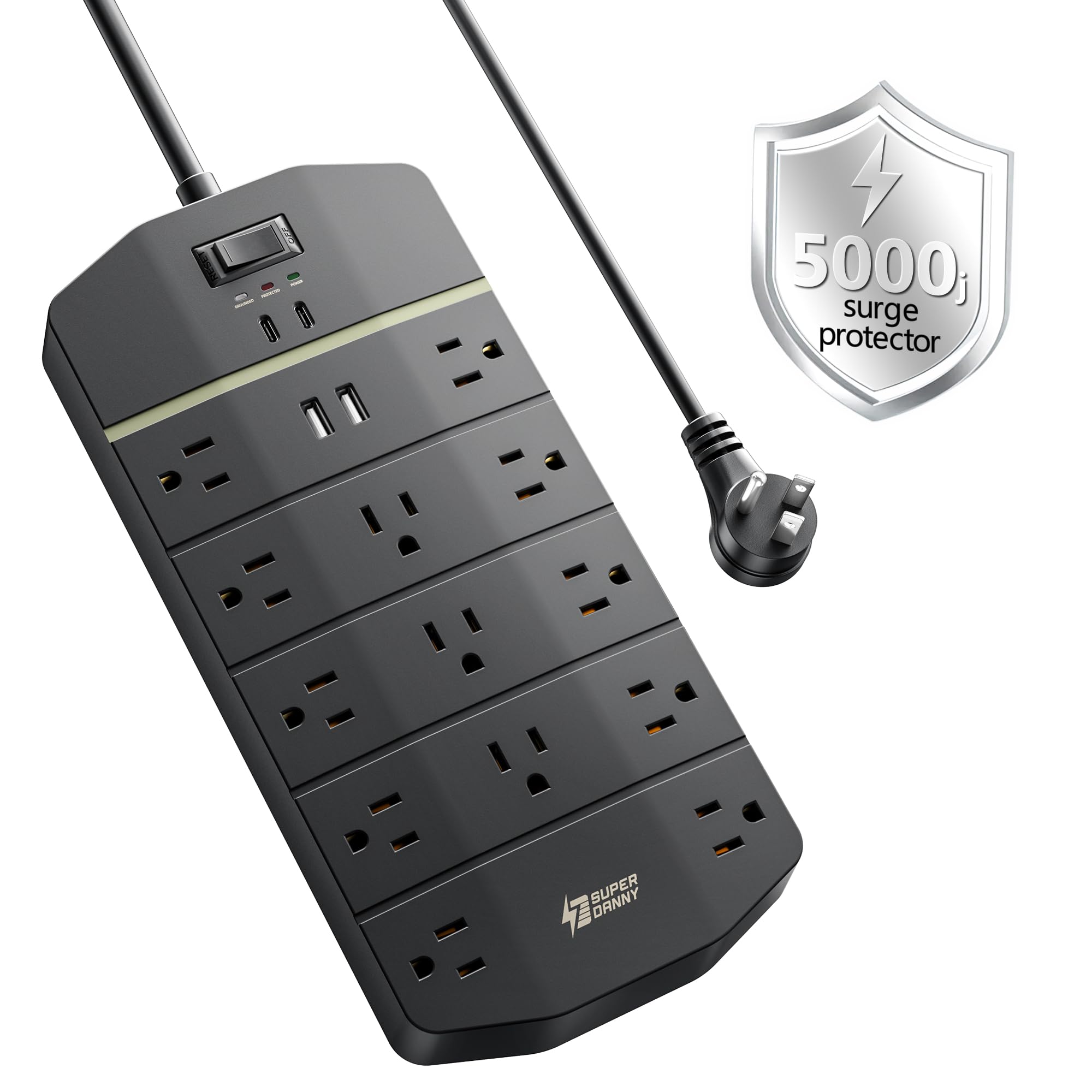
The top joule rating in the lineup — 5000J — for the most demanding setups.
With 5000 joules, this protector absorbs 85% more surge energy than the 2700-joule ALESTOR and Teiobar models. That is a serious safety margin for a high-end gaming PC, a multi-monitor workstation, or any setup where a single spike means losing expensive hardware. You get 13 widely-spaced AC outlets plus 4 USB ports — 2 USB-A and 2 USB-C with PD 20W fast charging.
The build includes 8-fold safety protection inside a fire-retardant casing: overload, short-circuit, overheat, over-voltage, over-current, surge, ground fault, and open flame protection. A 45° flat plug helps it fit behind furniture, and a drill template with screws is included for wall mounting. Owners mention the heavy-duty 14AWG/3C cord feels thicker than standard strips, which makes sense for the industrial-grade design. The NANOLAKE above offers more outlets, but this one gives you the highest raw surge absorption.
5000 joule top protection
- 5000 joules — the highest surge absorption in this guide.
- 13 wide-spaced outlets plus 4 USB ports with PD 20W fast charging.
- 8-fold safety protection in a fire-retardant casing.
large footprint
- Fewer AC outlets than the NANOLAKE (13 vs 18).
expensive gear shield: If your computer setup is valued at several thousand dollars, the extra 5000J gives you the highest ceiling before the protector wears out.
small desk: You only need a basic strip for a laptop and monitor — the 4000J Amazon Basics below is enough and costs less.
4. CCCEI Heavy Duty Power Strip Surge Protector (20 Amp, 4800J, 8 Outlets)

Built for the shop, garage, or workbench where 15-amp strips just aren’t enough.
Most home surge protectors are rated for 15 amps. This one handles 20 amps, meaning it can safely power heavier equipment like a table saw, air compressor, or a fully loaded workbench without tripping. The 12-gauge, 6-foot heavy extension cord is thicker than standard cords and stays cooler under a constant load. Customers note it feels rugged and stays put when wall-mounted.
Surge protection is rated at 4800 joules — equal to the NANOLAKE above — with a 20A circuit breaker and overload protection. It has 8 outlets, which is fewer than most office strips, but that is typical for industrial units where the priority is raw power capacity, not plug count. There are no USB ports, so you will need separate adapters for phones. The wall-mount design eliminates crawling under a desk. For a computer workbench with power tools sharing the same circuit, this is the one.
20 amp heavy duty
- 20-amp rating handles higher current than standard 15-amp strips.
- 12-gauge cord stays cool under sustained heavy loads.
- 4800J surge protection with a 20A circuit breaker.
no USB ports
- Only 8 outlets and no USB ports — not ideal for a pure office desk.
workshop champion: If you run a 15-amp saw or a bench of tools alongside your laptop, the 20-amp rating and 12-gauge cord mean you are not overloading the strip.
office use: You only need to power a desktop, monitor, and phone charger — the strips below are more compact and offer USB ports.
5. Amazon Basics 12-Outlet Surge Protector (4000J, 8ft Cord)
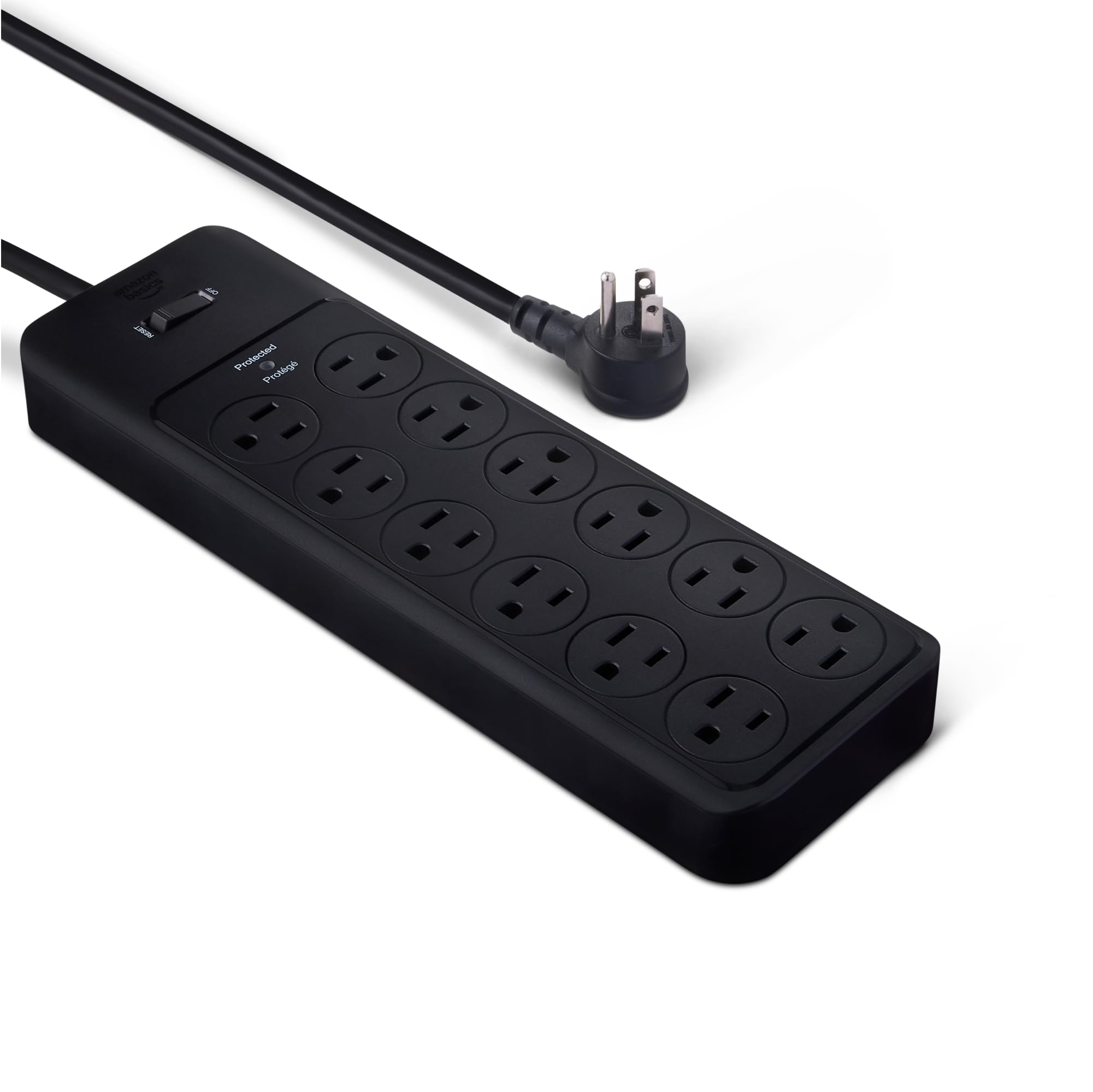
Straightforward protection with 4000J and 12 outlets, no USB clutter.
Sometimes you just want a simple surge protector without USB ports, extra features, or a premium price tag. The Amazon Basics 12-outlet strip delivers 4000 joules — more than most mid-range protectors — with an 8-foot extension cord. That is 25% more cord length than some 6-foot strips, giving you a bit more reach across a desk or behind a credenza.
Safety features include a 15-amp circuit breaker and PC flame-retardant material. Safety shutters on the outlets help prevent accidental misuse, and a power on/off switch gives you a clean cut. The back has keyhole slots for wall mounting. There are no USB ports, so you still need wall adapters for phones, but that keeps the strip slimmer and simpler. Reviewers point out it feels solid and does not have the wobble of cheaper strips. It sits below the SUPERDANNY in joule rating but above many basic strips.
reliable Amazon Basics
- 4000J is high for a no-frills strip — strong surge protection.
- 12 outlets cover a full desk setup with room to spare.
- Safety shutters and flame-retardant shell add confidence.
basic USB-less
- No USB ports — you will need separate adapters for phone and tablet charging.
pure protector: If you already have USB wall adapters and just want a high-joule strip for your PC and monitor, this gives you 4000J for a reasonable price.
need USB: You want USB-C fast charging built in — the ALESTOR or Teiobar below add that without a big jump in cost.
6. Teiobar Surge Protector (2700J, 12 Outlets, 4 USB Ports, 2 USB-C)
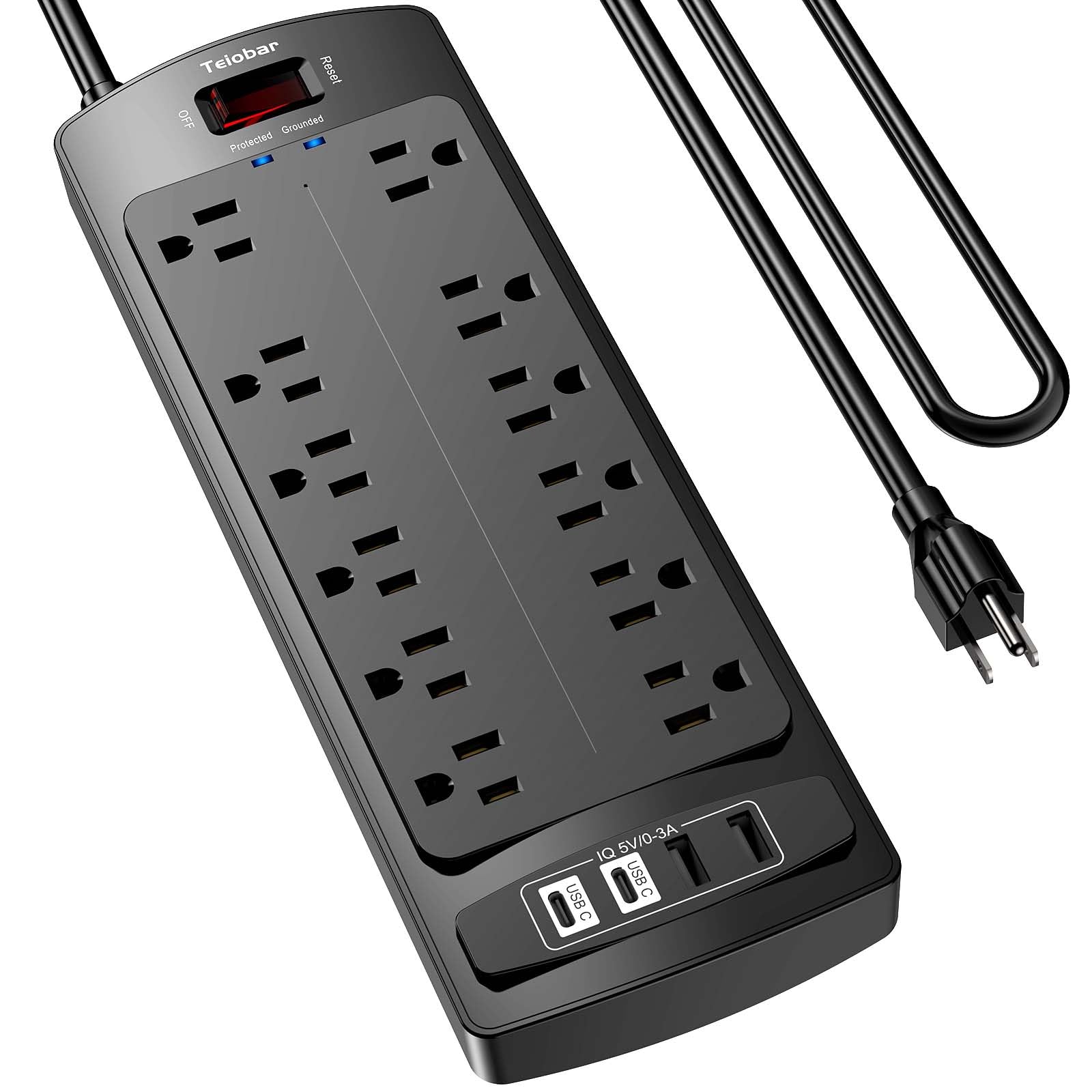
Two USB-C ports for the price of one — same joules, more flexibility.
The Teiobar matches the ALESTOR on paper — 12 AC outlets, 2700 joules, 6-foot cord, ETL certification — but swaps the single USB-C for two USB-C ports. Each USB-C port delivers 3A max, and two USB-A ports deliver 2.4A each. That means you can charge two modern phones or earbuds cases at the same time from the USB-C side, which is handy for a shared desk.
It uses a 2-level surge protection circuit combining a transient voltage suppressor (a fast-acting component that clamps voltage spikes) and a metal oxide varistor, which the maker claims responds quicker than single-stage MOV-only designs. The flame-retardant PC shell is rated at 1382°F, the same as the ALESTOR. Buyers at this price point note the wide-spaced 2-inch slots still fit large adapters without blocking. The biggest difference from the ALESTOR is the extra USB-C port and a slightly lower price, making this a solid budget pick if dual USB-C charging matters to you.
budget USB-C option
- 2 USB-C ports plus 2 USB-A — more USB flexibility than the ALESTOR.
- 2700J with a 2-level protection circuit for faster clamping.
- 2-inch wide-spaced outlets fit bulky adapters.
lower joule rating
- Same 2700J as the ALESTOR — far less than the 5000J or 4800J top picks.
budget USB-C pick: If you want to charge two USB-C devices at your desk without spending for a premium strip, this gives you the ports and 2700J of protection for a low entry cost.
need more joules: You need higher joule protection for a gaming PC or expensive workstation — the Amazon Basics at 4000J or the SUPERDANNY at 5000J offer a bigger safety buffer.
7. Anker Nano Power Strip (1500J, Desk Clamp, 70W USB-C)
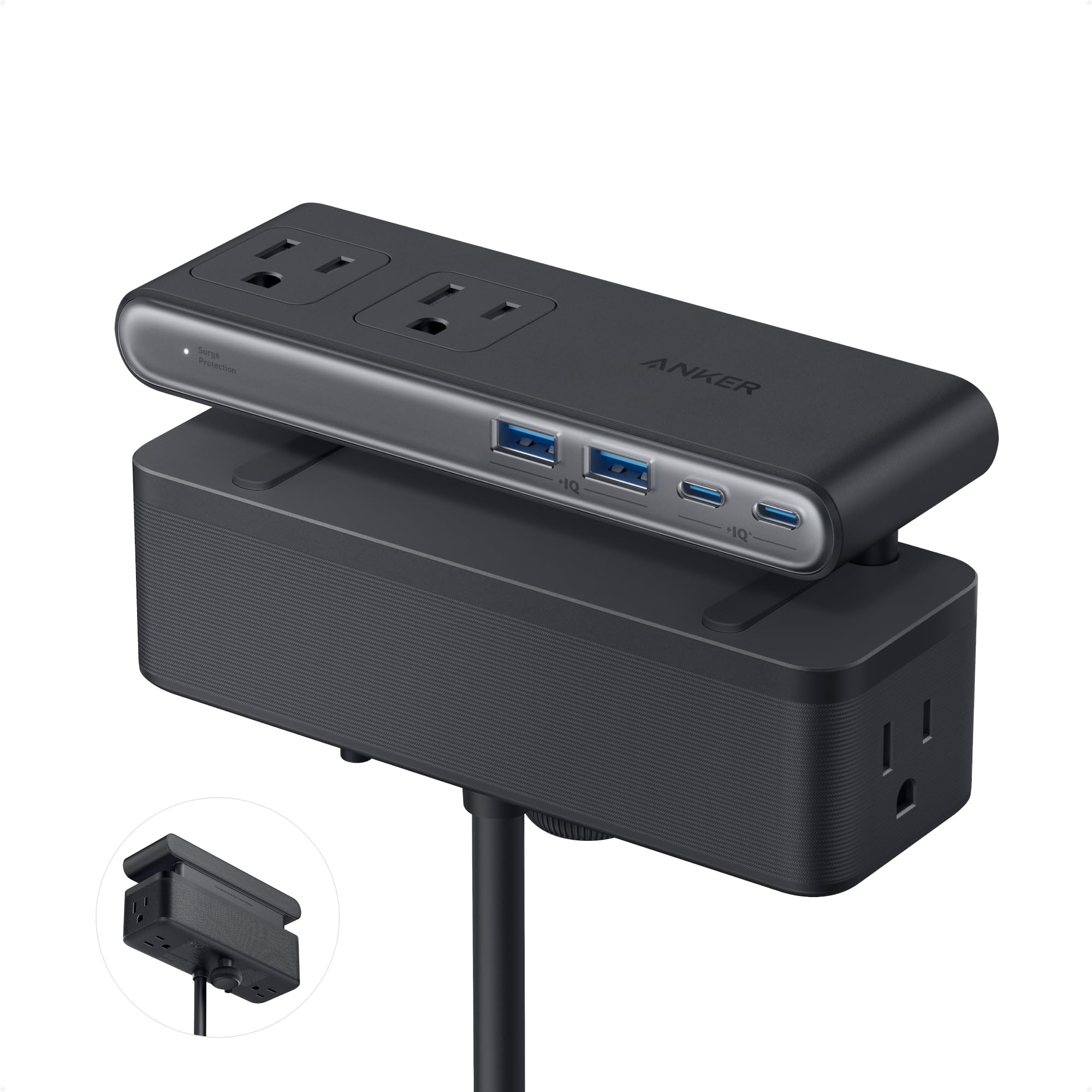
The desk clamp design that frees up floor space and charges a laptop at 70W.
This is the only pick that mounts to your desk edge instead of sitting on the floor or wall. The adjustable clamp fits tabletops between 0.6 and 1.8 inches thick, holding the strip securely so you can plug and unplug with one hand. The anker Nano has 6 AC outlets plus 4 USB ports (2 USB-A and 2 USB-C). The big feature here is 70W USB-C charging using GaN technology (gallium nitride — a chip that delivers high power in a small size), enough to fast-charge a MacBook Pro or other large laptop directly from the strip.
Surge protection is 1500 joules — lower than every other pick here, so it is better suited for a laptop and monitor than a high-power tower. The 5-foot cord is the shortest in the lineup, and the split top-and-bottom outlet layout reduces cord clutter. Shoppers say the clamp is stable and the design keeps cables off the desk surface. It is the most expensive pick and the lowest in joules, but the desk-clearing design and laptop charging speed make it unique for a minimalist workspace.
desk clamp design
- 70W USB-C PD fast charging — enough for a large laptop.
- Desk clamp mount frees floor space and keeps cords tidy.
- Compact dual-zone layout with 10 total ports in a small footprint.
low 1500 joule
- Only 1500J — significantly less surge protection than other picks.
clutter-free desk: If you hate cords on the floor and want to charge a laptop at full speed without a separate brick, this clamp design is unique and practical.
high protection: You have a high-power desktop PC or need high joule protection — 1500J is below what we recommend for a tower computer.
Understanding the Specs
Joules — the energy-absorption rating
A joule is a unit of energy. In a surge protector, the joule rating tells you how much surge energy the internal metal oxide varistor (a small disc that absorbs extra voltage) can handle before it is worn out. A 5000J protector can absorb far bigger or more frequent spikes than a 1500J one. For a desktop PC, aim for at least 2000J. For a basic laptop and monitor, 1000-1500J is okay, but higher is always better.
USB-C PD (Power Delivery) wattage
USB-C PD is a fast-charging standard that lets a surge protector charge a phone or laptop at higher speeds. The wattage number (20W, 70W) tells you the maximum power the port can deliver. 20W is enough for a smartphone or tablet. 70W can fast-charge a large laptop like a MacBook Pro. If you want to ditch your laptop’s wall adapter, look for at least 45-70W on the USB-C port.
Clamping voltage — the trigger point
This is the voltage level at which the surge protector starts absorbing the surge. Most protectors clamp around 330V to 400V. A lower clamping voltage means the protector reacts to smaller spikes. For computer equipment, a clamping voltage at or under 400V is standard. It is rarely listed on Amazon product pages, but if you see it, lower is better.
Wide-spaced outlets
A standard power strip lines up outlets with barely any gap. Wide-spaced outlets leave extra room (sometimes 2 inches) between sockets so you can plug in bulky power adapters — called wall warts — without blocking the next outlet. This matters for desk setups where monitors, laptops, and audio gear all have thick plugs.
FAQ
What is the difference between a power strip and a surge protector?
How many joules do I need for a gaming PC?
Can I plug a surge protector into another surge protector?
Do surge protectors wear out over time?
Is 1500J enough for a laptop and monitor?
What does the clamping voltage mean?
Can I use a surge protector with a space heater or refrigerator?
How do I wall-mount a surge protector?
What is GaN technology in a surge protector?
Will a surge protector work on a 240V circuit?
Final Thoughts: The Verdict
For the majority of shoppers, the computer surge protector winner is the NANOLAKE Surge Protector because it gives you 18 AC outlets, 4800 joules, and a 10-foot cord — plenty of protection and space for a full desktop setup. If you want the highest surge absorption for a premium rig, grab the SUPERDANNY 5000J Surge Protector. And for a minimalist desk where a laptop is the main machine, the Anker Nano Power Strip with 70W USB-C clamp keeps everything tidy and charges at full speed.
How We Picked
We do not accept paid placement. Every pick is matched to a real buyer and a real use-case; we do not hands-on test units.
Sources & Methodology
Specifications: manufacturer listings and product documentation. Review insights: verified customer reviews, as of July 2026. Pricing: not shown on this page (it changes often); check the current price via the retailer link.
As an Amazon Associate, WellFizz earns from qualifying purchases. This does not affect which products we feature.
Related Guides

Mo Maruf
I created WellFizz to bridge the gap between vague wellness advice and actionable solutions. My mission is simple: to decode the research and give you practical tools you can actually use.
Beyond the data, I am a passionate traveler. I believe that stepping away from the screen to explore new environments is essential for mental clarity and physical vitality.