Our readers keep the lights on and my smoothie glass nicely filled. As an Amazon Associate, I earn from qualifying purchases.
Specs are compiled from manufacturer listings and verified buyer reviews and can change over time — please confirm the key details on the product page before buying.
The wrong screen can turn a smooth line into a frustrating stutter. When you pick a computer for drawing, the most important thing is how the display and the processor work together to keep your strokes fast, accurate, and lag-free. This guide cuts past the vague promises and shows you the real specs that matter, with honest breakdowns of 11 machines built for digital art.
I’m Mohammad Maruf — the founder and writer behind WellFizz. This guide is built by comparing the manufacturers’ published specifications and the patterns across verified customer reviews, so you get each pick’s real strengths and trade-offs instead of marketing spin.
The right hardware holds you back or sets you free — and this breakdown of the best computer for drawing puts each model’s screen quality, color accuracy, stylus support, and real-world usability in plain English so you can decide with your eyes open.
Our Picks at a Glance



How To Choose The Best Computer For Drawing
Picking a drawing computer is different from picking a regular laptop. You are not just reading text or watching videos — you are making precise marks on a digital canvas. Every spec either helps your hand or gets in its way. Here is what to look for.
Display Quality Is Your Canvas
Your screen is where you work, so its resolution and color accuracy are critical. Look for a high-resolution panel like 2.5K or 3K (2880 x 1800) so you see fine details without zooming in too far. Color gamut is even more important — a display covering 100% DCI-P3 shows the rich, true-to-life colors you need for art that will be printed or shared. An OLED screen beats standard LED for deep blacks and contrast, making your shading work look real.
Stylus Support And Touch Interaction
A touchscreen alone is not enough for serious drawing. You need a machine that works with a pen that has pressure sensitivity — measured in levels like 4096 or 8192. A higher number means the pen can detect tiny differences in how hard you press, giving you thinner or thicker lines naturally. A 2-in-1 laptop lets you flip the screen into tablet mode, which feels closer to drawing on paper. For the most precise work, a dedicated pen display (like a Wacom) is the gold standard.
Processor Power And RAM
Drawing software like Photoshop, Clip Studio Paint, or Procreate needs a fast processor to keep brush strokes smooth. An Intel Core Ultra 9 or an AMD Ryzen AI 7 with a good NPU (neural processing unit for AI features) handles large canvases and complex layers. You want at least 16GB of memory, but 32GB is better if you work on detailed illustrations or 4K canvases. A fast SSD (1TB or more) keeps your project files loading quickly.
Quick Comparison
| Model | Best For | Screen & Resolution | RAM | Storage | Amazon |
|---|---|---|---|---|---|
| Apple MacBook Neo★ Best Overall | Ecosystem-driven everyday art | 13.3″ Liquid Retina (2408×1506) | 8GB | 256GB | Amazon |
| GEEKOM X16 ProAlso Great | Overall best value for artists | 16″ 2.5K (2560×1600) 120Hz IPS | 32GB | 1TB | Amazon |
| ASUS Vivobook S16Color Master | Vibrant OLED for color work | 16″ 3K (2880×1800) OLED 120Hz | 16GB | 1TB | Amazon |
| GEEKOM X14 Pro | Ultra-portable OLED for travel | 14″ 2.8K OLED 120Hz | 32GB | 1TB | Amazon |
| Samsung Galaxy Book5 Pro 360 | 2-in-1 with S Pen included | 16″ 3K (2880×1800) AMOLED 120Hz | — | — | Amazon |
| ASUS Zenbook Duo | Dual-screen multitasking artists | Dual 14″ 3K (2880×1800) OLED 120Hz | 32GB | 1TB | Amazon |
| HP OmniBook X Flip | Long battery 2-in-1 | 16″ 2K Touch (1920×1200) IPS | 16GB | 512GB | Amazon |
| Lenovo Yoga 7i | Premium OLED 2-in-1 with pen | 14″ WUXGA (1920×1200) OLED Touch | 16GB | 1TB | Amazon |
| Dell 16 Plus | Large canvas for pros | 16″ 2.5K (2560×1600) 16:10 | 32GB | 2TB | Amazon |
| Wacom Cintiq Pro 17 | Dedicated pen display for pros | 17.3″ 4K (Ultra HD) 120Hz Touch | — | — | Amazon |
| Lenovo IdeaPad | Budget-friendly with huge storage | 15.6″ FHD (1920×1080) Touch | 40GB | 2.5TB | Amazon |
In‑Depth Reviews
1. Apple 2026 MacBook Neo 13-inch
Our pick — over 4.5★ from 850+ verified ratings; the strongest balance of quality and price.
An entry-level Mac that brings Apple silicon to everyday drawing without the pro price.
The MacBook Neo is the new affordable Mac, built around the A18 Pro chip. Its 13-inch Liquid Retina display runs at 2408 x 1506 with up to 500 nits of brightness and support for a billion colors, giving you solid clarity for digital art. The aluminum design is thin and durable at 2.71 pounds, and battery life reaches up to 16 hours.
The A18 Pro chip handles creative apps like Photoshop and Procreate well for everyday tasks. The 1080p FaceTime HD camera is good for video calls. The biggest catch is the 8GB of unified memory — compared to the GEEKOM X16 Pro with 32GB, you are getting 4.0x less memory, and the 256GB SSD is half the storage of the HP OmniBook’s 512GB. This will limit you if you work on large, multi-layer files or store many projects locally.
Strong points
- Excellent build quality and integration with Apple ecosystem
- Up to 16 hours of battery life supports long creative sessions
- Vibrant Liquid Retina display with a billion colors
Limitations
- 8GB of memory is limiting for complex digital paintings and 3D work
- 256GB storage fills up fast with large art files
- No touchscreen or stylus support natively
Best for the Apple fan or student: If you already use an iPhone and want a smooth ecosystem for casual drawing, this is a solid starter.
Pass if: You need serious power for professional illustration, a touch interface for hand-drawn work, or more than 256GB of storage.
2. GEEKOM GeekBook X16 Pro
A big, bright canvas that keeps your hand moving at 120Hz without the premium price.
For an artist, the display is everything. The GEEKOM GeekBook X16 Pro gives you a 16-inch IPS screen with a sharp 2560 x 1600 resolution (the 16:10 aspect ratio gives you extra vertical space for toolbars and menus). It covers 100% of the sRGB color gamut, so the colors you paint are vibrant and accurate. The real bonus is the 120Hz refresh rate — your strokes feel immediate and fluid, with no ghosting as you move the pen quickly.
Under the hood, the Intel Core Ultra 5 125H processor with 14 cores handles heavy layers, and the 32GB of LPDDR5x memory at 7500MHz means you can run Photoshop, a browser with dozens of tabs, and a music app without slowing down. The 1TB PCIe Gen4 SSD gives you plenty of room for project files. At just 2.8 pounds, it is light enough to carry to a cafe or studio. Buyers report the IceBlade 2.0 cooling system keeps the fan noise low even during long sessions. The main trade-off is the IPS panel — while very good, it cannot match the deep blacks of an OLED screen.
Why it stands out
- 16-inch 2.5K display with a 120Hz refresh rate makes every brush stroke feel responsive
- 32GB of RAM lets you work on large, multi-layer canvases without lag
- Weighs only 2.8 pounds, so it travels easily
One limitation
- IPS screen shows good colors but lacks the pure blacks of an OLED panel
- Dedicated stylus support not included — you will need a third-party pen
Best for the value-conscious artist: You get a large, fast display and plenty of memory for under a grand — the balance for most digital painters.
Look elsewhere if: You need a built-in pen that writes directly on the screen, or you must have OLED contrast for your shading work.
3. ASUS Vivobook S16
An OLED canvas that makes your colors glow, with a resolution that packs more detail per inch.
When color is the priority, the ASUS Vivobook S16 steps up. Its 16-inch OLED panel hits a 2880 x 1800 resolution — a 50% increase in pixel density over the HP OmniBook’s 1920×1200 display. That means sharper lines and finer detail when you zoom in on your art. The 100% DCI-P3 color gamut covers a wider range of hues than standard sRGB, so your work looks true to your intent, both on screen and when printed.
The 75Wh battery keeps you drawing for up to 14 hours, and the 0.55-inch thin, 3.31-pound body makes it easy to move around. The AMD Ryzen AI 7 350 processor, with a 50 TOPS NPU, helps with AI-powered features in creative software like background removal or smart selection. Buyers mention the anti-fingerprint metal lid stays looking clean. The catch? The 16GB of memory is soldered and not upgradeable, which might limit you with extremely complex 4K canvases.
Where it wins
- 3K OLED display with 100% DCI-P3 delivers vibrant, accurate colors for professional art
- 120Hz refresh rate keeps pen strokes smooth and responsive
- Ultra-thin and lightweight at 3.31 pounds
Where it gives ground
- 16GB of RAM is fixed and cannot be upgraded later
- No built-in stylus or pen slot
Reach for this if: Color accuracy is your top priority and you want a high-resolution OLED screen that shows your work in its true richness.
Pass if: You need more than 16GB of memory for ultra-heavy 3D rendering or your workflow demands a built-in pen.
4. GEEKOM GeekBook X14 Pro

A featherlight 14-inch OLED that fits in a bag without cutting corners on power.
The GEEKOM X14 Pro proves you do not have to choose between portability and screen quality. At 2.2 pounds, it is lighter than most notebooks, yet it packs a 14-inch 2.8K OLED display with 100% DCI-P3 color and a 120Hz refresh rate. The self-lit OLED pixels produce true blacks and rich contrast — ideal for digital painting where shadow detail matters.
Inside, the Intel Core Ultra 9 185H processor with 16 cores and 22 threads is a serious workhorse. Paired with 32GB of LPDDR5x RAM at 7500MHz, it handles large canvases and demanding creative suites without stuttering. The 72Wh battery gives you up to 16 hours of runtime, and the included docking station means you do not need a bag of dongles. A physical camera shutter adds privacy. The 14-inch screen is smaller than the 16-inch models above, so you may need to zoom more on big canvases.
Key strengths
- Weighs just 2.2 pounds — one of the lightest drawing laptops available
- 2.8K OLED with 120Hz gives you a vivid, smooth canvas on the go
- 32GB of memory keeps complex projects flowing
Trade-offs
- The 14-inch screen is more compact, so fine detail work can feel cramped
- No integrated stylus — you will need to buy a separate pen
Ideal for the mobile artist: If you sketch in coffee shops or move between studios, this lightweight power machine keeps your color-accurate canvas with you.
Skip if: You need a larger, 16-inch screen for multi-window workflows or a built-in drawing pen.
5. Samsung Galaxy Book5 Pro 360

A 2-in-1 with a gorgeous AMOLED screen and an S Pen that feels like a real pencil.
Samsung brings its display expertise to the Galaxy Book5 Pro 360. The 16-inch Dynamic AMOLED 2X touchscreen runs at 2880 x 1800 resolution with a 120Hz refresh rate, making colors pop and motion feel smooth. The included S Pen with enhanced tilt sensitivity makes sketching, shading, and note-taking feel natural — no separate purchase needed.
The battery life is impressive at up to 25 hours, meaning you can draw all day without hunting for an outlet. The Intel Core 7 Ultra processor handles AI-assisted tools in creative software. The 2-in-1 hinge lets you flip the screen into tablet mode instantly. Buyers appreciate the quad speakers with Dolby Atmos for media breaks. The 16GB of memory is sufficient for most art tasks but may feel tight for 3D rendering.
What it does well
- Comes with the S Pen, so you can start drawing right away
- 3K AMOLED display with 120Hz gives brilliant color and smooth strokes
- Battery lasts up to 25 hours for full-day creative sessions
Considerations
- Limited to 16GB of memory, which may not be enough for pro-grade 3D work
- Price is at the premium end of the range
Perfect for the note-taker and sketcher: The included S Pen and long battery make this a great all-day companion for ideas and illustrations.
Think twice if: You need a replaceable or upgradeable memory, or you work with extremely large file sizes that benefit from 32GB.
6. ASUS Zenbook Duo

Two 3K OLED screens for an artist who needs more room than any single display can give.
The ASUS Zenbook Duo redefines workspace. It has two 14-inch Lumina OLED displays, each at 2880 x 1800 with a 120Hz refresh rate, giving you a combined canvas that rivals a desktop setup. You can put your reference images on one screen and your drawing software on the other, or span a single canvas across both for an rich drawing area.
The Intel Core Ultra 9 285H processor and 32GB of LPDDR5x RAM give you the horsepower to handle large files across both displays. The detachable Bluetooth keyboard and built-in kickstand let you switch between laptop, dual-screen, and sharing modes. Owners mention the 120Hz touch response feels immediate. The battery lasts about 12 hours, which is lower than some single-screen rivals, and the 3.64-pound weight is noticeable in a bag.
Unique advantages
- Dual 14-inch OLED screens at 3K resolution with 120Hz — class-leading multitasking for artists
- 32GB of RAM handles heavy projects across both displays
- Detachable keyboard and stand give you flexible drawing positions
Reality check
- 12-hour battery life is shorter than most single-screen laptops
- At 3.64 pounds, it is heavier than other ultrabooks
For the multitasking creative: If you constantly juggle references, palettes, and your canvas, this dual-screen setup is a standout.
Not for you if: You prioritize all-day battery life or want the lightest possible machine.
7. HP OmniBook X Flip 16

A 2-in-1 that outlasts a full workday with its massive 21-hour battery.
Battery anxiety disappears with the HP OmniBook X Flip. The 16-inch 1920×1200 2K touchscreen with 400 nits of brightness stays readable in bright rooms, and the 2-in-1 hinge lets you flip into tent or tablet mode for drawing.
The AMD Ryzen AI 5 340 processor includes a 50 TOPS NPU for AI tools, and the 16GB of LPDDR5x memory is enough for most creative work. The 512GB PCIe Gen4 SSD offers speedy load times. Customers note the 5MP IR camera with HDR and Poly Studio Audio Tuning makes video calls look crisp. The display resolution at 1920×1200 is lower than the ASUS Vivobook S16’s 2880×1800, so fine details are less sharp on screen.
Best features
- 21-hour battery life is class-leading for all-day creative work
- 2-in-1 design with touchscreen is practical for sketching
- AI processor with 50 TOPS NPU supports creative AI tools
Downsides
- 1920×1200 resolution is less sharp than 2.5K or 3K rivals
- 16GB of RAM is good but not expandable
Reach for this if: You need a convertible that lasts through a full day of classes or meetings without a charger.
Look elsewhere if: High pixel density is critical for your work, or you need more than 16GB of memory.
8. Lenovo Yoga 7i 2-in-1
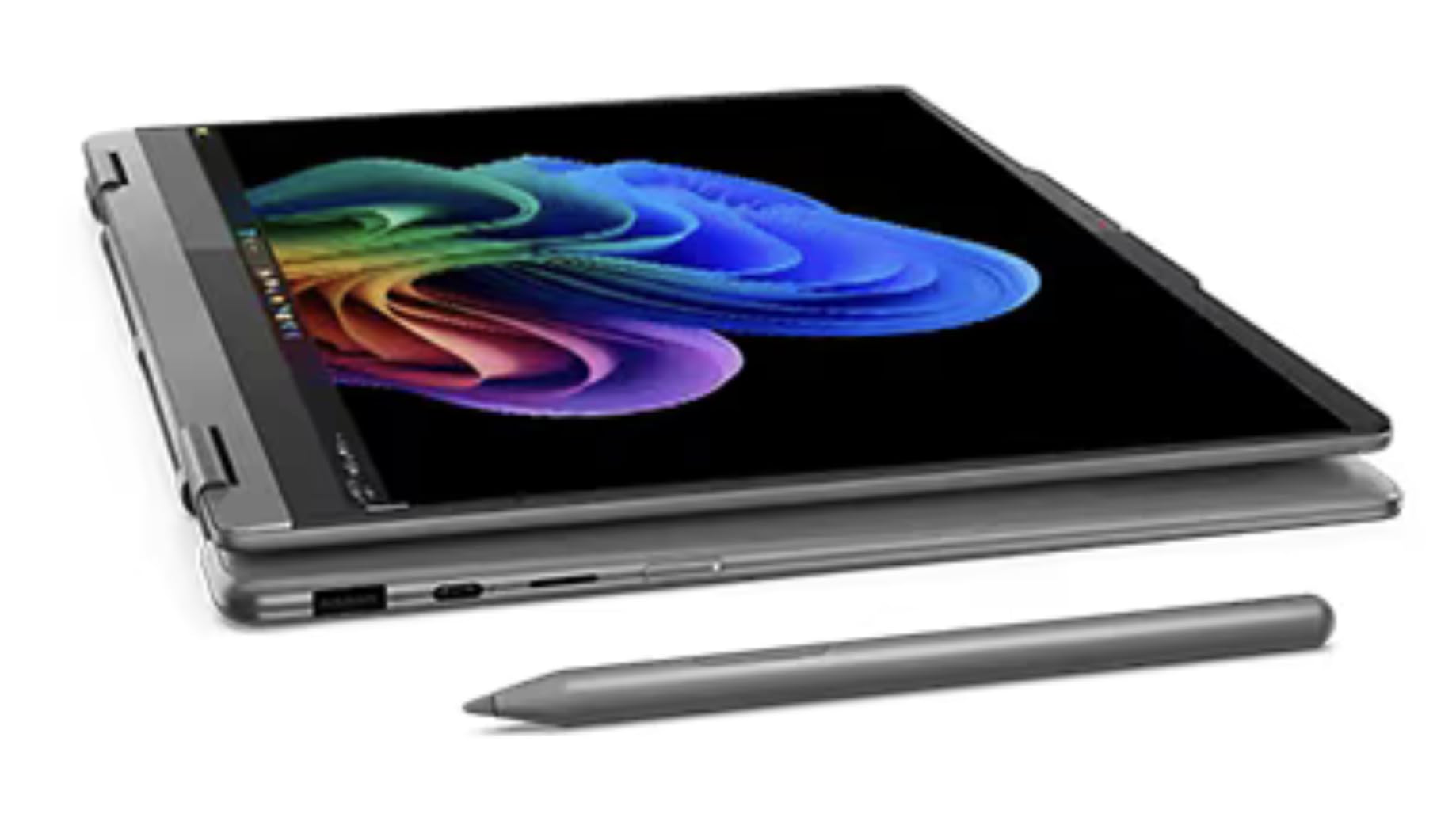
A 14-inch OLED 2-in-1 that comes with a Yoga Pen and military-grade toughness.
The Lenovo Yoga 7i brings an OLED touchscreen and a bundled Yoga Pen in a compact, durable package. The 14-inch WUXGA OLED display covers 100% DCI-P3 color gamut and reaches 400 nits of brightness, with HDR 500 True Black for deep shadows. At just 0.61 inches thin and 3.04 pounds, it is easy to carry around campus or a studio.
The Intel Core Ultra 5 226V processor and 16GB of LPDDR5X memory keep things moving for moderate creative work. The 1TB SSD gives you plenty of storage. It has been tested against 12 military-grade requirements for drops and spills. The 60Hz refresh rate is lower than the 120Hz you get on many rivals — scrolling and pen strokes will feel slightly less smooth. The battery is also rated at just 3 hours, which is very low for this class.
What it delivers
- OLED touchscreen with 100% DCI-P3 color gives you a vibrant, accurate canvas
- Includes the Yoga Pen for immediate drawing capability
- Military-grade durability tested against drops and spills
Compromises
- 60Hz refresh rate is not as smooth as 120Hz rivals for fast sketching
- 3-hour battery life is extremely short for a drawing laptop
For the student artist who values portability: The bundled pen and durable build make it a practical, if short-lived, choice for short sessions.
skip it if: You need more than a couple of hours of battery, or you want a silky-smooth 120Hz drawing experience.
9. Dell 16 Plus DB16250

A 16-inch powerhouse with 2TB of storage for artists who never want to delete a project.
The Dell 16 Plus is built for serious creative workloads. Its 16-inch 16:10 display at 2560×1600 gives you a tall, expansive workspace for timelines and tool panels. The Intel Core Ultra 9 288V processor, paired with Intel Arc Graphics, handles demanding creative suites and AI-accelerated tasks easily.
The standout spec is the 32GB of LPDDR5X memory and a massive 2TB PCIe Gen4 SSD — 2TB versus the typical 1TB of rivals. This means you can store hundreds of large project files without reaching for an external drive. The FHD+ webcam with Windows Hello makes secure login fast. Reviewers point out the 16:10 aspect ratio is ideal for design work. It has no fingerprint reader, which may be a minor inconvenience for some.
Top reasons to buy
- 2TB SSD gives you exceptional storage for large portfolios and project files
- 32GB of memory handles complex multi-layer illustrations with ease
- 16:10 aspect ratio provides extra vertical space for toolbars
Potential drawbacks
- No fingerprint reader — relies on Windows Hello face login
- No touchscreen, so you need a separate drawing tablet
Ideal for the storage-hungry pro: If you have years of artwork and massive 4K canvases, the 2TB drive and 32GB RAM give you room to breathe.
Not for you if: You prefer a touchscreen or a 2-in-1 form factor for direct pen input.
10. Wacom Cintiq Pro 17

A dedicated 4K pen display that puts the stroke quality of a Wacom Pro Pen 3 in your hand.
The Wacom Cintiq Pro 17 is not a laptop — it is a professional pen display you connect to a PC or Mac. That single-minded focus makes it the most precise drawing tool on this list. The 17.3-inch screen runs at Ultra HD 4K with a 120Hz refresh rate and 10-bit color, delivering near-zero latency and smooth, fluid strokes.
The Pro Pen 3 features 8192 levels of pressure sensitivity, customizable grips, and adjustable weight and balance so it feels exactly right in your hand. The 8 ExpressKeys and on-screen menus keep shortcuts at your fingertips without looking away from the canvas. It includes an Easy Stand for adjustable angles. It is a dedicated peripheral, not a standalone computer — you will need a separate laptop or desktop to drive it.
Professional strengths
- 4K resolution at 120Hz with 10-bit color for stunning, lag-free drawing
- 8192 levels of pressure sensitivity on the Pro Pen 3 gives you incredible line control
- Customizable ExpressKeys and ergonomic stand improve workflow
What to know
- Requires a separate computer — it is a display, not a standalone machine
- Premium price reflects professional-grade build and accuracy
The choice for the professional illustrator: If you live in a studio and need the most accurate pen-on-screen experience, this is the benchmark.
Skip this if: You need an all-in-one laptop or your budget is better suited to a convertible 2-in-1.
11. Lenovo IdeaPad 15.6

More memory and storage than any other pick, at a price that is hard to argue with.
The Lenovo IdeaPad is a budget-friendly workhorse that leans hard on capacity. It comes with 40GB of DDR4 RAM and a combined 2.5TB of storage (2TB SSD plus a 512GB docking station), blowing past every other machine on this list in both specs. The 15.6-inch FHD touchscreen at 1920×1080 lets you interact directly with your canvas.
The 10-core Intel Core i5 processor runs Windows 11 Pro, and Microsoft Office is included with a lifetime license. The camera privacy shutter and dual-array microphones are useful for video calls. Shoppers say the battery lasts up to 10 hours. The display is only 1080p at 60Hz, which is noticeably less sharp and smooth than the 2.5K or 3K OLED panels on premium picks — you will sacrifice some precision in fine detail work.
Value highlights
- 40GB of RAM is the highest on this list — great for heavy multitasking and large files
- 2.5TB total storage gives you immense space for projects
- Touchscreen and low price make it accessible
Things to consider
- 1080p resolution at 60Hz is far less sharp than higher-end OLEDs
- Intel Iris Xe integrated graphics is not ideal for 3D or GPU-intensive tasks
Best for the budget-conscious beginner: If you are learning digital art and need a huge workspace for files without the premium price, this is the most storage for your dollar.
Upgrade when you can: The lower screen resolution and refresh rate will limit you once you start demanding more from your canvas.
Understanding the Specs
Color Gamut (DCI-P3 vs sRGB)
Color gamut refers to the range of colors a screen can show. DCI-P3 is a wider, more professional standard used in digital cinema and high-end art. A display that covers 100% DCI-P3 can show richer reds, greens, and blues than one that only covers sRGB. If your art will be printed or displayed on high-end screens, you want DCI-P3.
Refresh Rate (60Hz vs 120Hz)
Refresh rate is how many times per second the screen updates the image. A 60Hz display refreshes 60 times per second; a 120Hz display does it 120 times. For drawing, a higher refresh rate means your pen stroke appears on screen almost instantly — less lag, less ghosting. It makes sketching feel more like pen on paper.
FAQ
Can I use any laptop for digital drawing?
What is the difference between a 2-in-1 laptop and a pen display?
How much RAM do I need for drawing software?
Is a 60Hz screen good enough for drawing?
What does 100% DCI-P3 mean for my art?
Do I need a dedicated drawing pen or can I use a finger?
Will a standard laptop run Procreate?
What storage size do I need for art files?
Final Thoughts: The Verdict
If you want one dependable pick, the computer for drawing winner is the GEEKOM GeekBook X16 Pro because it balances a large, fast 16-inch 2.5K screen at 120Hz with 32GB of RAM and a 1TB SSD, all at a price that undercuts many premium rivals. If you want a vibrant OLED canvas with superior color accuracy, grab the ASUS Vivobook S16. And for the professional whose art is their living, the standout is the dedicated precision of the Wacom Cintiq Pro 17.
How We Picked
We do not accept paid placement. Every pick is matched to a real buyer and a real use-case; we do not hands-on test units.
Sources & Methodology
Specifications: manufacturer listings and product documentation. Review insights: verified customer reviews, as of July 2026. Pricing: not shown on this page (it changes often); check the current price via the retailer link.
As an Amazon Associate, WellFizz earns from qualifying purchases. This does not affect which products we feature.
Related Guides

Mo Maruf
I created WellFizz to bridge the gap between vague wellness advice and actionable solutions. My mission is simple: to decode the research and give you practical tools you can actually use.
Beyond the data, I am a passionate traveler. I believe that stepping away from the screen to explore new environments is essential for mental clarity and physical vitality.