Our readers keep the lights on and my smoothie glass nicely filled. As an Amazon Associate, I earn from qualifying purchases.
Specs are compiled from manufacturer listings and verified buyer reviews and can change over time — please confirm the key details on the product page before buying.
The hardest part about buying a controller for retro gaming isn’t finding one that works — it’s finding one that feels like the console you remember. Most modern pads drop the distinctive D-pad feel, the exact button resistance, or the analog stick curve that made those classic games playable in the first place. This guide lines up seven options that match seven different retro consoles, so you can match the right grip to the games you actually play.
I’m Mohammad Maruf — the founder and writer behind WellFizz. This guide is built by comparing the manufacturers’ published specifications and the patterns across verified customer reviews, so you get each pick’s real strengths and trade-offs instead of marketing spin.
Everything here is built around the exact feel, layout, and wireless or wired connection that matters for a controller for retro gaming, from the classic Saturn D-pad to pocket-sized hall-effect joysticks that resist drift.
Our Picks at a Glance

How To Choose The Best Controller For Retro Gaming
The right retro controller depends on matching three things: the console you are emulating, the games you play most, and if you want to sit near the screen or kick back on the couch. Platformers and fighting games live and die by D-pad quality. Racing games and first-person shooters need analog sticks that do not drift. And if you switch between a PC, a Switch, and a phone, a Bluetooth pad with re-mappable buttons saves you from owning three separate controllers.
D-pad style vs button layout
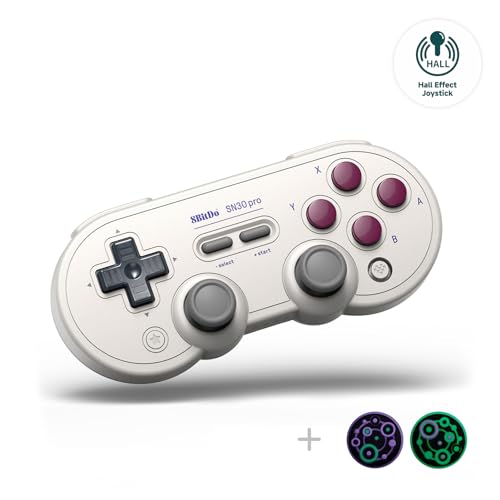
The D-pad is the single most important part of a retro controller. Sega Saturn fans swear by the eight-direction disc-style pad for fighting-game quarter-circles. NES and SNES purists prefer the cross-shaped D-pad with a distinct pivot point. If you play a lot of Street Fighter or King of Fighters, the Saturn-style pad (found on the Retro-Bit) is your best bet. For Mario or Mega Man, a tight cross D-pad (like the 8Bitdo Sn30 Pro) gives you better diagonal control.
Wired vs wireless — latency vs convenience
A wired controller (USB or original console port) gives you zero input lag and never needs charging. That matters for speedrunners and competitive fighting-game players. A 2.4GHz wireless pad (like the KIWITATA for SNES or the Retro Fighters for PS1/PS2) gives you the same near-zero latency with the freedom to sit across the room. Bluetooth pads (like the IINE Pocket or 8Bitdo Sn30 Pro) are the most versatile but can introduce a few milliseconds of lag — usually unnoticeable for casual play but worth testing for twitchy shooters.
Hall-effect joysticks vs traditional potentiometer sticks
Standard analog sticks use physical contact sensors that wear down and start drifting after months of use. Hall-effect joysticks use magnets to detect position with no physical contact — they do not drift, and they last years longer. If you are investing in a daily-driver retro controller, hall-effect sticks (found in the IINE Pocket and the 8Bitdo Sn30 Pro) are worth the bump in price. For a pure D-pad-only fighting-game pad or an N64 replica, standard sticks are fine, but keep an eye on the warranty.
Quick Comparison
| Model | Best For | Wireless Type | Button Count | Joystick Type | Amazon |
|---|---|---|---|---|---|
| 8Bitdo N30 2.4G (NES)★ Best Overall | Original NES console owners | 2.4GHz (NES receiver) | 10 | None | Amazon |
| 8Bitdo Sn30 ProTop Performer | Versatile retro across Switch, PC & phone | Bluetooth + USB-C | Full set + clickable sticks | Hall effect | Amazon |
| Retro-Bit Saturn USB | Fighting games & D-pad purists | Wired USB | 10 | None | Amazon |
| KIWITATA 2-Pack SNES | Original SNES console, couch play | 2.4GHz (SNES receiver) | 10 | None | Amazon |
| IINE Retro Pocket | Portable pocket gaming on the go | Bluetooth | 8 | Hall effect (recessed) | Amazon |
| Miadore N64 2-Pack | N64 emulation on PC & RetroPie | Wired USB | 16 | Standard analog | Amazon |
| Retro Fighters Defender | PS1/PS2/PS3 owners who want wireless | 2.4GHz + USB receiver | 15 | Standard analog | Amazon |
In‑Depth Reviews
1. 8Bitdo N30 2.4G Wireless Gamepad for Original NES (Transparent Edition)
Our pick — over 4.5★ from 900+ verified ratings; the strongest balance of quality and price.
The lightest retro pad on this list — and the only one built specifically for the original NES console.
At just 0.16 Kilograms, this is the featherweight of the group — 3.1 times lighter than the Miadore N64 two-pack at 0.5 Kilograms. But light does not mean cheap here. The N30 is a purpose-built 2.4GHz wireless pad for your original NES console, with a dedicated HOME button that accesses the Analogue NT Mini’s home menu wirelessly. It includes turbo A and turbo B buttons — a must for shoot-’em-ups where you need rapid fire. The built-in rechargeable lithium-ion battery keeps you untethered, and the 2.4GHz signal is lag-free (this is not Bluetooth, so you skip pairing delays). The transparent shell gives it that classic 1990s see-through look that retro enthusiasts love.
The trade-off is narrow compatibility: this controller works with the original NES system and does not support Bluetooth at all. If you want a NES-style pad for PC or Switch emulation, this is not the right choice — the 8Bitdo Sn30 Pro above is a better fit for multi-platform use. One reviewer noted the battery life is good for several sessions, but there is no published mAh rating in the data.
NES-owner essential: If you still have an original NES console and want to game from the couch without tripping over a cord, this is the cleanest wireless option available. pass on it if you are building a PC emulation rig — the Retro-Bit or Sn30 Pro covers more systems.
2. 8Bitdo Sn30 Pro Wireless Bluetooth Controller, G Classic Edition
The do-everything retro pad that finally brings hall-effect sticks to a classic SNES shape.
This is the controller you reach for when you want one pad that works on your Switch, your PC, your Android phone, and even your Tesla. The Sn30 Pro packs hall-effect joysticks (magnets, no physical contact — so they never develop stick drift) plus clickable sticks, rumble vibration, motion controls, a proper SNES-style D-pad, and a USB-C port. The manufacturer claims an 18-hour play time on the 480mAh rechargeable battery, and charging takes only 1 to 2 hours. Buyers report the D-pad feels exactly like the original SNES — tight and responsive, with a satisfying pivot point that makes platformers feel natural. The Bluetooth is version 4.0, which some users note adds a tiny bit of latency, but the USB-C wired mode bypasses that entirely when you plug straight into your PC or Steam Deck. At 0.24 Kilograms and 144×63.5×32.5mm, it slips into a jacket pocket easily.
Reviewers point out that the triggers are clicky digital switches, not analog triggers — so pressure-sensitive inputs like gradual acceleration in racing games are not there. A buyer noted a button-mapping quirk when pairing with a Tesla: the on-screen A/B prompts do not match the physical buttons. For pure retro emulation on Mac (OpenEmu, Dolphin) and iPhone (Delta), multiple owners say it works flawlessly straight from the start. One buyer did return theirs due to connection issues with a Raspberry Pi 5, so Raspberry Pi users should confirm compatibility first.
Why it wins the top spot
- Hall-effect joysticks — zero drift, higher precision than any traditional stick in this price range
- 18-hour battery with 1-2 hour recharge via USB-C — you play all week on one charge
- Widely compatible: Switch, PC (X-Input/D-Input), Android, iOS, macOS, Apple TV, Steam Deck
- 6-axis gyro motion controls and rumble vibration for games that support them
The honest trade-offs
- Digital triggers, not analog — no gradual pressure response for racing sims or PS2 ports
- Bluetooth 4.0 — not the latest spec; a few users note occasional latency on Switch
- Some Raspberry Pi 5 users report connection dropouts — test before committing
Versatile winner: Buy this if you want one reliable retro pad that switches between Switch, PC, Mac, and phone all week without a second thought.
One real limitation: The clicky digital triggers break immersion in racing games where you need analog throttle control — look at the Retro Fighters Defender if pressure-sensitive buttons matter.
3. Retro-Bit Official Sega Saturn USB Controller Pad (Model 2)

The Saturn D-pad — widely called the best fighting-game pad ever — now in a USB wired version for modern systems.
If you play fighting games (Street Fighter 6, King of Fighters, or retro arcade fighters), this wired controller is your endgame. The Saturn-style eight-direction disc D-pad makes quarter-circle motions and dragon-punch inputs feel easy in a way that no cross-shaped D-pad can match. The 10-button layout includes six face buttons laid out as three rows — perfect for fighting-game macros and six-button arcade ports. At 0.29 Kilograms it feels light but sturdy, and the 10-foot (3-meter) cable gives you enough reach for a couch-and-TV setup. Owners mention that after a year of regular play the controller shows no wear. Retailers note that switching between D-Input and X-Input is done by holding the START button for 5 seconds — a detail the listing sometimes buries. One reviewer who opened the shell found the internal D-pad cross is solid white nylon, matching the quality of original OEM Saturn controllers. The Retro-Bit is a full 0.13 Kilograms heavier than the 8Bitdo N30, giving it a more substantial feel on the lap.
The catch? There are no analog sticks — this is a pure D-pad-plus-buttons pad. If your retro library includes N64 games, PlayStation titles that rely on analog sticks, or any modern 3D game, this controller will not work well for those. A buyer mentioned that the START button can occasionally get stuck when pressed at an angle, though that experience is not universal. This controller is also a wired-only USB pad, so if you want to game from across the living room, you will need a USB extension cable.
Why fighting-game fans buy this
- Saturn disc-style D-pad is widely considered the best ever made for fighting games
- Six face buttons in three rows — perfect for arcade-perfect button mapping
- Build quality matches original Saturn pads; customers note no wear after a year of heavy play
- Works with Sega Genesis Mini, Switch, PS3, PC, Mac, Steam, RetroPie, Raspberry Pi
What it skips
- No analog sticks — completely unsuitable for N64, PS1/2 3D games, or modern shooters
- Wired only — the 10-foot cable is generous but still tethers you to the screen
- START button can catch if pressed at an angle, per some owners
For D-pad perfectionists: Grab this for fighting games and 2D platformers where the Saturn D-pad makes every quarter-circle input cleaner — it beats every cross-shaped D-pad on this list for precision.
skip it if: You need even one analog stick for N64 or PS1 emulation — the Miadore N64 pack or the Retro Fighters Defender covers those bases.
4. KIWITATA 2 Pack 2.4GHz Wireless Controller for SNES Original Console

A two-pack of rechargeable wireless pads for the original SNES that feels exactly like the wired originals — but without the cord.
This is the most practical option if you own an original Super Nintendo and want to play two-player Mario Kart or Super Bomberman from the couch. Each pad connects via a 2.4GHz signal with a range of up to 30 feet, using a 7-pin connector adapter that plugs into the SNES controller port. The built-in 3.7V/500mA lithium-ion battery delivers over 10 hours of continuous play, and recharging happens through a USB cable. The D-pad is frosted and concave for an anti-sweat, non-slip grip — a small upgrade over the smooth original. Each unit weighs 0.27 Kilograms, which is only 0.3 Kilograms heavier than the featherweight 8Bitdo N30 but feels substantial enough for adult hands. At 10 buttons, it matches the Retro-Bit Saturn pad’s button count and covers the standard SNES layout precisely.
Buyers warn that the LEDs on both the controllers and the dongles are extremely bright — one owner removed the 1k SMD resistor and replaced it with a 10k resistor to dim them. A few users report that if both dongles are plugged in, the controller you want for player 2 sometimes auto-connects to player 1 instead; reading the pairing instructions solves that. Also, the two-pack does not support both controllers working at once on a Super Famicom console — only on original SNES. One buyer mentioned a slightly misaligned USB charging port that required angling the cable, though the controller still functioned.
Two-player made easy
- Two rechargeable pads in one box — no fighting over the single wired controller
- 10+ hour battery on each pad supports marathon sessions
- Feel and response mimic the original SNES controller closely, per multiple owners
- 2.4GHz wireless range of 30 feet beats Bluetooth for stable living-room play
Worth knowing
- LEDs are aggressively bright — plan to cover or mod them if you game in a dark room
- Pairing can be confusing if both dongles are plugged in at once
- Does not support two-player on Super Famicom — only on original SNES
Best for two-player households: Buy this if you and a friend or partner play original SNES games regularly and want to ditch the cords without buying two separate singles.
it’s not for you if: You only play single-player — the single-pad 8Bitdo N30 for NES is lighter and simpler for one player.
5. IINE Retro Pocket Wireless Game Controller

The controller that actually fits in your pocket — with hall-effect sticks that should last years without drifting.
This ultra-compact Bluetooth gamepad is built for portability first. The recessed joystick design means the analog sticks sit slightly lower than the face, so they do not snag on fabric or get bent in a bag. That is a smart detail that separates it from every other controller here — you can slide it into a sling bag or even a large pants pocket without worrying about stick damage. The hall-effect joysticks (the same magnet-based tech as the 8Bitdo Sn30 Pro) give you 1000Hz polling rate — that means the controller reports its position to your device every millisecond, making inputs feel snappy and precise. It connects via Bluetooth to PCs, tablets, smartphones, handheld gaming consoles, car screens, and the Switch. At only 8 buttons, it has half the buttons of the 16-button Miadore N64 pad, but the face buttons plus two shoulder buttons cover most retro platformers and RPGs. The 2.0x gap in buttons between this and the Miadore N64 pad is noticeable if you rely on extra buttons for fighting-game macros or N64 emulation.
The biggest worry here is quality control. One owner reported severe stick drift from the start on the first unit, and the replacement developed the same drift after two weeks — reset and calibration did not fix it. That said, the same reviewer gave the controller 5 stars for portability and said the defective units might be outliers. Other owners praise the long battery life, the ability to use it while charging, and the responsive vibration and gyro features. The LT/RT inner shoulder buttons are hard to press, but the IINE app lets you rebind them to less-used functions. There is no analog trigger depth — these are digital switches, like the Sn30 Pro.
Pocket-friendly design
- Recessed hall-effect joysticks survive pocket carry without damage
- 1000Hz polling rate for responsive, low-latency input
- Multi-platform: Android, iOS, Mac, Windows, Switch, Steam Deck
- Compact design slips into a sling bag or large pocket
Quality concerns
- Multiple reports of severe stick drift from the start, including on replacement units
- Only 8 buttons — limited for N64 or fighting-game macro needs
- Inner shoulder buttons (LT/RT) are stiff and awkward to press
Best for travel: This is the only controller on the list that genuinely disappears into a pocket or EDC bag — grab it for Switch or phone gaming on planes and trains.
look elsewhere if: You cannot risk a defective unit — the drift reports are real enough that you might want to buy from a place with an easy return policy or choose the 8Bitdo Sn30 Pro for more consistent quality.
6. miadore 2 Pack USB Wired N64 Controller

The most buttons of any pad here (16) and the hardest to resist if you grew up with the original N64 trident grip.
If you emulate N64 games on your PC or Raspberry Pi, the three-pronged shape of this controller is what Mario 64, GoldenEye, and Ocarina of Time were designed for. The miadore pack gives you two controllers for the price of a single premium pad, each with 16 buttons — a full 2.0x more buttons than the IINE Retro Pocket’s 8-button layout. That extra button count matters for N64 games that map C-buttons and the Z-trigger separately. It uses a standard USB connection and is plug-and-play on Windows 10/11, Linux (Ubuntu, Mint, RetroPie, Recalbox, Lakka), and Mac OS X — no driver installation needed. Reviewers point out it works great with Project64 and RetroPie, with crisp controls and automatic detection. The 5.9-foot cord is shorter than the Retro-Bit Saturn’s 10-foot cable, so plan your desk or couch distance accordingly. At 0.5 Kilograms, these are the heaviest controllers on the list — 3.1 times heavier than the 8Bitdo N30 — but that heft feels appropriate for the original N64’s chunky design.
The honest downside: multiple shoppers say a small dead spot at the 5 o’clock position of the analog thumb stick. One reviewer called it a mild inconvenience but said the controller was still usable and playable. For casual N64 gaming, this is forgivable. For speedruns or competitive Mario Party minigames, that dead spot could cost you a round. Also worth noting: two owners confirmed these do not work on Chromebooks, and they are not compatible with Android TV boxes — only Android phones via a USB OTG cable.
N64 emulation made simple
- Two wired controllers in one box — ready for multiplayer N64 emulation right away
- 16 buttons cover all N64 inputs including C-buttons and Z-trigger
- Native plug-and-play on Windows, Linux (RetroPie), and Mac — no drivers needed
- Works with major N64 emulators: Project64, Mupen64Plus, Sixtyforce
Analog stick drawback
- Both controllers have a small dead spot at the 5 o’clock position on the thumb stick
- Does not work on Chromebook or Android TV boxes
- 5.9-foot cable is shorter than the 10-foot Retro-Bit cable — may need a USB extension
N64 purist choice: Buy this if you run Project64 or RetroPie and want the authentic three-pronged feel for Mario 64, Ocarina of Time, or GoldenEye — the dead spot is a minor annoyance but does not break gameplay.
Look elsewhere if: You need perfect analog precision for speedrunning or competitive play — the 8Bitdo Sn30 Pro’s hall-effect sticks are way more accurate.
7. Retro Fighters Defender Next-Gen PS1 – PS2 – PS3 – Switch & PC Wireless Controller

The only pad here with pressure-sensitive face buttons — a must-have for PS1 and PS2 driving games.
For PlayStation retro gamers, this is the most important pick on the list. The Retro Fighters Defender uses 2.4GHz wireless technology and retains pressure-sensitive face buttons — a feature that modern controllers dropped but that PS1 and PS2 games rely on for gradual acceleration in Gran Turismo, analog brake pressure in Wipeout, and variable-intensity attacks in Metal Gear Solid. It works with PS1, PS2, PS3, PS Classic, Switch, and PC. The package includes both a USB receiver and a dedicated PS1/PS2 receiver, so switching between a modern PC and a retro Sony console is as simple as swapping the dongle. The wireless range is over 30 feet — putting it on par with the KIWITATA SNES pad’s range. With 15 buttons, it sits between the 16-button Miadore N64 pad and the 10-button Retro-Bit Saturn, giving you the full PlayStation layout plus turbo functionality and vibration feedback for games that support it.
The notable absence is six-axis motion control — the data specifically notes “there is no six axis capability,” so games that rely on tilt controls on a PS3 controller will not translate here. At 10.6 Ounces (roughly 0.3 Kilograms), it is middleweight — heavier than the 0.16 Kilogram 8Bitdo N30 but lighter than the 0.5 Kilogram Miadore N64 pack. Buyers report solid build quality, though the plastic does not have the same dense, premium feel as original Sony DualShocks. A few owners note that the shoulder buttons feel shallower than the original PS2 controller’s triggers.
PlayStation retro essential
- Pressure-sensitive face buttons — the only controller here that works correctly for PS1/PS2 driving games
- Dual receivers (USB + PS1/PS2) so one pad handles PC and original console
- 30+ feet wireless range covers an entire living room
- Vibration feedback and turbo functionality included
What is missing
- No six-axis motion controls — some PS3 games will lack tilt functionality
- Shoulder buttons feel shallower than original DualShock triggers
- Plastic build feels less dense than original Sony controllers
PS1/PS2 wireless solution: Buy this if you still play Gran Turismo, Metal Gear Solid, or any PS1/PS2 game that needs analog button pressure — it is the only wireless pad on this list that supports that feature.
steer clear if: You only emulate PS1 on a PC or Switch and do not own the original consoles — the 8Bitdo Sn30 Pro is more versatile and costs less.
Understanding the Specs
Wireless Type — 2.4GHz vs Bluetooth
This is the biggest decision point after D-pad feel. A 2.4GHz wireless pad (like the 8Bitdo N30 or the KIWITATA SNES pack) uses a dedicated USB or console-port receiver that talks directly to your device. It has near-zero input lag and never needs pairing — plug in the dongle, and you are in. Bluetooth pads (like the IINE Retro Pocket or the 8Bitdo Sn30 Pro) pair with multiple devices, so you can switch from a phone to a PC to a Switch without swapping dongles. The trade-off is that Bluetooth can introduce 1-5ms of extra latency, though most players never notice it. For speedruns and fighting-game frame windows, go 2.4GHz. For convenience, go Bluetooth.
Hall-Effect vs Traditional Analog Sticks
Traditional analog joysticks use potentiometers — physical wipers that rub against a resistive strip to detect position. Over time, dust and wear cause a “dead zone” or drift, where the stick registers input even when you are not touching it. Hall-effect joysticks use magnets and a sensor to detect position with no physical contact. They do not wear out, they are more precise, and they completely eliminate drift. The 8Bitdo Sn30 Pro and the IINE Retro Pocket have hall-effect sticks. Every other controller here uses traditional sticks. If you plan to keep a controller for years of heavy use, hall-effect is worth the premium. For occasional weekend play, traditional sticks are fine and cheaper to replace.
D-Pad Construction — Cross vs Disc
There are two main D-pad designs. The cross-style (used on NES, SNES, and most 8Bitdo controllers) has a single pivot point in the middle with four separate directional arms. It gives clear diagonal feedback, ideal for platformers where you need precise up/down/left/right. The disc-style (used on the Sega Saturn and the Retro-Bit Saturn controller) is a circular dish with a ball-joint pivot under the center. It rolls smoothly between directions, making quarter-circle motions in fighting games significantly easier. There is no “better” design — only what matches the games you play most.
Button Count and Layout
The number of buttons on a retro controller ranges from 8 (IINE Retro Pocket) to 16 (Miadore N64 two-pack). More buttons do not automatically mean a better controller — they mean the controller is designed for a specific console’s layout. N64 games need C-button cluster and Z-trigger, so 16 buttons is appropriate. SNES games only use 10 buttons. Fighting games that emulate arcade six-button layouts need at least 10 face buttons. If you are buying a “universal” retro controller, look for at least 10 buttons plus two analog sticks. If you are buying for a specific console, match the original button count exactly — extra buttons can cause mapping confusion on some emulators.
FAQ
Will a retro controller work with my PC for emulation?
What is the difference between a retro controller and a modern controller for retro games?
Can I use one retro controller with multiple consoles or devices?
Why do some retro controllers not have analog sticks?
What does “pressure-sensitive buttons” mean and why do I need them?
How long do rechargeable retro controllers last on a charge?
Can I use a retro controller on a Nintendo Switch?
What is a dead zone or dead spot on a controller?
Do I need turbo buttons on a retro controller?
How do I know if a retro controller is compatible with RetroPie on Raspberry Pi?
Final Thoughts: The Verdict
For most buyers, the controller for retro gaming winner is the 8Bitdo Sn30 Pro because it combines hall-effect joysticks, an authentic SNES-style D-pad, and Bluetooth versatility across Switch, PC, Mac, Android, and iOS — all in one compact, well-built package. If you want the best D-pad for fighting games, grab the Retro-Bit Saturn USB. And for PS1/PS2 owners who need pressure-sensitive buttons and wireless freedom, the standout is the Retro Fighters Defender.
How We Picked
We do not accept paid placement. Every pick is matched to a real buyer and a real use-case; we do not hands-on test units.
Sources & Methodology
Specifications: manufacturer listings and product documentation. Review insights: verified customer reviews, as of July 2026. Pricing: not shown on this page (it changes often); check the current price via the retailer link.
As an Amazon Associate, WellFizz earns from qualifying purchases. This does not affect which products we feature.
Related Guides

Mo Maruf
I created WellFizz to bridge the gap between vague wellness advice and actionable solutions. My mission is simple: to decode the research and give you practical tools you can actually use.
Beyond the data, I am a passionate traveler. I believe that stepping away from the screen to explore new environments is essential for mental clarity and physical vitality.