Our readers keep the lights on and my smoothie glass nicely filled. As an Amazon Associate, I earn from qualifying purchases.
Specs are compiled from manufacturer listings and verified buyer reviews and can change over time — please confirm the key details on the product page before buying.
You can spend a lot on a graphics card, but for smooth 1080p gaming you mainly need enough VRAM (video RAM—the memory a GPU uses to hold textures and frames) to stop stutters. Many budget cards only pack 4GB, and when you turn up the detail in a modern game, that 4GB chokes and drops frames. This guide compares nine affordable GPUs to show you where your money buys real gaming performance and where it buys frustration.
I’m Mohammad Maruf — the founder and writer behind WellFizz. This guide is built by comparing the manufacturers’ published specifications and the patterns across verified customer reviews, so you get each pick’s real strengths and trade-offs instead of marketing spin.
Whether you are upgrading a prebuilt office PC or building your first gaming rig, these picks cover the market for a cheap video card that delivers smooth 1080p gaming while staying affordable.
Our Picks at a Glance


How To Choose The Best Cheap Video Card
The buyer’s trap with cheap video cards is focusing on the chipset name instead of the memory capacity and memory type. You can have an RTX or Radeon label, but if it carries only 4GB of VRAM (video RAM), modern games will drop frames the moment they load high-resolution textures. Here is what to check first.
VRAM: 8GB Is The New Minimum
Most AAA games today recommend 8GB of VRAM for 1080p high settings. A 4GB card will hit a wall quickly — textures will load late, and you will have to dial everything down to low just to keep things playable. The AISURIX RX 5500 XT, for example, gives you 8GB compared to the Sparkle Arc A310’s 4GB, which is a 2.0x gap in memory capacity.
Memory Type: GDDR6 vs GDDR5
GDDR6 (Graphics Double Data Rate 6, the current memory standard) is about 20% faster than GDDR5 on paper. The MOUGOL RX 580 uses GDDR5 while most newer cards use GDDR6. This matters for texture-heavy scenes — GDDR6 moves data faster, so the GPU spends less time waiting for assets and more time rendering frames.
Power Connectors and Physical Fit
Many budget builds reuse old power supplies. Some cards like the MSI RTX 3050 LP need no external power cable at all, while others require a single 8-pin connector. Always check your power supply’s available cables and the physical clearance inside your case. The XFX RX 7600 lists a recommended 550W PSU.
Quick Comparison
| Model | Best For | VRAM | Memory Type | GPU Clock | Amazon |
|---|---|---|---|---|---|
| MOUGOL RX 580★ Best Overall | Absolute budget 8GB entry | 8 GB | GDDR5 | 1206 MHz | Amazon |
| ASUS RTX 5060 OCAlso Great | Premium 1080p with DLSS 4 | 8 GB | GDDR7 | 2535 MHz | Amazon |
| PNY RTX 5060 OCTop Performer | Budget RTX with GDDR7 | 8 GB | GDDR7 | 2535 MHz | Amazon |
| ASRock RX 7600 | Best-value Radeon for 1080p | 8 GB | GDDR6 | 2695 MHz | Amazon |
| XFX RX 7600 SWFT210 | Quiet dual-fan Radeon | 8 GB | GDDR6 | 2655 MHz | Amazon |
| GIGABYTE RTX 3050 WF2 | Zero external power needed | 6 GB | GDDR6 | 1477 MHz | Amazon |
| MSI RTX 3050 LP | Low-profile small builds | 6 GB | GDDR6 | 1492 MHz | Amazon |
| AISURIX RX 5500 XT | Cheapest 8GB GDDR6 card | 8 GB | GDDR6 | 1750 MHz | Amazon |
| Sparkle Arc A310 | Media transcoding / low-power | 4 GB | GDDR6 | 1000 MHz | Amazon |
In‑Depth Reviews
1. MOUGOL AMD Radeon RX 580 Gaming Graphics Card
The aging legend that still offers 8GB of VRAM for the absolute cheapest price — but uses slower GDDR5 memory (a 20% speed penalty vs GDDR6).
The MOUGOL RX 580 uses older GDDR5 memory instead of the GDDR6 on the AISURIX RX 5500 XT, and its GPU clock is 1206 MHz compared to the AISURIX’s 1750 MHz. But it compensates with a massive 256-bit memory bus — double the 128-bit width of the RX 5500 XT. That wider bus helps move data efficiently despite the slower memory. It has 2048 Stream Processors and runs at 1206 MHz core clock. It requires a 6-pin power connector.
Buyers have mixed but mostly positive reactions. One shopper added “its a good starter gpu but for modern gaming you need something higher” and noted it was “a big boost” from their old GTX 960 2GB card. Another uses it on a Linux test PC and says it “doesn’t overheat” and runs “pretty quiet.” The card supports triple-monitor setups through HDMI, DisplayPort, and DVI outputs.
The Upside
- 8GB of VRAM at the absolute lowest entry price
- 256-bit memory bus is wider than any other card on this list, helping with texture bandwidth
- Compact 240x135x45mm size fits standard ATX and M-ATX cases
The Downside
- GDDR5 memory is 20% slower than GDDR6 on modern memory benchmarks
- 1206 MHz clock speed is significantly lower than newer 1750 MHz+ cards
Ideal for a true rock-bottom budget build where every dollar counts and you need 8GB of VRAM for less than the price of a new game. If you plan to play modern AAA titles, the AISURIX RX 5500 XT’s GDDR6 and higher clock speed deliver better frame rates for a little more cash.
2. ASUS Dual NVIDIA GeForce RTX 5060 8GB GDDR7 OC Edition
The new-gen card that brings GDDR7 memory (the latest, fastest graphics memory) to the budget table — so you load heavy textures in demanding games without stutter.
ASUS put NVIDIA’s latest Blackwell architecture and DLSS 4 (Deep Learning Super Sampling — an AI-powered upscaling that boosts frame rates) into a card that fits SFF-ready (small form factor) cases. The 8GB of GDDR7 video memory is faster than the GDDR6 found on most other cards here. That means better texture-loading performance in demanding games. The OC (overclocked) mode runs at 2565 MHz, with a default mode of 2535 MHz.
Buyers report that the 8GB of VRAM “still gets the job done” for 1080p gaming, and one buyer called it a “big leap in performance from iris xe graphics.” The axial-tech fan design uses a smaller hub for longer blades, increasing downward air pressure to keep the card cool. It weighs 1.4 pounds and measures 9 inches by 4.8 inches, so check your case clearance. It needs a single 8-pin power connector.
What Stands Out
- GDDR7 memory offers a measurable bandwidth boost over GDDR6 cards
- DLSS 4 uses AI to push higher frame rates at 1080p
- 0dB technology stops fans entirely under low load for silent operation
The Trade-Offs
- 8GB VRAM is the same capacity as the previous 4060 generation
- Requires PCIe 5.0 support for full bandwidth — older boards will bottleneck slightly
Reach for this if you want the newest tech in a budget card and plan to keep your PC for three to four years. If you have an older motherboard or a power supply without a 6+2 pin PCIe cable, the GIGABYTE RTX 3050 WF2 is a smarter fit since it needs no external power.
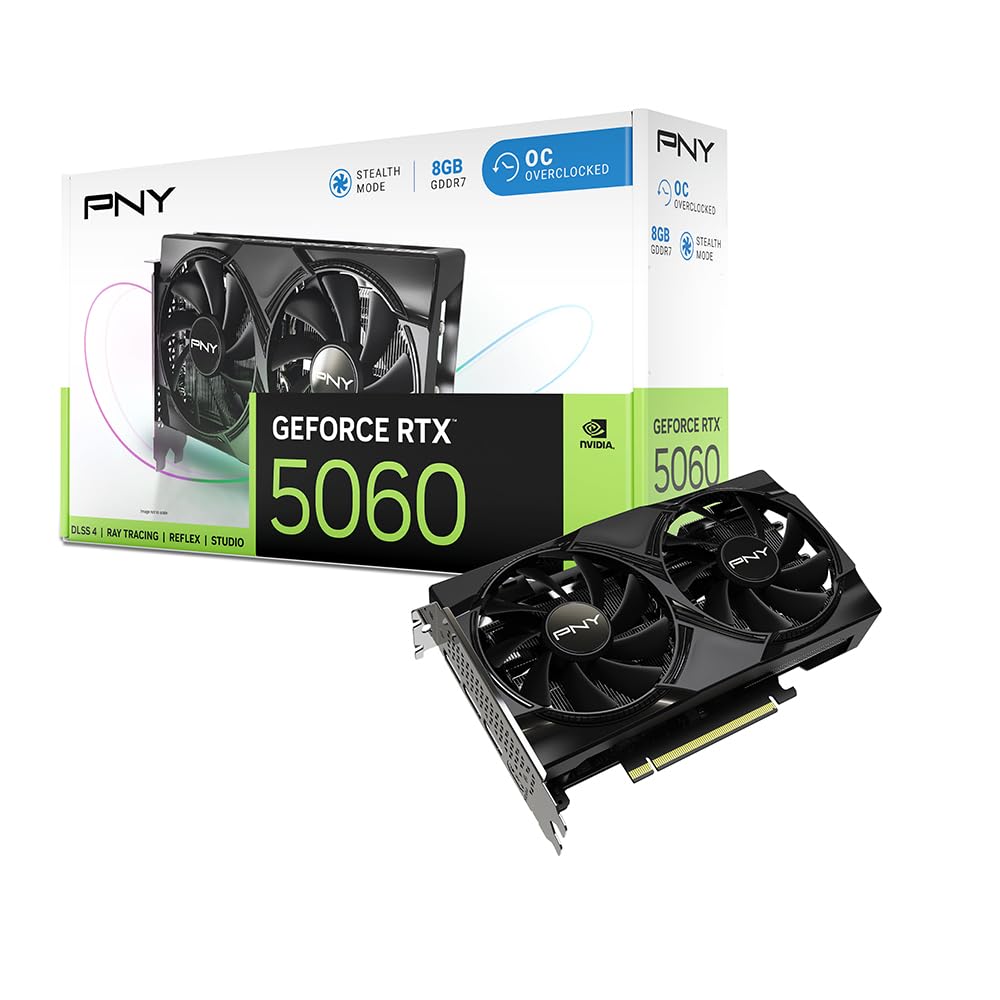
3. PNY NVIDIA GeForce RTX 5060 OC Dual Fan
The RTX 5060 that buyers are calling the best cheap card in 2025 because it packs the same GDDR7 memory as the ASUS card but at a lower price.
The PNY RTX 5060 has 8GB of GDDR7 memory with a 128-bit memory interface and a boost clock of 2535 MHz. The dual-fan cooler keeps thermals in check, and the 2-slot design is SFF-ready (small form factor), so it slides easily into compact mid-tower cases. It uses a PCIe 5.0 interface, but it works fine in PCIe 4.0 slots too. One reviewer noted it “runs cool and quiet.”
Owners mention hitting “100+ FPS on almost every game on high settings,” and one reviewer called it “the best cheap card 2025 forever.” Another mentioned the card is “small enough for all mid towers.” The fifth-gen Tensor Cores handle DLSS 4 (AI upscaling), while the fourth-gen Ray Tracing Cores give you hardware-accelerated ray tracing at this price — something older budget cards like the RX 580 cannot do.
Key Strengths
- GDDR7 memory with PCIe 5.0 support future-proofs the card for a motherboard upgrade
- DLSS 4 and ray tracing work at a budget price
- “Good on power consumption,” one buyer mentioned
One Limitation
- 8GB VRAM may hit the ceiling in a few years at ultra texture settings
Best suited for building a 1080p rig today with an eye on a future motherboard upgrade, thanks to PCIe 5.0. If your budget is strictly sub-
4. ASRock Radeon RX 7600 Challenger 8GB OC

At 2695 MHz boost clock, this is the fastest card in this roundup — so you get higher frame rates than the PNY RTX 5060 in many games, especially at 1080p.
The ASRock RX 7600 uses AMD’s RDNA 3 architecture (the latest graphics architecture from AMD, offering hardware ray tracing and better power efficiency). It boosts to 2695 MHz, the highest clock speed among all cards here. The 8GB of GDDR6 memory runs at 18 Gbps on a 128-bit bus, giving it ample bandwidth for modern game textures at 1080p. It recommends a 550W power supply and uses a single 8-pin connector. The 0dB Silent feature stops the fans completely when the GPU is idle.
Buyers are impressed: one called it “one of the better budget GPUs” and noted it runs “damn near silent” with up to “180 FPS” in games. Another buyer upgraded from a 6500 and said the “difference is actually insane” — they went from poor performance in modded Arma Reforger to playing on high settings at 60 FPS.
Why It Shines
- 2695 MHz boost clock is the fastest in this price tier — beats the PNY RTX 5060’s 2535 MHz in rasterization
- 0dB Silent mode makes the card inaudible during desktop tasks
- Supports up to 8K resolution via DisplayPort 1.4a with DSC
Watch Out For
- PCIe 4.0 x8 interface — older PCIe 3.0 motherboards will lose a little performance
Grab this one if you want the best performance-per-dollar for 1080p gaming on a modern motherboard. If you need NVIDIA-specific features like CUDA for productivity work, the PNY RTX 5060 is the better pick despite its lower clock speed.
5. XFX Speedster SWFT210 Radeon RX 7600

An RX 7600 with a refined dual-fan cooler that stays quiet even under load — one owner reported load temps around 73°C at 2100 rpm.
The XFX Speedster SWFT210 is the same AMD RX 7600 chipset as the ASRock, but with XFX’s own SWFT dual-fan cooling and a slightly lower boost clock of up to 2655 MHz. It keeps the full 8GB of GDDR6 memory and supports PCI Express 4.0. At 900 grams and 9.49 inches by 5.16 inches, it is a standard dual-slot card. One customer observed idle temperatures of 40°C at 0 rpm and load temperatures around 73°C at 2100 rpm.
Buyers generally praise its cooling. One user highlighted “switching from nvidia card was easy on Linux” and that the card is “compact, silent, good cooling.” Another noted that after updating drivers and adding case fans, the card “runs great” with max temps in the upper 70s. Some customers note random crashes in certain games like Overwatch 2.
Highlights
- Proven cooling keeps load temps in the 70s Celsius with low fan noise
- 8GB GDDR6 memory gives you room for modern textures at 1080p
- Works well on Linux with Mesa/Vulkan drivers
Potential Issues
- Some reviewers point out random crashes in certain games like Overwatch 2
Pick this card for a quiet 1080p gaming build where fan noise is a primary concern. If you want the highest clock speed in this price range, the ASRock RX 7600 runs at 2695 MHz — only 40 MHz more, but it’s a guaranteed higher peak.
6. GIGABYTE GeForce RTX 3050 WINDFORCE OC V2 6G

The RTX 3050 that fits into any PC without needing a power cable — it pulls all its juice from the PCIe slot itself.
This GIGABYTE card draws all its power from the PCIe slot, needing no external PCI-E power connection. That makes it a drop-in upgrade for older prebuilt office desktops with weak power supplies. It has 6GB of GDDR6 video memory (video RAM), a 96-bit memory interface, and a GPU clock of 1477 MHz. It measures 7.5 inches by 4.4 inches. One reviewer called it “the best RTX card with no external power connection” and uses it for Minecraft with ray tracing.
Buyers love the drop-in simplicity. One reviewer upgraded from 2GB to 6GB and said “my PC runs much better.” Another buyer noted it is “easy to install” and a “great choice” for entry-level gaming at 1080p. The dual WINDFORCE fans keep it cool during longer sessions.
What Makes It Unique
- Zero external power cables — works with any old power supply
- 6GB GDDR6 enables ray tracing at a budget price
- WINDFORCE dual fans run quietly under load
The Limitations
- 6GB VRAM is less than the 8GB on similarly-priced cards like the AISURIX RX 5500 XT
- 96-bit memory bus is narrower than the 128-bit bus on most competitors
Perfect for upgrading a prebuilt Dell, HP, or Lenovo office PC into a casual gaming machine without touching the power supply. If you have a proper PSU and want more graphical headroom, the ASRock RX 7600’s 8GB GDDR6 is a big step up.
7. MSI Gaming RTX 3050 LP 6G OC

The low-profile RTX 3050 that slides into compact cases like a Dell Inspiron 3471 SFF “without any modifications” — one buyer confirmed it.
MSI’s LP (Low Profile) card is a small-form-factor specialist. At just 6.9 inches by 2.7 inches and weighing 1.16 pounds, it fits tiny desktop chassis that accept only half-height cards. It packs 6GB of GDDR6 memory, a 96-bit interface, and a boost clock of 1492 MHz. It uses NVIDIA Ampere architecture and supports ray tracing and DLSS (Deep Learning Super Sampling, an AI upscaling feature). Outputs include one DisplayPort 1.4a and two HDMI 2.1a connectors.
Shoppers say it fits inside a Dell Inspiron 3471 SFF “without any modifications.” One reviewer says it handles “Pragmata, Death Stranding 2, Marvel Rivals” at 1080p with DLSS Quality. The only complaint from a 15-month owner: “on 1 out of every 25 startups one of the fans will make a clattering sound that goes away after 10 seconds.”
Why It Wins In Small Cases
- Low-profile bracket fits half-height expansion slots found in SFF PCs
- No additional power cable needed — runs off the PCIe slot alone
- Ray tracing and DLSS performance in a tiny package
One Caveat
- Only 6GB VRAM with a 96-bit bus limits performance at higher resolutions
Best for a media-center PC or upgrading a slim desktop where a full-height card will not fit. If you have a standard mid-tower, the GIGABYTE RTX 3050 WF2 gives you the same GPU in a bigger, cooler-running package for less cash.
8. AISURIX RX 5500 XT 8GB GDDR6

The cheapest ticket into 8GB of GDDR6 memory — a 2.0x VRAM advantage over the Sparkle Arc A310’s 4GB for less than the cost of a new game.
The AISURIX RX 5500 XT pulls ahead of similarly-priced competition by offering 8GB of GDDR6 memory when most cards at this price cap at 4GB. Its GPU clock of 1750 MHz surpasses the Sparkle Arc A310’s 1000 MHz by 75%. The card uses a 128-bit memory interface and draws power through a single 8-pin connector, with a max power draw of 130W. It includes three DisplayPort 1.4a outputs and one HDMI 2.0b port.
One buyer put it simply: “Most cheap cards only give you 4GB of memory, but this one gives you 8GB, which means games look better and run smoother.” Another reviewer called it “great for budget builds” and noted the fans “only spin when needed.” The semi-automatic intelligent fan system stops fans entirely when the GPU is cool.
The Edge
- 8GB GDDR6 memory at the lowest price in this roundup — a 2.0x gain over the Sparkle Arc A310
- 1750 MHz clock speed is 75% higher than the Sparkle A310, giving a clear gaming advantage
- Zero-noise fan mode during light desktop use
Known Issues
- Some buyers received cards with bent brackets — check packaging carefully
- A few reports of defective units that crash during video playback
Buy this card if your absolute priority is getting 8GB of modern GDDR6 memory for the smallest possible spend. If reliability consistency matters most, the brand-name ASRock RX 7600 costs more but has fewer defect reports.
9. Sparkle Intel Arc A310 ECO 4GB GDDR6

The 50-watt wonder built for media transcoding — a single-slot card that “works flawlessly” for 4K HEVC streaming on Plex, one buyer confirmed.
The Sparkle Arc A310 is a completely different animal from every other card here. It is designed for media server duty — think Plex, Jellyfin, or Emby — where its 50W TBP (total board power, the maximum heat and electricity it draws) and low-profile, single-slot design fit small NAS (Network Attached Storage) builds. It has 4GB of GDDR6 memory on a 64-bit bus and a GPU clock of 1000 MHz. An included short bracket fits both standard and low-profile cases.
Buyers are clear about its purpose. One reviewer noted they “purchased this card primarily as a 4K HEVC media transcoding accelerator for jellyfin on Arch Linux” and found it “works flawlessly.” Another noted the card’s “built-in HEVC, Quick Sync, and AV1 codec support” makes it ideal for a “Plex/Enby/Jellyfin server.” For gaming, it is severely limited by the 4GB VRAM versus the AISURIX RX 5500 XT’s 8GB (a 2.0x gap) and the 1000 MHz clock compared to the AISURIX’s 1750 MHz (a 75% gap).
Where It Excels
- Industry-leading media transcoding with HEVC, AV1, and Quick Sync codec support
- 50W TBP means it barely heats up and works with tiny power supplies
- Single-slot low-profile design fits into the tightest SFF and NAS cases
Where It Does Not
- 4GB VRAM is insufficient for modern 1080p gaming at high settings — a 2.0x gap vs the AISURIX RX 5500 XT
- 1000 MHz clock speed trails every other card on this list
Buy this card if you are building a media server and need hardware transcoding for 4K streams — it is the king of that specific use case. If your primary goal is gaming, the 4GB VRAM and low clock speed will disappoint compared to any other card here.
Understanding the Specs
VRAM — Video RAM (Video Memory)
VRAM stores textures, frame data, and shaders that the GPU needs to access instantly. When a game runs out of VRAM, it starts swapping data through slower system RAM, causing stutters and frame drops. At 1080p, 8GB is the recommended minimum for high texture settings in modern games. Cards with 4GB, like the Sparkle Arc A310, will struggle in demanding titles.
Memory Type — GDDR5 vs GDDR6 vs GDDR7
GDDR stands for Graphics Double Data Rate. GDDR6 is roughly 20% faster than GDDR5 because it transfers data at higher clock speeds per pin. GDDR7, found on the RTX 5060 cards, is even faster with higher bandwidth per watt. The MOUGOL RX 580 uses older GDDR5, while the AISURIX RX 5500 XT uses GDDR6 — the AISURIX holds a notable memory performance advantage.
FAQ
Will a cheap video card work with my old power supply?
Is 4GB of VRAM enough for gaming in 2025?
Can I use these GPUs for video editing or 3D rendering?
What is the difference between the GIGABYTE and MSI RTX 3050?
Does the ASRock RX 7600 work with Linux?
Will the AISURIX RX 5500 XT fit in my small case?
What DLSS version does each card support?
How long will a budget video card last before needing an upgrade?
Final Thoughts: The Verdict
For the majority of shoppers, the cheap video card winner is the ASRock RX 7600 Challenger because it delivers the best balance of 8GB GDDR6 memory, 2695 MHz clock speed, and excellent thermal performance at a price that does not hurt. If you want the newest technology with GDDR7 and DLSS 4, grab the {“@context”: “https://schema.org”, “@graph”: [{“@type”: “ItemList”, “name”: “9 Best Cheap Video Card”, “url”: “https://wellfizz.com/best-cheap-video-card/”, “numberOfItems”: 9, “itemListElement”: [{“@type”: “ListItem”, “position”: 1, “name”: “MOUGOL AMD Radeon RX 580 Gaming Graphics Card”, “url”: “https://wellfizz.com/best-cheap-video-card/#product-8”}, {“@type”: “ListItem”, “position”: 2, “name”: “ASUS Dual NVIDIA GeForce RTX 5060 8GB GDDR7 OC Edition”, “url”: “https://wellfizz.com/best-cheap-video-card/#product-1”}, {“@type”: “ListItem”, “position”: 3, “name”: “PNY NVIDIA GeForce RTX 5060 OC Dual Fan”, “url”: “https://wellfizz.com/best-cheap-video-card/#product-2”}, {“@type”: “ListItem”, “position”: 4, “name”: “ASRock Radeon RX 7600 Challenger 8GB OC”, “url”: “https://wellfizz.com/best-cheap-video-card/#product-3”}, {“@type”: “ListItem”, “position”: 5, “name”: “XFX Speedster SWFT210 Radeon RX 7600”, “url”: “https://wellfizz.com/best-cheap-video-card/#product-4”}, {“@type”: “ListItem”, “position”: 6, “name”: “GIGABYTE GeForce RTX 3050 WINDFORCE OC V2 6G”, “url”: “https://wellfizz.com/best-cheap-video-card/#product-5”}, {“@type”: “ListItem”, “position”: 7, “name”: “MSI Gaming RTX 3050 LP 6G OC”, “url”: “https://wellfizz.com/best-cheap-video-card/#product-6”}, {“@type”: “ListItem”, “position”: 8, “name”: “AISURIX RX 5500 XT 8GB GDDR6”, “url”: “https://wellfizz.com/best-cheap-video-card/#product-7”}, {“@type”: “ListItem”, “position”: 9, “name”: “Sparkle Intel Arc A310 ECO 4GB GDDR6”, “url”: “https://wellfizz.com/best-cheap-video-card/#product-9”}]}, {“@type”: “Product”, “position”: 1, “name”: “MOUGOL AMD Radeon RX 580 Gaming Graphics Card”, “image”: “https://m.media-amazon.com/images/I/71Uj2SHQYiL.jpg”, “brand”: {“@type”: “Brand”, “name”: “MOUGOL”}, “url”: “https://www.amazon.com/dp/B0FN7N4F5Y/?tag=wellfizzmo-20”, “offers”: {“@type”: “Offer”, “url”: “https://www.amazon.com/dp/B0FN7N4F5Y/?tag=wellfizzmo-20”}}, {“@type”: “Product”, “position”: 2, “name”: “ASUS Dual NVIDIA GeForce RTX 5060 8GB GDDR7 OC Edition”, “image”: “https://m.media-amazon.com/images/I/81i5KcFKysL.jpg”, “brand”: {“@type”: “Brand”, “name”: “ASUS”}, “url”: “https://www.amazon.com/dp/B0F8PR9L3X/?tag=wellfizzmo-20”, “offers”: {“@type”: “Offer”, “url”: “https://www.amazon.com/dp/B0F8PR9L3X/?tag=wellfizzmo-20”}}, {“@type”: “Product”, “position”: 3, “name”: “PNY NVIDIA GeForce RTX 5060 OC Dual Fan”, “image”: “https://m.media-amazon.com/images/I/61980M2Kf8L.jpg”, “brand”: {“@type”: “Brand”, “name”: “PNY”}, “url”: “https://www.amazon.com/dp/B0F4Z2DNH2/?tag=wellfizzmo-20”, “offers”: {“@type”: “Offer”, “url”: “https://www.amazon.com/dp/B0F4Z2DNH2/?tag=wellfizzmo-20”}}, {“@type”: “Product”, “position”: 4, “name”: “ASRock Radeon RX 7600 Challenger 8GB OC”, “image”: “https://m.media-amazon.com/images/I/612GZBgV5TL.jpg”, “brand”: {“@type”: “Brand”, “name”: “ASRock”}, “url”: “https://www.amazon.com/dp/B0C626FFG2/?tag=wellfizzmo-20”, “offers”: {“@type”: “Offer”, “url”: “https://www.amazon.com/dp/B0C626FFG2/?tag=wellfizzmo-20”}}, {“@type”: “Product”, “position”: 5, “name”: “XFX Speedster SWFT210 Radeon RX 7600”, “image”: “https://m.media-amazon.com/images/I/611CmYuyJdL.jpg”, “brand”: {“@type”: “Brand”, “name”: “XFX”}, “url”: “https://www.amazon.com/dp/B0C59RVD98/?tag=wellfizzmo-20”, “offers”: {“@type”: “Offer”, “url”: “https://www.amazon.com/dp/B0C59RVD98/?tag=wellfizzmo-20”}}, {“@type”: “Product”, “position”: 6, “name”: “GIGABYTE GeForce RTX 3050 WINDFORCE OC V2 6G”, “image”: “https://m.media-amazon.com/images/I/713ZXD2ICaL.jpg”, “brand”: {“@type”: “Brand”, “name”: “GIGABYTE”}, “url”: “https://www.amazon.com/dp/B0DQK4XSC7/?tag=wellfizzmo-20”, “offers”: {“@type”: “Offer”, “url”: “https://www.amazon.com/dp/B0DQK4XSC7/?tag=wellfizzmo-20”}}, {“@type”: “Product”, “position”: 7, “name”: “MSI Gaming RTX 3050 LP 6G OC”, “image”: “https://m.media-amazon.com/images/I/71LlSYcVPZL.jpg”, “brand”: {“@type”: “Brand”, “name”: “MSI”}, “url”: “https://www.amazon.com/dp/B0CTJZCJH1/?tag=wellfizzmo-20”, “offers”: {“@type”: “Offer”, “url”: “https://www.amazon.com/dp/B0CTJZCJH1/?tag=wellfizzmo-20”}}, {“@type”: “Product”, “position”: 8, “name”: “AISURIX RX 5500 XT 8GB GDDR6”, “image”: “https://m.media-amazon.com/images/I/61hDaBytz2L.jpg”, “brand”: {“@type”: “Brand”, “name”: “AISURIX”}, “url”: “https://www.amazon.com/dp/B0BS1G3B7P/?tag=wellfizzmo-20”, “offers”: {“@type”: “Offer”, “url”: “https://www.amazon.com/dp/B0BS1G3B7P/?tag=wellfizzmo-20”}}, {“@type”: “Product”, “position”: 9, “name”: “Sparkle Intel Arc A310 ECO 4GB GDDR6”, “image”: “https://m.media-amazon.com/images/I/41j9Cl+hETL.jpg”, “brand”: {“@type”: “Brand”, “name”: “Sparkle”}, “url”: “https://www.amazon.com/dp/B0CSFJN835/?tag=wellfizzmo-20”, “offers”: {“@type”: “Offer”, “url”: “https://www.amazon.com/dp/B0CSFJN835/?tag=wellfizzmo-20”}}, {“@type”: “FAQPage”, “mainEntity”: [{“@type”: “Question”, “name”: “Will a cheap video card work with my old power supply?”, “acceptedAnswer”: {“@type”: “Answer”, “text”: “It depends. Some cards like the GIGABYTE RTX 3050 WF2 and the MSI RTX 3050 LP draw all power from the PCIe slot and need no external power cable. Others, like the AISURIX RX 5500 XT and the ASRock RX 7600, require a single 8-pin connector. Check your PSU’s available cables before buying.”}}, {“@type”: “Question”, “name”: “Is 4GB of VRAM enough for gaming in 2025?”, “acceptedAnswer”: {“@type”: “Answer”, “text”: “For modern AAA games at 1080p with medium-to-high textures, 4GB is not enough. Games like Hogwarts Legacy and Cyberpunk 2077 will hit the VRAM ceiling and cause stuttering. The Sparkle Arc A310 with 4GB is best reserved for media transcoding, not gaming.”}}, {“@type”: “Question”, “name”: “Can I use these GPUs for video editing or 3D rendering?”, “acceptedAnswer”: {“@type”: “Answer”, “text”: “Yes, but performance varies. The RTX 3050 and RTX 5060 cards support NVIDIA CUDA, which accelerates Premiere Pro and Blender. The Radeon RX 7600 cards support OpenCL and work well with DaVinci Resolve. The Sparkle Arc A310 is excellent for media transcoding in Plex or Jellyfin.”}}, {“@type”: “Question”, “name”: “What is the difference between the GIGABYTE and MSI RTX 3050?”, “acceptedAnswer”: {“@type”: “Answer”, “text”: “Both have 6GB GDDR6 memory and a 96-bit bus. The GIGABYTE version (WINDFORCE OC V2) is a standard dual-slot card that fits mid-tower cases. The MSI LP version is a low-profile card designed for small-form-factor chassis. Choose the MSI if you have a slim case.”}}, {“@type”: “Question”, “name”: “Does the ASRock RX 7600 work with Linux?”, “acceptedAnswer”: {“@type”: “Answer”, “text”: “Yes. Reviewers confirm it works perfectly on Ubuntu 24.04.4 LTS and Bazzite without any additional drivers. The standard kernel supports AMD RDNA 3 cards from the start.”}}, {“@type”: “Question”, “name”: “Will the AISURIX RX 5500 XT fit in my small case?”, “acceptedAnswer”: {“@type”: “Answer”, “text”: “It measures 9.42 inches by 3.47 inches, which fits most standard mid-tower ATX and M-ATX cases. It is a dual-slot card, so check that your case has enough width and that the drive cages are not in the way.”}}, {“@type”: “Question”, “name”: “What DLSS version does each card support?”, “acceptedAnswer”: {“@type”: “Answer”, “text”: “The RTX 3050 cards support DLSS 3 (third-generation Deep Learning Super Sampling). The RTX 5060 cards support DLSS 4, which uses AI to generate additional frames for higher frame rates. The AMD Radeon cards use FSR (FidelityFX Super Resolution) instead of DLSS.”}}, {“@type”: “Question”, “name”: “How long will a budget video card last before needing an upgrade?”, “acceptedAnswer”: {“@type”: “Answer”, “text”: “An 8GB GDDR6 card like the RX 7600 or RTX 5060 should handle 1080p gaming at medium settings for about three to four years. An 8GB GDDR5 card like the RX 580 will start to show its age sooner, especially in texture-heavy titles released after 2024.”}}]}]}
Related Guides

Mo Maruf
I created WellFizz to bridge the gap between vague wellness advice and actionable solutions. My mission is simple: to decode the research and give you practical tools you can actually use.
Beyond the data, I am a passionate traveler. I believe that stepping away from the screen to explore new environments is essential for mental clarity and physical vitality.