Our readers keep the lights on and my smoothie glass nicely filled. As an Amazon Associate, I earn from qualifying purchases.
Specs are compiled from manufacturer listings and verified buyer reviews and can change over time — please confirm the key details on the product page before buying.
You are tired of replacing expensive cartridges every few weeks, only to have the printer refuse to print because one color is low. Refillable ink tank printers solve that by giving you thousands of pages before you need to refill, and they come with bottles that often last a year or more. This guide breaks down the best cheap ink tank printers that deliver real savings without the hassle of cartridges — starting with the models that balance low upfront cost with the lowest long-term ink expense.
I’m Mohammad Maruf — the founder and writer behind WellFizz. This guide is built by comparing the manufacturers’ published specifications and the patterns across verified customer reviews, so you get each pick’s real strengths and trade-offs instead of marketing spin.
After looking at speed, ink yield, print quality, and what actual buyers report about reliability, these are the ink tank printers that give you the most value. This is the best place to start if you are searching for a cheap ink tank printer that doesn’t skimp on the details that matter.
Our Picks at a Glance


How To Choose The Best Cheap Ink Tank Printer
Buying a cheap ink tank printer is about more than just the sticker price — you want the lowest total cost over the life of the machine. Here are the three specs that make the biggest difference.
Pages per minute and what it means for you
Black-and-white speed (measured in pages per minute, or ppm) tells you how fast the printer churns out text documents. In this group, speeds range from 10 ppm to 16 ppm. If you mostly print reports, invoices, or school assignments, a faster black ppm (15 or above) saves you real waiting time. Color ppm is always slower — look for 5 ppm or higher if you print photos or color handouts regularly.
Included ink — how many pages are really in the box
The biggest advantage of a tank printer is that the box includes enough ink to run for a year or more. Check the claimed page yield for the black and color bottles. Some models promise 6,000 black pages, others go up to 6,600 black pages or more. More pages mean fewer refill trips, so this is a direct measure of value. If a printer says it comes with “up to 2 years of ink,” look for the actual page number to compare apples to apples.
Duplex printing and other convenience features
Automatic duplex printing (printing on both sides of the paper without you flipping it) is a nice bonus that saves paper. Not every budget model has it — some only offer manual duplex, which is much slower. A flatbed scanner is standard on these all-in-ones, but an automatic document feeder (ADF) is rarer at this price level. Decide if you need those extras or you are fine with basic print-copy-scan.
Quick Comparison
| Model | Best For | B&W Pages/min | Color Pages/min | Duplex Printing | Amazon |
|---|---|---|---|---|---|
| Canon MegaTank G3270★ Best Overall | Budget Color Printing | 11 ppm | 6 ppm | No | Amazon |
| Canon MAXIFY GX2020Small Office Pick | Small Office with Duplex | 15 ppm | 10 ppm | Automatic | Amazon |
| Epson EcoTank ET-2800Best Ink Value | Long-Term Ink Savings | 10 ppm | 5 ppm | Manual | Amazon |
| HP Smart Tank 5101 | Mess-Free Refills | 12 ppm | 5 ppm | Manual | Amazon |
| HP Smart Tank 5103 | Ink + Photo Paper | 12 ppm | 5 ppm | Manual | Amazon |
| Epson EcoTank ET-4800 | Home Office with Fax | 10 ppm | 5 ppm | Manual | Amazon |
| Brother INKvestment Tank 580 | High-Volume Home Office | 16 ppm | 9 ppm | Automatic | Amazon |
In‑Depth Reviews
1. Canon MegaTank G3270 All-in-One Wireless Inkjet Printer
Canon’s lowest-cost tank printer with a user-replaceable print head.
The Canon MegaTank G3270 is the most affordable entry into the ink tank world, with a print speed of 11 ppm for B&W and 6 ppm for color. The key spec that separates it from Epson printers is the user-replaceable print head — one reviewer switched to Canon specifically because Epson’s print head is not replaceable, and they had a yellow ink failure.
Reviewers love the low cost. One buyer printed over 500 borderless 5×7 invitations using only half a tank of ink, which is a real-world demonstration of its ink economy. The 1.35-inch square LCD display is readable but small. Setup takes about 20 minutes, and print quality is bright and accurate on matte photo paper — one small business owner said colors were better than their old Epson. The catch: some shoppers say that the print heads can develop streaks within a week, and replacement print heads are often out of stock for months. The paper feeder is also sensitive to humidity.
Why it is the budget pick
- Lowest upfront cost of any tank printer on this list
- User-replaceable print head is a major plus for long-term use
- Prints up to 7,700 color pages per ink set
- Bright, accurate color output on photo paper
Known issues to consider
- Print heads can develop streaks quickly; replacements are hard to find
- Paper feeder has trouble in humid conditions
- Ink smears on bottom corner of pages for some users
Best for the budget-conscious buyer who wants a tank printer’s low ink costs with the ability to swap the print head themselves if it gets clogged. Look elsewhere if you cannot risk downtime due to a failed print head that is out of stock for months — the G3270 has documented print head reliability issues that could leave you without a printer.
2. Canon MegaTank MAXIFY GX2020 All-in-One Wireless Color Printer
The tank printer that adds fax, ADF, and a color touchscreen.
This is the most feature-packed model on this list. The GX2020 prints at 15 ppm in black and 10 ppm in color — the fastest color speed here, matching the ET-2980’s B&W speed but outpacing it in color by 2 ppm. It also gives you automatic duplex printing plus a 35-sheet automatic document feeder (ADF). That means you can load a stack of pages and walk away while the printer scans or copies them both sides.
The 2.7-inch LCD color touchscreen makes setup and navigation clear — customers note the onscreen menu walks you through each step, and connecting to Wi-Fi was straightforward even on older laptops. One reviewer who replaced a 12-year-old HP inkjet said filling the tanks was “no mess” and appreciated the front window showing ink levels. Just note the paper tray is thin plastic and not as sturdy as older printer trays. The GX2020 also includes fax, a feature that is rare at this price point.
What makes it stand out
- Color speed of 10 ppm leads the category
- 35-sheet ADF for hands-free scanning and copying
- Auto duplex printing on both sides saves paper
- Touchscreen interface is easy to navigate
A couple of cautions
- Paper tray is thin plastic and feels less durable
- Some reviewers point out photo quality is blurry or dull for image-heavy prints
- Runs at a premium price for a “cheap” tank printer
Pick this if you run a small office and need fax, ADF, and the fastest color speed available — the GX2020 has every productivity feature you could want. But if you primarily print photos, multiple reviews say image quality is disappointing compared to dedicated photo printers.
3. Epson EcoTank ET-2800 Wireless Color All-in-One Cartridge-Free Ink Supertank Printer
The best-selling EcoTank that focuses on ink economy over raw speed.
This is the most popular printer in the EcoTank family, with nearly 10,000 ratings, and for good reason: the ink lasts. The ET-2800 prints up to 4,500 black pages and 7,500 color pages per set of bottles, which Epson says is equivalent to about 90 individual cartridges. One reviewer noted they saved money because they bought all four ink bottles instead of buying cartridges every two weeks for their old HP.
Speed is modest here at 10 ppm B&W and 5 ppm color, so it is not the pick if you rush through print jobs. Setup takes about 10 minutes through the app, and the ink bottles snap into the tanks without squeezing. The 1.44-inch color LCD is small, and some users complain the screen requires a magnifying glass to read. Wi-Fi connection can be finicky — one veteran user found the solution was to install the printer using its IP address rather than relying on Epson’s software.
Why it is a top seller
- Highest color page yield — 7,500 color pages per ink set
- Ink bottles snap in for mess-free refills
- Proven reliability over a year of heavy use
- Cheap ink replacement costs versus cartridges
Where it falls short
- Slow print speed at 10 ppm B&W
- Small LCD screen is hard to read for some users
- Wi-Fi connectivity issues with Epson’s software
Best for anyone who prints in color frequently (scrapbooking, school projects, stickers) and wants the lowest per-page ink cost — the ET-2800 is a proven ink miser. But busy home offices that need fast printing or reliable Wi-Fi from the start should look elsewhere; be prepared to troubleshoot the wireless connection.
4. Epson EcoTank ET-4800 Wireless All-in-One Cartridge-Free Supertank Printer

An EcoTank that adds fax and Ethernet for wired home offices.
If you need a printer with fax capability and a wired Ethernet connection (for a more stable network than Wi-Fi), the ET-4800 is the Epson to pick. It prints at 10 ppm B&W and 5 ppm color — identical to the ET-2800 — but adds a fax machine and a flatbed scanner. Setup is easy, and buyers appreciate the huge ink capacity. One reviewer who replaced an HP that blocked black-and-white printing when the color ink ran out called it “freedom from ink-slave hell.” The included ink bottles are smaller (65 mL each) than the ET-2980’s, but still enough for months of moderate use.
The front paper tray feels flimsy according to several reviews, but it works fine for single-sheet feeding. A major complaint is that the duplex is manual only — you have to flip pages yourself. The scanner also has a feed scanner that some users say is cheaply built and prone to jamming. One owner reported the feed scanner fell apart after only 4 uses. The print quality is good for documents and passable for color graphics, but not outstanding for photos.
The strong points
- Built-in fax function for home offices that still need it
- Ethernet port provides a stable wired connection
- Great ink life — one refill can last a year
- App lets you check ink levels remotely
Areas of concern
- Manual duplex only — no automatic two-sided printing
- Feed scanner reported as cheaply built by multiple buyers
- Color print quality is only passable, not vivid
Reach for this if your home office needs fax and a wired network connection above all else — the ET-4800 delivers those extras without blowing the budget. Look elsewhere if you want automatic duplex or plan to scan multi-page documents daily; the manual duplex and fragile feed scanner are real drawbacks.
5. Brother INKvestment Tank 580 Wireless Color Inkjet All-in-One Printer (MFC-T580DW)

The fastest black-and-white printer here with 16 ppm speed.
Brother’s INKvestment Tank 580 leads the group in B&W speed at 16 ppm, and it also prints color at 9 ppm — making it one of the fastest all-around options. It includes automatic duplex printing, a 150-sheet paper tray, and up to 3 years of ink in the box. The refill bottles are spill-proof: a “no-spill” design that fills the tank in 30 seconds for color and 65 seconds for black, and the bottles are keyed so you cannot insert the wrong color. The 3-year limited warranty is also the longest standard coverage here.
The big compromise is the display. It uses a 1-line unlit LCD that buyers describe as nearly useless — one buyer mentioned they “could not read the small unlit single line display.” The Brother Mobile Connect app works around this by giving you onscreen controls on your phone, but the printer itself is not easy to navigate without it. Print quality is rated as good for documents, with one buyer noting it is “better than Epson” for text, but photo quality is only average. The unit weighs 14.8 pounds and measures 18.1 x 9 x 19.4 inches, so it is not compact.
What it does best
- Fastest B&W speed at 16 ppm among all picks
- Auto duplex saves paper without manual flipping
- 3-year limited warranty is the best coverage available
- Two paper trays offer flexibility for different paper types
What holds it back
- Unlit single-line LCD is nearly unreadable in normal light
- Wi-Fi setup can be problematic according to buyers
- Scanner quality is considered poor by some reviewers
Best for high-volume B&W printing where speed matters most — the MFC-T580DW is a workhorse with automatic duplex and the longest warranty. skip it if you need to navigate the printer’s own menu without grabbing your phone; the unlit display is a genuine frustration for many owners.
6. HP Smart Tank 5101 Wireless All-in-One Refillable Printer

HP’s entry-level tank printer with an incredibly simple refill system.
The HP Smart Tank 5101 focuses on making ink refills as easy as possible. Instead of squeezing a bottle into a tiny hole, you just plug the bottle into the tank and let it drain — no squeezing, no spilling. Print speed is 12 ppm for black-and-white and 5 ppm for color, which is slower than the Epson ET-2980 (which does 15 ppm B&W and 8 ppm color). The box includes ink for up to 6,000 pages in both black and color, and one owner reported that after 3 months of printing about 25 pages per week, “all ink levels still full.” That is a real-world sign of strong ink economy.
Where this printer struggles is reliability. It has a 3.8-star average from over 4,600 ratings, and the negative reviews paint a clear picture: the gravity-fed paper mechanism fails frequently, some say it takes 20 minutes to print one page regardless of paper type, and the Wi-Fi drops connection if the printer is about 35 feet from the router. The display uses symbols only and is hard to read from a normal angle. HP’s AI feature formats web pages for clean printing, which some owners like, but the paper feed issues are a deal-breaker for many.
The easy refill advantage
- Mess-free bottle refill — plug it in and let it drain
- Excellent ink economy; ink lasts months in moderate use
- HP AI feature cleans up web page prints
The reliability risk
- Paper feed mechanism is prone to jams and failures
- Slow to start printing from standby mode
- Wi-Fi drops connection beyond 35 feet from router
Reach for this if you hate messy ink refills and want the cleanest fill system on the market — the 5101 makes refilling genuinely painless. Look elsewhere if you need a printer that is reliable from the start with no paper feed or Wi-Fi issues; read the negative reviews before buying to see if the risks are worth it.
7. HP Smart Tank 5103 Wireless All-in-One Ink Tank Printer
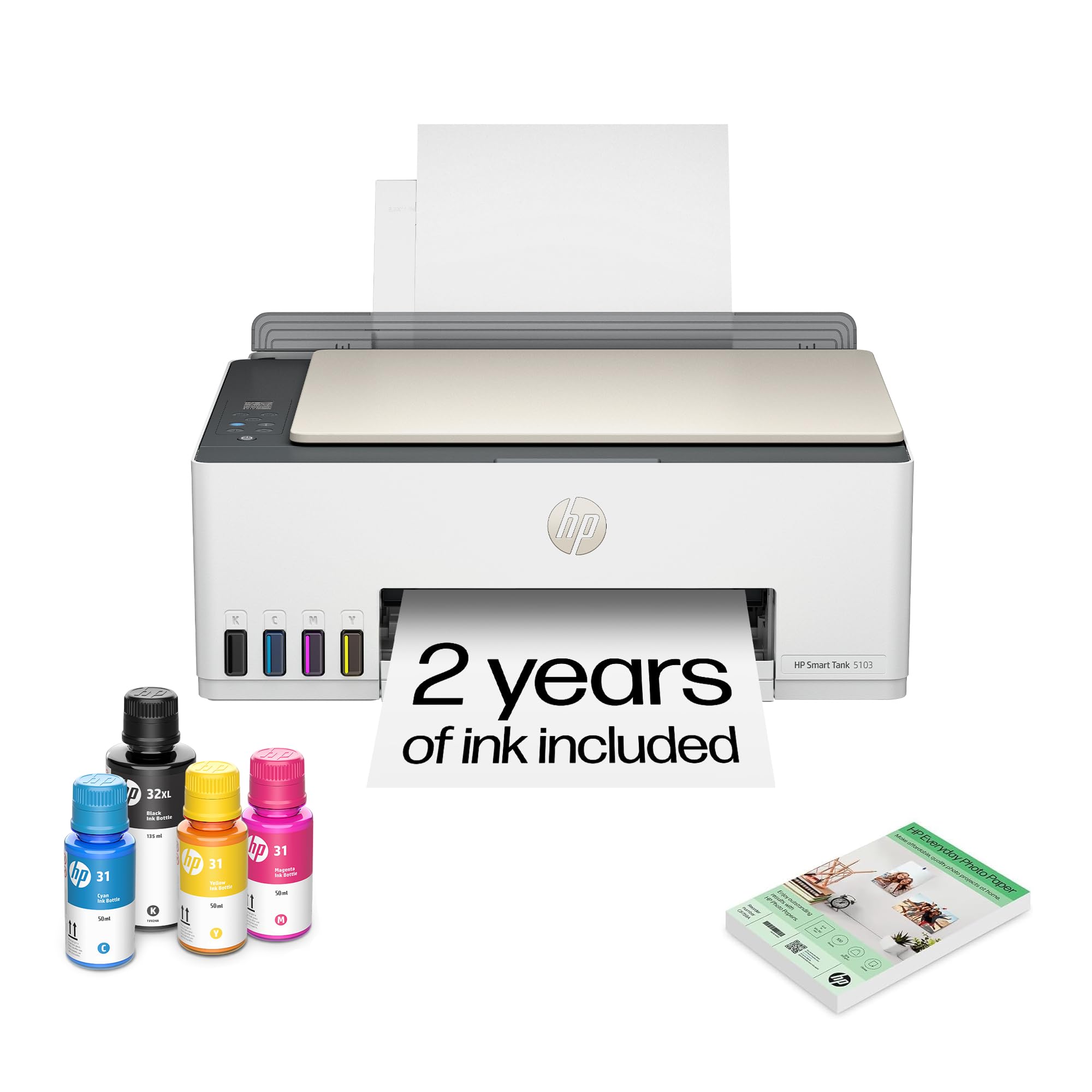
The 5103 is nearly identical to the 5101 but includes photo paper in the box.
The HP Smart Tank 5103 is essentially the same printer as the 5101 — same 12 ppm B&W speed, same 5 ppm color speed, same manual duplex, and the same mess-free refill bottles. The main difference is that HP includes 100 sheets of 4-by-6-inch photo paper in the box, making it a slightly better deal if you plan to print photos from day one. The ink yield is identical: up to 6,000 color or black pages.
Reviews echo the same frustrations as the 5101. One buyer who printed over 3,000 pages since February said the printer still works great and the original ink bottles are not yet empty, which confirms the excellent ink economy. But another review called it “the stupidest slowest printer I have ever had.” The HP app blocks phone use during printing, Google Drive does not work with it, and hotspot connectivity is hit-or-miss. Color quality is good but sometimes oversaturated — you can adjust it in the app, but it takes effort to dial in. The same chip-based restriction applies: off-brand ink bottles may print once then be blocked by the printer’s firmware.
What is the same
- Same mess-free ink refill system as the 5101
- Proven long-term ink economy — 3,000+ pages without empty bottles
- Includes 100 sheets of photo paper in the box
What is still a problem
- HP firmware blocks off-brand ink bottles after first use
- Slow print speed from standby
- Hotspot and Wi-Fi connectivity are inconsistent
Best for anyone already considering the 5101 who wants the photo paper included — the 5103 is the same printer with a small bonus. Not for anyone who wants to use cheaper off-brand ink; HP’s chip block means you must buy HP bottles. The 5101 may be a better value if you do not need the photo paper.
Understanding the Specs
Pages Per Minute (ppm)
Pages per minute is the standard speed measure for printers. It tells you how many text pages the printer can produce in 60 seconds from a cold start. Black-and-white (B&W) ppm is always faster than color ppm because color printing spreads each page with multiple passes. In this category, a B&W speed of 10 ppm is entry-level, while 15 or 16 ppm is fast enough for a busy home office. Color ppm between 5 and 8 is typical — if you print many color handouts, look for 8 ppm or higher.
Duplex Printing
Duplex means printing on both sides of the paper automatically. Automatic duplex flips the page for you, so you can print a 10-page document on 5 sheets without standing at the printer. Manual duplex means you have to flip the paper yourself and reload it — it works, but it is much slower and easy to mess up. If you print double-sided documents regularly, automatic duplex is a feature worth prioritizing, especially at this price level where it is not standard on every model.
FAQ
How many pages does a cheap ink tank printer print before needing a refill?
Can I use off-brand ink in a cheap ink tank printer?
Is a cheap ink tank printer good for photos?
How long do the print heads last on a cheap ink tank printer?
Does a cheap ink tank printer need Wi-Fi to work?
What is the difference between a supertank and an ink tank printer?
Will a cheap ink tank printer work with my Chromebook?
What does manual duplex mean on an ink tank printer?
How long does the ink last if I do not print often?
Is a cheap ink tank printer cheaper to run than a laser printer?
Final Thoughts: The Verdict
For most buyers, the cheap ink tank printer winner is the Canon MegaTank G3270 (Best Overall) because it balances cost and ink savings. If you want the best ink value for heavy color use, grab the Epson EcoTank ET-2800. And for a small office that needs fax and an automatic document feeder, the Canon MegaTank MAXIFY GX2020 packs the most features.
How We Picked
We do not accept paid placement. Every pick is matched to a real buyer and a real use-case; we do not hands-on test units.
Sources & Methodology
Specifications: manufacturer listings and product documentation. Review insights: verified customer reviews, as of July 2026. Pricing: not shown on this page (it changes often); check the current price via the retailer link.
As an Amazon Associate, WellFizz earns from qualifying purchases. This does not affect which products we feature.
Related Guides

Mo Maruf
I created WellFizz to bridge the gap between vague wellness advice and actionable solutions. My mission is simple: to decode the research and give you practical tools you can actually use.
Beyond the data, I am a passionate traveler. I believe that stepping away from the screen to explore new environments is essential for mental clarity and physical vitality.