Our readers keep the lights on and my smoothie glass nicely filled. As an Amazon Associate, I earn from qualifying purchases.
Specs are compiled from manufacturer listings and verified buyer reviews and can change over time — please confirm the key details on the product page before buying.
A cheap or old splitter quietly eats your internet speed, drops channels, or makes your MoCA network crawl. A cheap or old splitter quietly eats your internet speed, drops channels, or makes your MoCA network crawl.
I’m Mohammad Maruf — the founder and writer behind WellFizz. This guide is built by comparing the manufacturers’ published specifications and the patterns across verified customer reviews, so you get each pick’s real strengths and trade-offs instead of marketing spin.
Whether you are splitting for cable TV, a digital antenna, or a full MoCA 2.5 gigabit backbone, the right coaxial cable splitter keeps your signal clean from the wall to every device you plug in.
Our Picks at a Glance


How To Choose The Best Coaxial Cable Splitter
Match three things: the number of rooms you want to feed, the highest frequency your signal uses, and whether you run a MoCA network.
Count Your Outputs First
Splitters come in 2-way, 3-way, 4-way, and 8-way versions. Each split adds insertion loss — an 8-way splitter loses more than a 2-way, so buy only the ports you need. An 8-way splitter loses more than a 2-way, so do not buy more ports than you actually need — extra unused ports just eat signal.
Frequency Range Matters More Than You Think
Old splitters top out around 1,000 MHz (1 GHz). Modern cable internet and MoCA 2.5 signals can run up to 2,500 MHz (2.5 GHz). A splitter rated for only 1 GHz will block those higher frequencies, killing your internet speed.
MoCA 2.5 Compatibility
If you use MoCA adapters, your splitter must support MoCA 2.5 and cover the 1,675 MHz or 2,500 MHz range. Look for splitters that explicitly say they work with MoCA 2.5 and cover the 1,675 MHz or 2,500 MHz range. Non-MoCA splitters often filter out the 1,125 to 1,675 MHz band that MoCA uses, making your adapters useless.
Quick Comparison
| Model | Best For | Frequency Range | Number of Ports | MoCA 2.5 Ready | Amazon |
|---|---|---|---|---|---|
| Keliiyo 8-Way★ Best Overall | Large MoCA Networks | 5–2,500 MHz | 8 | Yes | Amazon |
| Amphenol 8-Way ABS318HTop Performer | Reliable 8-Port MoCA | 5–1,675 MHz | 8 | Yes | Amazon |
| Legrand OnQ VM1002 | Media Cabinet Install | 5–1,000 MHz | 8 | No | Amazon |
| NEWCARE 8-Way | Budget 8-Port Splitter | 5–2,400 MHz | 8 | Likely | Amazon |
| Amphenol 4-Way ABS314H | Compact MoCA Hub | 5–1,675 MHz | 4 | Yes | Amazon |
| Antop 3-Way | Antenna + Combiner | 75 Ohm | 3 | No | Amazon |
| BlueRigger 2-Way | Simple Two-Room Split | 5–2,300 MHz | 2 | No (covers MoCA band) | Amazon |
In‑Depth Reviews
1. Keliiyo 8-Way Coaxial Cable Splitter (5–2,500 MHz)
Our pick — 4.5★ from 650+ verified ratings; the strongest balance of quality and price.
The 8-port hub that actually delivered on MoCA speed promises.
If you need to feed eight rooms from a single incoming coax line, the Keliiyo tops the list because it handles the full 5 to 2,500 MHz frequency range — that is a 49% wider band than the Amphenol 8-Way ABS318H (which tops out at 1,675 MHz). That extra headroom matters: buyers report that swapping in this 2,500 MHz splitter boosted their download speed from 300–550 Mbps to over 800 Mbps on a MoCA setup. The splitter also supports MoCA 2.5 technology directly, so your adapters will link at full speed.
The rugged zinc-alloy housing resists corrosion and comes with 15 PSI pressure-sealed F-ports that keep moisture out. You also get a 6kV ring wave surge withstand rating (it can handle a voltage spike without frying your gear). At just 0.21 kg (about half a pound), it is light enough to mount inside a media cabinet or behind a TV stand.
One reviewer noted that it worked outdoors even though it is rated for indoor use only, which tells you the build quality is solid. The trade-off? An 8-way splitter inherently loses more signal per port than a 2-way or 4-way, so if you only need two or four rooms, you are better off with a smaller splitter that leaves your signal stronger.
Why It Wins
- 2,500 MHz frequency range handles modern cable internet and MoCA 2.5
- Buyers measured real speed gains (300–550 Mbps → 800+ Mbps)
- Surge protection up to 6kV for safety
One Thing to Know
- Eight ports means higher insertion loss than a 2-way or 4-way splitter
Reach for this if: you are building a MoCA 2.5 network across multiple rooms and want the widest frequency support available.
Look elsewhere if: you only need two ports — a smaller splitter gives you less signal loss.
2. Amphenol 8-Way Digital Splitter MoCA 2.5 ABS318H
A MoCA 2.5 specialist that solved real Xfinity sound problems.
This Amphenol ABS318H covers the 5 to 1,675 MHz band, which is precisely the range MoCA 2.5 adapters need to communicate — and that is its whole purpose. Unlike the Keliiyo, which reaches up to 2,500 MHz for future-proofing, the Amphenol is tune for the MoCA frequencies that matter today. Owners mention it resolved intermittent sound issues on Xfinity boxes and established a stable 2.5 GbE link between MoCA adapters that had been failing with older splitters.
Like the Keliiyo, it features excellent isolation and low insertion loss, plus the same 6kV surge withstand and 15 PSI pressure-sealed F-ports. At just 0.29 pounds, it is slightly heavier but still very compact for an eight-port unit. One reviewer specifically noted that replacing a five-year-old splitter with this Amphenol fixed their sound dropouts — a cheap fix that avoided a cable company service call.
What Stands Out
- Purpose-built for MoCA 2.5 (5–1,675 MHz)
- 6kV surge protection included
- Reviewed as reliable for gigabit MoCA mesh networks
The Limit
- Frequency range stops at 1,675 MHz, not the full 2,500 MHz
Best for MoCA purists: if you only need MoCA 2.5 support and want a proven brand, this is your splitter.
skip it if: you want the widest possible frequency coverage for future DOCSIS 4.0 or satellite signals.
3. Legrand OnQ 1X8 Enhanced Passive Video Splitter VM1002

The media-cabinet specialist that snaps in without tools.
The Legrand OnQ VM1002 is a different animal from the other eight-port splitters here. It is designed to lock into an OnQ or Legrand structured media cabinet with a bay-style bracket — you snap it in, tighten the thumb-screw coax connectors, and you are done. No drilling, no loose mounts. This means it will not work with MoCA 2.5 adapters that need frequencies above 1,125 MHz.
Customers note that the VM1002 has lower signal loss (about 7 dB) compared to other 1×8 splitters (which often lose 11 dB), which stopped phone line drops in one reviewer’s house. The splitter passes DC power between all ports, so it can power an antenna preamplifier if needed. The trade-off is size: at 1 pound, it is the heaviest splitter here, and it lacks a grounding point.
Why It Wins in a Cabinet
- Snap-in bracket install — no tools needed
- 7 dB insertion loss is lower than many 8-way splitters
- DC passing to all ports
The Catch
- 1 GHz limit blocks MoCA 2.5 and high-frequency signals
- No integrated grounding block
Pick this for: a clean install inside a Legrand/OnQ structured media cabinet for cable TV and cable internet.
Do not pick this for: any MoCA 2.5 network — the frequency range is too low.
4. NEWCARE Digital 8-Way Coaxial Cable Splitter 5–2,400 MHz

A cheap 8-way splitter that still reaches 2,400 MHz.
If you need an eight-port splitter but are on a tight budget, the NEWCARE gets you surprisingly close to the Keliiyo’s frequency range for a lower entry cost. It covers 5 to 2,400 MHz (only 100 MHz short of the Keliiyo’s 2,500 MHz), which means it handles MoCA signals and modern cable internet just fine. The die-cast zinc alloy shell with nickel plating keeps it rust-resistant and lightweight at 86 grams.
Buyers confirm it works well for splitting MoCA signals with no speed loss after the split, and one reviewer used it to run an antenna to five rooms, replacing a costly satellite subscription. The catch is that NEWCARE only offers a one-year warranty and does not explicitly advertise surge protection like the Keliiyo and Amphenol splitters do. All coaxial ports are power passing, but the manual warns only one highest voltage can pass at a time.
What You Get
- 2,400 MHz range covers MoCA and modern internet
- Lightweight at 86 grams
- Reviewers point out no speed loss on MoCA networks
Downsides
- No stated surge protection rating
- Shorter one-year warranty
The verdict: a solid value for an 8-port splitter if you need wide frequency support and are okay with fewer protective features.
Consider upgrading to: the Keliiyo if you want 2,500 MHz reach and 6kV surge protection.
5. Amphenol Digital Coaxial Splitter MoCA 2.5 (4 Way) ABS314H
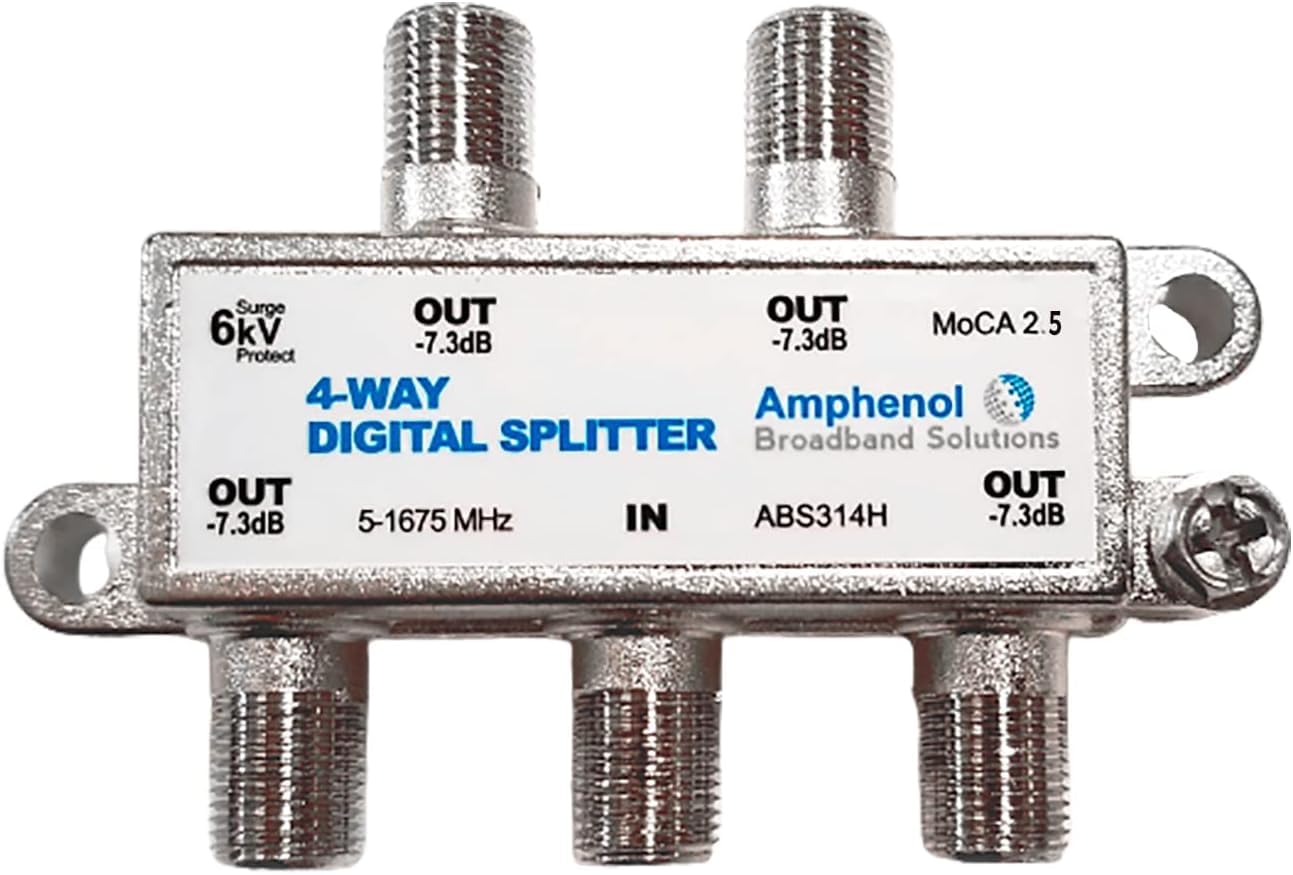
A four-port MoCA 2.5 hub that keeps gigabit speeds intact.
Not everyone needs eight ports. The Amphenol ABS314H gives you four outputs from 5 to 1,675 MHz, making it a smaller, more focused version of the ABS318H. It is built for the same MoCA 2.5 ecosystems and carries the same 6kV surge withstand and 15 PSI pressure-sealed F-ports found on the eight-port model. Since splitting a signal four ways causes less insertion loss than splitting it eight ways, each connected device gets a stronger signal.
Shoppers say it provides full gigabit internet speed to WiFi mesh satellites with no noticeable signal drop or interference. One reviewer specifically noted that after using this splitter with a PoE filter on the input and placing their modem on the low-loss port, their MoCA adapters worked perfectly. Do note that your modem and router need to support MoCA for this to work — if they do not, the splitter is just a high-quality standard coax splitter.
Highlights
- Less signal loss than 8-way splitters (fewer splits)
- Proven full gigabit throughput for MoCA 2.5 mesh
- Same 6kV surge protection as the larger Amphenol
Watch Out For
- Requires MoCA-compatible modem/router for full benefit
- 1,675 MHz cap — not the widest band available
Best for compact MoCA setups: if you need to feed 3-4 rooms with a wired MoCA backbone, this is your hub.
Skip if: you want the extra headroom of a 2,500 MHz splitter or need more than four outputs.
6. Antop Coax Splitter 3 Way for Cable TV, Satellite, HDTV

A 3-way splitter that doubles as a combiner for antenna setups.
The Antop 3-way stands out because it works as either a splitter (one signal in, three out) or a combiner (three antenna inputs merged into one output). If you have a roof antenna plus an indoor antenna and want to feed them into a single cable, this is the tool. One reviewer combined three antennas into one line and reported rock-solid station reception. Another buyer swapped an indoor stick antenna for a roof antenna with this splitter and went from 5 OTA channels to over 75.
It has a 75 Ohm impedance (standard for cable TV and antennas) and a compact footprint at 2.91 x 1.86 x 0.64 inches. The trade-off reported by one buyer is that each port loses over 3 dB of signal, which is slightly higher than some splitters. If you are pushing a weak antenna signal over long cable runs, that extra loss might cause trouble on distant TVs.
Why It Shines
- Works as both a 3-way splitter and a signal combiner
- One reviewer got 75+ OTA channels using a roof antenna
- Very compact size
Limitation
- Reported >3 dB loss per port — higher than some competitors
Reach for this if: you are combining multiple antennas into one feed or need a basic 3-way splitter for OTA TV.
Look elsewhere if: you need MoCA 2.5 support or are dealing with a weak antenna signal that cannot afford extra loss.
7. BlueRigger 2-Way Coaxial Cable Splitter (5–2,300 MHz)

A two-port mini that keeps signal clean with a nickel-plated shell.
Sometimes you just need to send your wall signal to a TV and a modem in the same room. The BlueRigger 2-way covers 5 to 2,300 MHz — high enough for MoCA signals (even though it is not labeled MoCA-specific) and well above the 1 GHz that old splitters handle. The nickel-plated, zinc-alloy die-cast housing is noticeably sturdy for such a small accessory, and buyers confirm the connections are tight and solid with no visible drop in screen image brightness or quality.
It supports all standard RG59 and RG6 cables and comes with a lifetime warranty and US-based customer support — unusual for a sub- item. Note that one reviewer found it did not work with their Dish RV satellite system, so if you are feeding a mobile satellite setup, check compatibility first. For standard home use — cable TV, HDTV, antenna, or cable modem — this is a reliable two-port solution that does not introduce noise.
What Works
- 2,300 MHz frequency covers modern signals and MoCA band
- Buyers report no visible signal loss
- Lifetime warranty included
The Fine Print
- Not certified for Dish RV satellite setups
- 2-way only — no expansion possible
Ideal for simple splits: if you only need two outputs and want a compact, well-built unit with a lifetime guarantee.
Not the pick if: you need more than two ports or are using a Dish RV satellite system.
Understanding the Specs
Frequency Range (MHz)
This is the range of signal frequencies the splitter can pass through without blocking. Old cable TV and antennas work at 5–1,000 MHz (1 GHz). Modern cable internet and MoCA adapters push up to 1,675 MHz or even 2,500 MHz. A splitter that says 5–2,500 MHz handles everything your internet provider and your home network can throw at it. A splitter that says 5–1,000 MHz will choke your MoCA speed and may block some cable internet channels entirely.
Insertion Loss (dB)
Every time you split a coax signal, some strength is lost — that is insertion loss, measured in decibels (dB). A 2-way splitter typically loses about 3.5 dB. An 8-way splitter loses around 10–12 dB. Lower is better. If your signal is already weak (long cable runs from the street), a high-loss splitter can make channels pixelate or internet speeds drop. Some splitters label one port as the “low loss” port for your modem — use that one.
FAQ
Does a coaxial cable splitter reduce internet speed?
What is the difference between a MoCA and a regular coax splitter?
Is a 2-way or 8-way splitter better for my home?
Can I use a splitter with an over-the-air antenna?
What is 75 Ohm impedance and do I need it?
How do I know if a splitter is MoCA 2.5 compatible?
Can I plug a splitter into another splitter (daisy-chain)?
What does power passing mean on a coax splitter?
Do coaxial splitters wear out over time?
Can I use an 8-way splitter if I only need 4 ports?
Final Thoughts: The Verdict
For most buyers, the best coaxial cable splitter is the Keliiyo 8-Way because it reaches 2,500 MHz, supports MoCA 2.5, and has proven to boost real-world internet speeds. If you need a smaller 4-port MoCA hub, grab the Amphenol ABS314H. And for a simple two-room setup on a budget, the BlueRigger 2-Way comes with a lifetime warranty and tight nickel-plated build.
How We Picked
We do not accept paid placement. Every pick is matched to a real buyer and a real use-case; we do not hands-on test units.
Sources & Methodology
Specifications: manufacturer listings and product documentation. Review insights: verified customer reviews, as of July 2026. Pricing: not shown on this page (it changes often); check the current price via the retailer link.
As an Amazon Associate, WellFizz earns from qualifying purchases. This does not affect which products we feature.
Related Guides

Mo Maruf
I created WellFizz to bridge the gap between vague wellness advice and actionable solutions. My mission is simple: to decode the research and give you practical tools you can actually use.
Beyond the data, I am a passionate traveler. I believe that stepping away from the screen to explore new environments is essential for mental clarity and physical vitality.