Our readers keep the lights on and my smoothie glass nicely filled. As an Amazon Associate, I earn from qualifying purchases.
Specs are compiled from manufacturer listings and verified buyer reviews and can change over time — please confirm the key details on the product page before buying.
Tinny, thin laptop speakers ruin the entire point of gaming — you miss the low rumble of an explosion, the quiet footstep sneaking up behind you, and the rich soundscape a good game builds. A real set of computer speakers for gaming changes that completely, bringing the action to life with clarity and punch your monitor’s built-in audio simply cannot touch.
I’m Mohammad Maruf — the founder and writer behind WellFizz. This guide is built by comparing the manufacturers’ published specifications and the patterns across verified customer reviews, so you get each pick’s real strengths and trade-offs instead of marketing spin.
if you want room-shaking bass for battle royales or precise mids for strategy titles, this roundup helps you find the computer speakers for gaming that match your setup, budget, and sound preferences.
Our Picks at a Glance


How To Choose The Best Computer Speakers For Gaming
Picking desktop speakers for gaming depends on a few core decisions. Here is what actually matters so you do not waste money on flashy marketing.
Channel Configuration: 2.0 vs 2.1
A 2.0 system has just left and right speakers, while a 2.1 setup adds a dedicated subwoofer for lower frequencies. For gaming, the subwoofer makes a huge difference — you feel explosions in your chest and hear deep environmental rumbles that 2.0 speakers simply cannot reproduce. If you play action, shooter, or open-world games, a 2.1 system is almost always worth the extra desktop space.
Connectivity and Latency
Wired connections (USB, AUX, optical) deliver zero noticeable delay, which matters most for competitive shooters where audio cues are timed to on-screen action. Bluetooth is convenient for casual play and music, but older versions can introduce a slight audio delay. Look for Bluetooth 5.3 or 5.4 for the lowest wireless latency, typically around or under 40ms.
Driver Size and Power
Larger drivers can move more air, producing fuller sound and deeper bass, but they also take up more desk space. A 2.5-inch to 3-inch full-range driver is common in compact speakers, while a dedicated subwoofer uses a 5.25-inch or larger driver for the low end. Power ratings (peak vs RMS) tell you how loud the speakers get without distortion — RMS is the more honest measure of continuous output.
EQ Modes and Software
Many gaming speakers include preset sound modes tuned for Music, Movies, or Gaming. These adjust the frequency curve to emphasize footsteps or dialogue. Higher-end models also offer companion software with a parametric EQ, letting you fine-tune the sound to your room and your ears. If you value customization, look for app or desktop software support.
Quick Comparison
| Model | Best For | Configuration | Bluetooth | Peak Power | Amazon |
|---|---|---|---|---|---|
| OHAYO 60W★ Best Overall | Hi-Fi Bookshelf Sound | 2.0 | 5.3 | 60W | Amazon |
| SteelSeries Arena 7Premium Pick | Premium Immersion | 2.1 | Yes | — | Amazon |
| BlueAnt Soundblade | Under-Monitor Design | 2.1 | 5.3 | 120W | Amazon |
| Creative Pebble X Plus | Compact 2.1 System | 2.1 | 5.3 | — | Amazon |
| Edifier Hecate RGB | Versatile Gaming Audio | 2.0 | 5.1 | 32W | Amazon |
| Nylavee 2.1 System | Value 2.1 with Subwoofer | 2.1 | 5.4 | 60W | Amazon |
| Edifier G1000 II | Budget with RGB | 2.0 | 5.4 | — | Amazon |
In‑Depth Reviews
1. OHAYO 60W Computer Speakers for Music and Gaming, Active Bluetooth 5.3
Our pick — 4.5★ from 900+ verified ratings; the strongest balance of quality and price.
MDF-built bookshelf speakers with real tweeters and a frequency range that surprised reviewers
If you prioritize music quality and vocal clarity alongside gaming audio, the OHAYO 60W speakers bring a hi-fi approach to the desktop. They use a 0.75-inch carbon fiber silk dome tweeter (a high-frequency driver made of lightweight carbon fiber and silk) and a 3-inch carbon fiber full-range driver, housed in premium MDF wooden enclosures (medium-density fibreboard that reduces vibrations) for cleaner sound. Shoppers say one reviewer called them “better than average PC speakers” and praised their suitability for music mastering and audio production alongside gaming.
The connectivity is versatile with Bluetooth 5.3, RCA, AUX, and USB inputs. The front panel gives you a volume knob plus separate treble and bass controls, letting you tune the sound without software. Buyers report the energy efficiency stands out — under 1W at full volume — and the Bluetooth works reliably at a 20-foot range with low latency. The catch: as a 2.0 system, they lack the deep sub-bass of a 2.1 setup with a subwoofer. Compared to the more expensive Nylavee system, the OHAYO offers better high-frequency detail and a wider frequency range, but it falls short on low-end rumble for explosive gaming moments. One customer observed the USB input sounds noticeably better than the 3.5mm connection.
What shines
- Real carbon fiber silk dome tweeter delivers crisp, clear highs for music and dialogue — a step above typical desktop drivers
- MDF wooden enclosure minimizes resonance for cleaner sound at higher volumes
- Separate treble and bass knobs give you direct tone control without needing software
What is missing
- 2.0 system with no subwoofer means deep bass for explosions and game soundtracks is limited
- Bluetooth version 5.3 is solid but not the very latest 5.4 found on competing models
- USB connection required for best sound quality — AUX input is noticeably less detailed
Best for: music lovers and producers who want detailed, clean stereo sound for gaming sessions and appreciate real tweeters and MDF cabinetry.
Think twice if: you want chest-thumping bass for action games — you will want a 2.1 system instead.
2. SteelSeries Arena 7 RGB Illuminated 2.1 Gaming Speakers
Audiophile-grade 2.1 sound that fills a room and shakes the floor
This is the set for gamers who want component-quality audio without building a full home theater. The SteelSeries Arena 7 uses separate silk dome tweeters (a type of high-frequency driver made from woven silk) and organic-fiber woofers in each satellite speaker to deliver detail across mid and high frequencies that typical plastic desktop speakers miss. The 6.5-inch downward-firing subwoofer produces thundering, deep bass — buyers report it vibrates floors in a two-story house, giving you that chest-thumping feel during action sequences.
Connectivity is generous here. You get USB, AUX, optical, and wired headset support alongside Bluetooth, making it easy to switch between your PC, PlayStation, and phone. The Sonar Software adds a 10-band parametric EQ (a tool that lets you adjust 10 separate frequency ranges), acoustic echo cancellation, and spatial audio for surround simulation, giving you granular control over every frequency. Owners mention the RGB lighting is highly adjustable and integrates with in-game events, though one reviewer noted the initial driver setup had a hiccup that was resolved with an update. At this tier, you are paying for a complete audio ecosystem — not just speakers — and the value holds up over years of use.
Floor-shaking power: The 6.5″ subwoofer and component drivers (38Hz-20kHz) create a neutral-warm sound profile that works for gaming, music, and movies alike. The headset auto-switch feature is a thoughtful touch for late-night sessions.
One honest caveat: You need USB for the full experience; there is no HDMI ARC, and cable clutter can build up if you use every connection. The price has increased over time, but owners who have used them for two years across PS5, Xbox Series X, and PC report zero complaints on value and performance.
Reach for this if: you want near-audiophile desktop sound with a subwoofer that genuinely shakes the room and software that lets you dial in every frequency.
Look elsewhere if: your desk space is very tight or your budget is under the premium tier — this is a long-term investment, not an impulse buy.
3. BlueAnt Soundblade Under-Monitor Soundbar, 120W 2.1 Channel

A sleek soundbar that slides under your monitor and delivers 120 watts of cinematic power
If desk space is at a premium but you refuse to compromise on audio, the BlueAnt Soundblade is a brilliant compromise. It packs a powerful 80mm neodymium subwoofer, dual neodymium drivers, and dual voice coils into a low-profile bar that fits neatly under your monitor — no separate satellite speakers cluttering your desk. With 120 watts of peak power (the maximum wattage it can handle in short bursts for loud effects), buyers describe the sound as loud and clean at high volume, great for both games and movies. The included remote has dedicated GAME, MUSIC, and MOVIE EQ modes so you can switch profiles without digging into software.
The connectivity suite is practical: auto-switching USB-C, Bluetooth 5.3, and a 3.5mm AUX input. Customers note it works smoothly with PS5, PC, and Mac, and the subwoofer design delivers good bass for the form factor. The catch buyers consistently mention is the loud voice prompt when you power on, off, or switch inputs — it cannot be turned down. One buyer mentioned some grumbling noises at very high volume, but the overall sentiment is that the Soundblade is a fantastic value, especially compared to the more expensive SteelSeries Arena 7. It reclaims desktop space, looks handsome, and sounds far better than its slim profile suggests.
Space-saving powerhouse: The 120W 2.1 channel system in a single under-monitor bar is a unique win for clean setups. Multiple buyers called it great value, praising the easy hookup and loud bass.
The trade-off: The un-mutable power-on voice prompt annoys some users, and the sound quality, while very good for the form factor, does not match a dedicated 2.1 system with separate satellites at the same price point.
Best for: minimalists who want one clean bar under the monitor with real subwoofer power and zero satellite clutter.
Consider another if: the audible voice prompt on power-on would drive you nuts — there is no way to turn it down.
4. Creative Labs Pebble X Plus 2.1 Channel USB Type-C Computer Speakers

A compact 2.1 system that delivers -class sound in a tidy desk footprint
Creative has mastered the art of big sound from small speakers, and the Pebble X Plus is their best desktop expression yet. This 2.1 channel system uses compact satellite speakers and a dedicated subwoofer to produce surprisingly full, clear audio that buyers describe as near -class quality. The USB-C digital input bypasses your PC’s often noisy onboard sound card, delivering a clean signal path. One reviewer specifically noted the wide soundstage (the sense of space and direction in the audio) and perfect subwoofer crossover (the frequency where the subwoofer takes over from the satellites), with minimal distortion even at maximum volume.
Connectivity is well thought out — a single USB-C cable powers everything while also handling audio, and Bluetooth 5.3 is on board for wireless convenience. The subwoofer adds punchy bass without muddying the mids and highs, and the RGB lighting is tastefully understated. A few honest trade-offs: the subwoofer uses passive radiators (a non-powered cone that moves with air pressure to boost bass), so it lacks the deepest sub-bass of a larger ported design, and the included subwoofer cable is on the short side. Buyers also mention the max volume could be a touch louder for very large rooms. Still, as a small-footprint, big-sound system, it consistently earns high marks.
Clean and capable: The USB-C single-cable setup keeps your desk tidy, and the soundstage surprises everyone who hears it. Buyers call it perfect for gaming, music, and dorm rooms.
Not for bass-heads: The subwoofer’s passive radiators mean it does not hit the deepest frequencies. One enthusiast pairs it with an Edifier T5 Powered Subwoofer for bone-shaking lows.
Reach for this if: you want a genuinely compact 2.1 system with clean USB-C audio and excellent clarity that punches way above its physical size.
Look elsewhere if: you need window-rattling sub-bass from the included sub — you will want a larger, ported subwoofer.
5. Edifier Hecate RGB Gaming Speakers, 32W Peak Power
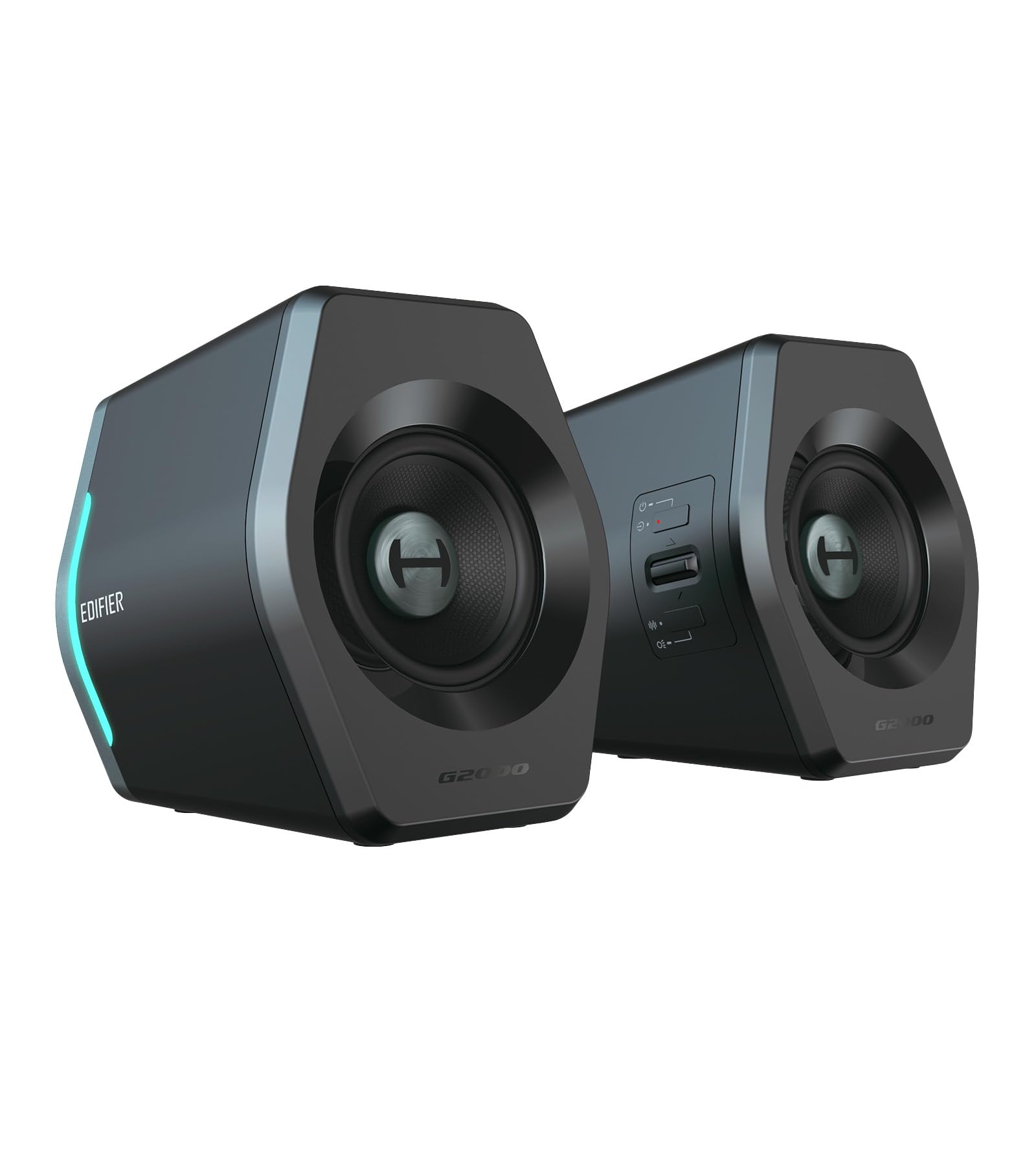
Compact bookshelf speakers with powerful bass and 12 customizable RGB lighting effects
Edifier’s Hecate line brings serious audio credibility to gaming, and these speakers prove it. With 2.75-inch full-range drivers pushing 16W+16W peak power, they produce explosive bass and crisp audio that reviewers point out sounds more expensive than it is. The 12 customizable RGB effects sync with your gameplay to create an rich e-sports atmosphere, and the matte panels with metal laser-engraved knobs give them a premium desk presence. One reviewer called them “little beasts” and said they are superior to the Creative Pebble V3 in sound quality.
Versatility is a strong suit: you get Bluetooth 5.1, USB sound card, and 3.5mm AUX inputs, with one-click EQ switching for Gaming, Movie, and Music modes. The compact size — 4.1 x 4.1 x 5.1 inches — fits easily on any desk, and a 10-degree tilt aims the sound toward your ears. Multiple buyers mention the easy setup and small footprint fit perfectly under monitors. The notable downside, mentioned by several reviewers, is the gimmicky power-on and power-off sound effect that cannot be disabled, which some found atrocious. If you are sensitive to unnecessary startup noises, it is worth knowing before you buy.
What stands out
- Excellent sound quality with powerful bass for the size — buyers call it an audiophile-approved option for music
- 12 customizable RGB lighting effects with laser-engraved metal knobs look premium on any desk
- Compact footprint with 10-degree tilt fits neatly under monitors without taking over the workspace
What holds it back
- Atrocious gimmicky startup and shutdown sounds cannot be disabled and annoy multiple owners
- Bluetooth 5.1 is a slightly older version, not the latest 5.3 or 5.4 found on competing models
- 2.0 system without a dedicated subwoofer for those who want floor-shaking lows
Best for: gamers who want rich, powerful desktop audio with flashy RGB and the build quality of a premium brand.
Think twice if: you cannot stand unnecessary sound effects on power-on — the startup chime is a common complaint and there is no way to turn it off.
6. Nylavee Computer Speakers with Subwoofer, 2.1 PC Speakers System

The complete 2.1 package — soundbar, subwoofer, Bluetooth 5.4, and genuinely easy setup
This is the configuration that gives you everything most gamers need: a stereo soundbar for clear dialogue and a standalone 5.25-inch subwoofer for deep, effective bass, all in one package. The Nylavee 2.1 system delivers 60W peak power (30W RMS) with dual soft-dome silk tweeters and full-range drivers in the soundbar, while the subwoofer handles the low end without distorting. Buyers consistently describe the sound as clear, powerful, and very loud for the size — one owner reported they “really can’t believe how great they sound and how loud they get.”
Setup is genuinely plug-and-play: the soundbar and subwoofer connect via a wired cable, and the entire system is powered by an AC adapter with no batteries required. Bluetooth 5.4 provides the latest wireless standard with low latency, and the 3.5mm AUX input keeps things simple for wired connections. The side knob controls power, volume, input switching, and mode selection. One honest note from a buyer: the slightly cheaper, non-lighting version exists if you prefer a cleaner look. Some users wish the subwoofer cable were longer for flexible placement, but overall, this delivers 2.1-channel immersion at a mid-range price that punches well above its tier.
Complete 2.1 value: The soundbar + subwoofer combo gives you the full low-end experience that 2.0 speakers cannot match. Buyers praise the modern design, reliable daily performance, and easy Bluetooth pairing with both TV and PC.
A minor fit note: The subwoofer is a separate, wired unit that needs floor or desk space near the soundbar — measure your setup before buying so the cable reaches comfortably.
Reach for this if: you want the simplicity of a soundbar paired with a real subwoofer for gaming and movies, without spending premium money.
Look elsewhere if: your desk cannot accommodate a standalone subwoofer box — you will need a 2.0 system or an all-in-one soundbar instead.
7. Edifier G1000 II Desktop Computer Speakers for Gaming, Bluetooth 5.4
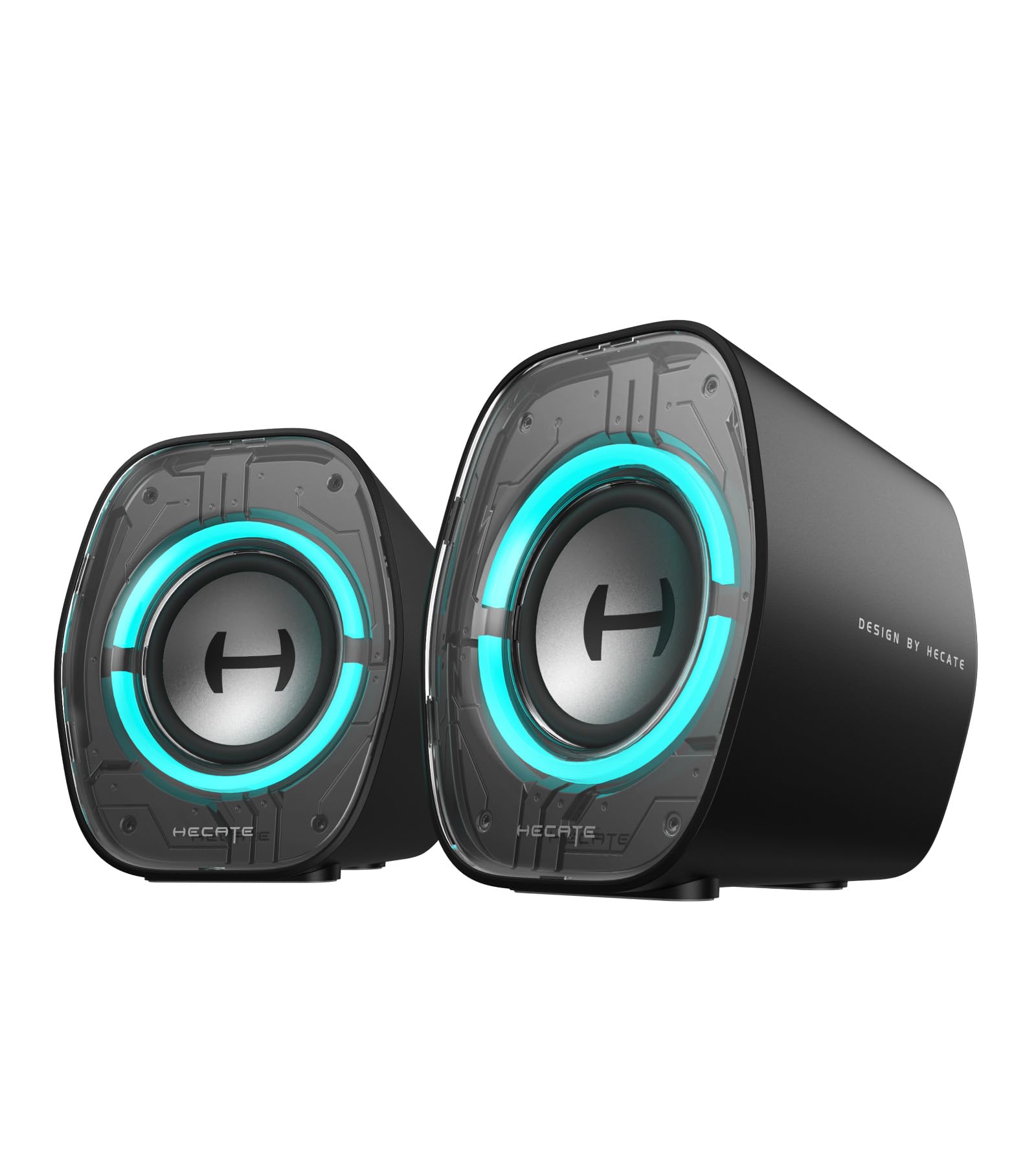
A cyber-chic budget pair with Bluetooth 5.4, app control, and surprisingly good bass for the size
The Edifier G1000 II is the entry-level champion that gets the fundamentals right without feeling cheap. Its 2.5-inch full-range driver with a 16-core high-magnetic system delivers rich spatial audio, and the racetrack bass reflex port (a slotted opening that tunes the cabinet to deepen bass) d eepens low frequencies far better than you would expect from such a compact pair. Buyers describe it as a “massive upgrade over built-in monitor speakers” and praise a strong balance between cyber-chic aesthetics and genuine acoustic quality at a price that is tough to top. The 9 dynamic RGB lighting modes let you switch between static, breathing, and color cycle effects.
Triple connectivity comes via Bluetooth 5.4 (with ≤40ms low latency), USB-C/USB-A, and 3.5mm AUX, making it compatible with PC, laptops, tablets, and consoles. The top-mounted buttons control EQ modes, volume, lighting, and input, and the EDIFIER ConneX App lets you fine-tune the sound. The 10-degree tilted baffle reduces desk reflections, and the ultra-slim 3.6-inch width fits even cramped setups. The honest buyer feedback: one user highlighted their cheaper and smaller portable Anker speaker sounds louder and richer, so expectations need to match the budget tier. Another noted the awful button design — you must hold to adjust volume and it jumps 5+ steps — and there is no way to disable the voice prompt.
Feature-packed entry point: Bluetooth 5.4 with low latency, app-controlled EQ, and 9 RGB modes at this price is impressive. The bass reflex port adds real depth that smaller speakers lack.
The honest trade-offs: The volume buttons are frustrating — you hold and the volume jumps unpredictably — and the voice prompt on power-on cannot be turned off. A few buyers felt the overall loudness was underwhelming compared to cheaper portable speakers.
Reach for this if: you want a budget-friendly RGB speaker pair with the latest Bluetooth 5.4 and app control for a clean, affordable desktop upgrade.
Look elsewhere if: you need high volume for a large room or find finicky buttons and an unmutable voice prompt deal-breaking.
Understanding the Specs
2.0 vs 2.1 Channel Configuration
A 2.0 system uses two speakers for stereo sound, while a 2.1 system adds a dedicated subwoofer for low-frequency effects. For gaming, 2.1 is the clear winner — it reproduces explosions, engine rumbles, and deep environmental sounds that 2.0 speakers simply cannot produce. The subwoofer handles frequencies below roughly 80Hz, leaving the main speakers free to focus on clear dialogue and mid-range detail. If you play FPS, racing, or open-world games, the extra channel transforms immersion.
Peak Power vs RMS Power
Peak power is the maximum wattage a speaker can handle in short bursts — useful for sudden loud effects like an explosion. RMS (Root Mean Square) power is the continuous wattage the speaker can produce without distortion, and it is the more honest rating. A speaker with 60W peak and 30W RMS will sound clean at moderate volumes but may strain if you push it hard. When comparing speakers, focus on RMS power for a realistic sense of how loud and clean they will stay during long gaming sessions.
Bluetooth Latency and Version
Bluetooth audio introduces a small delay between the video and the sound you hear. For gaming, anything below 40ms is generally imperceptible. Newer Bluetooth versions (5.3, 5.4) include better codec support and lower power consumption, but the latency depends on the specific implementation — not just the version number. For competitive shooters where audio timing is critical, a wired USB or AUX connection is still the most reliable way to eliminate delay entirely.
Driver Material and Size
The driver is the part of the speaker that moves air to create sound. Larger drivers (3 inches and up) can move more air, producing fuller bass and higher volume. Driver material matters too: carbon fiber and silk dome tweeters are lighter and more rigid than paper or plastic, producing cleaner highs with less distortion. A full-range driver handles both bass and treble in a single unit, while a two-way system splits the job between a tweeter (highs) and a woofer (mids and lows) for better separation and clarity.
FAQ
Do I need a subwoofer for gaming speakers?
Can I use Bluetooth gaming speakers for competitive play?
What size gaming speakers fit on a small desk?
What is the difference between peak power and RMS power in speakers?
Are USB-powered gaming speakers good enough?
How important is EQ for gaming speakers?
Can I connect gaming speakers to my console?
Do gaming speakers with RGB affect performance?
What is a good frequency response range for gaming speakers?
Are magnetic shielding and anti-slip pads important for desktop speakers?
Final Thoughts: The Verdict
Across the board, the best computer speakers for gaming is the Nylavee 2.1 System because it gives you a complete soundbar-plus-subwoofer setup with Bluetooth 5.4, easy controls, and genuinely punchy bass at a mid-range price that outperforms its cost. If you want a sleek under-monitor bar to reclaim desk space, grab the BlueAnt Soundblade. And for the ultimate premium experience with room-filling 2.1 sound and deep software customization, the SteelSeries Arena 7 is the long-term investment that keeps delivering.
How We Picked
We do not accept paid placement. Every pick is matched to a real buyer and a real use-case; we do not hands-on test units.
Sources & Methodology
Specifications: manufacturer listings and product documentation. Review insights: verified customer reviews, as of July 2026. Pricing: not shown on this page (it changes often); check the current price via the retailer link.
As an Amazon Associate, WellFizz earns from qualifying purchases. This does not affect which products we feature.
Related Guides

Mo Maruf
I created WellFizz to bridge the gap between vague wellness advice and actionable solutions. My mission is simple: to decode the research and give you practical tools you can actually use.
Beyond the data, I am a passionate traveler. I believe that stepping away from the screen to explore new environments is essential for mental clarity and physical vitality.