Our readers keep the lights on and my smoothie glass nicely filled. As an Amazon Associate, I earn from qualifying purchases.
Specs are compiled from manufacturer listings and verified buyer reviews and can change over time — please confirm the key details on the product page before buying.
Waiting for a viewport to stop spinning or a render to finish is the single biggest frustration in 3D modeling. The right machine turns that around, so you spend your time designing, not staring at progress bars. This guide breaks down seven pre-built desktops that actually handle heavy polygon counts, complex textures, and multi-threaded rendering without choking.
I’m Mohammad Maruf — the founder and writer behind WellFizz. This guide is built by comparing the manufacturers’ published specifications and the patterns across verified customer reviews, so you get each pick’s real strengths and trade-offs instead of marketing spin.
Whether you are iterating on a high-poly character in Blender, laying out a massive architectural scene, or running simulation caches, these options focus on what matters: CPU core count and clock speed, GPU VRAM (video memory) for texture work, and enough system memory to keep your scene loaded. This is your straight-to-the-point guide to the best computers for 3d modeling in 2025.
Our Picks at a Glance

How To Choose The Best Computers For 3D Modeling
Picking a 3D modeling PC is different from picking a gaming rig. You need raw multi-core speed for rendering, a graphics card with enough dedicated video memory (VRAM) to hold your entire scene’s textures, and enough system RAM so you are not swapping to disk when you subdivide a mesh. Here is what to check first.
CPU: Core Count and Cache Are King
3D modeling software like Blender and 3ds Max loves multiple cores. A processor with 8 or more physical cores and a large L3 cache (like AMD’s 3D V-Cache, which stacks extra memory on the CPU chip) significantly improves viewport performance. The clock speed matters too — a faster single-core boost helps with physics simulations and final rendering passes.
GPU: Focus on VRAM
Your graphics card handles the viewport display and, increasingly, the final render via engines like Cycles or Octane. The VRAM capacity is critical: a 12GB card is a good entry point, but 16GB or 32GB is far better if you work with 4K textures or complex scenes. The RTX 5070 Ti and 5080 series deliver a big jump here over previous generations.
RAM: 32GB Is The New Baseline
For a simple scene with a few dozen objects, 16GB of DDR5 can work, but the moment you add high-res textures, particle systems, or a complex subdivided mesh, you will hit the wall. 32GB of fast DDR5 RAM is the real starting point for a frustration-free experience. Go to 64GB if you handle huge architectural or VFX (visual effects) projects.
Quick Comparison
| Model | Best For | CPU / Max Boost | GPU / VRAM | RAM / Storage | Amazon |
|---|---|---|---|---|---|
| Skytech King 95★ Best Overall | Mid-range + 3D creation | Ryzen 7 9800X3D / 5.2 GHz | RTX 5070 Ti 16GB | 32GB / 1TB | Amazon |
| Ocean of StarsBest Value | AI + render acceleration | Ryzen 7 9700X / 5.5 GHz | RTX 5070 12GB | 32GB / 1TB | Amazon |
| Skytech Azure 3 | Value + Blender users | Ryzen 7 7800X3D / 5.0 GHz | RTX 5060 Ti 16GB | 32GB / 1TB | Amazon |
| WIWB 9800X3D | Budget CPU-heavy work | Ryzen 7 9800X3D / 5.2 GHz | RTX 5070 12GB | 16GB / 1TB | Amazon |
| iBUYPOWER Y40 Pro | Video editing + 3D | Ryzen 9 7900X / 5.6 GHz | RTX 5070 Ti 16GB | 32GB / 2TB | Amazon |
| Thermaltake View 9580 | High-end AAA modeling | Ryzen 9 9950X3D / — | RTX 5080 16GB | 32GB / 2TB | Amazon |
| Empowered PC Panorama XL | Extreme scene work + VR | Ryzen 7 7800X3D / 5.0 GHz | RTX 5090 32GB | 32GB / 2TB | Amazon |
In‑Depth Reviews
1. Skytech Gaming King 95 Desktop PC
Our pick — over 4★ from 60+ verified ratings; the strongest balance of quality and price.
A 9800X3D and 5070 Ti combo that chews through polygon-heavy scenes without breaking a sweat.
The defining edge here is the NVIDIA GeForce RTX 5070 Ti with 16GB of GDDR7 VRAM — enough to load a full high-poly scene with 4K textures and still have headroom for a render pass. The 32GB of DDR5 RAM at 5600MHz means you can keep Blender, Substance Painter, and a browser full of references open without hitting a slowdown. Buyers report it is “excellent for 3D content creation” and that the “5070 Ti runs Unreal Engine well,” which matches what this hardware was built for.
Upgrade potential is solid: the 850W Gold ATX 3 PSU (power supply unit) leaves room for a future GPU swap, and the 360mm AIO (all-in-one) liquid cooler keeps the Ryzen 7 9800X3D at its 5.2 GHz turbo without thermal throttling. The only catch? The motherboard has a single extra HDD slot, so plan your storage expansion accordingly.
What stands out
- RTX 5070 Ti with 16GB VRAM handles large texture sets easily
- 360mm AIO cooler keeps the 5.2 GHz CPU running cool under heavy renders
- 850W PSU provides good upgrade headroom compared to the 650W PSU in the Skytech Azure 3
Watch out for
- Some owners mention fans running at max RPM from the start; a quick BIOS change to silent mode fixes it
- One buyer received a used unit with another user’s account still on it
The scenario: You need a ready-to-run machine that handles Unreal Engine, Blender, and heavy asset creation daily.
The trade-off: The included keyboard and mouse are basic; you will likely want to upgrade those on your own.
2. Ocean of Stars AI Gaming PC
The value pick with a 5.5 GHz CPU and a 12GB RTX 5070 that punches above its price.
This unit leads the mid-range pack with the highest CPU boost clock in the comparison — the Ryzen 7 9700X hits 5.5 GHz, versus the Skytech Azure 3’s 5 GHz. For single-threaded tasks like mesh cleanup and modifier stacking, that extra clock speed translates to noticeably snappier viewport feedback. The RTX 5070 with 12GB of GDDR6X VRAM is a capable partner for 1440p modeling and rendering, though you will hit the VRAM ceiling faster than on a 16GB card.
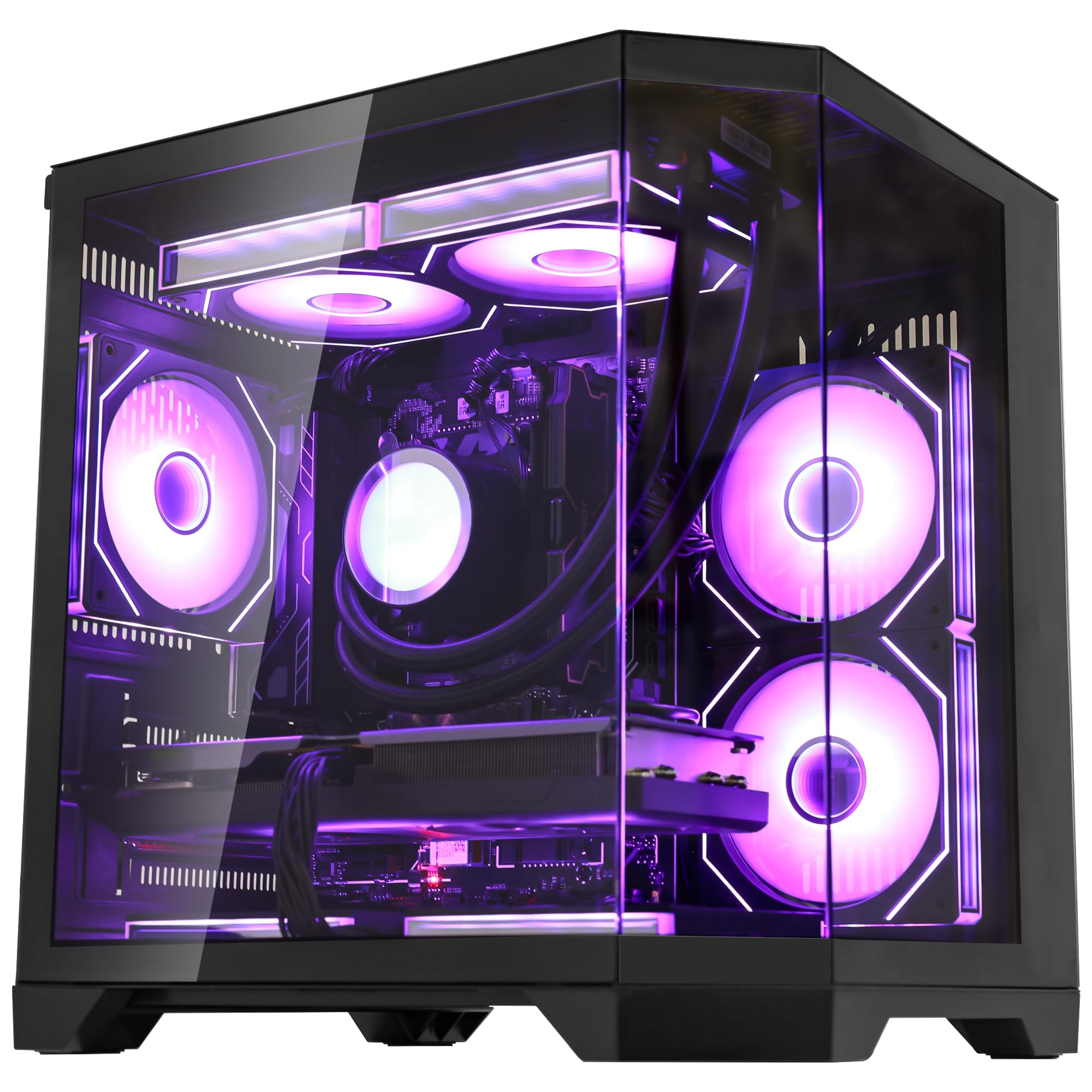
The 850W PSU is a significant advantage here — it has an 850W capacity versus the Skytech Azure 3’s 650W unit, giving you more room to upgrade the GPU down the road. Customers note it “runs Bodycam, DCS, MSFS24, racing sims, VR” flawlessly, and the 240mm AIO liquid cooler kept the CPU stable under load. The chassis has a panoramic glass panel and customizable RGB, but the absence of bloatware is the real win for a clean workstation setup.
Why it earns its spot
- Highest CPU boost clock (5.5 GHz) in the mid-range tier for fast viewport work
- 850W PSU offers strong future upgrade path
- 32GB DDR5 6000MHz RAM at a price point where others give 16GB
What you give up
- RTX 5070 has 12GB VRAM — compared to the 16GB on the Skytech King 95
- 240mm AIO is adequate but less thermal headroom than the 360mm units
Reach for this if: You want the fastest single-core CPU in this price bracket and a PSU ready for a future GPU upgrade.
Look elsewhere if: Your 3D scenes regularly exceed 12GB of VRAM — you will need a 16GB card.
3. Skytech Gaming Azure 3 Desktop PC

A 7800X3D with 16GB of VRAM that one buyer called the perfect Blender machine.
The RTX 5060 Ti with 16GB of GDDR7 memory is the real story here. For a 3D modeler, having 16GB of VRAM at this price tier is rare — it means you can load a complex scene with multi-subdivided geometry and high-res PBR (physically based rendering) textures without dropping into system RAM and causing stutter. One buyer specifically noted that “things like blender work great which is why I bought this,” confirming its real-world fit for 3D work. The Ryzen 7 7800X3D’s 3D V-Cache (an extra layer of memory directly on the CPU) provides a tangible boost in viewport responsiveness when orbiting and zooming in dense scenes.
The catch is the power supply. At 650W, it has 650W versus the Ocean of Stars’ 850W unit, which limits your future GPU upgrade options — the 5060 Ti is efficient, but a future 70-series card might push the limits. The 360mm AIO liquid cooler keeps things quiet and cool, though some buyers found the fans at max speed from the start and needed to dial them back in the BIOS.
Strengths
- 16GB VRAM on the 5060 Ti handles large 3D scenes without swapping
- 3D V-Cache on the CPU provides smooth viewport navigation
- 360mm AIO cooler keeps noise low once fan curve is adjusted
Limitations
- 650W PSU is the lowest in this lineup, limiting future upgrades
- Some reviewers point out cheap feeling front USB ports and bundled peripherals that break quickly
Best fit: A Blender user who wants maximum VRAM for the money and values viewport smoothness over raw render horsepower.
Swap to: The Ocean of Stars if you need a bigger PSU and don’t mind dropping to 12GB of VRAM.
4. WIWB Gaming Desktop PC

Packs the same elite 9800X3D CPU as the top pick but cuts costs on RAM and cooling.
This is a fascinating pick for a specific buyer: you get the Ryzen 7 9800X3D processor — the same chip in the Skytech King 95 — but at a lower price because the build skimps on two areas. The RAM is 16GB of DDR5, not 32GB, and the cooling method is air rather than liquid. For a modeler who works on moderately-sized scenes and knows they can add another 16GB stick later, this is a smart starting point. The CPU’s 3D V-Cache still delivers premium viewport performance.
The RTX 5070 with 12GB of VRAM is the same GPU found in the Ocean of Stars, so you get solid ray tracing and DLSS (Deep Learning Super Sampling) support for real-time rendering previews. One buyer confirmed they can play “Hogwarts Legacy with no lag” and praised the “quick startup.” The lack of a USB-C port is a noticeable omission for modern peripherals, and at 16GB of RAM you will need to close background apps when loading complex scenes. The air cooler is adequate for the 9800X3D at stock speeds, but sustained multi-hour renders might push thermal limits.
Smart compromises
- Premium 9800X3D CPU at a budget-tier price point
- 1TB Gen4 NVMe SSD provides fast asset loading
- Quieter than expected for an air-cooled system with many fans
Trade-offs to know
- 16GB RAM is the bare minimum for 3D work; expect to upgrade soon
- No USB-C port on the front or rear I/O
- Air cooling limits sustained multi-core render performance
Ideal if: You want the best modeling CPU available and plan to add RAM yourself later.
Skip if: Your daily workflow involves 32GB+ RAM usage or all-night render jobs.
5. iBUYPOWER Y40 PRO Black Gaming PC

A 12-core Ryzen 9 7900X paired with a 2TB SSD for render-heavy workflows and large asset libraries.
The Ryzen 9 7900X is the highest core-count CPU in this lineup at 12 cores and 24 threads, making it the obvious choice for multi-threaded render engines like Blender’s Cycles or V-Ray. The 5.6 GHz max boost clock means it still excels at single-threaded viewport tasks. The RTX 5070 Ti with 16GB of VRAM provides dedicated memory for texture-heavy scenes, and the “NVIDIA Studio” driver certification means it is tested for stability in creative apps.
The 2TB NVMe SSD is a standout storage spec — at 2TB compared to the 1TB of most competitors — so you can keep your entire project library and multiple render cache files on the fast drive. Reviewers call it an “absolute beast of a gaming machine” and note it runs “crazy cool in the dark room.” The catch is that some shoppers say power supply failures after about six months, and iBUYPOWER’s RMA (Return Merchandise Authorization) process requires you to ship the old part back at your own expense before they send a replacement. The 32GB of DDR5 RAM at 5200MHz is slightly slower than the 6000MHz kits found in other machines, but the difference in real-world modeling is minor.
What you get
- 12-core Ryzen 9 7900X crushes multi-threaded render jobs
- 2TB NVMe SSD gives you twice the storage of most competitors
- RTX 5070 Ti with 16GB VRAM and NVIDIA Studio drivers
What to watch for
- Some buyers report PSU failures within months; RMA requires shipping at your expense
- RAM clocked at 5200MHz, slower than the 6000MHz kits in other picks
Grab it for: Multi-hour renders and massive asset libraries that benefit from 12 cores and 2TB of storage.
Hesitate if: The potential PSU failure rate and tedious RMA process worry you for a daily work machine.
6. Thermaltake LCGS View 9580S-380XL

The 9950X3D and RTX 5080 deliver top-tier performance for serious high-end modeling and rendering.
This is the most powerful CPU in the entire lineup — the AMD Ryzen 9 9950X3D combines 16 cores with 3D V-Cache, giving you blistering multi-threaded render speed and lightning-fast viewport navigation simultaneously. The RTX 5080 with 16GB of VRAM supports the latest ray tracing architecture, and the 360mm closed-loop liquid cooler keeps thermal throttling at bay during all-night render farms. The AMD X870 chipset motherboard offers the latest connectivity, including a Type-C USB port and Wi-Fi support.
Buyers praise this machine as a “perfect machine” that “runs all AAA games at 1440p flawlessly,” noting the “pristine packaging” and “instant boot.” However, the customer service reputation is mixed: one buyer received a faulty unit and reported the support team “wouldn’t answer the phones or reply to an email,” while others had a smoother experience. The panoramic tempered glass panels are visually striking, but some users wish the USB ports were located on the top or front for easier access when the tower sits on the floor.
Flagship power
- 16-core 9950X3D with 3D V-Cache is the best CPU for modeling and rendering
- RTX 5080 delivers current-gen ray tracing and rendering speed
- 360mm AIO and AMD X870 chipset provide top-tier thermal and I/O performance
Potential pitfalls
- Customer support responsiveness is inconsistent based on buyer reports
- Some buyers received defective units requiring immediate return
- 16GB VRAM feels slightly low relative to the premium CPU in the system
Ideal for: A professional who wants the absolute fastest CPU for rendering and has a support-savvy mindset.
Consider instead: The Skytech King 95 if you need better customer service and a proven track record at a lower price.
7. Empowered PC Panorama XL RTX 5090

A 32GB RTX 5090 gives this machine more VRAM than most laptops have RAM — ideal for the most demanding scenes.
The RTX 5090 with 32GB of GDDR7 memory is the single most important spec in this entire comparison. You get 32GB of VRAM, compared to the 16GB in most other picks, which means you can load 8K textures, multi-million polygon scenes, and multiple simultaneous viewports without ever hitting a memory cap. Owners mention it runs “everything maxed, stable” and provides a “huge FPS jump” compared to the 4090 series. The Ryzen 7 7800X3D keeps the viewport responsive, though the CPU is clearly not the star here — the GPU is.
This machine is assembled in the USA and comes with a 3-year limited hardware warranty and lifetime technical support. Cooling is handled by 11 ARGB PWM (Pulse Width Modulation) fans — a large air-cooled setup — and the Panorama XL case provides front and side tempered glass panels. Some buyers found a disconnected fan cable on arrival, but customer support resolved it quickly. The missing motherboard spec sheet was a minor complaint for one buyer. Perfect for someone whose render engine and scene size are entirely GPU-bound — think Octane, Redshift, or Blender Cycles with massive texture sets.
class-leading spec
- 32GB VRAM on the RTX 5090 handles scenes no other machine in this list can load
- 3-year warranty and lifetime tech support provide long-term confidence
- 11 ARGB PWM fans and a spacious case keep thermals under control
Consider carefully
- The 7800X3D CPU is a tier below the CPU in most other premium picks
- One buyer needed to reseat components to fix crashes — possible shipping issues
- Premium price that is only justified if your workflow truly uses 32GB VRAM
Go here if: You work with massive GPU-rendered scenes or 8K textures that demand 32GB of VRAM.
Pass if: Your 3D work is CPU-bound or falls comfortably within 16GB of GPU memory.
Understanding the Specs
GPU VRAM — The Scene Capacity
Your graphics card’s dedicated video memory (VRAM) determines how much geometry and how many textures your viewport and render engine can hold at once. A 12GB card works for medium scenes, but 16GB is the real baseline for 3D modeling. The 32GB on the RTX 5090 is for extreme work like 8K texture sets or massive virtual production scenes. When your scene exceeds the VRAM, the system starts using your system RAM (which is much slower), causing stutter and dropped frames in the viewport.
CPU Cache — The Viewport Smoothness
AMD’s 3D V-Cache technology stacks an extra layer of memory directly on the processor die. This gives the CPU faster access to frequently used data, which directly improves viewport responsiveness when you orbit, pan, or zoom in a complex 3D scene. The Ryzen 7 7800X3D and 9800X3D both feature this technology. For modelers who spend all day in the viewport, the smoothness improvement over a standard CPU is noticeable and worth the money.
RAM — The Headroom
System RAM (DDR5) holds your entire open project, undo history, and any background apps. 16GB is the absolute entry point today and you will likely hit limits with complex scenes. 32GB is the balance where you can keep Blender, a browser, and Substance Painter open simultaneously. Go to 64GB if you handle heavy simulation caches or multi-user network renders. The speed of the RAM (measured in MHz, like 5600 or 6000) provides a modest performance bump but is less important than the total capacity.
PSU Wattage — The Upgrade Path
The power supply unit (PSU) wattage determines whether you can safely upgrade to a more powerful GPU later without replacing the entire PSU. A 650W unit (like in the Skytech Azure 3) will handle the current GPU but leaves no room for a higher-tier card. An 850W unit (like in the Ocean of Stars) offers a safe upgrade path to most mid-range future GPUs. This is a hidden spec that matters more over the three-year life of your computer than any other single component.
FAQ
What is the minimum VRAM I need for 3D modeling?
Is an Intel or AMD CPU better for 3D modeling in 2025?
Can I use a gaming PC for professional 3D work?
How much RAM do I need for Blender?
Does the PSU wattage really matter for a pre-built PC?
Is a liquid-cooled system necessary for 3D rendering?
Will the Skytech Azure 3’s 650W PSU support a future GPU upgrade?
What is 3D V-Cache and why should I care?
Is the RTX 5090 worth the extra cost over the RTX 5080 for modeling?
Should I buy a pre-built PC or build my own for 3D modeling?
Final Thoughts: The Verdict
If you want one dependable pick, the computers for 3d modeling winner is the Skytech Gaming King 95 because it balances a top-tier 9800X3D CPU with a 16GB RTX 5070 Ti, 32GB of RAM, and an 850W PSU — a combination that handles everything from viewport navigation to final rendering without compromise. If you want the fastest single-core CPU and a PSU ready for future upgrades at a lower price, grab the Ocean of Stars AI Gaming PC. And for extreme GPU-bound scenes that demand 32GB of VRAM, the standout is the Empowered PC Panorama XL with its RTX 5090.
How We Picked
We do not accept paid placement. Every pick is matched to a real buyer and a real use-case; we do not hands-on test units.
Sources & Methodology
Specifications: manufacturer listings and product documentation. Review insights: verified customer reviews, as of July 2026. Pricing: not shown on this page (it changes often); check the current price via the retailer link.
As an Amazon Associate, WellFizz earns from qualifying purchases. This does not affect which products we feature.
Related Guides

Mo Maruf
I created WellFizz to bridge the gap between vague wellness advice and actionable solutions. My mission is simple: to decode the research and give you practical tools you can actually use.
Beyond the data, I am a passionate traveler. I believe that stepping away from the screen to explore new environments is essential for mental clarity and physical vitality.