Our readers keep the lights on and my smoothie glass nicely filled. As an Amazon Associate, I earn from qualifying purchases.
Specs are compiled from manufacturer listings and verified buyer reviews and can change over time — please confirm the key details on the product page before buying.
If you are new to CNC, the biggest risk isn’t messing up your first carve — it is buying a machine that wobbles, breaks down in a week, or needs another in parts just to cut straight. A beginner needs three things: a rigid frame that holds its alignment, a spindle that can actually cut through hardwood, and a community or support team that helps when things go wrong. This guide walks you through the eight strongest picks at different price points, with real specs and real owner experiences, so you start with something that works.
I’m Mohammad Maruf — the founder and writer behind WellFizz. This guide is built by comparing the manufacturers’ published specifications and the patterns across verified customer reviews, so you get each pick’s real strengths and trade-offs instead of marketing spin.
Whether you are carving signs, engraving gifts, or prototyping parts, picking the right cnc router for beginners means matching your material ambitions to a machine that will not shake itself apart on day one.
Our Picks at a Glance



How To Choose The Best CNC Router For Beginners
Every new CNC owner eventually asks the same question: “Why didn’t it cut straight?” The answer is almost never a bad bit — it is a machine that lacks rigidity. Before you look at RPMs or software compatibility, focus on the frame. An all-aluminum or steel structure absorbs vibration and keeps the cutter on its path. Plastic frames or tubular rails flex under load, and that flex becomes chatter in your workpiece. The second thing is the Z-axis. A short Z-travel (under 2 inches) limits you to engraving thin stock. If you ever plan to carve a sign or a 3D relief, look for at least 60mm of vertical clearance.
Spindle Power vs. Material Reality
Beginners often chase the highest RPM number, but what actually matters is torque at the speeds you use. A 300W spindle (around 10,000 RPM) breezes through pine, MDF, and acrylic. If you want to cut hard maple, aluminum, or brass, you need a 500W spindle at minimum, or plan to upgrade to a trim router like the DeWalt DWP611. The data shows that buyers who started with a 300W machine eventually upgraded — so consider whether the machine you buy today has a spare spindle mount (often 52mm or 65mm) so you can swap to a more powerful motor later without buying a whole new frame.
The Safety Trio: Limit Switches, Emergency Stop, and Z-Probe
A beginner CNC without limit switches is like driving a car without brakes — the axis will keep moving past its physical boundary until something breaks. Every machine on this list that includes limit switches and an emergency stop gets higher long-term owner satisfaction. The Z-probe (a small tool that finds the top of your material automatically) saves you from crashing the bit into the work surface, which is the single most common beginner mistake. Buy a machine that has all three from the start, not as a separate upgrade kit.
Software Control and Community Support
GRBL is the de facto open-source firmware for small desktop CNCs. It works with free software like Candle, UGS, and Easel. The advantage of a GRBL machine is the massive online community — if something goes wrong, someone has already fixed it. A few machines now ship with ESP32-based WiFi controllers (GRBL 1.3a), which let you send files from a phone or tablet without a USB cable. It is a nice plus, but for a true beginner, a solid USB connection and a well-written manual matter more than wireless features.
Quick Comparison
| Model | Best For | Work Area | Spindle Power | Weight | Amazon |
|---|---|---|---|---|---|
| FoxAlien Masuter Pro★ Best Overall | Best Overall Starter | 15.75 x 15.75 x 2.36 in | 300W | 13 kg | Amazon |
| Twotrees TTC450 ProTouch Screen Power | Touch Screen Precision | 18.1 x 18.1 x 3.1 in | 775W Brush | 20.5 kg | Amazon |
| CNC 4040-PROBest Value Large | Value Large Format | 15.7 x 15.7 x 2.9 in | 500W | 19.12 kg | Amazon |
| Genmitsu PROVerXL 4030 | Large Build Volume | 15.7 x 11.8 x 4.3 in | 300W | 31 kg | Amazon |
| AnoleX 3030-Evo Max | Metal Cutting Ready | 11.8 x 11.8 x 2.8 in | 800W Trim Router | 39.5 lb | Amazon |
| FoxAlien Masuter 3S | Closed-Loop Precision | 15.75 x 15.75 x 3.74 in | 400W | 26.5 kg | Amazon |
| LUNYEE 3018 PRO MAX | Budget All-Metal Build | 11.8 x 7.09 x 3.1 in | 500W | 13 kg | Amazon |
| Genmitsu 3018-PROVer V2 | Entry-Level Price | 11.2 x 7.1 x 1.6 in | — | 9.24 kg | Amazon |
In‑Depth Reviews
1. FoxAlien Masuter Pro 3-Axis CNC Router Machine
Our pick — over 4★ from 600+ verified ratings; the strongest balance of quality and price.
The beginner-friendly CNC that buyers report cutting accurately within 30 minutes of unboxing.
This is the machine most newcomers should start with because its all-aluminum structure and linear rail Z-axis absorb vibration before it reaches the workpiece — a problem that plagues lighter, plastic-framed rivals. The generously-sized work area measures 15.75 inches by 15.75 inches with a Z-axis travel of 2.36 inches (400 x 400 x 60mm), which is enough for signs, coasters, and small wall art without instantly needing an extension kit. The 300W spindle spins at a maximum rotational speed of 10,000 RPM, which is enough for soft woods, MDF, acrylic, and nylon — but the machine ships with both a 52mm and 65mm spindle clamp so you can swap to a trim router later without buying a new carriage.
Buyers consistently call out the assembly as a standout feature. One reviewer wrote: “MasuterPro 4040: fast 30-min setup, accurate cuts immediately.” Others note that the included step-by-step manual is genuinely clear, and the main wiring comes pre-connected to the controller, so you are not staring at a rat’s nest of loose wires on your first evening. At 13 kilograms it is not a featherweight — and that is a good thing here — but comparing its 26-inch width to the 11.2-inch width of the Genmitsu 3018-PROVer V2, you are getting significantly more table presence and stability in exchange for the heavier lift onto your bench. The single real trade-off is that a handful of owners experienced spindle or controller failures after a few weeks, though FoxAlien’s support team resolved most of those cases by replacing parts.
Why It Works
- Rigid all-aluminum frame reduces chatter on hardwoods
- Two spindle clamps (52mm and 65mm) allow future upgrade to a trim router without extra purchases
- 15.75″ x 15.75″ work area covers large sign and plaque projects
- Pre-wired controller and clear manual make first-time setup achievable
The Catch
- 300W spindle will bog down on thick aluminum or dense hardwoods without patience
- Some owners mention controller failure within weeks; support response is good but replacement parts ship from China
Best for: The hobbyist who wants a balanced mix of work area size, frame rigidity, and upgrade path without jumping straight to a premium price tag.
Look elsewhere if: You need to cut brass or steel — you will need the higher spindle power of the 3030-Evo Max or a trim-router upgrade.
2. Twotrees TTC450 Pro All-Metal CNC Router Machine
A beefy machine with a responsive touch screen that takes the guesswork out of jogging and setup.
This is one of the heaviest machines in the roundup at 20.5 kilograms, and that mass translates into visible stability — the aluminum-and-stainless-steel frame includes dual limit switches on every axis and a NEMA 57 stepping motor that pushes the Z-axis with a positioning accuracy down to 0.0025mm. The 3.5-inch IPS capacitive touch screen is not a gimmick: it lets you jog the axes, set zero, and run files without a laptop plugged in, which is a genuine convenience when you are learning. The square work area measures 18.1 inches on each side with an 80mm Z-travel (460 x 460 x 80mm), which beats the Masuter Pro on every dimension and rivals larger machines at a lower price.
The included 775 brushed spindle motor (800W equivalent) runs at up to 12,000 RPM and comes with ten cutting bits, six clamping plates, and test engraving material. But the real draw here is expandability: the control box has a dedicated port for a 4th rotary axis, a laser module port, and a 500W spindle speed control port. One owner who upgraded to an 800W router called the machine “a beast,” though they warned that the factory spindle should be replaced if you plan to push it on metals. Another owner reported that the USB cable that shipped with the unit caused intermittent disconnects — swapping to a better cable solved it, so budget a few dollars for that fix.
What Stands Out
- 3.5-inch capacitive touch screen allows laptop-free operation and quick axis jogging
- Massive 18.1-inch work area with 80mm Z-travel handles tall stock and large pieces
- Built-in 4th axis and laser ports mean you can expand without buying a new control box
The Compromise
- Factory 775 spindle is adequate for MDF and soft wood but underpowered for serious metal work
- Several owners experienced USB connectivity issues that required replacing the stock cable
Reach for this if: You want the largest work area at this price point and the convenience of a touch screen so you are not tethered to a computer.
skip it if: You are on a tight budget and only plan to carve small coasters — the Masuter Pro gives you a better balance of quality and price for smaller projects.
3. CNC Router Machine 4040-PRO
A 500W spindle and lead-screw Z-axis in a 4040-format frame that holds its lines well for the price.
What makes this pick interesting for beginners on a budget is the 500W spindle at a price that normally buys a 300W machine. The spindle delivers enough torque to handle hardwoods and occasional aluminum, and the Z-axis uses a TR8-2T lead screw instead of a belt — which eliminates backlash on vertical moves, so relief carvings come out cleaner. The working area measures 15.7 inches by 15.7 inches with a 2.9-inch Z-travel (400 x 400 x 74mm), almost identical to the Masuter Pro, but the 4040-PRO has a 500W spindle versus the Masuter Pro’s 300W spindle. At 19.12 kilograms, it is significantly heavier than the 9.24-kilogram Genmitsu 3018-PROVer V2 — a 2.1x weight gap that tells you the frame is built to stay planted.
Reviewers praise the build quality for the money. One owner who upgraded to a palm router said: “Upgraded to palm router and got some better lines the provided spindle is fine if working with soft enough material.” That is an honest assessment — the 500W spindle works well for pine, MDF, and acrylic, but if you plan to cut dense hardwoods or metals often, swapping to a trim router is straightforward because the machine includes 52mm and 65mm clamps. The biggest downside is brand support: WolfPawn is a smaller name than FoxAlien or Genmitsu, and one reviewer noted it took a few weeks to get a replacement controller. Still, the same buyer updated their review to say the company made it right.
Smart buy for: The budget-conscious beginner who wants a 500W spindle and a lead-screw Z-axis from day one, and is comfortable with a lesser-known brand name.
Honest limit: Customer support turnaround is slower than the more established brands — if you live and die by fast warranty service, the Masuter Pro or Genmitsu PROVerXL are safer bets.
4. Genmitsu PROVerXL 4030 CNC Router Machine

A 31-kilogram C-beam frame that is built to handle cabinet-sized cuts without flexing.
This is the heaviest machine on the list at 31 kilograms, and the weight comes from the rigid C-beam aluminum extrusion and dual Y-axis lead screws. The work area is 15.7 inches by 11.8 inches with a Z-travel of 4.3 inches (400 x 300 x 110mm) — the largest Z-height in this roundup, meaning you can carve 3D reliefs or thick stock without running out of vertical space. The NEMA 23 stepper motors and beefy control box are a step up from the NEMA 17 motors found on most entry-level machines, and the included Z-probe, limit switches, and emergency stop give you the full safety trio from the start.
The included 300W spindle is adequate for engraving, but multiple customers note that upgrading to the DeWalt DWP611 trim router (the machine comes with a mount for it) transforms the cutting capability. One owner noted: “the included 300W spindle is okay for engraving but if you want to cut or mill, the upgrade to a bigger motor is a necessity.” That is an honest trade-off — you are buying the frame and motion system, not the spindle. The software side has drawn complaints: the included USB drive is USB-A (not USB-C), and Mac users report driver incompatibility. Plan to use a Windows laptop or a Raspberry Pi running UGS to avoid this headache.
The Frame Advantage
- 31 kg C-beam extrusion provides extreme rigidity for large-format cuts
- 4.3-inch Z-travel is the tallest in the roundup — excellent for 3D carvings and thick material
- Comes with a drop-in mount for DeWalt DWP611 trim router as a future upgrade
The Spindle Caveat
- 300W spindle is underpowered for aggressive cuts in hardwood or metal — budget for a trim router upgrade
- Software and driver installation on Mac is unreliable; Windows or Linux is recommended
Ideal for: The woodworker who needs a large Z-height for 3D projects and plans to run the machine from a Windows PC.
Not for: The beginner who wants to cut metal from the start — the 3030-Evo Max or Masuter 3S are better fitted for that.
5. AnoleX 3030-Evo Max CNC Router Machine
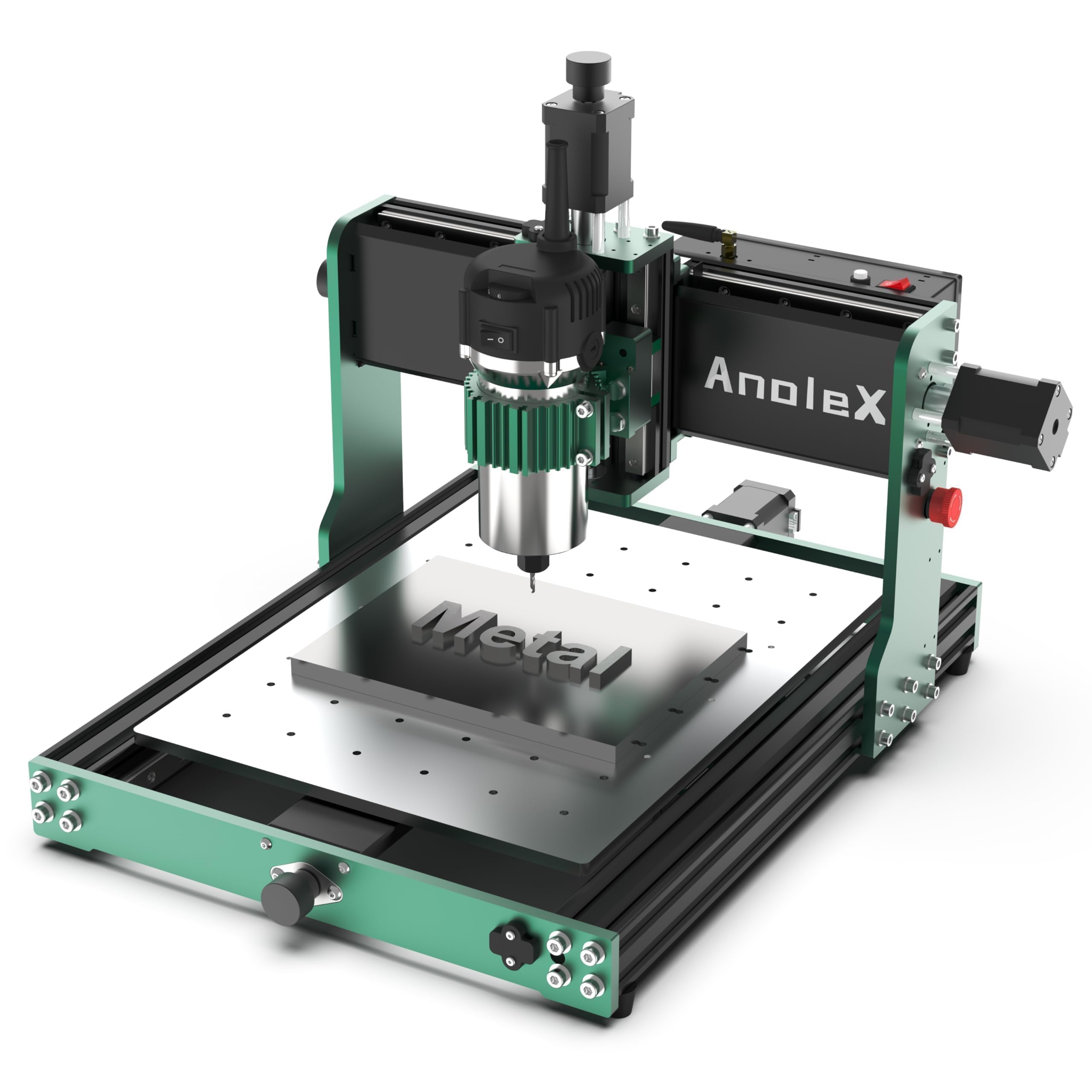
An 800W trim router on dual linear guides — the choice if you intend to cut metals from day one.
This is the only machine in the roundup that ships with an 800W trim router instead of a brushed spindle, and the difference is immediate: the router runs at six speeds between 8,000 and 24,000 RPM with software-controlled on/off, giving you the torque to cut 6061 aluminum plate to a cutting accuracy of ±0.05mm. Each axis uses dual MGN-15 linear guides and T8 lead screws, and the manufacturer claims a repeatability accuracy of ±0.01mm. The NEMA 17 motors are higher-torque than the common spec — 650mN·m versus the usual 420mN·m — and you can upgrade to closed-loop NEMA 17 motors later if you want to eliminate any risk of missed steps during long jobs.
The control board runs GRBL 1.3a on an ESP32 chip, which adds WiFi connectivity so you can send files from a phone or tablet without a USB cable. One owner who uses the machine for small-batch production said the linear rails are “excellent for aluminum with 1.5kw spindle upgrade,” noting that the few minor dead spots in the ball screws are resolved by upgrading to the 1204 ball screw kit. Another reviewer mentioned it cuts steel — 4140, 316 stainless, and O1 tool steel — with the proper speeds and carbide endmills, though they warned that a software bug can cause the machine to move unpredictably after finishing a program, so watch the machine until it fully stops.
Best for metals: The beginner who knows they want to cut aluminum, brass, or even steel from the start, and values an 800W trim router over a brush spindle.
Software bug: Reviewers report occasional post-program drift — always supervise the machine until the spindle stops completely.
6. FoxAlien Masuter 3S CNC Router Machine
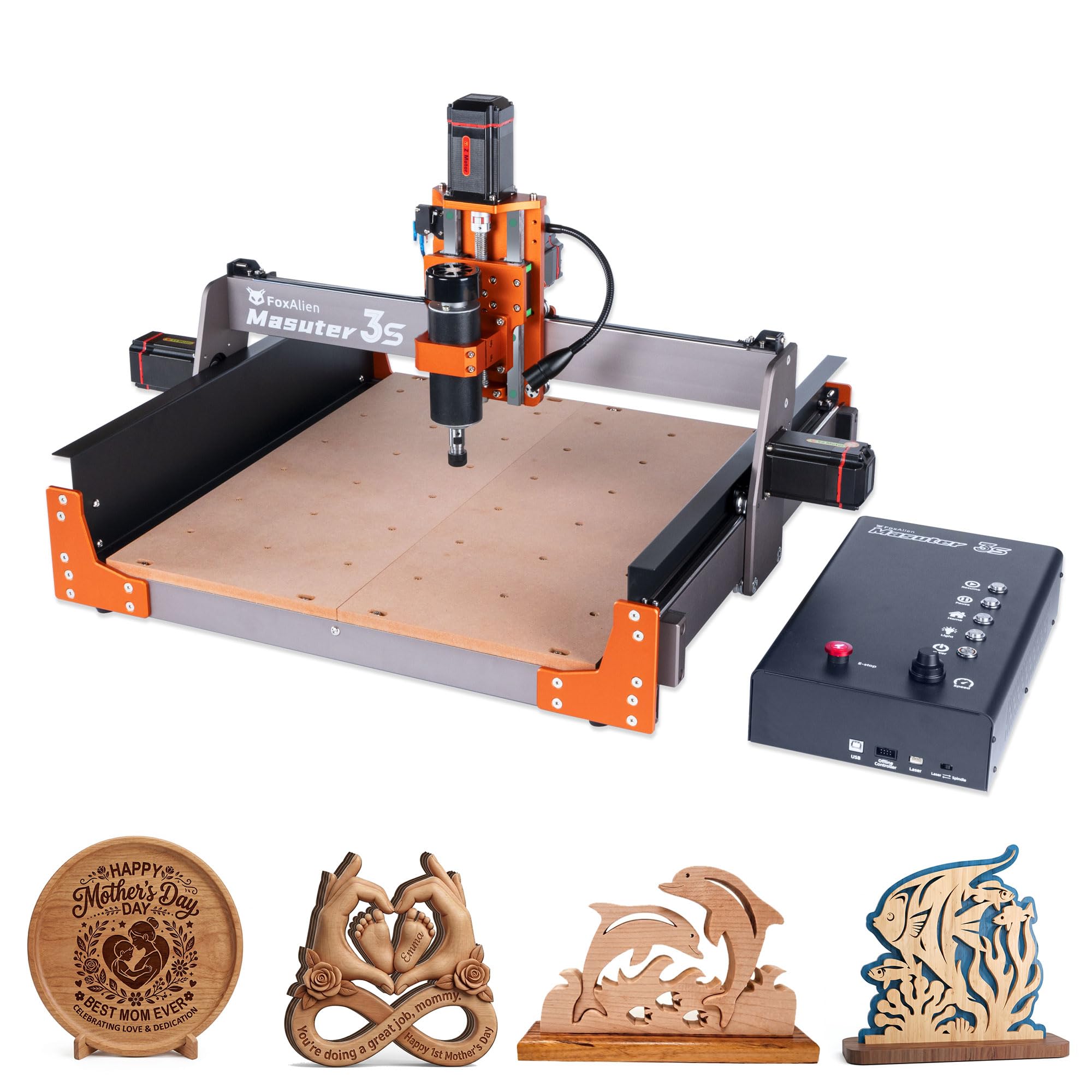
NEMA 23 closed-loop motors that self-correct missed steps — a serious upgrade for reliability.
What separates the Masuter 3S from the Masuter Pro is the drivetrain: closed-loop NEMA 23-76 stepper motors that deliver 2.2 Nm of torque and automatically detect and correct a missed step, so a long overnight job does not produce a ruined workpiece because a motor slipped halfway through. The maximum movement speed reaches 10,000mm/min, and the Z-axis uses dual HG-15 linear rails plus a T12 lead screw to hold an engraving precision of 0.05mm. The work area is 15.75 inches by 15.75 inches with a 3.74-inch Z-travel (400 x 400 x 95mm) — a full 1.4 inches taller than the Masuter Pro, which makes room for thicker stock and deeper 3D carves.
The included 400W spindle is a step up from the 300W spindle on the Pro, and the controller box is redesigned with dust-resistant housing and tactile shortcut buttons. The frame itself uses 2360mm extrusions that feel noticeably stiffer than the Pro’s construction. That pattern is rare but note for a machine at this price.
Why Closed-Loop Matters
- Closed-loop steppers prevent step-loss during long or high-load jobs — the motor self-corrects
- 2.2 Nm torque handles aluminum and dense hardwoods without stalling
- Work area with 3.74-inch Z-travel accommodates thicker stock than the Masuter Pro
The Risk
- A small segment of reviewers point out recurring controller or reliability issues that warranty communication did not fully resolve
- Weight of 26.5 kg makes it a dedicated bench fixture, not a portable unit
Grab this if: You plan to run long unattended jobs (like production batches) and the closed-loop feedback gives you confidence against ruined parts.
Think twice if: You want the simplest possible warranty experience — the Masuter Pro has a larger owner base and faster parts replacement.
7. LUNYEE 3018 PRO MAX CNC Machine
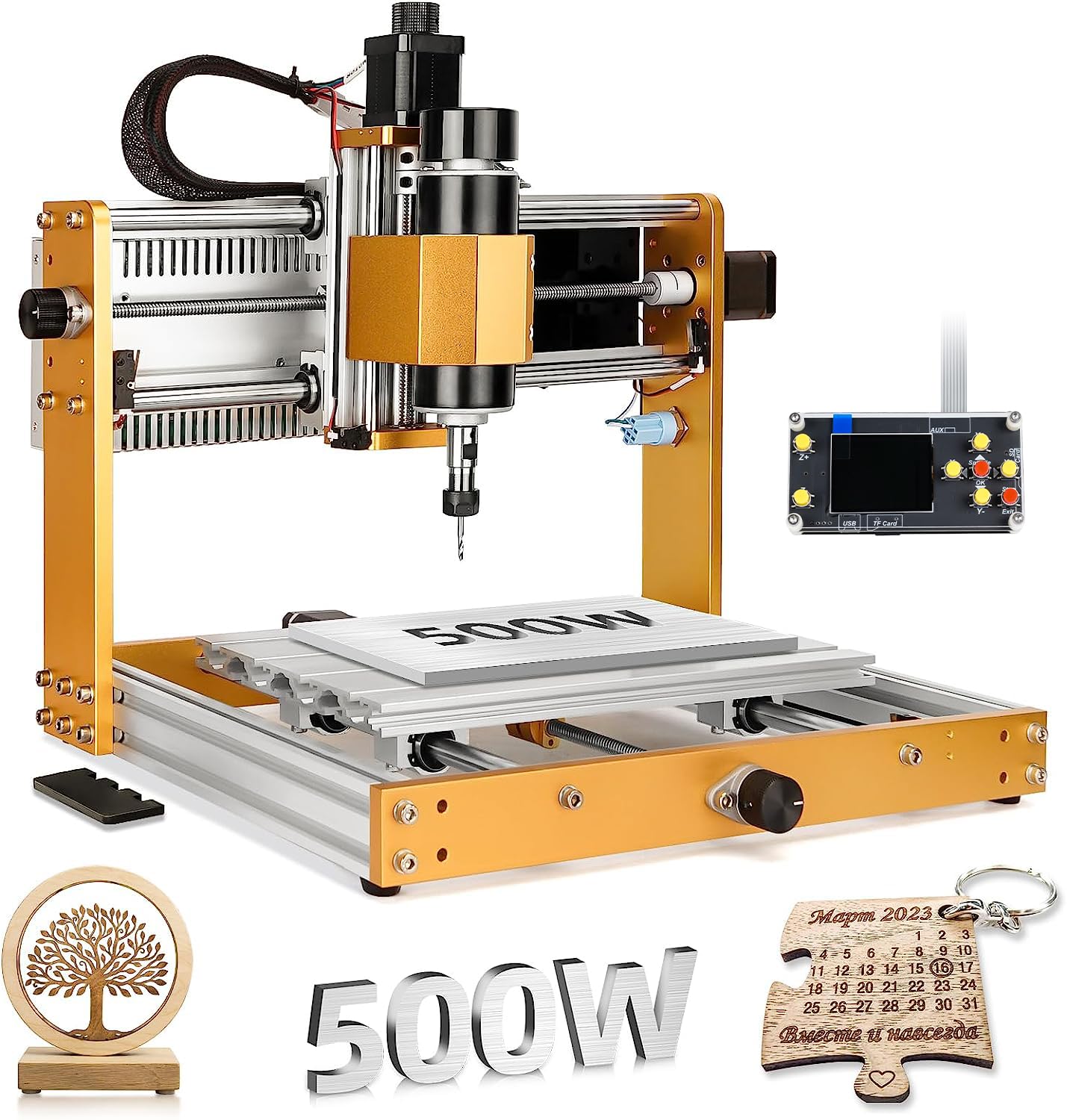
A 3018-format machine stretched to 500W with six limit switches and an 80mm Z-travel.
This machine takes the popular 3018 footprint and upgrades it in the places that matter most. The 500W spindle is significantly more capable than the 300W spindles found on most 3018-class machines, and the maximum movement speed reaches 5,000mm/min. The all-metal construction (no plastic parts except the electrical components) uses reinforced aluminum profiles that resist flex, and the Z-axis travel is 80mm — the longest Z-stroke among the standard 3018 models on the market, according to the manufacturer. The safety package includes six limit switches, an emergency stop button, and manual handwheels on all three axes so you can position the machine origin by hand instead of jogging blind.
One buyer who uses the machine for PCB drilling noted it assembled in about one hour and produces accurate cuts on acrylic without issue. Another reviewer specifically said it cuts better than their NymoLabs 5040. The downsides are consistent with budget 3018 machines: the included 10W laser module is weak for engraving, you need to buy your own power switch, and some buyers reported missing fasteners during assembly. The manufacturer’s assembly videos are not great — several owners relied on user-created YouTube guides instead. But for the price, you get a 500W spindle on an all-metal frame with a safety system that rivals machines costing twice as much.
Best for: The hobbyist on a strict budget who still wants an all-metal frame, a 500W spindle, and proper limit switches — not a toy.
The catch: Expect to spend an hour tuning the hardware from the start, and the manufacturer’s instructional videos are poor — lean on community YouTube guides.
8. Genmitsu 3018-PROVer V2 CNC Milling Machine

The classic entry point that proves a cheap CNC does not have to be a frustrating one.
The original 3018 was a gamble — it either worked perfectly or needed constant tinkering. The PROVer V2 fixes the worst of it with Toshiba TB6S109 drivers on 32-bit chips, pre-installed limit switches, an emergency stop, and a machined aluminum spoilboard instead of a slotted MDF base. The work area is 11.2 inches by 7.1 inches with a Z-travel of 1.6 inches (284 x 180 x 40mm), which is tight — you cannot stick a 2×4 under the spindle — but for coasters, keychains, and flat signs it is perfectly usable. The semi-preinstalled wiring harness means setup takes about 35 minutes, not three hours.
The single biggest difference between this and an unbranded 3018 is the support. One buyer wrote: “I bought my SainSmart Genmitsu 3018 ProVer v2, June 28, 2023. I can’t imagine a better entry level CNC unit, for beginners and hobbyists.” Another reviewer had a rough start with a faulty unit, but a customer service rep named Skye stepped in with a gift card and replacement parts, turning a negative experience into a recommendation. The trade-off is the small work envelope and the undefined spindle power — Genmitsu does not publish spindle wattage in the data, and the cutting depth is limited to 1.6 inches, so you are restricted to flat stock and shallow carves. It is a learning tool, not a production machine.
Why It Still Wins
- Industry-leading customer support turnaround for a beginner machine — Genmitsu has a dedicated US-based service team
- 32-bit Toshiba drivers produce smoother motion than older 8-bit controllers
- Limit switches and emergency stop are included, not optional add-ons
The Size Limit
- 1.6-inch Z-travel restricts you to flat material — no 3D reliefs or thick stock
- Spindle power is not specified in the data, and shoppers say it struggles with hard maple or aluminum
Perfect for: The total beginner who wants the lowest financial risk to learn G-code, bit selection, and machine tuning before investing in a larger machine.
Move on if: You already know you want to carve signs or cut aluminum — the work area and Z-travel will frustrate you within the first month.
Understanding the Specs
Work Area and Z-Travel
The work area — typically listed as width x depth x height — tells you the biggest piece of material you can fit under the spindle. A 15.75-inch square work area handles signs and coasters. The Z-travel (the vertical distance the spindle can move) is the spec that bites beginners hardest: a Z-travel of 40mm means you cannot carve a 3D relief that rises more than 1.6 inches off the table. If you plan to cut thick stock or 3D models, look for a Z-travel of 80mm or more.
Spindle Power and RPM Range
Spindle power is measured in watts (for brush motors) or horsepower (for trim routers and industrial spindles). A 300W spindle cuts pine, MDF, and acrylic cleanly at a maximum rotational speed of around 10,000-12,000 RPM. A 500W spindle handles hard maple and thin aluminum. An 800W trim router with 24,000 RPM top-end will cut brass and steel if you are patient and take shallow passes. The RPM range matters because harder materials need slower spindle speeds — a single-speed spindle gives you less control than a variable-speed router.
Stepper Motors and Control System
NEMA 17 stepper motors are standard on sub- machines. NEMA 23 motors (found on the Genmitsu PROVerXL 4030 and FoxAlien Masuter 3S) produce higher torque and handle heavier loads. Closed-loop motors (Masuter 3S) add a sensor that detects and corrects a missed step, which is critical for unattended runs. The control firmware is almost always GRBL (version 1.1f or 1.3a). GRBL 1.3a supports WiFi and coolant control; 1.1f is simpler but has a larger knowledge base for troubleshooting.
Frame Construction and Weight
A machine that weighs 13 kilograms (28.6 lb) will be more stable than a machine that weighs 9 kilograms (19.8 lb). The material matters too: extruded aluminum C-beam frames (Genmitsu PROVerXL) are stiffer than v-slot extrusion alone, and dual linear guides on each axis (AnoleX 3030-Evo Max) reduce play over time. If you plan to cut metals, look for a machine with at least dual linear guides on the Z-axis and a rigid spindle mount that does not flex under load.
FAQ
Can a beginner CNC router cut aluminum?
What software do I need to run these CNC routers?
What is the difference between a 3018 and a 4040 CNC?
How long does it take to assemble a beginner CNC router?
Do I need to upgrade the spindle on my first CNC router?
What safety features should I look for as a beginner?
Can I use a Mac to control these CNC machines?
How much maintenance does a CNC router need?
What is a 4th axis or rotary module for?
Should I buy a CNC router with WiFi or stick with USB?
Final Thoughts: The Verdict
For most people, the cnc router for beginners winner is the FoxAlien Masuter Pro because it combines a rigid all-aluminum frame, a generous 15.75-inch square work area, and straightforward assembly at a price that does not punish mistakes. If you want a larger work envelope with a touch screen, grab the Twotrees TTC450 Pro. And for the budget-focused learner who wants limit switches and an E-stop from the start, the Genmitsu 3018-PROVer V2 is the safest way to learn the ropes.
How We Picked
We do not accept paid placement. Every pick is matched to a real buyer and a real use-case; we do not hands-on test units.
Sources & Methodology
Specifications: manufacturer listings and product documentation. Review insights: verified customer reviews, as of July 2026. Pricing: not shown on this page (it changes often); check the current price via the retailer link.
As an Amazon Associate, WellFizz earns from qualifying purchases. This does not affect which products we feature.
Related Guides

Mo Maruf
I created WellFizz to bridge the gap between vague wellness advice and actionable solutions. My mission is simple: to decode the research and give you practical tools you can actually use.
Beyond the data, I am a passionate traveler. I believe that stepping away from the screen to explore new environments is essential for mental clarity and physical vitality.