Our readers keep the lights on and my smoothie glass nicely filled. As an Amazon Associate, I earn from qualifying purchases.
Specs are compiled from manufacturer listings and verified buyer reviews and can change over time — please confirm the key details on the product page before buying.
Your back sends you a message around 2:00 PM every workday — a dull ache that starts in your lower back and climbs up your spine. It is not your body failing; it is your chair ignoring your spine’s natural curve. A good computer chair for posture does not let that afternoon slump happen because it holds your lower back exactly where your spine wants it, hour after hour. The chair’s lumbar support holds your spine in its natural curve, so you don’t have to muscle yourself upright.
I’m Mohammad Maruf — the founder and writer behind WellFizz. This guide is built by comparing the manufacturers’ published specifications and the patterns across verified customer reviews, so you get each pick’s real strengths and trade-offs instead of marketing spin.
Adjustable lumbar support — a pad that presses into your lower back — is the single feature that separates a true posture chair from a generic ergonomic chair. Every pick here has it, but the range of adjustability, the weight limit, and the cushion thickness vary widely, and that is what determines whether your back feels fresh or fried by day’s end. This guide reviews nine posture-focused office chairs to help you match one to your body type and sitting schedule.
Our Picks at a Glance
How To Choose The Best Computer Chair For Posture
A posture chair actively supports your lower back’s natural inward curve (lumbar lordosis), unlike a regular office chair. Without that support, your spine rounds forward and your back muscles overwork to keep you upright.
Adjustable Lumbar Support: The Make-or-Break Feature
The lumbar support must adjust up and down, and ideally in and out. A fixed lumbar bump only works if your height matches the designer’s assumption. Look for a mechanism that adjusts at least 3 to 4 inches vertically and about an inch forward and back. That range lets you dial the pressure exactly where your lower back curves inward, rather than poking your spine in the wrong place.
Seat Cushion Thickness and Density
A foam cushion that squishes flat after an hour transfers pressure directly to your sitting bones and compresses your hip joints, which then tilts your pelvis backward and rounds your lower spine. Look for high-density foam at least 3 inches thick — it holds its shape and keeps your pelvis level. Mesh seats avoid this problem entirely because they do not compress, but some people find them too firm on the thighs.
Weight Capacity and Frame Build
The weight limit printed on a chair is not about whether the gas lift holds — it is about the frame staying rigid during recline and tilt. A chair rated for 300 pounds will feel noticeably more solid under a 180-pound person compared to a chair rated for 250 pounds, because the frame, base, and casters were engineered for higher forces. If you are over 200 pounds, look for a minimum 300-pound capacity to get a stable experience without wobble or squeaks.
Quick Comparison
| Model | Best For | Weight Capacity | Lumbar Adjustment | Seat Cushion | Amazon |
|---|---|---|---|---|---|
| SIHOO B100 Office Chair★ Best Overall | Budget-friendly ergonomics | 300 lbs | adaptive (follows spine curve) | polyester, polystyrene | Amazon |
| Nexthro Ergonomic Office ChairAlso Great | Heavy-duty stability | 400 lbs | 1″ forward/back, 3.15″ up/down | 3.2″ thick high-density foam | Amazon |
| CASASIO Ergonomic Home Office ChairThickest Cushion | Extra-thick cushion comfort | 330 lbs | 1.8″ up/down, 1.06″ in/out | 3.54″ high-density foam | Amazon |
| CASASIO Home Office Desk Chair | Custom neck and head support | 350 lbs | dual-direction adjustable (no exact range listed) | virgin foam | Amazon |
| Staples Dexley Ergonomic Task Chair | High adjustability at a mid price | — | adjustable lumbar support (exact range not listed) | mesh | Amazon |
| GABRYLLY Ergonomic Office Chair | Recline with footrest for breaks | 300 lbs | 3″ vertical, 1.6″ horizontal | mesh | Amazon |
| FLEXISPOT ErgoX Premium Chair | High weight capacity with dynamic lumbar | 400 lbs | dynamic lumbar support | mesh or foam options | Amazon |
| Steelcase Amia Office Chair | Premium comfort with LiveLumbar | — | hidden LiveLumbar (adjusts to movement) | foam with flexible edges | Amazon |
| Steelcase Leap Office Chair | Seven-point adjustability for custom fit | — | lower back firmness dial + 3D LiveBack | foam with waterfall edge | Amazon |
In‑Depth Reviews
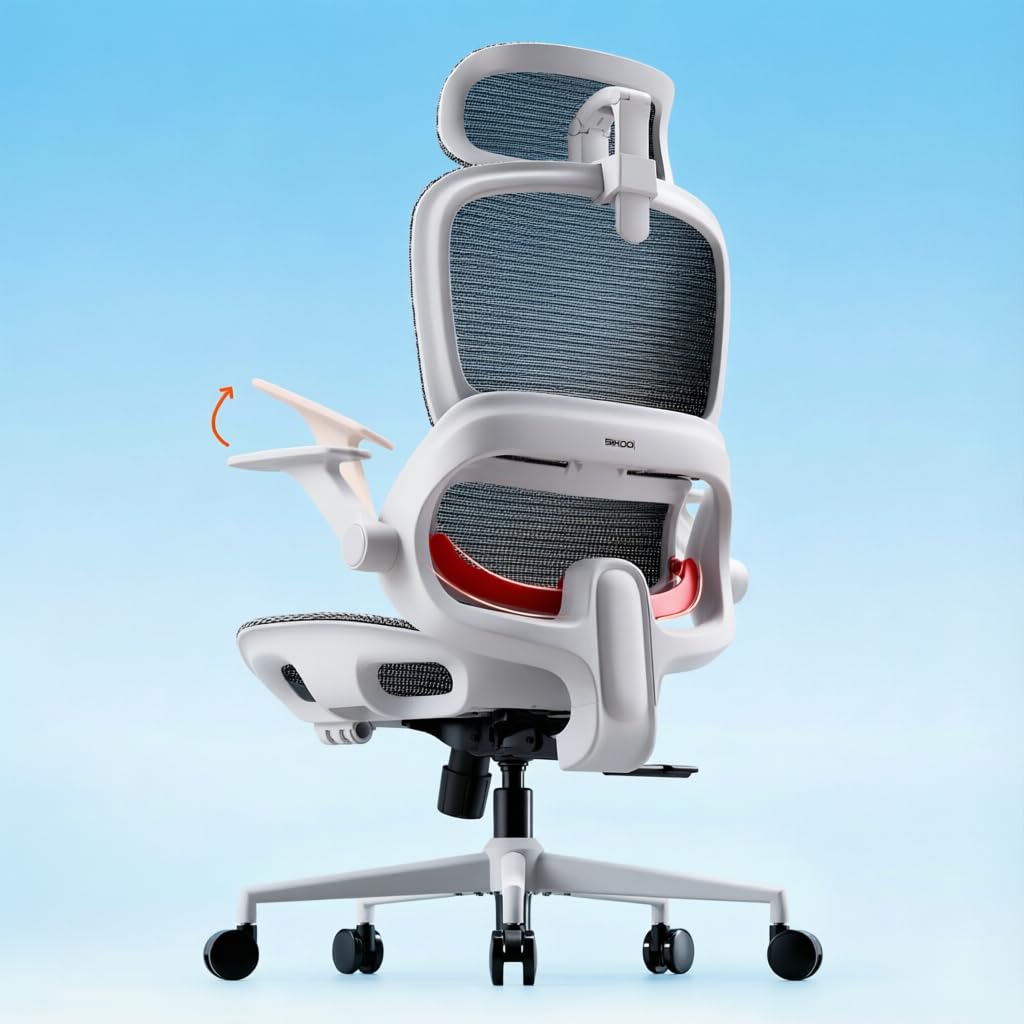
1. SIHOO B100 Office Chair (Grey)
Our pick — over 4★ from 16,500+ verified ratings; the strongest balance of quality and price.
A budget-friendly mesh chair with lumbar that follows your movements rather than needing manual adjustments.
The SIHOO B100 takes a different approach to lumbar support: it uses an adaptive curve in the mesh backrest that is designed to flex as you shift between leaning forward, sitting upright, and reclining. Rather than asking you to dial in a position, the chair moves with your spine. One customer observed they used the chair for three days at a desk job and found it “comfortable and pretty easy to adjust as needed.” Assembly took about 20 minutes with help from a second person.
The mesh back keeps you cool during long sessions, and the seat cushion is a widened design that spreads weight across hips and thighs. Where the B100 falls short compared to the Nexthro is the lack of a thick foam seat — the cushion is polyester and polystyrene rather than high-density foam — and the armrests only flip up rather than adjusting forward or pivoting. At 25.4 inches arm height and seat height adjustable from 18.3 to 21.9 inches, it accommodates a decent range of body sizes but does not have the precision lumbar range of the higher-priced models.
Standout feature: Adaptive lumbar that moves with you — no dial-twiddling, the mesh curve does the work.
Best for: Budget-conscious buyers who want a breathable mesh chair with automatic lumbar support and do not need a thick foam cushion or multi-direction armrests.
Consider upgrading to the Nexthro if: You weigh over 250 lbs or need a foam cushion that will not compress over long days.
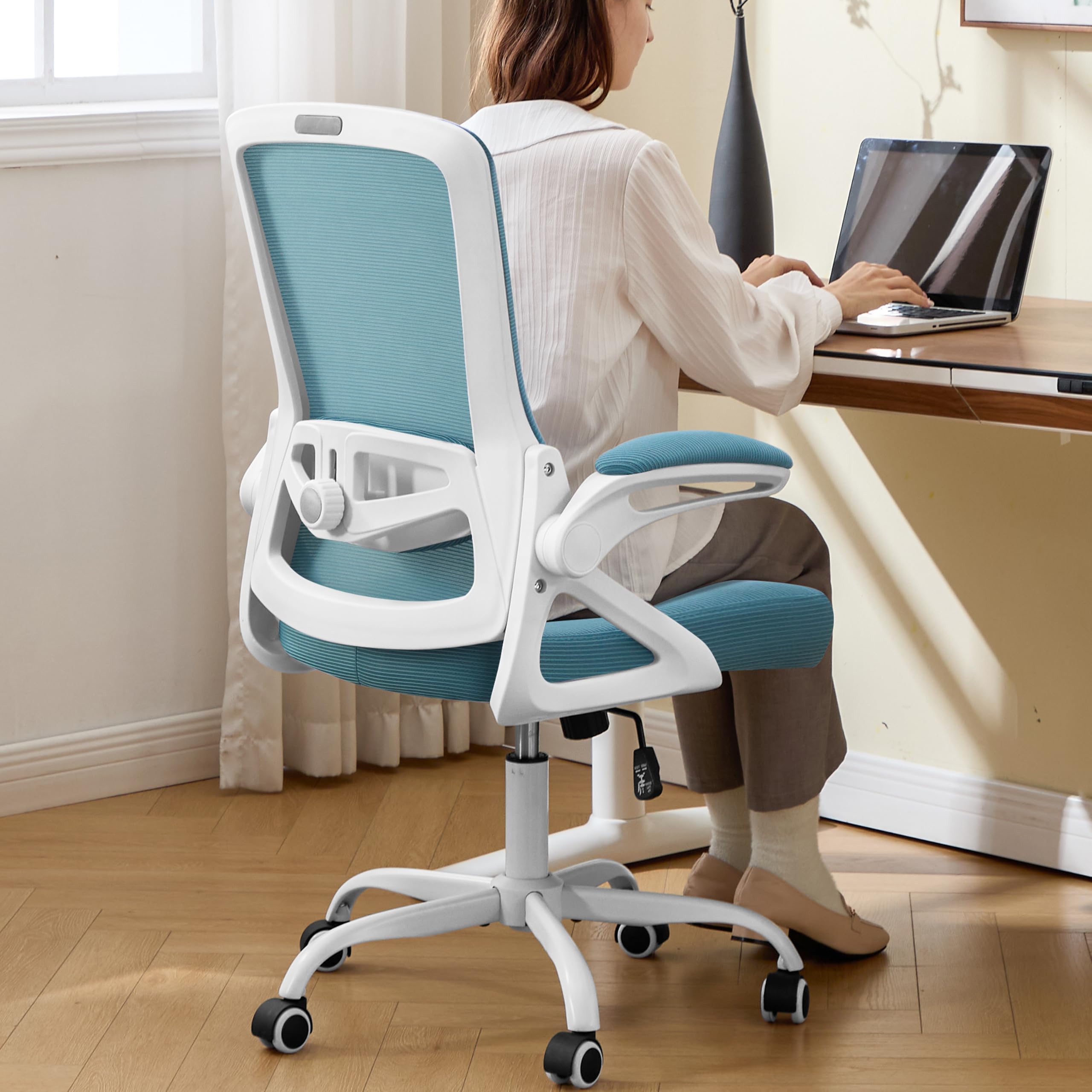
2. Nexthro Ergonomic Office Chair (Lake Blue)
A heavy-duty frame that cradles your lower back through a full workday without bottoming out.
The Nexthro stands out because it supports 400 lbs — 100 lbs more than many competitors at this price — and still delivers a cushioned seat rather than a punishing mesh surface. That seat cushion is 3.2 inches thick, made of high-density foam that buyers report stays supportive even after hours of sitting. One reviewer noted that they needed a replacement after years of use and found this chair’s cushion “thick and really plush while still maintaining its shape,” which tells you the foam does not go flat by lunchtime.
Unlike the SIHOO B100 below, which uses an adaptive lumbar that moves with you but offers no dial-in range, the Nexthro gives you 1 inch of forward-back and 3.15 inches of up-down lumbar adjustment. That extra freedom means you can position the support pad exactly where your spine curves inward, rather than hoping the chair guesses correctly. At 28 pounds, this chair is not lightweight — it is solid enough to stay planted during reclining or shifting weight side to side.
The catch is the flip-up armrests, which are convenient for sliding under a desk but do not offer forward-back or pivot adjustments. If you need your armrests to move in multiple directions to match your typing angle, the higher-end Steelcase models below give you that capability.
Why it wins: 400-lb capacity, 3.2″ foam cushion, and precise lumbar adjustment make this the most balanced posture chair for the widest range of body types.
Best for: Anyone over 200 lbs who wants a supportive foam seat with a high weight limit and adjustable lumbar that actually moves where you need it.
Reach for the CASASIO instead if: You prefer an extra-thick cushion (3.54″) and do not need a 400-lb frame.
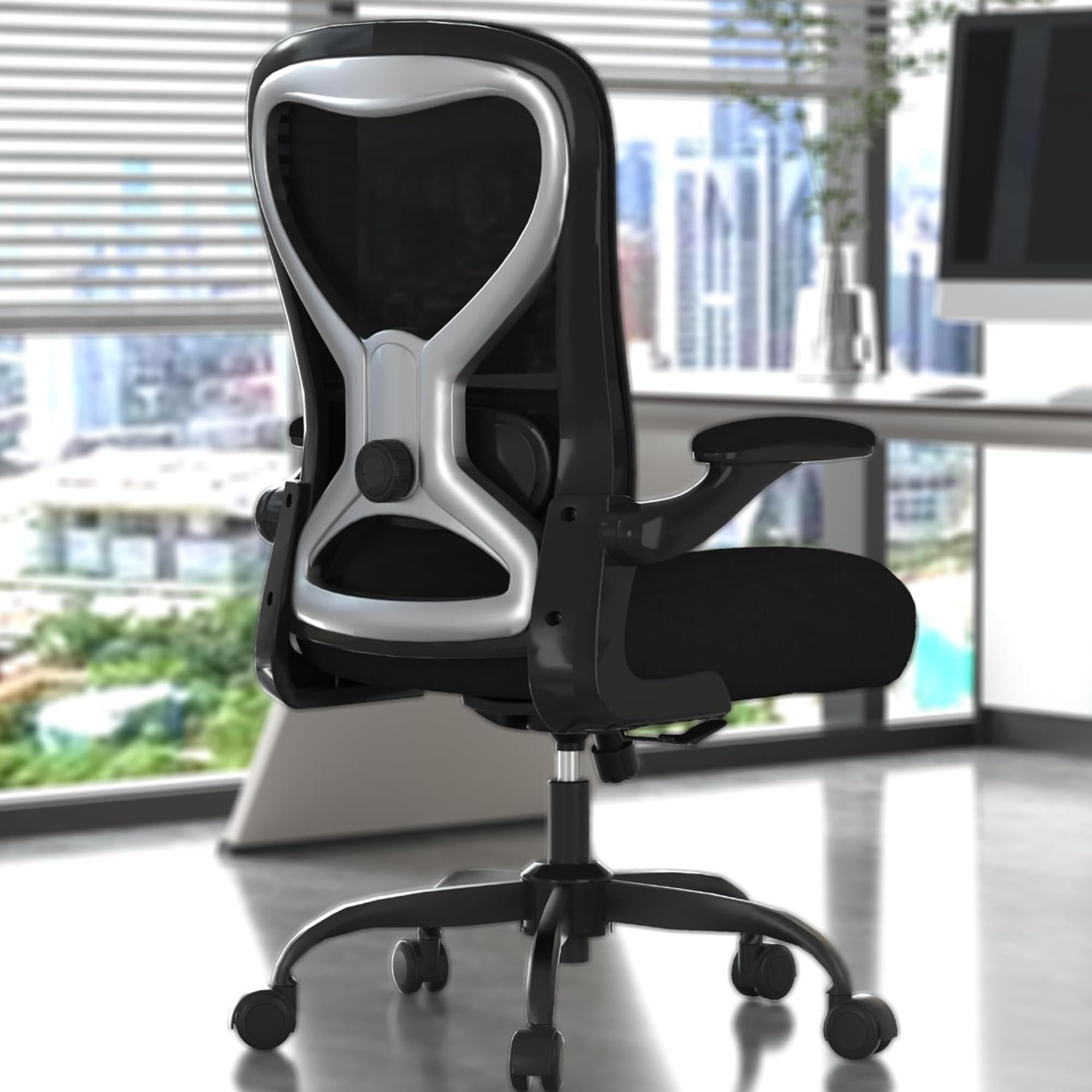
3. CASASIO Ergonomic Home Office Chair
An inch thicker than standard foam cushions, so your hips stay level and pain-free through back-to-back meetings.
The CASASIO seats you on a 3.54-inch slab of high-density foam — that is 1 inch thicker than what most chairs in this price range offer. That extra thickness means the padding does not compress to the hard base during eight-hour sessions, which keeps your pelvis from tilting backward and rounding your lower spine. Owners mention that the cushion feels “like memory foam” and had good lumbar support, though one noted the lumbar dial only pushes the pad forward rather than moving it vertically. The 4-way lumbar here adjusts 1.8 inches up and down and 1.06 inches in and out, so you can still dial in the depth of pressure.
At 27 pounds and a 330-lb weight limit, this chair is slightly less rugged than the Nexthro’s 400-lb frame, but the trade-off is a noticeably softer, deeper cushion that many customers note is the most comfortable seat they have used. The flip-up armrests match the Nexthro’s design, letting you clear the chair fully under a desk.
Standout move: 3.54″ foam that resists flattening — one of the thickest cushions you will find under.
Reach for this if: Your hips and thighs get sore after a few hours on thinner foam or mesh seats, and you want a serious cushion without jumping to premium pricing.
Watch out: The lumbar support adjusts via a knob rather than a sliding mechanism, which some buyers find less intuitive than a lever.
4. CASASIO Home Office Desk Chair (Black/Silver)
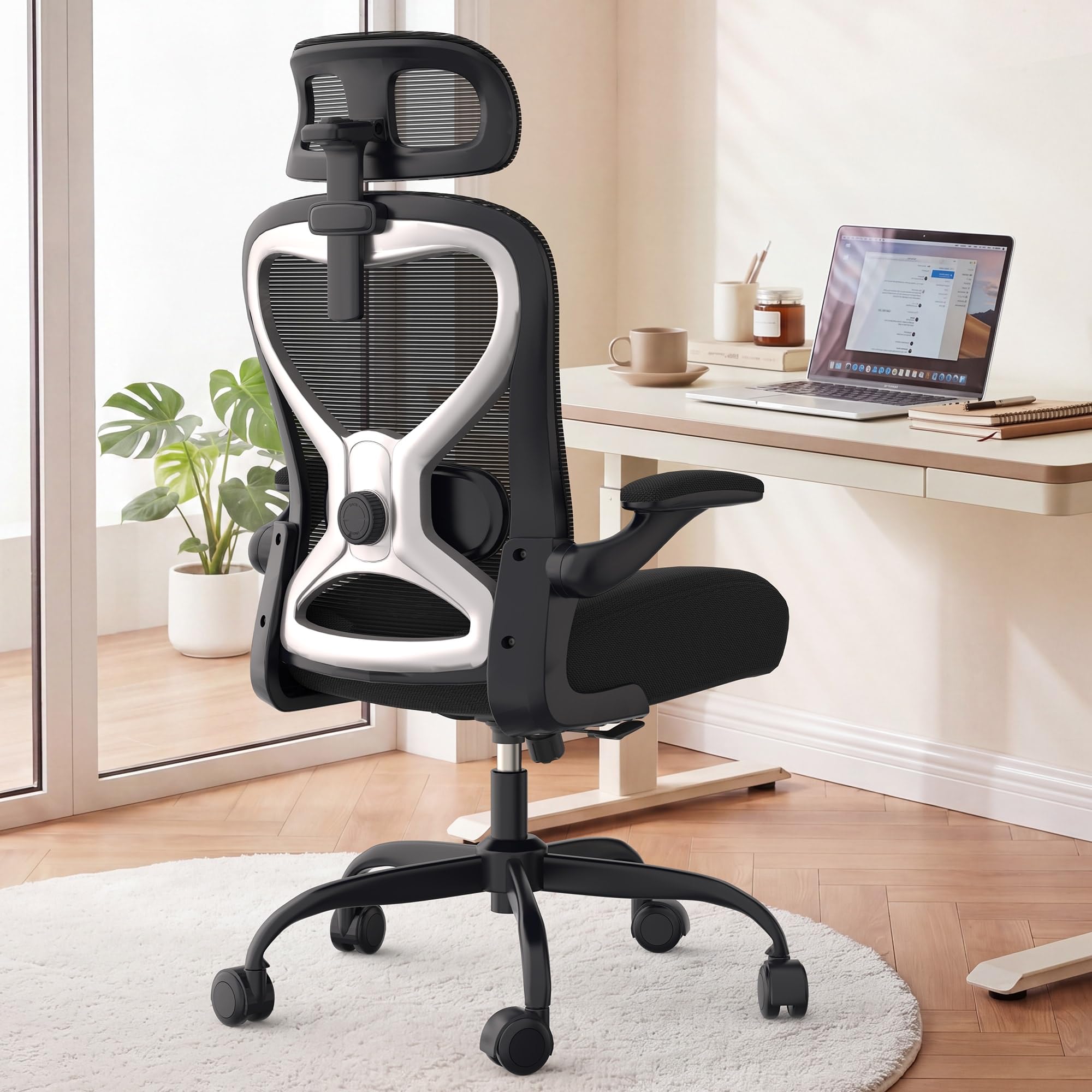
A headrest that tilts and pivots to match the exact angle of your neck, so your upper spine stays aligned.
The CASASIO Home Office chair distinguishes itself from the previous two picks with a 3D adjustable headrest — it moves up and down, tilts forward and back, and changes angle — which is rare at this price. Most budget chairs give you a fixed or height-only headrest that either pokes your neck or misses it entirely. Here you can dial the headrest to cradle your neck during focused typing, reading, or reclining. The dual-direction adjustable lumbar cushion lets you move the support closer to or farther from your back, though the spec sheet does not list exact range numbers.
This chair supports up to 350 lbs and uses virgin foam in the seat, which one reviewer described as “about 3.5 inches thick” with a balance of softness and firmness that prevents bottoming out. The tilt and rock function lets you lean back gently without locking — the motion moves with your body, which keeps blood flowing and reduces stiffness. Unlike the heavier Nexthro at 28 pounds, this CASASIO feels more nimble while still supporting a high weight load.
Why this excels
- 3D headrest adjusts height, depth, and angle for personalized neck support
- 350-lb capacity with virgin foam cushion
- Tilt & rock function for gentle movement during long sessions
A small gap
- Lumbar range is not specified as precisely as the Nexthro or CASASIO thick-cushion model
Perfect for: Taller users or anyone whose neck gets stiff from a fixed headrest — the 3D adjustment makes a real difference.
Consider the GABRYLLY instead if: You want an integrated footrest for napping breaks.
5. Steelcase Leap Office Chair (Onyx)

A seven-way adjustable seat that molds to your spine shape, backed by 70-plus years of seating research.
The Steelcase Leap is a different category of chair entirely. It has seven points of adjustability, including a lower back firmness dial that lets you increase or decrease the pressure of the lumbar support — not just move it up and down. The 3D LiveBack technology means the backrest changes shape as you recline, mimicking the natural motion of your spine rather than simply tilting. The seat glides forward as you lean back through a Natural Glide System, keeping you close to your desk even while reclining. This level of engineering is the result of Steelcase’s research over more than 70 years, according to the company.
Unlike all other chairs in this guide, the Leap arrives fully assembled — no tools required. It supports up to an unspecified weight, but reviews from a 170-lb user who sat for 6-7 hours daily reported no back or leg pain. One buyer mentioned the chair was “initially uncomfortable but improved over time,” which reflects that the LiveBack system takes a few days to break in as the flexible frame adapts to your movement patterns. The major trade-off is the price, but Steelcase backs it with a 12-year warranty, and reviewers point out the chair outlasts cheaper models by years.
Why it earns the price
- Seven points of adjustability including seat depth, lumbar firmness, and arm width
- Natural Glide System keeps you near your desk while reclining
- Fully assembled from the start — no tools needed
The honest trade-off
- Price is a significant investment, and one owner reported it did not help their back pain, which shows even premium chairs are not a guarantee
Reach for this if: You spend 8+ hours daily in a desk chair, want near-infinite adjustability, and consider a chair a long-term health investment rather than a piece of furniture.
skip it if: Your budget is under — the Nexthro or CASASIO models deliver strong posture support for a fraction of the cost.
6. Steelcase Amia Office Chair (Buzz2 Black)

A hidden lumbar mechanism that moves with your body, offering support without visible bulk or adjustment dials.
The Steelcase Amia uses a LiveLumbar system that is hidden inside the backrest — there is no big plastic pad or external lever. Instead, the lumbar support automatically adjusts to your movement as you shift position throughout the day. This is a quieter approach than the Leap’s dial-and-lever array; you simply sit and the chair responds. The seat cushion has flexible edges that reduce pressure on the underside of your thighs, and shoppers say it is comfortable for 8-10 hour sessions. One reviewer at 6 feet tall and 240 lbs said he experienced “no pain after 8 hours” of sitting.
The 4D arm support moves in height, width, pivot, and depth — matching the Leap’s arm adjustability — so you can rest your forearms at any angle. However, the Amia does not have a headrest option, which may matter if you recline often or need neck support. A buyer noted the foam seat cushion can be uneven from the start, with one reporting hip pain after a week. Steelcase offers a 12-year warranty, and the Amia is Carbon Neutral certified, reflecting the company’s sustainability commitment.
The key difference from the Leap: The Amia’s LiveLumbar is automatic and hidden — no firmness dial — which some users prefer for simplicity, while others miss the fine-tuning.
Best for: Users who want premium build quality and automatic lumbar support without spending over — the Amia usually lands around -.
Consider the Leap instead if: You want a headrest option, seat depth adjustability, and the ability to dial lumbar firmness manually.
7. GABRYLLY Ergonomic Office Chair with Footrest
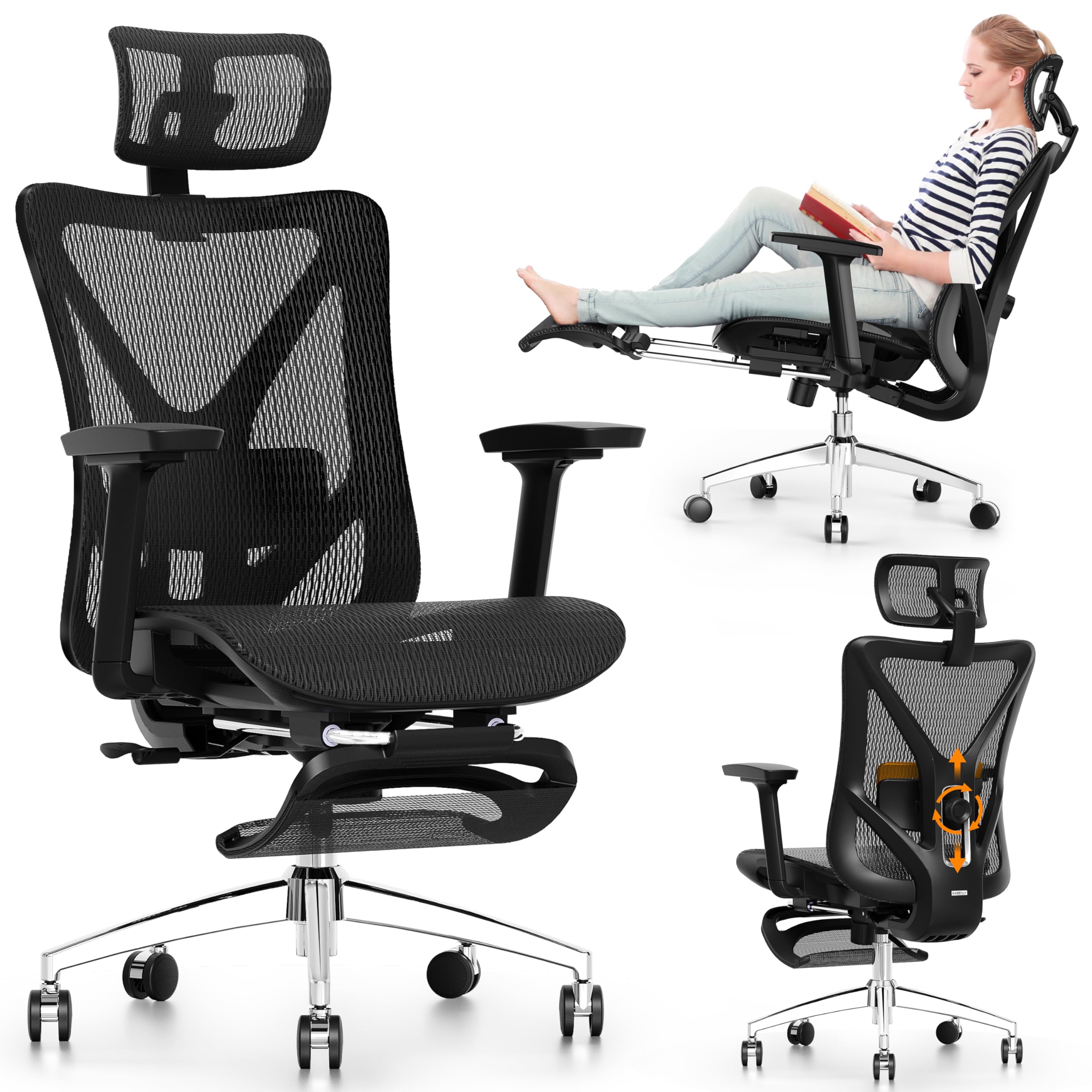
A steel-base recliner that lets you stretch out with a retractable footrest between work bursts.
The GABRYLLY is the only chair in this guide with an integrated steel footrest that extends up to 18.1 inches — paired with a 135° recline in three lockable positions (90°, 110°, and 135°). That combination turns your desk chair into a napping station during lunch breaks. The 2-way lumbar support moves 3 inches vertically and 1.6 inches horizontally, giving you a solid range to hit your lower back’s exact curve. The mesh design keeps air moving, and buyers report it holds up well under heavier users — one reviewer at 240 lbs and 5’11” reported “no issue” with stability.
The 3D armrests adjust up/down, front/back, and in/out — a step up from the flip-up armrests found on the Nexthro and CASASIO models — though some owners mention the arm pads feel firm and slick when resting elbows. The headrest adjusts in height, angle, and bracket position, giving you three ways to dial in neck support. At 300 lbs capacity, it sits in the middle range, matching the SIHOO B100 but falling 100 lbs short of the FLEXISPOT and Nexthro.
What stands out
- Steel base with 27.5-inch legs for stable reclining
- Retractable footrest extends to 18.1 inches for leg support
- 3D armrests adjust in three directions
One point to know
- Mesh is described by some buyers as firm with limited give — not as cushioned as foam seats
Reach for this if: You frequently take breaks at your desk and want a footrest plus full recline without buying a separate ottoman.
Pick the FLEXISPOT instead if: You need a higher 400-lb weight capacity and do not need the footrest.
8. FLEXISPOT ErgoX Premium Chair
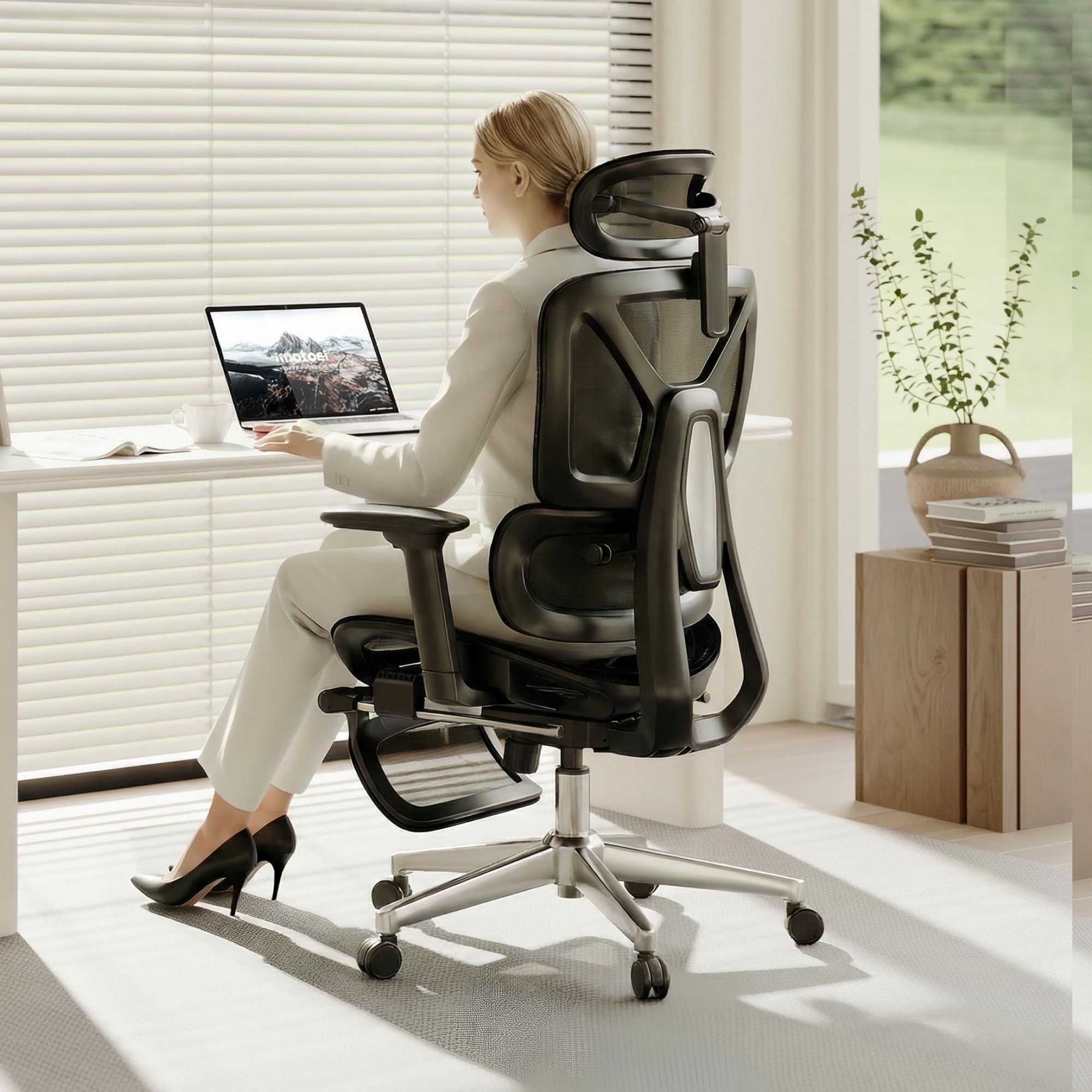
A 400-lb capacity chair with dynamic lumbar support and an optional nap footrest for work-life balance.
The FLEXISPOT ErgoX matches the Nexthro’s 400-lb weight capacity but adds two features the Nexthro does not have: adjustable seat depth (17 to 20 inches) and a retractable footrest. The dynamic lumbar support moves with your back as you recline, maintaining contact rather than leaving your lower back unsupported at certain angles. The 3D armrests adjust in height, forward/back, and swivel, giving you more positioning freedom than the flip-up arms on the budget models. Buyers who leave reviews note the chair is engineered for users between 5’1″ and 6’2″.
You can choose between a mesh seat for airflow or a foam Cloudtech cushion for a softer feel — a choice that the Nexthro and CASASIO chairs do not offer. The chair uses a reinforced nylon frame and a class 4 gas lift, which is a grade higher than the standard class 3 lift found in cheaper chairs. Despite the higher price compared to the Nexthro, the FLEXISPOT does not have the same volume of customer reviews, making it harder to judge long-term durability.
Why it stands apart
- Adjustable seat depth — rare in this price range — allows proper thigh support
- 400-lb weight capacity matches the Nexthro but with added footrest
- Choice of mesh or foam seat cushion
A small concern
- It has 363 customer reviews, compared to 170 for the Nexthro and 16,749 for the SIHOO — long-term reliability is less documented
Reach for this if: You need a 400-lb capacity chair with seat depth adjustability (for taller or shorter legs) and a footrest — the FLEXISPOT covers all three bases.
Pick the Nexthro if: You prioritize a lower price point and a proven foam seat over the adjustable seat depth.
9. Staples Dexley Ergonomic Task Chair (Black)

A well-known mesh chair from a major office retailer, with punchy adjustability features for the price.
The Staples Dexley is a familiar name in office seating, and its appeal rests on adjustable seat height, tilt tension, tilt lock, recline, a headrest that moves in height and angle, and 3D armrests that adjust in multiple directions. The ventilated mesh both on the back and the seat keeps air moving, which buyers consistently mention as a relief compared to foam chairs that trap heat. One reviewer called it a “good price for a comfortable chair” and noted the assembly was easy. Another pointed out that the chair initially felt uncomfortable until they discovered the side arm controller could lock the back into three positions, which made a “huge difference in comfort.”
The Dexley supports a broad range of body types with seat dimensions at 16.6 to 20.3 inches in height, 20.1 inches wide, and an overall height of 45.3 to 50.8 inches. The weight capacity is not listed in the spec sheet, which is a notable gap compared to the Nexthro and FLEXISPOT. The frame uses polypropylene and the chair weighs about what you would expect from a mid-range mesh model — sturdy but not as heavy-duty as the steel-base GABRYLLY.
A known limitation: The weight capacity is not published, which makes it harder to assess for heavier users compared to the Nexthro’s clear 400-lb rating.
Best for: Shoppers who prefer buying from a brand with physical retail presence (Staples) and want a breathable mesh seat with solid adjustability for under.
Consider the SIHOO B100 if: You want a published 300-lb weight capacity and adaptive lumbar support at a similar price point.
Understanding the Specs
Weight Capacity — Not Just a Number
The weight rating tells you how much force the frame and gas lift can handle during normal use. A chair rated for 400 pounds uses a thicker steel base, stronger caster wheels, and a higher-grade gas cylinder compared to one rated for 300 pounds. Even if you weigh less than the limit, a higher capacity means the chair will feel more solid and last longer because the components are over-engineered for the typical load.
Lumbar Adjustment Range — More Is Better
Lumbar support that only moves up and down is helpful, but support that also moves forward and backward gives you far more control over the pressure depth. A range of at least 3 inches vertically and 1 inch horizontally covers most spine lengths and curvatures. The more you can tune this, the less your lower back muscles work to hold your posture — which is the entire point of a posture chair.
FAQ
Is a mesh or foam seat better for posture during long workdays?
How do I know if the lumbar support is hitting the right spot on my back?
Can a chair fix rounded shoulders or forward head posture?
What is the ideal seat height range for someone who is 5’8″ tall?
Do I really need 3D or 4D armrests for posture?
Will a headrest improve my posture or cause more neck strain?
How often should I replace a posture office chair?
What is the difference between adaptive lumbar and adjustable lumbar?
Final Thoughts: The Verdict
For most people, the computer chair for posture winner is the Nexthro Ergonomic Office Chair because it pairs a 400-lb weight capacity with a 3.2-inch thick foam cushion and precise 1-inch forward-back lumbar adjustment — rare features at this price. If you want an extra-thick cushion that feels like memory foam, grab the CASASIO Ergonomic Home Office Chair (3.54 inch cushion). And for those who need near-infinite adjustability and can invest in a long-term health tool, the Steelcase Leap delivers seven-point adjustability and a 12-year warranty that outlasts cheaper chairs by years.
How We Picked
We do not accept paid placement. Every pick is matched to a real buyer and a real use-case; we do not hands-on test units.
Sources & Methodology
Specifications: manufacturer listings and product documentation. Review insights: verified customer reviews, as of July 2026. Pricing: not shown on this page (it changes often); check the current price via the retailer link.
As an Amazon Associate, WellFizz earns from qualifying purchases. This does not affect which products we feature.
Related Guides

Mo Maruf
I created WellFizz to bridge the gap between vague wellness advice and actionable solutions. My mission is simple: to decode the research and give you practical tools you can actually use.
Beyond the data, I am a passionate traveler. I believe that stepping away from the screen to explore new environments is essential for mental clarity and physical vitality.